
Using Google Ads for ecommerce is one of the most powerful ways to get your products in front of high-intent buyers right when they’re ready to pull out their wallets. Unlike social media ads, which often interrupt a user's scrolling, Google Ads connects you with shoppers who are actively looking for what you sell. This translates to higher conversion rates and a more direct line to revenue.
Why Google Ads Are Still the King of Ecommerce

In the world of online retail, not all traffic is created equal. While platforms like Facebook and TikTok are fantastic for building brand awareness, Google Ads is where you find people with clear commercial intent.
Think about the user's mindset. Someone scrolling their social feed is usually in a passive entertainment mode. But a person typing "best running shoes for flat feet" into Google? They have a problem and are actively searching for a solution to buy.
This fundamental difference is why search continues to dominate for driving direct sales. While social media suggests, search answers.
The Power of Purchase Intent
The high-intent nature of search traffic isn't just a theory—the data backs it up. For instance, in 2026, the average conversion rate for Google Search Ads in ecommerce is a solid 2.81%. That number blows away Display Ads, which sit at just 0.59%. It’s clear proof that active searchers are far more likely to convert than passive browsers.
This focus on intent is what makes a strong foundation in ecommerce PPC marketing so vital for any online store looking to scale profitably.
The core advantage of Google Ads is its ability to connect you with customers who have already decided they need a solution. Your job isn't to create demand but to prove your product is the best answer.
Here’s how Google Ads stacks up against other marketing channels based on user intent and typical ecommerce performance.
Quick Look: Google Ads vs Other Channels
While a mix of channels is always best, Google Ads is unparalleled for capturing customers who are ready to buy now.
From Manual Bids to AI-Powered Campaigns
The platform has come a long way from simple keyword bidding. Today's Google Ads for ecommerce relies heavily on AI and machine learning, especially through campaign types like Performance Max (PMax). These campaigns automate testing across Google's entire network—including Search, YouTube, Display, and Shopping—to find the best ad formats and placements.
But this automation comes with a huge catch: its success is entirely dependent on the quality of the data you feed it.
AI-driven campaigns need a constant stream of accurate signals to learn and optimize effectively. They need to know:
- Who is converting: Reliable conversion tracking tells the algorithm which users are most valuable.
- What is selling: A clean, detailed product feed ensures the right products are shown to the right people.
- What is working: Correct attribution data helps the system understand which touchpoints lead to a sale.
Without this clean data, even the most advanced AI will make poor decisions, wasting your ad spend and tanking your return on ad spend (ROAS). This is why ensuring data integrity has become a non-negotiable for profitable advertising. Bad data leads to bad results, no matter how much you spend.
Building Your Foundation in Google Merchant Center
If your Google Ads account is the engine, then your Google Merchant Center (GMC) product feed is the high-octane fuel. It’s simply impossible to run high-performance Google Ads for ecommerce without a clean, detailed, and consistently accurate product feed. This isn't just a box-ticking admin task; it's the strategic bedrock for every Shopping and Performance Max campaign you'll ever run.
Think of your feed as the DNA of your product catalog. It tells Google everything it needs to know: what you sell, who might want it, and how to show it to them. A messy, incomplete feed leads to frustrating ad disapprovals, low relevance, and, frankly, wasted money. On the flip side, a pristine, well-structured feed gets your products in front of the right shoppers at the right moment.
Even tiny errors in your product feed can have a massive negative impact. A simple price mismatch between your feed and your website can get your products disapproved instantly. A missing Global Trade Item Number (GTIN) can throttle your ad's visibility, preventing it from showing up in the most valuable placements.
Solving Common Product Feed Headaches
Every ecommerce manager has a horror story about a feed issue that brought a top-performing campaign to a screeching halt. Instead of playing whack-a-mole with errors, taking a proactive approach to feed management is the only way to ensure consistent performance. Let's dig into the usual suspects and how to fix them for good.
-
GTIN and Identifier Errors: Google relies on identifiers like GTINs, MPNs, and Brand to understand exactly what product you're selling. If you resell products from other manufacturers, providing the correct GTIN isn't optional. For those who manufacture unique products without GTINs, you must correctly set the
identifier_existsattribute tofalse. This simple step prevents automatic disapprovals. -
Image Disapprovals: Google is very particular about images. The most common slip-ups include watermarks, promotional text overlaid on the image, or low-resolution photos. Your best bet is to always use high-quality, professional shots on a clean white or neutral background. This makes your products look great and keeps you on the right side of Google's policies.
-
Price and Availability Mismatches: This one is a campaign killer. If the price or stock status in your feed doesn’t match what’s on your landing page, Google will pull the plug on that item's ad. Enabling automatic item updates in GMC can be a lifesaver, allowing Google to crawl your site and fix minor mismatches. But don't rely on it as a crutch—the real fix is ensuring your feed generation process is rock-solid from the start.
A well-managed product feed is your most powerful lever for improving ad relevance. When you give Google's AI rich, accurate data, it can make smarter decisions about who sees your ads, directly boosting your return on investment.
These issues almost always trace back to a disconnect between your website’s backend and the data being piped into GMC. Regular audits and a reliable feed management tool or platform integration are non-negotiable for catching these problems before they stop your campaigns dead in their tracks.
Optimizing Your Feed for Maximum Profitability
A clean feed is the price of admission. The real fun begins when you start optimizing the data within the feed to directly influence campaign performance. This is where you can build a serious competitive advantage.
Your product titles are one of the most critical elements; they act like SEO page titles for your products within Google's shopping ecosystem. A lazy title like "Blue T-Shirt" is a massive missed opportunity. A powerful, optimized title like "Brand Name Men's Performance V-Neck T-Shirt - Royal Blue, Size Large" instantly captures multiple high-intent search queries.
A great rule of thumb is to structure your titles by front-loading the most important information:
- Brand: Catches brand-loyal shoppers.
- Product Type: Tells Google what it is.
- Key Attributes: Includes specifics like material, color, size, or a key feature.
This same logic extends to your product descriptions. Use this space to answer common questions and sprinkle in relevant keywords a customer might be searching for. Go beyond basic specs and sell the benefits.
Finally, one of the most potent—and underused—features in GMC is custom labels. These let you segment products in ways that standard attributes just don't allow. For instance, you could create custom labels for:
- Margin:
high-margin,low-margin - Season:
summer-collection,winter-sale - Best-Sellers:
top-performer,new-arrival
By using custom labels, you can create hyper-specific campaigns in Google Ads that target your most profitable items or push seasonal inventory. This gives you granular control over your budget and bidding strategy, transforming your feed from a static product list into a dynamic tool for driving profitable growth.
Structuring Campaigns for Maximum Profitability
With a pristine product feed ready to go in Google Merchant Center, you’re at a critical junction. This is where your clean data meets real-world strategy. A thoughtful campaign structure is what translates all that hard work into actual profit. It’s how you control your budget, manage bids, and give Google's AI the exact signals it needs to find your ideal customers.
Simply throwing all your products into one giant campaign is a fast track to wasting ad spend. Think about it: different products have different margins, audiences, and seasonality. A smart structure acknowledges these nuances, letting you put your money where it will deliver the highest return. This is the foundation of making Google Ads for ecommerce work for you, not against you.
To really dial in your approach, it's essential to follow the best practices for optimising Google Ads campaigns, which will keep your strategies both efficient and effective.
Architecting Standard Shopping Campaigns
While Performance Max seems to get all the attention these days, savvy ecommerce advertisers know that Standard Shopping campaigns still offer invaluable control. Their real strength is in the details—the ability to use negative keywords and set campaign priorities gives you a level of manual oversight that PMax just can't match.
One of the most powerful ways to organize Standard Shopping is by using those custom labels you set up in your product feed.
- Structure by Profit Margin: Create separate campaigns for your
high-marginandlow-marginproducts. This is a game-changer. It lets you set a more aggressive Target ROAS (Return on Ad Spend) for products where you can afford a higher cost per acquisition, while keeping a tighter leash on lower-margin items. - Structure by Brand or Category: If you sell products from multiple brands, splitting them into different campaigns allows you to manage budgets based on brand performance or even partnership agreements. The same logic applies to categories like "Men's Shoes" vs. "Women's Handbags," helping you tailor bids and budgets to specific market trends.
This kind of segmentation is what separates the pros from the beginners. You're moving away from a one-size-fits-all approach and toward managing your ads like a portfolio, where each campaign has a clear business objective and performance target.
Taming the Performance Max Black Box
Performance Max (PMax) is Google's all-in-one, AI-driven campaign type, and frankly, it's a powerhouse for ecommerce. But its automated, "black box" nature often leaves advertisers scratching their heads, wondering where their budget is actually going. The key to taming PMax isn't to fight the automation—it's to guide it with the best signals you can provide.
The power of PMax is undeniable. Google's ad revenue skyrocketed to over $71 billion in Q2 2026 alone, driven by its near-90% dominance in search. This growth is a direct result of the platform's pivot to an AI-first model where PMax combines search, display, and shopping for incredible reach. However, this power demands excellent data hygiene to sidestep costly mistakes. You can get more details on Google's advertising scale and what it means for businesses in these in-depth statistics.
Your goal with PMax is to provide the AI with the best possible starting point. The better your inputs—asset groups, audience signals, and conversion data—the better the machine's outputs.
Your most critical inputs for PMax are:
- Asset Groups: Don't just dump all your products into a single asset group. Create themed groups based on product categories, brands, or specific promotions. If you're running a "Summer Sale," build an asset group with headlines, images, and videos that all scream "summer." This gives the AI contextually relevant creative to test and optimize.
- Audience Signals: This is your chance to give PMax a nudge in the right direction. Upload your customer lists (that valuable first-party data), create audiences from website visitors (retargeting lists), and build custom segments based on the search terms your ideal customers are typing into Google. These signals give the algorithm a massive head start.
- Conversion Data: At the end of the day, a conversion is the ultimate signal. This makes flawless conversion tracking completely non-negotiable. If PMax can't reliably see who is buying and what they are buying, it’s flying blind and can't optimize for more of those high-value customers.
For an even tighter grip on your data, our guide on how to use UTM parameters for better tracking will ensure every single click is properly accounted for.
A Hybrid Strategy for Total Coverage
Instead of framing it as Standard Shopping vs. Performance Max, the most sophisticated ecommerce advertisers use them together. A common and highly effective hybrid strategy is to use campaign priorities to create a symbiotic relationship between the two.
Here’s how it works in a real-world scenario:
- Defensive Branded Campaign (Standard Shopping): First, create a Standard Shopping campaign that only targets searches for your own brand name. You'll set its priority to "High." This acts as a shield, ensuring you capture all high-intent searches for your brand and protect that traffic from competitors. You get full control with specific bids and negative keywords.
- Prospecting Campaign (Performance Max): Next, run a PMax campaign that includes all your products. Because the Standard Shopping campaign has a higher priority, it will automatically "steal" any branded search traffic. This forces the PMax campaign to focus on what it does best: prospecting for new customers across Google's entire network with non-branded search terms.
This structure truly offers the best of both worlds. You get the surgical precision of Standard Shopping for your most valuable, bottom-of-funnel traffic, while unleashing the broad, automated reach of PMax to fuel top-of-funnel growth and find new customers you never would have reached otherwise.
Implementing Bulletproof Conversion Tracking
You can have the most perfectly structured campaigns and a flawless product feed, but if you can’t accurately measure what’s working, you're flying blind. Connecting your ad spend to actual revenue is the single most important part of running profitable Google Ads for ecommerce. This is where bulletproof conversion tracking becomes your source of truth.
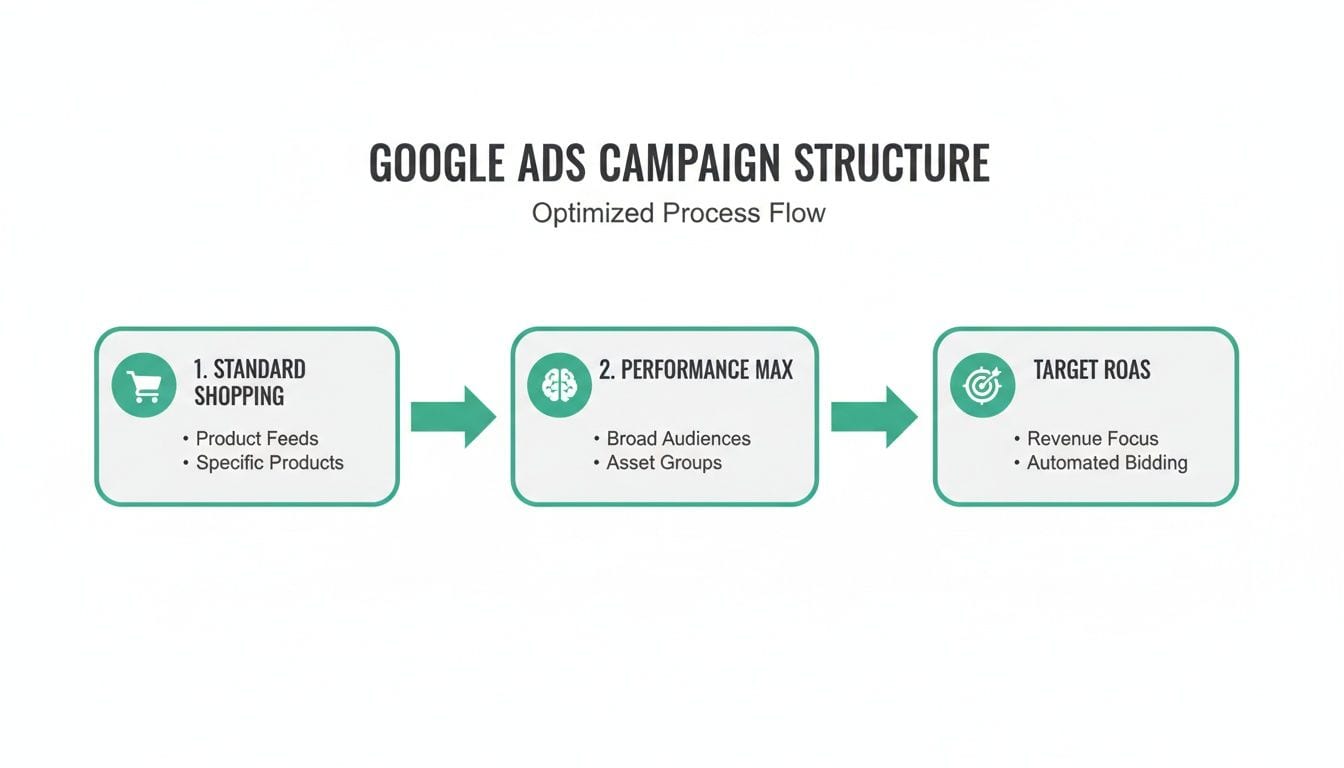
Think of it this way: a well-optimized account needs a clear path to follow. This diagram shows how we often structure campaigns to maximize profitability, starting with Standard Shopping for control and layering in Performance Max to find new customers, all while driving toward a specific Target ROAS.
Without reliable tracking, you can't prove your ROAS, confidently optimize bids, or know when it’s safe to scale your budget. It’s the difference between guessing and knowing. For a deeper look at the fundamentals, check out our guide on what conversion tracking is and why it's so critical.
Setting Up Tracking with Google Tag Manager
The modern, and frankly, the only way to do this right is with Google Tag Manager (GTM). GTM acts as a container for all your tracking scripts, sitting between your website and marketing platforms like Google Ads and Google Analytics. Instead of begging a developer to hard-code a new script every time you want to track something, you can manage it all from GTM’s interface.
This container-based approach doesn't just make your life easier; it also improves site speed because scripts can be loaded asynchronously. For any ecommerce store, GTM is your key to deploying not just purchase conversions, but a whole suite of valuable user signals.
Go Beyond the Purchase: Micro-Conversions Matter
Tracking the final purchase is a given, but it’s just one piece of the puzzle. Google's AI-powered bidding, especially in PMax, is hungry for data. The more high-quality signals you feed it, the faster it learns and the better it performs. This is where tracking micro-conversions gives you a massive competitive edge.
These are the smaller, yet significant, actions a user takes on their path to purchase. By tracking them, you give the algorithm valuable breadcrumbs about user behavior and intent, even if they don’t buy right away.
Think of it like this: A purchase is a touchdown, but micro-conversions are the first downs and completed passes that get you there. Tracking them helps Google understand which plays are actually working.
Here are the non-negotiable events every ecommerce store should be sending to Google.
Essential Ecommerce Events to Track
To properly feed Google's algorithm and understand the full customer journey, you need to track more than just the final sale. This table breaks down the essential events that provide a complete picture of user intent and behavior.
Tracking this full sequence of events unlocks powerful strategies. For instance, you can build audiences of users who add_to_cart but don't purchase and then hit them with a special offer. That level of granularity is only possible with comprehensive event tracking.
The High Cost of Bad Tagging and 'Dark Traffic'
Unfortunately, just setting up your tags isn't enough. The real danger is what happens after you launch. A website update, a new plugin, or simple human error can break your tracking without you even knowing it. This leads to broken attribution, wildly inaccurate ROAS, and money down the drain.
Another silent killer is "dark traffic." This happens when your UTM parameters—the tags added to your URLs to track campaign performance—are inconsistent or broken. When a user clicks an ad with a bad UTM link, their visit might get lumped into 'Direct' or 'Unassigned' traffic in Google Analytics instead of being correctly attributed to your Google Ads campaign.
This 'dark traffic' makes your campaigns look far less effective than they really are, which can lead you to make disastrous optimization decisions—like pausing a profitable campaign. A scalable, consistent UTM framework is simply non-negotiable for serious advertisers.
This is where automating your QA process becomes a lifesaver. Instead of relying on manual spot-checks, a platform like Trackingplan continuously monitors all your tracking tags in the background. It can instantly alert you if your purchase event stops firing or if UTMs are broken, ensuring every dollar you spend on Google Ads is measured and accounted for. This transforms your tracking from a fragile liability into a bulletproof asset.
Your campaigns are live, your product feed is pristine, and your bidding strategies are humming along. It’s easy to think the hard work is over, but in today’s complex ad tech ecosystem, launching your ads is just the beginning. The real challenge is protecting your investment from silent, costly errors that can sabotage performance without warning.
Running effective Google Ads for ecommerce now means embracing proactive quality assurance. Gone are the days when a weekly manual check was enough. The intricate web of tracking pixels, consent management platforms, and third-party integrations creates countless failure points that can quietly drain your ad budget.
Imagine a developer pushes a routine website update over the weekend. Unbeknownst to them, it accidentally breaks your Google Ads conversion pixel. Your ads keep running and spending money, but your reports show zero sales. The algorithm, now starved of conversion data, assumes your ads aren't working and throttles their performance. By the time you spot the flatline on Monday morning, you’ve wasted thousands of dollars and damaged your campaign's momentum.
The Invisible Threats to Your ROAS
These data issues are often invisible until it’s too late. They don't announce themselves; they just quietly erode the trust you have in your analytics and lead to flawed decision-making. You might lower bids on a campaign that’s actually performing well, simply because its conversions are being under-reported.
Here are a few common, yet destructive, scenarios I've seen countless times:
- Broken Tracking After an Update: As described above, a minor site change can completely sever the connection between your store and Google Ads, making your revenue data disappear.
- Consent Pop-ups Blocking Tags: A poorly configured cookie consent banner might prevent your analytics and ad tags from firing even for users who accept tracking, creating a huge blind spot in your data.
- Attribution Gaps: Discrepancies between what Google Ads reports and what Google Analytics 4 (GA4) shows are common. These gaps can arise from different attribution models or broken UTM parameters, leaving you unsure which platform to trust for optimization.
When your measurement is broken, you are no longer making data-driven decisions. You are making data-driven guesses based on faulty information, which is far more dangerous than relying on instinct alone.
These invisible errors all lead to the same outcome: under-reported revenue, skewed ROAS calculations, and optimization efforts that do more harm than good. You simply can’t fix a problem you can’t see.
Embracing Automated Observability
The only scalable solution is to move from reactive spot-checks to proactive, automated monitoring. This is the core principle of analytics observability. Instead of manually hunting for problems, you let an automated system watch your entire data pipeline, from the moment a user lands on your site to the final conversion event.
Think of it as a security system for your marketing data. It actively monitors every tag, pixel, and event, 24/7. When something breaks, you get an immediate, real-time alert.
An automated observability platform like Trackingplan can instantly notify your team via Slack or email the moment it detects issues like:
- Your
purchaseevent has stopped firing. - Revenue values are suddenly coming through as
0. - Campaign UTMs are malformed, creating "dark traffic."
This approach transforms your quality assurance from a manual chore into an automated safety net. It allows you to catch and fix problems in minutes, not days, protecting your ad spend and preserving the integrity of your campaign data. For any business serious about scaling its Google Ads for ecommerce, this level of active monitoring is no longer a luxury—it’s a fundamental requirement for survival and growth.
Common Questions on Google Ads for Ecommerce
Even with a solid strategy, you're bound to run into questions when you're in the trenches managing Google Ads for ecommerce. The platform is always changing, and what worked yesterday might need a tweak tomorrow. Let's tackle some of the most common sticking points with clear, actionable answers to help you navigate the challenges of running profitable campaigns.
Should I Use Performance Max or Standard Shopping?
This isn't an either-or question. The savviest advertisers I know don't choose one over the other—they use both in a hybrid strategy. It’s all about playing to each campaign type’s strengths.
One of the most effective tactics is running a Standard Shopping campaign set to a high priority, but only for your branded search terms. Think of it as a protective bubble around your most valuable, bottom-of-funnel traffic. This gives you total control over bids and negative keywords for users who are already looking for your brand by name.
At the same time, you let a Performance Max campaign run for broad prospecting and finding new customers. Because your Standard Shopping campaign snatches up all the branded searches, PMax is forced to hunt for non-branded terms and explore new audiences across Google's entire network. This structure gives you control where it matters most and automated growth where you want it.
My ROAS Is Low, What Should I Check First?
Slow down. Before you start slashing bids, pausing ad groups, or throwing out your creative, check your data integrity first. I can't tell you how many times a "performance problem" turns out to be a data problem in disguise.
Your very first stop should be to verify your tracking. Is your conversion pixel firing correctly on every single purchase? Are the revenue values and currency being reported accurately? Do you see a major gap between what Google Ads reports and your own analytics platform?
Here are a few other critical data points to audit immediately:
- Product Feed Accuracy: Are the prices and stock levels in your Google Merchant Center feed a perfect mirror of your website? Any mismatch can lead to disapproved products or, worse, skewed performance data that sends your campaigns in the wrong direction.
- UTM Parameter Health: Are your campaign tracking links built correctly? Broken UTMs are a classic culprit for sales being misattributed to "Direct" or "Organic," which makes your paid campaigns look far less effective than they really are.
An analytics QA tool can be a lifesaver here. It can instantly tell you if your
purchaseevent is broken or if revenue is being underreported, stopping you from making bad optimization decisions based on faulty data.
How Long Until Google Ads Are Profitable?
It's the million-dollar question, but the honest answer is: it depends. For a brand-new account, you absolutely have to factor in Google's learning phase, which usually takes about 2-4 weeks. During this time, the algorithm is just gathering data on who clicks and who converts, so performance will be choppy. Don't panic.
Your path to profitability is also shaped by your:
- Budget: A larger budget can help Google exit the learning phase faster simply because it gets more data to work with.
- Competition: If you're in a crowded niche, you can expect higher costs-per-click (CPCs), which will impact your initial return.
- Product Margins: This is a big one. Products with higher margins can naturally hit a positive ROAS much more quickly.
With a solid data foundation from day one and well-structured campaigns, I've seen many ecommerce stores start hitting a positive return on ad spend within the first 1-2 months. The trick is to feed the machine clean, reliable conversion data from the get-go. This shortens that painful learning phase and puts you on a much faster track to profitability.
Stop flying blind with your ad spend. Trackingplan provides a complete safety net for your analytics, automatically monitoring your tracking tags 24/7 to catch costly errors before they drain your budget. Ensure every dollar you spend on Google Ads is accurately measured by visiting https://trackingplan.com.