
A Google Analytics audit checks two things: that the GA4 property is set up the way your reports assume, and that your site actually sends GA4 what those reports read. A complete GA4 audit covers the property settings, events and key events, the dataLayer and tag manager, consent, campaign tagging and cross-domain measurement, checked on what real visitors send, not only in your own browser.
Most audits do the first half well. The second half is where the numbers go wrong.
This guide covers what an audit includes, then three ways to run one: by hand, with an AI assistant, or automated on real traffic. The GA4 audit checklist has the ten checks in detail.

What a Google Analytics audit is
A Google Analytics audit is a review of whether your GA4 data can be trusted: whether each number in a report comes from the event it claims to measure, sent once, with the right parameters and the right consent state. It covers the GA4 property and everything that feeds it. It is the GA4 case of a web analytics audit, the same review for any analytics tool.
It isn’t a report review.
A dashboard can look healthy while purchase fires twice on the thank-you page, or not at all on one browser.
So an audit has two halves. Configuration is what GA4 does with the data it receives: retention, filters, key events, cross-domain settings. Collection is what the site, the tag manager and the dataLayer actually send, for every kind of visitor.
What a GA4 audit covers
The layers, what to check in each, and where to look. Platform details come from Google’s Analytics Help.
| Layer | What you check | Where |
|---|---|---|
| Property and data retention | Who has access; event data retention set to 2 or 14 months (longer options are GA4 360 only) | Admin, Data Settings, Data Retention |
| Data filters | Internal traffic excluded. Filters work from the day they’re created; they don’t change historical data | GA4 Admin |
| Events and parameters | Names follow one convention; each event carries the parameters your reports read; nothing fires twice | DebugView (Admin, Data display), GTM Preview |
| Key events | The events that matter are marked. Marking one affects reports from then on, not history | Admin, Data display, Events |
| Cross-domain measurement | Every domain in the journey is listed. Without it, one person crossing two root domains counts as two users and two sessions | Admin, Data streams, Web, Configure tag settings, Configure your domains |
| Tag manager and dataLayer | Tags read the right dataLayer keys; what changed in the container since the last audit | GTM, the browser |
| Consent | Tags wait for the visitor’s choice, in every market | The hits, per consent state |
| Campaign tagging | UTMs follow one naming convention | Campaign links, acquisition reports |
| Destinations | GA4 and the ad pixels receive the same conversion | The hits |
Two rows explain why audits should come early. Neither data filters nor key events rewrite the past, so a mistake found in month six stays in months one to five.
For ecommerce, the event list is longer and every purchase parameter matters. The GA4 ecommerce tracking audit covers it step by step.
How to audit GA4 tracking for data gaps
To find data gaps in GA4, compare what should be sent with what actually arrives, split by the things that change collection: browser, device, market, consent state and page template. A gap is rarely a missing event everywhere. It’s an event missing on one browser, a parameter missing on one template, or a tag that only fires for visitors who accepted cookies.
Three places hide most gaps:
- Segments you didn’t test. Your test session runs in one browser, in one market, with one consent answer. Real traffic has all the others.
- Parameters, not events. The event arrives, so the report shows a count. The parameter that splits it by product or campaign is empty.
- Changes since the last audit. A tag edited in GTM, a new template, a new banner. The audit you passed last quarter tested a different site.
In a report, a tracking gap looks exactly like a real drop in demand. Telling them apart is the audit’s job.
Three ways to run a Google Analytics audit
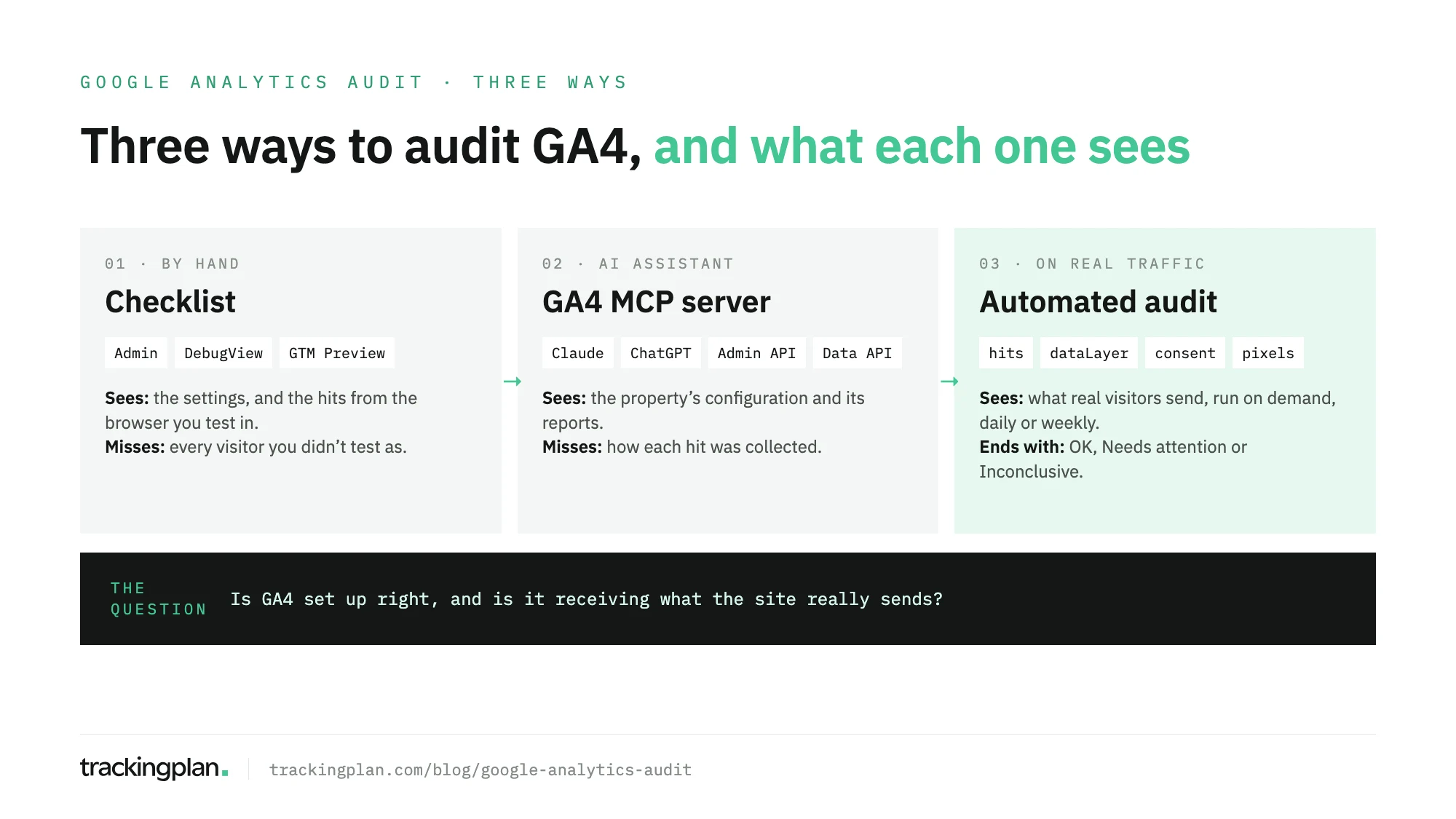
There are three ways to audit a Google Analytics implementation, and they see different things. A manual audit sees the settings and your own test sessions. An AI assistant connected to GA4 sees the configuration and the reports. An automated audit on real traffic sees what every visitor’s browser sends.
Audit GA4 by hand
To audit GA4 by hand, work through the property settings in Admin, then reproduce the key journeys with debug mode on and read each event in DebugView. Debug mode turns on through Tag Assistant or GTM Preview, or with the debug_mode parameter in the Google tag. DebugView then shows the events and user properties from that device in real time, as Google’s DebugView documentation describes.
The method:
- Write down what should be sent. Events, parameters and key events, per journey. The GA4 audit template gives you the sheet.
- Check the configuration. Retention, filters, key events, cross-domain, access.
- Walk each journey. Home to purchase, sign-up, lead form. Read every event and parameter in DebugView and GTM Preview.
- Test the consent paths. Accept, reject, ignore the banner. The tags should behave differently each time.
- Write the findings with an owner. A finding without an owner stays a finding.
A manual audit is thorough on the paths you walk. It says nothing about the ones you don’t.
It’s also slow. The agency Fact put it plainly: checking every possibility for every implementation “could easily take more than 200 hours” (Fact’s story). For the GTM side of the same work, see the GTM audit.
Audit GA4 with an AI assistant
Yes, you can audit GA4 with AI, and the fastest route is Google’s own Analytics MCP server connected to Claude or ChatGPT. It uses the Google Analytics Admin API and Data API, so the assistant can read the property’s details, its key events, its custom dimensions and metrics, its Google Ads links, and run standard, funnel and realtime reports. Setup is in how to connect GA4 to Claude and how to connect GA4 to ChatGPT.
It’s good at the configuration half: listing key events, custom dimensions and Google Ads links without opening Admin, and spotting settings that don’t match the reports, such as a key event with nothing behind it or a dimension nobody fills.
Where it stops: the assistant reads what GA4 recorded, not how each hit was collected. If purchase stopped firing on one browser after a release, run_report returns the lower total, and the assistant explains it as fluently as a correct one. It audits the property and the reports. It doesn’t audit the hits.
Google’s server is read-only by default. Three write tools, for annotations, custom dimensions and key events, only appear when whoever runs it turns writes on, as Google’s MCP server README explains.
Automated audits on real traffic
An automated audit checks what real visitors send, not what a test session sends, so it doesn’t need a manual test plan. Trackingplan learns your GA4, GTM and pixel setup from real traffic, and runs audits on those hits.
Every audit ends with a verdict: OK, Needs attention or Inconclusive. Inconclusive comes with its reason; it isn’t a failure.
Run an audit when you ask, or schedule it every day or once a week. Results reach you by email or Slack, and a scheduled audit can be sent only when it needs attention.
You start from a library of ready-made checks: key events, all events, consent implementation, acceptance rate, tag manager changes, cookie banner accuracy, new events or properties, Web Vitals, the data layer, destinations versus the data layer, and the UTM naming convention.
Behind each answer is evidence. The agent investigates before it answers, names a cause only when two independent pieces of evidence agree, and shows the queries behind every answer. When the fix is in GTM, it points to the change.
An audit is a specific check on that traffic. Monitoring is what watches it between audits: missing properties, broken triggers, consent breaches, drops and spikes, caught as they appear. One doesn’t replace the other.
You can ask the same agent from Claude, ChatGPT or Cursor through the Trackingplan MCP endpoint. So the AI route and the real-traffic route meet: the assistant you already use, reading hits instead of totals.
Is there a free Google Analytics audit tool? Yes: the free analytics audit. Install one tag; for 2 days Trackingplan learns your setup from real traffic, then you get 7 days free to audit it. The 9-day trial needs no credit card.
For agencies, the time is the argument. On Top Media puts its savings at 25–30 hours a month in manual data quality tasks, and Elogia at 12 hours a month. How the tools on the market compare is in GA4 audit tools.
Re-audit GA4 after a site release
To audit a GA4 implementation after a site release, re-check what the release could have changed, on real traffic, within the first hours: the key events, the parameters on them, the dataLayer keys the tags read, consent behaviour and any domain or template that’s new.
What to re-check:
- Key events and their parameters. The release passed QA; the events may still have lost a parameter on a template nobody tested.
- The dataLayer contract. A renamed key breaks the GTM variable that reads it, silently.
- Tag manager changes. What was published in the container around the release.
- Consent. A new banner or a new script can fire tags before the visitor chooses.
- New domains, subdomains or checkout providers. They belong in cross-domain settings, or one visitor becomes two.
- New events or properties. Something arrived that nobody planned. Find out if it’s meant to.
Monitoring catches regressions between releases on its own. A scheduled audit on the same checks, daily during a launch week, gives the release a verdict in writing.
How often to audit Google Analytics
Run a full Google Analytics audit when you inherit a property, before a migration or a redesign, and when the consent setup changes. Run the parts a release touched after every release. In between, schedule specific checks daily or weekly, and let monitoring watch the traffic.
A quarterly audit and nothing else leaves up to three months of reports built on whatever broke in week one. Filters and key events don’t fix history, so that time doesn’t come back. The checklist has a cadence per check.
Audit tool or agency?
Use a tool when the problem is coverage and frequency; hire an agency or a consultant when the problem is judgement: a measurement strategy, a migration, a team that needs someone to own it. Many teams do both, with the agency reading the tool’s findings instead of walking journeys by hand.
The trade-offs, cost and what to ask each one are in Google Analytics audit service or tool. If you run Adobe Analytics too, the Adobe Analytics audit covers its side.
Go deeper
- Google Analytics audit checklist: ten GA4 checks, with the evidence to inspect and who owns each fix.
- Google Analytics audit template: the sheet to record what should be sent and what you found.
- GA4 audit tools: twelve tools compared, from one-off property audits to monitoring.
- Google Analytics audit service or tool: when to hire an agency, when to use software.
- GA4 ecommerce tracking audit: the ecommerce events and parameters, step by step.
- Adobe Analytics audit: the same questions for Adobe.
- Connect GA4 to Claude: Google’s MCP server, set up and its limits.
- Free analytics audit: your GA4, GTM and pixels, audited on real traffic.
FAQ
What is a Google Analytics audit?
A Google Analytics audit is a structured review of a GA4 property and of the data the site sends it. It checks that the property is configured the way your reports assume, and that the events, parameters, consent states and campaign tags GA4 receives match what should be sent, for every kind of visitor.
Can AI audit my analytics implementation?
Partly. An assistant connected to GA4 through Google’s MCP server can read the property’s configuration and its reports and point out what looks wrong. It can’t see how each hit was collected, so a broken event looks like a real drop. An audit that reads real traffic, like Trackingplan’s, closes that gap.
Is there a free Google Analytics audit tool?
Yes. Trackingplan’s free analytics audit starts with one tag: for 2 days it learns your GA4, GTM and pixel setup from real traffic, then you get 7 days free to audit it. The 9-day trial needs no credit card.
How often should you audit GA4?
Run a full audit when you inherit a property, before a migration or a redesign, and after every release that touches tracking. Between full audits, schedule specific checks daily or weekly and keep monitoring the traffic, because a single release can change what GA4 receives.