
A Privacy Impact Assessment (PIA) is a structured document that helps your organization identify, analyze, and mitigate privacy risks before launching a new project or rolling out a new system. It’s a proactive tool that keeps you compliant with data protection laws and, just as importantly, helps build user trust from the ground up.
Why Your Martech Stack Needs a PIA Yesterday

Let's be honest: navigating data privacy in marketing and analytics can feel like walking through a minefield. Your martech stack—from the website's dataLayer and analytics platforms to CRims and ad pixels—is a tangled web of data flows. Every new tool you add or campaign you launch introduces potential privacy vulnerabilities.
This is where a Privacy Impact Assessment (PIA) becomes your best defense. It's not just another compliance checkbox to tick off a list; it’s a foundational risk management process. A solid PIA forces you to ask the hard questions about your data practices before something goes wrong, saving you from fines and serious reputational damage.
The Real Cost of Neglecting Risk Assessments
The consequences of skipping privacy risk assessments are steep and very public. Since the GDPR went into effect, organizations have been hit with staggering penalties. The total has climbed to over €4.5 billion since May 25, 2018, with regulators fining more than 1,200 companies.
Here’s the kicker: a shocking 62% of these fines were tied to inadequate risk assessments, including the failure to conduct a mandatory Data Protection Impact Assessment (DPIA), which is a specific type of PIA for high-risk activities. You can discover more about these GDPR findings and see for yourself how critical these proactive checks are.
And this isn’t just a European problem. With new privacy laws popping up in California, Virginia, and elsewhere, documented risk assessments are quickly becoming a global standard. A well-executed PIA is your proof of due diligence. It shows regulators you take privacy seriously.
From Reactive Fixes to Proactive Protection
Too many teams treat privacy as an afterthought. They only scramble to fix things after a data breach or a wave of customer complaints. That reactive approach is not just inefficient—it's dangerous.
A PIA completely flips the script. It embeds privacy considerations directly into your project lifecycle from day one.
Think of it like an architectural blueprint. You wouldn't build a house without one, right? A blueprint ensures the structure is sound. A PIA does the same for your data processing, helping you build a privacy-first martech stack. By conducting a PIA, you can:
- Spot hidden risks: Uncover vulnerabilities you never knew you had, like accidental PII collection in analytics events or murky data-sharing agreements with third-party vendors.
- Strengthen data governance: Create a clear, documented map of how personal data moves through your systems, from the moment it's collected to when it's deleted.
- Build customer trust: Show your users you're committed to protecting their data. In today's market, that's a powerful way to stand out.
A PIA is more than a document; it's a collaborative process that brings marketing, analytics, development, and legal teams to the same table. It forces a conversation about data that aligns business goals with privacy obligations, preventing costly missteps down the road.
Core Components Of A Martech PIA
Before diving into the template, it helps to get a high-level overview of what a comprehensive PIA involves. This quick-start table summarizes the essential pillars of the process.
This table lays out the roadmap for a successful PIA. Each component forces a critical look at your data practices, ensuring nothing is left to chance.
Mapping Your Data Flows Is Step Zero
You can't assess what you can't see. The absolute first step in any PIA is to create a complete and accurate map of your data flows. You need to understand every piece of data you collect, its purpose, where it's stored, and which third-party tools get a copy.
Without this foundational visibility, your PIA will be built on guesswork and outdated assumptions, leaving you completely exposed.
This is where a crystal-clear inventory of your analytics implementation becomes non-negotiable. Knowing precisely what your dataLayer contains, which events are firing, and what data is being shipped off to Google Analytics, Segment, or Facebook Ads is critical. This detailed map is the bedrock upon which a strong, defensible Privacy Impact Assessment is built.
Grab Your Free PIA Template and Get Started
Theory is great, but it's time to put it into practice. We’ve built a comprehensive privacy impact assessment template from the ground up, designed specifically for the messy reality of analytics and martech stacks. Think of it less as a document and more as a practical tool to steer your team's conversations and lock in smart decisions.
Ready to dive in? Download the customizable template here and you can get started right away.
[Download Your Free Martech PIA Template Now]
This isn't some generic, one-size-fits-all checklist you'd find floating around online. We tailored it to address the actual data flows and tools you're using every single day—whether that's Google Analytics 4, Adobe Analytics, Segment, or the countless ad pixels from platforms like Facebook and Google Ads. The whole point is to give you a solid framework that you can easily mold to your company's specific setup.
A Quick Tour of the Template
Our PIA template is broken down into a few key sections. Each one logically builds on the last, helping you paint a complete picture of a data processing activity, from the initial "why" all the way to the final risk mitigation plan.
Here’s what you’ll find inside:
- Project Description & Scope: This is where you nail down the "what" and "why." Get specific about the business goal, the tools involved (like implementing a new CDP), and who’s on the hook for it.
- Data Flow Analysis: This is the heart of the PIA. You’ll map out exactly what personal data is being collected, where it comes from, how it's used, and every single system or third party it touches. Be thorough here.
- Necessity and Proportionality Assessment: Time to justify the data grab. Is every single data point you're collecting truly essential for the stated purpose? Or are you grabbing extra info "just in case"? This is where you enforce data minimization.
Think of this template as a guided interview for your project. It forces you to ask the tough questions upfront, making sure privacy is baked in from the start, not just bolted on as an afterthought. This proactive approach is the only way to build real trust and stay compliant.
How to Make This Template Your Own
The real value here is in the customization. Your martech stack is unique, and your PIA needs to reflect that. Simply filling in the blanks won’t cut it; you need to adapt it.
Here are a few ways to tailor the template to fit your world:
- Name Your Tools: When you hit the data flow section, get rid of the generic placeholders. Don't write "analytics tool"; write "Google Analytics 4." Instead of "ad platform," list "Meta Ads Pixel" and "Google Ads Conversion Tag." Specificity is key.
- Add Your Own Risk Scenarios: We've included the usual suspects, but your business has its own unique risks. If you’re in healthcare marketing, for example, you'll need to add risks around HIPAA compliance that an e-commerce brand wouldn't even think about.
- Link to Your Internal Policies: Make this a living document. Reference your company’s existing data retention schedules, security protocols, and consent management policies directly in the PIA. This connects your assessment to your broader governance framework, turning it into an integrated part of your operations.
How To Complete Your Analytics PIA
Theory is one thing, but actually putting a privacy impact assessment template to work is where the rubber meets the road. To make this real, let's walk through a scenario I'm sure you've seen before: implementing a new Customer Data Platform (CDP).
Imagine our project is to integrate a CDP that unifies customer data from our website's dataLayer. The goal is to sync that data with our CRM and then push targeted audiences out to ad platforms and our main analytics tool. It's a classic martech project, and it's absolutely packed with potential privacy risks—making it the perfect candidate for a PIA.
By breaking down a tangible example like this, we can demystify the whole process. Seeing a filled-in template helps you get inside the thought process behind each section, which makes it far less intimidating to tackle your own assessments.
Essentially, using the template boils down to three core stages.
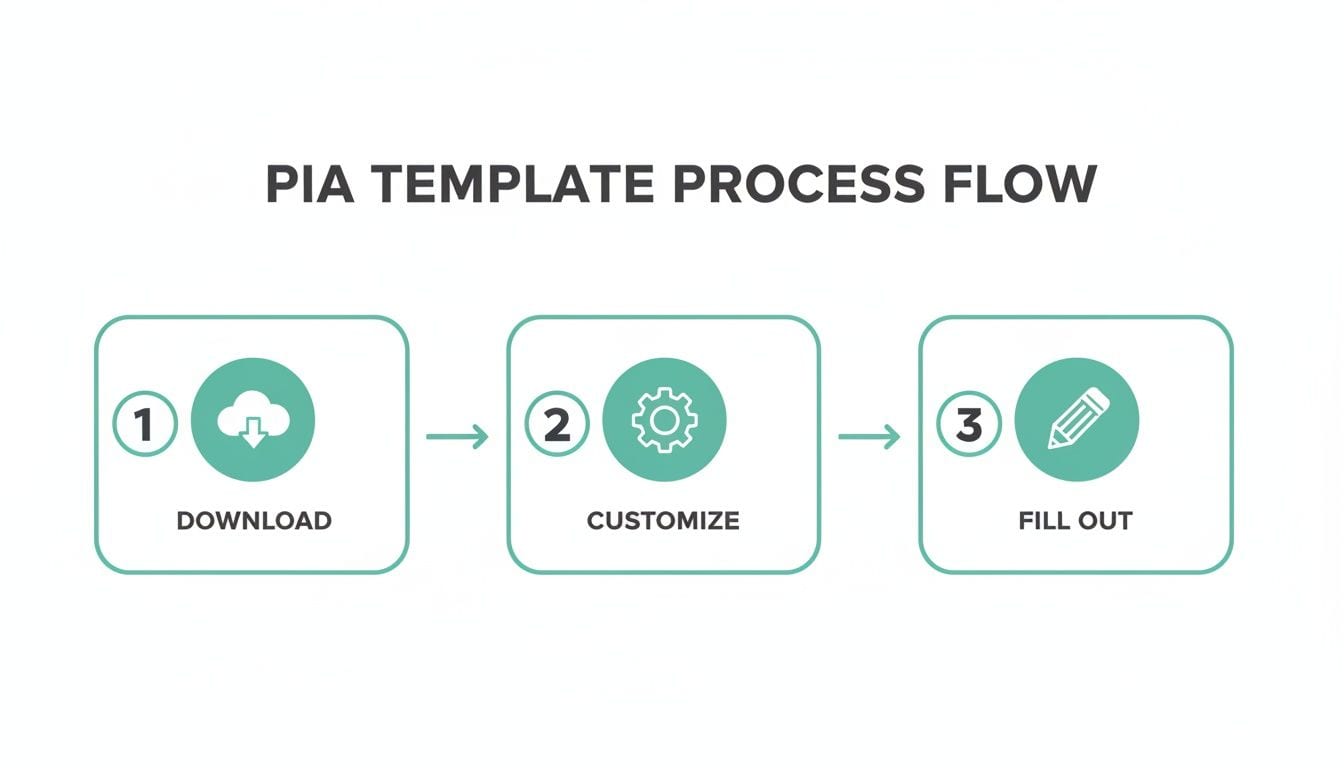
As you can see, it all starts with a solid template. From there, you tailor it to your project's specifics and then dive in with your team to fill it out.
Nailing The Project Description And Scope
First things first: you have to clearly define the "what" and the "why." A vague description is useless. You need to get specific about the project's goals, the tech involved, and who's driving it.
Example: Project Description
Project Name: Enterprise CDP Implementation (Project Unify)
Project Owner: Jane Doe, Head of Digital Marketing
Project Goal: To implement the 'ConnectData' CDP to create a unified customer profile. This will enable personalized user experiences on our website and improve the targeting efficiency of our digital advertising campaigns by syncing audiences with Meta Ads and Google Ads.
Tools Involved: ConnectData CDP, Google Tag Manager, Google Analytics 4, Salesforce CRM, Meta Ads Pixel, Google Ads Conversion Tag.
An entry like this sets a crystal-clear stage. It calls out the specific tools, spells out the business objective, and assigns ownership. There's no ambiguity, so everyone knows the project's purpose right from the jump.
Mapping The Data Flow The Right Way
This is easily the most critical part of the entire PIA. You have to trace the complete journey of personal data, from where it's collected to every place it ends up. A single mistake here can undermine the whole assessment. Put on your data detective hat and follow every single step.
For our CDP example, this means mapping how data travels from a user's browser, gets processed by the CDP, and then gets sent out to other destinations.
- Collection Point: User interaction data (like
page_vieworadd_to_cart) is captured from the website'sdataLayerthrough Google Tag Manager. - Processing Hub: The ConnectData CDP ingests this raw event data. It then enriches it with data from Salesforce, matching records based on the
user_id. - Downstream Destinations: The CDP forwards event data to Google Analytics 4 for analysis. It also syncs audience segments (e.g., 'High-Value Cart Abandoners') to Meta Ads and Google Ads for retargeting.
A huge mistake I see teams make is just assuming their documentation is accurate. Data flows change. Rogue events and properties pop up out of nowhere. Your PIA is only as strong as your data map's accuracy.
This is exactly why having ongoing visibility is non-negotiable. Without it, your PIA is just a static document built on a foundation of guesswork.
Assessing Necessity And Identifying Risks
Once the data flow is mapped out, you have to justify why you need every single piece of data you're collecting. This is the data minimization principle in action. At the same time, you'll start flagging potential privacy risks tied to each step in that data's journey.
Example: Necessity & Risk Assessment
This kind of systematic review forces you to challenge every data point. Is ip_address truly essential, or could a less-intrusive method achieve the same goal? Asking these tough questions is how you actively shrink your privacy footprint. This is especially vital when you learn more about PII data compliance and the strict rules around personally identifiable information.
Documenting Your Mitigation Measures
Finding the risks is just half the job. Now, you need to document the specific controls you'll put in place to tackle each one. These are your mitigation measures—the concrete steps you'll take to protect user data.
These measures usually fall into three buckets:
- Technical Controls: Safeguards built right into your systems, like data encryption, pseudonymization, or strict access controls.
- Administrative Controls: These are the policies and procedures that govern your data handling—think data retention policies, employee training, and incident response plans.
- Contractual Controls: These are the legal agreements you have with vendors, like Data Processing Agreements (DPAs), that bind them to protect your data.
Example: Mitigation Plan
A simple table like this transforms your assessment into an actionable plan. It creates clear ownership and makes it easy to track progress.
Even with the best planning, martech stacks are always in flux. A landmark World Economic Forum report found that fewer than 25% of G20 Pioneer Cities regularly conduct PIAs, even though 89% see privacy as a top concern. For teams wrestling with complex analytics, a privacy impact assessment template offers a crucial blueprint. It forces you to map data flows and mitigate risks, which can dramatically reduce the likelihood of a breach.
This is precisely where automated observability becomes a game-changer. It gives you the continuous validation you need to be sure the controls you documented in your PIA are actually working as intended, day in and day out.
Navigating Cross-Border Data Transfers
International data transfers are a massive headache for most marketing and analytics teams. Get this part of your PIA wrong, and the whole thing could be invalid. If your martech stack uses vendors based in other countries—say, sending European user data to US-based servers for Google Analytics—you've just waded into a very complex and high-stakes area of privacy law.
This isn't just a box-ticking exercise anymore. After the seismic "Schrems II" court ruling, simply having a standard contract in place doesn't cut it. You now have an active duty to assess whether the data receives equivalent protection in its destination country as it would back home. This single requirement has completely upended how businesses approach their global data flows.
The Rise Of The Transfer Impact Assessment
All this increased scrutiny has given rise to the Transfer Impact Assessment (TIA). Think of it as a specialized risk assessment that often becomes a non-negotiable part of your main PIA. A TIA forces you to get specific, documenting the legal landscape of the recipient country and detailing the extra measures you’re taking to keep the data safe.
The need for TIAs exploded almost overnight. With cross-border data flows being the lifeblood of digital analytics, the 2020 Schrems II ruling sent shockwaves through the industry. By early the next year, over 5,000 multinational firms were scrambling to complete their first TIAs.
A recent survey of 1,100 privacy professionals revealed that 67% of EU exporters hit roadblocks with data adequacy. More alarmingly, 23% had to halt data transfers entirely because of unresolved TIA issues, costing them an average of $4.7 million in lost revenue each.
Documenting Transfers In Your PIA Template
So, how do you tackle this in your privacy impact assessment template? You need a dedicated section to meticulously document every single cross-border transfer. This is where you connect the dots between your tools, the data they handle, and the legal safeguards protecting that data on its journey.
For each tool that sends data across a border, you need to document:
- The Data Importer: Who is the vendor receiving the data? Be specific (e.g., Google LLC).
- The Recipient Country: Where is the data being processed (e.g., United States)?
- The Transfer Mechanism: What is the legal basis for the transfer? This is usually Standard Contractual Clauses (SCCs) or an Adequacy Decision.
- Supplementary Measures: What extra steps are you taking to protect the data in light of the local laws?
One of the most common mistakes I see is teams assuming their vendor's standard DPA is a "get out of jail free" card. It's not. The responsibility for conducting a TIA and ensuring adequate protection ultimately falls on you, the data exporter. You have to verify and document that the promises made in a contract can actually be met in the real world.
Practical Examples Of Supplementary Measures
Let's make this real. Imagine you're sending EU user data to a US-based analytics provider. Your TIA would need to seriously consider US surveillance laws. To counter the risks you've identified, you would document your supplementary measures right inside your PIA.
These measures aren't just theoretical; they're concrete actions. They might include:
- Technical Measures: Things like implementing end-to-end encryption where the vendor physically cannot access the decryption keys. Or, you could use pseudonymization techniques to strip out direct identifiers before the data even leaves the EU.
- Contractual Measures: This involves adding specific, tougher clauses to your Data Processing Agreement (DPA). For example, requiring the vendor to notify you of any government access requests and obligating them to legally challenge those requests whenever possible. Getting the DPA right is a huge piece of the puzzle, which we cover in our guide: what is a Data Processing Agreement.
- Organizational Measures: You can also implement strict internal policies that limit the amount and type of data being transferred in the first place, making sure only the absolute minimum necessary is ever sent.
When you're trying to navigate the choppy waters of international data flows, knowing the regulations like GDPR inside and out is crucial. For some specific examples, it's worth checking out resources like Inbounter's GDPR compliance details.
By meticulously documenting these transfers and measures, you transform your PIA from a simple compliance checklist into a robust, defensible record of your due diligence—one that’s ready to stand up to any regulatory scrutiny.
Turning Your Assessment Into Action
Finishing your privacy impact assessment is a huge step, but it's really just the beginning. The real value of a PIA isn't in the document itself—it’s in what you do with it next. Too often, these assessments end up gathering dust in a folder.
To get the most out of your hard work, you need to transform that static document into a living framework for day-to-day privacy governance. This is where the paper-based exercise becomes a real-world blueprint for monitoring and validating the controls you've so carefully put in place.
Validating Your PIA Assumptions
Every PIA is built on a foundation of assumptions. You assume a certain analytics event doesn't collect PII. You document that consent flags are always honored by your ad pixels. But are those assumptions still true a week from now? A month?
This is where automated observability tools become your best friend. They provide a way to continuously check if what you've documented in your PIA matches what's actually happening in your martech stack.
Let's say your PIA states that the product_viewed event is free of personal data. An automated system can scan that event in real time and immediately flag it if a rogue property containing an email address suddenly appears. This lets you move from hoping your controls work to knowing they do.
From Static Document to Dynamic Monitoring
A "living" PIA means its findings are baked directly into your operational workflows. The risks and mitigation strategies you identified are the perfect starting point for your monitoring strategy.
- Set Up Real-Time Alerts: Take the highest risks you found and build alerts around them. If you flagged unauthorized cross-border data transfers as a major concern, set up a monitor to catch any new data flows to third countries instantly.
- Schedule Regular Reviews: A PIA isn't a "one and done" task. Plan to formally review and update it whenever you add a new vendor, launch a new feature, or make any significant changes to your stack. At a minimum, do a full review once a year.
- Integrate with Data Governance: The insights from your PIA are pure gold for your wider data strategy. A well-executed PIA is a cornerstone of strong data governance best practices, giving you a clear, risk-based "why" behind your policies.
Your PIA should not live in a silo. It is the strategic foundation for your privacy monitoring. The risks you documented are your "knowns"—the very things your observability platform should be configured to watch like a hawk.
Closing the Data Lifecycle Loop
Finally, putting your PIA into action means managing data from collection all the way to secure disposal. A critical, and often overlooked, step is having a clear chain of custody for retired assets.
For hardware or media containing sensitive data, obtaining a Certificate of Destruction is a must. It provides verifiable, auditable proof that data has been securely destroyed, which is a key control for mitigating data retention risks.
By connecting your initial assessment to continuous validation and secure disposal, you build a truly robust, end-to-end privacy management program. This approach doesn't just tick compliance boxes—it builds a resilient and trustworthy data ecosystem.
Got Questions About PIAs? We’ve Got Answers
Even with a great template, you’ll probably have questions once you start digging into your own martech stack. A privacy impact assessment template is a solid starting point, but applying it in the real world always brings up practical curveballs for analysts, marketers, and developers.
Let's clear up some of the most common questions that pop up. These should reinforce the key ideas from the guide and give you the confidence to dive in.
How Often Should We Update The PIA For Our Analytics Setup?
A PIA is never a "one-and-done" task—it’s a living document. You absolutely have to conduct a new one anytime you bring a new analytics tool, CDP, or marketing pixel into your stack. Any significant change in how you collect or process personal data should also trigger a fresh assessment. Think adding a new user identifier or creating new audience segments for targeting.
Beyond those project-based triggers, it’s just good practice to review your existing PIAs on a regular schedule. Aim for a review every 1-2 years or whenever a major regulatory shift happens, like a new privacy law or a significant court ruling. This keeps your assessments from getting stale and ensures they always reflect your current data practices.
What Is The Difference Between A PIA And A DPIA?
This one causes a lot of confusion, but the distinction is actually pretty simple.
Think of a PIA as the general framework for identifying and mitigating privacy risks in any project. It’s a best-practice methodology you can apply broadly.
A Data Protection Impact Assessment (DPIA), on the other hand, is a specific, legally mandated requirement under GDPR's Article 35. You're legally obligated to conduct a DPIA for any data processing that is likely to result in a "high risk" to individuals' rights and freedoms. The good news is our template is comprehensive enough to serve as the foundation for a formal DPIA if your activities meet that high-risk threshold.
Can An Automated Tool Replace A Manual PIA?
Nope, but it can make it a hundred times better. An automated tool can’t replace the human judgment needed for a PIA. A proper assessment requires you to weigh context, necessity, proportionality, and legal basis—all strategic decisions that software can't make.
But here’s the thing: automation is absolutely critical for the data discovery and validation phases. A good tool gives you the "ground truth" of what data is actually being collected and where it’s going. This stops your PIA from being based on outdated documentation or incorrect assumptions, which is one of the biggest ways these things fail.
Who Should Be Involved In Completing A Martech PIA?
A strong PIA is a team sport. Trying to do it alone is a recipe for disaster because you'll inevitably miss crucial perspectives. To create a robust and defensible assessment, you need to get the right people in the room.
Your core team should include:
- The Marketing Team: They own the business goals and can explain why a tool or process is necessary in the first place.
- Digital Analysts: They are the experts on the data itself—what’s being collected, how it’s structured, and how it's supposed to be used.
- Developers or Engineers: They get the technical implementation and can speak to data flows, security controls, and the underlying system architecture.
- The Legal or Privacy Team: They provide the essential legal oversight, assess compliance risk, and make sure the PIA meets all regulatory standards.
Getting all these stakeholders involved from the start ensures you cover the business, technical, and legal angles completely. The result is a much more effective—and useful—assessment.
A solid privacy impact assessment template is your first line of defense, but it's only as good as the data you feed it. Trackingplan gives you the real-time observability to validate every assumption in your PIA, turning your static document into a living, breathing part of your privacy governance. See how you can continuously monitor your data flows and catch risks before they become liabilities at https://trackingplan.com.