
What is tag management and how does it work?
A tag management system manages the full lifecycle of tags, including tracking pixels and JavaScript snippets, across all your digital properties. The core mechanism is the container tag: one snippet of code installed once across every page of your site. Every individual tag you need, whether that is a Google Ads conversion pixel or a Hotjar session recorder, fires from inside that container based on rules you define in the TMS interface.
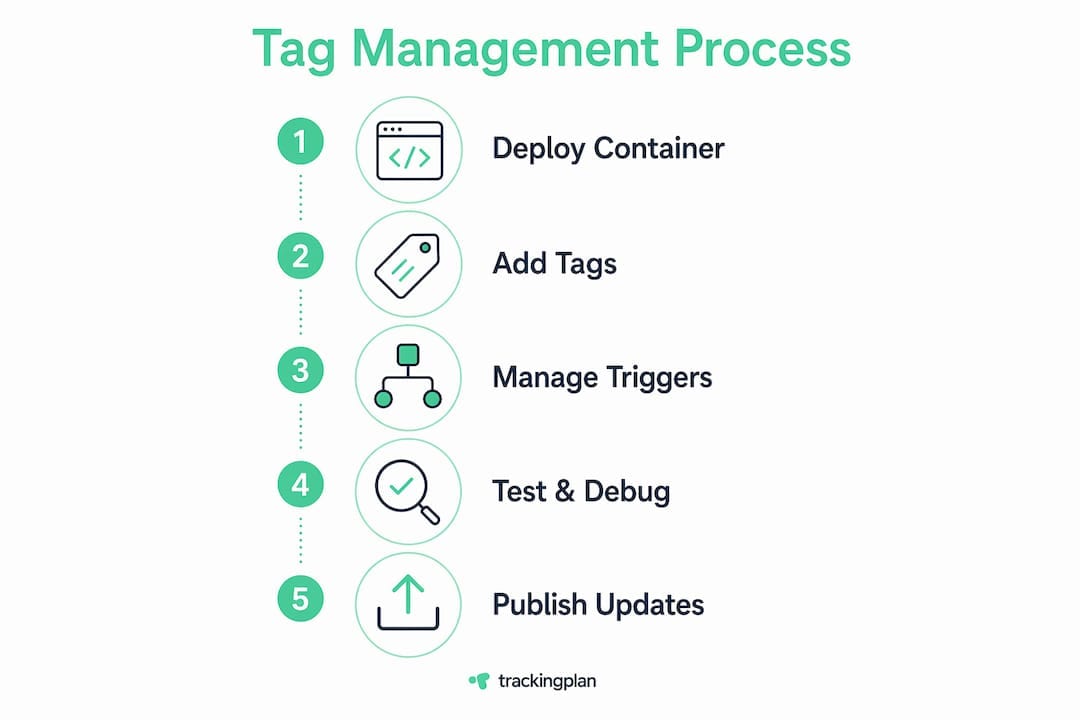
Here is how the process works in practice:
This architecture separates developer concerns from marketing operations. Developers install the container once. Marketers manage everything else through a UI, without touching site code again.
Pro Tip: Always use version control inside your TMS. Every published container should be a numbered version with a description of what changed. If a bad tag breaks your conversion tracking, you can roll back to the previous version in seconds instead of spending hours debugging live code.

What are the main benefits of a tag management system?
Adopting a TMS delivers concrete operational and data quality advantages that compound over time. The codeless management capability of tools like Google Tag Manager means marketing teams can deploy and update tracking without waiting for a development sprint.
The most significant benefits include:
“The real value of a tag management system is not just speed. It is the ability to maintain measurement integrity at scale without creating a permanent dependency on engineering resources.”
For marketing teams running multiple campaigns across paid search, social, and affiliate channels, that scalability is not optional. It is the difference between a measurement architecture that holds up and one that collapses under its own weight.
How do leading tag management tools compare?
Google Tag Manager holds 99.7% of the tag management market share as of November 2023. That number reflects both its zero-cost pricing and its deep integration with Google Analytics 4, Google Ads, and the broader Google Marketing Platform. For most marketing teams, GTM is the default starting point and often the permanent solution.
Adobe Experience Platform Launch and Tealium serve enterprise teams with more complex requirements. Adobe Launch integrates tightly with the Adobe Experience Cloud suite, making it the natural choice for organizations already running Adobe Analytics or Adobe Target. Tealium’s strength is its data layer management and real-time audience segmentation capabilities, which appeal to teams running sophisticated personalization programs.
The right choice depends on your existing stack, your team’s technical depth, and your data governance requirements. If you are evaluating options, Trackingplan’s comparative analysis of tag management systems covers the decision criteria in detail. For most teams starting fresh in 2026, Google Tag Manager remains the most practical entry point given its capabilities, community support, and cost.
Tag management best practices and common pitfalls
Effective tag management implementation requires discipline that goes beyond the initial setup. The container as a single point of failure is the most underappreciated risk in TMS deployments. One misconfigured trigger or a JavaScript error in a custom tag can break tracking across your entire site simultaneously.
The practices that separate reliable implementations from fragile ones:
Pro Tip: Document every custom tag and trigger in a shared tracking specification, sometimes called a measurement plan or data dictionary. Include the tag name, its purpose, the trigger conditions, and the variables it reads. When a new analyst joins the team or a vendor asks why their pixel is not firing, that document saves hours of reverse engineering.
The importance of tag management governance scales directly with the size of your Martech stack. A site running five tags can survive loose practices. A site running fifty cannot. Building the right habits early prevents the kind of measurement debt that takes months to untangle.
Key takeaways
A tag management system is the operational foundation of reliable digital measurement, and its value depends entirely on how disciplined your implementation and governance practices are.
Tag management in 2026: what I have learned the hard way
The shift toward codeless, visual tagging has made TMS platforms more accessible than ever. That accessibility is mostly a good thing. Marketing teams can move faster, test more, and iterate without engineering bottlenecks. But it has also created a generation of implementations built without any underlying governance structure, and those implementations fail in predictable ways.
The most common mistake I see is treating the TMS as a dumping ground. Teams add tags for every new vendor, every new campaign, every new experiment, and never remove anything. Six months later, the container has 80 tags, half of which are firing on every page load, and nobody can explain what most of them do. The analytics in marketing ROI case falls apart when your underlying data is this unreliable.
Privacy regulations have added a new layer of complexity that most teams are still catching up with. Consent Mode v2 from Google, combined with GDPR enforcement that has become genuinely aggressive, means that tag firing logic now needs to account for user consent state in real time. Teams that built their TMS implementations before 2022 often have consent logic that is either missing entirely or bolted on as an afterthought.
My honest recommendation: treat your tag management system the way a software team treats a production codebase. Version everything. Document everything. Review it on a schedule. The teams that do this have measurement they can trust. The teams that do not spend more time debugging data than using it.
How Trackingplan keeps your tag management reliable

Even the best-governed TMS implementation can develop issues over time. Tags break after site deployments. Pixels stop firing after a CMS update. dataLayer events start passing null values after a code refactor. Trackingplan’s web tracking monitoring detects these failures automatically, sending real-time alerts via Slack, email, or Teams the moment something goes wrong. For marketing teams managing complex Martech stacks, that means catching a broken conversion pixel in hours rather than discovering it weeks later when campaign data stops making sense. Trackingplan’s AI-assisted debugger also pinpoints root causes directly, cutting the time from alert to fix. If you rely on accurate tracking data to make attribution and spend decisions, Trackingplan gives you the monitoring layer your TMS alone cannot provide.
FAQ
What is a tag manager in simple terms?
A tag manager is software that lets you add, update, and remove tracking tags on your website through a visual interface, without editing site code directly. Google Tag Manager is the most widely used example.
How does a tag management system differ from hardcoded tags?
Hardcoded tags are embedded individually in site code and require a developer to change. A TMS uses one container snippet installed once, with all other tags managed through a UI, which removes the developer dependency for routine updates.
What is the dataLayer and why does it matter?
The dataLayer is a JavaScript object that passes structured data from your website to your TMS. It allows tags to capture accurate, consistent information like product IDs or transaction values rather than scraping unreliable page elements.
Which tag management tool should I use in 2026?
Google Tag Manager is the right starting point for most teams. It is free, well-documented, and holds 99.7% market share. Adobe Experience Platform Launch and Tealium are worth evaluating only if you have specific enterprise data governance or Adobe ecosystem requirements.
How often should I audit my tag management container?
A quarterly audit is the minimum for active marketing teams. Each audit should identify tags that are no longer needed, triggers that fire incorrectly, and any dataLayer events that have drifted from the original specification.