
Tag management is one of those terms that sounds way more complicated than it actually is. At its core, it’s a system that lets you add and manage all those little code snippets—or tags—on your website or app without constantly bugging your developers to edit the source code.
Think of it as a universal remote for all your third-party tools, like analytics platforms and advertising scripts. It brings everything under one roof, making it a whole lot easier to add, remove, or tweak these tools as your needs change.
The Foundation of Modern Digital Marketing
Picture your website as a high-tech stage production. Every tool you use—analytics, ads, pop-ups, chatbots—is a piece of equipment that needs power. Without a proper system, you'd have a tangled mess of extension cords running everywhere. It’s chaotic, slows things down, and one wrong move could bring the whole show to a halt. That’s exactly what a website looks like without tag management.
A Tag Management System (TMS) acts as a central switchboard. Instead of asking developers to hard-code dozens of individual tags directly into your site, they install just one snippet of code, often called a container tag.
Solving Digital Chaos
Once that single container is live, marketing and analytics teams can take the wheel. Using a simple web interface, they can manage everything else on their own. This shift is huge because it empowers non-technical teams to move quickly and independently.
Here’s why that matters:
- Move Faster: Launch new marketing campaigns and test new tools in a matter of hours, not weeks. No more waiting in long development queues.
- Boost Performance: A good TMS loads tags asynchronously, which is a fancy way of saying they don't block your main content from loading. The result? A faster, smoother experience for your users.
- Stay in Control: All your marketing tags live in one central dashboard. This gives you a clear view of what’s running on your site and drastically cuts down on the risk of human error.
To illustrate the shift, let's look at how operations change with and without a tag management system.
Before vs After A Tag Management System
This table illustrates the key differences in website operations before and after implementing a tag management system, highlighting improvements in efficiency, performance, and control.
AspectWithout Tag ManagementWith Tag ManagementDeployment TimeWeeks or months; dependent on developer cycles.Hours or days; marketing teams can deploy independently.Website PerformanceSlower page loads due to multiple, synchronous scripts.Faster page loads with asynchronous tag loading.Team AgilityLow; marketing is bottlenecked by IT/dev resources.High; teams can quickly adapt to market changes.Data GovernanceFragmented and risky; difficult to see all active tags.Centralized and controlled; clear overview of all tags.CostHigh developer costs for manual tag implementation.Reduced development costs and increased team efficiency.
The move to a TMS is a clear win for any team looking to become more agile and data-driven without sacrificing site performance or control.
This whole system was born out of necessity. Web tracking started with simple pixels back in the mid-1990s. But by the 2000s, websites were drowning in dozens of manually injected vendor tags for analytics, ads, and personalization tools. This "tag sprawl" was notorious for slowing down pages and creating fragile, error-prone setups.
Early pioneers like TagMan and Tealium introduced the idea of a centralized container, but it was the launch of the free Google Tag Manager in 2012 that really blew the doors open. It transformed tag management from a niche developer task into a core capability for any modern marketing team. You can dive deeper into the history of marketing tags on Taginspector.com.
By consolidating scattered scripts into a single, organized system, tag management fundamentally changes how businesses collect data, making the process faster, cleaner, and more reliable for everyone involved.
How Tags, Triggers, and Variables Work Together
To really get what tag management is all about, you need to understand its three core building blocks. The best way to think about them is like a simple automated recipe: an action only happens when a specific condition is met. This simple logic—Tags, Triggers, and Variables—is what gives a Tag Management System (TMS) its real power.
This relationship moves you away from the chaotic, hard-coded scripts of the past and toward a clean, centralized system for managing all your tracking.
The diagram below paints a clear picture of the difference between a messy, manual setup and the streamlined approach a TMS brings to the table.
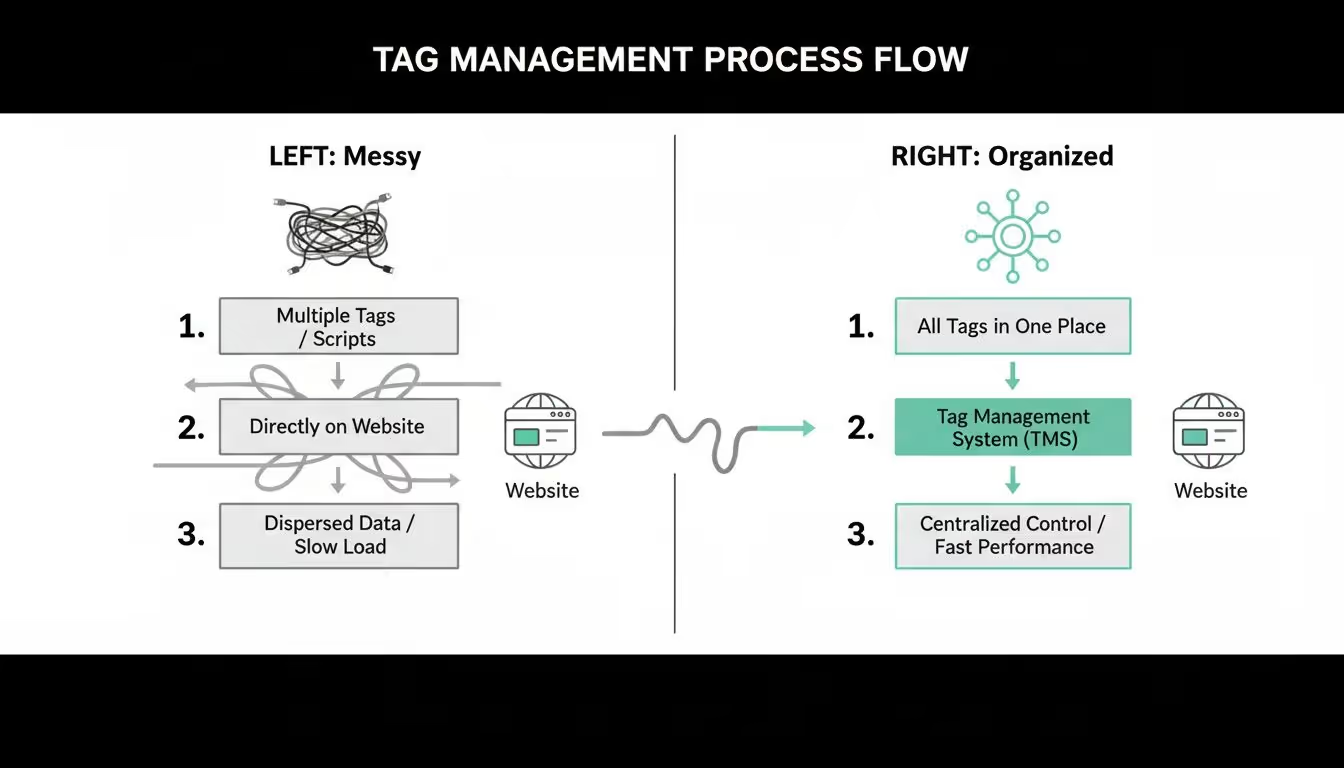
As you can see, a TMS acts as a central hub, creating a direct and orderly flow of data from your website to all your different marketing and analytics tools.
The Core Components of a TMS
Let’s break down each element of this "recipe" to see how they all interact. Nailing these three concepts is the key to deploying precise and effective tracking across your site.
- Tags: These are the actions in your recipe. A tag is just the code snippet from a third-party tool—like your Google Analytics tracking code, a Meta Pixel for remarketing, or a Google Ads conversion script—that you want to run on your site.
- Triggers: These are the "if" conditions that tell a tag when to fire. A trigger is set up to listen for specific user interactions or events, like a page view, a button click, a form submission, or someone landing on a thank-you page after a purchase.
- Variables: These are the dynamic ingredients that make your recipe smart. A variable is a placeholder for a value that can change, like a product name, an order total, a user ID, or the text on a clicked button. They pass specific, contextual information to your tags.
In a nutshell, a TMS works like this: When a specific Trigger (the event) happens, it tells a specific Tag (the code snippet) to fire, often passing along dynamic information captured by Variables.
A Practical Example in Action
Let's say you want to track every time someone signs up for your newsletter by submitting a form on your landing page. Without a TMS, you’d have to get a developer to hard-code a tracking script directly onto that form. It’s slow and clunky.
With a TMS, it's a whole different story:
- The Trigger: You create a trigger that listens for a successful "form submission" event, but only on that specific landing page.
- The Tag: You set up a Google Analytics Event Tag designed to track a custom event called "newsletter_signup."
- The Variable (Optional): You could even use a variable to capture the form's unique ID, just to be 100% sure you’re only tracking signups from the correct newsletter form and not any others.
When a user hits "submit," the trigger activates and tells the Google Analytics tag to fire, sending that "newsletter_signup" event straight to your reports. The whole process is managed inside the TMS interface, with no new code deployment needed.
For organizations managing complex tracking setups, especially with platforms like Google Tag Manager, enhancing data observability with automated QA tools becomes absolutely essential for maintaining accuracy at scale.
What Are the Real Business Benefits of a TMS?
It’s one thing to understand the nuts and bolts of tags, triggers, and variables. But where a Tag Management System (TMS) truly shines is in the real-world business results it drives. Let’s move past the technical "how" and dig into the business "why." A TMS isn't just a developer tool; it's a strategic asset that impacts your bottom line through better agility, performance, and governance.
The first thing you'll notice is a huge leap in marketing agility. In the old days, launching a new campaign or even just trying out a new analytics tool meant getting in line for a developer. That process could easily stretch into weeks, killing momentum. A TMS completely flattens that bottleneck.
It gives your marketing team the power to deploy, test, and tweak tracking tags themselves through a simple interface. This self-service approach means new initiatives can be up and running in a matter of hours, not weeks. Your whole organization can suddenly react to market shifts and new opportunities at a speed that was impossible before.

A Faster, Better Website
Another major win is a direct improvement in your website's performance. When tags are hard-coded directly into your site, they can seriously bog things down. Each script fights for resources, often blocking your main content from loading until it's finished. This creates a clunky user experience and can even hurt your SEO rankings.
A TMS fixes this by loading tags asynchronously. Think of it like this: your website’s main content gets top priority, while the tags load quietly in the background. They no longer act as a roadblock, which leads to faster page load times and a much happier experience for your visitors.
By separating tag deployment from your site’s core code, a TMS doesn't just speed up marketing—it makes the entire user experience better, which is what business goals are all about.
Stronger Data Governance and Compliance
Finally, and this is a big one, a TMS brings order to the chaos of data governance and privacy compliance. Without a central system, it’s tough to know what tags are firing on your site, what data they’re grabbing, and where it’s all going. It’s a messy and risky situation.
A TMS acts as a single source of truth for all your data collection. This centralized control gives you a few key advantages:
- Consistency: It guarantees that all tracking is implemented the same way across all your digital properties.
- Audit Trail: It keeps a clear, version-controlled history of every single change made to your tags, so you always know who did what, and when.
- Privacy Control: It makes it much easier to enforce privacy rules for regulations like GDPR and CCPA by managing user consent before any tags are allowed to fire.
This isn't just about technical tidiness; it’s a strategic imperative. The numbers back it up. Companies using a TMS report dramatic improvements in deployment speed—some see a greater than 90% reduction in the time needed for common tag changes. And by loading tags asynchronously, a TMS can slash the impact of third-party scripts on page load times, which can account for a hefty 20–50% of the load on some pages.
This trifecta of speed, performance, and control translates directly into faster campaigns, stronger site metrics, and much-improved compliance. To learn more about how tag management fits into the bigger digital marketing picture, check out these insights on InfoTrust.com.
Choosing the Right Tag Management Platform
Even though all Tag Management Systems (TMS) do the same basic job, they’re definitely not one-size-fits-all. Picking the right platform is a big decision that comes down to your company's size, technical needs, and, of course, your budget. The choice you make will have a direct impact on your team's agility and what you can do with your data.
For most small to mid-sized businesses, Google Tag Manager (GTM) is the obvious place to start. It’s completely free, surprisingly powerful, and plugs right into the entire Google Marketing Platform. GTM gives you all the essential tools you need to manage your tags, triggers, and variables without having to spend a dime, making it the perfect choice for teams that are ready to stop hard-coding tags.
Enterprise-Level Solutions
But as a business grows, its data ecosystem gets a whole lot more complicated. Large enterprises often hit a wall with what free tools can do and need more firepower. That’s where the paid, enterprise-grade platforms step in.
The big names in this space include:
- Tealium iQ: Famous for its massive library of over 1,300 pre-built integrations, Tealium is a beast at pulling together customer data from all kinds of sources, not just Google’s suite.
- Adobe Experience Platform Launch: If your company is already deep into the Adobe Experience Cloud, this is the natural fit. It’s built for seamless connections and workflows within that ecosystem.
- Ensighten Manage: This is another major player that really leans into robust data governance, security, and privacy features, which is a huge deal for large, compliance-focused organizations.
These premium platforms earn their price tags by offering advanced features and the kind of support you just don't get with free tools.
One of the biggest differentiators for enterprise systems is their ability to function like a Customer Data Platform (CDP). They don't just fire off tags; they collect, clean up, and route customer data in real-time across your entire tech stack to build a single, unified view of your customer.
Other perks often include things like server-side tagging for better privacy and performance, dedicated account managers to help you out, and service-level agreements (SLAs) that guarantee uptime and support. For a deeper look into how these platforms stack up, you can explore this comparative analysis of tag management systems.
Choosing the right TMS ultimately boils down to what your business is trying to achieve. If you're a startup or an SMB, GTM has more than enough power to get you going. But if you’re a global enterprise juggling complex data streams and strict privacy rules, investing in an enterprise TMS isn't just a good idea—it's a strategic necessity.
Comparison of Leading Tag Management Systems
To help you visualize the differences, here’s a quick breakdown of how the most popular platforms compare. This isn't an exhaustive list, but it highlights the key features that usually matter most when making a decision.
FeatureGoogle Tag ManagerTealium iQAdobe Experience Platform LaunchCostFreeEnterprise Subscription (Paid)Included with Adobe Experience Cloud (Paid)Primary AudienceSMBs, Startups, Mid-MarketLarge Enterprises, Regulated IndustriesBusinesses invested in the Adobe EcosystemKey StrengthSeamless integration with Google products, powerful and flexible at no cost.Extensive 1,300+ integration library, acts as a Customer Data Platform (CDP).Native integration with Adobe Experience Cloud products.Server-Side TaggingYes, with a self-hosted or Google Cloud setup.Yes, as part of the broader Tealium Customer Data Hub.Yes, via Event Forwarding.SupportCommunity forums and documentation.Dedicated Account Managers, SLAs, and technical support.Enterprise-level support tied to the Adobe Cloud subscription.Ease of UseRelatively easy to learn for basic use, with a steeper curve for advanced features.More complex initial setup, but powerful once configured.User-friendly interface, especially for users familiar with Adobe tools.
Ultimately, the best choice depends on where your company is today and where you plan to be in the future. GTM is a fantastic, risk-free way to start, while enterprise solutions from Tealium and Adobe provide the scale and governance needed for complex, global operations.
The Future of Tag Management and Data Privacy
Tag management has grown up. It’s no longer just a simple utility for deploying scripts; it's now a core piece of any modern data strategy. With user privacy taking center stage, Tag Management Systems (TMS) have become the command center for navigating this new reality. They are now crucial for managing user consent, giving teams the control to fire or block tags based on visitor preferences to stay compliant with regulations like GDPR and CCPA.
This shift has also put server-side tagging in the spotlight. As browsers tighten restrictions and third-party cookies fade away, this approach moves tag execution off the user's browser and onto a secure server. The payoff? More accurate data, tighter security, and even faster page loads. For anyone looking to stay ahead, exploring advanced server-side tracking solutions is becoming less of an option and more of a necessity.
The Rise of Server-Side and Privacy-First Tagging
The world of tag management has changed dramatically. Around 2015, the focus started to shift from just deploying scripts to handling much bigger challenges like server-side tracking, mobile SDKs, and first-party data integrations. This wasn't a random evolution—it was a direct response to new privacy laws, browser tracking prevention, and the constant demand for better performance.
Today, a TMS isn't just a client-side dispatcher anymore. It’s a full-blown data orchestration platform that helps companies keep control in a privacy-first world. To learn more about this journey, Macrometa offers some great insights on the evolution and limitations of tag management.
Future-proofing your data strategy means getting on board with these trends. If you want to dive deeper into this specific topic, our complete guide on server-side tagging for data accuracy and compliance is the perfect next step.
By moving tag execution to a secure server, businesses can reclaim control over their data, improve site performance, and build a more trustworthy relationship with their users in an increasingly privacy-conscious world.
This approach directly tackles some of the biggest data challenges today:
- Improved Data Accuracy: Server-side tagging isn't as vulnerable to ad blockers and browser restrictions, which means you get a more complete and reliable dataset.
- Enhanced Security: It limits the exposure of sensitive data on the client side and gives you final say over what information gets shared with third-party vendors.
- Better Performance: With fewer scripts running in the user's browser, pages load faster, creating a much smoother experience for your visitors.
Ultimately, the future of tag management is a smart mix of client-side flexibility and server-side control, all built on the non-negotiable foundation of respecting user consent.
Building Your Tag Management Strategy
Just dropping a Tag Management System (TMS) onto your site and calling it a day is a recipe for disaster. Without a clear, deliberate strategy, that shiny new TMS can quickly become just as tangled and messy as the hard-coded scripts it was meant to replace. A structured approach is the only way to keep your data collection clean and reliable for the long haul.
The very first thing you need to do is a comprehensive tag audit. This means mapping out every single script currently running on your website. You’ll need to figure out what each one does, who on the team owns it, and—most importantly—if it's even still necessary. It's not uncommon for this audit to uncover a bunch of redundant or forgotten tags that are dragging down your site speed for zero benefit.

Designing Your Data Layer Blueprint
With a clean slate, your next move is to design a data layer. Think of the data layer as the official blueprint for your website’s data. It standardizes all the information your TMS needs to access, creating a consistent, predictable structure for critical data points like user IDs, product details, and transaction values.
A well-designed data layer makes your entire tracking implementation more robust and way easier to manage down the line.
Establishing Strong Governance Processes
Finally, strong governance is what turns your tag management setup from a quick fix into a long-term asset. This is all about creating a framework of clear, documented rules that everyone on your team actually follows.
Key governance components typically include:
- Consistent Naming Conventions: Get a logical system in place for naming every tag, trigger, and variable. This keeps your container organized and easy for anyone to understand.
- Defined User Roles: Set up clear permissions for who can edit, approve, and publish changes. This simple step dramatically reduces the risk of someone making an accidental—and costly—error.
- Rigorous Testing Workflow: Every single change needs to be tested in a staging environment before it goes live. No exceptions. This multi-step process catches problems before they ever reach your users.
A solid governance plan is the single most important factor in preventing common pitfalls like duplicate tags, inconsistent data, and broken tracking. It ensures your system remains clean, accurate, and trustworthy.
Following these strategic steps will help you sidestep the chaos and set your team up for success. Once you're ready to put your strategy into action, a practical guide on how to use Google Tag Manager can be an incredibly helpful next step.
Common Questions About Tag Management
As teams start to dig into tag management, a few questions always pop up. Getting these sorted out early on demystifies the whole process and shows just how practical a Tag Management System (TMS) can be for your day-to-day workflow. Let's tackle the big ones so you can move forward with confidence.
One of the first hurdles is figuring out the difference between Google Analytics (GA) and Google Tag Manager (GTM). They're both Google products and sound alike, but they do completely different jobs.
Think of it like a toolbox and a ruler. Google Analytics is the ruler—it measures and reports on what users are doing. Google Tag Manager is the toolbox that holds and organizes all your measurement tools, including the ruler, making it a breeze to get them on your site.
In short, GTM is the system you use to deploy tracking codes, while GA is the platform that crunches the numbers those codes collect. They’re designed to be a powerful duo, not replacements for each other.
Will a TMS Slow Down My Website?
It’s a totally fair question—adding more scripts to your site sounds like a recipe for slower load times. But here's the twist: a properly set up TMS can actually speed things up. Without one, tags are often hard-coded to load synchronously, which means they can literally block your page content from appearing until they’re done loading.
A TMS flips that script by loading tags asynchronously. This means your website's content can load first, while all the tracking scripts fire away in the background. This parallel process keeps third-party tools from creating a bottleneck, leading to a much smoother experience for your users and better performance scores for you.
What Skills Are Needed to Use a TMS?
People often wonder if you need to be a developer to handle a TMS. The real answer is, it depends.
- For Marketers: The basics are built for non-technical folks. Tools like GTM have friendly interfaces and pre-built templates, letting marketers deploy standard tracking for platforms like Google Ads or Meta without touching a single line of code.
- For Developers: When things get more complex—like building a custom data layer, setting up server-side tagging, or implementing tricky event tracking—you'll want a developer in your corner. Their expertise ensures the data foundation is solid and everything runs reliably.
Ultimately, a TMS acts as a bridge between marketing and development, helping both teams get their work done more efficiently.
A solid tag management strategy is the bedrock of trustworthy analytics. But when your tracking breaks, you're flying blind. Trackingplan automatically keeps an eye on your entire analytics setup—from the data layer to your marketing pixels—and alerts you the second something goes wrong. Stop wasting time on manual audits and fix data issues before they tank your decisions. Discover how Trackingplan can ensure your data is always accurate.