
The Core Concept of Web Tagging
Here's a simple analogy: imagine your website is a large department store. Web tagging is like installing tiny, invisible sensors in every aisle and on every single product. Shoppers won't even notice they're there, but these sensors are working around the clock, tracking how people move through the store.
When a visitor walks in, a "page view" tag fires off, just like a sensor at the entrance. If they click a promotional banner, an "event" tag registers that interaction. When they finally buy something, a "conversion" tag sends a signal confirming the sale. All this data flows back to the store manager, showing them which displays are working, where customers are getting stuck, and what products are flying off the shelves.
Without those sensors, the manager would be flying blind, knowing only the final sales numbers. They’d have no idea how shoppers found the store or what they did before pulling out their wallets. In the same way, a business without web tagging is operating in the dark—unable to measure marketing ROI or truly understand how people use its site.
Why Tagging is Essential
Proper tagging is the bridge connecting your website to your business intelligence tools. It's the engine that powers smart, data-driven decisions.
At its heart, web tagging transforms anonymous clicks into actionable business insights. It’s the mechanism that allows you to ask critical questions about your audience—and actually get answers.
This whole process is non-negotiable for a few key reasons:
- Performance Measurement: Tags are what feed platforms like Google Analytics, telling you how many visitors you have, where they came from, and which pages they care about.
- Marketing Attribution: Advertising tags, often called pixels, are crucial for connecting ad clicks to on-site actions. This is how you prove which campaigns are driving sales and which are just wasting money.
- User Experience Improvement: By tracking how users engage with forms, buttons, and videos, you can pinpoint areas of frustration and make targeted improvements to your site’s design.
The Key Players in the Tagging Ecosystem
Before we go deeper, it helps to understand the main components that make up a typical web tagging setup. They all work together to get data from a user's browser over to your analytics dashboards.
The Web Tagging Ecosystem at a Glance
Here’s a quick summary of the essential elements and what each part does.
Think of these three pieces as a team: the tag is the scout that gathers intel, the tag manager is the mission coordinator that tells the scouts where to go, and the data platform is the command center where all the intel is analyzed to make strategic decisions.
The Journey from Server Logs to Smart Tags
To really get why modern web tagging is so important, it helps to rewind the clock a bit and see how we used to track website traffic. In the early days, our only source of truth was raw server log files. These were just simple text files that lived on a web server, logging every single request that came through.
Every time a browser requested a piece of content—an HTML file, an image, a style sheet—the server would chalk it up as a "hit." While this gave us a rough pulse on site activity, the data was wildly inaccurate. A single page with ten images would register eleven hits, making it almost impossible to tell one actual human visitor from another.
The Shift to Client-Side Tracking
Then came a game-changing innovation. The practice of embedding small snippets of JavaScript code directly into websites first emerged around 1997, and it completely changed how businesses measured what was happening online. Instead of wrestling with clumsy server logs, we could now use client-side tags to track user behavior right from inside the visitor's browser.
This new approach was far more accurate. It finally allowed us to measure things like unique visitors and actual pageviews, paving the way for tools like Google Analytics to deliver much deeper insights into the user journey. The focus shifted from just counting server requests to understanding real human interactions.
The move from server logs to JavaScript tags was the critical leap that turned web analytics from a technical guesswork exercise into a strategic business function. It allowed us to finally measure people, not just page components.
The Rise of Tag Chaos
As the web exploded in popularity, so did the number of third-party marketing and analytics tools. Every platform, from advertising networks to A/B testing tools, needed its own unique tag placed on a website. This quickly led to a "wild west" of unmanaged, chaotic tags.
Developers found themselves in a constant loop of adding, removing, and updating dozens of different code snippets, often with little to no oversight. This tag overload created a host of new headaches:
- Slow Site Performance: All those extra tags could bog down a site and kill page load times.
- Data Inconsistencies: Different tools would often report conflicting numbers, creating a mess of confusing data.
- Security Risks: Every unvetted third-party script was a potential backdoor for security vulnerabilities.
This era of tag chaos made one thing crystal clear: a more organized, centralized system was desperately needed. It's interesting to see how the industry is evolving, with server-side methods now making a comeback to boost data accuracy and compliance. You can learn more about this modern approach in our guide to server-side tagging for data accuracy compliance. But before today's smart tags, those original server logs were foundational, and understanding how to handle them is still a core skill. For a deeper look, check out these log management best practices.
Breaking Down the Different Types of Web Tags
Not all tags are created equal; each type has a specific job to do. Think of them as different tools in a toolbox, each designed for a particular task. Understanding these distinctions is the first step toward building a coherent and effective web tagging strategy for your business.
At the most basic level, you have Page View Tags. Their function is straightforward: they fire every time a page on your website loads. This is the cornerstone of web analytics, telling you which pages are most popular and how users navigate from one part of your site to another. A base Google Analytics tag is a perfect example of this.
Capturing Specific User Actions
While knowing which pages get views is useful, modern analytics demands more detail. This is where Event Tags come in. These tags are set up to capture specific user interactions that don't involve loading a whole new page.
- Video Plays: An event tag can tell you when a user clicks the play button on an embedded video.
- Form Submissions: You can track when someone successfully submits a contact form or signs up for a newsletter.
- File Downloads: These tags can record every time a user downloads a PDF, like a whitepaper or case study.
Event tags give you a granular view of user engagement, revealing what content and features are truly resonating with your audience beyond just simple page visits. This detailed information helps you understand precisely how users interact with your digital experience.
Measuring Marketing Impact
Next, we have Conversion Pixels. These are special tags provided by advertising platforms like Meta, Google Ads, or LinkedIn. Their primary role is to connect your marketing spend to actual results.
For example, when a user clicks on one of your ads and later makes a purchase on your site, the conversion pixel fires. This sends a signal back to the ad platform, confirming that the campaign successfully drove a sale. This data is critical for calculating return on ad spend (ROAS) and optimizing your campaigns for better performance. For those new to the concept, you can learn more about what a tag is and its foundational role in digital measurement.
Organizing Your Tagging Infrastructure
Finally, it's important to understand two key components that manage this entire system. A Data Layer acts as a virtual container on your site, holding structured information that your tags can access. Think of it as a well-organized filing cabinet where key data points—like product IDs or user login status—are stored for easy retrieval by any tag.
The Data Layer is the single source of truth for your web tagging. It decouples your tags from your website's code, creating a stable and scalable foundation for data collection.
This structured approach leads us to Tag Management Systems (TMS), such as Google Tag Manager. A TMS provides a central dashboard where you can deploy, manage, and update all your different tags without needing to edit your website's code directly. This puts control back into the hands of marketers and analysts, allowing for faster implementation and better governance over your entire tagging ecosystem.
How Tagging Powers Your Analytics and Marketing
Web tagging is the invisible bridge connecting raw user behavior on your site to the actionable business intelligence you rely on every day. Think of it as the engine that feeds critical data into platforms like Google Analytics, turning a chaotic stream of clicks, scrolls, and page views into a clear story about your audience.
Without tags, your analytics dashboard would be a ghost town. These little snippets of code are responsible for populating every single report you use to answer the fundamental questions that drive your strategy.
This map shows how simple actions—like a page view or an event click—are captured by tags and ultimately lead to measurable conversions.
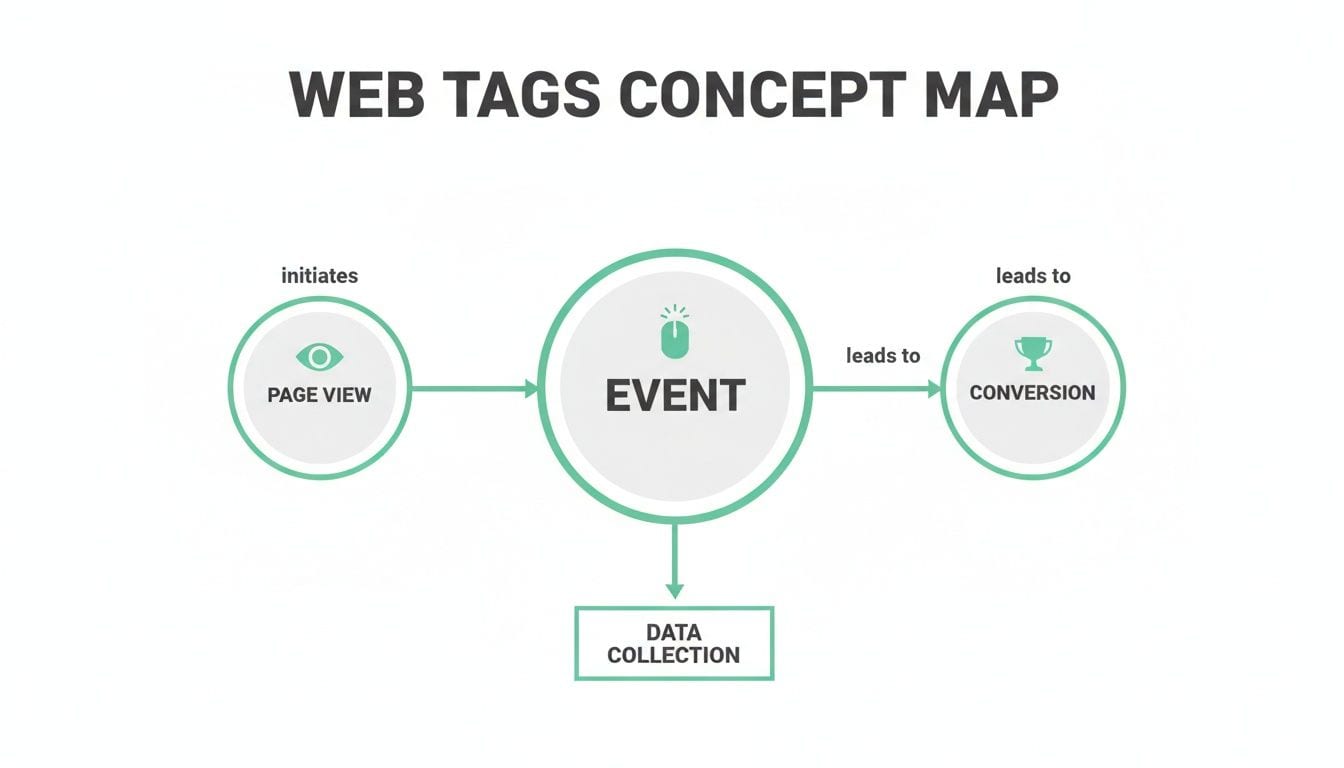
As you can see, the journey starts with an initial engagement, which is captured by tags. That data then funnels down to the valuable outcomes your business can measure and optimize against.
Turning Clicks Into Customers
Beyond basic analytics, tagging is the absolute lifeblood of modern digital advertising. Marketing pixels—specialized tags from platforms like Meta, Google Ads, and LinkedIn—are what make it possible to measure campaign effectiveness and get a positive return on your ad spend.
When a user clicks one of your ads and later makes a purchase, it's the conversion pixel that connects those two events. This is the mechanism that allows you to build powerful attribution models, justify your marketing budget, and prove which channels are actually working.
Clean, well-managed tagging is the foundation of every data-driven marketing strategy. It ensures that the insights you gather and the advertising decisions you make are based on accurate, reliable information.
The launch of Google Analytics in 2005, which Google acquired from a company called Urchin, really cemented web tagging's central role in the digital world. It quickly became the planet's most-used analytics service, weaving website data and advertising platforms together to enable some seriously powerful analysis. This was when tagging evolved from simple hit counters to sophisticated pixel-based tracking, giving birth to the formal discipline we have today.
Enabling Smarter Marketing and Personalization
The data collected by web tags doesn't just measure what already happened; it fuels your future marketing success. By getting a handle on user behavior, you can create highly targeted and personalized experiences that just plain work better.
- Retargeting Campaigns: Marketing pixels let you show specific ads to users who visited your site or added an item to their cart, gently nudging them to come back and finish their purchase.
- Audience Segmentation: Tags help you build custom audience lists based on user actions, like frequent visitors or high-value customers. This allows you to tailor your messaging and offers for maximum impact.
- Conversion Rate Optimization (CRO): By tracking how users interact with different page elements, you can run A/B tests to see which designs, headlines, or calls-to-action get the best results.
To truly capitalize on this data, it's critical to build robust data pipelines for real-time insights. This ensures information flows efficiently from the user's browser all the way to the decision-makers who need it, making your entire strategy more agile and effective.
Solving Common Web Tagging Problems
Let's be honest: a perfect web tagging setup is incredibly rare. In the real world, most marketing and data teams spend a huge amount of time wrestling with issues that chip away at data quality. These problems can be anything from minor annoyances to major data blackouts that make your analytics reports completely useless.
Getting a handle on these challenges is the first step toward building a more resilient strategy. The goal is to shift from constantly fighting fires to proactively preventing them, so you can trust your data when it matters most.
Diagnosing Tag-Related Headaches
Most tagging problems fall into just a few categories. Each one introduces a different kind of "noise" into your data, making it hard to trust the insights you're gathering. Broken or missing tags are probably the most obvious culprit, creating frustrating gaps where you expect to see user activity.
Another common headache is the presence of "rogue" tags. Think of these as unauthorized or outdated code snippets, often left behind from old marketing campaigns or forgotten tools. They can seriously slow down your site and, in some cases, even create security risks by sending data to unapproved third parties.
The most dangerous tagging problems aren't the ones that break your site; they're the ones that silently corrupt your data. A misconfigured tag can send garbage information to your analytics tools for months, leading to flawed business decisions based on bad reports.
Finally, you have issues that corrupt the data itself. These are subtle but damaging:
- Schema Errors: This happens when the data a tag sends doesn't match the format your tools are expecting. For instance, sending a product name where a price should be can make your e-commerce reports completely inaccurate.
- Misconfigured Campaign Tracking: Badly formed UTM parameters are a classic example here. A single typo in a campaign name can split your data across multiple rows, making it impossible to measure the true performance of a marketing initiative.
A Proactive Troubleshooting Framework
Instead of waiting for a dashboard to break, you need a proactive approach. The best way to start is by creating a simple but effective troubleshooting plan that anyone on your team can follow.
Key Steps for Tag Investigation
- Isolate the Problem: First things first, figure out exactly what's broken. Is a single event not firing, or has all tracking gone down on a specific page?
- Use Browser Developer Tools: The "Network" tab in your browser's developer tools is your best friend. You can use it to see if your tags are firing and what data they're trying to send.
- Validate with a Tag Debugger: Tools like the Google Tag Assistant or platform-specific debuggers show you exactly which tags are active on a page and highlight any immediate errors.
- Check Your Tag Manager Configuration: Dive into your TMS and review the triggers and variables. A common mistake is a trigger condition that's either too specific or too broad, causing a tag to fire at the wrong time—or not at all.
- Audit Your Data Layer: Make sure the data layer is actually being populated with the information your tags need. If the data isn't there, the tag has nothing to send.
Building a Modern and Scalable Tagging Strategy
If you're tired of constantly putting out data fires, it’s time to move beyond reactive fixes and build a deliberate plan. Creating a solid, scalable web tagging infrastructure isn't just a one-off technical project; it's a strategic commitment to data quality that grows right alongside your business. The first step? Establish a single source of truth.
This is where a comprehensive tracking plan comes in. Think of it as the blueprint for your entire analytics setup. This document meticulously outlines every event, parameter, and user property you plan to collect. It defines what each piece of data means and exactly where it should be tracked, getting everyone from marketing to development on the same page.
Establishing Clean Data Foundations
With a clear plan in hand, your next priority is consistency. One of the simplest yet most powerful things you can do for data quality is to enforce strict naming conventions. Vague, cryptic event names like click_1 or submit_v2 are a recipe for confusion and make any real analysis a nightmare.
Instead, get your team to adopt a clear, object-action framework (like product_added_to_cart). This structure instantly tells you what happened, removing all the guesswork and making your analytics reports intuitive. A solid governance model like this is what stops data from decaying over time and protects the integrity of your entire setup.
A tagging strategy is your organization's constitution for data collection. It defines the rules of engagement, ensures consistency, and provides a clear framework for making data-driven decisions that everyone can trust.
Implementing Rigorous Governance and QA
Let’s be clear: no tag should ever go live without being thoroughly checked. A rigorous Quality Assurance (QA) process for every new tag or change is completely non-negotiable. This goes way beyond just seeing if a tag "fires"—it means confirming that it sends the right data, in the right format, at the right time.
As your strategy matures, you'll need to think about tooling. Choosing the right platform is a big decision, and our guide on choosing a tag management system breaks down the options with a detailed comparison.
Finally, you absolutely must build privacy and consent management into your strategy from day one. Your tagging setup has to respect user choices, ensuring tags only fire when the proper consent has been given. The ultimate goal is to move away from manual spot-checks and toward automated monitoring, which guarantees your data stays accurate, compliant, and trustworthy 24/7.
Frequently Asked Questions About Web Tagging
As you get comfortable with web tagging, a few questions always seem to come up. Getting these concepts straight is key to having productive conversations about data and making sure everyone is on the same page. Let's walk through some of the most common ones.
What Is the Difference Between Web Tagging and Cookies?
It's easy to mix these two up, but they play very different roles. Think of it this way: web tags are the bits of code that collect and send data, while cookies are small text files stored on a user's browser to remember them between visits.
They’re a classic team. A tag might tell a browser to create a cookie that stores an anonymous user ID. When that person comes back, another tag can read the cookie to recognize them as a returning visitor. So, the tag is the action (collecting data), and the cookie is one of the tools it uses (storing an ID).
Do I Need to Code to Implement Web Tagging?
Not necessarily, which is a huge relief for most marketers. A good Tag Management System (TMS) like Google Tag Manager gives you a visual interface to deploy most standard analytics and marketing tags without ever touching the site's source code.
That said, for more complex tracking—like capturing custom interactions or implementing a well-structured data layer—you’ll want a developer on your side. Their expertise is crucial for making sure the right information is exposed to your TMS, so your tracking is both powerful and accurate.
The best tagging setups strike a balance between the speed of a TMS and the technical precision of developer support. This combo gets you both agility and data you can trust.
How Is Web Tagging Affected by Privacy Changes?
The slow death of third-party cookies is completely reshaping the tagging world, especially for anything related to cross-site advertising and retargeting. This has forced businesses to get serious about their first-party data strategies.
As a result, tags are now much more focused on collecting data directly on your own website and apps. Server-side tagging is also gaining a lot of steam because it gives you more control over your data flow, can improve site performance, and helps you adapt to this new privacy-first reality. It's a smart way to strengthen your data governance while keeping up with the modern web.
A solid tagging strategy is the bedrock of trustworthy data. Trackingplan provides a fully automated analytics QA platform that keeps an eye on your entire tagging implementation, from the data layer all the way to your marketing pixels. We spot errors like broken tags, schema issues, and campaign tracking problems in real time. This means you can fix issues before they corrupt your data, all without drowning in manual audits. Make sure your insights are always built on a foundation of quality at Trackingplan.