10 10 questions
?What is PII? Definition, examples, and protection
PII, personally identifiable information, is any data that identifies a person, either on its own or combined with other data. A full name, an email address, a phone number, a Social Security number, or a home address each identifies someone directly. A zip code, a date of birth, or a job title does not, until you put two or three of them together.
For an analytics team, PII is also the data that should never reach Google Analytics, an ad pixel, or a data warehouse without a reason and a legal basis. Most of the time it gets there by accident: an email in a URL, a name in a dataLayer push, a user ID that turns out to be a phone number. This page defines PII, lists the examples that matter, and shows where it hides in tracking and how to keep it out.
PII examples
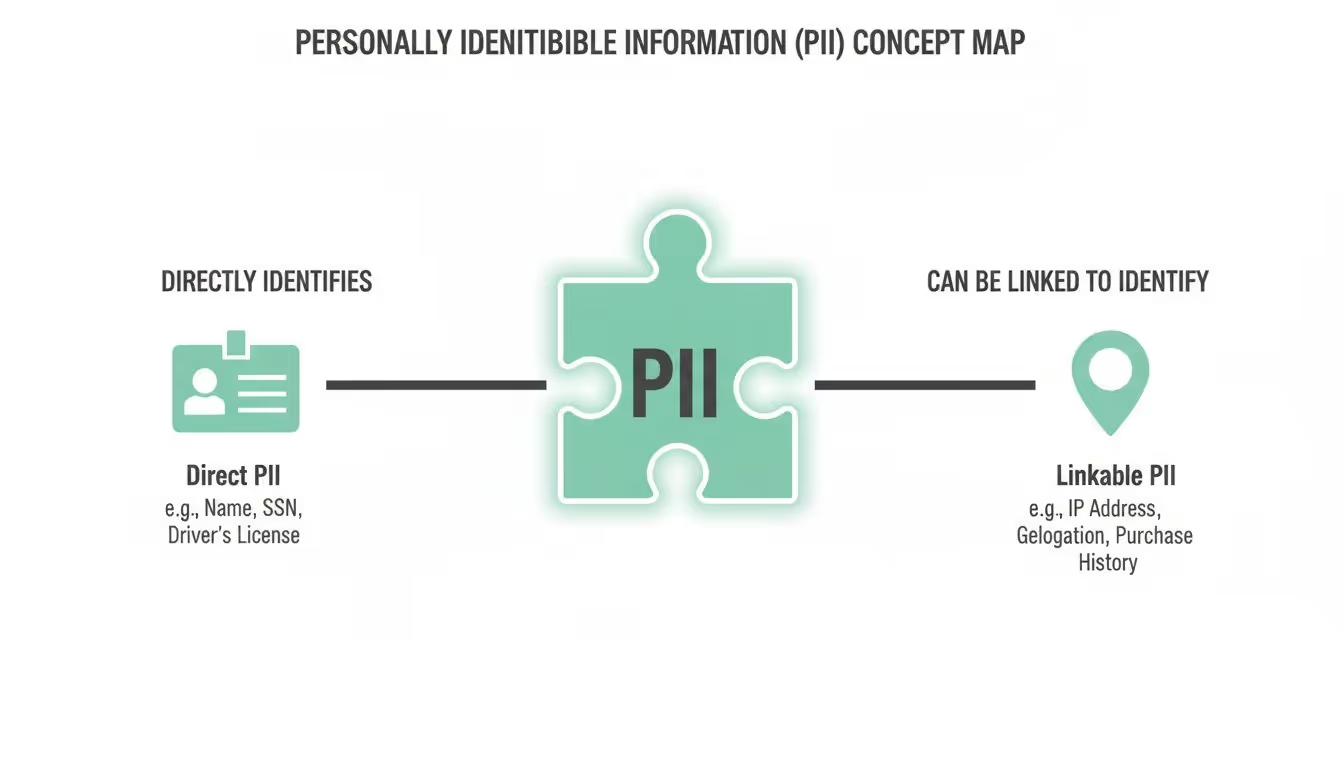
PII splits into two kinds. Direct identifiers point to one person on their own. Linkable identifiers are harmless alone and identifying once combined.
| Direct identifiers | Linkable (indirect) identifiers |
|---|---|
| Full name | Date of birth |
| Email address | Zip code or city |
| Phone number | Gender |
| Home address | Race or ethnicity |
| Social Security number or national ID | Job title and employer |
| Passport or driver’s license number | Device ID or advertising ID |
| Credit card or bank account number | IP address |
| Biometric data (fingerprint, face scan) | Cookie or session ID |
| Login username with password | Browsing history |
| Photo of the person’s face | Approximate location |
The U.S. General Services Administration puts the rule well: the definition of PII is “not anchored to any single category of information or technology.” It requires “a case-by-case assessment of the specific risk that an individual can be identified” (GSA, Rules and Policies – Protecting PII). Context decides. A zip code in a public dataset is nothing; a zip code next to a birth date and a gender narrows the list to a handful of people. For the full list by category, with how each one leaks into analytics and how to protect it, see the list of personally identifiable information.
Sensitive vs non-sensitive PII
Not every piece of PII carries the same risk, and regulations treat the two groups differently.
Sensitive PII can cause serious harm if exposed: fraud, identity theft, discrimination. It calls for the strictest protection, and laws such as GDPR and the US state privacy laws require consent, or at least a right to limit its use, before you process it.
- Government identifiers: Social Security number, passport number, driver’s license number
- Financial information: bank account numbers, credit card details
- Health and medical records: diagnoses, treatments, insurance information
- Biometric data: fingerprints, voiceprints, facial recognition data
- Precise geolocation, sexual orientation, religion, and other protected characteristics
The scale of the risk shows in breaches. In 2024, a background-check company’s dataset of about 2.7 billion records was leaked, including names, addresses, dates of birth, and an estimated 272 million unique Social Security numbers.
Non-sensitive PII is often public or harmless on its own. The danger is re-identification: pieced together, these fields can single out a person.
- Zip code or city
- Date of birth
- Gender
- Race or ethnicity
A privacy policy that only protects the sensitive group is incomplete. Your data handling has to account for what the non-sensitive fields reveal in combination.
PII vs personal data (GDPR) vs PHI (HIPAA)
The three terms overlap, but they come from different laws and cover different things.
| Term | Law | What it covers | Example |
|---|---|---|---|
| PII | US federal guidance and state laws | Data that identifies a person, directly or combined | Email address, SSN, name plus address |
| Personal data | GDPR (EU) | Any information relating to an identifiable person, including online identifiers and behavior | IP address, cookie ID, browsing history |
| PHI | HIPAA (US) | Health information held by a covered entity or its business associates that identifies a patient | A diagnosis tied to a name, an appointment record |
Personal data is the widest of the three. Everything that is PII is personal data; not everything that is personal data would be called PII in US usage. PHI is the narrowest: health data, and only in the hands of healthcare providers, insurers, and their partners.
Whatever the term, the same principles apply under GDPR, the US state laws, Brazil’s LGPD, and Canada’s PIPEDA: collect only what you need for a stated purpose (data minimization and purpose limitation), get consent where the law requires it, and honor the person’s rights to see, correct, and delete their data.
Where PII hides in digital analytics
PII leaks in analytics are rarely the work of an attacker. They come from everyday setups: a form that puts the email in the URL, a developer who adds a helpful field to an event, an error logger that captures the whole payload.
Form submission URLs. A visitor signs up for a newsletter and the confirmation page carries their email in the query string. Every tag on that page sends it as the page location:
https://example.com/thank-you?email=john.doe@email.com
Custom event properties. A developer adds the user’s name to an event meant to track a feature:
event: 'feature_used',
properties: { user_name: 'Jane Smith', feature: 'profile_update' }
The dataLayer. A user_signup push that should carry an internal ID carries the email instead, and every tag that reads the object forwards it:
dataLayer.push({
  'event': 'user_signup',
  'user_id': '12345',
  'email_address': 'sandra.dee@example.com' // accidental PII
});
Error logging. Detailed error messages sent to an analytics tool can include the data that caused the error, PII included.
Browser autocomplete. The browser fills a hidden or unexpected form field with a saved email or name, and the form event sends it along.
Integration syncs. A CRM or marketing-automation sync writes a profile field into an object that the analytics tags also read.
In each case the fix is the same: remove the field, or replace it with an ID that means nothing outside your systems. The hard part is finding out it happened. See the guide to PII leak detection in analytics for the full picture of where leaks come from.
What happens if PII reaches Google Analytics or your ad pixels
Three things, usually in this order.
Vendor terms. Google’s policy prohibits sending Google Analytics data it could recognize as a personal identifier. A property found with PII can have its data deleted, which means losing the history, not just the offending rows.
Fines. Under GDPR, a violation can cost up to 4% of annual worldwide turnover. US state laws and the FTC have fined companies for sending personal data to ad platforms through pixels, from GoodRx and BetterHelp to the CCPA cases against Healthline and Disney. An email in a URL parameter is enough to start an investigation. See how to prevent privacy fines under CCPA and GDPR.
Trust and clean data. Customers leave when their data is mishandled, and PII in your analytics pollutes the datasets your decisions rest on. The cleanup, with forensic audits, legal fees, and notifications, costs more than prevention ever would.
How to detect and prevent PII leaks
- Keep a tracking plan. Define which events and properties you collect and which fields are off limits. When developers and marketers work from the same plan, accidental collection drops before it starts.
- Keep PII out of URLs. Submit forms with
POST, strip emails and tokens from confirmation and reset links, and turn on GA4’s data redaction for email addresses and query parameters. - Mask, hash, or tokenize anything that has to travel. Masking hides the value (
****1234); hashing turns it into a one-way, fixed-length string; tokenization swaps it for a stand-in that only your systems can resolve. Use the fields ad platforms built for hashed identifiers, not custom parameters: hash an email with SHA-256 before sending it to a platform that expects hashed identifiers, and use a random ID, never the email, asuser_id. To build your own detection, Trackingplan publishes an open-source PII regex library with patterns organized by country. - Monitor on real traffic. Manual audits catch what existed on audit day. A release, a new pixel, or a CMP update can undo all of the above the next week.
Trackingplan does the fourth step automatically. It inspects every hit for PII leaks, Consent Mode misfires, and vendors firing without permission, across web, mobile, and server-side, and classifies what it finds by sensitivity. Private fields are masked on the device by default, so personal data never leaves the user’s browser on its way to Trackingplan. Findings land in your privacy channel with the hits, the vendor, the market, and the regulation involved, so the fix is a tag change, not an investigation. See how to secure PII with Trackingplan and the privacy and compliance page. Our own data practices are in the privacy policy.
FAQ
What are 5 examples of PII?
Full name, email address, phone number, Social Security number, and home address. Each one identifies a person on its own.
What is not considered PII?
Data that cannot be traced back to a person, even combined with other data: aggregated statistics, properly anonymized datasets, and business information such as a company name or a generic address like info@company.com. A single zip code or a date of birth is not PII on its own, but becomes PII once combined with other details.
Is an email address PII?
Yes. A personal email address identifies a person directly, and it is one of the most common pieces of PII that leaks into analytics, through URL parameters and form events.
Is a phone number PII?
Yes. US federal guidance and industry practice treat a phone number as information that can distinguish or trace a person’s identity, alone or combined with other data. The details, including hashing for ad platforms, are in is a phone number PII?.
Is an IP address PII?
Under GDPR, an IP address is personal data, because it can identify a device and, with help from the provider, its user. US definitions treat it as linkable PII, which is why Google Analytics 4 no longer stores IP addresses and why anonymization matters.
What is the difference between PII and personal data?
PII is the US term for data that identifies a person, directly or combined with other data. Personal data is the broader GDPR term: it covers PII plus any information relating to an identifiable person, including online identifiers and behavioral data.
Who is responsible for PII compliance?
Everyone who touches the data. A DPO or privacy lead owns the program, developers keep PII out of events and URLs, marketers check the tools they add, and leadership sets the rules. Monitoring makes the shared responsibility visible: when a leak appears, the finding names the field, the page, and the vendor, and the team that owns that tag fixes it. The PII compliance checklist splits the program into seven steps, from the data map to the response plan.
?Do you collect any data about my users?
The Trackingplan SDK only inspects the network requests that your site or app already sends to third‑party vendors (e.g., Google Analytics, HubSpot, Mixpanel, Google Ads), and forwards to our backend only the events required for anomaly detection, already anonymized on-device.
These requests are parsed locally in the browser or app, where anonymization and masking are applied as configured. Only the processed, non-identifiable event data is transmitted to Trackingplan’s servers. Once received, events are parsed, modeled, and continuously monitored to detect anomalies that may indicate implementation issues, whether in your own tracking or introduced by third-party tools. Through our web interface, teams can explore the detected schema, review alerts, and inspect sample events to debug tracking errors with full visibility and control.
Additionally, we do not introduce new identifiers, nor store IP addresses or fingerprinting data, as these are stripped before processing.
For a complete overview of our privacy and security measures, please visit our Privacy & Security documentation.
?How does Trackingplan handle the data it receives when customers use Trackingplan?
At Trackingplan, we are committed to full transparency in how we handle data and protect user privacy. Our platform is designed with privacy, security, and compliance at its core, ensuring that our clients maintain complete control over their data while meeting the strictest privacy regulations.
The Trackingplan SDK only observes the network requests your site or app already sends to third-party services—such as Google Analytics, HubSpot, Mixpanel, or Google Ads. These requests are parsed locally within the user’s browser or mobile app, where any necessary anonymization or masking is applied according to your configuration. Only processed, anonymized events—never raw or identifiable data—are forwarded to Trackingplan’s backend, strictly for anomaly detection purposes.
Client data remains fully encrypted and logically isolated at all times. Our infrastructure runs on hardened AWS PaaS services, with encryption enforced both in transit and at rest. Fine-grained IAM roles and resource-level permissions ensure strict access control, while all customer data is automatically deleted after 90 days by default.
Security is not just technical—it’s built into our processes. Every code change is peer-reviewed and deployed via CI/CD pipelines. Our team enforces two-factor authentication (2FA), maintains detailed audit logs, and ensures 24/7 system monitoring with on-call coverage to guarantee availability. GDPR principles are embedded into our design, and we offer optional Data Processing Agreements (DPAs) to support legal and regulatory compliance.
Through Trackingplan’s web interface, clients can inspect data schemas, review alerts, and analyze sample events in real time—empowering teams to debug implementation issues and safeguard data quality, without ever compromising user privacy.
For a complete overview of our privacy and security measures, please visit our Privacy & Security documentation.
?Will the installation script interfere with my site or cause security issues?
No. The Trackingplan installation script is specifically engineered to be lightweight, non-intrusive, and secure—comparable to those used by trusted observability tools like Datadog and Sentry. At under 10KB, it loads asynchronously and does not block or delay the execution of any existing page elements or scripts.
The script is served directly as source code to eliminate the risk of unauthorized changes. It has been thoroughly reviewed by some of the most security-conscious clients in the industry, including data-driven organizations and privacy-focused teams. For companies that require additional assurance, we offer access to the decompiled version of the script under a signed non-disclosure agreement (NDA).
Designed with privacy and performance in mind, the script works only on declared endpoints—intercepting requests to third-party vendor domains that you’ve explicitly selected for monitoring. It performs anonymization and masking locally within the browser or app, without relying on external dependencies or introducing new cookies, storage mechanisms, or cross-site tracking.
Trackingplan's script never collects more data than your site or app already sends to analytics providers. It simply observes outgoing requests and ensures that only anonymized, relevant data needed for anomaly detection reaches our backend—without interfering with your application or compromising user privacy.
For a complete overview of our privacy and security measures, please visit our Privacy & Security documentation.
?Where are your servers located?
Trackingplan infrastructure runs exclusively on hardened cloud infrastructure in the EU — AWS (Frankfurt), ClickHouse Cloud (Frankfurt), Cloudflare's edge network, and Microsoft Azure for AI.
All customer data is processed and stored in the EU.
All endpoints are protected via AWS WAF, TLS 1.2+ encryption, and AES‑256 at rest.
For a complete overview of our privacy and security measures, please visit our Privacy & Security documentation.
?How to Remove a Tracking Cookie and Reclaim Your Privacy
Heading straight to your browser’s settings to clear your data is a common first step. You'll usually find an option like 'Cookies and other site data' under a 'Privacy and Security' section. Clicking that clears out the small data files websites use to watch what you do online. It's a simple move, but it's the foundation of taking back some control over your digital privacy.
What Tracking Cookies Are and Why They Matter
Before you start deleting, it helps to know what you’re actually dealing with. Tracking cookies are tiny text files that websites drop into your browser. Think of them as digital breadcrumbs. Some are harmless and even helpful, but others are designed to follow you from site to site, piecing together a detailed picture of your habits and interests.
That data is a goldmine for advertisers. It’s the reason you can search for running shoes on one site and suddenly see shoe ads plastered all over your social media feed for weeks. To really get a handle on this, you need to know the difference between two key types of cookies.
First-Party vs. Third-Party Cookies
The distinction between first-party and third-party cookies is what separates the helpful from the invasive.
- First-Party Cookies: These come directly from the website you're on. They’re the good guys, mostly. They remember your login, keep items in your shopping cart, and save your language preferences. Without them, the web would be a much clunkier place.
- Third-Party Cookies: These are the ones you need to watch out for. They’re placed by a different domain than the one you’re visiting—think advertisers, social media widgets, or analytics services embedded on a page. Their main job is to track you across the web, building that detailed profile for targeted advertising.
The entire digital advertising industry is in the middle of a massive shake-up. Big players like Google are phasing out support for third-party cookies, largely because people are demanding more privacy. We're slowly moving toward a cookieless future, but the exact timeline and what comes next are still up in the air.
This shift makes it more important than ever to take control of your own data. It’s not just about cookies; you need to understand more about data privacy in a broader sense. For more practical resources on managing your digital footprint, our Trackingplan Privacy Hub is a great place to start.
Manually Deleting Cookies on Any Browser
Taking control of your online privacy starts with a few clicks. If you're tired of digital breadcrumbs following you around the web, every major browser gives you the power to wipe them clean. Learning how to find and remove a tracking cookie is a fundamental skill for anyone who wants to manage their own data.
The process is generally pretty similar across browsers, but the exact menu names and locations can vary. The trick is knowing where to look so you can decide what stays and what goes.
This flowchart gives you a high-level view of how a simple website visit can kick off a whole chain of events that ends with your data in an advertiser's analytics platform.
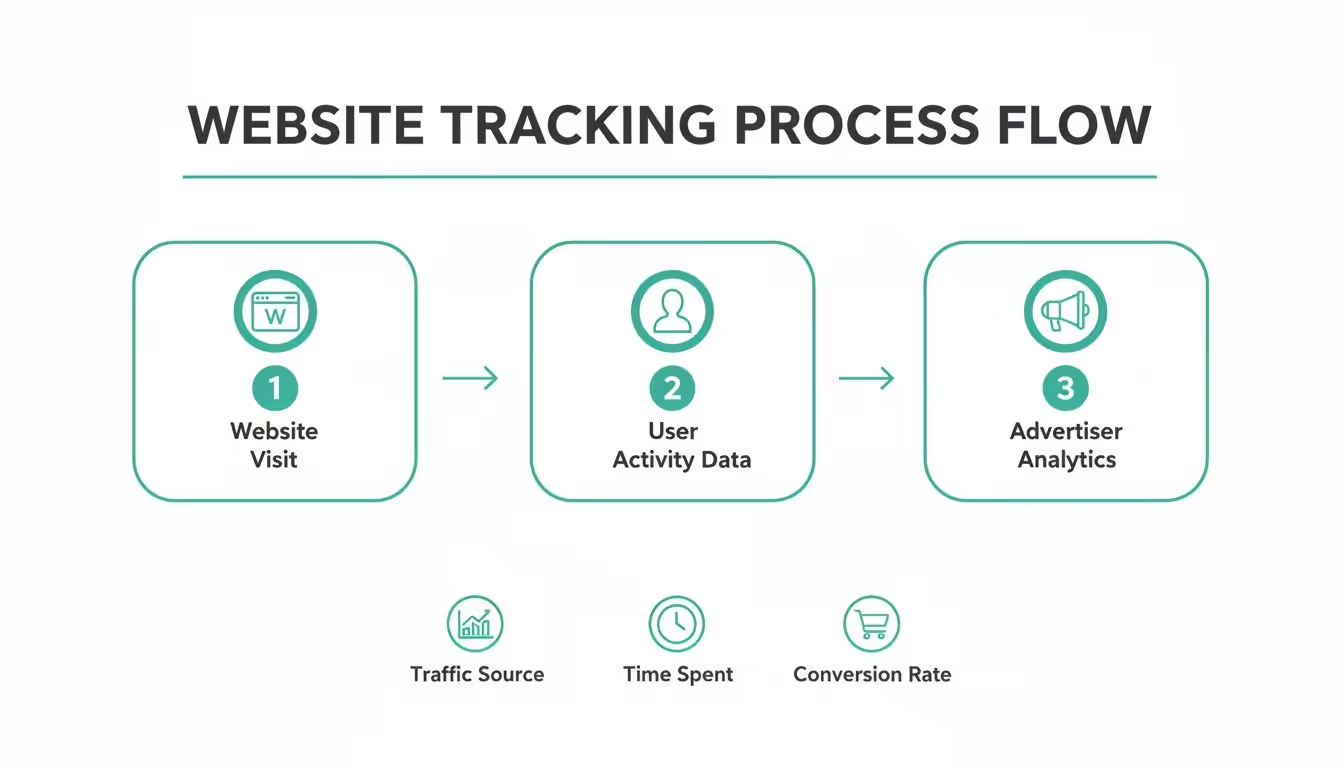
As you can see, your interaction is just the first step in a much larger data collection process that fuels the advertising ecosystem.
Finding Your Browser’s Cookie Settings
Before you start clearing things out, it’s important to understand a key distinction: deleting your cookies is not the same as deleting your entire browsing history. Wiping cookies specifically targets the small files used for tracking and keeping you logged in, leaving the list of sites you've visited completely intact.
Most browsers tuck these options away in a "Privacy and Security" section. Think of this as your command center for managing cookies, site permissions, saved passwords, and more. Getting familiar with this area is step one.
To help you get there faster, here’s a quick reference table showing you exactly where to find the cookie management settings in the most popular browsers.
Quick Guide to Browser Cookie Settings
This table provides the direct navigation paths to access and manage cookies within Chrome, Firefox, Edge, and Safari.
Following these paths will bring you to a list of every website that has stored data in your browser. From here, you can get rid of them individually or wipe the slate clean all at once.
Selective Deletion vs. Wiping Everything
Once you're in the cookie settings, you have a choice to make. Do you go for the nuclear option and delete everything, or do you take a more surgical approach?
- Wiping All Cookies: This is fast and thorough. It guarantees all trackers are gone, but it comes with a major annoyance—you'll be logged out of every single website you use.
- Selective Deletion: This method takes a bit more time but gives you complete control. You can search for the domains of known ad networks or data brokers (like
doubleclick.net) and delete only their cookies, leaving your logins for trusted sites untouched.
For example, you could search for a specific ad network’s domain, remove only its data, and keep your email and social media sessions active.
A common mistake is just hitting "clear browsing data" and calling it a day. Most browsers have advanced controls that let you check only the box for "Cookies and other site data," which saves you from losing your browsing history or saved passwords. This little detail is the key to cleaning up without causing a huge headache for yourself.
For those who want even more granular control without digging through browser settings, dedicated tools can step in. A utility like ShiftShift's Cookie Manager offers more advanced features for managing specific cookies automatically, which can be a real time-saver if you want to block certain trackers without disrupting your regular browsing.
For developers and anyone with a bit of technical curiosity, managing cookies isn't just about clicking buttons in browser settings. You can get your hands dirty and control them directly with code. This gives you incredibly granular power over how cookies are set, read, and—most importantly—removed. This kind of programmatic control is non-negotiable for building privacy-first applications and staying compliant.
When you're handling cookies with code, you're operating in one of two places: on the client-side, right in the user's browser, or on the server-side, which happens on your web server before a page even gets to the user. Both have their place and their own set of advantages.

Client-Side Deletion with JavaScript
On the client side, good old vanilla JavaScript gives you a direct, if slightly clunky, way to interact with cookies through the document.cookie property. Here's the interesting part: you don't actually "delete" a cookie. Instead, you overwrite it by setting its expiration date to a time in the past.
The browser sees that expired date and just gets rid of the cookie for you.
Here’s a quick example of how you’d remove a cookie named _ga_tracker:
document.cookie = "_ga_tracker=; expires=Thu, 01 Jan 1970 00:00:00 UTC; path=/;";
This snippet essentially tells the browser that _ga_tracker has an empty value and expired a long, long time ago. But there’s a catch. You must also specify the correct path (and sometimes domain) that the original cookie was set with. If these attributes don't match, the browser will just ignore your command, and the cookie will stick around.
Server-Side Removal with Set-Cookie Headers
Often, a more robust and secure approach is to manage cookie deletion from the server. This is especially true for any cookies marked with the HttpOnly flag, which makes them completely invisible to client-side scripts like JavaScript. In those cases, the server is the only place with the authority to modify or remove them.
The concept is the same: the server sends a Set-Cookie header in its HTTP response with an expiration date in the past. Here’s how you might do it in a Node.js app using the Express framework:
app.get('/logout', (req, res) => { res.cookie('session_id', '', { expires: new Date(0), httpOnly: true, secure: true }); res.send('You are now logged out.'); });
When a user hits the /logout endpoint, the server sends back a response that instructs the browser to immediately delete the session_id cookie by setting its expiration to a past date.
A critical detail here is the inclusion of thesecureattribute. This flag is a must-have, as it ensures the cookie is only ever sent over an HTTPS connection, preventing it from being intercepted on insecure networks. Forgetting security attributes likeHttpOnlyandSecureis a common pitfall that can easily expose user data.
Getting a handle on these programmatic methods is a huge step. As the industry continues to shift toward new ways of identifying users, you might find it useful to explore what is cookieless tracking to see where things are headed. For now, knowing how to properly remove a tracking cookie is a vital skill for any developer serious about maintaining functionality and user privacy.
How to Verify Cookies Are Actually Gone
So you’ve gone through the steps to remove a tracking cookie. But how do you really know it worked? Trusting a setting or a script to do its job isn't enough—you need to verify it. Thankfully, you don't need any fancy software to check your work. The tools are already built right into your browser.

This final check is a crucial step. It’s the difference between hoping for privacy and actually confirming it.
Using Browser Developer Tools for Confirmation
Every modern browser comes with a powerful suite of developer tools that let you peek under the hood of any website. This is the most direct way to see exactly which cookies are active on a site in real time.
To get started, just right-click on a webpage and select "Inspect" or "Inspect Element." This opens the developer tools panel. From there, look for a tab labeled "Application" (in Chrome/Edge) or "Storage" (in Firefox).
Inside this tab, you'll find a "Cookies" section in the left-hand navigation. Clicking it reveals every single cookie currently stored for that specific domain. If you’ve successfully zapped a tracking cookie, its name simply won't be in the list anymore. It’s instant, undeniable proof.
For a deeper dive into this process, check out this guide on how to audit cookies and your CMP for more advanced monitoring techniques.
Automated Defense with Browser Extensions and Features
Manual checks are great for spot-checking, but for everyday protection, automation is your best ally. Several excellent browser extensions can act as a personal security guard, actively blocking trackers before they even get a chance to set a cookie.
- Privacy Badger: Developed by the Electronic Frontier Foundation, this extension learns to block invisible trackers automatically. It also sends a "Do Not Track" signal and stops trackers that ignore your request.
- uBlock Origin: While it's famous as an ad blocker, it's also a highly effective and lightweight tracker blocker. It uses community-maintained blocklists to stop requests to known tracking domains before they load.
Many browsers also offer strong native protections. Firefox’s Enhanced Tracking Protection, for instance, blocks third-party tracking cookies by default, giving you a solid first line of defense without any extra add-ons.
The key takeaway is that verification isn't a one-time task. It’s an ongoing process of using the right tools—both manual and automated—to ensure your privacy settings are working as intended and that no new, unwanted trackers have slipped through.
Understanding how users manage cookies is complex, and the data on awareness varies widely by region. To learn more about this industry shift, you can explore insights on what marketers can do as tracking cookies become less prevalent.
If you’ve ever tried to zap a tracking cookie only to see it pop right back up, you're not going crazy. Some cookies are just built to be stubborn. This isn't usually for shady reasons; it's because of specific technical rules that dictate how they can be accessed and by whom. Getting a handle on these rules is the key to actually clearing them out for good.
One of the biggest roadblocks you'll run into is the HttpOnly flag. When a server tags a cookie with this attribute, it’s basically putting up a "Do Not Touch" sign for any scripts running in your browser, like JavaScript. This is a great security move—it stops malicious cross-site scripting (XSS) attacks from grabbing sensitive data from your session cookies. The downside? It also means your own code, specifically document.cookie, can't delete them. Only the server that set it can give it the boot.
Understanding Cookie Scope and Silos
Beyond just being script-proof, cookies operate in tightly controlled zones defined by their Domain and Path attributes. Think of these as invisible fences that keep cookies from wandering where they don't belong.
- Domain Attribute: This decides which websites can even see the cookie. A cookie set for
shop.example.comis completely invisible toblog.example.comunless theDomainis explicitly set to the parent,.example.com. - Path Attribute: In the same way, this locks a cookie down to a specific folder on a website. A cookie with
Path=/cart/will only get sent when you’re navigating pages inside that directory.
This is why deletion attempts often fail. If your command to remove a cookie doesn't perfectly match the original Domain and Path it was set with, the browser just ignores it. The cookie stays put. This siloed system is fundamental to web security, but it definitely complicates things when you're trying to do a manual cleanup.
The complexity of these attributes highlights a broader trend in digital marketing. Marketers are constantly navigating evolving technical standards and user expectations, which influences everything from cookie management to ad targeting.
Adding another layer to all this is the SameSite attribute. This setting dictates whether a cookie can be sent along with requests that originate from other websites. With values like Strict or Lax, browsers can block cookies from being attached to third-party requests, which is a huge help in preventing cross-site request forgery (CSRF) attacks. While it's a win for security, it introduces yet another rule governing when and how a cookie can be accessed.
It can be tough to find clear historical data on how quickly privacy-focused tech like this gets adopted, but you can get a good sense of how marketers are adapting to these digital footprint changes on techreviewer.co.
Common Questions About Removing Tracking Cookies
Even after you get the hang of removing tracking cookies, a few practical questions always seem to pop up. Wiping your digital slate clean can feel great, but it often brings up some minor headaches and nagging doubts. Let’s walk through some of the most common concerns so you can feel confident about managing your privacy online.
The big one is always: will clearing my cookies log me out of all my accounts? The short answer is yes, it often will. Websites use their own first-party session cookies to remember that you’re signed in. When you do a bulk delete, those helpful cookies get tossed out right along with the trackers.
To get around this, you can try a more surgical approach. Most browsers let you search for and remove data from specific domains. This means you can zap cookies from known ad networks while leaving the session cookies for your trusted sites untouched.
How Often Should I Clear Cookies?
There’s no magic number here—the right frequency for clearing cookies really boils down to your personal comfort level with online tracking. It’s all about striking a balance between privacy and convenience.
- For Maximum Privacy: If you're serious about minimizing your footprint, you might clear your cookies daily or even set your browser to automatically delete them every time you close it. This gives you the strongest protection, but get ready to log into your favorite sites. A lot.
- A Balanced Approach: For most of us, a weekly or monthly cleanup is a pretty practical compromise. It keeps the buildup of tracking data from getting out of hand without turning into a major daily chore.
- The Automated Method: A better long-term strategy might be to use privacy-focused browser extensions. They can block a huge number of trackers from ever being stored in the first place, which means you won't need to do manual cleanups nearly as often.
Does Incognito Mode Stop Tracking Cookies?
Incognito or Private mode is great for temporary privacy, but it’s definitely not an invisibility cloak. When you open an incognito window, your browser creates a sterile, isolated session. Any cookies created during that session are automatically wiped the second you close that window.
This is fantastic for stopping cookies from sticking around permanently on your device, but it’s critical to know its limits. While you're in an incognito session, the websites you visit can still see you. So can your internet service provider and any network administrators. Think of it as a tool for local privacy on a shared computer, not a way to hide your tracks from the wider web.
At Trackingplan, we see data quality and privacy as two sides of the same coin. Our automated analytics QA platform helps your team catch tracking issues, consent misconfigurations, and potential PII leaks in real time. This ensures your data is not only reliable but fully compliant. Find out how you can build trust and deliver better insights by visiting www.trackingplan.com.
?Can Trackingplan help me stay compliant with GDPR and CCPA?
Trackingplan supports your privacy compliance efforts by providing a robust set of tools and safeguards designed to protect user data and respect consent preferences:
- On-device anonymization and masking: All personally identifiable information (PII) is anonymized or masked locally within the user’s browser or app, ensuring no sensitive data leaves the device.
- Privacy audit: Trackingplan continuously scans outbound network requests to detect accidental PII leaks, logging details such as fields involved, page context, and consent status for thorough monitoring.
- Consent validation: We verify that no data is sent without valid consent signals, including support for frameworks like Google Consent Mode and CCPA opt-out flags, helping you enforce user choices.
- DPA and processor compliance: Trackingplan acts as a data processor under GDPR and offers a data processing agreement (DPA). Standard contractual clauses (SCCs) are available to ensure lawful international data transfers.
- Documentation and alerts: Detailed audit trails, data retention logs, and anomaly alerts provide data protection officers (DPOs) with actionable insights to maintain ongoing compliance.
For a complete overview of our privacy and security measures, please visit our Privacy & Security documentation.
?How can I secure PII for Privacy and Compliance with Trackingplan?
Trackingplan provides robust tools to help you secure personally identifiable information (PII) and maintain compliance with privacy regulations:
- On-device PII masking: The Trackingplan SDK applies masking rules locally on the user’s device before any data leaves the browser or app. You can configure these rules using extensible regular expressions or predefined vendor-specific patterns to identify and anonymize sensitive data like email addresses, phone numbers, and more.
- Privacy Audit: This feature continuously scans all outbound requests for any accidental PII leaks. It logs the affected fields, the specific pages or events, and the user’s consent status, giving you visibility into potential privacy risks.
- Manual review and tuning: You have full control to review and adjust anonymization patterns and PII filters as needed to ensure they stay effective and accurate for your tracking setup.
- Consent enforcement: Trackingplan respects user consent signals, such as Google Consent Mode and CCPA opt-out flags. When enabled, it prevents sending data for users who have opted out, ensuring compliance with privacy laws.
These built-in features allow you to monitor, detect, and prevent the exposure of PII, helping your organization stay privacy compliant.
For full details, please refer to our Privacy & Security documentation or check our Privacy Hub.
?What are the Risks of HIPAA Non-compliance?
If HIPAA-regulated PII (e.g. patient identifiers, medical history, health-provider data) is transmitted without encryption, masking, or proper policy control, you risk:
Non-compliance fines
Fines for non-compliance are not cheap – your business can be fined hundreds of thousands of dollars for non-compliance.
Exposing your patients’ data to fraud
Inadequate security systems attract online hackers, making your business susceptible to data breaches. Personal information such as credit card details, security codes, names, birth dates, and other sensitive data becomes a prime target for malicious actors, leading to potential identity theft and fraudulent activities.
Costly investigation fees
If evidence of non-compliance is found, the responsibility for covering these investigation fees will fall on your business. This translates to substantial costs amounting to thousands of dollars.
Criminal Charges
An individual who intentionally acquires or reveals personally identifiable health information (PHI) –which is precisely what HIPAA’s Privacy Rule aims at protecting–, can be subjected to criminal consequences, including fines of up to $50,000 and a maximum imprisonment of one year.
However, if the misconduct includes false pretenses, the criminal penalties can escalate to $100,000 and a potential imprisonment term of up to five years. Moreover, if the conduct is characterized by the intent to sell, transfer, or exploit PHI for commercial advantage, personal gain, or malicious harm, the penalties increase to $250,000, and the individual may face imprisonment for up to 10 years.
Reputation lost
Non-compliance can erode customer trust in your business, leading to a loss of confidence among your customer base. Instances of data breaches may result in customers refusing to engage in transactions with your business, causing lasting damage to your reputation.
Avoid HIPAA’s non-compliance Risks with Trackingplan
Trackingplan helps mitigate these risks by:
- Masking all PII on-device, ensuring no PHI is processed by our backend.
- Encrypting all transported data, enforcing least-privilege access.
- Providing audit logs and alerts for any potential PHI leaks.
- Working with your compliance team to align with HIPAA's Technical & Administrative Safeguards.
To learn more, check this article on HIPAA-compliant digital analytics challenges and how organizations in the healthcare sector navigate constraints while leveraging their data.
For full details, please refer to our Privacy & Security documentation.