tpTrackingplan answers
Let's start with a simple, real-world example of Personally Identifiable Information (PII): a person's full name combined with their home address. Other classic examples are things like an email address, Social Security number, or a driver's license number.
At its core, PII is any piece of data that can, either by itself or when pieced together with other information, point directly to a specific individual.
Understanding PII With Real-World Examples
Think of someone's identity like a jigsaw puzzle. A single piece—a name, an email, a phone number—might not tell you much on its own. But as you connect those pieces, a surprisingly clear picture of a person begins to form. That's the essence of Personally Identifiable Information (PII).
This concept map helps visualize how different data points fit together, breaking PII down into its two main flavors: direct and linkable identifiers.
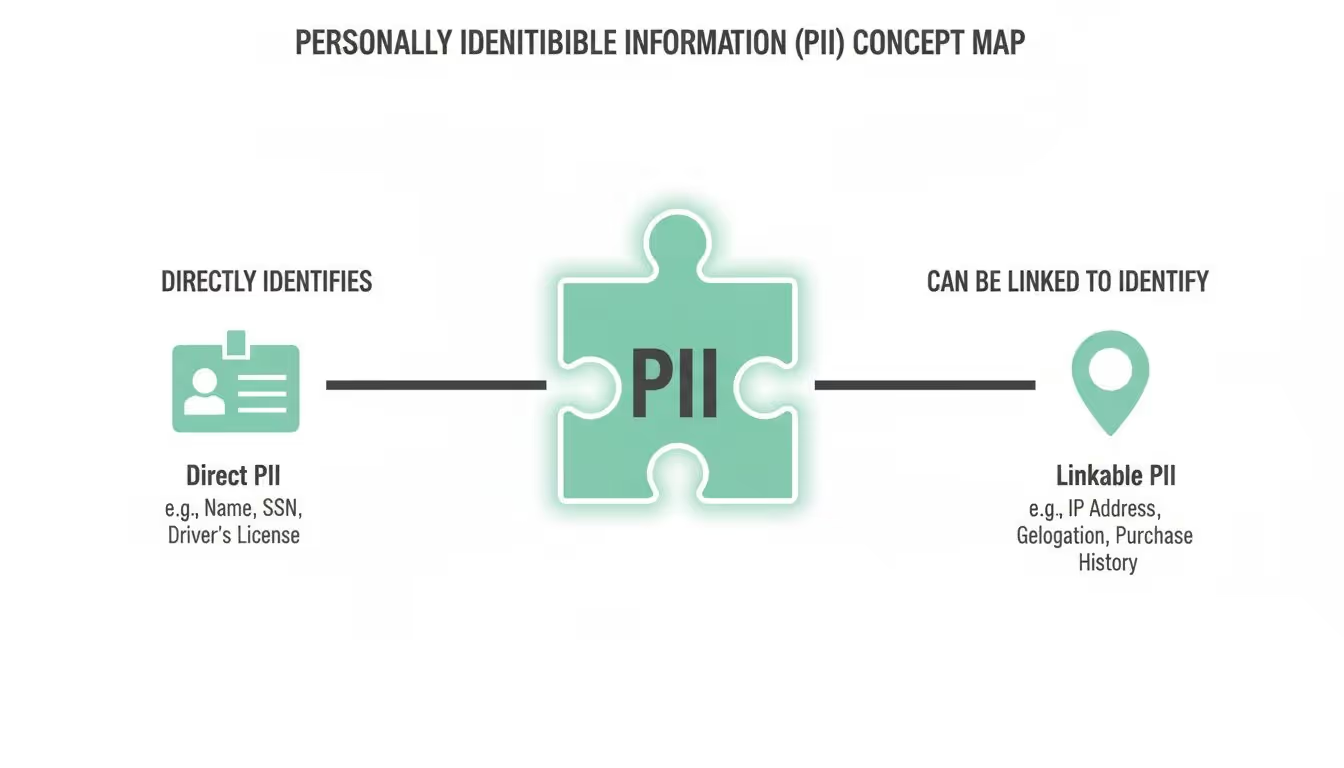
As the map shows, some data is an obvious giveaway, while other bits need to be connected to reveal a person's identity. This is why it's so critical to protect all types of personal data, not just the most obvious ones.
Direct vs. Linkable Identifiers
PII isn’t just one big bucket of data; it's generally split into two types based on how easily it can identify someone. Getting this distinction right is the first real step toward building solid data governance and privacy protection practices.
If you want to go deeper, you can explore more about the meaning and importance of PII in our detailed guide.
Personally Identifiable Information (PII) is not anchored to any single category of information or technology. Rather, it requires a case-by-case assessment of the specific risk that an individual can be identified.
This idea from the U.S. General Services Administration really hits the nail on the head. Context is everything. To make this clearer, let's break down these two crucial categories with some straightforward examples.
Common Examples of Personally Identifiable Information (PII)
Here’s a quick reference table that lays out the differences between direct and linkable identifiers, giving you clear examples for each category.
As you can see, what qualifies as PII is broader than most people think. A single piece of "linkable" data might seem harmless, but when it's combined with other seemingly anonymous data points, it can quickly become a privacy risk.
Distinguishing Between Sensitive and Non-Sensitive PII
Not all personally identifiable information is created equal. Understanding the difference between sensitive and non-sensitive PII is crucial for data protection and staying compliant with regulations like GDPR and CCPA.
Think of it like this: knowing someone’s favorite color is one thing, but knowing their bank account password is on a completely different level. Both are personal details, but the potential for harm if exposed is worlds apart. This distinction is what guides your security measures, because some data is inherently high-risk, while other pieces only become a problem when combined.
What Is Sensitive PII?
Sensitive PII is the kind of information that, if it ever got out, could lead to serious harm, embarrassment, or unfair treatment for an individual. This is the stuff identity thieves dream of, and it demands the highest level of protection.
Because the potential for damage is so severe, regulations impose strict penalties for breaches involving this category of information. Examples of sensitive PII usually include:
- Government Identifiers like a Social Security number (SSN), passport number, or driver's license number.
- Financial Information such as bank account numbers or credit card details.
- Medical and Health Records including diagnoses, treatments, and insurance information.
- Biometric Data like fingerprints, voiceprints, or facial recognition data.
A classic example of sensitive PII is the combination of a person’s full name with a government ID like an SSN. In one massive data incident, a single dataset exposed roughly 2.7 billion records, which included about 272 million unique Social Security numbers—that’s equivalent to around 80% of the U.S. population. This one breach opened the door for large-scale identity theft and fraud, showing just how valuable this kind of combined data is on criminal markets.
For analytics teams, accidentally forwarding a name and national ID to a marketing pixel can turn routine event tracking into a critical data violation. To get a better sense of the scale of these exposures, check out the findings from the SpyCloud Identity Exposure Report.
Understanding Non-Sensitive PII
Non-sensitive PII, sometimes called linkable information, is data that’s often publicly available or wouldn't cause direct harm to someone on its own. But that doesn’t mean it's harmless.
The real danger with non-sensitive PII is that it can become identifying when pieced together. A zip code by itself is innocuous, but a zip code combined with a date of birth and gender can narrow down the possibilities to a shockingly small group of people.
This process, known as re-identification, is a huge privacy concern. Examples of non-sensitive PII include:
- Zip code or city
- Date of birth (without other identifiers)
- Gender
- Race or ethnicity
Context is everything here. While a single piece of non-sensitive data might seem low-risk, your data governance policies have to account for how multiple data points could be linked together to unmask an individual's identity.
Finding PII Hiding in Your Digital Analytics
PII leaks in digital analytics are rarely the work of a shadowy hacker. The reality is far more mundane—and arguably more insidious. They often slip through the cracks of everyday operations, born from misconfigured forms, messy URLs, and overlooked event parameters. These subtle exposures can create massive compliance risks right under your nose.
Forget the dramatic data heist. The real threat usually looks something like an email address accidentally tacked onto a URL string after a user submits a "forgot password" form. That URL, now carrying clear PII, gets scooped up by your analytics tool as a page_view event. Just like that, sensitive data is quietly shipped off to third-party servers where it has no business being.

This is a classic example of PII hiding in plain sight. It’s a completely preventable error, but one that highlights why you need to be constantly vigilant about the data you’re collecting.
Common Hiding Spots for Accidental PII
To stop these leaks, you have to know where to look. PII loves to hide in places that aren't immediately obvious to marketing or analytics teams, which is why a proactive audit is non-negotiable. The most frequent culprits are query parameters in URLs and unstructured event properties.
Let's walk through a few common scenarios where PII can pop up unexpectedly. These examples show just how easily user data can be exposed through totally standard digital marketing and analytics practices.
- Form Submission URLs: A user signs up for your newsletter. On the confirmation page, their email is passed directly into the URL.
- Example:
https://example.com/thank-you?email=john.doe@email.com
- Example:
- Custom Event Properties: A developer, trying to be helpful, includes a user’s full name in a custom event meant to track a new feature.
- Example:
event: 'feature_used', properties: { user_name: 'Jane Smith', feature: 'profile_update' }
- Example:
- Error Logging: Detailed error messages sent to your analytics tool might capture the entire data payload that caused the error, including any user PII that was present.
The most dangerous PII leaks are the ones you don't know are happening. Automated query string parameters and dynamic event properties can capture and transmit sensitive data without any manual intervention, creating a silent compliance breach.
From URL Strings to Event Payloads
To make this crystal clear, let's look at how PII shows up in the actual technical implementation. On most websites, a data layer—a JavaScript object used to pass information to tag management systems—is where the action happens.
Imagine a user_signup event. A well-designed, compliant event would only contain non-identifiable information. A poorly configured one, however, might look like this:
dataLayer.push({ 'event': 'user_signup', 'user_id': '12345', 'email_address': 'sandra.dee@example.com' // Accidental PII });
In this snippet, the email_address is the smoking gun. It’s an explicit piece of PII that should never be sent to a standard analytics platform like Google Analytics. The fix is simple: remove this property entirely from the event payload. This ensures only anonymized or non-sensitive data gets tracked.
This is where regular code reviews and automated monitoring become your best friends. They are essential for catching these kinds of issues before they snowball into serious data breaches.
The True Cost of Leaking PII in Analytics
Failing to protect PII in your analytics isn't just a technical slip-up; it's a major business liability that can trigger a cascade of severe consequences. The fallout from a data leak goes way beyond a messy spreadsheet. We're talking about substantial financial, legal, and reputational damage that can haunt a company for years.
These aren't just hypotheticals. The risks show up in a few critical areas, each with the power to inflict serious harm on your organization. From eye-watering fines to the complete erosion of customer loyalty, the cost of looking the other way is staggering.
Crippling Regulatory Fines
Data privacy laws like GDPR and the CCPA aren't messing around. They’ve given regulators the power to levy fines that can climb into the millions of dollars or a hefty percentage of a company's global revenue. A single violation under GDPR, for instance, can result in penalties of up to 4% of annual worldwide turnover.
And these fines aren't just reserved for massive, headline-grabbing breaches. Even a seemingly small, accidental leak—like the example of PII we saw earlier with an email address in a URL—can be enough to trigger a costly investigation and a painful penalty. If you want to dive deeper into staying compliant, check out our guide on how to prevent privacy fines under CCPA and GDPR.
Irreversible Loss of Customer Trust
Trust is the foundation of any customer relationship, and a PII leak shatters it in an instant. Once your customers feel their personal information isn't safe with you, winning back their confidence becomes an uphill battle. The damage to your brand's reputation can be immediate and long-lasting, leading to customer churn and negative buzz that scares off potential new clients.
A data breach is a violation of the digital trust between a company and its customers. The immediate financial cost is often just the beginning; the long-term reputational damage can be far more destructive to a business.
This loss of trust hits your bottom line directly. Customers will simply take their business elsewhere, and your brand gets a new label: risky and unreliable. To soften the blow, it's critical to have a modern, programmatic data breach response plan ready to go.
Beyond the hit to your reputation, leaking PII also causes other serious problems:
- Corrupted Analytics Data: When PII seeps into your analytics, it pollutes your datasets. This contamination skews your data, leading to flawed insights and, ultimately, poor business decisions.
- High Operational Costs: The cleanup is never cheap. It involves a whole host of expenses, from forensic audits and legal fees to customer notifications and implementing tougher security measures.
How to Proactively Detect and Prevent PII Leaks
When it comes to data breaches, playing defense is always more expensive and stressful than having a good offense. To build a strong defense against PII leaks, you need to shift from a mindset of damage control to one of active prevention. This really comes down to a mix of careful planning, smart data handling, and having the right tech in your corner.
The bedrock of any solid prevention strategy is a clear and comprehensive tracking plan. Think of it as the blueprint for your entire analytics setup. It defines exactly what data you’re allowed to collect and, more importantly, what’s strictly off-limits. By setting these rules from day one, you establish a single source of truth that keeps developers and marketers on the same page, slashing the risk of accidental PII collection before it even starts.

This image isn't just about looking at dashboards; it's about the collaborative effort required for good data governance. The intense focus on the screen captures the kind of detailed analysis needed to spot potential PII leaks before they turn into full-blown problems.
Essential Best Practices for PII Prevention
Beyond a rock-solid tracking plan, a few technical best practices are non-negotiable for keeping your data clean and compliant. These methods are all about de-identifying user information before it ever hits your analytics tools, effectively neutralizing the risk.
- Data Masking: This technique hides original data with placeholder content (like replacing a credit card number with
****). It conceals sensitive information while still letting your teams work with the data's structure for things like testing or development. - Hashing and Tokenization: Hashing converts data into a unique, fixed-length string of characters, and it’s a one-way street—you can’t reverse it. Tokenization swaps sensitive data for a unique, non-sensitive stand-in called a token. Both are fantastic for protecting data while keeping it useful for analysis.
Putting these practices into place manually is a big step toward building a resilient privacy framework, but it's not without its challenges. Manual audits and code reviews are often slow and, let's be honest, prone to human error. This is where automation really changes the game.
Automating Detection with Analytics Observability
Modern analytics observability tools have taken PII detection from a painful, periodic chore to a continuous, automated process. These platforms act like a vigilant security guard for your data pipelines, constantly scanning every single analytics event for patterns that look like common PII formats.
Instead of waiting for a quarterly audit to find problems, an observability platform can spot an email address in a URL string or a Social Security number in an event payload the instant it happens. This real-time capability is what proactive defense is all about.
The moment a potential leak is detected—say, an example of pii like a phone number shows up in a custom event—the platform fires off an alert to the right team through Slack, email, or whatever channel they use. This lets developers zero in on the exact source of the leak and push a fix before it affects a large number of users or lands you in hot water with regulators. To see this in action, you can learn more about how to secure PII for privacy and compliance with Trackingplan.
This automated, real-time approach doesn't just ensure your data stays clean and trustworthy. It also frees up your team to focus on finding insights instead of constantly policing their data streams. It’s simply the most effective way to stay ahead of privacy risks and maintain a compliant, reliable analytics implementation.
Building a Culture of Privacy-First Data Governance
Tools and automated alerts are fantastic, but they only get you so far. The most robust defense against data leaks isn't a piece of software—it's a company-wide culture built around privacy-first data governance. This mindset shifts data protection from a simple compliance checkbox to a core value shared by everyone.
Building this culture starts with one simple but powerful concept: ownership. Every single piece of data you collect needs a designated owner who is responsible for its entire lifecycle, making sure it’s handled according to your privacy standards. This accountability is the bedrock of everything else.
A privacy-first culture means every team member, from marketing to engineering, understands their role in protecting customer data. It shifts the responsibility from a single person or department to the entire organization, creating a human firewall against accidental leaks.
Creating a Single Source of Truth
For a privacy-focused culture to actually work, your teams need a unified playbook. This is where a meticulously maintained tracking plan becomes your organization's data constitution. It acts as the single source of truth, spelling out exactly what data is okay to collect and how it must be handled.
When everyone is working from the same script, the odds of someone accidentally sending an example of pii to an analytics tool plummet. It ensures that every team and every vendor is perfectly aligned.
This proactive approach is strengthened through ongoing training and clear communication. A huge part of building trust and staying compliant is being transparent about your data practices, which is something you can see when you read our privacy policy.
Ultimately, putting in the work to build this culture pays off in a few key ways:
- Empowers Employees: It gives every team member the knowledge and responsibility to handle data correctly.
- Reduces Human Error: Clear guidelines and repeated training minimize the chance of accidental data exposure.
- Builds Customer Trust: A visible commitment to privacy becomes a competitive advantage.
Frequently Asked Questions About PII
Navigating the world of data privacy can bring up a lot of questions. Let's tackle some of the most common ones that come up in the day-to-day grind of managing analytics and user data.
What’s the Difference Between PII and Personal Data?
You'll often hear "PII" and "personal data" used like they're the same thing, but there’s a subtle but important difference. PII, or Personally Identifiable Information, is a term that really took root in the United States. It refers to anything that can be used to identify a specific person, either directly or indirectly.
"Personal data," on the other hand, is a broader concept straight out of Europe’s GDPR. It covers all PII, but it also includes things like online identifiers or behavioral data that could be linked back to an identifiable individual. A good way to think about it is that PII is a key part of the much larger universe of personal data.
Who Is Responsible for PII Compliance?
This is a big one. PII compliance isn't just one person's job or something you can hand off to the legal team. It's a shared responsibility that touches every part of the organization. While a Data Protection Officer (DPO) might lead the charge, everyone has a part to play.
- Developers are on the front lines, writing code that needs to prevent PII from getting captured by mistake.
- Marketers have to make sure their campaigns and the tools they use aren't quietly collecting data they shouldn't be.
- Leadership sets the tone, building a privacy-first culture from the top down.
Ultimately, a strong data governance framework is what ties it all together. It makes sure every team knows exactly what their role is in protecting user information, turning compliance into a collective effort instead of a siloed task.
What Happens if PII Goes to Google Analytics?
Sending PII to Google Analytics is a major misstep, and one with serious consequences. First off, it's a direct violation of their terms of service. Google can, and often will, delete all of your historical data without warning, completely torching years of analytics insights.
Beyond losing your data, it's a huge compliance risk. Under laws like GDPR and CCPA, accidentally sending an email address in a URL parameter isn't just a mistake—it's a data breach. That kind of slip-up can trigger hefty fines and do serious damage to the trust you've built with your customers. This is exactly why automated detection is no longer a "nice-to-have."
Safeguarding against PII leaks requires continuous, automated monitoring. Trackingplan acts as your analytics watchdog, constantly scanning your data streams to detect and alert you to potential PII exposure in real time. We help you fix issues before they become crises. Discover and prevent leaks automatically at https://trackingplan.com.