
This is the audit half of the Meta Conversions API guide: how to review an implementation that already exists, by hand first and then continuously.
Your Meta ads are spending. Purchases are happening. Leads are landing in the CRM. Then the numbers stop agreeing.
Events Manager says one thing, Ads Manager says another, and your backend says something else again. The marketing team thinks attribution is broken. The dev team says the implementation is fine. The analyst pulls exports, finds duplicate purchases, missing values, and event names that almost match but don’t. That’s the point where a Meta Conversions API audit stops being a nice-to-have and becomes operational cleanup.
For many teams, another setup guide isn't necessary. They already have Pixel, CAPI, or both running. What they need is a playbook for verifying what's being sent, what Meta can use, and what keeps breaking after release cycles, consent changes, checkout edits, or tag manager updates. That’s where audits pay for themselves.
A strong audit does three jobs. It checks whether server and browser signals align. It verifies whether the payload is usable for attribution and optimization. And it puts guardrails in place so you’re not doing the same emergency investigation again next quarter.
Preparing for Your Meta CAPI Audit
Privacy changes forced many advertisers into hybrid tracking, but plenty of implementations went live half-finished. After Apple’s iOS 14.5 update, adoption of hybrid Pixel plus CAPI setups rose to 35-60% of active advertisers, and proper implementation can recover 10-40% more conversions. The same analysis notes that EMQ scores below 6.0 hurt optimization and can raise CPA by 15-25%. That’s why an audit matters before you touch campaign strategy or blame creative performance. See the figures in Trackingplan’s write-up on Meta Pixel and CAPI audit fundamentals.

Get the right people in the room
A Meta Conversions API audit fails when one team owns the problem and another team owns the fix.
You need three functions involved from day one:
- Marketing owners: They define which events matter for bidding and reporting.
- Developers or implementation owners: They know where events are generated, transformed, hashed, and sent.
- Data or analytics leads: They reconcile platform numbers against backend truth and spot schema drift.
If those groups work in sequence instead of together, you get slow fixes and bad assumptions. Marketing asks for more conversions. Devs patch the endpoint. Analytics later finds that values are duplicated or attributed to the wrong action source.
Practical rule: Treat the audit as a data integrity project, not a media optimization task.
Decide what success looks like
Don’t start by opening Events Manager and clicking around. Start with a specific business question.
Common useful audit goals include:
- Closing a reporting gap between Ads Manager and the CRM or payment processor.
- Improving Event Match Quality so Meta can use server-side events more effectively.
- Removing double counting that’s inflating ROAS and making budget decisions unreliable.
- Verifying consent handling so server events respect user privacy choices.
Keep the target narrow enough to measure. Broad goals like “improve tracking” usually produce long issue lists and little progress.
Confirm access before the audit starts
This sounds basic, but access issues kill momentum. Before the first working session, confirm that the team can get into the systems that matter.
Use a short checklist:
- Meta Business Manager and Events Manager: You need access to event diagnostics, test events, match quality signals, and dataset configuration.
- Tag manager or implementation layer: Google Tag Manager, server-side GTM, custom middleware, Shopify apps, or your CDP.
- Backend records: Orders, qualified leads, subscription changes, or whatever your source of truth is.
- Consent platform settings: If the CMP suppresses browser events but server events still fire, your audit has to catch that.
- Release ownership: Someone must be able to deploy fixes quickly once you find them.
If you’re still deciding how your server-side stack should be organized, this guide to server-side tagging for Meta CAPI, Google Ads, and TikTok is a practical reference.
Audit the consent logic before the payload logic
A lot of teams reverse this. They inspect event structure first and privacy behavior later. That’s backwards.
If the CMP blocks the browser pixel but the backend still sends purchase events without the same consent state, your implementation may be technically complete and still operationally wrong. That’s not just a compliance concern. It also creates inconsistent reporting and makes debugging harder because some events disappear by design while others disappear by accident.
The bigger shift is cultural. Third-party cookies, browser restrictions, and consent controls changed the way teams need to think about collection architecture. If you want a useful non-vendor primer on that environment, The future of customer data is worth reading.
Freeze change while you inspect
Audits go sideways when three things happen at once: campaigns keep running, the site keeps shipping changes, and nobody knows which version of tracking was live on which day.
For the audit window, document:
| What to log | Why it matters |
|---|---|
| Recent site releases | They often explain sudden breaks in event firing |
| Checkout or form changes | These are common points of schema drift |
| Consent banner updates | They can suppress or reshape event flow |
| Tag manager publishes | A container change can alter both Pixel and CAPI behavior |
A clean audit starts with controlled context. Otherwise you’re comparing moving targets.
Deep Dive into Event Schema and Data Mapping
Most broken CAPI setups don’t fail loudly. They fail subtly. Events arrive with the wrong structure, missing fields, invalid timestamps, or values that look plausible in logs but aren’t usable in Meta.
That’s why schema review has to be forensic. You’re not just asking whether a Purchase event exists. You’re asking whether that event is complete enough, consistent enough, and correctly mapped enough to support attribution and optimization.
Start with the required payload fields
Meta can only process what it can parse. In practical audits, I begin by validating the minimum viable event payload before looking at any business-specific enrichment.
When reviewing payloads in Meta’s Test Events tooling, check that event_time is a Unix timestamp with a ±15 minute tolerance, and verify that user_data is hashed with SHA256. For e-commerce implementations, the contents array and accurate custom_data for revenue are also important for richer optimization inputs, as described in Improvado’s overview of Facebook Ads data challenges and payload validation.
The baseline fields I inspect first are:
event_name: Must align with the intended action and your measurement design.event_time: Wrong format or stale timestamps can break deduplication and reporting coherence.action_source: If this is wrong, Meta may classify the event incorrectly.user_data: Hashing quality and normalization matter more than teams think.custom_data: Revenue, currency, item data, and other business properties need clean mapping.
Validate business meaning, not just syntax
A payload can be technically valid and still be useless.
A common example is sending Purchase on checkout initiation rather than confirmed payment. Another is populating value with cart subtotal in one flow and order total in another. Meta receives both. Your reports look populated. Finance still can’t trust them.
Here’s the kind of review that catches real issues:
| Field | Correct mapping example | Common failure |
|---|---|---|
event_name | Purchase only after successful transaction confirmation | Fired earlier in checkout flow |
currency | Matches transaction currency consistently | Missing on some orders |
value | Uses final transaction value from backend | Uses page-level estimate or stale cart value |
contents | Includes item-level detail for the confirmed order | Empty array or front-end cart snapshot |
action_source | Reflects website/server context accurately | Hardcoded incorrectly across all events |
A valid payload isn’t the same as a trustworthy event.
Compare source systems field by field
The fastest way to find bad mapping is side-by-side comparison. Pull examples from the browser layer, the server payload, and the backend record for the same conversion.
Look for these patterns:
- The backend has the order, but CAPI doesn’t. Usually a server trigger or middleware issue.
- Both browser and server send the event, but values differ. Often caused by separate data sources or timing differences.
- The server sends the event, but critical properties are blank. Mapping exists, but the enrichment layer is failing.
- Custom event names don’t match reporting conventions. Marketing sees fragmented data because implementation naming drifted over time.
A disciplined data layer helps. If your browser and server stacks don’t share a stable contract, audits take longer and fixes become brittle. A reference on data layer best practices for analytics and marketing tracking can help standardize that contract before your next redesign creates another mismatch.
Watch for silent schema erosion
Schema problems often start after a site update, not at initial launch. A new checkout, a revised lead form, or a CMS template change can alter field names, null handling, or object structure without anyone intentionally changing tracking.
These are the failures I see repeatedly:
- Revenue fields moved or renamed and nobody updated the server transform.
- Email is present in the app or CRM but no longer available at the point the event is created.
- Currency defaults disappear for international transactions.
- Content IDs change format and break downstream joins with feeds or catalog logic.
Audit habit: Save raw examples of good and bad payloads during the review. They make re-testing faster and stakeholder reporting much clearer.
Schema review is where you separate “events are firing” from “events are fit for use.” That distinction is the whole point of the audit.
Solving the Deduplication and Event Matching Puzzle
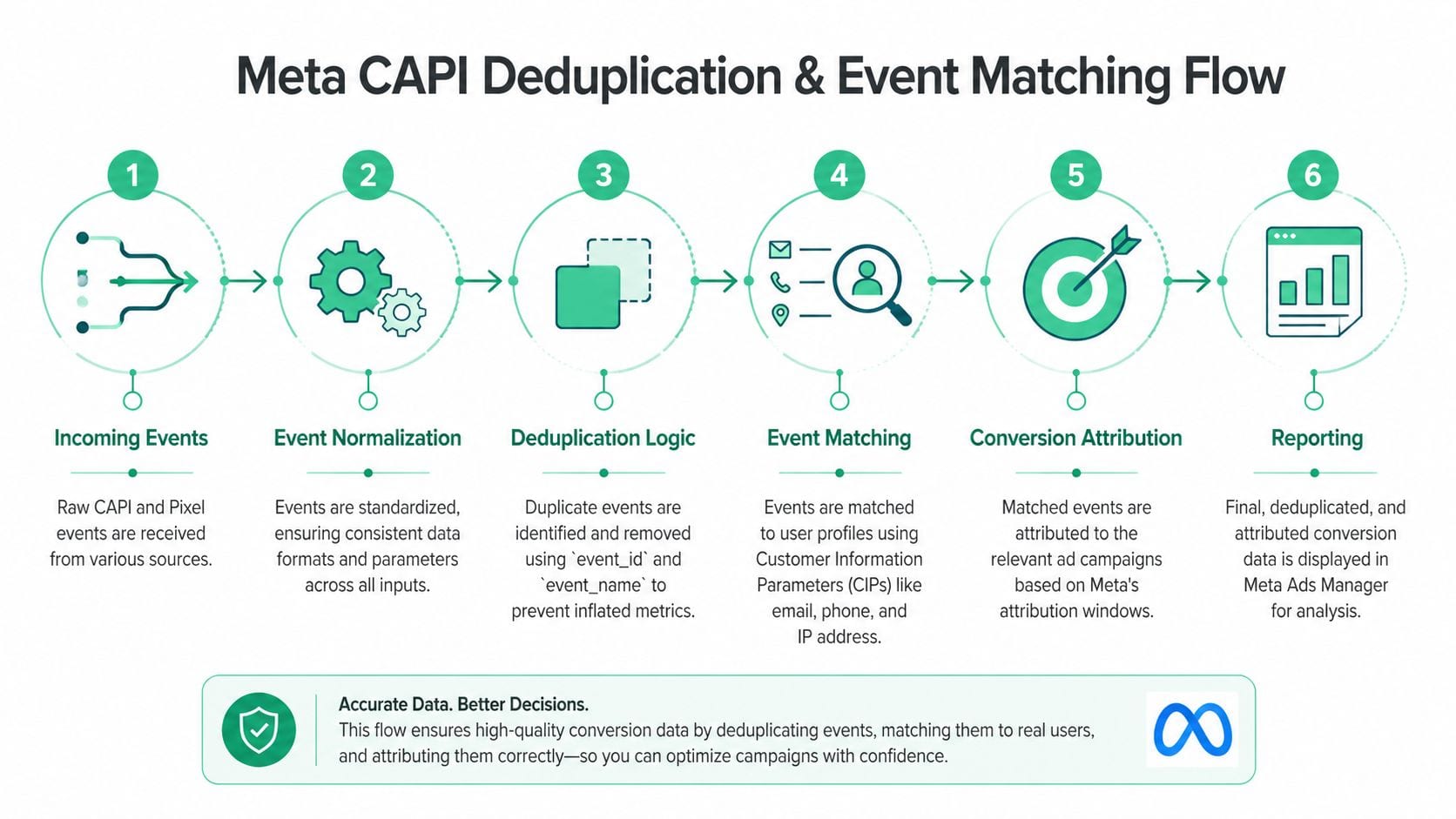
Deduplication is where trust usually breaks first. The browser pixel sends one version of the event. The server sends another. Meta tries to treat them as the same conversion, but it can only do that when the identifiers, timing, and event definitions line up.
If they don’t, your team starts debating whether Meta is overreporting, underreporting, or both. In many cases, all three are happening across different event types.
What deduplication is actually checking
Meta doesn’t magically know that a browser Purchase and a server Purchase represent the same action. You have to tell it by sending matching keys and aligned event semantics.
In practice, the heart of the process is simple:
- The browser pixel fires an event.
- The server sends a second version of that same event.
- Both versions carry the same
event_name. - Both versions carry the same
event_id. - Timing is close enough and payload logic describes the same action.
- Meta deduplicates them into one reported conversion.
That looks simple on a diagram and messy in production.
Where teams usually get it wrong
Cometly’s audit guidance highlights the impact clearly: when event_id values mismatch, conversion counts can be inflated by 15-25%, and over-deduplication can miss 10-20% of events. It also notes that the tracking gap can be 35% or more when you reconcile Ads Manager against backend records and segment by device to isolate problem cohorts. The source is Cometly’s article on Conversions API versus Facebook Pixel auditing.
That matches what shows up in real audits. The most common failure patterns are:
- Client and server generate different IDs for the same user action.
- One side sends
Purchase, the other sends a custom purchase-like event with a similar meaning but a different name. - The pixel fires on page load, the server fires after payment confirmation. Both are “purchase” in someone’s head, but not the same event operationally.
- IDs are reused across retries, tabs, or sessions.
- Timestamps are delayed enough that dedupe behaves inconsistently.
A lot of inflated ROAS reports come from this exact problem. The team thinks CAPI added visibility. In reality, the implementation added duplicates.
A reliable event ID strategy
The fix isn’t “use event IDs.” It’s “use one event ID generation strategy across browser and server for the same business action.”
The cleanest approach is usually:
- Generate the ID once at the moment the business action is created.
- Persist it long enough for both browser and server processes to access it.
- Reuse the same ID in both deliveries.
- Tie retries to the same action, not a newly generated identifier.
What doesn’t work well is letting the browser invent one ID and the backend invent another based on a slightly different trigger. That’s how you get two clean payloads that represent one sale and still can’t be deduplicated.
For teams debugging this, Trackingplan’s article on Meta Pixel audit checks is a useful companion because it frames browser-side validation in a way that complements CAPI troubleshooting.
Event Match Quality is not a vanity metric
Once deduplication is under control, the next question is whether Meta can match the event to a user profile well enough to use it.
That’s where Event Match Quality, or EMQ, matters. In practical terms, EMQ drops when your user identifiers are weak, missing, malformed, or hashed incorrectly. If you send a clean server event without the user signals Meta needs, the event may still exist, but its optimization value is limited.
The strongest audit checks here are straightforward:
- Email and phone normalization: Lowercase, trim spaces, standardize before hashing.
- SHA256 hashing consistency: Don’t mix hashed and unhashed handling across code paths.
- IP address and user agent availability: If your architecture strips them too early, match quality suffers.
- Field presence by event type: Purchase may be enriched while lead events remain bare.
Field note: I’d rather see fewer events with complete, accurate matching data than a flood of server events that nobody can confidently attribute or optimize against.
Timing and matching work together
A common mistake is treating dedupe and matching as separate technical chores. They influence each other operationally.
If the browser event fires too early and the server event fires only after final confirmation, the IDs may match but the business meaning doesn’t. If the event timing is close but the user data differs between the two sources, Meta may dedupe one action while still struggling to match it effectively for attribution and optimization. Good CAPI setups align all three layers:
| Layer | What must be true |
|---|---|
| Event definition | Browser and server describe the same business action |
| Event ID | Both sources use the same identifier |
| User data | Matching fields are normalized, available, and hashed correctly |
When all three line up, reporting becomes easier to trust. When one fails, you get the worst kind of problem: dashboards that look precise and still mislead decision-makers.
The manual CAPI audit checklist
Manual audits still matter. Even if you plan to automate later, you need to understand what “correct” looks like by inspection. The problem is that most checklists stay superficial. They tell you to “verify events” without forcing you to inspect the risky parts.
This is the version to use on a first serious review, before automating any of it.
Start with payload truth, not platform dashboards
Open the actual requests. Use your browser tools, server logs, tag manager preview modes, or any request inspector available in your stack. Platform dashboards can help validate receipt, but they shouldn’t be your first evidence.
Check these basics first:
- Event naming. The browser event and server event should represent the same business action with the same intended mapping.
- Required fields present. Missing core identifiers, timestamps, or value fields often lead to partial usefulness even when the request succeeds.
- Correct data types. A number sent as a string, a boolean sent as text, or an array flattened incorrectly can break downstream interpretation.
- Value fidelity. Compare payload values against the actual user action, order record, or application state.
This sounds elementary, but it catches a surprising amount of drift. A reused server template, an updated ecommerce object, or a renamed parameter can inadvertently push invalid structures to production.
Deduplication lives or dies on event_id
This is the check that teams underestimate most.
When you send the same conversion from browser and server, deduplication depends on exact alignment of identifiers and event semantics. If the browser sends one event_id and the server invents another, the platform may interpret them as two separate conversions. If the same business action maps to different event names across layers, you can create confusion even when identifiers exist.
If deduplication is broken, your paid media team won’t debate implementation details. They’ll debate budget decisions based on inflated or deflated conversions.
Manually verify deduplication like this:
- Trigger a test conversion.
- Inspect the browser-side event.
- Inspect the server-side event.
- Confirm that the shared
event_idis exactly the same. - Confirm both events refer to the same action and timestamp context.
- Review the destination’s testing or diagnostics interface to see whether the platform receives and processes them as expected.
Keep a short list of test transactions with timestamps so the team is reviewing the same evidence. Don’t audit deduplication by comparing aggregate reports only. You need event-level traces.
Check attribution identifiers and identity fields
CAPI doesn’t fix weak identity on its own. It gives you another delivery path. You still need to preserve the right identifiers and format them consistently.
Review whether these categories of data are passed when appropriate:
- Click and browser identifiers such as
fbpandfbc - User data fields that support matching, where your legal basis and platform policies allow them
- Session and transaction context that helps connect the event to the right journey
The common failure patterns are straightforward. A redesign drops the cookie handoff. The server endpoint receives a partial payload. Hashing runs on an already transformed value. A field exists for some templates but disappears on others.
Inspect normalization too. Case, whitespace, formatting, and hashing order matter. Don’t assume that because the field exists, it’s useful.
Validate mapping logic, not just field presence
A field can be present and still be wrong.
Look closely at how your implementation maps business events to destination events. For example, make sure:
- A lead event isn’t firing on both form start and form submit.
- A purchase event reflects completed transactions, not payment attempts.
- Refunds, cancellations, and test orders are filtered appropriately.
- Multi-step funnels don’t accidentally reuse the same event name for different milestones.
A practical way to review mapping is to compare three things side by side: the business definition, the source trigger, and the outgoing payload. Any mismatch between those three deserves investigation.
Inspect campaign tagging integrity
Server-side data often gets blamed for attribution issues that really start with inconsistent campaign inputs. Your audit should include a light but disciplined review of campaign tagging conventions.
Check for:
- UTM naming consistency across channels and teams
- Persistence logic for campaign identifiers through the session or conversion path
- Unexpected overwrites from redirects, scripts, or landing page logic
- Destination-specific expectations for attribution fields
If your team wants a practical companion process for this part of the review, use a dedicated conversion tracking verification workflow as a cross-check. It helps keep tagging, event logic, and destination validation aligned.
Manually review privacy, consent, and PII risk
This is the part many teams postpone because it feels legal, not technical. That’s a mistake. Privacy failures often happen inside payload construction.
Inspect outgoing requests for any field that could expose personal data where it shouldn’t. Look at custom parameters, querystring passthroughs, form values, product metadata, and free-text fields. A leak often comes from convenience. A developer forwards an object wholesale instead of selecting approved keys.
Then test consent scenarios. Change consent states and repeat key actions. Confirm that event collection, enrichment, and forwarding behave according to your policy. If a user declines advertising storage or an equivalent consent mode, your payload behavior should reflect that.
This part of the audit is manual and tedious for a reason. You’re checking edge cases, not just happy paths.
Common CAPI errors and their business impact
| CAPI Error | Technical Symptom | Business Impact |
|---|---|---|
| Broken deduplication | Browser and server events use different event_id values | Conversions appear inflated or inconsistent across reporting views |
| Schema drift | Payload property name, type, or nesting changes after a release | Dashboards become unreliable and downstream models classify events incorrectly |
| Missing attribution identifiers | fbp, fbc, or related identifiers stop passing | Ad platforms have weaker context for matching and attribution |
| Wrong event mapping | A business action is sent under the wrong destination event name | Optimization uses misleading conversion signals |
| PII leakage | Unapproved user data appears in custom parameters or forwarded objects | Privacy risk increases and remediation becomes urgent |
| Consent misconfiguration | Events still enrich or send when consent state should block them | Governance rules are violated and audit effort expands |
| Rogue events | Old tags, plugins, or scripts fire duplicate or deprecated events | Analysts lose trust in event counts and debugging time rises |
What manual work does well, and where it fails
A manual audit is good for deep understanding. It forces the team to inspect assumptions, challenge documentation, and see exactly how the implementation behaves.
It’s bad at consistency.
People forget to rerun tests after releases. They test the primary checkout flow but skip alternative journeys. They validate one browser but not the app. They clean up a bug and never notice a new payload field leaking next sprint. Manual audits produce point-in-time confidence, not durable control.
That’s the main limitation. The checklist works. It just doesn’t scale well in fast-moving environments.
Implementing Continuous Monitoring and Testing
A one-time audit catches today’s problems. It doesn’t protect next month’s release.
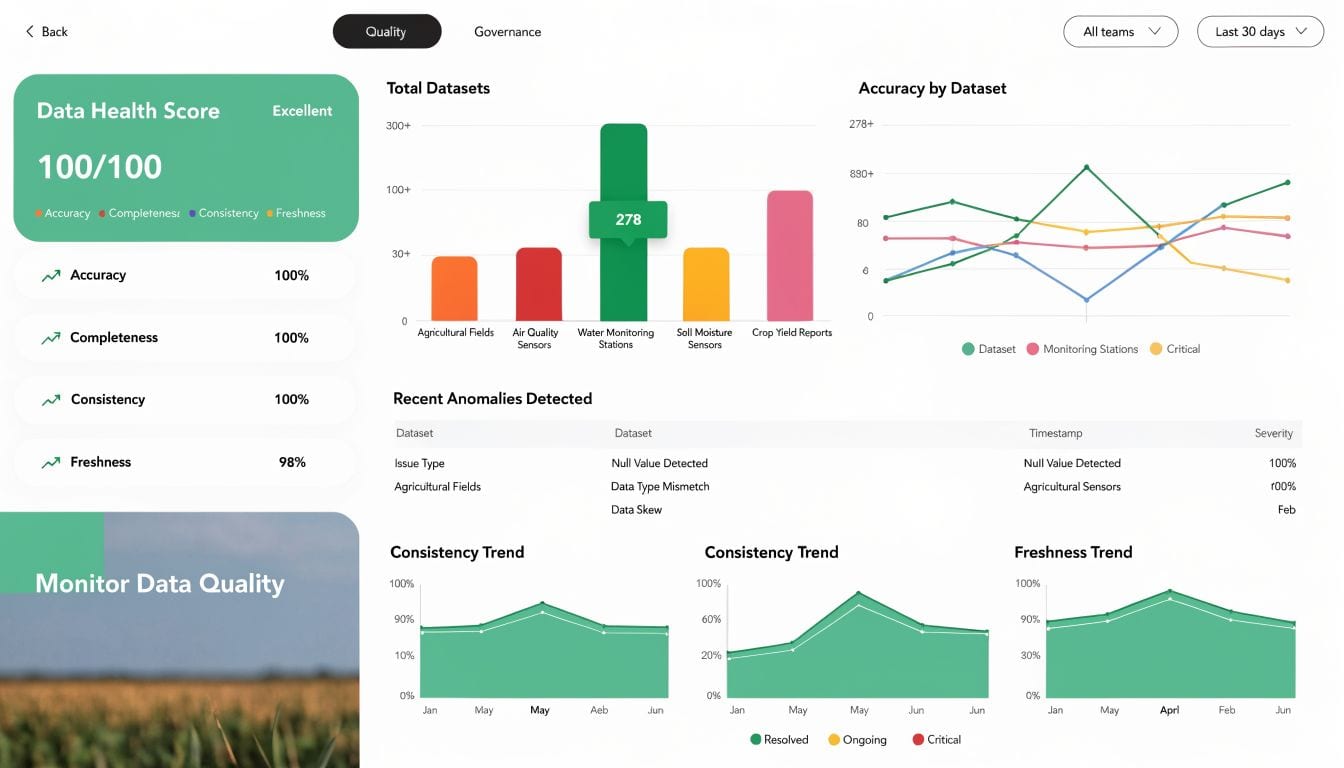
That’s the hard truth organizations often learn after they fix CAPI once, declare victory, and then experience data loss again after a checkout tweak, consent banner update, or server container change. Properly audited hybrid setups can recover 20-30% of lost conversion data, but discrepancies between Pixel and CAPI streams often exceed 20% when the implementation degrades. The same source notes that automated monitoring is critical for catching gaps, UTM errors, and rogue events in real time. See the details in AdsUploader’s article on Meta Conversions API auditing and discrepancy detection.
Native tools are useful, but they are not enough
Meta gives you two solid starting points: Test Events and Diagnostics.
Use Test Events when you need to verify whether a specific payload is arriving and whether key parameters are present. Use Diagnostics when you want a platform-level view of recurring warnings, dropped fields, or implementation issues.
Those tools are necessary. They are also reactive.
They help when someone is already looking. They don’t tell you much about what changed overnight, which release introduced a malformed payload, or when a single market began sending blank currency values. These views are typically only opened after reporting has already gone wrong.
Build a monitoring loop, not a quarterly ritual
The better operating model is continuous QA. That means the implementation is watched even when nobody is actively auditing it.
A practical monitoring loop includes:
- Daily anomaly checks: Missing purchases, spikes in duplicate events, or sudden drops in matched events.
- Weekly schema validation: Confirm required properties still exist and still match your tracking plan.
- Release-based revalidation: Re-test key events after any checkout, lead form, or consent-related change.
- Alerting: Send failures to Slack or email so fixes start immediately.
If you manage this manually, it works for a while, then fails under the weight of volume. That’s especially true for agencies, multi-brand organizations, and teams with separate web and server owners.
Where automated QA changes the economics
This is the point where automated observability becomes more than convenience. It changes response time and reduces blind spots.
One option is Trackingplan’s CAPI audit tool, which monitors tracking implementations continuously and flags issues such as rogue events, schema mismatches, campaign tagging problems, and potential PII leaks. The primary value in tools like this isn’t that they replace technical judgment. It’s that they surface breakage before performance reporting gets corrupted.
What works in practice is simple:
| Monitoring layer | Manual checks | Automated QA |
|---|---|---|
| Test single event payloads | Good | Good |
| Detect silent schema drift | Weak | Strong |
| Catch rogue or missing events after releases | Inconsistent | Reliable |
| Watch for tagging and consent anomalies | Limited | Strong |
| Scale across many sites or clients | Painful | Practical |
Continuous monitoring turns CAPI from a fragile implementation into an observable system.
A short walkthrough helps if your team hasn’t used observability tools for analytics QA before:
What to alert on first
Not every issue deserves the same urgency. If you try to monitor everything at once, your team will ignore the alerts.
Start with four categories:
- Revenue-critical failures: Missing
Purchase, broken values, missing currency. - Deduplication failures: Sudden shifts in browser versus server ratios, duplicate purchase spikes.
- Matching degradation: User data fields disappearing or hash quality changing.
- Governance issues: PII leaks, UTM anomalies, or events firing despite blocked consent.
That gives you a workable early-warning system without creating alert fatigue. Once that’s stable, expand into secondary checks like feed alignment, custom event hygiene, and environment-specific validation.
Troubleshooting Common CAPI Failures and Prioritizing Fixes
Most audit findings fall into a small number of failure modes. The mistake teams make is treating every issue as equally urgent. They’re not.
A broken purchase value field deserves faster action than a naming inconsistency on a low-value custom event. A deduplication error that inflates reported conversions is more dangerous than a cosmetic warning in Diagnostics. Good audit work ends with prioritization, not just diagnosis.
Common CAPI Failure Modes and Fixes
| Symptom | Likely Cause | How to Fix |
|---|---|---|
| Purchases are higher in Meta than in backend records | Browser and server events use different event_id values, causing duplicate counting | Generate one shared event_id per transaction and send it from both sources |
| CAPI purchases are much lower than expected | Server trigger fires too late, fails on some confirmations, or misses backend states | Audit the exact trigger point and compare confirmed orders against sent payloads |
| EMQ is weak | Missing or malformed user parameters, or inconsistent hashing | Normalize identifiers before SHA256 hashing and confirm required user fields are present where consent allows |
| Revenue shows incorrectly or not at all | custom_data mapping is incomplete or inconsistent | Validate value, currency, and item details against backend order records |
| Diagnostics show event quality issues after a site release | Template or checkout changes altered field names or object structure | Reconcile live payloads against the approved tracking plan and update transforms |
| Meta and backend numbers diverge by device | Browser restrictions, consent logic, or platform-specific firing differences | Segment reconciliation by device and browser, then inspect the affected implementation path |
Fixes that usually deserve first priority
I group remediation into three buckets.
First, trust breakers. These are issues that make reporting unreliable. Duplicates, missing purchases, and bad revenue values go here. Fix them first because leadership will make budget decisions from this data.
Second, optimization blockers. Weak matching, missing user data, and poor lifecycle event quality sit here. These don’t always create obvious reporting chaos, but they reduce how much Meta can learn from your conversion stream.
Third, maintenance risks. Naming drift, undocumented transforms, or inconsistent environments may not hurt this week. They almost always hurt after the next release.
Don’t prioritize by how loud the warning looks in Events Manager. Prioritize by business impact and blast radius.
Translate technical findings into stakeholder language
Engineers need root cause. Marketing leaders need consequence.
A strong audit summary should connect each issue to operational impact:
- Deduplication mismatch becomes “reported conversions may be inflated.”
- Missing purchase value becomes “ROAS and value-based optimization are unreliable.”
- Weak user matching becomes “Meta has less usable signal for attribution and audience building.”
- Consent inconsistency becomes “tracking behavior is not aligned across browser and server.”
That framing matters because the ROI of a fix is real. In one documented case, improvements to CAPI implementation for Sage and Paige increased reported conversions by 54% and lifted Meta ROAS by 41% within 14 days by improving match quality and fixing data gaps. That example is documented qualitatively in Trackingplan’s case coverage.
Frequently Asked Questions About Meta CAPI Audits
How often should a Meta Conversions API audit happen?
Run a full audit after major site changes, checkout changes, lead flow changes, or consent updates. If your stack changes frequently, don’t rely on scheduled audits alone. Pair them with continuous monitoring.
What’s the first thing to compare during an audit?
Compare backend truth against Meta reporting for your highest-value conversion event. For most brands, that’s purchase or qualified lead. If that event doesn’t reconcile, deeper platform analysis won’t help much.
Is a discrepancy between Pixel and CAPI always a problem?
No. Browser and server tracking observe different moments in the journey. What matters is whether the difference is explainable and stable. Large unexplained divergence usually points to trigger, timing, or deduplication issues.
Should every event be sent through CAPI?
No. Focus first on events that matter for optimization, attribution, and downstream reporting. Sending low-value noise to Meta rarely improves outcomes and makes debugging harder.
What usually improves results fastest?
In mature audits, the fastest wins usually come from fixing shared event_id logic, cleaning up revenue mapping, and improving user data quality for matching. Those changes affect both reporting trust and optimization quality.
Can Meta’s native tools replace automated monitoring?
Not if your environment changes often or spans multiple sites, brands, or teams. Native tools help with testing and diagnosis. They don’t provide persistent observability across the stack.
If your team is tired of rediscovering the same tracking problems after every release, Trackingplan is worth evaluating. It gives data, marketing, and engineering teams a shared way to monitor analytics and attribution quality across web, app, and server-side implementations so Meta CAPI issues are caught before they distort reporting or campaign decisions.