
Why MCPs matter for the digital analytics team
The way we QA tagging has changed twice in just a few years: first from manual ("I open DevTools, click around, check the Network tab") to scripted (Cypress, Playwright in CI), and now to an agentic mode where an LLM can drive the browser, read the dataLayer and validate hits without you writing the test.
The bridge between the LLM and the browser is called MCP (Model Context Protocol): an open standard from Anthropic that standardizes how models talk to external tools. In digital analytics, the two relevant browser MCPs are the official ones from Google and Microsoft.
This guide isn't a generic developer comparison. It's a comparison focused on what we analysts actually do: validate events, inspect payloads, audit dataLayers, measure how tags affect performance and simulate real journeys.
What is Chrome DevTools MCP?
Chrome DevTools MCP is an official MCP server maintained by Google's Chrome team. It allows an AI agent to control and inspect a live Chrome instance using the Chrome DevTools Protocol.
"chrome-devtools-mcp lets your coding agent (such as Gemini, Claude, Cursor or Copilot) control and inspect a live Chrome browser. It acts as a Model-Context-Protocol (MCP) server, giving your AI coding assistant access to the full power of Chrome DevTools for reliable automation, in-depth debugging, and performance analysis."
— Officialchrome-devtools-mcpdocumentation on npm (npmjs.com)
Key facts:
- Maintainer: Google (official
ChromeDevToolsGitHub organization) - Package:
chrome-devtools-mcpon npm - Requirements: Node.js LTS and Chrome stable or newer
- Underlying tech: Puppeteer + Chrome DevTools Protocol (CDP)
- Supported browsers: Chrome and Chrome for Testing only
- Exposed tools: 26 tools (~18k tokens of context)
- Connection modes: dedicated profile, isolated instance, or
--autoConnectto a Chrome already running (since Chrome M144)
Standout capabilities for analytics:
- Full network request inspection with payloads and headers
- Performance traces and Web Vitals extraction (LCP, INP, CLS)
- CPU and network emulation
- Lighthouse audits (performance, accessibility, SEO, best practices)
- Console with source-mapped stack traces
- Auto-connect to a real session with active cookies, login and CMP
What is Playwright MCP?
Playwright MCP is the official MCP server maintained by Microsoft, built on top of the Playwright framework. Instead of relying on screenshots, it exposes structured snapshots of the page's accessibility tree, which means the LLM "reads" the page as structured text rather than interpreting pixels.
"A Model Context Protocol server that provides browser automation capabilities using Playwright. Enables LLMs to interact with web pages through structured accessibility snapshots — no vision models required."
— Official Microsoft Playwright MCP documentation (playwright.dev/mcp)
Key facts:
- Maintainer: Microsoft (official
microsoft/playwright-mcprepository) - Package:
@playwright/mcpon npm - Underlying tech: Playwright + accessibility tree
- Supported browsers: Chrome, Firefox, WebKit (Safari) and Microsoft Edge
- Exposed tools: 21 base tools (~13.7k tokens of context), extendable with
vision,pdfanddevtoolscapabilities - Connection modes: isolated profile by default, optional session persistence, connection to existing Chrome via the Playwright MCP Bridge extension
Standout capabilities for analytics:
- True cross-browser support (including Safari/WebKit, where ITP bites)
- End-to-end user journey simulation with auto-waiting
- Network and storage mocking to force edge-case states
- Persistent sessions with preserved login and cookies
- Reusable test generation in TypeScript
- Extensible: there are forks that automatically capture
dataLayerevents during the flow
Head-to-head technical comparison
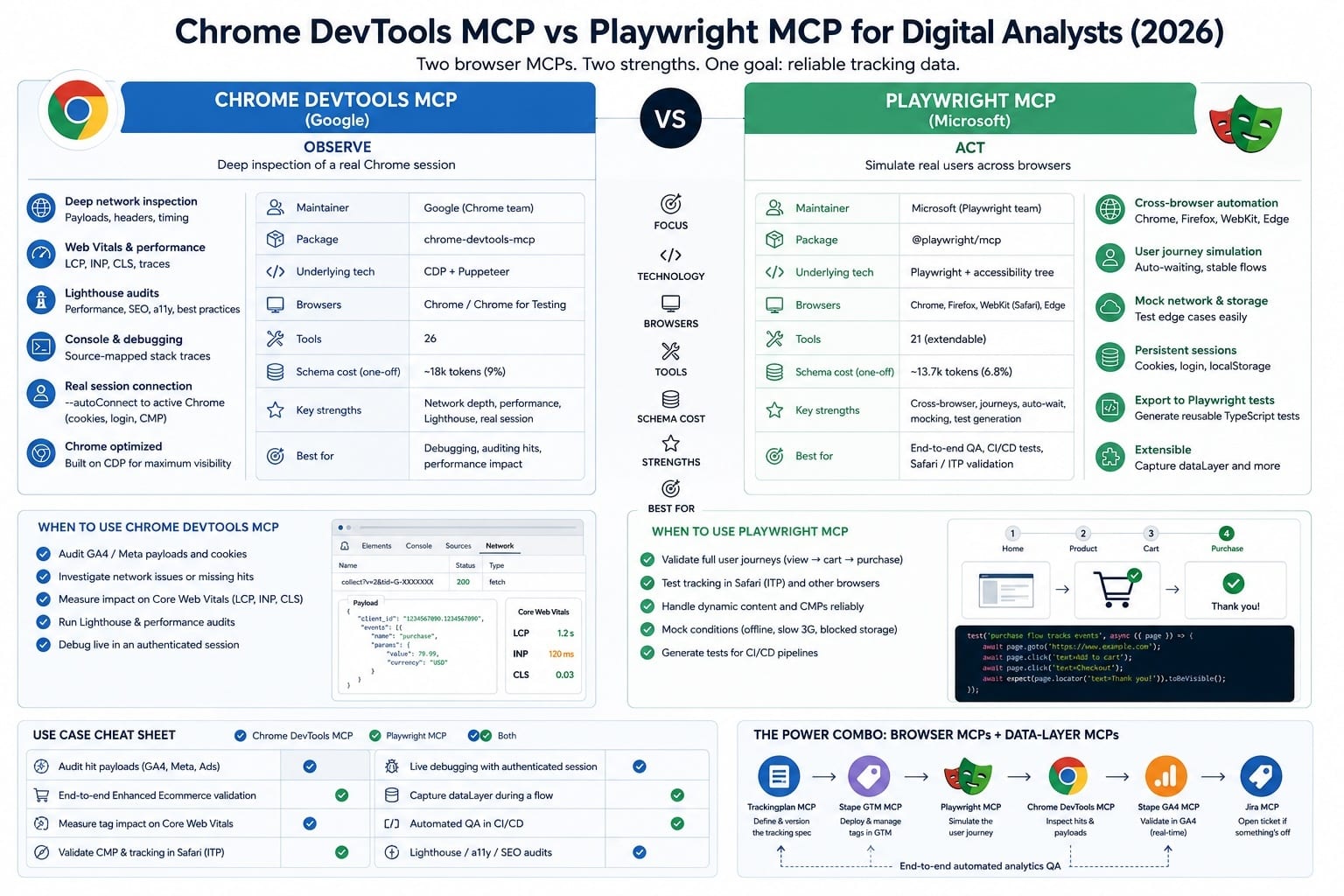
Sources: official documentation from Chrome for Developers, Playwright and benchmarks from Mario Zechner (2025) on token cost.
Real-world use cases in digital analytics
This is where the comparison earns its keep. These are the typical tasks of an analyst and the tool that feels best for each one.
1. Auditing the payload of a GA4 or Meta CAPI hit
Best option: Chrome DevTools MCP.
When you need to confirm that a purchase event is sending the right parameters to /collect (GA4) or that the _fbp cookie travels with the Meta hit, the agent needs to read the full request body. Chrome DevTools MCP exposes complete payloads via CDP, while Playwright MCP requires manual interception.
2. Validating Enhanced Ecommerce across a journey
Best option: Playwright MCP.
To validate the view_item → add_to_cart → begin_checkout → purchase flow you need an agent that can simulate a full user, wait for dynamic renders, handle CMP popups and follow navigation. Playwright's auto-waiting drastically reduces flakiness.
3. Measuring whether a new tag is hurting Core Web Vitals
Best option: Chrome DevTools MCP.
"It is rich in dedicated tools not found in Playwright MCP, such as detailed analysis of Web Vitals (LCP, FID, CLS) and emulation of CPU and network."
— Comparative analysis by tmasuyama1114 on Zenn (November 2025)
You can ask the agent to load the page with and without a specific tag, record performance traces and attribute the LCP delta to concrete scripts.
4. Checking that the CMP and tagging work in Safari
Best option: Playwright MCP.
Safari is where most tracking issues blow up — ITP, third-party cookie restrictions and divergent Storage API behavior. Chrome DevTools MCP can't help you here because it only controls Chrome. Playwright MCP supports WebKit natively.
5. Live debugging of an authenticated production implementation
Best option: Chrome DevTools MCP with --autoConnect.
"This new feature allows the Chrome DevTools MCP server to request a remote debugging connection to an active Chrome instance, enabling a seamless transition between manual and AI-assisted debugging."
— Official announcement from the Chrome team (Chrome for Developers, 2025)
You're already logged into the client's GA4, their GTM Preview and their admin area. You hand off control to the agent without reproducing the whole setup.
6. Automatically capturing the dataLayer during a flow
Best option: Playwright MCP (extended).
As analyst Gunnar Griese reports in his analysis of MCPs for digital analytics, because the code is open source, Playwright MCP can be easily extended to automatically detect and record dataLayer events as they occur during user interactions, eliminating the manual process of clicking around with DevTools open.
7. Automated QA on every release of the site
Best option: Playwright MCP.
Here Playwright has the structural advantage: the flows the agent executes can be turned into real Playwright tests that live in your repo, run on every release and compete directly with paid solutions like ObservePoint or Code Burst.
Summary table: which one for which job
The most powerful workflow: combine them with data-layer MCPs
Limiting the conversation to "Chrome DevTools MCP vs Playwright MCP" sells the topic short. The real qualitative leap comes when you combine them with data-layer MCPs:
- Stape GTM MCP: full management of a Google Tag Manager container (accounts, containers, tags, triggers, variables, publishing).
- Stape GA4 MCP: dimension and metric queries, real-time validation, property management.
- Trackingplan MCP: validation against a versioned tracking spec.
- Enterprise connectors (Slack, Jira, Notion): to close the loop with tickets and communication.
As Nicolas Hinternesch documents in his implementation with Stape GTM MCP and Playwright MCP in VS Code, combining the Playwright MCP for browser automation with the GTM MCP makes it possible to orchestrate a complete testing scenario and validate the functionality of deployed tags from the same chatbot.
Typical end-to-end workflow:
- The analyst defines a spec (Trackingplan MCP).
- The agent deploys the tags in GTM (Stape GTM MCP).
- The agent simulates the journey (Playwright MCP).
- The agent captures the hits and verifies the payloads (Chrome DevTools MCP).
- The agent queries GA4 real-time to confirm ingestion (Stape GA4 MCP).
- The agent opens a Jira ticket if anything is off.
Context-cost considerations
There are two distinct costs to factor in here, and most public comparisons only mention the first one. For analytics work — which involves multi-step journeys, not single-shot prompts — the second one is the one that actually hurts.
1. Schema cost (one-off, on session start)
Every MCP you activate eats a percentage of the model's context just with its tool schemas:
Source: benchmark by Mario Zechner (November 2025).
If on top of that you add GTM MCP, GA4 MCP, Trackingplan MCP, Slack MCP and Jira MCP, you can easily burn 35-40% of the context on schemas alone — before the agent has done a single thing.
2. Runtime cost per action (the one that actually hurts)
This is where the picture flips, and where Playwright MCP becomes the expensive one — often by an order of magnitude on real journeys.
The reason is structural, not a bug:
- Playwright MCP takes a full accessibility-tree snapshot of the page as its default way of giving the model context about what's on screen. For a content-rich page — an e-commerce listing, a dashboard, a checkout — that snapshot can easily run to tens of thousands of tokens. And it's regenerated and sent again after every interaction.
- Chrome DevTools MCP is much more surgical. It listens to network and lifecycle events over CDP to know when the page is fully loaded, then takes a screenshot to interpret the state visually and decide the next step. It only pulls the specific data it actually needs (a request body, a console message, a performance trace) instead of dumping the whole page into context.
In practice, this means a tagging audit with 10-15 interactions across a journey can run an order of magnitude cheaper at runtime on Chrome DevTools MCP than on Playwright MCP. The "Playwright is cheaper" headline from schema benchmarks reverses completely as soon as you start actually using the tools.
Field note from production
The runtime gap between the two MCPs isn't something extrapolated from public benchmarks — it's something we hit firsthand wiring both into our own tracking-audit workflows at Trackingplan.
When the agent walks a real journey on a real client site — a homepage, a category page, a product detail, an add-to-cart, a checkout — Playwright MCP's accessibility-tree snapshots stack up fast. Each one is tens of thousands of tokens on a content-rich page, regenerated and resent after every interaction. Across a single audit, the runtime token bill consistently ran one order of magnitude higher than the equivalent flow on Chrome DevTools MCP, where the agent listens to network and page-lifecycle events over CDP and only captures a screenshot when it actually needs to interpret the visual state to decide the next step.
If your use case is one-shot ("inspect this page, tell me what's wrong"), you won't notice. If your use case is agentic QA across a real funnel — which is what tagging validation actually looks like — that runtime delta turns into real cost and real latency on every single run.
Practical recommendation
- Enable/disable MCPs per session depending on the task (most clients allow this).
- For surgical audits (inspect this hit, check this LCP, debug this console error), Chrome DevTools MCP is dramatically cheaper end-to-end.
- For long agentic journeys where you genuinely need cross-browser or user-simulation depth (CMP validation in Safari, Enhanced Ecommerce QA), budget for Playwright's snapshot cost — or use it selectively and hand off to DevTools MCP for the inspection steps.
Honest limitations you should know
Chrome DevTools MCP:
- Chrome only. No use for validating Safari or Firefox.
- Results are ephemeral: it doesn't generate reusable code.
- Slightly higher schema cost than Playwright (but much lower runtime cost — see context section above).
- Google collects usage statistics by default (disable with
--no-usage-statistics).
Playwright MCP:
- Network inspection less rich than CDP.
- No native Web Vitals (requires activating the
devtoolscapability). - Starts from a clean session by default: for SSO-heavy environments you need the bridge.
- The accessibility-tree approach is efficient as a representation, but it dumps the full tree into context on every step — runtime token cost on multi-page journeys can be an order of magnitude higher than Chrome DevTools MCP.
- Some custom elements without proper ARIA roles can be invisible to the agent.
Frequently asked questions
What is the key difference between Chrome DevTools MCP and Playwright MCP?
Chrome DevTools MCP is for the agent to observe the browser (network, performance, console) and works on Chrome only. Playwright MCP is for the agent to act like a user and supports Chrome, Firefox, WebKit and Edge.
Which one is better for auditing GA4 and GTM implementations?
For auditing the exact content of the hits (payloads, parameters, cookies), Chrome DevTools MCP. For validating that a full journey fires the right events in the right order, Playwright MCP. Most serious teams use both.
Can I use these MCPs without knowing how to code?
Yes. Both integrate with clients like Claude Desktop, Claude Code, Cursor and VS Code. Once configured, the analyst interacts in natural language ("audit the purchase event on this URL and tell me whether GA4 receives the right value").
Which one consumes fewer tokens?
It depends on what you're measuring. On schema cost (loaded when the session starts) Playwright MCP is lighter — about 13,700 tokens vs Chrome DevTools MCP's 18,000, per public benchmarks from November 2025. But at runtime, on real multi-step journeys, Playwright MCP becomes much more expensive: it sends a full accessibility-tree snapshot of the page after every action, while Chrome DevTools MCP queries the browser surgically over CDP and only captures screenshots or specific data when needed. For analytics work, the runtime cost is the one that dominates.
Can I connect the MCP to my real Chrome with my active sessions?
Yes. Chrome DevTools MCP supports this natively with the --autoConnect option since Chrome M144. Playwright MCP supports it via the Playwright MCP Bridge extension.
Do these MCPs replace ObservePoint or professional monitoring tools?
Not entirely. They cover ad-hoc QA and functional tests in CI/CD quite well. For continuous monitoring at scale (thousands of pages, alerting, reporting), ObservePoint and similar tools still bring specific capabilities that an MCP alone doesn't cover.
Are they safe to use in production?
Both expose full browser control to the agent, so the usual precautions apply: use dedicated profiles or isolated sessions for sensitive tasks, be careful with credentials, and avoid connecting the agent to sessions with personal data you shouldn't share with the LLM provider. The official Chrome DevTools MCP documentation itself warns against sharing sensitive information.
Conclusion
If your job is digital analytics and you can only start with one, my honest recommendation:
- Start with Chrome DevTools MCP if your day-to-day is debugging and auditing existing implementations on Chrome.
- Start with Playwright MCP if your day-to-day is tagging QA on every release or you work with Safari audiences.
- Medium term, install both and turn them into the foundation of an agentic workflow that also includes the GTM MCP and your analytics platform's MCP.
The real shift isn't "which MCP do I choose." It's that for the first time, a digital analyst has an assistant that can open the browser, click, read the payload, compare against the spec, open the ticket and verify in GA4 that the data arrives. Two years ago, that was science fiction.