Conversion data loss iOS 14 - Struggling with conversion data loss iOS 14? Our guide explains the impact, provides audit steps, and details technical fixes
You launch a campaign that should be working. Spend is stable. Click volume looks normal. The site still sells. But the ad platform says conversions fell off a cliff, ROAS looks broken, and nobody agrees on which dashboard to trust.
That situation didn’t start because marketers forgot how to build campaigns. It started because the measurement layer changed underneath them. Since Apple’s privacy changes, conversion data loss iOS 14 has become a daily operating constraint for growth teams, analysts, developers, and agencies. The hard part isn’t only losing visibility once. It’s rebuilding a tracking setup that stays reliable after site releases, consent changes, pixel updates, and platform API shifts.
Teams that recover well usually do three things. They quantify the damage against a real source of truth. They rebuild tracking around server-side and first-party signals. Then they keep validating the implementation so fixes don’t degrade undetected over time.
If your dashboards no longer line up, if Meta underreports while Shopify or your CRM still shows healthy sales, or if attribution windows are hiding a large share of delayed purchases, the problem is diagnosable. It’s also fixable, at least to a useful and decision-grade level. The bigger shift is strategic. Post-iOS measurement works best when teams treat tracking as an observable system, not a one-time implementation. That’s the same mindset behind the broader move described in Trackingplan’s look at the death of third-party cookies and first-party data.
The Post-2021 Marketing Meltdown
For a lot of teams, the breaking point looked deceptively simple. A campaign that had been producing steady purchases suddenly showed fewer conversions inside Meta or Google. Finance didn’t see the same drop. Ecommerce revenue didn’t collapse. Sales teams kept closing deals. The dashboards just stopped agreeing with each other.
That mismatch damaged more than reporting. It damaged confidence. Performance marketers started questioning bid decisions. Analysts had to explain why platform ROAS looked weak while the business still hit revenue targets. Developers got pulled into urgent debugging requests even when tags seemed to be firing.
What changed in practice
The immediate cause was Apple’s privacy shift. But the business effect was broader than one operating system update. Teams lost the clean signal path they had relied on for click-to-conversion reporting, audience building, and ad optimization.
Three symptoms showed up again and again:
- Platform numbers dropped first: Paid social dashboards often showed weaker conversion performance before the business saw any real commercial decline.
- Attribution became harder to defend: Marketers could still see traffic and some conversions, but not with the same completeness or consistency.
- Every team used a different truth source: Media buyers trusted ad platforms, analysts trusted backend data, and leadership wanted one answer.
Practical rule: When ad platform conversions fall but your backend stays stable, treat it as a measurement investigation before treating it as a marketing failure.
The post-2021 disruption also forced a mindset change. Older tracking models assumed that if a pixel was installed, most of the important journey would be visible. That assumption doesn’t hold anymore. Browser restrictions, consent rules, and app-level privacy controls have made tracking quality a moving target.
Why this is still a live issue
A lot of organizations treated iOS 14 as a one-time migration problem. Install CAPI, clean up events, move on. In reality, the recovery work doesn’t end with implementation. Event schemas drift. Developers rename fields. Checkout flows change. Consent tools update. One broken parameter can erode reporting for weeks undetected.
That’s why the practical goal today isn’t “perfect attribution.” It’s durable, trustworthy measurement. Teams need a setup that can survive routine product and marketing changes without sending them back into spreadsheet triage every quarter.
Why iOS 14 Broke Conversion Tracking
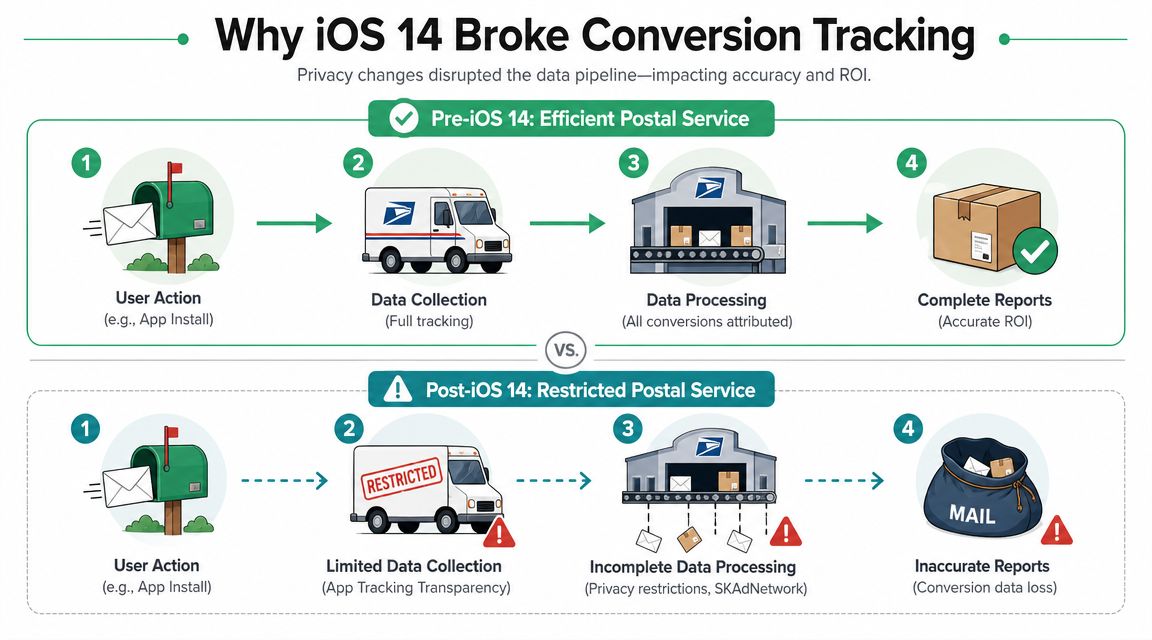
A familiar post-iOS 14 scenario goes like this. Paid social spend holds steady, orders in Shopify or the CRM look healthy, and platform-reported purchases fall anyway. The break usually is not demand. It is the handoff between ad click, site or app activity, and the platform’s ability to match that activity back to a user.
Apple changed that handoff in 2021 with App Tracking Transparency in iOS 14.5. Apps now need explicit permission to track users across apps and sites using the Identifier for Advertisers. Once a large share of users stopped allowing that tracking, platforms lost a reliable user-level signal they had depended on for attribution, retargeting, and optimization.
What actually broke in the measurement chain
Before ATT, the workflow was relatively stable:
- A user clicked an ad
- The platform stored identifiers tied to that interaction
- A pixel or SDK captured the conversion event
- The platform matched the event back to the ad exposure or click
That process was never perfect, but it gave ad platforms enough consistent feedback to optimize bidding and report performance with reasonable confidence.
After ATT, that matching step became less dependable for iOS traffic. If the user declined tracking, the platform lost access to one of the clearest ways to connect ad engagement to conversion activity. Safari restrictions added more pressure by limiting cookie-based tracking in browser sessions, especially in journeys with delayed conversion or cross-device behavior.
The practical result was straightforward. Purchases still happened. A meaningful share of them stopped showing up where marketers expected to see them.
Why platforms became less reliable for optimization
Platform algorithms learn from observed conversions, not from the conversions your finance or CRM team sees later. When fewer conversions are observed at the platform level, three things usually happen:
- Reported conversion volume drops: The platform misses some valid outcomes.
- Audience building gets weaker: Retargeting and lookalike inputs become thinner or less current.
- Optimization quality declines: Bidding models train on a smaller and less representative set of signals.
This is also where implementation quality started to matter more. Missing parameters, inconsistent event names, or undefined dimensions can make already-limited attribution worse. Teams dealing with messy analytics fields should also clean up basic taxonomy issues such as “not set” values in Google Analytics, because privacy-driven loss and implementation errors often show up together.
Why SKAdNetwork helped, but did not restore the old workflow
Apple’s replacement framework, SKAdNetwork, gives advertisers a privacy-safe way to receive app campaign performance data. The trade-off is reduced detail and slower feedback.
For app marketers, that means aggregated reporting instead of user-level visibility. For analysts, it means less flexibility when validating campaign performance against product data. For media teams, it means slower optimization cycles and less confidence when diagnosing why one campaign outperforms another.
SKAdNetwork can support measurement. It does not replace the level of granularity teams previously used for daily decision-making.
Why this turned into an ongoing data quality problem
Many teams treated iOS 14 as a migration project. Add Conversions API, rank events, update attribution settings, and close the ticket. In practice, those fixes age.
Checkout flows change. Consent banners get reconfigured. Developers rename fields. App releases alter event behavior. A server-side setup that looked clean in the first month can drift gradually and start losing signal again.
That is why the underlying problem is bigger than ATT itself. iOS 14 exposed how fragile marketing measurement had become when too much trust sat in one chain of identifiers and one-time implementations. The teams that recovered best did more than patch tracking. They built a process to keep validating that events still fire correctly, still carry the right parameters, and still reconcile against backend sources over time.
How iOS Data Loss Manifests in Your Reports
Monday morning. Paid social says efficiency dropped hard over the weekend. Shopify or the CRM says sales held up. Finance wants an answer before noon, and the team is stuck debating which dashboard reflects reality.
This is how iOS-related data loss usually appears in practice. Platform-reported purchases fall faster than actual orders. ROAS weakens inside ad platforms while blended revenue trends look more stable. Teams start spending time reconciling reports instead of improving campaigns.
The pattern is familiar because the missing signal does not hit every metric equally. Spend is still recorded accurately. Conversion credit is not. That imbalance distorts the ratios people use to make decisions.
Common symptoms show up fast:
- ROAS drops inside ad platforms: Revenue is still coming in, but part of it never gets attributed back to the campaign.
- CPA rises even if demand is steady: Missing conversions shrink the denominator.
- Campaign comparisons get biased: Campaigns with heavier iOS exposure often look worse than campaigns reaching users who are easier to measure.
- Executive reporting gets tense: Paid media appears to decline while finance, ecommerce, or sales reports show less movement.
The reporting confusion gets worse when basic analytics hygiene is already weak. Unattributed sessions, broken UTM values, and malformed traffic dimensions can blur the picture further. That is why teams should still fix fundamentals such as not set issues in Google Analytics while they work on post-iOS attribution gaps.
The damage does not stop at reported conversions.
Audience systems weaken too. If purchase, lead, or subscription events are missing or poorly matched, fewer users qualify for retargeting. Seed lists for modeled audiences become smaller and less representative. Delivery then changes because the platform is optimizing against a thinner stream of signals. In other words, a measurement problem can turn into a media performance problem.
Delayed conversion paths add another layer of undercounting. Many businesses do not convert users on the first session or within a short attribution window. High-consideration purchases, B2B lead gen, and repeat-visit ecommerce journeys often mature days or weeks later. The sale still happens, but the platform may not connect it back to the original ad interaction, so the campaign looks less effective than it really was.
Cross-device behavior creates a similar gap. A user clicks on an iPhone, researches on mobile, then buys later on desktop or through a sales rep. The business records the outcome. The ad platform may only see fragments of the journey. Analysts usually spot this as a recurring mismatch between device-level engagement and final conversion counts.
That mismatch tends to look like this:
| Report view | What it tends to show |
|---|---|
| Ad platform dashboard | Lower conversion counts and weaker attributed revenue |
| CRM or ecommerce backend | More stable actual sales or qualified leads |
| Analyst reconciliation sheet | A persistent gap that shifts by device, channel, and conversion lag |
The practical mistake is treating any one of these views as permanently correct. Platform data is still useful for optimization. Backend data is still the best record of business outcomes. The work is to define which metrics are trustworthy for each decision, then keep validating them over time.
That last part matters more than many teams expect. A tracking fix can reduce underreporting today and drift six weeks later after a checkout update, consent change, tag refactor, or app release. In the post-iOS 14 environment, the underlying reporting symptom is not just missing conversions. It is recurring uncertainty unless someone is checking that the data still reconciles.
Diagnosing Your Data Gaps A Practical Audit Process
Monday morning, paid media says Meta conversions dropped again. Sales says pipeline looks normal. Ecommerce says orders did not fall at the same rate. That is the point where teams stop arguing about whose dashboard is right and start auditing the gap.

The goal is simple. Measure the difference between what the ad platform records and what the business received, then keep measuring it after every fix. Post-iOS 14, one cleanup project is rarely enough. Tracking breaks after checkout changes, consent updates, tag revisions, and app releases. A good audit process catches that drift before the team starts optimizing against bad numbers.
Start with the business record you trust most
For ecommerce, that is usually the order database or Shopify. For lead gen, it is often the CRM. For subscriptions, billing or internal revenue records usually win.
Pick one source of truth for each primary conversion event and write it down. If the organization trusts Salesforce for qualified opportunities and the order system for revenue, use those systems as the validation layer. Do not switch the benchmark every time a platform report looks better.
The point is not to prove the ad platform wrong. The point is to establish a stable baseline so recovery can be measured the same way every month.
Build a discrepancy report that survives beyond this quarter
A spreadsheet is enough at the start. The report matters more than the tool.
Include these fields:
- Date: Match timezone and conversion date logic as closely as possible.
- Platform conversions: Pull from Meta, Google Ads, or the channel being audited.
- Backend conversions: Orders, leads, opportunities, or closed revenue from the trusted system.
- Revenue value: Compare attributed revenue against confirmed revenue.
- Device, OS, or browser segment: Isolate traffic that is more exposed to iOS-related loss where possible.
- Campaign, ad set, or channel grouping: Give media and analytics teams something actionable.
- Conversion lag view: Separate same-day reporting from 7-day or longer outcomes.
That last field gets missed often. It matters because some “loss” is really delayed matching or delayed qualification, while some is true undercounting.
A useful discrepancy report also helps teams boost website conversion rates for the right reasons. If checkout friction is lowering actual completions, the backend will show it. If only platform reporting falls while orders stay stable, the problem is measurement, not conversion performance.
A practical audit sequence
Use a repeatable order so people are comparing the same things each time.
Pull a fixed date range from both systems
Start with a recent period large enough to show a pattern. One or two weeks is usually easier to validate than a full quarter.Audit one primary conversion first
Purchases, qualified leads, booked demos, or another event tied directly to revenue should come before add-to-cart or other micro-conversions.Standardize definitions before comparing counts
Check timezone, attribution window, duplicate handling, refund treatment, and whether the CRM logs creation date or qualification date.Segment where failure is likely to cluster
Split by channel, campaign, landing page, browser, device type, and checkout path. In these segments, bad redirects, consent logic, or broken handoffs usually show up.Review implementation evidence
Check tag manager changes, release logs, consent manager behavior, server event logs, and platform event diagnostics. A count mismatch without implementation evidence leads to speculation.Record a hypothesis and a test
Example: purchase events dropped after a checkout domain change. Test by tracing event flow from browser to server to platform and matching a sample of real orders.
This is the operating rule I use with teams: validate fixes against business outcomes, not against whether a dashboard recovered.
For teams that need a broader review of tagging, consent, and event consistency, a structured web analytics audit process helps surface where the discrepancy starts.
What to look for while diagnosing
Some causes are privacy-related. Others are plain implementation failures that became harder to ignore after iOS 14 reduced signal quality.
The common ones are:
- Purchase or lead events firing inconsistently after site releases
- Missing or unstable identifiers between browser and server events
- UTM parameters dropped during redirects or payment handoffs
- Consent configuration blocking more measurement than intended
- Cross-domain checkout flows without reliable session continuity
- Event naming mismatches between frontend tracking, server events, and platform mappings
- Offline conversions imported late or with weak matching fields
Treat these as separate classes of problems. Privacy loss changes how precisely platforms can attribute. Implementation errors are defects and should be fixed, then watched. That last step matters. Durable data quality comes from continuous validation, not from assuming a one-time repair will hold.
Rebuilding Your Measurement Stack With Technical Fixes
Monday morning, paid social is down 18 percent in platform reporting, Shopify looks steady, and the CRM is showing leads that never made it into ad manager. That is the point where teams usually ask for a tracking fix. The better question is which part of the measurement chain can still be trusted, and how to rebuild it so the answer holds after the next site release, CMP change, or checkout update.
A post-iOS 14 rebuild is not a single integration project. It is a measurement system made up of browser events, server events, first-party records, consent rules, and validation checks that keep those parts aligned over time.
Server-side tracking gives you a stronger base
For web advertisers, server-side event delivery through Meta Conversions API is usually the first technical fix worth prioritizing. It reduces dependence on the browser, where ad blockers, script failures, page abandonment, and privacy controls create obvious blind spots.
That only helps if the server event is tied to a real business action. A purchase should come from confirmed order logic. A lead should come from an accepted form submission or a CRM record creation step, not from a button click that may or may not complete.
Teams get into trouble when they treat CAPI as a recovery button. It is infrastructure. Good infrastructure improves signal quality, but only if the event design, identifiers, consent handling, and QA process are also sound.
Deduplication is where many implementations fail
Running both browser and server events is standard. Counting them correctly is the hard part.
If the browser sends Purchase and the server sends Purchase for the same order, both events need the same event_id so the ad platform can merge them. Without that shared identifier, reporting can inflate, matching can degrade, or the platform may choose one event path inconsistently. Any of those outcomes will make optimization less reliable.
I usually check three things first:
- The same conversion is sent from both sources only when both sources are intended
- The shared event_id is generated once and passed consistently
- Key fields such as value, currency, event name, and timestamp match closely enough to deduplicate cleanly
A server event that appears in Events Manager is not proof the implementation is correct.
Client-side and server-side each have a job
Browser pixels still matter because they capture page context, product views, and user actions in real time. Server events matter because they are less exposed to browser-side loss and can be tied to backend truth.
Here is the practical trade-off:
| Aspect | Client-Side Tracking (e.g., Pixel only) | Server-Side Tracking (e.g., CAPI + Pixel) |
|---|---|---|
| Where the event is sent from | User’s browser | Your server plus browser redundancy |
| Exposure to browser restrictions | High | Lower |
| Reliability during page or script issues | More fragile | More resilient if backend event logic is solid |
| Implementation complexity | Lower to start | Higher, requires coordination with developers |
| Deduplication requirement | Usually not applicable | Critical |
| Best use case | Fast deployment, directional measurement | Better attribution recovery and stronger optimization signals |
The goal is not to replace the pixel. The goal is to stop asking the pixel to carry the full measurement load.
First-party data turns tracking into reconciliation
The teams that recover trust fastest usually improve first-party data design at the same time. Email, customer ID, lead ID, order ID, and status changes give analysts a stable way to connect ad traffic, on-site behavior, and confirmed outcomes.
That changes the quality of reporting in two ways. Match rates tend to improve when platforms receive cleaner identifiers under the right consent conditions. Internal reconciliation also gets easier because finance, CRM, product analytics, and paid media can compare the same underlying entities instead of arguing over screenshots from different dashboards.
If your team is improving measurement while also working on funnel performance, the two efforts should stay connected. Better attribution has more business value when the site experience is already being improved to boost website conversion rates.
SKAN belongs in the stack, but in a narrow role
For app businesses, SKAN is still part of the setup. It is useful for privacy-safe, aggregated campaign measurement. It is not a substitute for backend event pipelines, product analytics, or app-to-CRM reconciliation.
That distinction matters because teams often overread SKAN reports. Use SKAN for campaign-level feedback where Apple requires it. Use first-party systems and backend events as the operating source of truth for revenue, trial starts, subscription state, and retention.
Consent logic needs engineering discipline
Consent choices have to flow through the full implementation, not just the CMP banner. I have seen clean CAPI setups break because browser events respected consent but server events did not, or because a frontend release changed how consent states were passed downstream.
A reliable setup does four things:
- Applies the same consent interpretation across browser and server events
- Records which events were suppressed and why
- Prevents fallback logic from sending events after a user declines
- Gets retested after CMP, checkout, or template changes
This is also why one-time QA is not enough. A fix can work in April and drift by June.
Continuous validation is what makes the rebuild last
The post-iOS 14 mistake is assuming the project ends when CAPI goes live and platform numbers improve. In practice, fixes break. Event mappings change. Developers rename fields. Payment flows introduce a new redirect. Consent updates alter what gets sent. Durable data quality comes from checking the implementation continuously against known outcomes.
That is the operating standard teams should aim for: compare tracking against orders, leads, and revenue on an ongoing basis, and alert on changes before campaign decisions drift with them. A disciplined conversion tracking validation process is what turns technical fixes into a measurement system people trust.
An Implementation Checklist for Recovering Lost Conversions
A recovery project moves faster when someone owns the checklist and keeps each team aligned. Marketing can’t do this alone. Analytics, engineering, product, and sometimes legal all touch part of the implementation.
Server-side foundation
Use this phase to establish the event pipeline you can trust most.
- Deploy Meta CAPI with shared event IDs so browser and server purchase events can be deduplicated correctly.
- Review your server-side event source and make sure the event is triggered from a dependable backend action, such as order confirmation or CRM status change.
- Map core events carefully. Purchase, lead, initiate checkout, and other priority events should use consistent naming and parameters across systems.
- Test failure scenarios like page interruption, script blocking, and delayed confirmation flows.
SKAN and app-specific work
If your business depends on app measurement, separate this stream from your web assumptions.
- Define your SKAN conversion value logic around the app outcomes that matter most to the business.
- Document reporting expectations internally so teams know SKAN is aggregated and delayed, not a replacement for granular diagnostics.
- Align app, web, and backend naming conventions where possible, which makes reconciliation far less painful later.
First-party data and consent
This phase usually decides whether the implementation survives long term.
- Audit your first-party collection points such as forms, checkouts, logins, and CRM creation moments.
- Review consent behavior across browser and server flows so suppression and activation rules aren’t contradicting each other.
- Check redirect and landing-page handling to preserve campaign context where consent and compliance allow.
- Create shared documentation that marketing and engineering can both use without translating each other’s terminology.
A more structured framework for ongoing conversion tracking validation helps here, especially once the initial deployment is live.
Validation and measurement
The final phase is where teams often rush. Don’t.
- Keep the discrepancy baseline in place so you can compare before and after implementation.
- Define success as improved trust, not cosmetic uplift. The goal is decision-grade data.
- Review late-conversion behavior separately if your funnel often matures beyond platform attribution windows.
- Schedule recurring QA checks after releases, checkout changes, CMP updates, and campaign tagging changes.
Recovery is real when the team can explain the remaining gap, not when the dashboard simply looks healthier.
From Fix to Future-Proof Validating Your Data with Trackingplan
A lot of post-iOS projects stall after the first implementation sprint. CAPI gets deployed. Pixel events appear. The team checks a few purchases in Events Manager and moves on. Then a frontend release changes the dataLayer, a backend field gets renamed, or a consent update suppresses a category of events. Weeks later, reporting drifts again.
That’s why conversion data loss iOS 14 isn’t only an implementation problem. It’s an observability problem. The stack needs ongoing validation across browser events, server-side pipelines, campaign tagging, and consent behavior.

What continuous validation should catch
A durable QA layer should detect the things teams rarely notice immediately but that materially affect attribution quality:
- Missing or broken pixels after site changes
- Schema mismatches between planned and actual event properties
- UTM and campaign-tagging errors
- Server-side event anomalies
- Consent violations or unexpected suppression
- Traffic anomalies that suggest a data collection failure
Modern analytics stacks are interconnected, so a small implementation error in one tool can distort several downstream reports at once.
Why this is different from one-time QA
Manual audits still have value, but they don’t scale well when multiple teams ship changes every week. Ongoing validation is what closes the gap between “we implemented the fix” and “the fix is still working.”
Trackingplan is built for that monitoring layer. It continuously discovers martech implementations across web, app, and server-side stacks, then flags broken pixels, schema mismatches, UTM issues, missing events, and consent problems in real time. For teams managing ongoing performance work, that’s often more useful than another one-off troubleshooting session.
If you want a broader perspective on conversion-focused execution outside pure analytics, resources around Gorilla digital marketing for conversions can complement the measurement side by helping teams tighten the on-site and campaign experience as well.
A short product walkthrough is useful here because this category is easier to grasp when you can see the monitoring layer in action:
What trust looks like now
The goal isn’t to recreate a pre-2021 world that no longer exists. The goal is to operate with a measurement system that is transparent about uncertainty, resilient to technical drift, and strong enough to support budget decisions.
Teams regain trust in data when they can answer four questions quickly:
| Question | What a healthy setup provides |
|---|---|
| Are events firing correctly? | Ongoing validation across browser and server layers |
| Are we counting the same conversion twice? | Deduplication checks and schema consistency |
| Are campaign inputs clean? | Monitoring for UTM and tagging issues |
| Did a recent release break tracking? | Alerts and change visibility across teams |
That’s the durable lesson from the post-iOS era. Fixes matter. Monitoring keeps the fixes real.
If your team is tired of debugging broken dashboards after every release, Trackingplan gives you an automated way to monitor analytics quality across pixels, dataLayer, UTMs, consent logic, and server-side tracking so your marketing and product teams can trust the data they use to make decisions.