
You launch a campaign, check Google Ads, and see strong conversion volume. Then you open GA4, your CRM, or the order system and the numbers don't line up. That gap creates immediate friction. The paid media team trusts one dashboard, analytics trusts another, and leadership wants one answer.
This is the practical reality behind conversion discrepancies Google Ads investigations. Most mismatches aren't solved by one explanation or one setting. You need a disciplined way to separate normal platform behavior from actual tracking loss, duplicate firing, consent suppression, or reporting setup mistakes.
The Real Cost of Mismatched Conversion Data
A discrepancy is rarely just a reporting annoyance. It changes how teams bid, which campaigns they scale, and which channels they defend in budget reviews. If Google Ads reports more conversions than your analytics stack, the media team may keep pushing spend into campaigns that only look strong because the measurement is inflated or counted differently.
The reverse is just as damaging. If analytics or backend systems undercount ad-driven outcomes because tags fail, consent blocks collection, or the journey breaks across domains, good campaigns look weaker than they are. Teams cut spend for the wrong reason and then spend the next month explaining why performance “suddenly dropped.”
Where the damage shows up first
The first problem is optimization quality. Smart Bidding, audience decisions, and campaign comparisons all rely on conversion data. If the input is inconsistent, optimization gets noisy.
The second problem is reporting credibility. Once stakeholders see conflicting totals, every later discussion gets harder:
- Budget reviews slow down because teams argue over whose number is “right.”
- Forecasts weaken because the baseline isn't stable.
- Channel comparisons break because each platform is telling a different story.
- Analysts lose time reconciling reports instead of improving performance.
Practical rule: If you can't explain the gap clearly, you can't confidently act on either number.
The hidden operational cost
What hurts most is the time sink. Conversion investigations often start too deep. Teams jump into attribution theory, export comparisons, and custom reports before checking whether the conversion tag fired twice, whether the imported action is misconfigured, or whether consent is suppressing collection.
A good debugging process fixes that. Start with implementation basics. Then move into platform settings. Then inspect attribution and environmental issues. That order matters because many “advanced” discrepancies come from very ordinary setup problems.
This is the difference between a stressful reconciliation exercise and a repeatable workflow. When you know what to check first, you stop treating every mismatch like a mystery.
Why Google Ads and Analytics Will Never Perfectly Match
Monday morning, the Google Ads report shows one number for leads, GA4 shows another, and the gap is large enough that someone asks which platform is wrong. In practice, that is usually the wrong question. The first question is whether both platforms are measuring the same thing, with the same rules, on the same timeline.
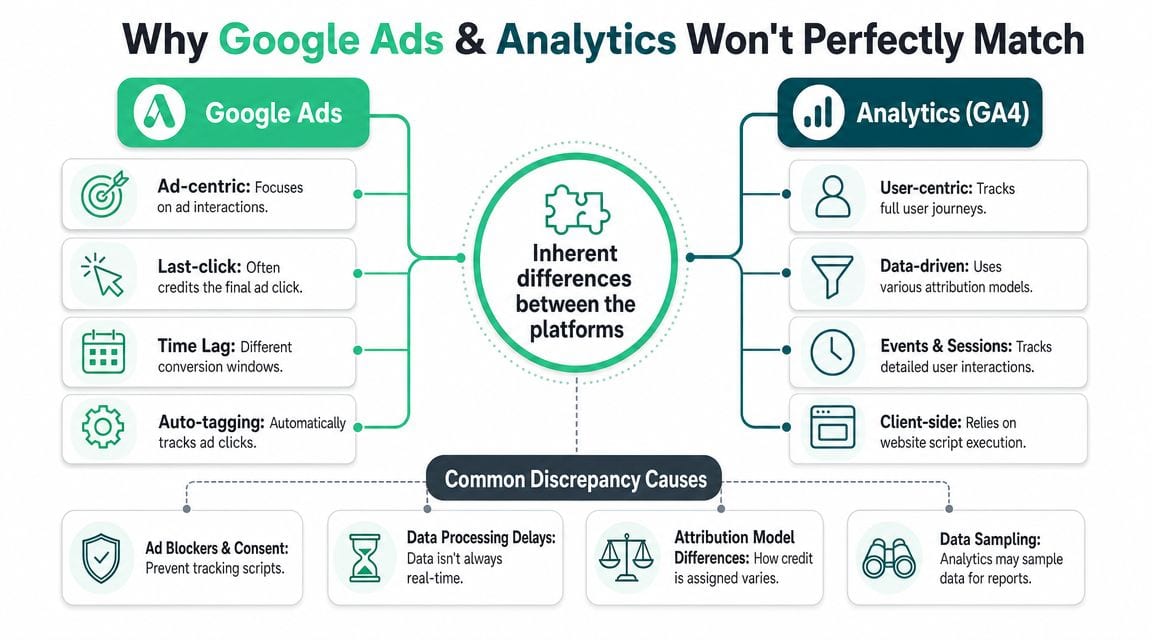
Google Ads and GA4 were built for different jobs. Google Ads is designed to tie outcomes back to ad interactions so bidding and campaign optimization can work. GA4 is designed to record user behavior across sessions, events, devices, and channels. Even with careful setup, those design choices create differences.
Structural differences come first
Start with counting logic, because it explains a surprising share of mismatches without touching attribution. Google Ads can count every conversion or one conversion per ad click, depending on how the action is configured. GA4 records events under its own event and session logic, and those rules do not map cleanly to Google Ads in every case.
A simple example makes this clear. A user clicks an ad, submits two lead forms, then returns later and completes another action. Google Ads may count those outcomes one way for bidding. GA4 may count the event occurrences another way in its reports. Both systems can be functioning correctly and still produce different totals.
This is why experienced analysts do not treat parity as the goal. They treat explainability as the goal.
Attribution adds a second source of mismatch
Once counting rules are understood, check attribution. If one platform is using ad-centric credit and the other is distributing credit across a broader path, the totals and channel contribution will differ even when the raw event collection is clean.
Trackingplan's guide to understanding GA4 attribution models is a useful reference here because it shows why two valid attribution models can answer different business questions. I usually check this before getting pulled into a tag audit, because attribution disagreements are often reporting disagreements in disguise.
Reporting dates create confusion fast
Date logic is another common trap. Google Ads often reports conversions based on the ad interaction context, while GA4 reports around when the event was recorded in analytics. Compare the same calendar window in both tools without adjusting for that difference, and the gap can look worse than it is.
Short date ranges make this more obvious. Same-day or yesterday-versus-yesterday checks are often the least stable comparison, especially if you are reviewing recent clicks, delayed conversions, or imported events.
Privacy, identity, and platform behavior also matter
Some differences come from conditions neither platform can fully normalize. Consent settings can suppress analytics collection on part of the journey. Cross-device behavior can make user stitching uneven. Ad blockers and browser restrictions can affect analytics visibility differently from ad platform reporting. Imported offline conversions add another layer because the conversion exists in one reporting chain before it appears in another.
These are not edge cases anymore. They are part of normal measurement operations.
Set a tolerance band, then debug in order
The practical approach is to define what level of variance your team accepts, then investigate only when the gap exceeds that range or changes suddenly. That keeps analysts out of endless reconciliation work and pushes attention toward the discrepancies that can change decisions.
For smaller teams, providers offering Google Ads solutions for small businesses often simplify this well. They use one source for optimization decisions and a separate reconciliation view for analytics or finance. That is a healthier model than forcing every dashboard to match line for line.
A useful rule is simple: if the discrepancy is stable and understood, document it. If it grows, shifts abruptly, or affects bidding and budget decisions, start debugging from the easiest implementation checks and work upward. That order matters more than chasing a perfect match that the platforms were never built to deliver.
A Prioritized Checklist for Debugging Discrepancies
When the gap is larger than your normal tolerance, don't start with attribution debates. Start with the parts most likely to be broken and easiest to verify.
That means implementation first, configuration second, environment third.

Phase one tagging checks
Before touching reports, open your browser tools and validate the actual conversion path. Use Google Tag Assistant, GTM Preview mode, browser network inspection, and your site's thank-you or confirmation flow.
Start with these checks:
Confirm the conversion fires once
Refresh the confirmation page. Retry the flow. Trigger the event again through the actual user path. If the Google Ads conversion or GA4 event fires more than once per intended action, inflated totals are likely coming from duplicate firing.Verify the trigger conditions
A common issue is a trigger that relies on a broad page rule instead of a true success condition. For forms, that can mean firing on button click rather than successful submission. For purchases, it can mean firing on page load instead of a confirmed order state.Check parameter quality
For purchase events, inspect transaction ID, value, currency, and item-level details if relevant. Missing or unstable transaction IDs make deduplication harder. Inconsistent values can produce a mismatch between platforms even when counts are close.Look for duplicate containers or hardcoded tags
I still see sites where a Google Ads tag exists in GTM and also directly in the site template. That creates inflated counts that don't look obvious until someone traces the network requests.
If you need a practical reference for implementation failures, Trackingplan's guide on Google Ads conversion tracking not working is a useful checklist for the first pass.
A short triage table
| Check | What to inspect | Why it matters |
|---|---|---|
| Single firing | Thank-you page reload, repeated submit attempts | Duplicate conversions inflate Ads or GA4 |
| Correct trigger | Successful submit or confirmed order state | Prevents counting failed or partial actions |
| Stable identifiers | Transaction ID or lead ID | Helps deduplication and reconciliation |
| Tag duplication | GTM plus hardcoded scripts | Causes silent overcounting |
Phase two platform configuration checks
Once firing behavior looks clean, move into settings inside Google Ads and GA4.
Many teams find the actual source of conversion discrepancies Google Ads reports.
Counting setting in Google Ads
Check whether the conversion action is set to count every conversion or one conversion. For purchase actions, “every” is often valid. For lead forms, “one” is usually more appropriate. A mismatch here can create a totally expected gap against GA4 or CRM counts.Primary versus secondary actions
Make sure the conversion action you're reviewing is the one used for bidding and reporting. Teams often compare a primary imported action in Ads with a different event name in GA4.Imported GA4 event setup
If Google Ads imports a GA4 conversion, confirm the event is marked as a conversion in GA4, named consistently, and not duplicated by another imported action.Window alignment
Compare click-through windows and any imported settings that affect eligibility. If one platform includes a broader path than another, totals will separate quickly.
Field note: When counts are off, I trust the event path before I trust the reporting interface. Tags tell you what happened. Reports tell you how the platform interpreted it.
Phase three journey and environment checks
If tagging and settings look clean, the problem usually lives in the user journey or collection environment.
This phase takes longer because the issue may only affect certain browsers, domains, or consent states.
Cross-domain breaks
Lead forms, payment gateways, booking engines, and embedded checkouts often move users across domains or subdomains. If linker parameters fail or the session breaks, GA4 may lose continuity while Google Ads still attributes differently.
Inspect the full path:
- Landing domain to form domain
- Main site to checkout
- Subdomain hops
- Third-party scheduling or payment tools
A discrepancy that appears only on one conversion type often points here.
URL parameter loss
Some redirects, link shorteners, and CMS rules strip query parameters. If ad click identifiers don't survive the landing flow, attribution weakens quickly. This is especially common after landing page redesigns, routing changes, or consent middleware adjustments.
Consent and script suppression
Cookie banners and consent platforms can block or delay analytics and advertising tags. That doesn't always create a visible implementation error. The page may load fine, but the tag never gets permission to run.
Manual checks often fail in these scenarios. A tester with full consent accepted won't reproduce what a real user experiences under partial or denied consent.
Browser and device specific issues
Segment by device and browser when the gap doesn't show up everywhere. Mobile Safari behavior, in-app browsers, and aggressive privacy environments frequently reveal collection gaps that don't appear on desktop Chrome.
What to document while debugging
Don't investigate from memory. Keep a simple issue log with:
- Date the mismatch began
- Which conversion action is affected
- Whether the gap is inflation or suppression
- Browsers, devices, or landing pages involved
- Any site releases, GTM publishes, CMP changes, or redirect changes around that time
That log turns random troubleshooting into a repeatable audit trail. It also helps when you need to show engineering exactly what changed and when.
Reconciliation Workflows in Action
Checklists are useful, but the process becomes clearer when you run it against common situations. Two patterns show up repeatedly: the e-commerce purchase mismatch and the B2B lead form mismatch.

E-commerce purchase mismatch
A retailer sees more purchases in Google Ads than in GA4. The instinct is to blame attribution, but the first pass should stay operational.
Start on the order confirmation page with Tag Assistant and network inspection. Check whether the Google Ads purchase conversion fires once and whether the GA4 purchase event also fires once. Then inspect whether the transaction ID is present and stable.
After that, compare the path by segment:
Device split
If the discrepancy is concentrated on mobile, browser privacy or checkout flow issues are likely involved.Checkout path
If the site uses a separate payment domain, confirm cross-domain tracking survives through payment and back to confirmation.Import logic
If Ads uses imported GA4 purchases plus a direct Ads tag, verify you're not comparing one system against a mixed setup with overlapping actions.
A practical validation framework helps here. Trackingplan's article on conversion tracking validation is a good reference when you want to test the event path systematically instead of spot-checking random sessions.
If a purchase discrepancy appears suddenly after a checkout update, inspect the journey before touching attribution settings. Front-end releases break measurement more often than attribution models do.
B2B lead form mismatch
Lead gen problems look different because success conditions are usually less stable than purchases. Forms can submit partially, redirect inconsistently, or rely on JavaScript events that fail without warning.
A standard workflow looks like this:
| Step | What to check | Common finding |
|---|---|---|
| Trigger review | GTM event or form success state | Trigger tied to click instead of successful submit |
| Confirmation path | Redirect or thank-you message | Conversion event fires before backend acceptance |
| Hosted form domain | Marketing automation or subdomain | Cross-domain attribution breaks |
| Imported event mapping | GA4 conversion imported into Ads | Wrong event imported or duplicate import |
For B2B, I pay close attention to hosted forms. If a form lives on a marketing automation subdomain or embedded iframe, the path can break in ways that are invisible in high-level reports. The user sees a successful submission, but GA4 loses continuity or the ad identifier never survives the handoff.
Another frequent issue is counting multiple lead-quality states as one action. Marketing may report “form submitted,” sales may report “qualified lead,” and Google Ads may optimize on the first event available. Those aren't interchangeable. If you compare them directly, the discrepancy looks technical when it's in reality definitional.
The repeatable pattern
In both examples, the winning workflow is the same:
- Validate the event path.
- Confirm the conversion action definition.
- Inspect imports and duplicate actions.
- Segment by device, browser, and path.
- Only then interpret the remaining gap as expected platform variance.
That order saves time because it removes the obvious implementation failures before you spend effort on more abstract explanations.
From Reactive Fixes to Proactive Prevention
A familiar pattern plays out after enough discrepancy investigations. The team finds the bug, patches the tag, confirms that counts look normal again, and moves on. Two weeks later, a different template drops a parameter, consent suppresses one destination in one market, or a GTM change duplicates an event. The problem is no longer diagnosis. The problem is relying on diagnosis as the operating model.
Google Ads adds another layer because some reporting differences come from platform filtering, attribution settings, and reporting columns rather than a broken implementation. Google documents that invalid activity can be filtered from conversion reporting, and some conversion types are excluded from default views unless you include them in the reporting setup. Those are legitimate differences, but they also make spreadsheet-based checks slower and less reliable because the analyst has to separate expected platform behavior from actual tracking loss by hand.
Good prevention starts with governance
Prevention starts with controls that make change visible.
- A living tracking plan with each event, owner, trigger, parameter set, and destination documented
- A release checklist that covers site changes, GTM publishes, CMP changes, checkout edits, and form updates
- A naming standard for UTMs, events, and conversion actions so teams do not create reporting drift through inconsistent labels
- A primary optimization source plus a separate reconciliation view, so teams do not switch definitions mid-analysis
These controls do not stop every issue. They do cut the time to isolate one. When a discrepancy appears, the first question becomes “what changed?” instead of “what are we even supposed to be tracking?”
Observability is the practical next step
Governance helps before release. Observability helps after release.
Many breakages are quiet. A purchase value disappears on one page type. A form event keeps firing, but one destination stops receiving a required parameter. Consent rules suppress tags only in a specific region. Client-side and server-side streams drift apart after a deployment. Standard QA misses these cases because the implementation still looks fine in a few manual tests.
An automated monitoring layer solves a different problem than reporting does. It checks whether the collection logic, schemas, destinations, and consent behavior still match the intended setup. That is a better early-warning system than waiting for someone to notice a dashboard mismatch days later.
Trackingplan is one example of that workflow. It monitors tags, pixels, events, schemas, destination behavior, consent-related issues, and traffic anomalies across analytics and ad platforms. For the broader operating model, this guide to automated marketing observability shows how teams put that into practice.
To make the concept more concrete, this video from Trackingplan's YouTube channel is worth watching:
What proactive teams do differently
Teams with a prevention mindset do not start with report comparison. They monitor the instrumentation itself, review changes as they happen, and keep a record of what shifted before the discrepancy reaches the weekly dashboard.
That gives them faster answers to the questions that usually slow everyone down:
- Is the gap caused by attribution settings or collection loss?
- Did a recent release change the event schema or parameter set?
- Did consent behavior change by region or device class?
- Is one destination receiving data that another destination missed?
My rule is simple. If investigation starts only after a stakeholder spots a mismatch in a report, the team is already behind.
The value here is not convenience. It is shorter time to detection, shorter time to root cause, and fewer hours wasted reconciling numbers that should have been validated at the collection layer first.
Achieving True Confidence in Your Marketing Data
Reliable conversion reporting doesn't come from chasing perfect parity. It comes from knowing which differences are expected, which are dangerous, and how to isolate the cause quickly.
That starts with accepting a basic truth. Google Ads and GA4 won't match exactly because they don't measure the world the same way. Once that's clear, the work gets more practical. You stop asking for identical totals and start asking better questions about counting logic, conversion definitions, imports, consent behavior, and journey continuity.
A strong debugging process follows a clear order. Validate the tag path. Review platform settings. Inspect the user journey across domains, devices, and consent states. Keep notes on when the issue began and what changed around that time. That discipline prevents teams from overcomplicating straightforward implementation problems.
The next level is prevention. Manual investigations will always matter, but they shouldn't be your first line of defense. Governance, release controls, and observability reduce the number of surprises and shorten the time to diagnosis when something breaks.
When teams get this right, the outcome is bigger than cleaner reporting. Budget decisions get easier. Campaign optimization gets sharper. Conversations with stakeholders get less defensive and more useful. You don't need to promise perfect alignment across every platform. You need a system that makes discrepancies understandable, measurable, and manageable.
If your team is tired of finding tracking issues only after dashboards drift, Trackingplan is worth evaluating. It helps analysts, marketers, and developers monitor analytics and ad-tracking implementations continuously, so broken tags, schema mismatches, consent-related losses, and destination discrepancies surface earlier instead of turning into reporting fire drills.