
A tag gateway is the lighter cousin of server-side tracking: the tags still run in the browser, but their requests go through your own domain first. This guide covers what that changes and what it does not.
Think of a Google Tag Gateway as a kind of digital bouncer for your website's data. It’s not a specific product you can buy, but rather a strategic architecture for managing data on a server you control. This approach marks a big change from how websites have traditionally handled analytics and marketing data.
The Growing Shift to Web Analytics Gateways
In this setup, every data collection request from a user’s browser goes to one secure server first—your gateway. This server acts as a middleman, inspecting, cleaning, and then forwarding the data to its final destinations, like Google Analytics or Facebook. It’s a complete departure from the old client-side method, where dozens of tags would fire off directly from a user's browser.
That traditional approach was a recipe for slow-loading pages and serious privacy gaps. Now, moving to a gateway model is becoming less of a choice and more of a necessity. This shift is being pushed by major industry-wide changes that demand a more controlled and secure data pipeline.
Why This Transition Is Happening Now
The web analytics landscape is in the middle of a massive shake-up, making server-side solutions more important than ever. A few key factors are driving this change:
- Tougher Privacy Laws: Regulations like GDPR and features such as Google's Consent Mode v2 demand strict governance over what data gets collected and where it goes. A gateway gives you a central point of control to enforce these rules.
- The End of Third-Party Cookies: As browsers phase out third-party cookies, tracking users across different sites is getting much harder. A gateway operating in a first-party context is a huge help in maintaining data accuracy.
- The Need for Speed: Website performance is non-negotiable. Funneling dozens of tracking scripts through a single server-side request dramatically improves site speed and the overall user experience.
This move toward a gateway is directly tied to the tools marketers depend on every day. Take Google Tag Manager (GTM), which holds a massive 99.7% market share among websites using a tag management system. It powers 46.4% of all websites globally, making it the command center for deploying tracking tags. But with this dominance comes chaos; the average top marketing site is firing 12 different tags, and misconfigurations are everywhere, causing broken pixels and bad data. Read more about the technology's market share and find additional statistics.
A Google Tag Gateway helps tame this complexity. It centralizes control, allowing you to manage the flow of data from a single point, reducing the chaos of client-side tagging and creating a more reliable system.
This section lays the groundwork for understanding how the analytics ecosystem is evolving. By adopting a gateway approach, you can build a data foundation that is not only faster and more reliable but also ready for the privacy-first future of the web.
How a Google Tag Gateway Works
To get a grip on how a Google Tag Gateway works, think of it like a busy restaurant. The old way of doing things—client-side tagging—was like letting every single customer run directly to the kitchen's suppliers to place their order. It's pure chaos, slow, and creates a massive traffic jam.
With a server-side gateway, the whole operation is much more orderly. The waiter (the user's browser) takes a single, neat order and gives it to the head chef (your tagging server). The chef then takes care of all the communication with the different suppliers (your analytics and marketing vendors) on the customer's behalf.
This "chef" is the heart of the Google Tag Gateway. It's a server that acts as a central proxy, catching all the data before it ever gets sent out to third-party tools. Let's break down the main pieces of this modern architecture.
The Core Components of the Gateway
A server-side tagging setup has a few key parts working in concert. Knowing their roles makes it much easier to see how data flows from a user’s browser all the way to your analytics dashboards.
- The Client: This is just the user's web browser or mobile app. In a gateway setup, the client’s only job is to fire off a single, lightweight data request to your own server.
- The Tagging Server: This is the "gateway" itself. It's a server environment that you control, usually built with a Google Tag Manager server container and hosted on a platform like Google Cloud. This server is where the data stream is received, processed, and then sent out.
- The Endpoints: These are the final destinations for your data—think Google Analytics 4, Facebook's Conversion API (CAPI), or your CRM. The tagging server is responsible for sending perfectly tailored data payloads to each one.
This diagram gives a high-level view of how this tag management process flows.
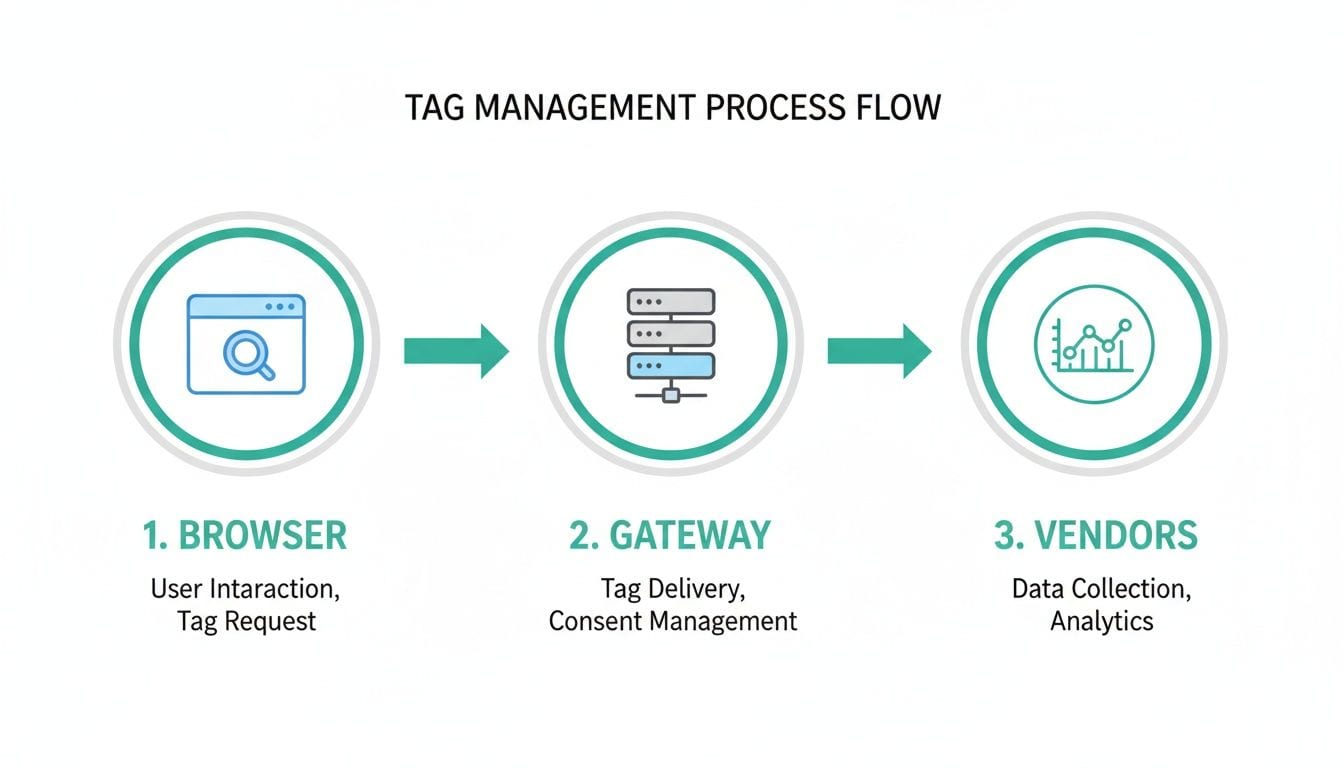
As you can see, instead of the browser making separate calls to every vendor, it just sends one request to the gateway. The gateway then takes over all the downstream communication.
The Data Flow Explained
The journey of a single data point through the gateway is a clear, multi-step process. It all starts when an event happens on your site, like a button click or a page view. The client-side GTM container bundles this information into a single HTTP request and sends it to your unique tagging server URL.
Once that request hits your Google Tag Gateway, the server-side GTM container takes over. This is where you can configure it to inspect, change, enrich, or even redact the incoming data. For instance, you could remove a user's IP address or add product margin details from an internal database before forwarding the event.
Finally, the gateway sends the clean, enriched data to your chosen vendors through their server-to-server APIs. This approach is far more reliable and less vulnerable to browser privacy tools and ad blockers, which means you end up with much more accurate data.
Key Takeaway: The term "Google Tag Gateway" is a functional name for a server-side proxy you build and control. It’s not an out-of-the-box product but a strategic architecture implemented using tools like a GTM server container.
While this setup gives you tremendous control, it also concentrates risk. By 2026, over 34 million+ sites will send data through GTM. The average top marketing website already juggles 12 tracking tags, which dramatically increases the odds of errors like missing events or PII leaks. With Google's tools capturing between 75% and 81.4% of the web analytics market, even tiny tagging glitches can have a huge impact on campaign ROI, making continuous monitoring an absolute necessity. You can read the full research about tag manager technology usage to see just how this dominance affects the industry.
The Core Benefits of Using a Tag Gateway
So, why go through the trouble of setting up a Google Tag Gateway? It all comes down to getting real, measurable wins in privacy, performance, and data accuracy. Moving to this server-side setup completely changes how your website talks to third-party tools, giving you a level of control that just wasn't possible before. It’s a direct answer to the biggest headaches of traditional client-side tagging.
For any business running online, these aren't just technical details—they have a real impact on user trust and your bottom line. Let's dig into the three main advantages you get by putting a tag gateway in place.

Greater Data Privacy and Control
Think of your gateway as a private security checkpoint for every piece of analytics data that leaves your site. With client-side tagging, data zips straight from a user's browser to vendors like Google and Facebook, leaving you with almost no say in what gets sent. A Google Tag Gateway flips that script entirely, putting you back in the driver's seat.
Before any information is passed along, you get the chance to inspect it, change it, or even stop it from going any further. This is a game-changer for modern data governance and staying compliant with privacy laws.
A gateway architecture empowers you to proactively manage data privacy. You can redact sensitive Personally Identifiable Information (PII), hash user email addresses, or remove location data before it ever reaches a third-party server.
This centralized control makes it far simpler to enforce your company’s data policies and respect user consent. Instead of juggling privacy rules across dozens of individual tags, you set them once at the gateway. That ensures they're applied consistently for every single vendor.
A Major Boost in Website Performance
Website speed isn't just a vanity metric; it directly ties to user experience and how many people actually convert. Traditional client-side tagging is a well-known performance killer. Each new tag adds another JavaScript file the user's browser has to download, process, and run.
A Google Tag Gateway gets around this by bundling all those requests into one. The browser makes a single, lightweight request to your own server instead of juggling a dozen connections to different vendor domains. From there, your server does the heavy lifting, talking to all the downstream analytics and marketing platforms.
The effect on page load times can be massive. For an e-commerce site, a checkout page that loads even a fraction of a second faster can lead to a real increase in sales. A study by Google found that a one-second delay in mobile page load can slash conversion rates by up to 20%.
- Before Gateway: Multiple, slow script requests from the browser to various vendors.
- After Gateway: One fast, clean request from the browser to your server.
This streamlined process takes the load off the user's device and network, creating a much smoother and quicker experience for everyone who visits your site.
Higher Data Accuracy and Resilience
One of the biggest hurdles in digital analytics right now is the data that gets lost to ad blockers and browser privacy features like Intelligent Tracking Prevention (ITP). These tools are designed to block requests to known tracking domains, which means a huge chunk of your analytics data might never even be collected.
Because a Google Tag Gateway runs on your own domain (in a first-party context), it's much more resistant to these blockers. The initial request from the browser to your server looks like normal website traffic, so it usually gets a pass.
This lets you capture a ton of data that would otherwise have vanished into thin air. The benefits of this improved data signal are clear:
- More Reliable Conversion Tracking: You get a more accurate view of which campaigns are actually driving sales.
- Clearer Attribution Insights: It becomes much easier to connect the dots in the full customer journey.
- Improved Audience Building: Better data means you can create much more precise user segments for retargeting.
By minimizing this signal loss, you're ensuring the data you use for decision-making is as complete and accurate as possible. That means smarter marketing spend and a much truer picture of how users behave on your site.
The business case for a tag gateway
Beyond the technical setup, the real question is simple: what does a Google Tag Gateway actually do for your business? Think of this not as just another IT project, but as a direct investment in your marketing results and business intelligence. It’s about restoring confidence in your GA4 and Google Ads reports so you can make decisions that count.
The core value is its ability to reclaim data signals that would otherwise vanish. By routing tracking requests through your own domain, they are no longer seen as third-party calls by browsers and ad blockers. This one change makes a huge difference in your data quality, which in turn fuels smarter bidding and more reliable performance analysis.
Quantifying the Impact on Your Data
This isn't just a theoretical gain; the results are measurable. Businesses putting this tracking method into practice are seeing an average 11% uplift in signals compared to their old third-party tracking setups. That improvement directly translates into more valuable insights for analysts and marketers. You can take a closer look at these findings and understand the full scope of what the Google Tag Gateway offers.
Having a more complete dataset creates a ripple effect that touches both your strategy and your revenue:
- Smarter Bidding in Google Ads: Automated bidding strategies like Target CPA or Target ROAS depend entirely on the quality of your conversion data. When you feed them more complete data, the algorithms make better choices, optimizing your ad spend for real results—not just the conversions that happened to make it past the blockers.
- Improved Conversion Modeling: Even with first-party data, some signals will inevitably be lost. A richer dataset, however, gives Google’s models a much stronger foundation to accurately fill in the gaps, painting a clearer picture of campaign performance when direct measurement isn’t possible.
- Trustworthy GA4 Reports: When your analytics reports are missing big chunks of data, every decision is a gamble based on an incomplete story. Boosting your signal volume restores trust in your reports, giving your team the confidence to make data-driven moves.
A More Resilient Marketing Funnel
Ultimately, implementing a Google Tag Gateway fortifies your entire marketing measurement system. For marketers and agencies, it makes demonstrating ROI to clients and stakeholders much more straightforward. The connection becomes crystal clear: a more complete dataset from the gateway leads to better decisions, which drives higher revenue and more reliable insights.
Think of it as patching the leaks in your data pipeline. Each recovered signal—every click, conversion, and user interaction that was previously lost—contributes to a more accurate and powerful analytics foundation, making your marketing efforts more efficient and effective.
Gateway vs. Server-Side GTM: Clearing Up the Confusion
It’s easy to get tangled in the terminology here, so let’s clear up a common point of confusion. "Google Tag Gateway" is not a separate product you can buy from Google. Think of it as a functional description—a strategic role that a server plays in your data architecture.
The tool most commonly used to build this gateway is the server container in Google Tag Manager (GTM). When people talk about a Google Tag Gateway, they're describing the server-side proxy that intercepts, processes, and routes data. While the gateway concept is technically tool-agnostic, GTM's server-side environment has become the go-to solution.
This is why the terms are often used interchangeably. But knowing the distinction is key: you’re not buying a "gateway"; you're building one using server-side GTM (sGTM).
A Practical Comparison
To make this distinction crystal clear, let’s compare how a traditional client-side GTM setup stacks up against a server-side gateway built with GTM. Seeing them side-by-side highlights the fundamental differences in how each approach manages data flow, performance, privacy, and cost.
The table below breaks down the practical differences you'll encounter when deciding which setup is right for your business.
Tagging Approaches: Client-Side vs. Server-Side Gateway
This comparison highlights how a traditional client-side GTM setup differs from a server-side Google Tag Gateway implementation across key operational areas.
As you can see, the gateway approach fundamentally changes how you control and manage your data, offering major upgrades in performance and privacy.
The Rise of the Hybrid Model
Understanding this comparison helps you see that a Google Tag Gateway isn't about completely replacing your entire tagging strategy. Instead, it’s a powerful evolution. Many businesses now operate a hybrid model, which is often the most effective approach.
In a hybrid setup, the client-side GTM container doesn't disappear. Its role simply changes. Instead of managing dozens of vendor tags, it's simplified to do one thing very well: send a clean, consolidated data stream to the server-side gateway.
The server container then takes on the heavy lifting. It receives that single stream and intelligently distributes the data to all your different analytics and advertising platforms.
This method gives you the best of both worlds—the flexibility of client-side event collection and the robust control and performance of a server-side gateway. For a deeper dive, explore our comprehensive server-side tag guide for 2026, which covers how to maximize data accuracy and ad performance.
Why Automated QA for Your Gateway Is Essential
A Google Tag Gateway gives you impressive control over your data flow, but it also creates a new, critical layer where things can quietly break. Just because data makes it into your gateway doesn't mean it's coming out correctly. This is where automated Quality Assurance (QA) becomes non-negotiable.
Think of implementing a server-side gateway as building a high-tech central sorting facility for your data packages. While it streamlines everything, it also becomes a single point of failure where one tiny mistake can cause a massive pile-up. Problems can pop up silently inside your server container, corrupting your analytics without any obvious red flags.
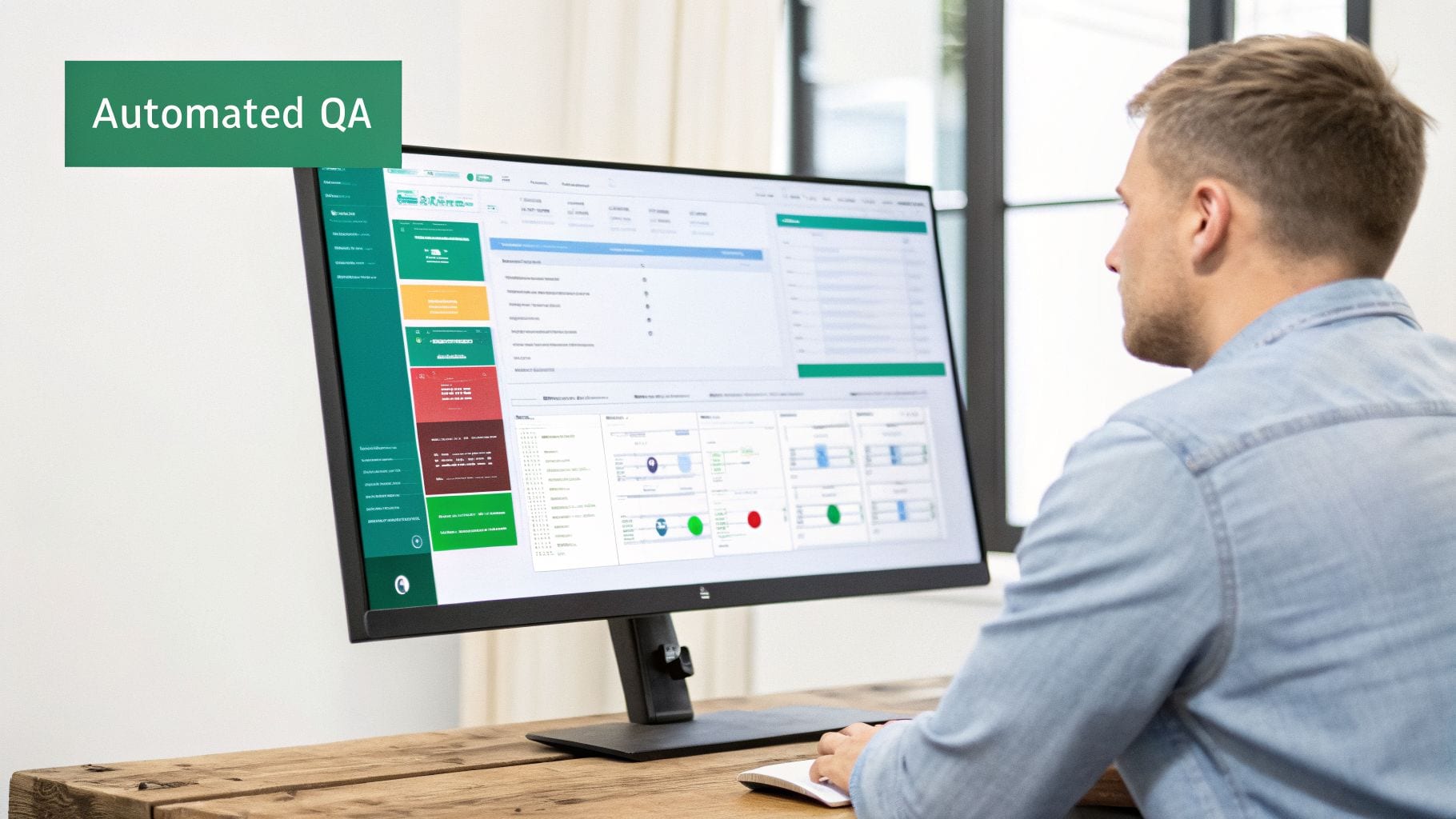
Manual spot-checks and periodic audits just aren't enough to catch every potential issue. Data is flowing constantly, and a small code deployment or a simple change in a vendor’s API can break your entire setup in an instant.
The Hidden Risks Within Your Gateway
Without continuous monitoring, your Google Tag Gateway can quickly turn into a black box. You have visibility into the data coming in, and you see what eventually lands in your analytics tools, but you’re completely blind to what happens in between.
Several types of silent errors can crop up in this layer:
- Schema Mismatches: Your server might receive an event with the property
product_idbut be configured to look foritem_id. The event gets forwarded, but without the crucial product detail, completely skewing your sales reports. - Broken Data Transformations: You might have logic set up to hash user emails for privacy. If that logic fails, you could either send plaintext PII straight to a vendor—a huge compliance breach—or send a garbled value that breaks user matching.
- Failed Event Forwarding: A specific tag inside your server container could fail to fire because of a misconfigured trigger. Your primary analytics might look fine, but your advertising platforms suddenly stop receiving conversion data, silently tanking your campaign performance.
These issues are subtle and often go unnoticed until someone on the marketing or analytics team flags a report that just looks "wrong." By then, you could have weeks of bad data poisoning your dashboards and business decisions.
Creating a Safety Net with Observability
This is where a dedicated observability platform like Trackingplan provides an essential safety net. It’s built to give you complete visibility across your entire data pipeline, turning your gateway from a black box into a transparent, fully monitored system. The platform basically acts as an automated QA engineer that never sleeps.
An observability tool automatically maps your entire data flow—from the browser's dataLayer, through the Google Tag Gateway, and out to every destination like GA4, an ad platform, or a CRM.
This end-to-end view is what makes the difference. It lets you see not just that an event fired, but that it was correctly formatted, transformed, and successfully received by every intended endpoint. Trackingplan installs in minutes and starts providing value right away by discovering and validating your analytics in real time.
This constant monitoring is especially critical given how concentrated the tools are in the market. Research shows that among top marketing sites, 41.4% route data through a GTM-based gateway, with a staggering 94.9% of them using Google Analytics. This heavy dependency means tagging errors can cascade through your whole stack, from inconsistent UTMs to broken pixels, impacting workflows everywhere. Discover more insights about Google Analytics' market dominance.
From Reactive Fixes to Proactive Alerts
With an automated QA solution, you shift from a reactive to a proactive posture. Instead of waiting for broken dashboards to tell you there’s a problem, you get real-time alerts the moment an issue occurs. For anyone responsible for data integrity, understanding why quality assurance is so important in digital analytics is the first step toward building a reliable system.
Automated alerts cover critical failure points, including:
- Rogue Events: Get notified if unexpected or undefined events start showing up, which often points to a tracking implementation error.
- PII Leaks: Receive immediate warnings if sensitive data like emails or names are detected in payloads, helping you stop serious privacy breaches before they happen.
- Broken Pixels: Know instantly if your Facebook, TikTok, or other ad pixels stop firing from the server, protecting your ad spend from being wasted on untracked campaigns.
By pairing your Google Tag Gateway with automated observability, you ensure the data leaving your server is always accurate, compliant, and trustworthy. This creates a single source of truth that empowers your entire organization to make decisions with confidence.
Future-Proofing Your Analytics Strategy
When you pull it all together, adopting a Google Tag Gateway isn't just a smart move for the future—it's a foundational piece for any serious analytics strategy today. As the digital ecosystem shifts toward a cookieless, privacy-first model, this kind of server-side architecture becomes the bedrock of trustworthy data collection.
Just setting up a gateway is only the first step. Its real power is unlocked when you have a system in place to constantly monitor and verify the data flowing through it. Without that critical oversight, even the most advanced server-side setup can become a pipeline for bad data, completely undermining the trust you were trying to build.
From Fragile to Resilient Analytics
The end goal here is to transform your analytics from a fragile, error-prone system into a resilient, trustworthy engine that fuels business growth. A Google Tag Gateway gives you the right structure, but it doesn’t automatically guarantee data quality on its own. Events can still be malformed, transformations can fail, and crucial campaign data can get lost on its way from your server to its final destinations.
The combination of a server-side gateway and automated QA creates a complete, closed-loop system. The gateway centralizes control, and the QA platform ensures that control translates into reliable, accurate data.
This powerful duo gives you the confidence to navigate the technical and regulatory changes that are constantly reshaping our industry. Instead of your teams scrambling to put out data fires, they can focus on driving results, armed with insights they know they can depend on.
The Single Source of Truth
By pairing your Google Tag Gateway with an automated QA and observability solution like Trackingplan, you establish a definitive single source of truth for your entire organization. This alignment is absolutely critical, making sure everyone—from marketing and product to development and data science—is working from the same reliable playbook.
- Marketing teams can finally trust their campaign attribution and ROAS metrics.
- Developers can deploy changes without the nagging fear of breaking analytics.
- Analysts can build dashboards knowing the underlying data is completely sound.
As you look to future-proof your analytics strategy, understanding and addressing common GA4 reporting issues becomes paramount, especially when integrating with advanced tag management solutions. An automated system validates data integrity all the way from the dataLayer to the final reports, catching inconsistencies that could otherwise poison your insights.
This integrated approach ensures your Google Tag Gateway doesn't just collect data—it delivers dependable business intelligence. It’s how you build a data culture founded on accuracy and trust, ready for whatever comes next.
Frequently Asked Questions
Moving into server-side tagging naturally brings up a lot of questions. We've gathered some of the most common ones about Google Tag Gateway to give you clear, straightforward answers.
Do I Need to Be a Developer to Set Up a Google Tag Gateway?
Not entirely, but you'll likely need one to get started. The initial server deployment on a cloud platform is a job for a developer. Once that's done, a lot of the day-to-day management inside the Google Tag Manager server container is built for technical marketers.
Thanks to pre-built templates in the community gallery, many common tasks are surprisingly simple. However, if you need to debug tricky issues or write custom logic from scratch, you'll probably need to loop in someone with technical chops. The difficulty really hinges on how custom your tracking setup needs to be.
What Does a Google Tag Gateway Cost to Run?
While Google Tag Manager is free, the server that runs your gateway is not. If you go with Google Cloud's App Engine, the free tier can often cover the needs of websites with lower traffic volumes.
For sites that see more action, costs are tied to the number of requests and can run anywhere from under a hundred to several hundred dollars per month. It's smart to keep a close eye on your cloud billing to stay on top of these operational costs.
Key Insight: Many organizations find the cost of running a Google Tag Gateway is easily justified by the gains in data accuracy and campaign performance. The data you reclaim often leads to much smarter ad spend and a higher ROI.
Can I Use My Existing Client-Side Tags with a Server-Side Gateway?
Yes, you can, and this hybrid approach is how most teams ease into server-side tagging. Your current client-side GTM container gets simplified to send just one consolidated data stream to your new server-side gateway.
From there, the gateway takes over. It processes that stream and fans the data out to your various analytics and marketing vendors. This method lets you migrate to a full server-side environment gradually, without having to rip and replace your entire setup at once.
How Does a Tag Gateway Help with GDPR and CCPA Compliance?
A Google Tag Gateway creates a central checkpoint for all your data before it ever reaches a third-party vendor. From a compliance perspective, this architecture is a game-changer.
It gives you a single place to inspect all incoming data, allowing you to automatically strip out or hash Personally Identifiable Information (PII) like emails and phone numbers. You can also manage consent rules centrally, ensuring data only goes to a vendor if a user has given explicit permission. This makes it far easier to honor privacy choices across your entire analytics stack.
Gain complete confidence in your data. Trackingplan provides a single source of truth by automatically monitoring your entire data flow—from the browser, through your Google Tag Gateway, and to every destination. Get real-time alerts on broken tracking, PII leaks, and schema errors before they corrupt your dashboards. Book your personalized demo today.