
When you need to check the reliability of a website, the process starts with a quick, 60-second gut check. First impressions matter. A professional design, speedy load times, and a seamless mobile experience are all early signs of credibility. On the other hand, an outdated look, slow performance, or glaring typos can be immediate red flags, telling you a site might not be worth your trust.
Your First Look at Website Reliability
That gut feeling you get the moment you land on a new website isn't just a hunch; it's your brain processing thousands of visual cues in an instant. Snap judgments about trustworthiness happen long before you read a single word. These initial impressions are your first line of defense when checking a website’s reliability.
A clean, modern design with intuitive navigation isn’t just about looking good. These are signals of investment and professionalism. A website is a digital storefront, and a sloppy, confusing layout suggests the business behind it might be just as disorganized—or worse, not legitimate at all.
The Power of First Impressions
Think about it: a staggering 75% of users admit to judging a company's credibility based purely on its website design. In a digital world with over a billion websites, that first look is everything. User behavior studies confirm this judgment is formed in as little as 0.05 seconds.
This rapid-fire assessment has very real consequences for any business. A visually engaging page can increase the time a visitor stays by 23%, while better navigation can slash bounce rates by 15%.
A website's design and performance are its digital handshake. A weak, slow, or sloppy handshake immediately erodes confidence and makes a user question if the entity behind it can be trusted with their time, data, or money.
Your 60-Second Reliability Scan
Before you get bogged down in the technical weeds, start with a quick scan. This initial once-over helps you spot the most obvious red flags and decide if a site is even worth a deeper look.
For a quick initial scan, use this checklist to get a first impression of a site’s reliability in under a minute.
Quick Website Reliability Checklist
This initial check is a powerful first filter. It helps you quickly separate the promising sites from the ones that don't deserve another second of your time.
If you want to dig a bit deeper into ownership right away, a WHOIS lookup can give you quick details on the domain registration. This first look moves you from a subjective feeling to an actionable evaluation, setting the stage for the more technical checks to come. For a more exhaustive approach, you can learn what is a site audit and how to perform one.
Investigating a Website's Security and Reputation
A polished design and fast load times are great, but they don't tell the whole story. The true marks of a website’s reliability are often invisible—the security measures humming along behind the scenes. When you really need to know if you can trust a site, investigating these hidden shields is non-negotiable.
Don't let a slick user interface lull you into a false sense of security. It can easily mask major vulnerabilities. It’s time to move from just looking at a site to actively investigating it. Think of yourself as a digital detective on the hunt for clues that prove a site is fundamentally sound.
The Padlock Is Just the Beginning
Your first and most basic check is the SSL/TLS certificate—the little padlock icon you see in the browser’s address bar. This confirms that any data moving between you and the website is encrypted. If a site doesn't have that padlock and uses "http://" instead of "https://," it's an immediate, major red flag.
Cybersecurity is the invisible foundation of website reliability, yet a surprising 35% of sites still don’t have basic SSL certificates. This is a huge risk, especially with cyberattacks surging 25% year-over-year. In fact, research across 7 million websites revealed the average site is hit with 94 attacks every single day.
The absence of HTTPS is no longer a minor oversight; it's a clear sign of neglect. In an environment where data breaches can cost businesses millions, basic encryption is the bare minimum for any site asking for your trust, time, or information.
But even when you see the padlock, you can dig deeper. Clicking on it reveals details about the certificate, like who issued it and its expiration date. This gives you another layer of confirmation that the site is actively maintaining its security protocols.
Unmasking a Website's Identity and History
A key part of sizing up a website is figuring out who owns it and how long it’s been around. Malicious actors love to use new, anonymously registered domains for their scams because they can be abandoned in a flash.
You can use a free WHOIS lookup tool to find this information. A WHOIS record gives you the dirt on the domain registrant, including when the domain was created, when it expires, and often the registrar's contact info.
Here’s what to look for in a WHOIS record:
- Domain Age: Was the domain registered just last week? While not always a bad sign, a brand-new domain for a supposedly "established" business should raise suspicion. Most legitimate businesses have domains that are several years old.
- Registrant Information: Is the owner's information public, or is it hidden behind a privacy service? Privacy services are common, but a total lack of transparency can be a red flag, especially for e-commerce or financial sites.
- Consistency: Does the registrant's name or country match the information on the website? Any mismatches here are a huge warning sign.
Scanning for Malware and Blacklists
Even a well-established site can get compromised. It's always a good idea to run a site through a free online tool to check if it's known for hosting malware or has landed on any blacklists.
Google Safe Browsing is an excellent place to start. You can check a site's current status to see if Google has flagged it as unsafe for visitors. A clean report from a service like this adds another strong layer of confidence.
For anyone who wants to take a more proactive approach to security, you can gain a deeper understanding of these measures by exploring What Is Penetration Testing?.
These background checks—verifying SSL, investigating the domain’s history, and scanning for malware—are the foundation of any thorough reliability assessment. They take your evaluation from a simple glance to a truly well-informed investigation.
Verifying Content Quality and Business Legitimacy
A slick website design is one thing, but a truly reliable site is backed by a real, accountable organization. While the technical checks we’ve covered are your first line of defense, the content on the site and the transparency of the business behind it are what ultimately prove its legitimacy. This is where you move beyond code and connect the digital front to a real-world entity.
Think about it: a legitimate business treats its website like a flagship store. You wouldn't expect to see spelling mistakes, broken English, or sloppy design in a high-end retail shop. The same standard applies online. Pervasive grammatical errors, awkward phrasing, and frequent typos are more than just minor slip-ups—they signal a lack of investment and professionalism.
Evaluating Content for Authority and Accuracy
High-quality content does more than just avoid errors; it demonstrates genuine expertise and is built on claims you can actually verify. When you're assessing a site’s content, you need to ask whether it provides real value or just pushes out generic, unsupported statements.
Look for these clear signs of authority:
- Author Information: Are articles written by named authors with clear credentials or biographies? A total lack of authorship is a huge red flag. It suggests no one is willing to stand behind the information.
- Cited Sources: Does the content link out to reputable, external sources to back up its claims? A trustworthy site isn’t afraid to show its work, proving a commitment to accuracy.
- Originality and Depth: Does the content offer a unique perspective, or is it just a cheap rewrite of what you can find on ten other sites? Reliable websites invest in creating original content that actually helps their audience.
Any site making bold claims without a shred of evidence should be handled with skepticism. For instance, a health site promising a miracle cure without a single link to a scientific study is highly suspect. The same goes for a financial blog offering "guaranteed" investment returns without providing data or clear risk disclaimers.
A website's content is its voice. If that voice is unclear, unprofessional, or makes promises it can't back up, it's a strong indicator that the business behind it may be just as unreliable. True expertise is shown through clarity, evidence, and accountability.
Connecting the Website to a Real-World Entity
It’s easy to build a convincing digital facade, but a legitimate business always leaves a verifiable trail. Your next move is to find tangible proof that a real, accountable organization is running the website. This means stepping away from the site itself to find off-site validation.
Start by looking for the essentials: the contact information. A reliable business wants customers to get in touch. Hunt for a dedicated "Contact Us" page that offers more than a simple web form.
A physical address is a powerful trust signal. You can pop it into an online map to see if it points to a legitimate commercial building or just an empty lot. A verifiable phone number is another good sign; a quick call can confirm if it’s a working business line or a dead end.
Seeking Authentic Social Proof and Third-Party Reviews
On-site testimonials are easy to fake and should always be taken with a grain of salt. To get a real feel for a company's reputation, you have to look for reviews on independent, third-party platforms.
Here’s a practical approach to get the real story:
- Check Independent Review Sites: Look up the company on platforms like Google Reviews, Trustpilot, or the Better Business Bureau (BBB). These sites have measures in place to verify reviews and filter out fakes.
- Analyze the Pattern of Reviews: Be wary of a profile that has nothing but glowing five-star reviews, especially if they were all posted around the same time and use similar, generic language. A healthy mix of positive and negative reviews often paints a more realistic and trustworthy picture.
- Review the Company's Responses: Pay close attention to how the business handles negative feedback. A professional, proactive response that tries to solve the customer's problem is a fantastic sign of a legitimate and customer-focused company.
This whole process—verifying content, confirming business details, and analyzing social proof—is how you get past a website’s surface-level appearance. It’s what gives you the confidence that you’re dealing with a real business, not just a digital illusion.
Confirming Data Integrity Through Analytics Validation
A website can look sharp, sail through security scans, and boast glowing reviews. But for marketers, analysts, and anyone making business decisions, it's only as reliable as the data it generates. A site with broken analytics is like a car with a faulty dashboard—you're driving blind, unsure of your speed, fuel, or if the engine is about to fail. This is why verifying a site's data integrity is a non-negotiable step in confirming its overall reliability.
You can get a quick look under the hood using the built-in developer tools in your browser. This gives you a direct view of whether the website's analytics are actually firing as expected. It's a fundamental check to ensure the data you base your decisions on is accurate.
A Manual Look at Analytics Tags
To get started, open your browser's developer tools. Just right-click anywhere on the page, select "Inspect," and then click the "Network" tab. With the panel open, reload the page, and you'll see a flood of requests the website is making.
In the filter or search box, type "google" or "analytics." Look for a request made to a platform like Google Analytics. A successful request, usually showing a status code of 200, confirms the main analytics tag is firing. If you see nothing, that's a huge red flag. The site might not be tracking user behavior at all.
This same method works for checking marketing and advertising pixels. You can search for requests to platforms like Facebook (often containing "connect.facebook.net") or other ad networks. If those pixels are missing or broken, it means your marketing campaigns aren't being tracked correctly, which throws a wrench in measuring performance and ROI.
Understanding the DataLayer
The dataLayer is a JavaScript object that serves as a vital middleman, passing information from your website to a tag management system like Google Tag Manager. It’s structured to hold critical details about user interactions, from product views and button clicks to form submissions.
You can inspect it by typing dataLayer into the "Console" tab of your developer tools. A healthy, well-structured dataLayer will display a clean list of events with clear, descriptive names and all the relevant parameters.
A website without a clean, functioning dataLayer is a sign of poor technical implementation. It suggests that even if analytics tags are firing, they may not be receiving the rich, contextual data needed for meaningful analysis, making the entire setup unreliable.
On an e-commerce site, for example, a click on the "Add to Cart" button should push an add_to_cart event to the dataLayer, complete with details like the product's name, price, and ID. If that event is missing, or the parameters are empty, your analytics platform won't record the action. This is exactly how you end up with inaccurate sales funnels and flawed business intelligence.
This infographic breaks down the core pillars of verifying website legitimacy, moving from content and business checks to the social proof that builds trust.
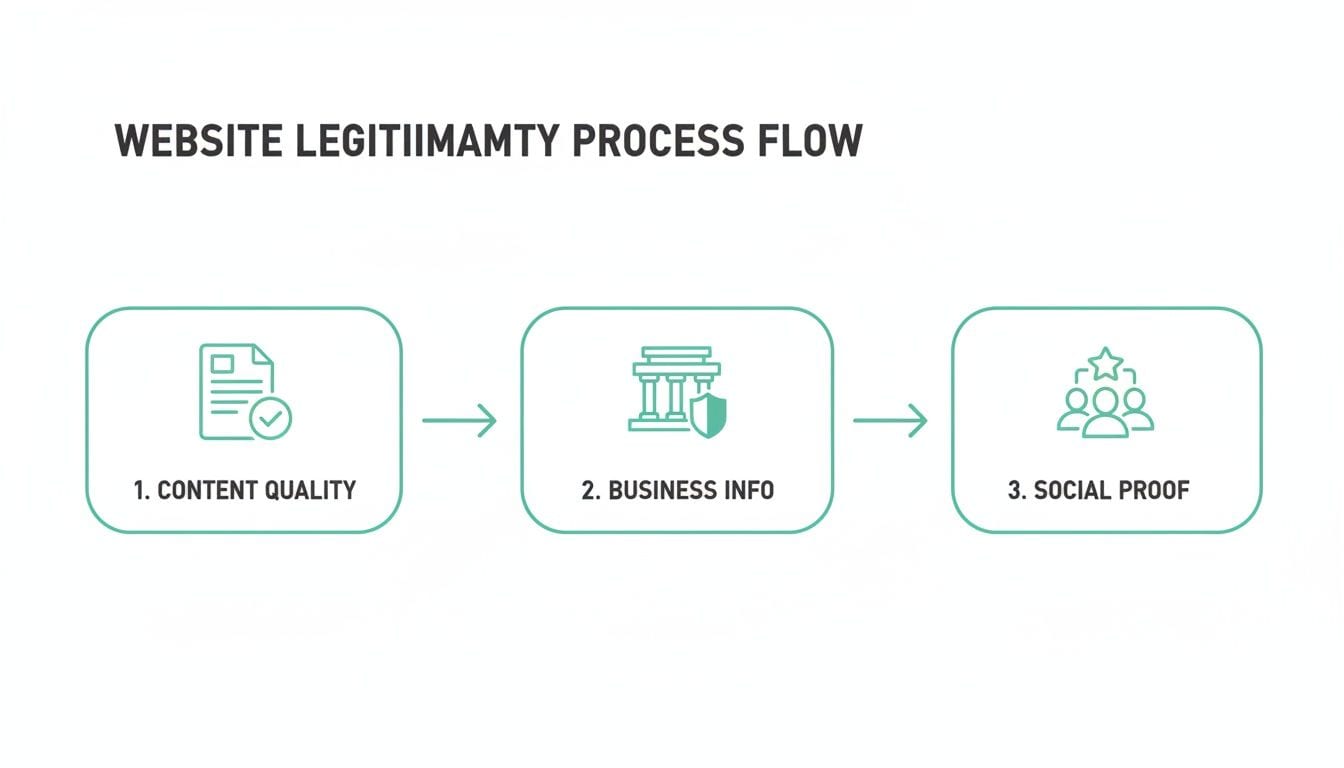
As the visualization shows, true reliability isn't a single checkmark but a multi-step process. Each layer of validation builds on the last, creating a complete picture of trustworthiness.
The Limits of Manual Checks and the Rise of Automation
Manual spot-checks are great for troubleshooting a specific problem, but they aren't a scalable solution for guaranteeing data integrity over time. A tag might work perfectly one day and break the next after a seemingly minor code update. It's simply impossible to manually check every event on every page, all the time.
This is where modern analytics observability platforms make a huge difference. Tools like Trackingplan automate this entire validation process. Instead of requiring you to manually dig through developer tools, these platforms work in the background, continuously monitoring your entire analytics implementation.
- Continuous Monitoring: They automatically discover all your analytics tags, pixels, and events across your entire site.
- Real-Time Alerts: If an event breaks, a property goes missing, or a new "rogue" tag appears out of nowhere, the platform immediately alerts your team via Slack or email.
- Compliance and Privacy: They can also detect potential Personally Identifiable Information (PII) leaks, where sensitive user data is accidentally sent to analytics tools, helping you stay compliant with regulations like GDPR.
By moving from reactive manual checks to proactive, automated monitoring, you can build confidence that the data flowing into your dashboards is always complete and accurate. You can learn more about this approach by exploring what is data observability in our dedicated guide. It ensures that every decision you make is built on a foundation of data you can actually trust.
Automating Reliability Checks for Continuous Trust
One-off manual checks give you a snapshot of a website’s health, but they can't guard against problems that surface tomorrow. A website is a living system; a new code deployment, a marketing campaign launch, or even a simple CMS update can break critical functionality without any warning.
To truly check the reliability of a website continuously, you need to shift from reactive spot-checks to a proactive, automated strategy. This is all about building continuous trust and ensuring the technical, business, and data foundations of your site stay solid 24/7—not just when you happen to be looking.
Think of it this way: manual checks are like a security guard patrolling a building once a day. Automation is a full-time surveillance system that never blinks.
From Fire-Fighting to Proactive Prevention
Here’s a scenario that happens all too often: your marketing team launches a major campaign, but a minor code update accidentally breaks your Facebook conversion pixel. The website looks fine and traffic is flowing, but for weeks, zero conversions are attributed to your ads.
The issue goes completely unnoticed until someone manually pulls a report and realizes the numbers are way off. By then, thousands of dollars in ad spend have gone down the drain. This reactive "fire-fighting" is both expensive and exhausting.
An analytics observability platform would have detected the missing pixel immediately after the deployment. An automated alert would have hit the marketing and development teams' Slack channel, flagging the exact problem in minutes, not weeks.
This is the real power of moving from a manual to an automated approach. It’s about catching issues the moment they appear, before they can do any real damage to your revenue, data, or user trust.
A Playbook for Automated Monitoring
Setting up automated checks is a team sport. It requires tight collaboration between marketing, development, and QA to build a system that covers every angle. Here’s a practical playbook for how these teams can create a sustainable monitoring process.
Marketing Team's Role:
- Define Critical User Journeys: Map out the most important paths users take, like signing up for a newsletter, adding an item to the cart, or completing a purchase. These are the flows that absolutely must work, no matter what.
- List Essential Pixels and Tags: Keep an up-to-date list of all marketing pixels (Facebook, LinkedIn, etc.) and analytics tags that are critical for campaign tracking and attribution.
- Set Campaign Tagging Rules: Establish clear UTM conventions for all campaigns. An automated system can then validate that incoming traffic follows these rules, which is key for clean marketing data.
Development & QA Team's Role:
- Implement an Observability Tool: Integrate a platform like Trackingplan. This typically involves adding a small script to your site, which takes just a few minutes to start discovering and monitoring your entire analytics setup automatically.
- Configure Alerts: Set up real-time alerts for critical failures. Route these directly to a shared channel like Slack or Microsoft Teams so both developers and marketers are notified instantly about issues like broken events or schema changes.
- Integrate with CI/CD Pipelines: For maximum protection, you can integrate automated checks directly into your deployment process. This can stop code that breaks tracking from ever being pushed to your live production environment.
This collaborative playbook ensures everyone has skin in the game when it comes to data quality and website reliability. It bridges the gap between technical implementation and business impact, creating a resilient system where trust isn't an afterthought—it's just part of how you operate.
Frequently Asked Questions About Website Reliability
As you get the hang of checking a website's reliability, you'll run into questions about how these methods work in the real world. This section covers the most common ones with clear, direct answers to help you evaluate any site with confidence.
What Is the Single Most Important Factor for Website Reliability?
If I had to pick just one, a secure HTTPS connection—that little padlock icon in your browser—is the absolute, non-negotiable starting point. A site without it is an immediate red flag. It fails the most basic security check.
But true reliability is more than just one thing. It's a mix of technical security, business transparency, content quality, and verifiable data integrity. A site can be technically secure but still publish misleading content or have broken analytics, making its data completely useless. A complete check that covers all these areas is the only way to be sure.
How Can I Check if a Website's Analytics Are Reliable?
You can start with a quick manual check using your browser's developer tools. Just open the "Network" tab, refresh the page, and filter for key analytics platforms like "google-analytics" or marketing pixels from "facebook." If you don't see those tags firing, the data isn't being collected.
For a more durable and scalable solution, you really need an analytics observability platform like Trackingplan. It automates the process, moving beyond simple spot-checks to continuously monitor your entire analytics setup.
A tool like this will instantly catch:
- Broken or missing user events.
- Schema changes or mismatched properties.
- Data gaps that are skewing your reports.
By flagging these issues in real-time, you can be confident that the data feeding your dashboards is always accurate and trustworthy.
Does a Professional Website Design Guarantee Reliability?
A professional design definitely makes a great first impression. In fact, studies show that 75% of users judge a site's credibility based on its aesthetics. A clean, modern look suggests the business has invested time and resources, which are good signs.
But a pretty face isn't enough. A site can look perfect on the surface while hiding serious issues underneath.
A polished design can be a convincing mask for a range of underlying problems, including security vulnerabilities, broken contact forms, or—critically for any data-driven business—a faulty analytics implementation that sends corrupt data to your dashboards. True reliability means the entire system works flawlessly from front-end to back-end.
This is exactly why you need to go beyond a visual check and dig into the technical, business, and data integrity details covered in this guide.
Can I Trust Online Reviews to Determine a Website's Reliability?
Online reviews are a valuable piece of the puzzle, but you have to read them with a critical eye. To use them effectively, look for reviews on independent, third-party platforms like Trustpilot, Google Reviews, or the Better Business Bureau (BBB) instead of just relying on the glowing testimonials a company features on its own site.
Be skeptical of profiles that seem a little too perfect. A sudden wave of generic, five-star reviews all using similar language is a huge red flag for fake or incentivized feedback. A trustworthy company will usually have a healthy mix of positive and negative reviews.
And pay close attention to how the business responds to criticism. A professional, helpful response to a negative review is a strong signal that you're dealing with a legitimate, customer-focused company. Think of reviews as just one data point in your overall assessment.
Ready to stop worrying about data integrity and start trusting your analytics? Trackingplan offers a fully automated observability platform that ensures the quality of your analytics across all digital platforms. It continuously monitors your entire implementation, sending real-time alerts for broken events, missing pixels, and PII leaks, so you can fix issues before they impact your ROI. Get a single source of truth for your data and empower your teams to make decisions with confidence. Learn more and see how it works at https://trackingplan.com.