Master server-side tracking with our CAPI audit tool guide. Learn to prep, test, and automate your Conversions API audit for 100% accurate data.
Your team launches server-side tracking to stabilize attribution, reduce browser-side loss, and feed ad platforms cleaner conversion signals. A week later, the arguments start. Paid media sees one number in Meta. Product analytics shows another. Finance trusts neither. Engineering says the events are firing, so the implementation must be fine.
That’s the trap with CAPI. When it breaks, the failure often goes unnoticed. The requests still go out. The dashboards still populate. But the details inside the payload can drift just enough to distort reporting, ruin deduplication, weaken match quality, or send data you never meant to send.
A good CAPI audit tool isn’t just for checking whether an endpoint receives traffic. It’s for proving that your server-side implementation reflects what the business thinks it’s measuring. In practice, that means tracing events from the browser or app into the server container, validating what gets transformed, confirming what reaches each destination, and catching discrepancies before they turn into budget decisions.
The Silent Data Killers in Your Conversions API
A familiar situation looks like this. Meta reports more purchases than your internal analytics workspace. The paid team thinks the campaigns are working. The analytics team thinks deduplication is broken. The developer checks logs, sees successful requests, and closes the ticket.
Nobody’s wrong to be concerned. They’re just looking at different failure modes.
The Conversions API, or CAPI, is powerful because it gives you a server-side path to send events to advertising and analytics platforms. That helps when browser restrictions, blocked scripts, and fragile client-side tags reduce visibility. But it also creates a second place where tracking can fail. Not with a visible JavaScript error on the page, but in payload mappings, server-side transforms, hashing logic, consent handling, and event routing.
A lot of these issues don’t announce themselves. They sit in production until someone notices reporting drift.
One team sees purchases counted twice because browser and server events don't share the same event_id. Another team loses attribution because fbp or fbc stops passing after a template change. Another accidentally sends personal data in custom parameters because a developer reused an object that was never meant for ad destinations. The requests succeed in all three cases. The implementation is still wrong.
Here’s the high-level view if you want a quick primer before getting hands-on:
Silent errors are more dangerous than broken tags. Broken tags get fixed. Quietly wrong data gets trusted.
This is why a CAPI audit has to be treated as a data integrity exercise, not a deployment checkbox. You’re not just asking whether the event arrived. You’re asking whether the event is correct, deduplicated, policy-safe, and useful downstream.
That’s also why periodic spot checks usually fall short. Server-side implementations change with release cycles, platform updates, campaign launches, and template edits. A modern audit approach treats validation as an ongoing process so your team isn’t rediscovering the same class of bug every quarter.
Preparing for a Comprehensive CAPI Audit
A messy audit usually starts with a messy understanding of the implementation. Someone knows the browser events. Someone else knows the server container. Another person knows the ad platform setup. Very few teams have the whole flow documented in one place.
That’s the first problem to fix.
Map the full event path
Start with instrumentation discovery. For each important event, document the route from the original trigger to the final CAPI payload. In most stacks, that means following the event through several checkpoints:
- Browser or app origin. Identify the trigger. A
purchase,lead, oradd_to_cartmay start in a web data layer, app event stream, backend transaction system, or a mix of them. - Transformation layer. Inspect the server-side tag manager, middleware, or custom endpoint where values are renamed, normalized, enriched, or filtered.
- Destination payload. Verify exactly what gets sent to Meta or another destination. Don’t rely on expected mappings. Look at the actual outgoing request structure.
- Downstream interpretation. Confirm how the platform classifies the event once received.
Teams that skip this step usually audit the last payload only. That sounds efficient, but it hides the root cause. If currency is wrong at the destination, you need to know whether the bug started in the data layer, the server container, or the transformation logic.

A practical way to think about the map is this:
- Source truth lives at the origin event.
- Transformation risk lives in the server layer.
- Business impact appears at the destination.
If you’re still evaluating your setup, this guide to Facebook Conversions API implementation patterns is useful for understanding where these handoff points usually appear.
Gather the documents nobody can find when the audit starts
An audit slows down when every answer depends on a Slack thread from six months ago. Pull the key materials together before anyone opens a debugger.
You want the current versions of:
- Event taxonomy. Your canonical list of event names and their definitions.
- Schema expectations. Required and optional properties, expected types, and allowed values.
- Server container logic. Variables, templates, triggers, transformations, filters, and routing rules.
- Consent rules. What should happen when users opt out, partially consent, or change state during the session.
- Hashing and user data logic. Which fields are normalized and hashed, where that happens, and which destination receives them.
- Campaign tagging conventions. Naming standards for UTMs and any logic used to persist click identifiers.
Don’t overcomplicate the format. A clean spreadsheet, a shared spec, or a well-maintained workspace is enough. What matters is that everybody audits against the same source of truth.
Practical rule: If two teams describe the same event in different words, you don’t have documentation. You have folklore.
Build a small audit squad
A good CAPI audit is cross-functional. One person almost never has enough context to diagnose all discrepancies.
The most effective setup is usually a small working group:
- Developer or implementation owner handles server container behavior, payload generation, hashing, and release context.
- Analyst checks event meaning, schema consistency, reporting expectations, and downstream effects on measurement.
- Marketer or media owner validates business relevance. They know which events matter for optimization and which mismatches are causing real operational pain.
Each role sees a different kind of defect. Developers spot malformed payloads. Analysts spot semantic errors. Marketers spot conversion anomalies that hurt campaign decisions.
One more preparation step matters more than teams expect. Define the audit scope before you start. Don’t say “let’s review CAPI.” Say “we’re auditing purchase, lead, initiate_checkout, and signup flows across web and server for Meta, with consent and PII checks included.” Narrow scope produces faster answers.
Your Manual CAPI Audit Checklist
Manual audits still matter. Even if you plan to automate later, you need to understand what “correct” looks like by inspection. The problem is that most checklists stay superficial. They tell you to “verify events” without forcing you to inspect the risky parts.
This version is the one I’d use with a client on their first serious review.
Start with payload truth, not platform dashboards
Open the actual requests. Use your browser tools, server logs, tag manager preview modes, or any request inspector available in your stack. Platform dashboards can help validate receipt, but they shouldn’t be your first evidence.
Check these basics first:
- Event naming. The browser event and server event should represent the same business action with the same intended mapping.
- Required fields present. Missing core identifiers, timestamps, or value fields often lead to partial usefulness even when the request succeeds.
- Correct data types. A number sent as a string, a boolean sent as text, or an array flattened incorrectly can break downstream interpretation.
- Value fidelity. Compare payload values against the actual user action, order record, or application state.
This sounds elementary, but it catches a surprising amount of drift. A reused server template, an updated ecommerce object, or a renamed parameter can inadvertently push invalid structures to production.
The old lesson from survey technology still applies. When the U.S. Bureau of Labor Statistics moved the Consumer Expenditure Interview Survey to Computer-Assisted Personal Interviewing in April 2003, the shift reduced manual data keying and used built-in edits during data capture instead of relying only on later cleanup, as described in the BLS background on CAPI adoption. That same principle matters in server-side analytics. Catch issues at capture and transformation time, not after they’ve already polluted reporting.
Deduplication lives or dies on event_id
This is the check that teams underestimate most.
When you send the same conversion from browser and server, deduplication depends on exact alignment of identifiers and event semantics. If the browser sends one event_id and the server invents another, the platform may interpret them as two separate conversions. If the same business action maps to different event names across layers, you can create confusion even when identifiers exist.
If deduplication is broken, your paid media team won’t debate implementation details. They’ll debate budget decisions based on inflated or deflated conversions.
Manually verify deduplication like this:
- Trigger a test conversion.
- Inspect the browser-side event.
- Inspect the server-side event.
- Confirm that the shared
event_idis exactly the same. - Confirm both events refer to the same action and timestamp context.
- Review the destination’s testing or diagnostics interface to see whether the platform receives and processes them as expected.
Keep a short list of test transactions with timestamps so the team is reviewing the same evidence. Don’t audit deduplication by comparing aggregate reports only. You need event-level traces.
Check attribution identifiers and identity fields
CAPI doesn’t fix weak identity on its own. It gives you another delivery path. You still need to preserve the right identifiers and format them consistently.
Review whether these categories of data are passed when appropriate:
- Click and browser identifiers such as
fbpandfbc - User data fields that support matching, where your legal basis and platform policies allow them
- Session and transaction context that helps connect the event to the right journey
The common failure patterns are straightforward. A redesign drops the cookie handoff. The server endpoint receives a partial payload. Hashing runs on an already transformed value. A field exists for some templates but disappears on others.
Inspect normalization too. Case, whitespace, formatting, and hashing order matter. Don’t assume that because the field exists, it’s useful.
Validate mapping logic, not just field presence
A field can be present and still be wrong.
Look closely at how your implementation maps business events to destination events. For example, make sure:
- A lead event isn’t firing on both form start and form submit.
- A purchase event reflects completed transactions, not payment attempts.
- Refunds, cancellations, and test orders are filtered appropriately.
- Multi-step funnels don’t accidentally reuse the same event name for different milestones.
Analytics QA starts to overlap with broader engineering discipline. If your team needs a refresher on how QA thinking applies beyond product code, this overview of quality assurance in software development is a good framing resource. The core idea translates well to analytics. Define expected behavior, test it systematically, and treat regressions as production defects.
A practical way to review mapping is to compare three things side by side: the business definition, the source trigger, and the outgoing payload. Any mismatch between those three deserves investigation.
Inspect campaign tagging integrity
Server-side data often gets blamed for attribution issues that really start with inconsistent campaign inputs. Your audit should include a light but disciplined review of campaign tagging conventions.
Check for:
- UTM naming consistency across channels and teams
- Persistence logic for campaign identifiers through the session or conversion path
- Unexpected overwrites from redirects, scripts, or landing page logic
- Destination-specific expectations for attribution fields
If your team wants a practical companion process for this part of the review, use a dedicated conversion tracking verification workflow as a cross-check. It helps keep tagging, event logic, and destination validation aligned.
Manually review privacy, consent, and PII risk
This is the part many teams postpone because it feels legal, not technical. That’s a mistake. Privacy failures often happen inside payload construction.
Inspect outgoing requests for any field that could expose personal data where it shouldn’t. Look at custom parameters, querystring passthroughs, form values, product metadata, and free-text fields. A leak often comes from convenience. A developer forwards an object wholesale instead of selecting approved keys.
Then test consent scenarios. Change consent states and repeat key actions. Confirm that event collection, enrichment, and forwarding behave according to your policy. If a user declines advertising storage or an equivalent consent mode, your payload behavior should reflect that.
This part of the audit is manual and tedious for a reason. You’re checking edge cases, not just happy paths.
Common CAPI errors and their business impact
| CAPI Error | Technical Symptom | Business Impact |
|---|---|---|
| Broken deduplication | Browser and server events use different event_id values | Conversions appear inflated or inconsistent across reporting views |
| Schema drift | Payload property name, type, or nesting changes after a release | Dashboards become unreliable and downstream models classify events incorrectly |
| Missing attribution identifiers | fbp, fbc, or related identifiers stop passing | Ad platforms have weaker context for matching and attribution |
| Wrong event mapping | A business action is sent under the wrong destination event name | Optimization uses misleading conversion signals |
| PII leakage | Unapproved user data appears in custom parameters or forwarded objects | Privacy risk increases and remediation becomes urgent |
| Consent misconfiguration | Events still enrich or send when consent state should block them | Governance rules are violated and audit effort expands |
| Rogue events | Old tags, plugins, or scripts fire duplicate or deprecated events | Analysts lose trust in event counts and debugging time rises |
What manual work does well, and where it fails
A manual audit is good for deep understanding. It forces the team to inspect assumptions, challenge documentation, and see exactly how the implementation behaves.
It’s bad at consistency.
People forget to rerun tests after releases. They test the primary checkout flow but skip alternative journeys. They validate one browser but not the app. They clean up a bug and never notice a new payload field leaking next sprint. Manual audits produce point-in-time confidence, not durable control.
That’s the main limitation. The checklist works. It just doesn’t scale well in fast-moving environments.
Automating Your Process with a CAPI Audit Tool
Manual review gives you depth. It doesn’t give you coverage.
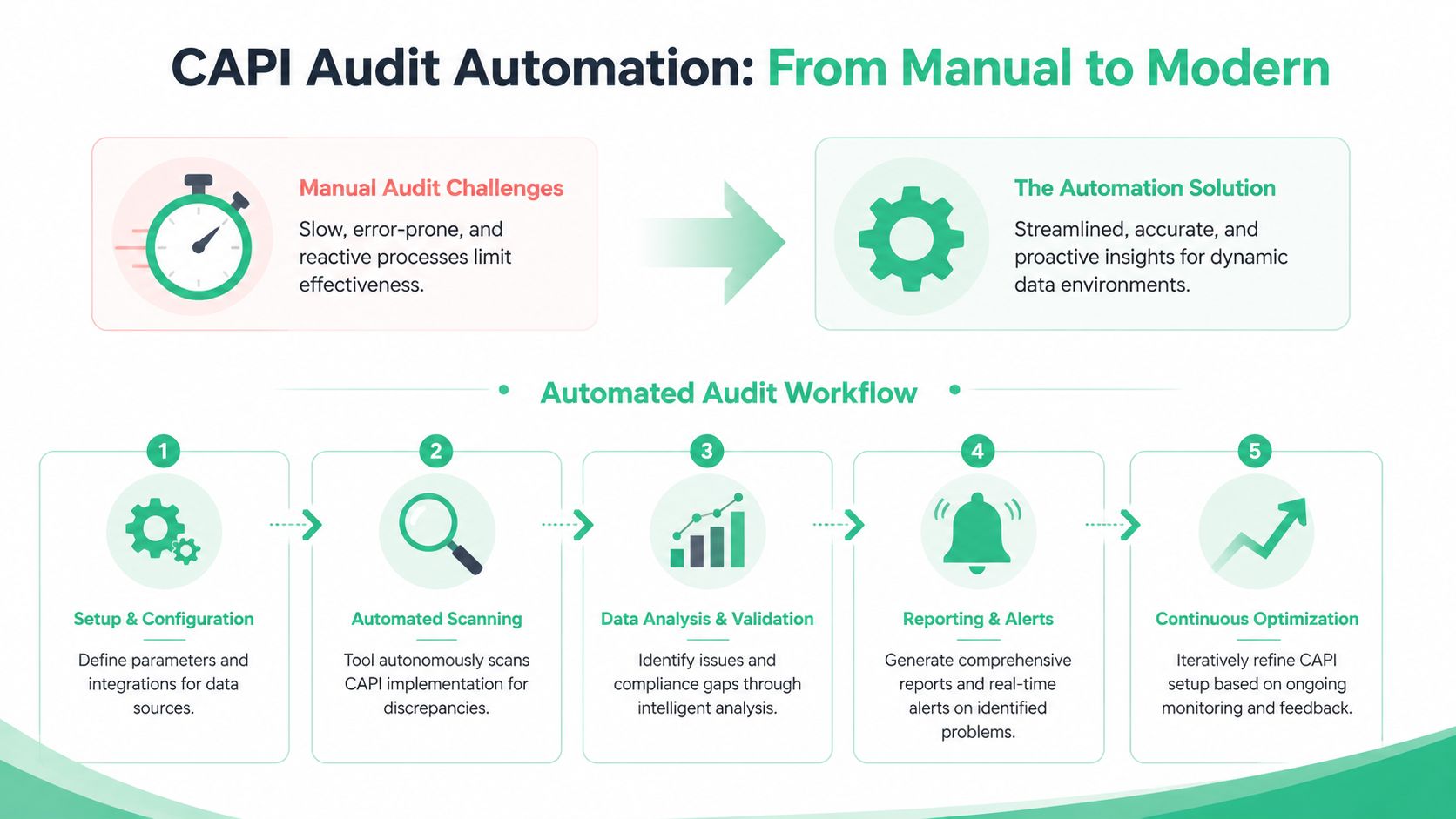
That’s the key reason teams move to a CAPI audit tool. Server-side tracking changes too often for spreadsheet-driven QA to keep up. New releases alter payloads. Marketing launches create new tagging patterns. Container edits reroute fields. Third-party integrations introduce events no one approved. By the time someone notices in a dashboard, the bad data has already spread into reporting, attribution, and optimization.
A dedicated observability approach changes the model from “inspect when there’s a problem” to “detect drift as it happens.”
Why manual audits break in dynamic stacks
The issue isn’t that analysts or developers are careless. It’s that modern tracking stacks are dynamic by design.
A single production change can affect:
- Payload schema through renamed or restructured properties
- Destination behavior through trigger edits or template changes
- Privacy handling through consent logic regressions
- Campaign data quality through malformed UTMs or overwritten identifiers
Manual QA is reactive. It starts after a discrepancy appears. Automated monitoring can watch every event pattern continuously and flag deviations early.
That philosophy mirrors good engineering practice more broadly. If your team is building a stronger release process around analytics too, these automated testing best practices are a useful companion read because the underlying principle is the same. You reduce human dependency for repetitive validation and reserve manual effort for edge cases and root-cause analysis.
What an automated CAPI audit tool should actually do
The phrase “audit tool” gets used loosely. For server-side tracking, the useful version isn’t just a request logger. It should help teams answer four operational questions:
What is sending?
The tool should continuously discover events, properties, and destinations across web, app, and server-side flows.What changed?
It should flag schema drift, missing parameters, rogue events, and unexpected payload changes when they occur.Why did it change?
It should help isolate the likely source, whether that’s a data layer edit, a server container update, or a destination mapping issue.Who needs to act?
It should notify the right people in the workflow, not just generate passive logs nobody reviews.
The useful outcome isn’t more monitoring screens. It’s faster diagnosis.
You can see the privacy angle in this walkthrough:
Where automation pays off fastest
The quickest wins usually come from the issues teams struggle to catch manually.
One is schema validation. Instead of waiting for an analyst to notice that value changed type or a nested object moved, the tool can compare live traffic against expected structure and alert on the mismatch.
Another is PII leak detection. Manual spot checks miss too much because leaks often appear only on certain templates, form paths, or release versions. Continuous inspection gives you a better chance of catching the problem before it becomes widespread.
Another is campaign governance. In many organizations, bad UTMs and inconsistent naming conventions create reporting chaos long before anyone blames CAPI. Automated checks can flag non-compliant tags as they appear, which prevents attribution confusion from entering the pipeline in the first place.
If you’re evaluating software in this category, this overview of a conversion tracking audit tool is helpful because it frames audit automation as continuous observability rather than a one-time validation task.
A useful audit tool doesn’t replace investigation. It removes the blind search phase so the team can investigate the right thing first.
The real operational shift
The biggest change isn’t technical. It’s organizational.
With automation, analytics QA stops being a heroic cleanup exercise run by one careful analyst. It becomes a repeatable operating layer. Developers get alerted when a release changes payload structure. Marketers get warned when campaign naming breaks conventions. Analysts stop spending mornings proving that a discrepancy exists and start fixing the source.
That’s what turns a CAPI audit from a project into a system.
Troubleshooting Common CAPI Implementation Issues
Some CAPI problems repeat across teams because the underlying causes repeat. The fastest way to debug them is to treat each issue as a chain: visible symptom, likely failure point, confirmation step, fix.

Low Event Match Quality
The symptom is straightforward. The platform receives events, but the match quality looks weak or unstable.
The common causes are usually one of these:
- Missing user parameters in part of the journey
- Inconsistent normalization or hashing before server dispatch
- Lost click identifiers between landing and conversion
- Consent-based suppression behaving differently than the team expects
Start by comparing a strong event and a weak event from similar journeys. Identify which identity-related fields are present in one and missing in the other. Then trace the drop-off backward. Did the field disappear in the browser, in the handoff to the server, or during transformation?
A specialized API debugging toolkit can help with request inspection, and this roundup of API testing tools for developers is a practical reference when your team needs the right diagnostic setup. But the key discipline is comparison. Don’t ask “why is match quality low?” Ask “what changed between the events that match and the events that don’t?”
Inflated or deflated conversions
This usually points to deduplication failure or event mapping drift.
If counts look too high, suspect duplicate browser and server events that don’t reconcile. If counts look too low, check whether one source stopped firing, whether the destination rejects part of the payload, or whether a transaction event is filtered too aggressively.
Use a controlled test path. Create a conversion, record the timestamp, inspect browser and server traces, and confirm whether one business action produced exactly the expected set of events. Avoid starting from aggregate dashboard discrepancies because they hide sequence-level behavior.
When conversion counts drift, don’t start with attribution reports. Start with one known transaction and follow it end to end.
Events don’t appear at all
When an expected event is missing in the destination, the root cause is often earlier than people think.
Check these in order:
Was the source event created?
Confirm the original trigger occurred.Did the server layer receive it?
If not, inspect transport, routing, and trigger conditions.Was it transformed or filtered out?
Look for conditional logic, environment rules, consent gates, or event allowlists.Did the destination reject it?
Validate payload structure and required fields.
This sequence matters. Teams waste time in the destination interface when the server never received the event in the first place.
Rogue events from old code or third parties
This problem causes confusion because the data looks active, not broken. You see extra events, old event names, or inconsistent counts, but no one knows where they come from.
The usual culprits are deprecated tags, hardcoded pixels left in templates, plugins injecting scripts, or overlapping container rules after a migration.
The fastest way to isolate rogue traffic is to compare observed events against your approved tracking plan and list every unknown or deprecated item. Then group them by path, environment, and source context. Rogue events tend to cluster. They often appear on a legacy page type, a specific locale, or a stale checkout variant.
Consent behavior doesn’t match policy
This is one of the hardest issues to spot without deliberate testing.
The event may still fire, but enrichment or forwarding should change based on the user’s consent state. If that logic fails, the requests may look valid while violating your intended governance rules.
Test multiple consent paths, not just the default banner accept flow. Decline, change preference mid-session, and return on a later visit. Inspect whether the payload changes appropriately in each scenario. If the implementation depends on multiple systems exchanging consent state, audit the handoff points carefully.
Operationalizing Continuous CAPI Monitoring
A mature team doesn’t wait for a quarterly audit to learn that tracking broke last week. They build monitoring into the delivery process.
That changes how CAPI quality is managed day to day. Instead of relying on analysts to notice discrepancies in reports, the team connects validation to releases, environment changes, and real traffic patterns. If a new server container publish introduces a property mismatch, the right people should know while the change is still fresh. If campaign tagging breaks convention, the alert should reach the channel owner before reporting gets messy.
Put analytics QA closer to deployment
The strongest setups treat tracking changes like application changes. They go through review, validation, and post-release monitoring.
That doesn’t require a heavy process. It requires consistent handoffs:
- Before release. Validate expected events, properties, and consent behavior in staging.
- At release. Watch for unexpected schema changes, missing events, and rogue traffic.
- After release. Alert into Slack or Microsoft Teams so developers, analysts, and marketers see the same issue record.
Continuous monitoring becomes more valuable than a static checklist. The tracking plan stays current because it reflects observed behavior, not last quarter’s documentation.

Create one shared source of truth
The operational payoff comes from alignment. Developers need to know what should fire. Analysts need to know what fired. Marketers need to know whether they can trust the numbers.
A current monitoring layer solves that by turning event behavior into a shared reference point. Instead of debating screenshots from different tools, the team can inspect the same stream of validated tracking data. That’s the foundation for trustworthy attribution, cleaner reporting, and faster debugging.
If your team is building that operating model, a practical next step is to look at how data quality monitoring for analytics supports ongoing validation across web, app, and server-side implementations.
The end result is simple. Fewer surprises in reporting. Less engineering time spent on forensic debugging. More confidence when performance teams make optimization decisions based on conversion data.
If you want to replace manual CAPI audits with continuous analytics QA, Trackingplan is built for that job. It automatically discovers your tracking across web, apps, and server-side flows, monitors payload changes in real time, alerts teams to schema drift, rogue events, campaign tagging issues, consent misconfigurations, and potential PII leaks, and keeps an up-to-date tracking plan that analysts, marketers, and developers can work from. That gives your team a practical way to trust conversion data without living in browser tools, spreadsheets, and postmortems.