
A campaign launches on Monday. By Friday, paid social looks strong, analytics looks odd, and the CRM says revenue is lower than either of them. Marketing thinks attribution shifted. Analytics suspects duplicate events. Development says nothing changed except a routine release. That mix of confidence and uncertainty is exactly when a pixel implementation audit stops being a technical cleanup task and becomes a business requirement.
The problem is common. According to a 2022 DMA finding cited by Cometly, 30% of marketing campaigns suffer from pixel misfires, and pixel-only tracking can miss 30-60% of conversions from privacy-conscious audiences. If you optimize spend on unreliable signals, you don't just get messy reporting. You train ad platforms on bad inputs and make weak budget decisions with a clean-looking dashboard.
A strong audit fixes more than a tag. It aligns marketers on business intent, analysts on schema and validation, and developers on implementation details. It also forces one uncomfortable but useful truth into the open: a manual spot check is better than nothing, but it won't protect a live stack for long.
Teams that take data trust seriously usually pair their audit process with analytics data validation practices. That means checking what fires, what data is sent, whether consent rules are enforced, and how issues are monitored after the release goes live.
Your Guide to a Bulletproof Pixel Implementation Audit
A pixel implementation audit starts with one question: can you trust the event stream enough to make spend and product decisions from it? If the answer is "mostly," the audit hasn't gone far enough.
I've seen the same pattern across ecommerce, lead gen, and multi-brand environments. A team validates the happy path, confirms that PageView and Purchase appear in a browser extension, and assumes the rest is fine. Then a checkout change drops a value parameter, a single-page app re-fires a route event, or a campaign launches without proper tagging. Reports still populate. They're just wrong in ways that take weeks to notice.
What a real audit covers
A useful audit isn't limited to whether a tag exists. It checks whether the implementation is complete, documented, accurate, privacy-safe, and resilient to change.
That means validating:
- Discovery and ownership: Every pixel, destination, trigger, and business owner is identified.
- Behavior: Events fire at the correct moment, and only when they should.
- Payload quality: Required parameters are present, typed correctly, and mapped consistently.
- Deduplication: Browser and server events don't double count.
- Campaign data: UTM and click identifiers survive redirects and handoffs.
- Consent and privacy: Tracking honors user choices and doesn't leak sensitive data.
- Monitoring: The team gets alerted when the implementation drifts.
Practical rule: If a finding can't be assigned to a team and verified in a reproducible way, it isn't an audit finding yet. It's just suspicion.
Who should be involved
This work breaks when one team owns all of it. Marketing knows what should be measured. Analytics knows how it should be structured. Development controls the implementation path. Governance or privacy teams set the boundaries. A bulletproof audit connects those roles into one operating model instead of asking one person to guess across all of them.
Building Your Foundation with Pixel Discovery and Mapping
You can't audit what you haven't mapped. Most broken implementations aren't hidden because they're technically complex. They're hidden because nobody has a current inventory of what exists, where it fires, who owns it, and why it's there.

Manual discovery versus automated discovery
Manual discovery is like mapping a city by walking every street. You inspect page source, review your tag manager container, open browser developer tools, trace network requests, click through journeys, and document what you find. Done carefully, it's useful. Done under deadline, it's incomplete.
Automated discovery works more like a satellite view. A crawler or observability platform scans routes, captures requests, inventories pixels and destinations, and keeps watching after the initial audit. That changes the job from "find everything by hand" to "review, classify, and govern what the system surfaces."
The trade-off is straightforward:
| Approach | What it does well | Where it breaks |
|---|---|---|
| Manual discovery | Good for understanding intent, testing critical flows, and reviewing edge cases | Slow, repetitive, easy to miss hidden triggers, variants, and inherited tags |
| Automated discovery | Better for scale, coverage, change detection, and maintaining an up-to-date inventory | Still needs humans to define ownership, business purpose, and remediation priority |
A mature team uses both. Manual review gives context. Automation gives coverage.
Build a pixel inventory before you validate anything
A proper inventory becomes the source of truth for the audit. If you're working from screenshots, ad hoc spreadsheets, and memory, the audit will drift the moment someone publishes a container change.
Your inventory should include:
- Pixel or tool name: Meta Pixel, GA4, Floodlight, TikTok Pixel, LinkedIn Insight Tag, custom endpoints, and any server-side destinations.
- Owner: Marketing, analytics, product, agency, or engineering.
- Where it appears: Domain, subdomain, app section, checkout, embedded forms, iframes, microsites, and landing pages.
- Trigger condition: Page load, button click, route change, form submit, purchase completion, consent granted.
- Business purpose: Attribution, remarketing, analytics, experimentation, affiliate tracking, CRM sync.
- Expected parameters: Event name, value, currency, content identifiers, lead metadata, transaction reference, consent state.
- Destination path: Browser, server-side endpoint, tag manager, direct script load, SDK.
- Environment: Production, staging, QA, regional deployments.
Where teams usually miss pixels
Inherited stacks create the most confusion. Agencies often inherit old campaign pages, archived GTM workspaces, platform plugins, and direct code snippets that survived multiple redesigns. Embedded checkouts and third-party booking flows are another blind spot because ownership is split across vendors.
Single-page applications add a different failure mode. The tag exists, but trigger logic depends on route changes, delayed dataLayer pushes, or state updates that don't happen consistently. In those setups, a page-by-page inventory isn't enough. You need a state and action inventory.
Most teams don't have a tracking problem first. They have a visibility problem.
A practical mapping routine
Start with the highest-value journeys first: home, product or service detail, add to cart or lead intent, checkout or form completion, and confirmation states. Open developer tools, use the Network tab, filter for relevant collection requests, and click each step. Record every event that fires and every destination that receives it.
Then compare what you found with your tag manager configuration, vendor plugins, and server-side routing. Mismatches matter. A trigger in GTM doesn't prove the request reached the destination. A request in the browser doesn't prove the payload was complete.
If your data layer is weak or inconsistent, fix that before adding more tags. A clean data layer design reduces downstream ambiguity because every platform can read from the same well-structured source instead of relying on brittle DOM scraping or one-off variables.
The Core Audit Verification and Validation Checks
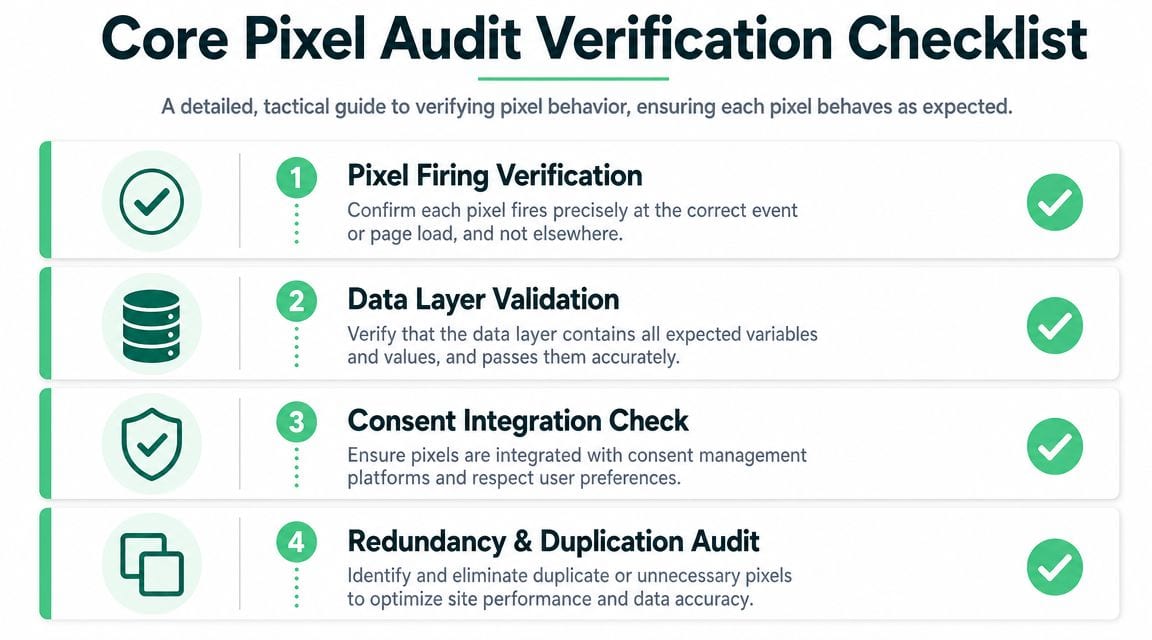
Once the inventory exists, critical work starts. At this stage, teams move from "the pixel is installed" to "the implementation is reliable." Four checks matter more than anything else: firing, payload, deduplication, and campaign tagging.
Verify event firing behavior
Start with timing and frequency. An event should fire at the exact user action or page state it represents, not before it and not multiple times.
For example, a Purchase event tied to button click is usually wrong. It should generally fire after confirmed completion, not at the moment a user attempts payment. In browser developer tools, use the Network tab and preserve logs while stepping through the conversion path. Filter by collection endpoints, then compare the exact request sequence with the user journey.
Check for these failure modes:
- Early firing: Confirmation events firing before the transaction is finalized.
- Late firing: Events depending on a script or data layer object that appears after the request should've gone out.
- Duplicate firing: Two requests for the same event on one action, often caused by multiple containers, plugin overlap, or route re-renders.
- Missing firing: Trigger conditions never become true on certain browsers, templates, or consent states.
A good test isn't one clean run. Repeat the journey with consent accepted, rejected where applicable, logged-in and logged-out states, and different entry paths. Bugs often hide in the non-default path.
Validate payload and schema quality
An event name without a trustworthy payload has limited value. The browser request can look healthy while the business signal is broken.
Review the actual request body or query parameters and compare them against your tracking plan. The event should include the expected values, with the right type and format. A revenue field sent as null, a currency mismatch, a missing content identifier, or a malformed product array can all degrade reporting and optimization.
Inspect three layers together:
- Data layer values
- Tag manager variable resolution
- Final network payload
That three-step chain matters because the defect may live in any of them. A product ID might exist in the data layer but fail in GTM due to the wrong variable path. Or GTM may populate correctly while the destination template transforms the value incorrectly.
Use test conversions with known values and compare them against downstream systems. According to Markifact's discrepancy guidance for Meta pixel stats, platform-reported conversions versus CRM or ecommerce systems naturally vary by ±5-15% because of cancelled orders, payment failures, and test transactions. The same source notes that cross-device attribution can create discrepancies of ±20-40%. That means you shouldn't chase perfect parity. You should chase explainable variance.
If the gap is larger than what your implementation and attribution model can explain, treat it as an audit finding, not a reporting quirk.
Check deduplication in hybrid setups
Hybrid measurement is now standard in serious implementations because browser-only collection leaves too much unobserved. But hybrid setups create their own trap: duplicate conversion records when browser and server events represent the same action without a reliable deduplication key.
Review how browser and server events are paired. The event name alone isn't enough. You need a stable event identifier or transaction reference shared across both paths, and both systems need consistent logic for when to send the event. If the browser event fires on confirmation page load while the server event fires on order creation, they may refer to different business moments.
Common issues include:
- Different IDs on browser and server requests
- Server events sent without their browser counterpart context
- Retries creating additional server events
- Client and server firing from slightly different trigger moments
Test this with one controlled conversion, then inspect both browser and server logs. You should be able to trace a single business action through both systems and prove whether one final conversion should be counted.
Audit campaign tagging and click identifier capture
A technically correct pixel can still produce bad attribution when campaign metadata is broken. That's why every pixel implementation audit should include campaign tagging verification.
Check landing pages, redirects, consent flows, and form handoffs. Confirm that UTM parameters and platform click identifiers are preserved long enough to be captured and associated with the right user or session. Problems often appear when:
- Redirects strip parameters
- Internal links overwrite campaign data
- Forms submit into external systems without carrying source metadata
- Single-page apps fail to persist original landing parameters across route changes
This is one area where browser extensions alone don't help much. You need to inspect request payloads, local storage or cookies where appropriate, hidden form fields, and CRM records. If marketing is seeing undercounted revenue from paid acquisition, broken campaign tagging is often closer to the cause than the ad platform itself.
A compact validation matrix
| Check | What to inspect | What success looks like |
|---|---|---|
| Firing | Trigger logic, event timing, frequency | Correct event at correct moment, once per intended action |
| Payload | Parameters, types, required fields, transformations | Clean, complete schema aligned to tracking plan |
| Deduplication | Event IDs, transaction references, browser and server pairing | One business action represented once |
| Campaign tagging | UTM capture, redirects, storage, CRM handoff | Original acquisition data survives the full journey |
Effective Debugging and Remediation Workflows
Most audits don't fail because the issue is hard to detect. They fail because the handoff after detection is weak. Someone notices a broken Purchase event, drops a vague message in Slack, and three teams spend days debating whether the problem is real.

Agency environments make this worse because inherited implementations are messy. In Trackingplan's review of Facebook pixel audit issues, agency audits found that 65% of implementations contain rogue events or schema mismatches that can inflate attribution by 15-30%. The same source states that 70% of agencies report revenue undercounts from untagged campaigns. Those are exactly the kinds of issues that slip through when debugging depends on scattered manual checks.
A realistic broken Purchase scenario
An ecommerce team notices that ad platform purchases increased after a checkout update, but booked revenue didn't move with them. The analyst reproduces the journey and sees two problems: the browser Purchase event fires twice on confirmation, and one of the requests is missing the value parameter.
That isn't one bug report. It's two separate findings with different likely causes.
The analyst's handoff should include:
- Exact page and flow: Product page to cart to checkout to confirmation.
- Reproduction steps: Browser, device type, consent state, and any login requirement.
- Observed behavior: Duplicate Purchase events and one payload missing value.
- Expected behavior: One Purchase event with complete revenue and currency fields.
- Evidence: HAR capture, screenshots of the network request, and transaction reference if available.
- Business impact: Inflated platform conversion totals and weak optimization signal.
A browser debugging tool like Omnibug for request inspection helps analysts isolate what data was sent over the wire instead of relying on platform UI summaries.
What the developer should investigate
Once the issue is reproducible, development needs a root-cause path, not another round of "can't replicate."
For duplicate purchases, the usual suspects are:
- SPA route handling: A route re-render triggers the same tag twice.
- Multiple installations: Native plugin plus GTM tag, or old snippet plus template-based tag.
- Event listener overlap: Both a click handler and a confirmation state change trigger Purchase.
- Retry logic: A failed request retry isn't deduplicated before dispatch.
For the missing value parameter, likely causes include:
- Data layer timing: Revenue object isn't populated when the tag reads it.
- Variable path mismatch: GTM variable points to an outdated property name.
- Conditional logic: Some payment methods return a different schema.
- Template transform issues: Currency or value gets dropped during mapping.
A good developer fix does two things. It resolves the immediate bug and prevents the same class of error from recurring. That often means moving event logic closer to the source of truth, tightening trigger conditions, and standardizing how transaction data is exposed to the data layer.
Field note: If two systems define "purchase completed" differently, your team will keep shipping bugs that look random but aren't.
What marketing and analytics validate before release
The loop shouldn't close when code merges. Marketing and analytics need to validate the fix in staging, then again in production with controlled checks.
Use a short release checklist:
| Role | Validation responsibility |
|---|---|
| Analytics | Confirm event count, payload schema, and downstream receipt |
| Development | Verify trigger logic, code path, and no regressions on related flows |
| Marketing | Confirm platform event visibility and campaign attribution impact |
| Governance or privacy | Confirm consent and sensitive data handling remain intact |
This final validation is where many teams get lazy. They see one correct request in staging and move on. Instead, test multiple paths, including alternative payment methods, mobile browsers, and consent-denied states where relevant.
Auditing for Privacy and Consent Compliance
A pixel implementation audit that ignores privacy is incomplete. Clean attribution doesn't help if the implementation fires before consent, leaks sensitive data, or sends fields a regulator or platform policy would reject.

Teams often treat compliance as a legal review that happens after analytics design. That separation creates bad outcomes. Consent behavior is part of implementation quality. If tags fire on page load before the consent state resolves, that's not only a policy issue. It's an implementation defect.
What to test in consent enforcement
Open the site in a clean browser session and test each consent state intentionally. Don't assume your consent management platform is controlling tags correctly just because the banner appears.
Check these conditions:
- Before interaction: Non-essential pixels shouldn't fire before the user makes a choice where consent is required.
- Accepted state: Approved categories should trigger the expected tags and no others.
- Rejected state: Marketing and analytics tags covered by consent rules should remain suppressed.
- Changed preferences: Updates in consent settings should change behavior without stale firing.
- Regional behavior: Geo-based consent logic should match the policy your legal team approved.
For teams tightening this process, consent enforcement verification guidance is useful because it frames consent checks as observable implementation behavior rather than policy text alone.
Scan for PII leaks, not just missing consent
Sensitive data often leaks in less obvious places than the event payload itself. I've seen email addresses in URL query strings, names pushed into the data layer for convenience, and transaction notes forwarded to third-party tools because nobody reviewed the raw request shape.
Your audit should inspect:
- Network payloads: Query parameters, request bodies, headers where applicable
- Data layer objects: User attributes, checkout fields, free-text inputs
- URLs and redirects: Email, phone, internal customer IDs, or other sensitive values in query strings
- Third-party form embeds: Hidden field mappings and post-submit redirects
This matters well beyond ad tech. Any organization handling financial information, creator payouts, or account-level earnings should treat privacy review as part of data governance. A practical reference point is Mogul's emphasis on protecting artist financial data, which reflects the broader principle that operational data should be exposed only where there is a clear, approved need.
Privacy failures rarely start with malicious intent. They start with convenience, copy-pasted parameters, and missing review.
Non-negotiable audit standard
If a pixel requires consent, test it under each consent state. If a payload contains customer-level detail, inspect it raw. If a URL can carry user data, review redirects and handoffs. "We trust the CMP" isn't evidence. The browser and the request log are.
Moving from Manual Audits to Automated Monitoring
A manual audit is a snapshot. That's its biggest weakness.
The day after your audit, someone publishes a tag manager change, updates checkout, adds a new landing page template, or launches a regional consent rule. Your spreadsheet is already aging. The implementation might still be correct, but you no longer know that with confidence.
Why manual-only governance breaks at scale
Manual checks are still necessary for deep investigation, but they don't scale well across modern stacks. They miss transient failures, depend on individual diligence, and consume time from analysts and engineers who should be improving measurement strategy instead of chasing preventable regressions.
The data gap gets wider in privacy-heavy environments and hybrid architectures. As noted earlier in this article's source set, browser-only measurement leaves material blind spots. In the section most suited for citing it, Trackingplan's Facebook pixel audit article reports that well-configured hybrid setups using server-side tagging can achieve 85-95% event match rates, while browser-only implementations often top out around 50%. That isn't just a tooling preference. It's an operating model change. Continuous monitoring becomes more important as the architecture gets more complex.
What automated observability changes
Automated monitoring shifts the team from reactive debugging to ongoing control. Instead of waiting for a marketer to notice weird ROAS or an analyst to spot a drop in reported purchases, the system watches for:
- Missing or broken pixels
- Unexpected new events
- Schema changes and parameter drift
- Duplicate requests
- Campaign tagging errors
- Consent misconfigurations
- Potential PII leaks
One option in this category is Trackingplan, which continuously discovers martech implementations and monitors analytics and attribution data quality across browser, app, and server-side stacks. The practical value isn't that it replaces engineers. It reduces the amount of detective work they have to do after something breaks.
This pattern shows up in other regulated, data-heavy industries too. The same reason teams invest in continuous controls for driving bank performance with data-led automation applies here: manual review alone doesn't keep complex operational systems trustworthy.
A better operating model for audit maturity
Use periodic audits for structural review and automated monitoring for day-to-day governance.
That model usually looks like this:
- Quarterly or major-release audit: Review architecture, mappings, destinations, ownership, and consent design.
- Ongoing automated checks: Watch for drift, anomalies, and undocumented changes.
- Role-based alerting: Send technical issues to developers, schema issues to analytics, and campaign issues to marketing.
- Controlled remediation: Every alert becomes a ticket with evidence, owner, and validation criteria.
- Tracking plan maintenance: Keep documentation synchronized with observed reality.
A video overview can help if your team is trying to explain this shift internally. Trackingplan's YouTube channel has relevant material on analytics QA and observability, including this Trackingplan video overview.
Conclusion Building a Culture of Data Trust
A strong pixel implementation audit isn't a one-off cleanup. It's a working discipline.
The teams that get reliable attribution and cleaner optimization signals don't rely on luck or heroic debugging. They map the stack, verify behavior at the request level, fix issues with clear cross-team ownership, and treat privacy as part of implementation quality. Then they stop depending on point-in-time checks alone.
That shift changes how decisions get made. Marketing stops arguing with analytics over whose number is right. Developers get bug reports they can act on. Governance teams see consent and privacy controls tested in real behavior, not just policy language. Leadership gets reporting that deserves confidence.
Data trust doesn't come from a dashboard. It comes from repeatable verification and fast detection when reality drifts from the plan.
If you want to reduce manual QA work and keep your tracking stack observable after the audit is done, Trackingplan is worth evaluating. It continuously discovers tags and destinations, monitors pixels and analytics implementations, and alerts teams when events, parameters, campaign tagging, consent behavior, or potential PII handling drift from expected behavior.