
You launch campaigns, budgets start spending, and Events Manager looks active enough to calm everyone down. Then the true questions arrive. Why is Purchase lower than expected, why did retargeting audiences shrink after a site release, and why does one team swear the Meta Pixel is installed correctly while another team can't reproduce the numbers?
That's the normal state of Facebook tracking now. A simple pixel install isn't enough for teams that depend on attribution, optimization, and defensible reporting. If you're responsible for trackers for Facebook, the job isn't just to make events appear. The job is to build a setup that survives browser restrictions, developer changes, consent rules, and silent schema drift.
Building Your Modern Facebook Tracking Stack
The old approach was simple: install the Meta Pixel, add a few standard events, and call it done. That setup still captures useful browser-side signals, but it's not resilient enough on its own.
Meta's own implementation guidance recommends using both the Meta Pixel and the Conversions API for more accurate conversion measurement, especially when browsers block cookies or when client-side tags are disrupted. In practice, the reliable order is to configure the Pixel first, then send server-side events through CAPI, often through server-side GTM, and validate everything in Test Events (Stape's implementation guide).
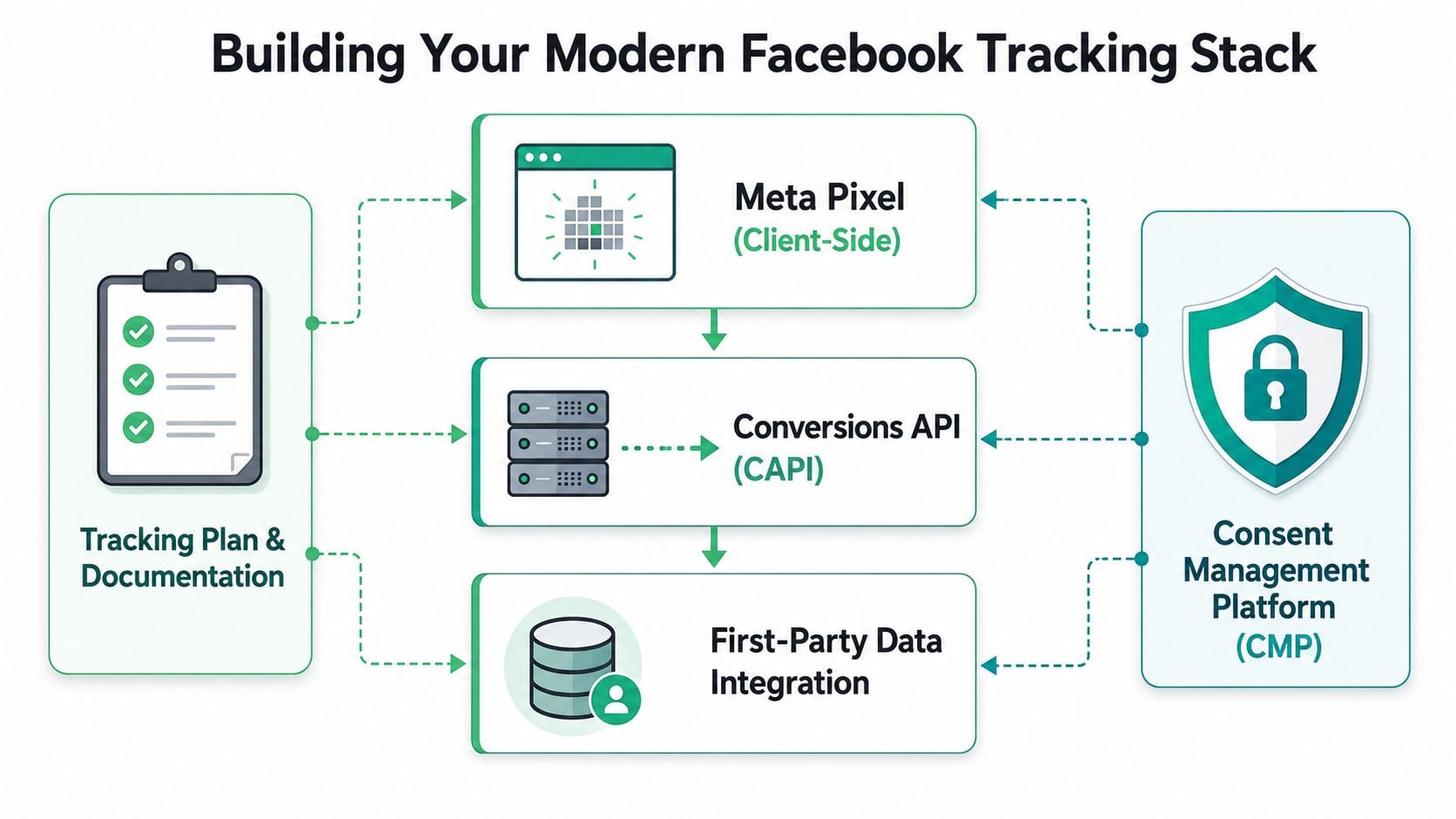
What each layer actually does
The Meta Pixel is still your front line. It sees page context, browser behavior, and the immediate conditions around events like PageView, ViewContent, AddToCart, or Purchase. It's also the quickest way to verify whether your implementation logic basically works.
The Conversions API adds a second path. Instead of depending on the browser to deliver everything, your server sends event data to Meta directly. That gives you a more controlled and durable route for important conversion events, especially near checkout, lead submission, or subscription confirmation.
A mature stack usually includes these parts:
- Client-side collection: The Pixel captures browser events and useful context.
- Server-side delivery: CAPI forwards important events from your backend or server container.
- First-party business data: Order systems, CRM events, or backend confirmations enrich what the browser alone can't prove.
- Consent enforcement: Your CMP decides whether those trackers can fire at all.
- Documentation: A tracking plan defines names, triggers, parameters, ownership, and QA rules.
Practical rule: Don't think in terms of Pixel versus CAPI. Think in terms of event survivability.
Why Pixel-only setups keep disappointing teams
Pixel-only implementations break in subtle ways. They may still fire for some users, on some pages, in some browsers, while missing enough high-value events to distort optimization.
That's why teams that want cleaner measurement move to a hybrid approach. The browser provides immediacy. The server provides redundancy. Together they reduce single-point failure.
For a good primer on why Pixel fundamentals still matter before you add complexity, Skup's guide on unlocking data with Facebook Pixel for entrepreneurs is a useful baseline. Once that foundation is clear, the next practical step is a server-side design for Meta events, such as this guide to Facebook Conversion API implementation patterns.
The stack I'd put in place first
If I were deploying trackers for Facebook on a site from scratch, I'd build in this order:
- Install the base Pixel cleanly across all relevant templates.
- Define a small event model before tagging anything. Fewer clean events beat many inconsistent ones.
- Add CAPI for critical conversions first, not every possible interaction.
- Share identifiers for deduplication between browser and server events.
- Run validation before launch and after every release.
That sequence keeps the system understandable. It also gives analysts, marketers, and developers one shared implementation model instead of two disconnected tracking projects.
Implementing Trackers with Tag Management Systems
A tag management system is where Facebook tracking becomes manageable instead of fragile. The point isn't just easier deployment. The point is centralizing event logic, variables, consent behavior, and release control so you don't end up with one event hardcoded in the frontend, another injected by a plugin, and a third sent from the backend with different naming.
Independent academic research has shown that Facebook web tracking relies on more than basic cookies. The mechanisms include first- and third-party cookies, cookie synchronization, and fingerprinting techniques. That makes cross-site correlation more possible, but it also increases fragility and compliance risk when identifiers or consent states change. A recurring failure is assuming browser-side Pixel events are complete when ad blockers, browser privacy controls, and identity restrictions can reduce coverage and attribution fidelity (ACM research on Facebook web tracking).
Build around event logic, not around tags
A strong GTM-style implementation starts with a simple model:
| Component | What it should answer |
|---|---|
| Trigger | When should this event fire? |
| Variables | What product, value, currency, or user context should be attached? |
| Tag | Where should the event be sent, and in what schema? |
| Consent gate | Is the platform allowed to receive the event? |
That's the right mental model for trackers for Facebook. The tag itself is the last step, not the first.
A clean web container pattern
For browser-side events, keep the setup boring. Boring implementations survive redesigns.
Use a web container to send a small set of high-value standard events. Typical examples include PageView, ViewContent, AddToCart, InitiateCheckout, Lead, and Purchase. For each one, define the business condition first, then map the payload.
A simple pattern looks like this:
- Page-level triggers: Fire
PageViewon page load andViewContentonly on pages that match your product-detail logic. - Interaction triggers: Fire
AddToCartfrom a confirmed UI action, not from a click on a disabled button or modal opener. - Transaction triggers: Fire
Purchaseonly after the order is confirmed, ideally from the thank-you page and backend confirmation logic together.
Variable design matters more than most teams expect
Most broken Facebook setups don't fail because the tag is missing. They fail because the parameters are inconsistent.
Focus on variables like these:
- content_ids: Must match your catalog or internal product reference model.
- value and currency: Should come from the same transaction source used by your commerce platform.
- event_id: Required if you want clean deduplication across browser and server.
- user data fields: Only if your privacy model, legal guidance, and consent state allow them.
If product IDs are malformed, dynamic retargeting becomes unreliable even when the event itself appears in Meta.
Server-side delivery through a server container
Your server container should receive normalized event data from the web container or backend and forward only what Meta needs. Here, teams often overcomplicate things. You don't need every click on the site to hit CAPI. You need the events whose loss would affect bidding, audience building, or conversion reporting.
A practical deployment usually follows this pattern:
- Send structured event data from the site to your server container.
- Map internal event names to Meta's expected event names.
- Pass a shared event_id when the same event can arrive from browser and server.
- Apply consent rules before forwarding.
- Log and test payloads before publishing.
For teams using a server GTM architecture, this walkthrough on server-side tagging for Meta CAPI and related ad platforms is a useful reference because it keeps the focus on transport and governance rather than one-click templates.
What usually goes wrong
The most common implementation mistakes are predictable:
- Wrong trigger timing:
Purchasefires before payment is confirmed. - Loose selectors: A frontend class change breaks
AddToCart. - Schema drift: One template sends
content_idsas an array, another as a string. - Missing event IDs: Browser and server events can't be reconciled.
- Consent bypasses: Server-side forwarding ignores the state captured by the CMP.
A tag manager helps only if you treat it as a controlled system. If everyone publishes tags freely, you've just moved the mess into a different interface.
Validating Your Facebook Tracking Implementation
A Facebook implementation isn't real because tags exist in a workspace. It's real only when expected events appear with the right timing, the right parameters, and the right duplication behavior under realistic user flows.
That's why validation has to feel more like debugging a payment pipeline than checking a marketing box. You're verifying transport, schema, consent state, page context, and whether browser and server traces describe the same customer action.
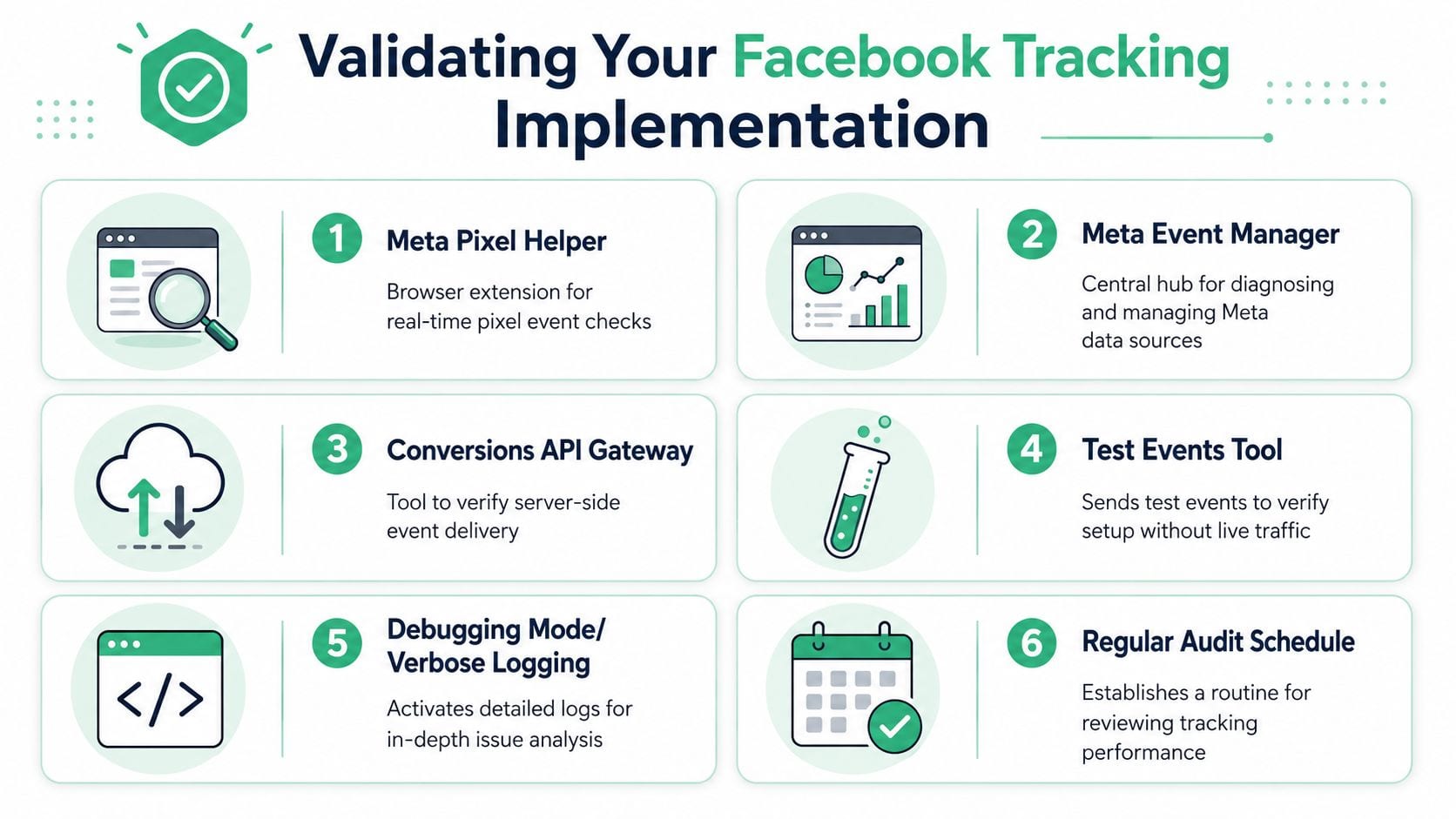
Start with the native Meta tools
Meta's Events Manager should be your operational console, not just a place you visit when marketing asks whether the pixel is alive. The Test Events workflow is especially important because it shows whether events are arriving in a way Meta can process during implementation.
Run tests through the full journey you care about. Don't stop at page loads. Check product views, cart interactions, form submissions, and confirmed purchases.
What to verify every time
Use a checklist. It keeps validation consistent across releases and across teams.
- Event presence: Does the event appear when the user action really happens?
- Event absence: Does it stay silent when the action does not happen?
- Parameter integrity: Are value, currency, IDs, and content fields populated as intended?
- Source consistency: Does the browser event align with the server event?
- Deduplication readiness: Is the same
event_idavailable to both paths when needed? - Consent behavior: Does the event stop when the CMP says it must stop?
Validation rule: If you can't explain why an event fired, you shouldn't ship it.
Check browser and server stories separately
A lot of confusion comes from mixing two different questions. First: did the browser-side event fire? Second: did the server-side event arrive and map correctly?
Treat those as separate investigations.
For browser checks, use your browser debugging workflow and inspect the event on the page where it originates. For server checks, inspect the payload arriving in your server container, then confirm that Meta receives it with the expected event name and fields. If one side works and the other doesn't, you've narrowed the problem immediately.
Deduplication is where many setups quietly fail
When both the Pixel and CAPI report the same conversion, Meta needs a shared key to understand that they represent one user action, not two. If your browser event has one identifier and your server event has another, reporting gets noisy fast.
That's why I like to validate deduplication with a single test purchase or lead in a controlled environment first. The event name should match. The event_id should match. The firing conditions should also describe the same real-world action.
A practical audit also checks for broader implementation hygiene. If you want a framework for reviewing event coverage, naming, and payload quality, this Facebook Pixel audit guide is a good complement to Meta's own debugging tools.
A short validation matrix
| Check | Good sign | Warning sign |
|---|---|---|
| PageView | Fires once on intended load | Multiple fires from route changes or duplicate snippets |
| AddToCart | Fires after a confirmed add action | Fires on button render or modal open |
| Purchase | Tied to order confirmation | Fires on payment step or refresh |
| CAPI event | Appears with expected schema | Missing fields or mismatched event name |
| Deduplication | Browser and server share one event identity | Same conversion appears as separate instances |
Validation isn't a launch task. It's release discipline. Teams that only test after setup usually discover problems after campaigns have already optimized against bad signals.
Managing Privacy Consent and Data Governance
Tracking quality and privacy controls have to be designed together. If they aren't, one of two things happens. Either the legal setup blocks measurement in unpredictable ways, or the tracking setup keeps sending data when it shouldn't.
Facebook's rollout of off-Facebook activity in 2019 was an important signal of how this tension works in practice. The control first launched in South Korea, Ireland, and Spain, and Facebook said users could see information tracked outside its service, delete past browsing history, and prevent future clicks from being used for ad targeting. At the same time, Facebook said this would not affect the metrics sent back to advertisers about ad performance (ABC30's report on the rollout). The takeaway for implementation teams is simple: user-facing controls, ad targeting, and reporting aren't the same thing, so your governance model can't be simplistic either.
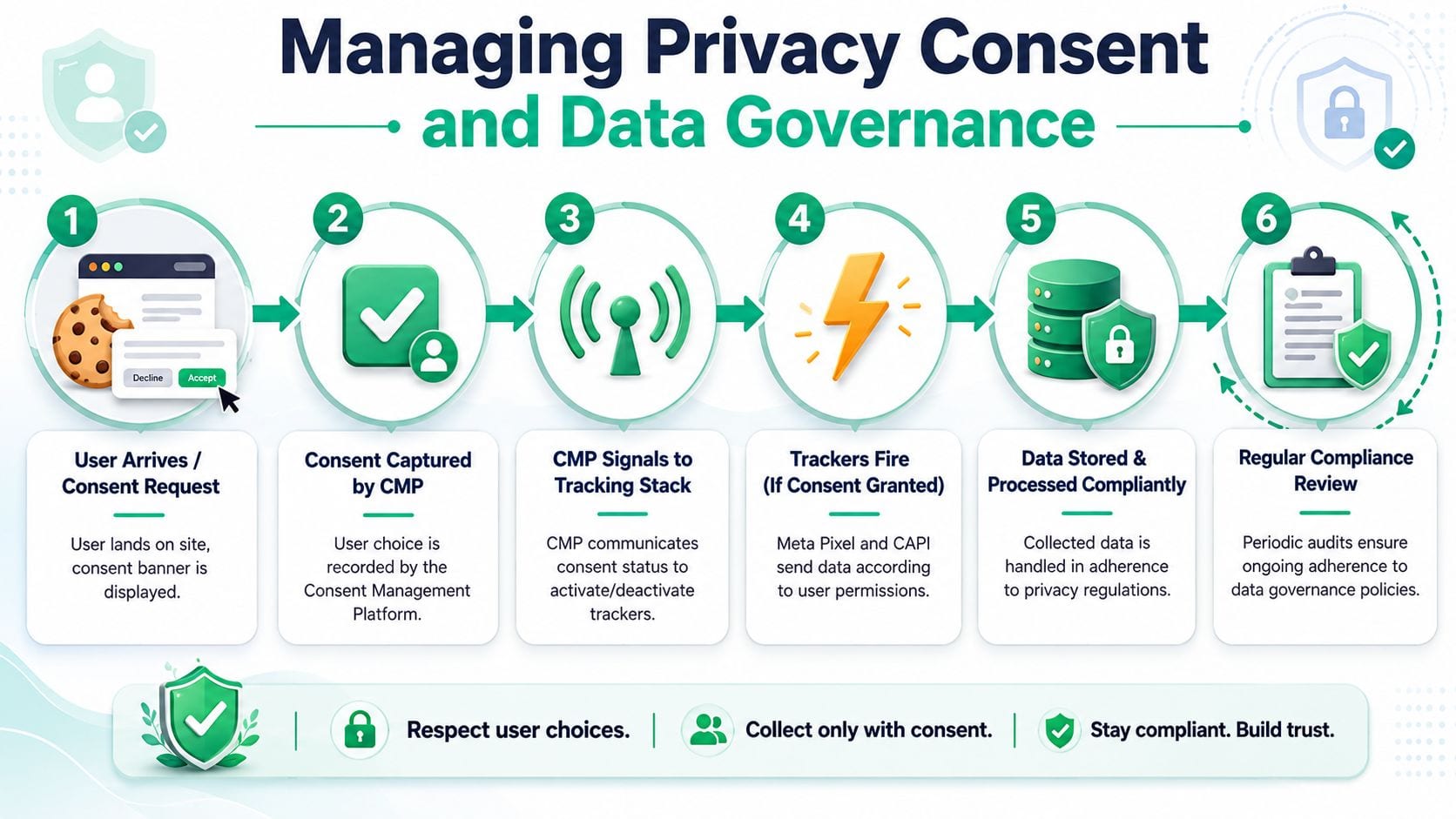
Make the CMP a control plane
A consent management platform shouldn't just display a banner. It should actively control whether browser tags fire and whether server-side forwarding is allowed.
That means your CMP needs to pass consent state into your tag manager and, where relevant, into your server-side routing logic. If a user opts out, the browser shouldn't continue loading Meta tags regardless, and your backend shouldn't keep forwarding equivalent events as if consent never changed.
A basic operating model looks like this:
- Capture consent state from the CMP.
- Map consent categories to specific Meta-related tags and destinations.
- Block or allow execution in the web container.
- Mirror that decision in server-side forwarding logic.
- Log the behavior so QA can confirm it.
PII leaks are a governance failure, not a minor bug
The risk that worries me most in Facebook deployments isn't a missing PageView. It's accidental transmission of personal data through URLs, form fields, custom parameters, or bad data layer design.
Common causes include query strings that contain email addresses, custom JavaScript that scrapes form values, and server-side transformations that forward raw fields without review. Once those leaks are in the system, they're hard to unwind and even harder to audit retroactively.
Some tracking bugs lose data. PII bugs create exposure.
What to review before publishing
Use a governance checklist before any release involving trackers for Facebook:
- Consent mapping: Every Meta tag and server destination must have a documented consent dependency.
- Parameter review: Inspect payload fields for user identifiers, free text, and URL parameters.
- Template hygiene: Remove legacy tags, duplicated plugins, and old hardcoded snippets.
- Ownership: Assign one team to approve schema changes and another to validate them.
- Audit trail: Keep a record of who changed what and why.
For teams building a more formal operating model, this article on privacy and compliance in tracking implementations is a helpful reference for turning policy into enforceable controls.
Ensuring Data Quality with Continuous Monitoring
The hardest truth in Facebook tracking is that the implementation you trust today will drift. A redesign changes DOM hooks. A checkout vendor modifies the confirmation page. A developer removes a data layer key that looked unused. An access token expires. None of those failures needs to break the whole system to hurt reporting. One missing parameter on one important event is enough.
That's why continuous monitoring isn't a nice-to-have for trackers for Facebook. It's basic operational protection.
Consumer Reports found that, on average, 2,230 different companies shared data on each participant in its study, and LiveRamp appeared in 96% of participants' data. The same reporting also noted that major retailers and major data firms appeared in the ecosystem, showing how far Facebook-related tracking extends across third-party sites, apps, and data brokers (Consumer Reports on Facebook's wider tracking ecosystem). In an environment that broad, silent drift and unexpected data sharing paths are operational risks, not edge cases.
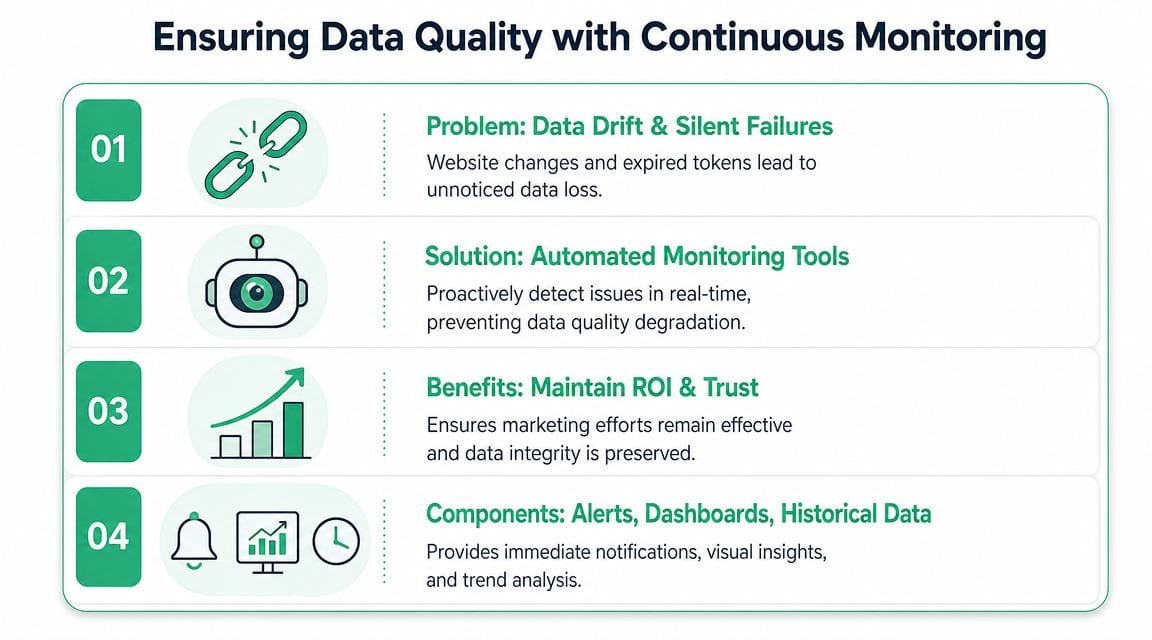
Manual checks won't catch decay fast enough
Teams usually notice tracking breakage in one of three ways. Paid media sees strange performance. Analysts notice a discrepancy after a dashboard review. Or someone opens Events Manager and spots something off days later.
That's too late.
A durable process watches for specific failure modes continuously:
- Missing events: Purchase or Lead stops arriving after a release.
- Payload regressions:
content_ids, value, or currency fields become malformed. - Rogue trackers: An app, plugin, or agency injects an additional pixel without approval.
- Consent drift: Events appear for traffic segments that should be blocked.
- Schema changes: New event names or property types appear without documentation.
What automated monitoring should actually do
The monitoring layer needs to compare live behavior against an expected implementation. Alerts matter, but raw alert volume isn't the point. You want tools that tell you what changed, where it changed, and which destinations were affected.
That usually means the platform should:
| Capability | Why it matters |
|---|---|
| Event discovery | Finds what's actually firing across browser, app, and server flows |
| Schema monitoring | Flags missing, new, or malformed properties |
| Destination checks | Confirms Meta receives what your site intended to send |
| Traffic anomaly alerts | Surfaces unexpected drops or spikes before reporting suffers |
| PII and consent checks | Catches governance problems early |
One option in this category is Trackingplan, which monitors analytics and marketing implementations across web, app, and server-side stacks, detects missing or rogue events, flags schema mismatches and potential PII leaks, and alerts teams through systems like Slack or email. For teams that want to see practical walkthroughs, the company's Trackingplan YouTube channel includes videos on monitoring and QA workflows.
The operational payoff
Automated QA changes how teams work. Instead of debating whether Facebook numbers look odd, they can investigate a concrete alert: Purchase payload changed on the checkout confirmation page, or a Meta destination stopped receiving a parameter required by the tracking plan.
Good monitoring doesn't just tell you that data is wrong. It narrows the root cause while the issue is still fixable.
This matters most after launches. The day after a new checkout, CMS template, or consent implementation goes live is when you want a machine checking every event contract you depend on. Otherwise, campaign optimization continues on top of corrupted inputs, and nobody notices until the monthly review.
The teams that keep Facebook measurement reliable aren't the ones with the most tags. They're the ones with the strongest feedback loop between implementation, validation, and monitoring.
If your team is tired of discovering broken Facebook tracking after campaigns, dashboards, or compliance reviews have already been affected, Trackingplan is worth evaluating as an automated QA layer. It's designed to observe analytics and marketing tags across web, app, and server-side setups, detect drift in events and properties, flag consent or PII issues, and alert the people who need to fix them before data loss turns into reporting noise or wasted spend.