
At its core, site tagging is the process of adding small bits of code, known as tags, to your website. These tags are like tiny digital messengers that collect data on user actions and send it off to third-party tools, powering everything from your analytics dashboards to your advertising campaigns.
The Foundation of Digital Data Collection

Think of your website as a bustling retail store. You'd want to know how many people walk in, which aisles they browse, what products they pick up, and what they ultimately buy. Site tagging is the digital equivalent of installing foot traffic counters, security cameras, and checkout scanners all at once.
These small but powerful code snippets are the engine behind modern digital marketing. They work silently in the background, capturing critical information about how users interact with your site. This isn't a new concept; its roots trace back to the mid-1990s with the first tracking pixels—tiny, invisible 1x1 images that fired off a server request when a page loaded. This simple mechanism allowed early ad servers to measure campaign effectiveness at scale for the first time. For more on the evolution of this tech, tagwithai.com offers some great insights.
Why Is Site Tagging So Important?
Without tags, your website is a black box. You'd have no reliable way to measure performance, understand what your users are doing, or justify your marketing spend. Effective site tagging bridges the gap between your website and the platforms you depend on to run your business.
A well-executed tagging strategy lets you:
- Track User Behavior: See which pages visitors view, what buttons they click, and how they move through your sales funnel.
- Measure Campaign Performance: Accurately attribute conversions and revenue to specific marketing channels like Google Ads, social media, or email.
- Personalize User Experiences: Serve up relevant content, product recommendations, or targeted ads based on a user's past actions.
- Optimize Conversion Rates: Pinpoint exactly where users are dropping off and gather the data needed to fix the leaks.
In essence, site tagging is the foundational layer that translates raw user clicks into actionable business intelligence. It’s the process that gives meaning and context to website traffic, allowing you to make data-driven decisions instead of relying on guesswork.
To help clarify the different roles tags play, here’s a quick breakdown of their key functions.
Key Functions of Site Tags at a Glance
As you can see, tags are involved in nearly every aspect of the digital experience.
Ultimately, understanding what site tagging is becomes the first step toward building a reliable data collection framework. It’s the essential mechanism that feeds your analytics platforms, informs your marketing strategies, and helps you connect with your audience in a more meaningful way. From simple pageview tracking to complex event monitoring, it all starts with a tag.
The Evolution From Manual Code to Tag Management Systems
In the not-so-distant past, site tagging was a developer’s job, plain and simple. Every single tracking script—whether for analytics or a new ad campaign—had to be painstakingly hard-coded directly into the website's HTML. If you wanted to measure something new, you had to file a ticket and get in the engineering queue.
This old-school approach was slow and incredibly fragile. A marketer’s simple request to add a conversion pixel could turn into a multi-day ordeal. Worse, a single misplaced comma in a script could bring down a page or, just as bad, silently corrupt your data collection for weeks.
As businesses adopted more and more digital tools, the source code became a messy graveyard of third-party scripts. This "tag bloat" slowed down websites and created a chaotic environment where no one was really sure what was running, where it came from, or if it was still needed.
The Rise of the Tag Management System
The late 2000s brought a massive change with the arrival of Tag Management Systems (TMS). This was a game-changer. Suddenly, marketing and analytics teams were freed from their constant dependency on IT for every little tracking update. Instead of waiting days, teams could now manage their tags through a simple web interface. Adobe even reported that by 2010, this new way of working cut tag implementation time by a staggering 80%.
A TMS works like a digital container for all your third-party scripts. A developer installs a single TMS snippet on your site—just once. After that, marketers can add, edit, or remove all other tags from within the TMS platform, no coding required.
You can think of a Tag Management System as a universal remote for your website's data collection. Instead of juggling a dozen different remotes (tags), you get one central device to control everything. You can change channels (deploy new tools) instantly without having to rewire your entire setup.
How a TMS Changed the Game
The move from manual coding to tag management wasn't just a technical upgrade; it fundamentally changed how businesses handled their data. Platforms like Google Tag Manager quickly became indispensable. If you're looking for a deeper dive, you can learn more by exploring our frequently asked questions about https://www.trackingplan.com/faqs/what-is-tag-management.
This new model brought a few key advantages to the table:
- Agility and Speed: Marketers could now launch campaigns and deploy tracking in minutes, not days. This meant they could finally react to market changes in real time.
- Reduced Developer Dependency: This freed up engineers to work on the actual product instead of spending their days copying and pasting marketing scripts.
- Centralized Control: With all tags in one place, you finally had a clear dashboard showing what data was being collected and where it was being sent.
- Improved Performance: Most tag managers load scripts asynchronously, meaning they don't block your main page content from loading. This was a huge win for user experience and site speed.
Ultimately, this evolution did more than just make things faster. It empowered the teams closest to the data to manage their own tools, paving the way for a more nimble, data-driven culture.
Understanding Your Modern Tagging Architecture
To really get what site tagging is all about, you need to look under the hood at how a modern setup actually works. It isn't just a messy pile of code snippets. It's a carefully planned architecture designed to be efficient and, most importantly, accurate. The whole system is built to make sure clean, consistent data flows from your website straight into your analytics and marketing platforms.
At the very core of this structure is the Data Layer. Think of it as a universal translator for your website. It’s an invisible object that gathers all the important information a user generates—like their ID, the product they’re looking at, or the total value of their cart—and organizes it into a standard format that your tags can easily understand.
This simple concept prevents absolute chaos. Instead of every tag trying to scrape the page for information in its own weird way, they all pull from one consistent source of truth. This guarantees every tool, from Google Analytics to your Meta Pixel, gets the exact same high-quality data.
The evolution from messy, manual coding to a structured, tag manager-driven approach is a pretty big deal. It's a shift that has handed a lot of power back to marketing and analytics teams.
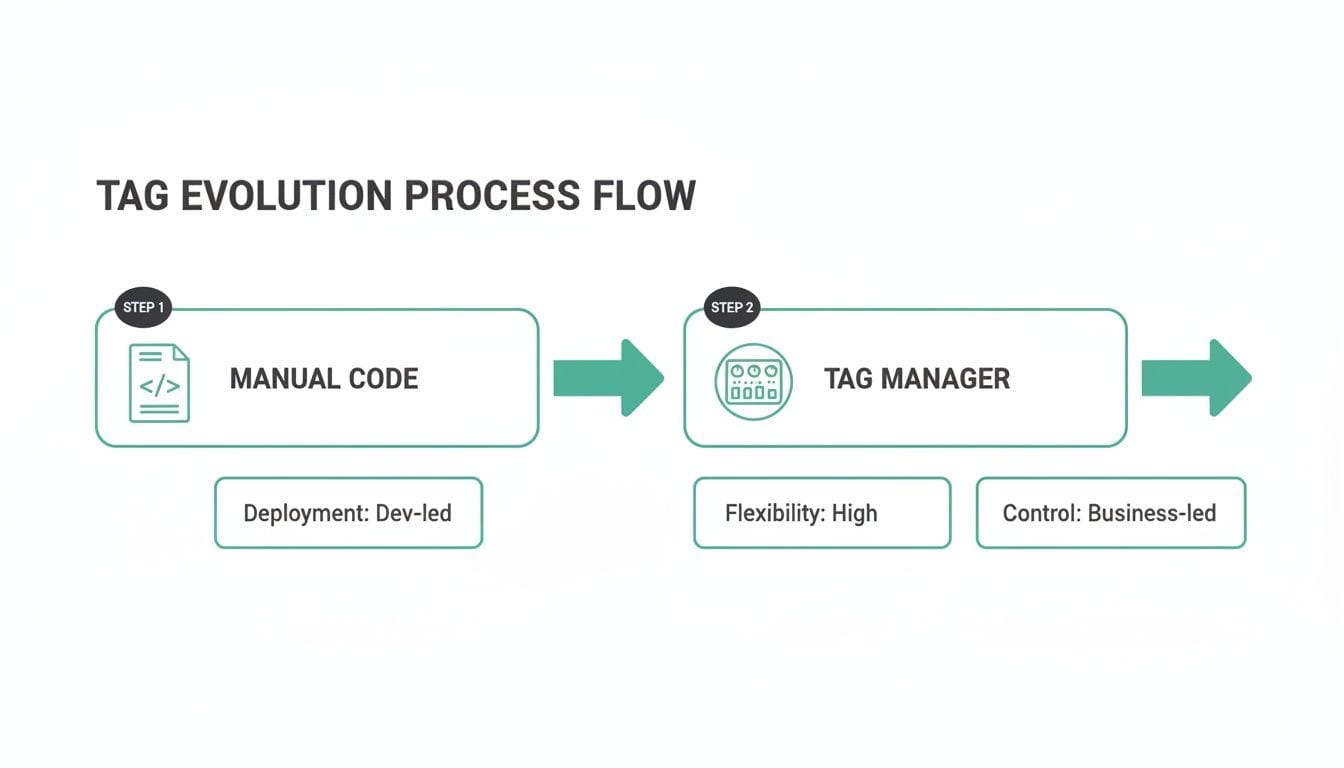
This image really highlights that move away from a developer-dependent, rigid process to the much more flexible, business-led system that tag managers enable.
Client-Side vs. Server-Side Tagging
Once you have a data layer in place, the next big decision is how that data gets sent out. For a long time, the go-to method was client-side tagging.
In this setup, every tag fires directly from the user's web browser (the "client"). A visitor lands on your site, their browser runs the JavaScript for your tag manager, and that manager then triggers individual tags for Google Analytics, ad platforms, and everything else. Each tag makes its own separate call to its respective platform.
- Pros: It’s pretty straightforward to set up and has been the industry standard for ages.
- Cons: It can really slow down your website because the user's browser is juggling a ton of network requests. Even worse, it's wide open to ad blockers and browser privacy features like Intelligent Tracking Prevention (ITP), which can stop tags from firing and leave you with huge gaps in your data.
A purely client-side setup is like having a dozen different delivery drivers show up at your warehouse (your website) to pick up individual packages (data). It can get crowded, cause traffic jams, and some drivers might get blocked at the gate.
The Shift to Server-Side Tagging
To get around these problems, server-side tagging has emerged as a much more robust and reliable way to do things.
With server-side tagging, the user's browser sends just one, consolidated stream of data to a secure server that you control. That server then takes the data and distributes it to all your different marketing and analytics tools. Instead of ten tags firing from the browser, only one does. Your server handles the rest of the work.
This approach brings some major advantages:
- Improved Performance: By cutting down the number of scripts running in the user's browser, server-side tagging can give your page load speed and user experience a noticeable boost.
- Enhanced Data Control and Security: Because all the data passes through your own server first, you have total say over what information gets sent to third-party vendors. This makes it much easier to manage user privacy and prevent sensitive data from leaking.
- Increased Data Accuracy: Server-side tagging is far more resistant to ad blockers and browser restrictions. Since the data is sent from your server, not the user's browser, these tracking interruptions are largely sidestepped, leading to much more complete and accurate datasets.
While client-side tagging is still common and perfectly fine for many situations, a hybrid approach or a full move to server-side is quickly becoming the new standard. For any business that relies on high-quality data, it creates a more durable, secure, and efficient foundation for modern site tagging.
How Broken Site Tagging Silently Kills Your ROI
A well-oiled tagging architecture is one of your most powerful assets. But a broken one? That's a silent profit killer.
Faulty site tags don’t announce themselves with flashy error messages or crashing websites. Instead, they quietly chip away at your return on investment through corrupted data, missed opportunities, and misguided decisions. It's like a slow leak in your revenue funnel—one that often goes completely unnoticed for months.

These kinds of errors are far more common than most teams realize. As marketing tech stacks have ballooned, tagging failures have become a massive problem in digital analytics. It’s not unusual for audits to find that 20-35% of a site's tags fire incorrectly. These silent breakdowns can come from anywhere—schema mismatches, missing events, or ad blocker interference—and they quietly impact billions of user interactions.
The High Cost of Bad Data
When your tags fail, the consequences ripple across the entire business. Every broken tag creates a new blind spot, leading to poor decisions that directly hit your bottom line. This isn't just about technical glitches; it's about real money being wasted.
Imagine an e-commerce company launching a big ad campaign to drive traffic to a new product page. At the same time, a recent website update inadvertently broke the "Add to Cart" event tag.
- The Technical Failure: The tag stops firing when a user adds the new product to their cart.
- The Business Impact: The marketing team sees tons of traffic but abysmal conversion rates. They assume the campaign is a flop and pull the plug, killing what could have been a highly profitable ad spend.
This isn’t some rare, hypothetical scenario. Small, seemingly minor errors in your site tagging can trigger significant financial consequences.
Common Failures and Their Business Consequences
Broken tagging isn’t a single problem but a whole category of them, each with its own damaging outcome. Understanding these specific issues is the key to connecting a technical error to the business pain it causes.
For example, inconsistent campaign tracking—often the result of messy UTM conventions—can lead to a 12% loss in traffic attribution. That means you have no real idea which campaigns are working, making it impossible to optimize your ad spend.
Broken tags create a distorted reality. You're making critical budget and strategy decisions based on a funhouse mirror reflection of your business, where successful campaigns look like failures and user friction points are completely invisible.
To really see how technical errors translate into business damage, it’s helpful to look at a few common examples.
Impact of Common Tagging Errors
This table breaks down some of the most frequent tagging failures and shows just how directly they can hurt your business.
Each of these failures quietly sabotages your data integrity, and the longer they go unnoticed, the more damage they do.
This is exactly why teams need tools that can automatically detect silent tracking errors before they snowball into costly mistakes. Ultimately, robust site tagging isn't just a technical best practice; it's a fundamental requirement for protecting your ROI and ensuring your business is making decisions based on reality, not corrupted data.
Building a Bulletproof Tag Governance Strategy
After seeing how easily a few broken tags can tank your ROI, the immediate question is: how do you stop it from happening? The answer isn't chasing down and fixing individual fires one by one. It’s about building a systematic defense—a solid tag governance strategy that prevents the chaos before it even begins.
This strategy acts as the rulebook for your data, making sure every tag is implemented correctly, tested thoroughly, and actually tied to a business goal. It's what turns tagging from a chaotic free-for-all into a disciplined, predictable process. Without this structure, even the most sophisticated analytics setup will eventually crumble under the weight of bad data.
A strong governance model isn’t just a nice-to-have; it's a must for any company that takes its data seriously. It gives you the clarity and control to finally trust your numbers and make decisions with confidence.
The Tracking Plan: Your Single Source of Truth
At the heart of any good governance strategy is the tracking plan. Think of this document as your company's constitution for data collection. It spells out every single event, property, and user attribute you want to track, defining what each one means, where it should fire, and why it matters to the business.
It’s the blueprint for your entire data architecture. Developers use it to code the tracking correctly, analysts use it to know what data they have to work with, and marketers use it to connect their campaigns to real, defined metrics.
A well-documented tracking plan should clearly outline:
- Event Naming Conventions: A consistent syntax for naming events, like using a Verb_Object format (e.g.,
Product_Viewed). - Property Definitions: The specific data points attached to each event (e.g.,
product_id,price,category). - Trigger Conditions: The exact user actions that should make an event fire.
- Business Rationale: A simple explanation for why each event is being tracked and which KPIs it supports.
Without a tracking plan, you’ve got data anarchy. Every team just makes up its own rules, which leads to inconsistent naming, duplicate events, and a dataset so messy it becomes worthless. A tracking plan creates a shared language that everyone in the company can understand and stick to.
Establishing a Clear Deployment Workflow
Once you have a tracking plan, the next step is to nail down a structured workflow for how new tags and events get requested, tested, and pushed live. This process stops people from adding rogue tags on a whim and guarantees that every change is properly checked.
A good workflow usually has a few key stages:
- Request: A stakeholder (like someone from the marketing team) formally requests a new tracking event and explains the business need for it.
- Specification: An analyst or data owner adds the new event to the official tracking plan, defining all its properties and triggers.
- Implementation: A developer implements the tag, following the exact specifications from the tracking plan.
- Quality Assurance: The new tag is put through its paces in a staging environment to make sure it fires correctly and sends the right data.
- Deployment: Only after it passes QA does the tag get deployed to the live production site.
This step-by-step process builds in critical checkpoints that catch mistakes early, long before they can pollute your production data. It enforces accountability and ensures that every piece of data you collect is intentional, accurate, and valuable. By adopting a formal workflow, you shift from constantly reacting to problems to proactively ensuring quality—creating a far more stable and trustworthy analytics foundation.
The Future of Tagging with Automated Observability
Even with a rock-solid governance strategy, manual checks and periodic audits will only get you so far. The reality is that most teams are still stuck putting out data fires after the damage is done. This is where the future of site tagging is headed: a move away from reactive fixes toward a proactive, automated approach called observability.
Think of it like having a 24/7 security guard for your entire data pipeline. That’s the core idea behind automated observability. Instead of just hoping your manual spot-checks catch every little error, these platforms continuously watch your data streams in real time, validating every single event against your master tracking plan.
From Manual Audits to Real-Time Monitoring
The old way of guaranteeing data quality involved painfully tedious, manual audits that were often outdated the second they were finished. Automated observability completely flips this model on its head. It works by automatically discovering every tag and data point on your site and then monitoring them without a single interruption.
This constant vigilance offers some serious advantages:
- Automatic Discovery: It maps out your entire analytics setup, showing you every tag that’s firing, where all that data is going, and exactly how it’s structured. No more guesswork.
- Real-Time Anomaly Detection: The system instantly flags problems as they happen, like unexpected traffic spikes, broken conversion funnels, or sudden drops in key event counts.
- Schema Validation: It compares every event against your tracking plan to catch property mismatches or missing data before it can pollute your reports and dashboards.
Here’s a glimpse of what an automated discovery and monitoring dashboard actually looks like. It provides a single, unified view of your entire data flow.
This visual shows how an observability platform can give teams a clear, real-time overview of their entire analytics implementation, making it easy to spot inconsistencies at a glance.
Creating a Proactive Advantage
This shift from manual QA to automated monitoring is about more than just catching errors faster. It transforms tag management from a defensive, frustrating chore into a genuine strategic asset. When teams can finally trust their data, they can make bigger, bolder, and faster decisions.
With automated observability, you’re no longer asking, "Is our data accurate right now?" Instead, you’re operating with the confidence that you’ll be the first to know the second it isn’t. This creates a foundation of trust that empowers the entire organization.
The system sends instant alerts for critical issues directly to your team via Slack or email the moment something breaks. For a deeper dive into how this all comes together, you can learn more from this automated marketing observability guide.
This approach creates a single source of truth where marketers, analysts, and developers can finally collaborate effectively. It’s designed to catch everything from accidental PII leaks to broken campaign attribution, ensuring the data that fuels your business decisions is always complete, accurate, and trustworthy. It's the final, crucial step in mastering site tagging and locking in its long-term value.
Frequently Asked Questions About Site Tagging
Even after you've got the basics down, a few questions always pop up when it comes to the real-world practice of site tagging. Let's tackle some of the most common ones to clear up any confusion.
What Is the Difference Between a Tag and a Pixel?
You’ll often hear these two terms used interchangeably, but there’s a subtle history behind them.
Originally, a "pixel" was just that—a tiny, invisible 1x1 image tag. Its only job was to fire off a signal to a server, usually to count something simple like an ad impression. It was the original, bare-bones way to track user activity.
Today, a "tag" is a much broader concept, almost always referring to a snippet of JavaScript. These modern tags are far more powerful; they can bundle up detailed event data with multiple properties and send it off to analytics tools. In fact, most of what we call "pixels" today, like the Meta Pixel, are actually sophisticated JavaScript tags.
How Many Tags Are Too Many for One Website?
There's no magic number. I've seen sites with 50 tags running smoothly and sites with 10 that were a complete mess. The real problem isn't the number of tags you have, but how they're implemented and managed.
The key is performance. A well-organized Tag Management System that loads tags asynchronously—meaning they don't block your page content from loading—is your best defense against slowdowns. The more important practice is to perform regular audits to get rid of old, unused, or redundant tags. It’s about quality and organization, not just quantity.
Can I Manage Site Tagging Without Being a Developer?
For the most part, yes. That’s exactly what modern Tag Management Systems were built for. They give marketers and analysts a user-friendly interface to add, edit, and deploy standard tags without ever having to touch the site's source code.
That said, having some foundational technical knowledge is a huge advantage. Setting up the data layer correctly or debugging a tricky implementation often requires a partnership between marketing and development. The best tagging strategies I’ve seen always come from strong collaboration between the business and technical teams.
Stop chasing data fires and start trusting your numbers. Trackingplan provides a single source of truth, automatically discovering and validating your entire analytics setup so you can fix issues fast and deliver reliable insights. Learn how to build a foundation of data you can count on at Trackingplan.