
So, what exactly is server-side tracking?
Instead of letting a user's browser send data directly to a dozen different marketing and analytics platforms, server-side tracking routes all that information to a single server that you control first. From there, your server acts as a central hub, cleaning up the data, adding to it, and then sending it off to its final destinations. This small change in the data's journey gives you a massive amount of control and can seriously boost your website's performance.
The Critical Shift from Browser to Server Tracking

Think of your website as a bustling restaurant. For years, data collection has worked like a waiter running from table to table, taking orders, and then shouting them directly to all the different stations—the grill, the bar, the dessert counter. This is client-side tracking in a nutshell. The user's browser is the waiter, sending data directly to Google Analytics, Facebook, and everywhere else. It's chaotic.
Now, imagine a better system. The waiter takes a single, clean order and brings it to a central kitchen—that’s your server. Here, the head chef (your server-side setup) reviews the order, checks it for accuracy, adds any special notes, and then sends the right instructions to each station. This organized, controlled process is the essence of server-side tracking.
Why the Old Way Is Breaking Down
That traditional client-side method is getting less reliable by the day. A few powerful forces are actively disrupting that direct line of communication from a user's browser to your analytics tools. This isn't just a small hiccup; it's creating huge data gaps that can lead you to make some seriously flawed business decisions. The industry isn't just choosing to move to a new model—it's being forced to.
This shift is happening for a few key reasons:
- Widespread Ad Blockers: A huge chunk of internet users now run ad blockers. These tools don't just hide ads; they often stop analytics and marketing scripts from even loading. This means entire segments of your audience are effectively invisible.
- Browser Privacy Features: Browsers like Safari (with its Intelligent Tracking Prevention), Firefox, and even Chrome are rolling out stricter privacy controls. These features can slash cookie lifespans and block third-party scripts, crippling your ability to track user journeys over time.
- Privacy Regulations: Laws like GDPR and CCPA have put consumers back in the driver's seat when it comes to their data. With client-side tracking, it's incredibly difficult to manage exactly what data is being fired off to third-party vendors, which puts you at a much higher compliance risk.
The core problem with client-side tracking is the loss of control. Data is sent directly from an environment you don't own (the user's browser) to destinations you don't fully control, leaving it wide open to being blocked or modified along the way.
The Strategic Need for a New Approach
With third-party cookies on their way out, businesses have no choice but to rethink their data strategies from the ground up. To get the full picture on this, check out our guide on the death of third-party cookies and the importance of first-party data. Server-side tracking directly tackles these challenges by creating a stable, controlled pipeline for your data.
By moving all the heavy lifting from the browser to your own server, you take back ownership of your data flow. This is no longer just a technical upgrade. It’s a strategic imperative for building a more resilient, accurate, and privacy-first analytics foundation that can actually withstand the changes to come.
Comparing Client Side vs Server Side Tracking
To really get why server-side tracking is such a big deal, you have to see it side-by-side with the way we’ve always done things. While both methods are trying to capture user data, how they do it changes everything—from your site’s performance to whether you can even trust your business insights. This isn't just some minor technical difference; it’s a complete overhaul of how your data gets from point A to point B.
The traditional method, client-side tracking, puts all the work on the user's browser. When someone lands on your site, their browser runs a bunch of JavaScript snippets (or "tags") that fire off data directly to third-party tools like Google Analytics or Facebook. Every script makes its own separate trip, sending data out on its own.
On the other hand, server-side tracking brings in a middleman: your own server. The user's browser just sends a single, clean stream of data to your server first. Acting as a central hub, your server then takes that information, cleans it up, adds to it, and securely passes it along to all the third-party tools that need it.
The Flow of Data: A Head-to-Head Look
Let's walk through an example to make this crystal clear. Imagine a customer clicks the "Buy Now" button on your e-commerce store.
- Client-Side Data Flow: The browser kicks into high gear, running multiple scripts at once. One script pings Google Analytics with the purchase event, another tells Facebook Ads, and a third informs your affiliate platform. Each of these outgoing requests is a potential failure point, easily blocked by ad blockers or browser privacy settings.
- Server-Side Data Flow: The browser sends just one lightweight request with the purchase details over to your server. Your server gets that single piece of data and then opens its own secure, reliable connections to forward the information to Google Analytics, Facebook Ads, and the affiliate platform.
That small change in routing makes a massive difference in data quality and control. By being the single point of contact, your server shields the entire data collection process from the chaotic and often hostile environment of a user's browser.
Breaking Down the Key Differences
The choice between these two tracking methods has a direct impact on your digital strategy. While client-side tracking is often easier to get started with, its cracks are really starting to show. Server-side tracking takes more effort to set up, but it gives you a much more durable and future-proof foundation for your data.
To put it all in perspective, here’s a direct comparison of client-side and server-side tracking across the dimensions that matter most.
Client-Side vs Server-Side Tracking At a Glance
The table below breaks down the core trade-offs between relying on the user's browser versus your own server for data collection.
This comparison highlights that while client-side is easier to start, it comes with significant long-term vulnerabilities.
The fundamental trade-off is between ease and control. Client-side is quick to start but leaves you vulnerable, while server-side requires an investment to build a resilient and trustworthy data foundation.
Ultimately, the limitations of client-side tracking are becoming a major business liability. Incomplete datasets lead to misinformed marketing spend, slow websites drive away customers, and poor privacy controls create significant compliance risks. Server-side tracking directly addresses these pain points, offering a strategic solution for businesses that rely on accurate data to grow.
Understanding the Architecture of Server-Side Tracking
To really get what server-side tracking is all about, you have to look under the hood at how the data actually moves. The architecture might sound complex, but it’s not. In fact, it’s best to think of it as a modern logistics network, built for efficiency and total control.
Imagine a user’s action on your website—like clicking a button—is a small package. In the old client-side world, that single package would be copied and handed off to a whole fleet of different couriers (third-party scripts), all leaving directly from the user's browser and heading to separate destinations. With server-side tracking, the whole process is way more organized.
This diagram shows you the two different data flows side-by-side.
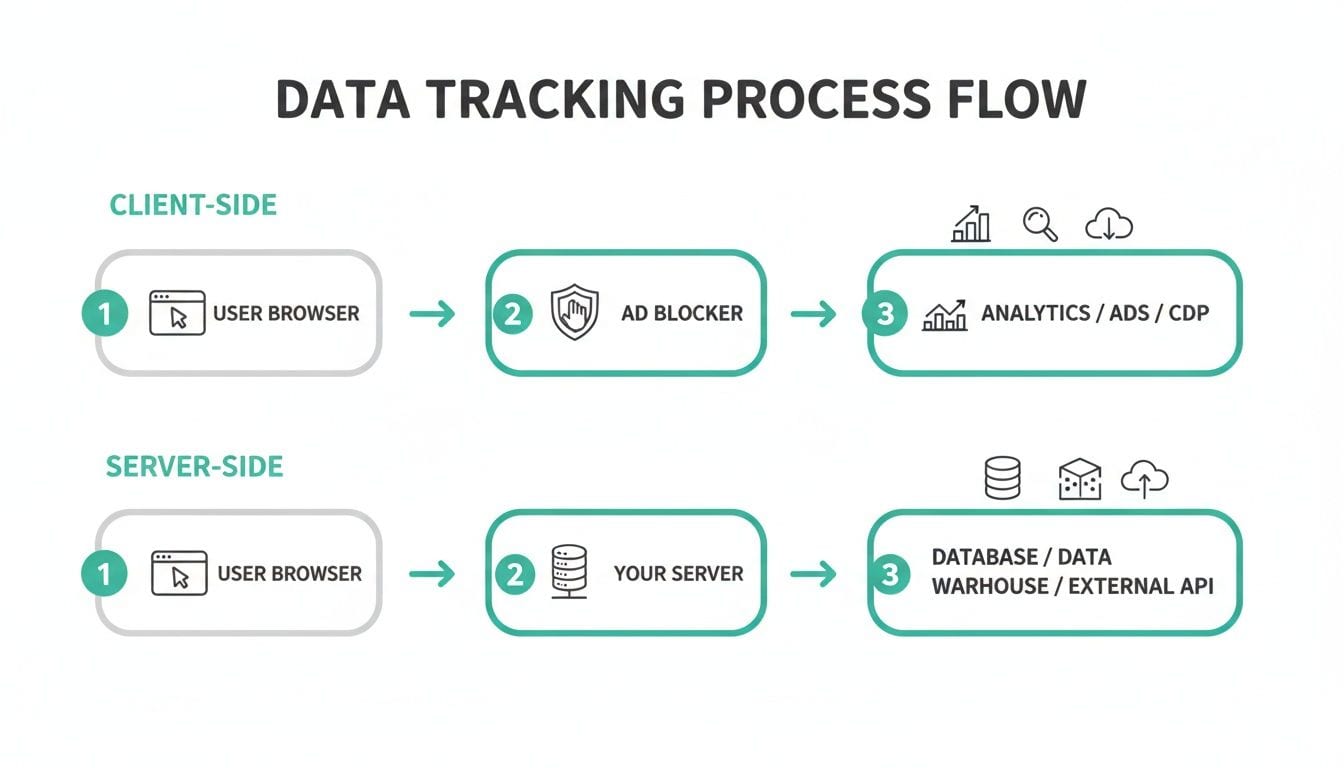
You can see how the client-side path is wide open to interruptions from things like ad blockers. The server-side path, on the other hand, creates a single, much more resilient route for your data. This architectural shift is the real secret to getting much higher data accuracy.
The Core Components of the Data Journey
The whole system is built on three key components working in concert. Each one has a very specific job in getting data from a user’s browser to its final destination—safely and reliably. Once you understand these parts, you have a clear blueprint of the entire data flow.
-
The Client-Side Tag (The Pickup Request): It all starts with a tiny piece of code on your website. Usually, it's just a single script, like the Google Tag Manager web container snippet. Its only job is to capture that initial user interaction and send one streamlined data packet to your server. This keeps the browser’s workload minimal, which helps your site speed.
-
The Server Endpoint (The Distribution Hub): This is the heart of your whole server-side setup—a dedicated server that you control. It acts as a central hub that receives the raw data packet from the browser. Popular tools, like a Google Tag Manager server-side setup, make it much easier to manage this endpoint. For a deep dive, check out this guide on how to configure Google Tag Manager for server-side use.
-
Server-to-Server APIs (The Final Delivery): Once your server has the data, it no longer needs the user's browser. Instead, it opens direct, secure communication channels—these are server-to-server APIs—with platforms like Google Analytics, Meta (Facebook), and others. This method is far more dependable than trying to send data from a browser.
By centralizing data processing at the server, you create a single source of truth. The server becomes the gatekeeper, ensuring every piece of data is validated, cleaned, and enriched before being passed on to any third-party tool.
Visualizing the Data Flow in Action
Let’s trace a piece of data as it moves through this architecture. When a user adds a product to their cart, the lightweight client-side tag fires a single request with all the event details to your server endpoint (something like collect.yourdomain.com).
Once your server receives this request, you can perform several critical actions:
- Validate the data to make sure it's formatted correctly.
- Enrich the event by pulling in extra info from your CRM, like a customer's lifetime value.
- Redact sensitive information like personal details to stay compliant with privacy laws.
- Transform the data to meet the specific formatting needs of each destination platform.
Finally, your server sends this clean, polished data directly to your marketing and analytics partners through their APIs. This kind of robust infrastructure is only possible because of how powerful server technology has become. The global server market hit $112.4 billion in revenue in just one quarter, thanks to a 61% year-over-year increase fueled by AI and high-density computing. This is the powerful backbone that supports the scalable server-side tracking systems used by today's top companies. This controlled, server-managed flow guarantees higher-fidelity data, which in turn leads to much better business decisions.
The Business Case for a Server Side Approach

It’s one thing to understand the technical architecture, but where does server-side tracking really deliver business value? The decision to make this shift isn’t just an IT project; it’s a strategic move that directly impacts your marketing ROI, user experience, and even legal standing. Think of it as an investment in a more reliable and trustworthy data foundation for the future.
The heart of the business case comes down to one thing: data accuracy. Traditional client-side tracking is leaking data. With ad blockers, browser privacy features, and network issues, it's not uncommon to see data loss as high as 20%. That means one in five conversions or key user actions might never even be recorded, leading to skewed reports and poorly allocated marketing spend.
By routing data through your own server first, you create a protected channel that sidesteps most of these browser-level roadblocks. This simple change ensures a much more complete and accurate dataset makes its way to your analytics and ad platforms, paving the way for smarter, more confident decisions.
Supercharge Your Website Performance
One of the first things you'll notice after moving to a server-side setup is a serious boost in website speed. Client-side tracking clutters your site by forcing a user's browser to download and run a whole mess of third-party JavaScript files. Each script adds a little more digital weight, slowing down the user experience—and potentially hurting your conversion rates and SEO.
A server-side setup changes the game by consolidating these dozens of requests into a single, lightweight one from the user's browser to your server. From there, your server does the heavy lifting of talking to all your third-party vendors.
By offloading script execution from the browser to the server, you reduce client-side processing, leading to faster page loads. This not only improves the user experience but also sends positive signals to search engines, potentially improving your organic visibility.
For example, an online retailer that implemented a server-side model was able to achieve a 7% increase in site speed. This win came simply from taking a pile of vendor tags off the browser and moving them into their own secure server environment.
Gain True Data Ownership and Control
Maybe the most powerful advantage of all is finally gaining complete ownership of your data pipeline. When you use client-side tracking, third-party scripts have a direct line into your user's browser, and it can be tough to know exactly what information they're scooping up. This creates a huge blind spot for privacy and compliance.
Server-side tracking puts you in the driver's seat. You become the gatekeeper controlling a single, unified stream of data. This gives you the power to inspect, clean, and even strip out sensitive information before it ever leaves your ecosystem. This level of control is essential for navigating today's strict privacy landscape.
- Strengthened Compliance: You can easily manage data to comply with regulations like GDPR and CCPA. For instance, you can hash or remove Personally Identifiable Information (PII) on your server so it never reaches a third-party tool improperly.
- Vendor Management: You get to decide precisely what data each vendor receives. If you want to send rich event data to your analytics platform but only bare-bones conversion data to an ad network, you can build that logic right on your server.
- First-Party Data Asset: The data flowing through your server becomes a valuable, proprietary first-party asset. You can enrich it with information from other systems, like your CRM, to build much deeper customer profiles for analysis and personalization.
This shift transforms your data from something you just borrow from third-party scripts into a strategic asset you own and govern completely. It's how you future-proof your analytics in a world where data privacy and control are paramount.
Navigating Implementation Challenges and Best Practices
Making the jump to server-side tracking is a smart, strategic move. But let's be real—it's not as simple as flipping a switch. This is a full-blown infrastructure project that demands careful planning, technical resources, and a new way of thinking about data governance. Acknowledging these hurdles upfront is the first step to getting it right.
The first thing most teams notice is the initial setup cost and complexity. Unlike client-side tagging, which often gets by with free JavaScript snippets, a server-side setup needs, well, a server. Whether you go with a managed solution or spin up your own cloud instances, you're introducing a new operational expense. Think of it as an investment in data quality, but it's one you absolutely need to budget for.
Then there's the migration itself. This can be a huge undertaking. You have to map out a transition from your current client-side setup to the new server-side model without leaving gaps in your data. This usually means running both systems in parallel for a while to make sure everything matches up, which requires some serious technical oversight and management.
Common Pitfalls and How to Avoid Them
Getting a server-side tracking system off the ground means sidestepping the common mistakes that can derail the whole effort. One of the biggest blunders is treating it like a one-and-done project. Your server-side environment is a living system; it needs ongoing care and maintenance to stay effective and reliable.
Another frequent misstep is underestimating the skills required. Implementing and managing a server-side container, configuring server-to-server APIs, and debugging data flows is a different ballgame than traditional tag management. It requires a more technical skillset, and without the right expertise, teams can quickly get in over their heads.
To keep your transition smooth and set yourself up for long-term success, here are a few best practices to live by:
- Start Small and Scale. Don't try to boil the ocean. Begin by migrating a single, critical tool like Google Analytics to your server-side environment. Test it, validate its performance, and make sure the data is accurate before you start adding more complex marketing pixels.
- Establish Clear Governance. Decide from day one who owns the server-side container, what data is allowed to flow through it, and how changes get deployed. This discipline prevents your shiny new server from becoming as cluttered and chaotic as the client-side tag managers of the past.
- Invest in Technical Expertise. Make sure your team has the skills needed for the job, or bring in an expert who can guide you. Properly migrating to server-side tagging involves specific best practices that can save you a world of headaches and prevent costly mistakes down the line.
The Role of Analytics Observability
Maybe the most critical practice for any modern server-side setup is embracing analytics observability. Your data is now flowing through a complex, multi-stage pipeline that you own. The old "fire-and-forget" mentality of client-side tags just doesn't cut it anymore. How can you be sure the data is actually accurate?
Analytics observability is the practice of having continuous, automated visibility into your entire data pipeline. It shifts you from manually spot-checking reports for errors to a system that proactively tells you the moment something breaks.
This is where automated monitoring platforms become non-negotiable. They act as a dedicated QA layer, constantly validating data from the point of collection all the way to its final destination. These tools are built to automatically catch issues like schema changes, missing properties, or broken API connections in real-time.
By giving you instant alerts and root-cause analysis, they transform what could be a fragile, opaque system into a reliable and trustworthy source of truth for your entire business.
The Future of Digital Analytics Is Server Side
The conversation around digital analytics is changing, and fast. As we head deeper into a world without third-party cookies and with much stricter privacy standards, server-side tracking is no longer just a technical edge—it's becoming a core business strategy. The game isn't just about collecting data anymore; it's about building a resilient, compliant, and trustworthy analytics foundation that can handle whatever comes next.
This shift is part of a bigger industry-wide move toward first-party data ownership. For years, businesses effectively rented their data insights from third-party scripts scattered across their websites, but that model is breaking down. Server-side tracking lets you build your own data infrastructure, turning your analytics from a potential vulnerability into a powerful, proprietary asset that actually builds customer trust.
The Growing Adoption Gap
While the benefits are clear, the speed at which companies are making the switch varies wildly across the globe. The 2026 JENTIS Server-side Tracking Report throws a spotlight on a major geographic divide.
In Europe, especially in regions like DACH (Germany, Austria, Switzerland) and the Nordics, companies are way ahead of the curve. Mainstream adoption is already hitting 50-60% among enterprise marketers. This rush is being fueled by the urgent need for GDPR compliance and the very noticeable performance boosts.
Meanwhile, the United States is moving at a much slower pace. We're only seeing about 20-25% penetration in mid-to-large companies. Many are still clinging to legacy client-side methods, even with growing pressure from CCPA and other state-level privacy laws.
This data tells a crucial story: businesses operating in stricter regulatory environments are being forced to innovate faster, building more robust data practices out of sheer necessity.
Why Mastering Your Server Is Non-Negotiable
The takeaway here is unmistakable: mastering your data infrastructure on the server is no longer optional. It’s the essential groundwork for survival and growth in this new digital era. Relying solely on client-side methods is like building a house on shifting sand—it’s just a matter of when, not if, it will crumble under the weight of new browser restrictions and privacy regulations.
By taking control of your data flow on the server, you are not just future-proofing your analytics. You are investing in data accuracy, site performance, and, most importantly, the trust of your customers.
Ultimately, understanding what is server-side tracking is the first step toward building this durable foundation. It empowers you to create a single source of truth, giving you the clarity and confidence to make smarter marketing decisions, personalize user experiences, and navigate the privacy-first world with a clear competitive advantage. The future of analytics isn't just about better tools; it’s about better architecture. And that architecture is built on the server.
Got Questions About Server-Side Tracking?
As you start digging into server-side tracking, a few common questions always seem to pop up. Let's clear the air and give you some straightforward answers on what this shift in data collection really means in practice.
Does Server-Side Tracking Get Rid of Client-Side Tracking Altogether?
Not quite. Most modern server-side setups don't eliminate client-side scripts entirely but instead rely on a hybrid model. You’ll still have a lightweight script on the user's browser to catch that initial spark—a click, a page view, you name it.
But here’s the key difference: instead of that script firing off data to a dozen different vendors, it sends one clean, unified data stream straight to your server. From there, your server does all the heavy lifting—enriching the data, applying business logic, and forwarding it to your third-party tools. The goal isn't to eliminate the browser's role, but to drastically reduce its workload.
Is Server-Side Tracking More Expensive?
It’s less about being more expensive and more about a shift in where the costs lie. Traditional client-side tracking often has that "free" feeling upfront, but it’s loaded with hidden expenses: bloated scripts tanking your site performance, and bad data leading to wasted ad spend.
With server-side tracking, you’re looking at direct costs for server hosting, which will naturally scale with your traffic.
But you have to weigh that investment against the massive ROI you get from higher data accuracy, better conversion rates from a faster website, and a much lower risk of getting hit with compliance fines. A predictable monthly server bill is often a small price to pay for a data strategy you can actually trust.
How Do I Make Sure My Server-Side Data Is Accurate?
Keeping data accurate in a server-side environment is a different ballgame. The old ways of manual checks just don't cut it. The gold standard today is to use an automated analytics observability platform, which essentially acts as a control tower for your entire data pipeline.
These tools are no longer a "nice-to-have"—they're critical for trusting your server-side data. Here’s why:
- They keep a constant eye on your data as it moves from collection all the way to its destination.
- They automatically flag critical issues you'd otherwise miss, like missing data, incorrect values, or broken API connections.
- Your team gets real-time alerts, letting them jump on problems immediately instead of waiting for someone to notice the dashboards look "off."
This kind of proactive monitoring turns what could be a black box into a reliable, trustworthy source of truth that you can confidently use to make business decisions.
Ready to build a trustworthy, server-side analytics foundation? Trackingplan provides automated observability and QA to ensure your data is always accurate and reliable. Get started with Trackingplan today and take control of your data pipeline.