
Baidu tracking, at its core, is about using Baidu's own analytics tools like Baidu Tongji to see what users are doing on your websites and apps. It's a must-have for tapping into the Chinese market, but it has a funny way of showing up in tech stacks where you'd least expect it, creating some serious data blind spots for global companies.
Why Your Tech Stack Might Have a Baidu Tracking Blind Spot
Ever had that nagging feeling that Baidu Analytics might be running on your site without you putting it there? It happens a lot more often than people realize. We see global brands discover Baidu tracking scripts firing away in their tech stack, even when they have no active strategy for users in China. This is what we call "ghost tracking."
So, how does it get there? This unexpected guest usually piggybacks on third-party tools, plugins, or vendor scripts that have Baidu Analytics embedded in them. For instance, that marketing automation platform or a slick customer support widget you just installed might be using Baidu Tongji for its own analytics, and in doing so, quietly adds it to your website.
The Hidden Impact of Unmanaged Baidu Tracking
When this "ghost" Baidu tracking goes unnoticed, it can cause a whole host of problems for your data operations and even your broader business strategy. The fallout ranges from wonky metrics to some pretty serious compliance headaches.
Here’s a breakdown of the key issues that can pop up:
- Data Integrity Issues: Unmanaged scripts are notorious for sending incomplete or just plain wrong data. This pollutes your analytics, leads to flawed business intelligence, and can result in some very costly decisions based on bad information.
- Performance Degradation: Every extra script adds to your site's load time. An unmonitored Baidu pixel can easily slow down page rendering, which not only frustrates users but can also ding your SEO rankings.
- Compliance and Privacy Risks: Without proper oversight, you have no real way of knowing what user data is being collected or where it's being sent. This creates a massive blind spot for regulations like GDPR, CCPA, and others.
The sheer scale of Baidu's reach is often underestimated by Western companies. We're not just talking about a regional tool here; Baidu Analytics is used by more than 12.9 million websites worldwide, and its presence is definitely global.
Even in the United States, roughly 2.66 million websites have Baidu Analytics running for their tracking operations. That makes it a significant player, even far from its home market. You can discover more insights about Baidu's market presence here.
At the end of the day, having full visibility into your analytics setup isn't a nice-to-have; it's non-negotiable. Without a solid monitoring solution, you're essentially flying blind. You need to identify and manage every single tracking pixel—especially the unexpected ones from Baidu—to maintain data quality, stay compliant, and keep your digital ecosystem healthy.
Getting Your Baidu Tongji Tracking Code Live
Before you can start digging into user data, you've got to get the Baidu Tongji tracking code up and running on your website. The first move is pretty simple: create a Baidu account to get access to the Tongji platform. This is your entry point for generating the unique tracking script that unlocks all of Baidu's analytics power.
Once your account is set up, Baidu will prompt you to add a new site. This is where you'll register the domain you want to track. From there, Baidu Tongji generates a unique JavaScript snippet, much like the one you’d get from Google Analytics. This is the piece of code you’ll need to embed into your website’s HTML to get the data flowing.
Finding Your Way Around the Baidu Tongji Interface
When you first log in, you'll land on the Baidu Tongji dashboard. Heads up: the platform is primarily in Chinese. However, modern browser translation tools do a surprisingly good job of making it manageable for non-speakers.
Here’s a look at the login page, which is your gateway to the analytics suite.
Getting past this initial screen is the first hurdle. After that, you'll head into the site management section to generate the script you need.
Choosing Your Implementation Method
You have a few solid options for deploying the Baidu tracking script. The best choice really boils down to your technical comfort level and what platform your website is built on. Each approach has its own quirks and is better suited for different situations.
To help you decide, here’s a quick comparison of the most common ways to get your Baidu tracking code deployed.
Comparing Baidu Tongji Implementation Methods
No matter which path you take, picking one and sticking with it is what counts. A consistent setup is the foundation of reliable data.
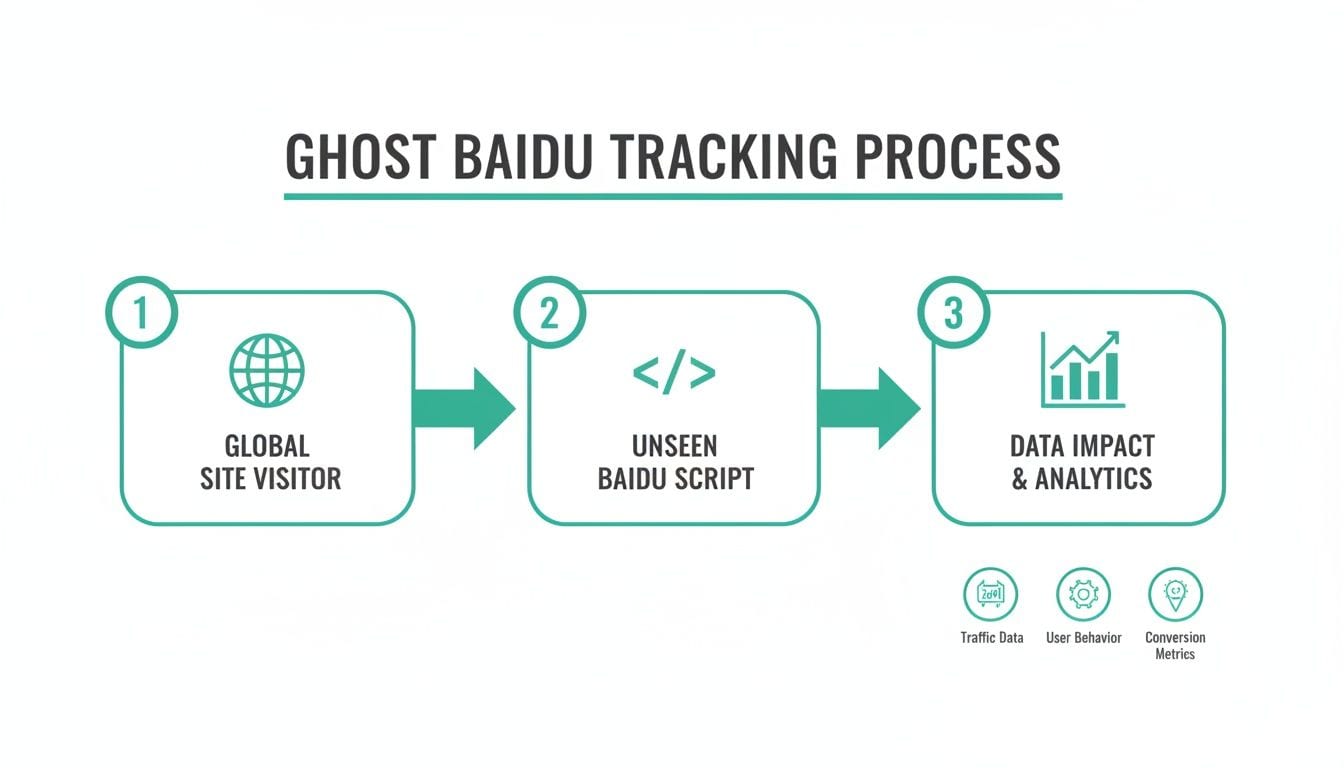
This flowchart maps out how a tracking script, whether you put it there or not, starts collecting data from the moment a visitor interacts with your site.
It’s a good visual reminder of why a clean implementation matters. You want to be in control of what’s firing, not letting "ghost" tags from third-party tools muddy your analytics.
Key Takeaway: The one non-negotiable best practice is to place the tracking script as high up in the
<head>tag as possible. This ensures it loads right away, so you can capture data from users who might bounce before the page fully loads.
Whichever method you choose, make sure you're consistent. The script needs to be on every single page you want to track. If it's missing from some pages, you'll end up with massive gaps in your data, making it impossible to see a complete user journey. Getting this right from the start will save you countless headaches later on.
For a deeper look into keeping your implementation clean, you can learn more about Baidu integration and how to ensure your data quality stays high.
How to Validate Your Baidu Tracking Implementation
Getting your Baidu Tongji code live is a great start, but it’s just that—a start. Simply deploying the script doesn't mean you're collecting accurate data. You have to actively confirm that the script is not only present but also firing correctly on every key user action.
Blind faith in your setup is a risky strategy. To build a data foundation you can actually trust for business decisions, you need to validate your Baidu tracking implementation. The good news is you can get started right now with tools already built into your browser. This first pass will give you a quick health check and help you spot any glaring installation errors immediately.
Performing Manual Checks with Browser Tools
Your web browser’s developer tools are your first line of defense. They let you peek under the hood and inspect the network activity as you move through your site, showing you the raw data being sent to Baidu's servers. It’s the most direct way to see if your tracking pixel is alive and kicking.
Here’s how you can do a quick check:
- Open your website in a browser like Chrome or Firefox.
- Right-click anywhere on the page and hit "Inspect" to pull up the developer tools.
- Click over to the "Network" tab, which logs every request your browser makes.
- In the filter box, type in
hm.baidu.com. This is the domain Baidu Tongji uses to receive tracking data. - Now, just refresh the page or click around your site.
If everything is working, you'll see new entries pop up in the network log. These requests, usually for a file like hm.js, are the heartbeat of your Baidu tracking. Seeing them is a solid sign that your site is successfully talking to Baidu's analytics servers. If you see nothing? Something’s broken.
Pro Tip: Don't just stop at the homepage. Walk through a few critical user flows, like adding an item to the cart or submitting a form. This ensures your tracking is active across the entire user journey, not just at the front door.
Shifting to an Automated Validation Strategy
Manual checks are perfect for a quick spot-check, but they don't scale. They’re time-consuming, prone to human error, and it’s impossible to cover every single user path or device. A one-time check also won't save you when a future code update or site change breaks your tracking without warning.
This is where automated analytics QA platforms completely change the game. Instead of you hunting down problems, these tools work 24/7 to monitor your tracking implementation for you.
An automated solution like Trackingplan can:
- Automatically Discover Pixels: It continuously scans your site to find all your analytics tags, including your Baidu pixel, so you always know exactly what's running.
- Verify Correct Setup: The platform validates that the Baidu script is installed correctly and matches what you've defined in your tracking plan.
- Provide Real-Time Alerts: You get an immediate alert if an event goes missing, a property is malformed, or the pixel stops firing altogether. This flips your team from being reactive to proactive.
By moving to an automated approach, you graduate from periodic manual audits to continuous, reliable oversight. This ensures your Baidu tracking data stays high-quality around the clock, giving you the confidence to act on the insights you gather. To learn more about this process, check out our guide on how to properly test a tag.
Mastering Baidu Tracking for Mobile Apps
When you shift from tracking websites to mobile apps, the playbook for Baidu tracking changes completely. Web tracking is fairly straightforward—drop in a JavaScript snippet and you’re mostly good to go. But mobile apps are a different beast. They operate in the sandboxed worlds of iOS and Android, which means you’ll need a dedicated Software Development Kit (SDK) to get the job done.

This is where the Baidu Mobile Tongji SDK comes in. It’s your key to unlocking what users are actually doing inside your native app. Integrating it is the first real step toward understanding how people move between screens, use your features, and hit those mobile-specific goals. Be prepared, though—this process is a bit more hands-on than its web counterpart, as it requires developers to embed the SDK right into the app's codebase.
Integrating the Baidu Mobile Tongji SDK
Once your developers have added the SDK to your project dependencies for iOS or Android, the next crucial step is initialization. This typically means adding a single line of code to your app's main startup sequence—think the AppDelegate for iOS or the Application class for Android. This snippet uses your unique App Key from Baidu Tongji to make sure all the data collected gets sent to the right account.
With the SDK live, you can start tracking the interactions that matter most:
- Screen Views: You’ll need to manually log which screens users visit. This helps you map out the most common navigation paths and pinpoint where people are dropping off.
- Custom Events: This is where you track specific actions. Think button clicks, form submissions, or in-app purchases. It’s how you measure engagement with your app’s core features.
- User Attributes: You can also capture anonymous user data like device type or app version. This is incredibly useful for segmenting your audience and digging deeper into your analysis.
A unified tracking plan is essential for a complete view of the customer journey. When your web and mobile Baidu tracking strategies are aligned, you can connect user actions across platforms, transforming fragmented data points into a cohesive narrative.
Platform-Specific Implementation Tips
Every mobile platform has its own set of rules. For Android, you need to make sure you’ve correctly configured the necessary permissions in the AndroidManifest.xml file. This allows the SDK to collect device information without any hitches. On the iOS side, you’ll be managing dependencies with tools like CocoaPods or Swift Package Manager and will need to handle App Tracking Transparency (ATT) prompts correctly to stay compliant.
Baidu's commitment to its analytics platform is clearly backed by its performance. In Q1 2024, Baidu's revenue hit about USD 4,472 million, marking a 3% increase year-over-year. This kind of financial strength fuels ongoing improvements to their SDKs and data infrastructure.
As you explore different ways to gather insights from your mobile apps, it's smart to see what else is out there. For instance, you can check out a guide on the best mobile app analytics tools for React Native to get a broader view of the market. Ultimately, a solid mobile tracking setup is the foundation for making smart, data-driven decisions about your product.
Wrestling with Common Baidu Tracking Headaches
Even when you think you've nailed the implementation, hitting a few snags with your Baidu tracking is practically a rite of passage. Data that doesn't match up, tracking codes that go silent, and traffic sources that are a total mystery—these are the headaches that can make you question your entire analytics setup. Getting good at diagnosing these issues is what separates a healthy data pipeline from a frustrating one.
One of the first things people notice is that their Baidu Tongji and Google Analytics data never seem to agree. Don't panic; this doesn't automatically mean something is broken. The two platforms just see the world differently, with their own attribution models and definitions of what a "session" even is. This alone will cause some natural variance. Plus, Baidu is heavily biased towards its own ecosystem, which definitely impacts how it attributes traffic from Baidu Search compared to other channels.
What to Do When Your Tracking Code Goes Silent
So, you have a gut feeling your Baidu Tongji code isn't firing. The first place I always look is the browser's developer tools. Pop open the "Network" tab and look for any requests pinging hm.baidu.com. If you see them, the code is alive. If not, you've likely got a problem in one of these spots:
- Bad Placement: The script might be buried too far down in your site's HTML. If it's at the bottom of the
<body>, a user could easily click away before it has a chance to load. Always stick it high up in the<head>section. - Tag Manager Goofs: Using a tool like GTM? A finicky trigger is a classic culprit. Double-check that your triggers are configured to fire on the right pages and for the right user actions.
- Content Security Policy (CSP): Your site’s CSP might be acting like an overzealous bouncer, blocking scripts from
hm.baidu.com. You'll have to get in there and whitelist the domain to let the tracking code do its job.
My Two Cents: Don't just assume a silent code means your tracking is dead everywhere. The problem could be isolated to specific pages, a certain browser, or only on mobile. Be methodical and test a few different scenarios to really narrow down the cause.
Fixing Muddled Traffic Sources
Another classic problem is seeing a huge blob of traffic under "Direct" or "(not set)" when you know for a fact it’s coming from your paid campaigns or a specific referral. This usually screams that something is wrong with your URL tagging or the way Baidu is interpreting referral data.
The Chinese digital ecosystem is its own beast, and that plays a big role here. By November 2024, Baidu's desktop market share in China had settled around 39.38%, partly because competitors like Bing have been gaining ground. This constant flux can mess with referral data as users bounce between platforms. You can dig into the full research on search engine market shares on Statista if you're curious.
The most direct fix is to be meticulous with your campaign tagging. Make sure every single marketing URL is tagged with Baidu-specific parameters like hm_source, hm_medium, and hm_campaign. This spoon-feeds Tongji the exact information it needs to attribute your traffic correctly.
Of course, manually hunting for these issues is a massive time sink. This is where an automated QA platform really proves its worth. A tool like Trackingplan doesn’t just sit around waiting for you to spot a problem. It’s actively monitoring your Baidu tracking 24/7. When a tag dies or data gets funky, it sends you a real-time alert with a root-cause analysis, turning hours of painful debugging into a quick, straightforward fix.
Questions We Hear All the Time About Baidu Tracking
Diving into Baidu tracking can feel a bit like stepping into a new world, especially if you’re used to the familiar territory of Google Analytics. It’s no surprise that marketers, analysts, and developers all run into a unique set of questions when getting started.
We’ve been there, so we’ve rounded up some of the most common questions we get. Think of this as your go-to cheat sheet for navigating Baidu Tongji and sidestepping common pitfalls.
Can I Use Baidu Tongji If I’m Outside of China?
Short answer: yes, you absolutely can. Your business and servers don't need to be in China to use Baidu Tongji. The platform is accessible globally.
But—and this is a big but—be ready for a couple of hurdles. You might notice some latency in your data reporting. More importantly, the user interface is almost entirely in Chinese, so you'll want to have a good browser translation tool handy to find your way around.
Does Baidu Tongji Comply with GDPR and CCPA?
This is a really important question, and the answer is a bit complicated. As a Chinese company, Baidu operates under Chinese cybersecurity laws, which means its data privacy practices aren't built from the ground up to meet Western regulations like GDPR or CCPA.
It’s on you to make sure your use of Baidu Tongji is compliant. If you operate in regions governed by these laws, you'll need to get explicit user consent and clearly spell out your use of Baidu's tracking tools and data processing in your privacy policy. Don't skip this step.
Why Does My Baidu Tracking Data Look So Different From Google Analytics?
Seeing a mismatch between Baidu Tongji and Google Analytics is completely normal. It almost never means one of them is "wrong." The numbers just tell different stories, and here's why:
- They Define Things Differently: What counts as a session, user, or bounce rate isn't universal. Each platform has its own rulebook for these core metrics.
- Attribution Is Skewed: Baidu really, really favors its own ecosystem. It's not shy about giving more credit to traffic from Baidu Search than Google would.
- The Great Firewall Effect: China’s Great Firewall can slow down or outright block Google’s tracking scripts. This means you’re likely missing data from mainland Chinese users in Google Analytics. In contrast, Baidu tracking works perfectly within China, giving you a much clearer picture of that audience.
Instead of pulling your hair out trying to make the numbers match, focus on what each tool does best. Use Baidu Tongji to get deep, reliable insights into your Chinese user base and lean on Google Analytics for your broader global view.
Ready to gain full visibility over your entire analytics setup, including Baidu? Trackingplan automatically discovers and monitors all your tracking pixels, sending real-time alerts when something breaks so you can maintain data integrity without manual audits. Ensure your Baidu tracking is always accurate and reliable by visiting https://trackingplan.com.