
You launch Microsoft Ads because the clicks look cheaper, the import from Google takes minutes, and the interface feels familiar enough to move fast. Then the first month closes and nobody can answer the one question that matters. Did those clicks produce profitable customers, or did they just produce activity?
That's where most Bing Ads PPC programs go sideways. The platform itself isn't the problem. Weak tracking is. If UET is misfiring, conversion goals are duplicated, UTMs are inconsistent, or your CRM handoff is messy, lower CPC becomes a distraction instead of an advantage.
A profitable Microsoft Advertising program starts before the first bid. It starts with account architecture, conversion design, naming discipline, and analytics QA that can survive real traffic, consent conditions, and site changes. Once that foundation is in place, Bing Ads PPC becomes much easier to judge accurately and scale confidently.
Why Bing Ads PPC Deserves Your Attention
The lazy take on Microsoft Advertising is that it's just smaller Google Ads. That framing misses the point and usually leads to bad strategy. Bing Ads PPC works best when you treat it as its own acquisition channel with different inventory, different audience layers, and different economics.
In the U.S., the Microsoft Advertising network holds 7.56% of search market share, and globally it accounts for about 4% to 5% of search, reaching roughly 500 million to 1 billion unique monthly visitors according to Coupler's PPC statistics roundup. That's not niche traffic. It's a meaningful commercial audience, especially if you sell in English-speaking markets or care about desktop-heavy, high-intent search behavior.
The scale is smaller, but the channel is still substantial
A lot of teams ignore Microsoft Ads because they anchor on Google's dominance. That's a mistake. A single-digit share of global search still represents a large volume of commercial queries, and many advertisers see less auction pressure there than they do on Google.
The bigger shift is strategic. Recent Microsoft Ads coverage puts the advantage less in “cheap Bing clicks” and more in inventory and targeting diversity across Bing, Yahoo, AOL, DuckDuckGo, Edge, MSN, Outlook, and the Microsoft Audience Network, plus LinkedIn profile targeting, as explained in this Microsoft Ads guide from Gravitate Design.
Microsoft Ads is worth testing when you need another high-intent search channel, not when you want a bargain-bin version of Google.
The economics are good enough to justify serious testing
A 2026 paid-search benchmark reported Microsoft Advertising search CPC at about $1.54, roughly 33% lower than Google Ads. The same benchmark listed an average conversion rate of 2.94%, compared with 3.17% on Google Search, an average CTR of 5.28%, and a 26% lower B2B CPA than Google. It also noted that only about 6% of paid-search budgets were allocated to Microsoft Advertising, based on Digital Applied's 2026 benchmark roundup.
That mix matters. It suggests a channel that many advertisers still underfund, even though the economics can work well, especially for B2B and higher-consideration offers.
| Metric | Microsoft Advertising (Bing) | Google Ads (Search) |
|---|---|---|
| Average CPC | $1.54 | Higher than Microsoft by comparison |
| Average CTR | 5.28% | Not listed in the verified benchmark here |
| Average conversion rate | 2.94% | 3.17% |
| B2B CPA | 26% lower than Google | Baseline comparison |
| Share of paid-search budgets | About 6% | Majority share by implication |
If you need a refresher on the paid search fundamentals before going deeper into Microsoft Ads specifics, Gorilla's guide to PPC is a useful primer.
Architecting Your Bing Ads Account for Success
Good account structure saves you from bad decisions later. It's the difference between knowing why performance changed and guessing. In Bing Ads PPC, I'd rather have a boring account that reports clearly than a clever one that hides intent, mixes geographies, and forces endless cleanup.
Importing from Google Ads can be a sensible starting point, but it shouldn't be the final structure. Microsoft Ads has its own audience options, placement mix, and reporting needs. If you mirror your Google account without adapting it, you inherit all the assumptions from another platform.
Start with intent, not with channel convenience
Build the account around user intent first. That usually means separating at least these categories:
- Brand campaigns for exact brand protection and branded variants.
- Non-brand high-intent campaigns for bottom-funnel commercial searches.
- Research or mid-funnel campaigns for broader exploratory queries.
- Competitor campaigns if your legal and brand rules allow them.
- Audience-focused campaigns where retargeting or Microsoft audience layers justify separate control.
This structure makes budget decisions cleaner. It also makes search query analysis less painful because you aren't mixing radically different intent levels inside one campaign.
Use naming conventions that survive scale
Most account mess starts with naming. If you can't tell what a campaign targets from the name alone, reporting gets harder every month.
A practical naming format usually includes:
- Market or geography
- Network or campaign type
- Intent bucket
- Product or service line
- Match or audience qualifier when useful
You don't need an elaborate taxonomy. You need one that your paid team, analytics team, and stakeholders can all understand quickly.
Practical rule: Every campaign name should answer three questions at a glance. What are we selling, who is this for, and how should budget be interpreted?
Decide where Microsoft should diverge from Google
Some accounts should stay closely aligned with Google for management efficiency. Others need a Microsoft-specific structure. The right answer depends on how different your traffic, audience targeting, and landing page strategy are likely to be.
Use a separate structure when:
- Audience overlays matter because LinkedIn profile targeting or Microsoft network placements will influence optimization.
- Device behavior differs enough that desktop-heavy traffic changes conversion patterns.
- Budget control needs more granularity than your Google setup currently allows.
- Reporting needs channel-specific attribution views for sales teams or finance.
If you're reviewing structure before launch, a disciplined checklist helps catch the obvious misses. Trackingplan's PPC audit checklist is useful for that kind of pre-launch review.
Keep budgets and settings easy to read
At the campaign level, keep location, language, and budget logic clean. Don't lump multiple countries or markedly different regions together unless you're comfortable averaging away useful insight. The same goes for language targeting. If copy, search behavior, or landing pages differ, split them.
The house analogy fits here because it's accurate. Nobody notices great foundations during launch week. They notice them later, when the structure is still stable after months of changes, tests, imports, and handoffs.
The Cornerstone Your Analytics and Tracking Setup
This is the part often rushed, and it's the part that decides whether the account becomes profitable or noisy. Cheap clicks don't help if your measurement is wrong. One source makes that point clearly: lower CPC can still lead to a higher cost per conversion when traffic quality is weaker, which is why profitability depends on reliable tracking rather than click price alone, as noted in Instapage's comparison of Bing Ads and Google Ads.
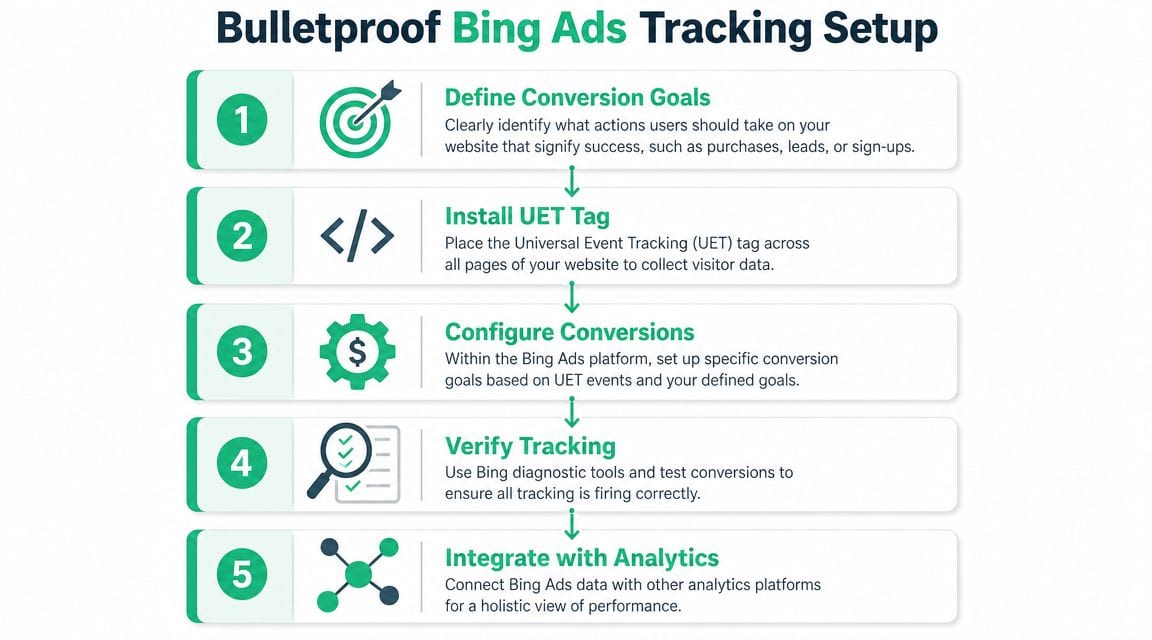
Before launch, I want to know exactly how a click becomes a session, how a session becomes a conversion, how that conversion is attributed, and how failures will be detected. If any of that is fuzzy, the campaign isn't ready.
Here's the workflow I recommend teams document and validate before spending meaningfully.
Define conversions before you touch bidding
Start with business outcomes, not platform defaults. A form submission might matter. So might a qualified lead status in the CRM, a booked demo, a purchase, or a subscription start. If you skip this step and count every micro-action as success, the bidding algorithm will chase volume rather than value.
I like to separate conversions into three buckets:
- Primary outcomes that represent business value and should influence bidding.
- Secondary outcomes that help diagnose funnel quality but shouldn't necessarily drive optimization.
- Guardrail events such as step completions or key engagement events that help spot breakage.
That separation keeps the account honest. It also reduces the classic problem where smart bidding learns on the wrong event because the easiest action was treated as the most important one.
Install UET correctly and validate the firing logic
Microsoft Ads relies on the Universal Event Tracking (UET) tag. In practice, the tag is frequently deployed through Google Tag Manager because it's easier to manage, version, and test. Direct installation can work too, but only if someone owns ongoing QA.
The biggest implementation mistakes are rarely dramatic. They're small and expensive:
- The tag is present but blocked on some templates or consent states.
- The tag fires twice because hardcoded and tag-managed implementations overlap.
- The conversion event triggers on page load instead of confirmed success.
- The thank-you page is reachable without completing the action, which inflates conversions.
- Single-page application behavior breaks event firing after route changes.
Use test submissions and browser-level inspection before launch. Then repeat the test on desktop and mobile, in the major templates, and under real consent conditions.
A good companion resource here is Trackingplan's guide to conversion tracking validation, especially if your team needs a repeatable QA process rather than a one-time spot check.
Configure goals with discipline
Inside Microsoft Ads, create only the goals you intend to use. Don't port over every historical event from another ad platform just because it exists.
Good goal configuration usually means:
- One clearly defined primary conversion per major campaign objective
- Consistent naming between the ad platform, tag manager, analytics tool, and reporting layer
- A value model that reflects revenue or lead quality when available
- No duplicate paths where the same user action can be counted by multiple goal types unintentionally
The account should answer basic questions cleanly. Which campaigns generated leads? Which generated qualified leads? Which generated pipeline or revenue, if your stack supports that handoff? If your setup can't answer those in plain language, simplify it.
UTM conventions are not busywork
UTMs become critical the moment traffic leaves the ad platform and enters the rest of your stack. If naming isn't standardized, you'll spend more time cleaning data than using it.
The rule set should be simple enough for marketers to follow every time. Keep casing consistent. Standardize source and medium values. Decide how campaign, ad group, audience, and creative details are encoded. Lock it down before multiple people start launching campaigns.
A platform can optimize only what your data tells it happened. If campaign tagging is sloppy, every downstream report inherits the same confusion.
This is also where many teams benefit from hands-on walkthroughs. Trackingplan's YouTube video below is relevant if you're auditing pixel behavior and campaign measurement together.
QA the full journey, not just the pixel
Don't stop after seeing one event fire in preview mode. You need end-to-end validation.
Run through the full path:
- Click the ad with final URLs and tracking parameters intact
- Confirm landing page load and parameter persistence
- Complete the conversion action
- Verify UET event firing
- Check platform reporting after the expected processing delay
- Confirm analytics and CRM attribution where applicable
In these situations, experienced teams catch ugly surprises. A thank-you page may work, but UTMs might be stripped by a redirect. The ad platform may record a conversion, but the CRM may assign it to direct traffic. Or consent settings may suppress tracking in one region but not another.
None of that is theoretical. It happens constantly after redesigns, form changes, checkout updates, and CMP adjustments. If you want Bing Ads PPC to scale safely, your analytics setup has to be treated like production infrastructure, not campaign decoration.
Creating and Launching High-Impact Campaigns
Once tracking is solid, campaign creation becomes much less risky. You can launch with the confidence that wins and losses will show up in the data instead of disappearing into attribution fog.
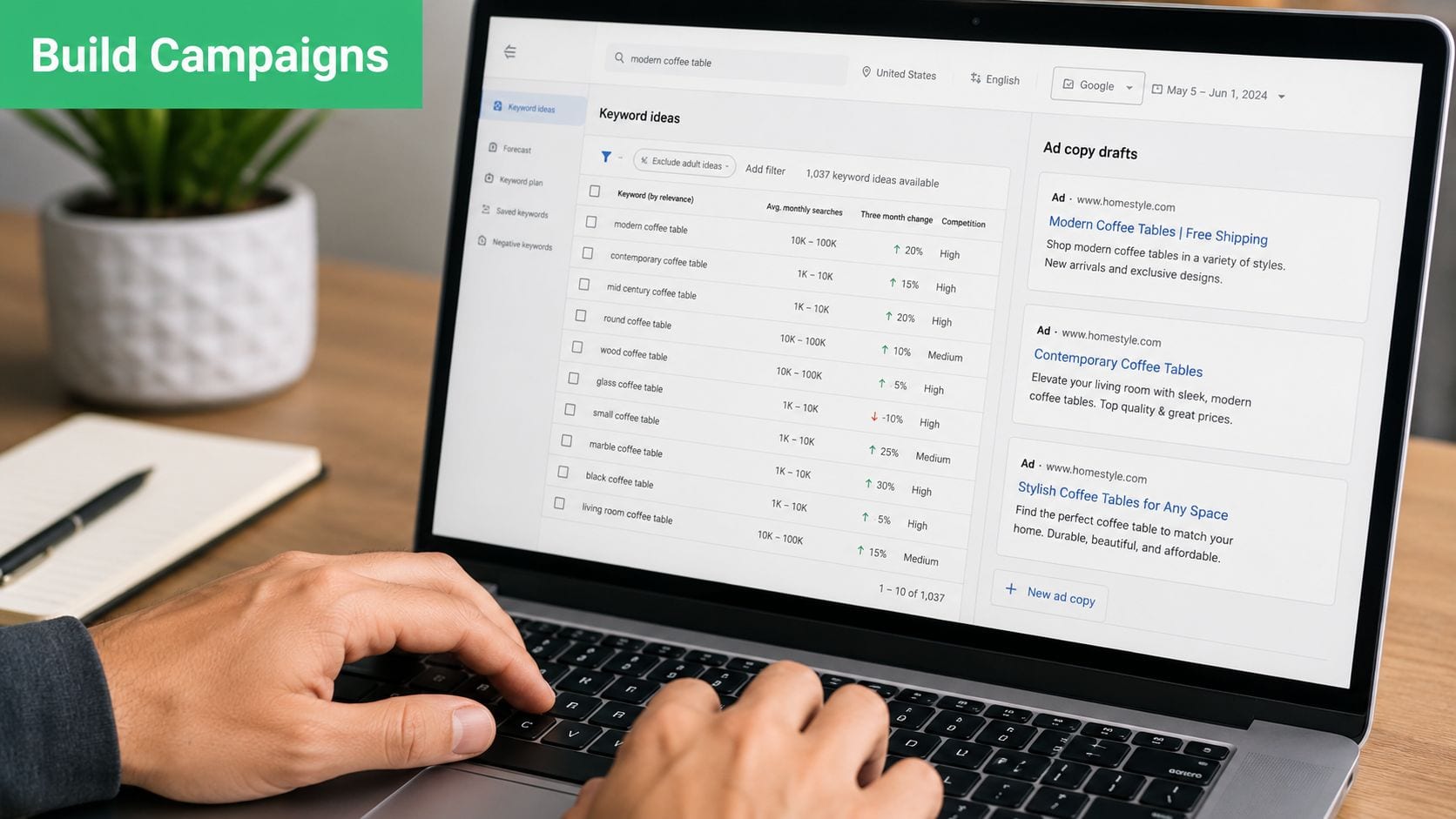
The first job is keyword discipline. Tight ad groups still matter in Microsoft Ads because relevance affects delivery, and message match still shapes click quality and downstream conversion behavior.
Group keywords by meaning, not by spreadsheet convenience
Some teams still argue over SKAGs versus broader thematic ad groups. In practice, the best answer is usually “as tight as necessary, as simple as possible.” If a set of keywords expresses the same user need and can be answered with the same ad and landing page, keep them together. If not, split them.
A good launch structure often looks like this:
- Brand terms in their own campaign so budget and reporting stay protected.
- Commercial intent terms grouped by offer or service line to preserve relevance.
- Higher-funnel terms isolated because they often need different copy and different success metrics.
- Competitor terms separated because query intent and expected conversion quality are different.
Write ads for the query, not for the product brochure
Microsoft's auction combines your maximum bid with ad relevance to the query, and the platform supports automated strategies such as Enhanced CPC, Maximize Conversions, Target CPA, and Target ROAS. Those systems only work well when they receive clean conversion data, as outlined in American Eagle's Microsoft Ads overview.
That means ad copy can't be generic. It needs to reflect the searcher's task. Strong launch ads usually do three things:
- Mirror the language of the keyword theme
- State a concrete reason to click
- Prepare the user for the landing page they're about to see
If you're running local or service-area campaigns, the principles are similar, but the geo intent and landing page match become even more important. For that angle, pay-per-click advertising for local growth is a practical reference.
Use extensions and URLs like they're part of the ad
Extensions often get treated as setup chores. They shouldn't. Sitelinks, callouts, structured snippets, and other assets help shape click quality before the user reaches the site. Keep them aligned with actual landing page paths and commercial priorities.
The same goes for destination URLs and tracking parameters. Before launch, verify that UTMs follow a consistent structure and that final URLs don't introduce redirect noise or parameter stripping. Trackingplan's piece on UTM parameter best practices is a good checklist for this stage.
Better launch campaigns usually look less “creative” in the ad account. They look organized, specific, and intentionally repetitive where the user expects consistency.
Pick bidding with restraint
If conversion tracking is brand new, don't rush straight into aggressive automation. Start with a setup that lets you inspect query quality and conversion integrity first. Once the account is producing stable, trustworthy outcomes, automated bidding has a fair chance to do its job.
Launch quality comes from control. Scale comes later.
Continuous Optimization for Peak Performance
A Bing Ads account usually looks fine in the first week. Clicks come in, CTR looks healthy, and CPC often undercuts Google. Then the critical question shows up. Are those clicks producing qualified leads, sales, and revenue you can trust in reporting?
That is why optimization starts with measurement integrity, not bid tweaks.
The first wave of post-launch data is useful, but it is easy to misread. Early swings can come from low volume, delayed conversion reporting, CRM lag, or a campaign optimizing toward the wrong action. Changing too much too fast hides the underlying cause.

Audit signal quality before performance quality
Before adjusting bids, confirm that the account is recording the right outcomes and attributing them consistently. I want to know four things early:
- Search terms match commercial intent
- Landing pages match the promise of the ad
- Conversion actions reflect real business value
- CRM outcomes broadly line up with platform-reported wins
If those pieces are shaky, lower CPC just buys cheaper ambiguity.
This matters a lot in Microsoft Ads because traffic can look efficient at the surface level while lead quality varies by query, device, audience layer, and network distribution. The account should be optimized against outcomes that survive beyond the platform dashboard.
Change one variable at a time
Optimization gets noisy when teams rewrite ads, change bids, expand keywords, edit landing pages, and shift budgets in the same review cycle. That makes it hard to isolate what helped and what hurt.
Use a tighter cadence instead:
- Review search term reports and add negatives.
- Check whether converting queries are grouped with the right ads and landing pages.
- Validate that imported or native conversion goals are still firing correctly.
- Adjust bids or bidding strategy after conversion data is stable.
- Test landing page changes with a specific hypothesis and enough time to judge the result.
That process is slower on paper. In practice, it gets to profitable scale faster because the account stays interpretable.
Segment Microsoft inventory so waste is visible
Microsoft Ads is not just Bing.com search traffic, and optimization suffers when everything is blended into one reporting view. Search, audience layers, and other inventory sources can behave very differently. Keep campaign structure and reporting clean enough to answer basic budget questions with confidence.
Separate performance by factors that affect lead quality:
- Search terms and match type
- Device
- Audience layer
- Network or placement grouping where available
- Campaign objective and conversion action
That level of segmentation helps you find where lower CPC is producing margin, and where it is just buying volume.
If spend reviews are still too blended to spot waste quickly, this guide on how to optimize ad spend without losing measurement clarity is a useful reference.
Use automation after the account earns it
Automated bidding can work well in Microsoft Ads, but only when conversion inputs are clean and the campaign has enough stable signal. If the platform is learning from duplicate goals, weak lead proxies, or mixed-intent traffic, automation will scale those problems efficiently.
A practical sequence works better. Start with enough control to inspect query quality and conversion integrity. Then shift to automation once primary conversions, offline validation, and budget pacing are dependable.
Strong Microsoft Ads programs scale certainty first. Cheap clicks help only when tracking, qualification, and optimization logic are strong enough to turn them into profitable growth.
Common Bing Ads PPC Pitfalls and How to Avoid Them
Most Microsoft Ads failures aren't dramatic platform failures. They're ordinary account mistakes that stack up. A weak import, a broken goal, broad matching without enough negatives, or reporting built on inconsistent campaign tags can make the channel look worse than it is.
Below are the patterns I see most often, along with the symptom, likely cause, and fix.
Importing from Google and assuming it's done
Symptom: Campaigns launch fast, but performance is erratic and reporting doesn't line up with expectations.
Cause: The account was imported from Google Ads and left mostly untouched. That often leaves behind structures, settings, and assumptions that don't fit Microsoft inventory or audience behavior.
Fix: Treat import as a draft. Review campaign settings, ad copy, extensions, audience layers, location settings, and conversion mapping before budget ramps. The import saves time. It doesn't replace platform-specific judgment.
Optimizing to the wrong conversion
Symptom: The platform reports conversions, but sales teams complain that lead quality is weak or revenue doesn't follow.
Cause: The account is optimizing to a low-value action because it was easiest to track. Common examples include generic page visits, shallow engagement events, or duplicate form goals.
Fix: Rebuild the conversion hierarchy. Keep one primary business outcome tied to each campaign objective, move softer actions into observation or secondary reporting, and make sure downstream qualification data can challenge what the ad platform calls success.
A conversion that doesn't map to business value is just a pleasant-looking error.
Trusting lower CPC too much
Symptom: Click costs look attractive, but cost per meaningful outcome stays stubborn or gets worse.
Cause: The team judged the channel on media efficiency instead of profit efficiency. Lower CPC drew attention away from weaker query quality, weak landing page fit, or poor post-click qualification.
Fix: Review search terms, landing page alignment, and sales-qualified outcomes together. Microsoft Ads can be efficient, but cheaper traffic only matters if the funnel after the click is strong.
Neglecting negative keywords and query review
Symptom: Spend rises, CTR may look acceptable, but the account attracts mixed-intent traffic.
Cause: Search term analysis is too shallow or too infrequent. Microsoft Ads needs the same query hygiene as any search platform.
Fix: Build a recurring query review process. Add negatives aggressively where intent is clearly off-target, and separate informational from commercial themes before they contaminate each other's data.
Letting analytics drift after launch
Symptom: Performance suddenly changes after a site update, but nobody knows whether the problem is traffic, conversion rate, or broken tracking.
Cause: Tracking was validated once, then left alone. New templates, revised forms, consent changes, and tag manager edits introduced silent breakage.
Fix: Re-test conversion paths after site releases, form updates, and CMP changes. Monitor the full measurement chain, not just platform dashboards. The longer tracking drift goes unnoticed, the more optimization decisions compound the error.
Writing generic ads for a distinct channel
Symptom: Impressions happen, but engagement quality is mediocre and ad tests produce weak learning.
Cause: The ads were copied from Google without enough attention to Microsoft-specific audience context, query patterns, and inventory.
Fix: Rewrite around search intent and landing page promise. Use ad variations to test message framing, not just cosmetic wording changes. Good Microsoft Ads creative usually feels direct, specific, and closely tied to the actual query.
If your Bing Ads PPC program is spending against shaky data, fixing bids won't solve the core problem. Trackingplan helps teams monitor analytics, pixels, campaign tagging, attribution signals, and implementation changes across web, app, and server-side stacks so performance decisions rest on trustworthy data instead of guesswork.