
A lot of teams reach the same breaking point with event tracking. Marketing launches campaigns and wants clean attribution. Product wants funnel visibility. Analysts want trustworthy dimensions. Engineering wants fewer ad hoc requests and less tag sprawl. Everyone agrees data matters, but the implementation still lives in scattered tickets, old GTM containers, half-documented SDK calls, and dashboards that nobody fully trusts.
That's usually when event tracking stops being a tagging task and becomes a governance problem.
If you treat it like a few clicks in Google Tag Manager or a quick SDK patch, you get fragmented naming, broken parameters, duplicate events, and reports that look precise but aren't dependable. If you treat it like shared infrastructure, you get something far more useful: a behavioral data layer that supports marketing optimization, product analysis, QA, privacy controls, and cross-channel measurement.
The High Cost of Inaccurate Analytics
A familiar pattern goes like this. A team launches a major paid campaign, traffic rises, and the first dashboard readout looks promising. Then the questions start. Why did conversions spike in one report but not another? Why is the checkout funnel showing fewer starts than product page visits suggest? Why did a retargeting audience suddenly shrink?
The root cause is often mundane. A renamed event. A missing parameter. A duplicate trigger introduced during a release. A consent rule applied on one template but not another. None of these failures looks dramatic in isolation. Together, they distort the story the business tells itself.
The cost isn't only reporting confusion. Teams shift budget based on bad attribution, redesign flows based on false drop-off points, and celebrate or cancel tests for the wrong reason. When the data layer is unstable, every downstream decision inherits that instability. If you're working through that problem now, this practical guide on how to fix poor data quality issues is useful because it frames data quality as an operational discipline rather than a cleanup project.
What bad tracking looks like in practice
Three teams usually feel the pain first:
- Marketing teams lose confidence in campaign reporting when conversion events fire inconsistently across landing pages or channels.
- Analysts spend more time reconciling event definitions than analyzing behavior.
- Developers and QA teams get pulled into reactive debugging because no one can quickly identify whether the issue started in the site, tag manager, SDK, or destination.
Broken event tracking rarely fails loudly. It usually fails quietly, inside the exact reports stakeholders trust most.
That's why the business risk is bigger than a few bad charts. It affects forecasting, personalization, experimentation, audience building, and compliance. Trackingplan's overview of the business risks of poor data quality is a useful reference for teams trying to explain this internally to non-technical stakeholders.
Why this keeps happening
Teams often still implement tracking one request at a time. A marketer asks for a button click. Product asks for a new funnel step. Engineering adds an event. Nobody revisits the naming standard, parameter definitions, or downstream effects.
That incremental approach feels fast. It also creates hidden debt. Event tracking only becomes reliable when the taxonomy, implementation pattern, and QA process are designed together.
What Is Event Tracking and Why It Matters
Event tracking records specific user interactions, not just page loads. Instead of only knowing that someone visited a product page, you can measure whether they clicked an image gallery, opened size guidance, added an item to cart, started checkout, or completed a purchase.
That shift matters because user behavior doesn't happen at the page level. It happens through actions.
According to Amplitude's guide to event tracking, the foundational shift in modern analytics is from pageview-only measurement to event tracking, which records discrete user actions like clicks and form submissions as timestamped records with contextual properties. This turns analytics from a page-level reporting model into a behavior-level measurement system across web, mobile, and server-side environments.
Think like a store operator
A pageview model is like standing at the entrance of a retail store and counting how many people walk into each aisle. That tells you where traffic went.
An event model is like watching what people do in the aisle. Which shelf did they inspect? Did they pick up the product? Did they ask for help? Did they put it back? Did they go to checkout and abandon at payment?
That's why event tracking is more useful for real analysis. It lets teams study movement through a journey, not just visits to locations.
The basic anatomy of an event
An event usually includes a few core fields:
- Event name such as
add_to_cart,form_submit, orvideo_play - Timestamp that marks when the action happened
- User or device identifier so behavior can be tied to a session, user, or cohort
- Properties or parameters that add context, such as product ID, page type, campaign, button text, or device class
Those properties are what make event data analytically powerful. A bare event count tells you volume. A well-structured event with clean properties tells you who did what, where, and under what conditions.
Why teams outgrow pageview thinking
Modern customer journeys don't stay inside a single website visit. Users move between web pages, mobile apps, authenticated product flows, APIs, and server-side interactions. Event tracking gives teams one behavioral model they can apply across all of them.
That consistency helps with:
- Funnel analysis for journeys like signup, lead generation, checkout, or onboarding
- Segmentation by campaign, device, geography, product plan, or customer type
- Troubleshooting friction when users drop at a specific interaction rather than a whole page
- Activation workflows in analytics and marketing tools that rely on behavioral triggers
If you're also working through advertising measurement, it helps to understand tracking pixels for DTC because many teams confuse page analytics, marketing pixels, and event instrumentation even though they serve different jobs.
A pageview tells you where a user was. An event tells you what the user tried to do.
That's the reason event tracking matters. It gives analysts, marketers, and product teams a shared language for behavior.
Designing Your Event Taxonomy and Schema
Most tracking problems start before implementation. They start with vague definitions.
If one team asks for “checkout click,” another asks for “begin checkout,” and a developer ships purchase_start_button, you already have a governance issue. The event may fire correctly, but the data model is drifting.
Start with the journey, not the tag
A clean taxonomy begins with business questions. For an e-commerce flow, those questions are usually straightforward:
- Which product interactions indicate intent?
- Where do users drop between product view and payment?
- Which campaign or device segments produce low-quality checkout starts?
- Which actions should trigger audiences, alerts, or QA checks?
From there, define a finite sequence of meaningful actions. Don't track every possible click just because you can. Track the interactions that support analysis and operations.
A practical pattern is to define:
- Core journey events tied to major steps
- Supporting interaction events that explain behavior inside those steps
- Shared properties that should stay consistent across the taxonomy
Build a naming convention people can follow
Your naming system has to be simple enough that marketers, analysts, and developers all use it the same way. The exact pattern can vary, but consistency matters more than style.
Two workable models are common:
- Business action names such as
product_viewed,checkout_started,order_completed - Object plus action names such as
product_view,cart_add,checkout_complete
The important part is choosing one pattern and documenting what each event means. Don't let web and mobile invent separate verbs for the same action unless the behavior is truly different.
For web implementations, it also helps to centralize the event definition in a structured data layer. This guide to a well-designed data layer is useful because it shows why the data layer should act as the source of truth, not just a dumping ground for variables.
Define properties with the same discipline
Event names get most of the attention. Properties are where tracking plans usually break.
If add_to_cart sends product_id on web, itemId on iOS, and sku on server-side, you haven't created a unified event. You've created three related fragments.
Use a schema that answers these questions for every property:
- What is the canonical name?
- What data type should it be?
- Is it required or optional?
- Which platforms must send it?
- What are valid values or enumerations?
Here's a simple example.
| Event Name | Trigger | Properties | Description |
|---|---|---|---|
product_viewed | User lands on a product detail page | product_id, product_name, category, price, currency | Captures a product detail view |
add_to_cart | User adds a product to cart | product_id, quantity, price, currency | Captures cart addition intent |
checkout_started | User enters the checkout flow | cart_value, currency, items_count | Marks the start of checkout |
payment_info_added | User submits payment step | payment_method, cart_value, currency | Captures progress toward purchase |
checkout_completed | Order confirmation is reached | order_id, cart_value, currency, items_count | Marks successful purchase completion |
Document the edge cases
Good taxonomy design includes the arguments teams usually postpone:
- What counts as a duplicate if the same CTA can fire twice
- When an event should fire in single-page apps
- Whether retries or backend confirmations create a second record
- Which properties are prohibited because they may contain PII
- Which values must be normalized before dispatch
Practical rule: if two people can read an event name and infer different meanings, the taxonomy isn't ready.
This is why strong event tracking plans are collaborative. Marketing brings campaign and audience requirements. Product brings funnel and feature logic. Engineering brings implementation realities. Analytics defines the shared model and governance.
Implementing Event Tracking Across Platforms
A clean taxonomy on paper does not survive contact with production by itself. The true test starts when web, mobile, and backend teams each have different release cycles, tooling constraints, and failure modes. Good implementation connects those realities to one governed event model so analysts are not left reconciling three versions of the same customer action later.
Web tracking with a data layer and tag manager
On the web, the safest pattern is simple. Application code emits a structured event into the data layer. The tag manager reads that payload and sends mapped versions to the tools that need it.
That separation reduces long-term maintenance. If engineers hardcode vendor scripts directly into product logic, every schema change turns into a code change, a QA cycle, and often a regression risk. With a stable data layer contract, engineering owns event creation once, and analytics or marketing operations can manage destination mappings without touching core site behavior.
A strong web implementation usually includes:
- Product code that emits a defined event payload
- A data layer with stable field names and expected value formats
- A tag manager that maps and routes events to each destination
- Version control for tagging changes, not just application code
This setup also makes debugging faster because teams can inspect the source payload before any destination-specific transformation changes names, drops fields, or alters formats.
Mobile instrumentation needs release discipline
Mobile tracking breaks for a different reason. Events may be correctly designed, but app releases lag behind the tracking plan, SDK versions differ by platform, and old app versions can keep sending outdated parameters for weeks.
That creates a governance problem, not just an implementation problem.
iOS and Android teams need the same event definitions, but they also need platform-specific acceptance criteria. Analysts should know which app version introduced a schema change. Product managers should know whether a new funnel step can be trusted before adoption reaches enough users. Without that coordination, dashboards blend old and new payloads and nobody notices until the numbers stop matching.
Useful mobile practices include:
- Tracking specs tied to release tickets
- Explicit app version parameters on key events
- Pre-release validation in staging and test builds
- A deprecation plan for old parameters and event names
Server-side tracking adds control and operational risk
Server-side dispatch gives teams more control over payload filtering, enrichment, consent handling, and destination routing. It can also help improve tracking stack performance by reducing client-side load and centralizing delivery logic.
The trade-off is straightforward. Centralization improves control, but it also widens the blast radius of mistakes. If one transformation rule is wrong, several downstream tools inherit the same bad payload. If deduplication logic fails, inflated conversion counts spread everywhere at once.
Use server-side patterns where they solve a real problem, such as privacy controls, browser limitations, or multi-destination routing. Do not adopt them just because the architecture sounds cleaner.
Implementation needs ownership at every layer
Cross-platform tracking works when ownership is explicit:
- Product and analytics define the source event contract
- Engineering implements event generation at the correct trigger point
- Tagging or data teams manage mappings to downstream platforms
- QA validates payloads before release
- Monitoring catches drift after release
Each layer has a different job. Blurring them usually creates gaps. Developers assume analytics will catch schema problems. Analysts assume engineering tested trigger logic. Marketers assume events in a dashboard mean the implementation is correct.
Implementation quality comes from treating tracking as a governed delivery process. Web, app, and server-side events should all resolve back to the same business definition, the same schema rules, and the same validation standard. That is what makes the data usable across reporting, experimentation, attribution, and lifecycle analysis.
Common Event Tracking Pitfalls to Avoid
A launch can look clean on Friday and still leave the team with unusable analytics on Monday. The tags fire. Dashboards populate. Then paid media sees inflated conversions, product sees broken funnels, and analysts discover that the same user action was tracked three different ways across web, app, and backend.
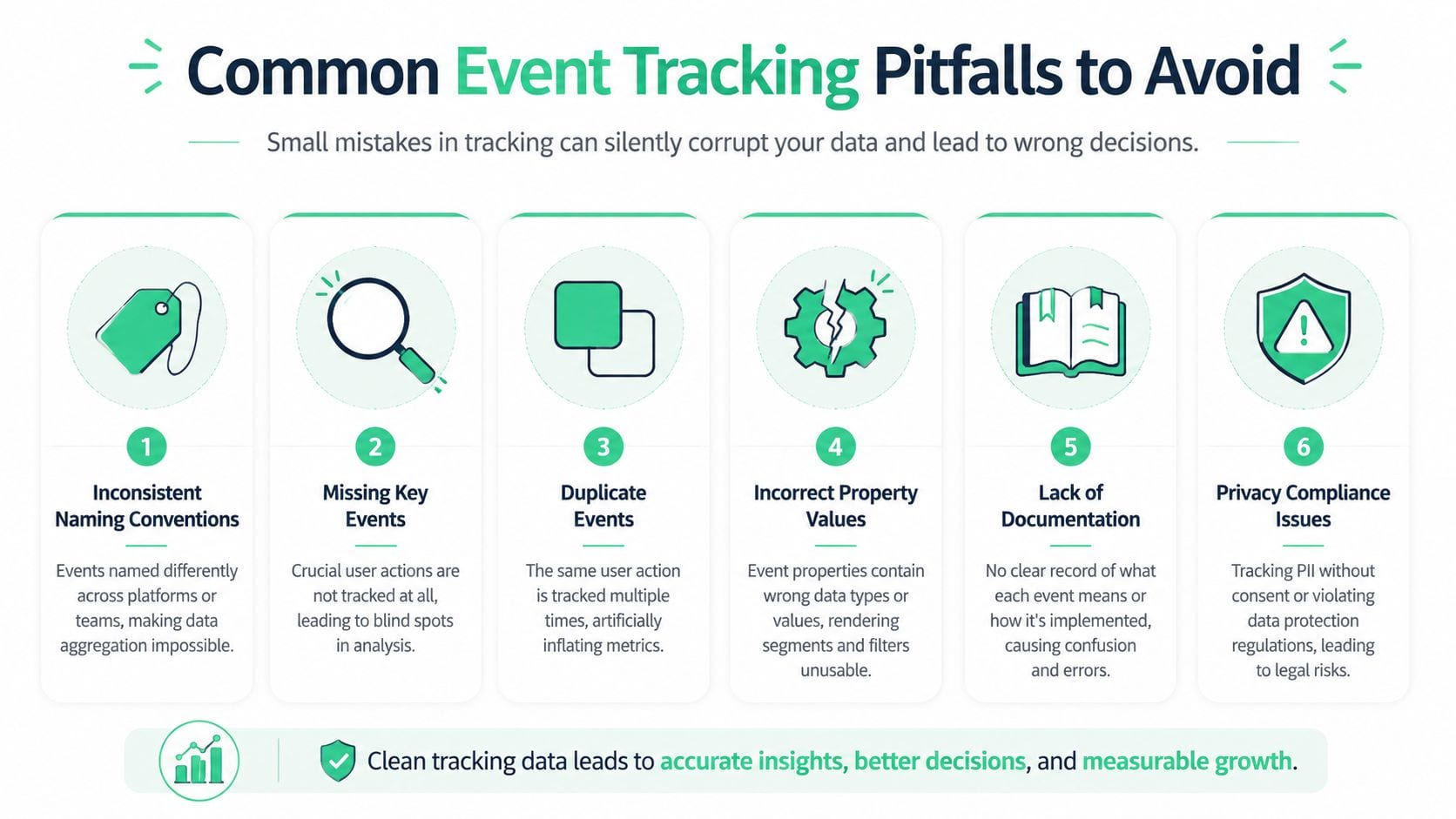
The pattern is common because event tracking usually fails as a governance process before it fails as an implementation. Teams focus on getting events out the door, but the actual risk sits in weak contracts, inconsistent ownership, and no system for catching drift after release.
Inconsistent naming and schema drift
The first failure mode is semantic inconsistency. Web sends signup_completed. Mobile sends registration_complete. Backend sends user_created. Each team can defend its naming choice, but reporting still breaks because the business definition was never enforced across platforms.
Schema drift creates the same problem one level deeper. An event may exist everywhere, yet one source sends plan_type, another sends subscription_tier, and a third turns the value into free text. Analysts then patch the gaps in SQL, BI tools, or customer data platforms. That work is expensive, hard to maintain, and rarely documented well enough for the next person.
This is why taxonomy decisions belong upstream. Naming is not a cosmetic detail. It determines whether the data can support lifecycle analysis, attribution, experimentation, and finance reporting without constant cleanup.
Duplicate and missing events
Duplicates and gaps usually come from implementation choices that looked harmless in isolation. A single-page app may reattach listeners on route change. A thank-you page may fire on refresh. A server-side destination may receive the same conversion that the browser already sent. On the other side, a key interaction may never fire because one template, app state, or consent branch was missed.
The result is not just "messy data." It changes business decisions. Conversion rates rise or fall for the wrong reason. Experiment readouts become untrustworthy. Channel performance gets credited to the wrong touchpoints.
A better standard is to define trigger rules as part of the event contract. State the condition in plain language. Fire once when the order enters confirmed status. Do not fire on render. Do not fire on refresh. Do not fire again from server-side routing unless the browser event is intentionally suppressed.
Property failures that break analysis
Event volume gets attention. Parameter quality determines whether the event is usable.
Common failures include:
- Wrong data types, such as revenue sent as text instead of a number
- Unstable enumerations, where a product or content update changes values without warning
- Blank required properties on events used in funnel steps, audience building, or attribution
- High-cardinality values that fragment reports or exceed platform limits
- UI labels used as source values instead of stable internal identifiers
A fired event with malformed properties is still a broken implementation. It may pass a surface-level debugger check and still fail every serious downstream use case.
Privacy mistakes and platform limits
Privacy failures usually enter through convenience. Query parameters get passed through untouched. Form inputs are reused in payloads. User-generated content appears in event properties because nobody reviewed the schema with legal, security, or governance in mind. Consent logic also tends to drift over time, especially across regions, app versions, and inherited templates.
Platform constraints create a different kind of mistake. Teams design around the reporting tool instead of the business model, then start trimming event names, dropping parameters, or overloading one event to do too many jobs. GA4, for example, enforces implementation limits that push teams to be selective about event and parameter design. That is manageable if the taxonomy is intentional. It becomes a problem when the schema is already inconsistent.
If you are comparing architectures, server-side patterns can also improve tracking stack performance and help with control over routing and privacy. They do not remove the need for clear event definitions, deduplication rules, or payload review.
What prevention actually looks like
Teams that maintain reliable tracking treat it like a governed delivery process, not a tagging task. They keep one shared tracking plan, version schema changes, and require review before new events reach production. They also define approved values for critical properties instead of letting each platform improvise.
The other difference is operational discipline. They test edge cases that break real implementations, such as consent denial, SPA route changes, retries, localization, async rendering, and partial page states. They review payloads for PII before release. They watch for drift after release with a system for data quality monitoring for event tracking, because taxonomy decay usually starts after the initial launch, not during it.
Good tracking holds up under change. That takes naming discipline, schema control, privacy review, and ongoing oversight across the full data lifecycle.
QA Validation and Continuous Monitoring
A release goes out on Thursday. Conversion volume looks normal on Friday. On Monday, an analyst notices that a key signup event is missing a parameter used for audience building, but only on one localized template and only for users who declined one consent category. The event fired. The dashboard moved. The data was still wrong.
That is why QA for event tracking cannot stop at launch checks. Teams need two layers of control. First, validate the implementation before release. Then monitor production behavior continuously, because tracking quality usually breaks through product changes, template edits, consent updates, and vendor-side changes after the initial setup.
What manual QA should cover
Manual validation is still part of a strong process because it catches implementation errors at the point where they are cheapest to fix. It also forces the team to compare the tracking plan against what the site or app sends.
Useful checks include:
- Inspecting the data layer to confirm the expected payload exists before any tag or SDK sends it downstream
- Using browser developer tools to review network requests, payload structure, and request timing
- Checking platform debuggers such as GA4 DebugView and Realtime reports to confirm events arrive with the expected names and parameters
- Testing critical flows under different states such as login status, consent choice, locale, device class, and SPA route changes
Debugging tools help, especially for catching mismatched parameters that can slip through when an event name still appears to fire correctly. But they only show what happened in the sessions you tested.
Where manual QA falls short
Coverage is the key constraint.
A small implementation can survive with careful spot checks. A mature stack cannot. Once teams support multiple sites, apps, consent paths, server-side routing, ad platforms, and frequent releases, manual testing becomes selective by necessity. Selective testing leaves blind spots, and instrumentation failures rarely announce themselves clearly.
Common failures that escape manual QA include:
- A typo in an event name introduced during a refactor
- A missing pixel or SDK call on one template, route, or app screen
- A property format change that breaks only one downstream destination
- A consent regression that suppresses allowed tracking or sends data where it should not
- An unexpected field that introduces privacy risk or pollutes reporting logic
The practical difference is simple. Manual QA confirms that tracked flows worked in a controlled test. Continuous monitoring checks whether the measurement system still behaves as expected in production.
What continuous monitoring needs to catch
Continuous monitoring should watch the tracking system the same way engineering teams watch application health. The goal is not more alerts. The goal is faster detection of tracking drift before analysts, marketers, or paid media teams make decisions on damaged data.
| Monitoring Need | What It Protects Against |
|---|---|
| Schema checks | Renamed events, missing properties, malformed payloads |
| Traffic anomaly detection | Sudden drops or spikes caused by implementation changes |
| Destination validation | Events arriving in one platform but failing in another |
| Privacy checks | PII leaks, consent errors, unexpected fields in payloads |
This operational layer changes how teams manage analytics. Instead of waiting for a reporting discrepancy, they review the health of collection itself. Trackingplan's overview of data quality monitoring for event tracking is a useful reference for teams formalizing that process.
The operating model that holds up
Reliable tracking depends on habits, not just tooling.
- Validate before release with defined test cases tied to the tracking plan.
- Monitor after release because production behavior changes constantly.
- Assign ownership across analytics, engineering, and marketing so issues get triaged and fixed.
- Review drift regularly so schema changes do not become accepted noise.
Teams that do this well treat event tracking as a governed system. QA checks implementation quality. Monitoring protects data quality over time. Both are required if the data is going to support reporting, experimentation, attribution, and activation without constant rework.
Automating Observability with Trackingplan
The hard part of event tracking isn't only implementation. It's keeping the implementation trustworthy after product releases, campaign launches, template updates, and vendor changes.
That's where automated observability tools fit. Instead of relying on analysts to manually inspect flows and compare dashboards after something looks wrong, teams can add a monitoring layer that continuously checks what's being collected and what reaches downstream tools.
The need is real. As Trackingplan notes in its article on data quality issues in analytics, 70% of digital analytics data is estimated to be inaccurate due to implementation errors, and 95% of organizations still rely on manual audits. The same source argues that automated detection is needed for schema mismatches, rogue events, and missing pixels across complex stacks.
What automated observability changes
An observability platform should help answer questions that manual QA handles poorly:
- What changed in production since the last release
- Which event or property drifted from the agreed schema
- Whether a pixel or analytics destination stopped receiving data
- Whether payloads now include fields that may create privacy risk
- Which team should investigate based on the root cause
That changes the workflow. Instead of analysts discovering bad data after dashboards are already polluted, the team gets operational visibility much earlier.
If you want to understand the mechanics, Trackingplan's platform overview shows how automated monitoring can sit across the data layer, tags, and destinations rather than only checking one endpoint.
Where a tool like this fits
In practice, this kind of platform becomes useful when you have any of the following:
- Multiple sites or apps
- Several analytics and media destinations
- Frequent releases
- Shared ownership across marketing, product, and engineering
- Compliance sensitivity around PII and consent
A short product walkthrough helps make that concrete:
The main takeaway is simple. Event tracking done right is not a one-time setup. It's a managed system. When teams automate observability, they spend less time hunting for silent failures and more time using the data with confidence.
If your team is tired of discovering broken analytics after reports go live, Trackingplan is worth evaluating as part of your event tracking workflow. It gives teams automated visibility into dataLayer changes, schema mismatches, missing pixels, destination failures, and privacy-related issues so analysts, marketers, and developers can work from more reliable data.