
Successful Facebook advertising optimization isn't just about fiddling with bids and headlines. The real secret is building a rock-solid, data-driven foundation before you even think about launching a campaign. The goal is to build a resilient structure where every dollar is measurable, accountable, and chasing a clear business outcome.
Building Your Foundation for Facebook Ad Success
Before you can really start optimizing, your technical setup has to be flawless. This foundational work isn't the most exciting part of running ads, but it’s what separates campaigns that scale profitably from those that just burn cash. Without it, you're flying blind.
The first, non-negotiable step is getting your measurement right. With privacy updates constantly shifting the ground beneath our feet, relying only on the browser-based Meta Pixel is a surefire way to lose data. Instead, you need to run both the Meta Pixel and the Conversions API (CAPI) in tandem. This dual setup creates a much more durable connection between your site and Facebook, capturing data from both the client-side and server-side.
Get Your Measurement Right
To guarantee accuracy, you absolutely must set up event deduplication. This nifty process stops Meta from double-counting conversions—like when a single purchase gets logged by both the Pixel and CAPI. Clean, deduplicated data is the bedrock of every successful Facebook advertising strategy.
This obsession with reliable tracking is more critical now than ever. In fact, clean conversion data is the key to Facebook ad success, with many experts calling it the top trend as third-party cookies crumble. We’ve seen top brands that upload customer lists for lookalikes get a 20-30% ROAS uplift just by excluding low-value segments.
Set a Clear Campaign Objective
Once your tracking is solid, the next make-or-break decision is your campaign objective. This choice is you directly telling Meta's algorithm what kind of user to go out and find for you.
If your goal is to generate sales, choosing the 'Sales' objective is mandatory. Selecting 'Traffic' might get you cheaper clicks, but they will be from users who are conditioned to click, not necessarily to buy. This single decision dramatically impacts who sees your ads and your ultimate return on investment.
This flow chart nails down the foundational steps: setting up measurement, picking an objective, and building trust in your data.
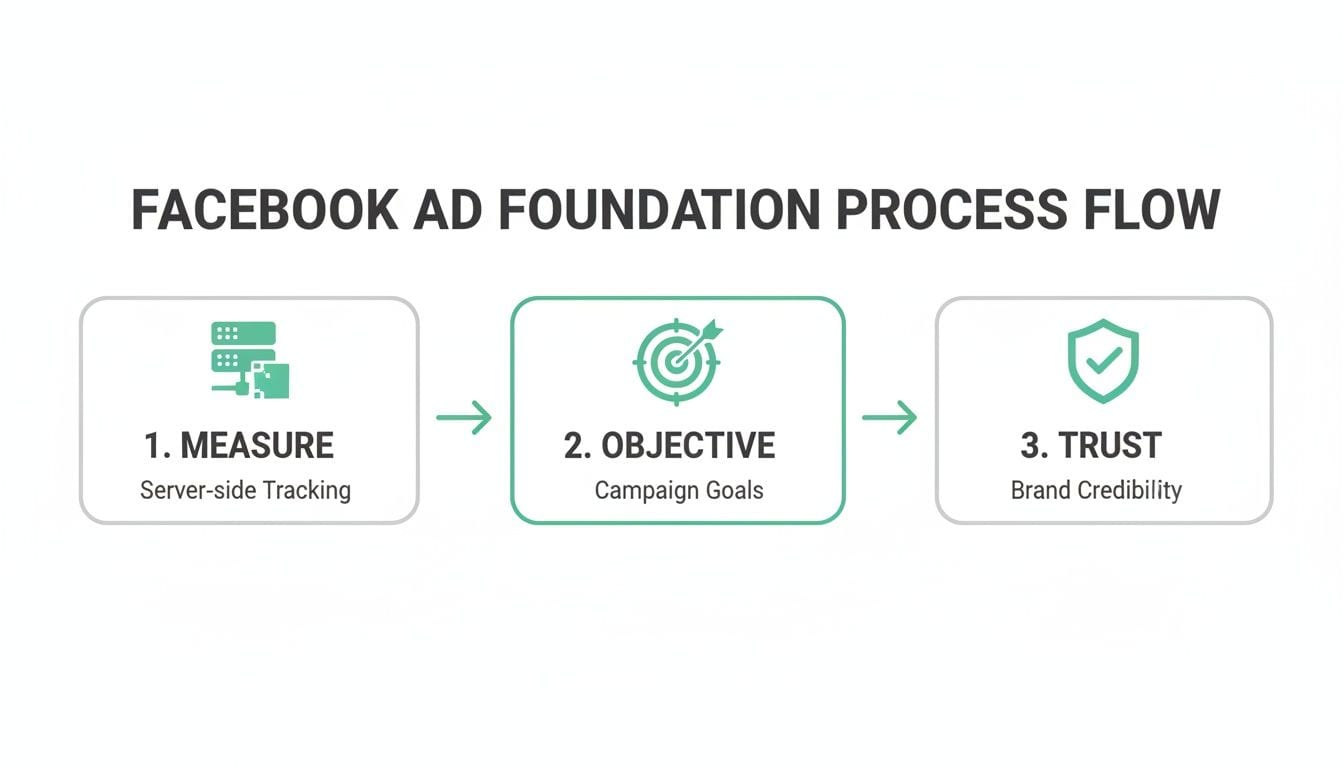
The visual just reinforces the point: a winning campaign starts with measuring what matters, aligning your objective to that measurement, and then having complete confidence in the data you're seeing.
To really nail down the fundamentals for your campaigns, checking out some expert tips for creating Facebook ads is a smart move. These pillars ensure your optimization efforts are built on a structure designed for success, giving you the confidence to adapt to whatever changes come next.
How to Structure Campaigns for Scalability
A messy, disorganized campaign structure is one of the fastest ways to burn through your ad spend and lose sight of what’s actually driving results. For any serious Facebook advertising optimization, you need a framework that brings clarity and allows you to allocate your budget with confidence. It’s time to move past random campaigns and start thinking like a strategist.
The most reliable method I’ve seen is structuring campaigns around a full-funnel model. This approach aligns your advertising with the natural customer journey, guiding people from their very first interaction with your brand all the way to a purchase—and hopefully, beyond. This typically breaks down into three distinct stages.
Top of Funnel Prospecting
This is where you make your first impression. The goal here is to introduce your brand to new audiences who have probably never heard of you. Don't focus on immediate sales; think awareness and reach. You're casting a wide net to discover potential customers.
Your primary audiences at this stage will be:
- Broad Interest & Behavior Targeting: Go after users based on their declared interests (like "fitness and wellness") or platform behaviors (like "engaged shoppers").
- Lookalike Audiences: These are incredibly effective. You can build a Lookalike Audience from a source like your email list or past purchasers, and Meta will find users with similar traits. Always start with a 1% Lookalike to get the highest-quality match.
This stage is all about feeding the top of your funnel with qualified users who can then flow down into the next phase of their journey.
Middle of Funnel Retargeting
Once someone engages with your brand—clicks an ad, watches a video, visits your site—they move into the middle of the funnel. Your goal shifts from introduction to nurturing their interest and building consideration. You're no longer talking to strangers; this is a warm audience.
This is your chance to retarget users who have shown clear intent but haven't converted. By creating Custom Audiences of website visitors, video viewers, or Instagram engagers, you can serve them more targeted messaging that nudges them toward a decision.
Bottom of Funnel Conversion
This final stage is all about closing the deal. These audiences are hot leads who are right on the edge of converting. They might have added a product to their cart before getting distracted, or maybe they started the checkout process but never finished.
Your targeting here should be hyper-specific:
- Cart Abandoners: Target users who triggered the 'AddToCart' event but not the 'Purchase' event within the last 7-14 days.
- Viewed Specific Products: Remind users of the exact items they were looking at, often using dynamic product ads for maximum relevance.
This full-funnel structure provides a clear system for Facebook advertising optimization. It ensures you’re delivering the right message to the right person at the right time, which dramatically improves your chances of turning them into a loyal customer and scaling your results efficiently.
Winning with Creative and Audience Targeting
While a solid campaign structure gets your ads in front of the right eyeballs, it’s your creative and audience targeting that actually grabs their attention. These two elements are the biggest levers you can pull for real Facebook advertising optimization. Getting this right means ditching the generic stock photos and developing authentic messaging that genuinely connects.
The entire game here boils down to one thing: relentless testing. You have to systematically test every single creative element—from headlines and ad copy to images and CTAs—to find out what actually works. Let the data, not your gut feelings, guide your creative strategy.
Master Your Audience Strategy
Your audience is the other half of this powerful equation. While broad targeting certainly has its place, the biggest performance boosts almost always come from your own first-party data. Building powerful Custom and Lookalike Audiences will consistently outperform cold prospecting because you’re reaching people who already have a connection to your brand.
Here are the key audiences you should be prioritizing:
- Website Custom Audiences: Target visitors who viewed specific product pages, spent a certain amount of time on your site, or abandoned their cart.
- Customer List Custom Audiences: Upload your email or customer list to find your existing customers on Facebook. You can then retarget them with new offers or exclude them from acquisition campaigns.
- Lookalike Audiences: Build incredibly effective lookalikes from your best customers (like high LTV purchasers) to find brand-new prospects with similar traits.
Avoid the classic mistake of "set it and forget it" audience management. You need to constantly monitor your audience frequency and engagement. If you see frequency creeping up while your click-through rates are dropping, that’s a dead giveaway for audience fatigue. It's time to rotate in new creative or test new segments.
Align Creative with Placements
Not all placements are created equal. An ad that crushes it in the Facebook Feed will almost certainly flop as an Instagram Reel if you just copy and paste it. Tailoring your creative to the specific placement is a non-negotiable part of any serious optimization workflow.
The benchmarks prove it. Lead generation campaigns, for example, consistently hit the highest click-through rates (CTR), averaging 2.53%. When you look at placements, Instagram Stories lead the pack with a 1.34% CTR, while the Facebook Feed remains a strong contender at 1.11%.
This data tells a clear story: you have to match your creative format to how users behave in each environment.
- Reels and Stories: These demand vertical, fast-paced videos with bold text overlays and catchy audio. You have about three seconds to grab someone's attention before they scroll on.
- Feed and Carousels: These formats give you more room to tell a story. Use high-quality images, compelling carousels to show off multiple products, and more detailed ad copy.
To give your visuals an immediate boost and drive more engagement, you can explore some proven design hacks to skyrocket your ad click-through rate. By systematically testing your audience segments and pairing them with creative that’s optimized for each placement, you build a powerful engine for continuous improvement and sustainable growth.
Smart Bidding and Budget Management Tactics
Getting your budget and bidding right is what turns a Facebook campaign from a money pit into a money-maker. It all comes down to how you tell Meta to spend your cash, and that starts with two core budgeting methods: Campaign Budget Optimization (CBO) and Ad Set Budget Optimization (ABO).
ABO is your go-to for control and testing. You set the budget for each ad set individually, which is perfect when you need to guarantee spend for a new audience or creative, even if it’s not an instant winner. I find it’s also the best choice when your audience sizes are wildly different, as it stops one massive audience from gobbling up the entire budget.
CBO, on the other hand, is Meta’s scaling machine. You set one budget for the whole campaign, and the algorithm shifts spend to the top-performing ad sets automatically. Once you have a couple of proven ad sets that are hitting their stride, switching to CBO is the most efficient way to maximize your results.
Choosing Your Bidding Strategy
Your bidding strategy is your instruction to Meta on how to play the auction game. The two you’ll use most often are Highest Volume and Cost Per Result Goal.
- Highest Volume: This tells Meta to get you the most conversions possible within your budget. It’s a great way to drive volume, but your cost per acquisition (CPA) can swing quite a bit.
- Cost Per Result Goal: With this, you set an average cost you’re willing to pay for a conversion. The algorithm works to hit that average, giving you more predictable costs. The trade-off? If your goal is too low for the auction, you might not get much delivery.
A solid approach I’ve used for years is to launch new campaigns with the Highest Volume strategy. Let it run to gather some real-world performance data. Once you know your baseline CPA, you can switch to a Cost Per Result Goal to lock in profitability as you start to scale.
Scaling Winners and Controlling Costs
When an ad set takes off, it’s tempting to throw a ton of money at it. Don’t. Big, sudden budget changes can shock the system and throw the ad set right back into the "learning phase," killing your momentum.
A much safer way to scale is by increasing the budget by no more than 20% every 2-3 days. This gives the algorithm time to adjust without resetting its progress.
Bid caps are another tool for keeping costs in check, especially when auctions get heated. While a Cost Per Result Goal aims for an average cost, a bid cap sets a hard maximum you'll pay in any single auction. This prevents you from overpaying when competition spikes, but be careful—setting it too low will choke your delivery.
Of course, all these bidding decisions are only as good as the data feeding them. If your tracking is off, you're just guessing. To really tighten up that data signal, check out our guide on the Facebook Conversions API.
Why Automated Analytics QA Is Your Secret Weapon
Let's be honest: your Facebook advertising optimization is only as reliable as the data you're feeding the algorithm. You can have the most brilliant creative and a perfectly dialed-in audience, but a single broken pixel or a missing conversion event can quietly derail everything, leading to misattributed sales and completely torched ad spend.
This is where an automated observability layer stops being a "nice-to-have" and becomes your most valuable asset. Think of it as a 24/7 QA team for your entire marketing tech stack, one that never sleeps or takes a coffee break.
From Reactive Firefighting to Proactive Monitoring
We’ve all been there. You're deep into a campaign, and the numbers just feel... off. Manually checking every tag, trigger, and event across your site is an impossible, soul-crushing task.
The scary part? Things break all the time. A developer pushes a seemingly minor code update that accidentally breaks your 'Purchase' event, and you might not realize it for days or even weeks. By then, the damage is done. Your campaigns have been "optimizing" based on garbage data, your dashboards are a work of fiction, and you've made critical budget decisions based on a corrupted view of reality.
An automated analytics QA platform like Trackingplan completely flips the script. Instead of discovering a problem after seeing a disastrous performance report, you get a real-time alert the second an issue occurs. It’s the difference between finding a small crack in a dam and dealing with a full-blown flood.
Imagine getting a Slack notification that your 'AddToCart' event is no longer firing on iOS devices after a recent app update. You can pause the relevant campaigns immediately, alert your dev team, and prevent thousands of dollars from being wasted. That’s the power of automated QA.
This approach means you can finally trust your numbers and optimize with confidence, knowing your ROAS is real. You can learn more about this in our article on why you should use automated analytics to detect errors and boost ROI.
Building Unbreakable Trust in Your Data
Clean, reliable data is the fuel that powers modern ad platforms. Meta's AI has become incredibly powerful—with some updates delivering a 3.5% lift in ad clicks on Facebook—but this sophisticated machine demands accurate signals to work its magic.
Agencies that have adopted automated QA have seen up to 40% faster issue resolution, which is critical for preserving attribution integrity. When the AI models receive the clean, consistent data they need, performance follows. This isn't just about fixing bugs; it's about making your data—and by extension, your entire optimization strategy—dependable.
Frequently Asked Questions
When you're deep in the trenches of Facebook advertising, the same questions tend to pop up. Let's get you some straight, practical answers to the most common puzzles marketers and analysts face.
How Often Should I Optimize My Facebook Campaigns?
There’s no single magic number here, but a solid rule of thumb is to give any new campaign at least 3-5 days to find its footing and exit the learning phase. Don't jump the gun with major changes during this time.
Once a campaign is stable, you'll want to monitor performance daily. However, save the big decisions—like reallocating your budget or shutting down ad sets—for a weekly review. This gives you enough data to make a confident call.
As for creative, you should plan on refreshing your ads every 2-4 weeks to sidestep ad fatigue. This is especially critical in retargeting campaigns, where frequency can shoot up fast.
Keep a close eye on your frequency and click-through rate (CTR). If you see frequency rising while your CTR is falling, it’s a clear signal that your audience is tired of your ad. It's time for a refresh.
What Is a Good ROAS for Facebook Ads?
A "good" Return on Ad Spend (ROAS) really depends on your industry, profit margins, and specific business goals. That said, a common benchmark many e-commerce brands shoot for is a 3:1 or 4:1 ROAS, which means generating $3-$4 in revenue for every $1 spent.
The most important step is to calculate your break-even ROAS. This number tells you the floor for profitability. For instance, if your profit margin is 25%, you need a ROAS of at least 4:1 just to cover your ad costs. Anything you make above that is pure profit.
Why Are My Facebook Ad Costs Increasing?
If your costs are creeping up, it's usually because of a few predictable culprits. Figuring out which one is affecting you is the first step toward getting costs back under control.
- Seasonality: Costs almost always spike during peak shopping periods like Q4 for Black Friday and Cyber Monday. The auction just gets more crowded.
- Audience Saturation: You've shown your ads to most of your target audience multiple times. You're hitting a point of diminishing returns, and costs rise.
- Ad Fatigue: When people see the same creative over and over, they stop paying attention. Your relevance score drops, and Meta charges you more to show the ad.
- Increased Competition: New advertisers jumping into your auction can drive up the price for reaching the same audience.
To combat rising costs, you have to be proactive. Consistently refresh your creative, test entirely new audience segments (like different lookalike percentages or interest stacks), and explore placements like Reels that might offer lower CPMs.
What Is the Difference Between the Meta Pixel and Conversions API?
Both the Meta Pixel and the Conversions API (CAPI) are designed to track user actions, but they work in fundamentally different ways. Understanding the distinction is crucial for accurate measurement.
The Meta Pixel is a snippet of JavaScript that fires in a user's browser. It's a client-side tool, which means it can be blocked by ad blockers or impacted by browser privacy updates like Apple's App Tracking Transparency (ATT).
The Conversions API (CAPI), in contrast, sends event data directly from your server to Meta's. Because it’s a server-side connection, it isn't affected by browser-level issues, making it far more reliable.
| Aspect | Meta Pixel (Client-Side) | Conversions API (Server-Side) |
|---|---|---|
| How it Works | JavaScript code in the browser | Direct connection from your server |
| Reliability | Vulnerable to ad blockers, cookie restrictions, and iOS 14+ | Highly reliable; not affected by browser-level issues |
| Data Gaps | Prone to missing data due to privacy features | Fills the gaps left by the Pixel |
| Best Practice | Use in tandem with CAPI | Use in tandem with the Pixel |
Using both together—with event deduplication configured correctly—gives Meta a complete picture of your conversions. This setup helps you recover the data the Pixel inevitably misses, leading to much more accurate reporting and better campaign optimization.
Your Facebook advertising optimization is only as strong as the data behind it. Trackingplan gives you a complete, automated QA layer to ensure every pixel, event, and UTM tag is firing perfectly. Stop guessing and start trusting your data. Get started with Trackingplan today and see what you've been missing.