
Have you ever noticed how an ad for a pair of shoes you just looked at suddenly seems to be everywhere you go online? Or wondered how a company knows for sure that their latest marketing campaign actually led to sales? The magic behind it all is often a surprisingly simple piece of tech called pixel tracking.
This tiny bit of code is the engine powering much of modern digital analytics and advertising. It's the invisible link between what a user does and what a business can measure.
Think of a tracking pixel like a tiny, invisible tripwire on a webpage. When your browser loads the page, it also trips over this wire. That tiny action sends a signal back to a tracking server, logging the interaction. It’s a simple event, but it’s packed with crucial information about what users are doing.
The Foundation of Digital Insights
This one small action unlocks a treasure trove of data that businesses depend on to make smart decisions. The information gathered is the bedrock of digital strategy, allowing companies to:
- Measure Campaign Success: Finally get clear answers on which ads are driving sales, sign-ups, and other important conversions.
- Understand User Behavior: See the paths people take through a website, which pages they linger on, and where they get stuck and leave.
- Power Personalization: Create tailored experiences and retargeting campaigns that show relevant ads to people who have already shown they're interested.
At its core, pixel tracking turns anonymous website visits into actionable intelligence. It closes the gap between a marketing effort and a customer's reaction, giving teams the clarity they need to stop guessing and start optimizing their strategy and spending.
To give you a quick overview, here’s a simple breakdown of how the different pieces of pixel tracking fit together.
Pixel Tracking at a Glance
This table provides a foundational look, but as we'll see, the real power comes from how this simple mechanism is used to drive sophisticated marketing and analytics strategies.
How Pixel Tracking Works Under the Hood
To really get what pixel tracking is, we need to pull back the curtain and see what’s happening behind the scenes. At its core, the whole process is surprisingly simple. It all boils down to a basic request-and-response action between your browser and a server, kicked off by a small snippet of code on a website.
When you land on a page with a tracking pixel, your browser is told to ask a tracking server for a file. That request is the trigger. The server logs this request, and in doing so, it captures a bunch of useful information that comes along for the ride—things like your device type, browser, and a rough idea of your location based on your IP address.
This all happens in the blink of an eye, completely invisible to you, so your browsing experience is never interrupted.
The diagram below shows this fundamental loop in action: a user does something, the pixel fires, data is sent to a server, and insights are generated.
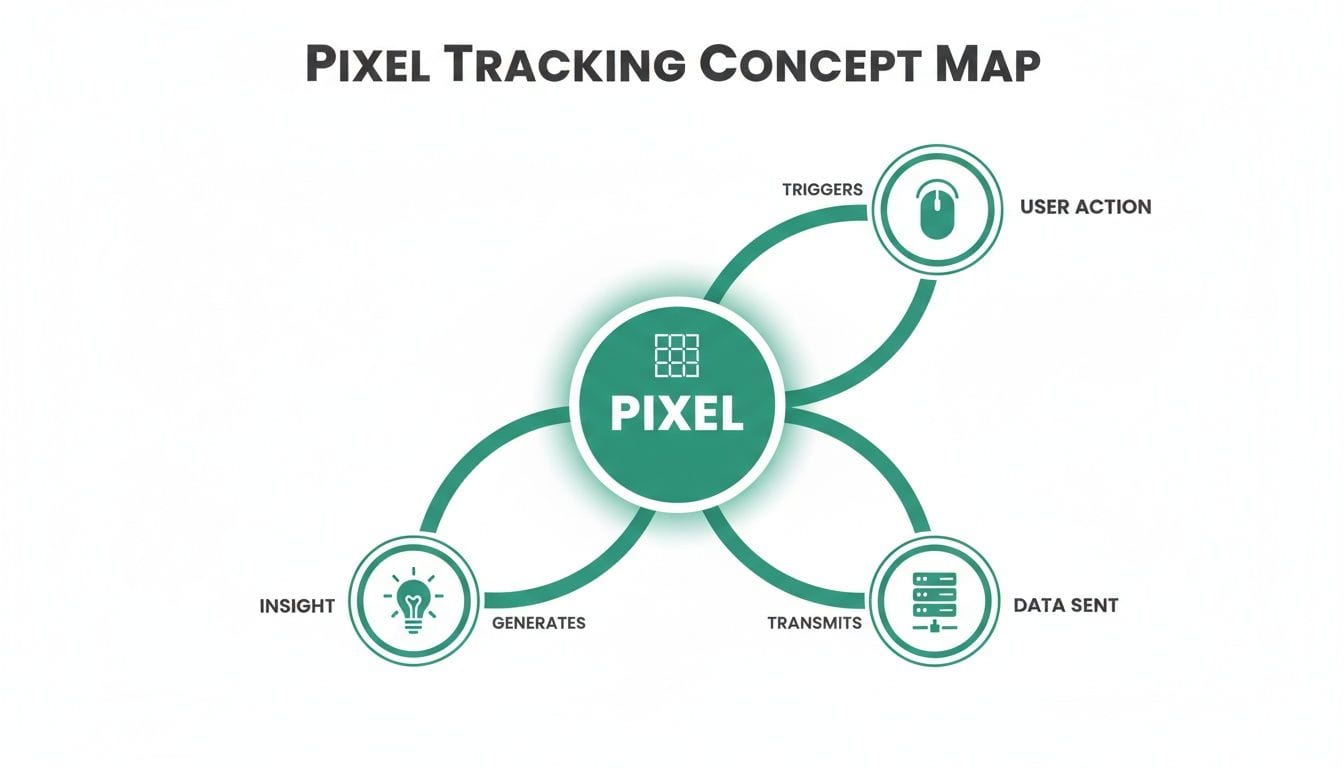
This interaction-to-intelligence flow is the foundation of all pixel-based measurement. While the concept is straightforward, the technology has split into two main types, each with its own strengths.
The Classic Image Pixel
The original tracking pixel is just a tiny, transparent 1x1 image. You can think of it like an invisible stamp placed on a webpage. When your browser loads the page, it also has to request this "stamp" from the server where it's stored.
Because the image is completely transparent and only one pixel in size, you never see it. The server, however, does see the request. It logs that request as a specific event, usually a simple page view. This old-school method is lightweight, reliable, and perfect for measuring basic interactions like website visits or ad impressions.
Key Takeaway: The 1x1 image pixel is a simple counter. Every time it loads, it pings a server and says, "Someone's here." It's the most fundamental way to confirm that a piece of content was viewed.
The Modern JavaScript Pixel
Image pixels are great for counting, but modern marketing needs to know what users are doing, not just that they showed up. This is where JavaScript pixels come in. Often called web beacons or tags, these are much more than a simple image request—they are tiny programs that actually run in the browser.
This ability to execute code turns them into skilled investigators, allowing them to gather much richer data about user behavior. A JavaScript pixel can track dynamic actions that go far beyond a page simply loading.
- Button Clicks: It can tell you when a user clicks the "Add to Cart" or "Sign Up" button.
- Form Submissions: It can fire an event the moment a lead form is successfully submitted.
- Scroll Depth: It can even measure how far down a page a user scrolls, giving you a clue about their engagement level.
Since JavaScript pixels have logic, they can collect more detailed data, track complex user journeys, and send custom event information to analytics and ad platforms. If you want to dive deeper into how these code snippets operate, you can check out the fundamentals of web tags. This advanced functionality is what powers the sophisticated analytics and retargeting campaigns that are so critical to digital strategy today.
Key Use Cases for Pixel Tracking in Digital Marketing

Now that we have a handle on how pixels actually work, let's get to the good stuff: what can you do with them? This tiny bit of code is the engine behind some of the most powerful strategies in modern digital marketing, turning raw user behavior into measurable outcomes and smarter decisions.
From the fundamentals of website analytics to complex, multi-channel advertising campaigns, tracking pixels deliver the data that marketers, analysts, and business leaders depend on to understand what’s working and where to invest next.
Let's break down the three primary ways this technology gets put to work.
Website Analytics and User Journey Mapping
At its most basic level, pixel tracking is all about understanding how people interact with your website. When you install a tool like Google Analytics, you’re adding a JavaScript pixel (the GA tag) that diligently collects a treasure trove of information on every single visit.
This goes way beyond simple page view counts. It lets you map out entire user journeys, showing you which pages are the most popular, how long visitors stick around, and—more importantly—where they decide to leave.
- Behavior Flow: You can literally see the paths users take, from the moment they land on your site to the moment they bounce.
- Conversion Funnels: This is where you find the leaks. A pixel can show you exactly where users abandon a process, like a checkout flow or a sign-up form.
- Content Engagement: Find out which blog posts, videos, or product pages are actually holding people's attention.
By digging into this data, you get a clear, unbiased look at your website's performance and can spot obvious opportunities for improvement.
Advertising Attribution and ROI Measurement
How do you know if that big ad budget is actually driving sales? Pixel tracking is the key to conversion tracking and proving your ROI.
Imagine you're running a campaign on a platform like Meta or Google Ads. You place their conversion pixel on a critical page, like the "Thank You" page a customer sees after making a purchase. When someone clicks your ad, then goes on to buy the product, the pixel on that confirmation page fires.
That little signal zips back to the ad platform, creating a direct link between the ad click and the sale. This connection is called attribution.
Attribution is simply the process of connecting a user action (like a sale or lead) to a specific marketing touchpoint (like an ad click). It’s what lets you say, "This campaign generated X dollars in revenue," and prove your marketing works.
This isn't a new concept; pixels have been the standard for measurement since they first appeared in the late 1990s. The impact is huge. A recent analysis found that campaigns with properly configured pixel tracking can boost their ROI by as much as 35%, mainly by capturing conversions that would otherwise be missed. For more on this, you can discover further insights about pixel tracking on Improvado.io.
Retargeting and Audience Personalization
This is probably the use case you've personally experienced the most. Retargeting is the magic that makes ads for a product you just looked at seem to "follow" you across the internet.
It's all powered by pixels. A pixel placed on your site can build specific audiences based on what users do. For example, you can create a list of everyone who has:
- Viewed a specific product page.
- Added an item to their shopping cart.
- Started the checkout process but didn't finish.
Once a user is "tagged" by the pixel and added to one of these audiences, the ad platform can serve them highly relevant ads on other websites or social media feeds. It's a powerful way to remind them of their interest and nudge them back to your site to finish their purchase, making it an incredibly effective tactic for recovering sales you might have otherwise lost for good.
Implementing Pixels the Right Way
Knowing how a pixel works is one thing, but getting it onto your website is a whole different ball game. The way you choose to implement your pixels is a critical decision that balances control, flexibility, and the technical resources you have on hand. Your approach will directly shape how easily you can manage, update, and grow your tracking strategy down the road.
The right method often comes down to your team’s structure and workflow. Do your marketers need to add new pixels without waiting for the next developer sprint? Are you tracking actions inside a mobile app instead of a website?
Let’s break down the three main ways to get pixels deployed.
Hard-Coding Directly Into Your Website
The old-school approach is hard-coding. This is where a developer manually takes the pixel's code snippet and embeds it directly into your website's source code. You can think of it like permanently wiring a new light fixture straight into your house's electrical system.
Once it's in place, this method is direct and reliable. The problem? It's incredibly rigid. Every little change—like tracking a new button click or adding a new parameter—requires a developer to go back into the code, make the edit, and redeploy the entire site. This creates bottlenecks, slows down marketing teams, and can lead to a messy, bloated codebase over time.
Using a Tag Management System
A much more modern and flexible solution is to use a Tag Management System (TMS), like the popular Google Tag Manager. A TMS acts as a central hub or a container that holds all your different tracking pixels (which are usually just called "tags" in the TMS world).
Here’s how it works: a developer installs one single TMS snippet onto your site. Just once. From that point on, marketers and analysts can add, edit, test, and remove any tracking pixel they want through the TMS’s user-friendly interface—no coding or developer help needed.
A Tag Management System is like a power strip for your website. Instead of wiring every single device directly into the wall, you just plug them all into one manageable hub. It gives you the power to turn individual tags on or off, set rules for when they should fire, and manage everything from a single dashboard.
This approach empowers your non-technical teams, massively speeds up deployment times, and keeps your website's actual code clean and lightweight.
Implementing via a Software Development Kit
When your focus shifts from a website to a mobile app, the game changes. In the app world, you'll use a Software Development Kit (SDK) provided by your analytics or ad platform.
An SDK is essentially a bundle of pre-written code that developers integrate directly into the app. This kit provides all the necessary functions to track in-app events, like a user completing a level in a game or making an in-app purchase.
For example, if you wanted to track conversions from your ads, you'd use a specific integration like the Facebook Pixel SDK to send event data from your app straight back to the ad platform. While this still requires a developer for the initial setup, SDKs are the gold standard for robust and reliable mobile app tracking.
Navigating Privacy Consent and the Future of Tracking
The digital world is in the middle of a massive shift toward user privacy, and pixel tracking is caught right in the crossfire. Consumers are more aware than ever of how their data is being used, and browsers are rolling out stricter rules to match. For anyone in analytics or marketing, understanding consent and the changing technical landscape isn't just a good idea—it's a matter of survival.
This new reality forces us to draw a sharp line between two types of pixels: first-party and third-party. Getting this distinction right is the key to navigating today’s privacy-first world.
First-Party vs. Third-Party Pixels
So, what's the difference? It all comes down to who owns and controls the data collected by the pixel.
-
First-Party Pixels: You place these on your own website, for your own use. A classic example is the Google Analytics pixel that tracks user behavior on your site. The data it gathers belongs to you and is meant to help you improve your own product or service.
-
Third-Party Pixels: These are placed on your website by another company, usually an ad network or a social media platform. The data they collect is sent back to their servers to track users across many different websites, mostly for ad retargeting.
This distinction is absolutely critical under regulations like GDPR and CCPA. These laws require businesses to get explicit user consent before collecting personal data, especially for the kind of cross-site tracking that third-party pixels are famous for. When implementing any kind of tracking, particularly for mobile, it's vital to be transparent about how privacy is handled. Reviewing typical app privacy policies can give you a clearer picture of what's expected.
The Crumbling World of Third-Party Data
It’s not just about legal compliance. The tech giants themselves are fundamentally changing how tracking works. Browsers like Safari, with its Intelligent Tracking Prevention (ITP), and Firefox, with its Enhanced Tracking Protection, already block most third-party trackers by default. But the biggest domino to fall is Google's plan to phase out third-party cookies in Chrome, a move that will affect the majority of web traffic worldwide.
This shift marks the end of an era. The long-standing reliance on third-party cookies for cross-site tracking is becoming obsolete, forcing marketers and analysts to adapt to new, privacy-preserving measurement methods.
This doesn't mean tracking is dead; it just means it has to evolve. The industry is moving toward more robust and transparent solutions that respect user privacy while still delivering valuable insights. One of the leading approaches in this new landscape is what is server-side tracking, which gives you far greater control and security over the data you collect. This evolution isn't just a challenge—it's creating a more sustainable and trustworthy future for digital analytics.
Common Pixel Problems and How to Solve Them

Your entire analytics strategy is built on one simple assumption: your pixels are firing correctly. But here's the thing—these tiny snippets of code are surprisingly fragile.
A minor website update, a new feature release, or even a change in a third-party tool can silently break them. When that happens, your data gets corrupted, and you start making flawed business decisions based on a distorted picture of reality.
When a pixel fails, the consequences ripple outward. You might misattribute sales to the wrong ad campaign, overspend on ineffective channels, or completely miss crucial user behavior insights. These aren't just technical glitches; they're expensive business problems that directly hit your bottom line.
Broken or Missing Pixels
The most straightforward issue is a pixel that simply fails to fire. This often happens after a site redesign or when a developer updates a page's code, accidentally removing or altering the pixel’s trigger. The result is a total blind spot in your data.
Imagine a broken pixel on your "purchase confirmed" page. Your ad platforms will suddenly report zero conversions, making a successful campaign look like a complete failure. This missing data often leads teams to incorrectly turn off high-performing ads, wasting both time and money.
Duplicate Pixels and Inflated Metrics
Just as damaging is the problem of duplicate pixels, where a single user action causes two or more identical tracking events to fire. This usually happens when a pixel is implemented in multiple ways—for instance, once through a tag manager and again hard-coded directly on the site.
Duplicate firing leads to artificially inflated metrics. If a single purchase is counted twice, your conversion rate, revenue, and return on ad spend (ROAS) will all appear double what they actually are, creating a dangerously misleading view of performance.
To keep your data clean, it's crucial to spot and fix these common errors quickly. The table below breaks down some of the most frequent pixel problems you'll encounter and how to approach them.
Troubleshooting Common Pixel Tracking Errors
Staying on top of these issues is fundamental to maintaining data integrity. Without reliable tracking, your analytics reports become little more than guesswork.
The Modern Solution: Automated Monitoring
Let's be realistic: manually checking every pixel on every page is an impossible and unsustainable task. The definitive solution is to adopt an automated analytics observability and QA platform. Instead of tedious manual audits, these systems act as a 24/7 watchdog for your data.
- Proactive Detection: They continuously scan your website in a live environment, immediately identifying issues like missing, duplicate, or broken pixels the moment they occur.
- Real-Time Alerts: Your team gets instantly notified via Slack or email with specific details about what broke, where it happened, and why.
- Root-Cause Analysis: Advanced platforms can pinpoint the exact change or deployment that caused the issue, dramatically speeding up the troubleshooting process for developers.
By automating this critical QA function, you can finally trust that the data powering your dashboards is always accurate and reliable. That's how you make decisions with confidence.
Frequently Asked Questions About Pixel Tracking
Even with a solid grasp of how tracking pixels work, you’ll inevitably run into practical questions on the ground. Let’s tackle a few common ones that pop up for marketers, developers, and analysts all the time.
Can Users Block Tracking Pixels?
Yes, and they do—all the time. Users have a whole arsenal of tools to block tracking pixels, from ad-blocking browser extensions to the built-in privacy features in browsers like Safari and Firefox. These browsers often block many third-party trackers right out of the box.
This is a huge reason why you see data discrepancies between your server logs and what your analytics platforms are telling you. It’s also why monitoring your actual data capture rate is so critical for understanding what’s really going on with your performance metrics.
Key Insight: Pixel blocking is just a reality of the modern web. Instead of chasing a mythical 100% data capture rate, smart teams measure what they can actually collect and build their strategies around that reliable data.
Are Tracking Pixels the Same as Cookies?
Not quite, but they’re close partners in crime. Think of it this way: a tracking pixel is the messenger that fires off and sends data back to a server. A cookie is a small text file that the server asks a browser to store on a user's device, acting like a name tag.
A common example is retargeting. An ad network's pixel might place a cookie on your browser when you visit a site. That cookie acts as an identifier, letting the ad network recognize you later on other websites and serve you relevant ads. As browsers continue to phase out third-party cookies, this relationship is being forced to evolve, pushing the industry toward new methods of identification.
How Do I Know if My Pixels Are Working Correctly?
The old-school way involved painstakingly manual checks using browser developer tools or running brittle, scripted tests. Frankly, these methods are a massive time sink, they don't scale, and they’re terrible at catching the intermittent issues that slowly poison your data over time.
A much more reliable approach is to use an automated analytics QA and observability platform. These tools act like a security guard for your data, continuously monitoring your site’s data layer and every single marketing pixel in a live environment. They can automatically spot problems like missing events, messed-up parameters, or duplicate fires, then alert your team right away so you can fix things before they derail your business decisions.
Stop guessing and start trusting your data. Trackingplan provides fully automated analytics monitoring and QA to ensure every pixel fires correctly. Our platform discovers your entire implementation and alerts you in real time to broken pixels, data mismatches, and PII leaks, so your team can deliver reliable insights and maximize ROI. See how it works.