
Before tag management systems (TMS) became the norm, the digital world was a very different place for marketers and analysts. Every new tool, analytics tracker, or ad pixel needed a developer to manually jam a JavaScript snippet into the website’s code. This was slow, clumsy, and a huge bottleneck.
Picture this: your marketing team is ready to launch a hot new campaign and needs a Facebook pixel on the site. They’d have to file a ticket with IT, cross their fingers a developer was free, and then wait for the next development cycle. This could drag on for weeks, completely sinking a campaign's momentum before it even started.
Adobe Dynamic Tag Manager (DTM) was built to solve this exact headache. It was a system that let marketers deploy and manage all their tags without having to touch a single line of site code. While it's since been replaced by Adobe Experience Platform Launch, understanding DTM is key to seeing how we got to where we are with modern data collection.
The Digital Switchboard Your Website Needed

Solving The Hardcoding Headache
The big idea behind DTM was the container tag. Instead of dozens of individual scripts hardcoded across your site, a developer just had to place one DTM container script on every page. Just once. From that point on, marketers could add, edit, or remove all other tags using a simple web interface.
Think of it like a digital switchboard for your website's data. Instead of needing an engineer to physically rewire the building for every new phone line, you could just flip switches from a central control panel to route signals wherever they needed to go. This was a game-changer for how big companies handled their marketing tech.
DTM untangled the web of hardcoded scripts, transforming a rigid, developer-dependent process into a flexible, marketer-driven workflow. It was a crucial step toward data democratization.
The power was suddenly back in the hands of the marketing and analytics teams. They could be way more responsive, testing new tools or updating tracking in a matter of hours, not weeks. The payoff was immediate:
- More Agility: Marketers could roll out campaigns and their tracking on their own schedule, without getting stuck in a development queue.
- Less IT Burden: Developers were freed from the tedious, repetitive work of adding and removing tags, letting them focus on building the actual product.
- Better Site Performance: DTM gave you control over how and when tags fired, which often led to faster page load times.
- Centralized Control: All third-party scripts lived in one place, giving you a clear view of what data was being collected and sent from your site.
The Foundation For Modern Data Collection
Even though DTM is no longer around, its DNA is in every modern tag management system. It set the standard by solving the crippling problem of hardcoded scripts, paving the way for more sophisticated tools like Adobe Experience Platform Launch. That history is essential to understanding why today's tag management solutions work the way they do and why they're so vital for any data-driven company.
The Journey From DTM To Adobe Launch
While Adobe Dynamic Tag Manager (DTM) was a huge step forward in its time, the digital world kept moving. Websites became faster, more complex, and more connected. DTM’s original architecture, as effective as it was, started to feel dated in an environment that demanded more speed, flexibility, and automation.
The market was changing, and technology was advancing right alongside it. Competitors were rolling out faster, more modern platforms, and user expectations for website performance were at an all-time high. Adobe knew a simple update wouldn't cut it. To meet the future needs of enterprise data collection, they needed to go back to the drawing board.
This led to the creation of Adobe Experience Platform Launch, a completely new tag management system built from the ground up. The move from DTM to Launch wasn’t just a new name—it was a full architectural overhaul designed to tackle the core limitations of its predecessor.
A Rebuild for The Modern Web
Adobe Launch came packed with critical upgrades that made it vastly more powerful than DTM. These weren’t just nice-to-have features; they were essential for any organization serious about data governance, performance, and integration.
The biggest game-changer was its API-first design. This meant that pretty much anything you could do in the user interface could also be done programmatically through an API. This unlocked massive potential for automation, letting teams bake tag management into their CI/CD pipelines and manage complex setups across dozens of web properties with ease.
Another groundbreaking feature was the Extension Marketplace.
- Before Launch: Getting a third-party tool to work in DTM often meant writing custom JavaScript, which was a recipe for errors and a headache to maintain.
- With Launch: Integrations became as simple as installing an app. The marketplace offered pre-built extensions for popular tools like Facebook, Google Analytics, and many others, which drastically simplified setup and ensured the code was well-vetted and optimized.
The move to Adobe Launch marked a pivotal shift from a closed system to an open, extensible platform. It empowered developers and marketers to build, share, and deploy integrations with unprecedented ease and security.
Why The Migration Was Necessary
Simply put, staying on DTM wasn't a sustainable long-term strategy. Adobe Launch offered real, tangible benefits that directly impacted business performance and security. The platform's new architecture was built for speed, using lighter, asynchronous JavaScript libraries that barely made a dent in page load times.
This obsession with performance was crucial, as even a few milliseconds of delay can hurt user experience and tank conversion rates. On top of that, Launch brought much stricter user permissions and a more robust publishing workflow. This gave organizations fine-grained control over who could make changes and a multi-stage approval process—a must-have for large teams trying to prevent accidental data leaks or broken tracking.
Even with fierce competition, Adobe's tag management solutions have held their ground. At its peak, DTM was used on an estimated 100,000 to 154,929 live websites, proving its value in the enterprise world. The strategic evolution to Adobe Launch was a direct answer to a changing market, positioning Adobe to compete effectively with a modernized platform. You can find more details on these usage trends in BuiltWith's comprehensive tracking data. This history makes it clear why the migration wasn't just recommended—it was essential for staying competitive and secure.
Understanding Core Tag Management Architecture
To really get your head around a system like Adobe Dynamic Tag Manager (or its successor, Adobe Launch), it helps to think of it as a digital recipe for collecting data. Just like a chef needs ingredients, instructions, and appliances to cook a meal, a tag management system relies on a few core components to capture and send information.
These components form the bedrock of the entire architecture. At its heart, you have three fundamental building blocks: Data Elements, Rules, and Extensions. Once you understand how these three parts work together, the whole process clicks into place. Without them, you'd be stuck in the bad old days, manually hardcoding dozens of individual scripts directly onto your website.
This structure is what gives tag management its power. It lets you separate the what (the data you want) from the when (the user action that triggers the collection) and the where (the tool you're sending it to).
Data Elements: The Ingredients
First up, Data Elements are the raw ingredients in your data recipe. Think of them as variables or pointers that you set up in the tag manager to grab specific pieces of information from your site at any given moment. A Data Element is just a named container that holds a value, which can then be used by other parts of the system.
Let's say you want to track which products people are adding to their carts. You’d create Data Elements to capture information like:
- Product Name: Grabs the name of the item from the product page.
- Product ID: Pulls the unique SKU or identifier for that product.
- Price: Captures the price of the item right when the user clicks "Add to Cart."
- User ID: Identifies the logged-in user to connect the action to an account.
These elements are incredibly flexible. They can pull data from JavaScript variables, cookies, URL query parameters, or even the text inside an HTML element on the page. They are your system's eyes and ears, always ready to read important information.
Rules: The Instructions
If Data Elements are the ingredients, then Rules are the recipe's instructions. A rule is a simple but powerful "if this, then that" statement that tells the tag manager what to do, and when to do it. This is the engine that brings your entire data collection strategy to life.
Every rule has three parts:
- Event (The "When"): This is your trigger. It defines the specific user action or page event that kicks off the rule. Common events are simple things like a page loading, a click on a button, a form submission, or a video being played.
- Condition (The "If"): This part is optional but incredibly useful. It acts as a filter, adding extra criteria that must be true for the rule to fire. For example, your rule might be triggered by any click (the event), but you can add a condition so it only fires if that click was on a button with the text "Add to Cart."
- Action (The "Then"): This is the final step—what actually happens. Once the event occurs and any conditions are met, the action defines what the system should do. This is where you tell it to send the data captured by your Data Elements to a specific tool, like Adobe Analytics or a Facebook Pixel.
A well-structured rule is the brain of your analytics implementation. It connects a user's behavior (the event) with your business goals (the action), ensuring you only fire tags when it's meaningful to do so.
Extensions: The Appliances
Finally, Extensions are your kitchen appliances. In the old DTM days, these were called "Tools," but the concept evolved in Adobe Launch into a much more robust system. An extension is essentially a pre-packaged bundle of code that integrates a third-party marketing or analytics tool right into your tag manager.
Think of them as plug-ins. Instead of having to write a bunch of custom code to format and send data to the Facebook Ads API, you just install the Facebook Pixel extension. It gives you a clean, user-friendly interface to set up your pixel, and it handles all the complicated code behind the scenes.
Extensions make deploying new tools faster, cut down on errors, and ensure that the integrations are properly maintained by their developers. You can learn more about how all these components fit into the bigger picture in our guide to Adobe tag management.
Real-World DTM Use Cases and Integrations
Technical diagrams and feature lists are great, but the real magic of a tool like Adobe Dynamic Tag Manager happens when you see it in action. A well-oiled tag management system (TMS) is more than just a container for scripts; it becomes the central nervous system for your entire digital marketing and analytics stack. It’s the invisible plumbing that connects dozens of tools, making sure they all get clean, consistent data.
Think about it from a practical standpoint. For a global retailer, a TMS is mission-critical for deploying Adobe Analytics across hundreds of international sites. It lets them track core user actions—product views, add-to-cart clicks, purchases—while handling all the regional quirks like different currencies and languages from one central hub.
Powering The Modern Martech Stack
Or consider an automotive brand gearing up for a major vehicle launch. The marketing team needs to get tracking pixels live for Facebook, Google Ads, and a dozen other platforms. Instead of filing endless IT tickets and waiting weeks, they can deploy and configure these tags themselves in a matter of hours. This is what we mean by agility.
A TMS is the mission control for your marketing technology. Here are a few of the most common ways it gets put to work:
- Core Analytics Deployment: This is the bread and butter. You use it to deploy primary analytics tools like Adobe Analytics or Google Analytics, ensuring pageviews, events, and custom dimensions are captured the same way, every time, across your entire site.
- Advertising and Retargeting: A TMS makes it ridiculously easy to manage pixels from platforms like Meta (Facebook), Google Ads, and LinkedIn. Marketers can set up conversion tracking and build remarketing audiences based on user behavior without touching the site’s code.
- A/B Testing and Personalization: Tools like Adobe Target or Optimizely are almost always deployed through a TMS. This allows teams to roll out experiments and personalized experiences quickly, without needing developers for every single test variation.
One of DTM's biggest impacts was simplifying how companies track website visitors. This core function is the foundation for understanding user journeys and making smart decisions to improve the digital experience.
The diagram below gives you a visual breakdown of how it all connects—showing data elements flowing into rules and extensions that power these integrations.
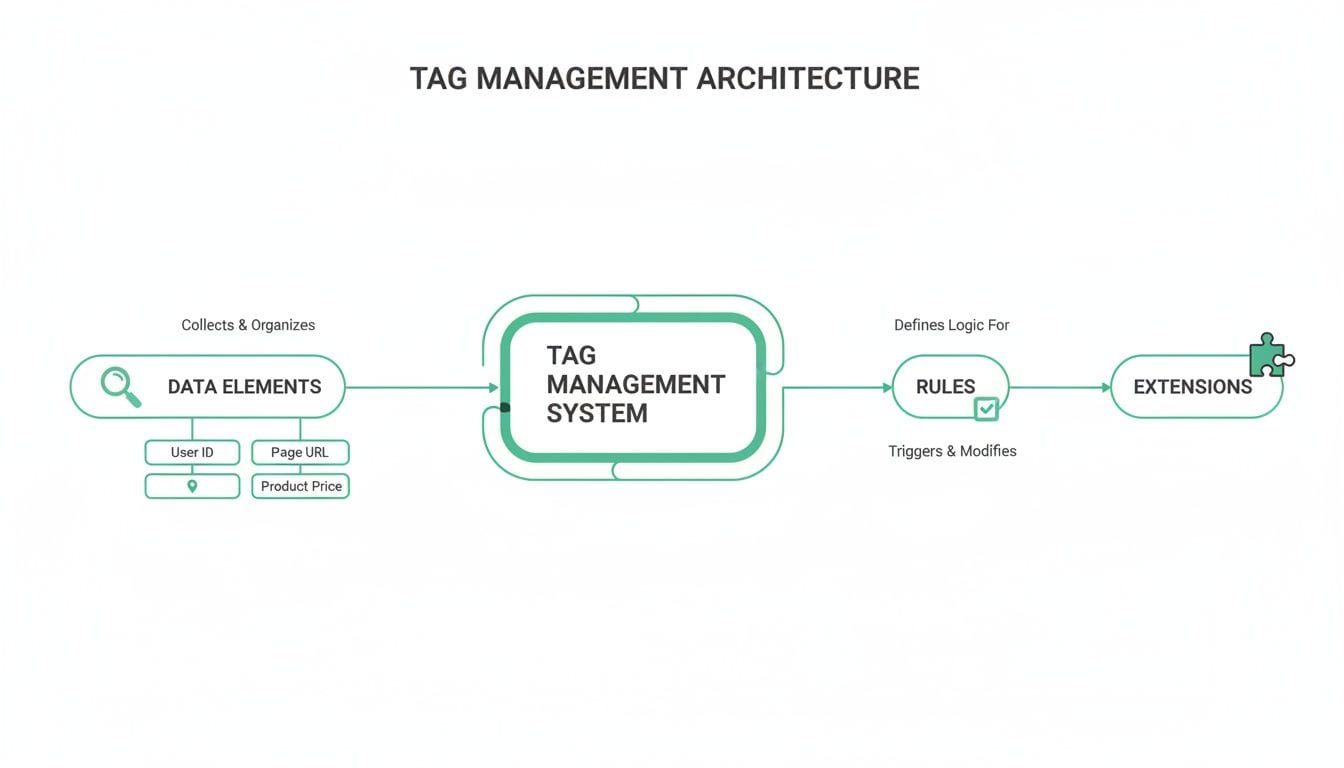
This flowchart really captures the essence of a TMS: it listens for user actions, runs them through your predefined logic, and then sends perfectly formatted data to the right marketing or analytics destination.
Adobe DTM vs Google Tag Manager A High-Level Comparison
No discussion of Adobe DTM is complete without mentioning its main competitor, Google Tag Manager (GTM). While both serve the same fundamental purpose, they were born from different philosophies and cater to slightly different corners of the market. DTM (and now Launch) is deeply integrated into the Adobe Experience Cloud, making it a natural choice for enterprise-level organizations already invested in that ecosystem. GTM, on the other hand, is built for accessibility and seamless integration with the Google Marketing Platform.
Here’s a quick comparison to highlight their key differences:
Ultimately, the choice often comes down to your existing tech stack. If your company runs on Adobe Analytics and Target, Adobe's TMS is the path of least resistance. If Google Analytics is your source of truth, GTM is the obvious fit.
A Hub for Diverse Industries
The widespread adoption of Adobe DTM speaks volumes about its flexibility. At its peak, DTM was deployed on 133,267 live websites, with a total history of use on over 460,000 sites. The platform found a strong home in the Retail industry, which made up 17% of its customer base, and the Automotive sector, which accounted for another 9%.
A well-managed TMS doesn't just deploy scripts; it enforces data governance. It ensures every tool receives the same high-quality data, preventing discrepancies and building trust in your business intelligence.
This centralized control is a game-changer. It prevents data silos from popping up between different marketing platforms. When your analytics tool reports 1,000 conversions, your ad platform should see the exact same number. A TMS makes that possible.
For those pushing the envelope with more advanced setups, you can explore our guide on server-side tagging in Adobe Launch. This evolution of tag management offers even better performance and data control, showing just how far the technology has come.
Adobe vs Google in the Tag Management Arena
In the world of tag management, two giants loom large, forcing most organizations to pick a side. In one corner, you have Adobe Dynamic Tag Manager and its successor, Adobe Launch, plugged into the enterprise-grade Adobe Experience Cloud. In the other, you have Google Tag Manager (GTM), the free, accessible tool that has become almost synonymous with the industry itself.
Getting to grips with this rivalry is about more than just comparing features. It’s a strategic decision that mirrors a company’s entire martech philosophy—influencing team workflows, data integrations, and the very core of its digital strategy.
While Adobe DTM certainly carved out its own territory, the ground has shifted beneath its feet. Google’s approach didn’t just create competition; it led to one of the most one-sided market dominations in marketing technology.
The GTM Juggernaut and The Free Model
Google Tag Manager’s meteoric rise boils down to one simple, powerful factor: it’s free. This completely erased the barrier to entry for millions of users, from solo bloggers and small businesses all the way up to major corporations. GTM quickly became the default for anyone dipping their toes into web analytics or digital marketing.
Then there’s the ecosystem. GTM’s seamless integration with Google Analytics, Google Ads, and BigQuery created a convenient, powerful walled garden. For teams already managing their analytics and advertising through Google, adopting GTM was just the logical next step. This network effect kicked off a self-perpetuating cycle of adoption that competitors found nearly impossible to break.
The numbers tell the story. Google Tag Manager now commands an astounding 99.3% market share, running on nearly 2.9 million websites. In stark contrast, Adobe Launch and its newer iteration, Adobe Activation, have a combined footprint of just over 2%. This 98.1 percentage point gap is a testament to GTM’s overwhelming dominance, a narrative fueled by accessibility and deep ecosystem synergy. You can dig into more of this data on the competitive dynamics of tag managers.
Adobe's Enterprise Focus
So, if GTM is the undisputed champion of the masses, where does that leave Adobe? The answer is in its target audience. Adobe’s tag management solutions were never built to win a numbers game; they were built for the enterprise.
Adobe Launch is woven directly into the fabric of the Adobe Experience Cloud. For companies that treat Adobe Analytics as their source of truth and rely on tools like Adobe Target for personalization or Adobe Audience Manager for segmentation, Launch is the hands-down winner. The native integrations are tighter, the data flows are more direct, and the entire system is engineered to operate as one cohesive unit.
While Google Tag Manager won the battle for mass adoption, Adobe Launch continues to be the strategic choice for enterprises committed to a unified Adobe-centric data ecosystem.
This positioning creates a very clear trade-off for organizations:
- Google Tag Manager (GTM): The champion of accessibility and ease of use. It's the go-to for the vast majority of the web, especially for those already deep in the Google Marketing Platform.
- Adobe Launch: The superior choice for large enterprises invested in the Adobe Experience Cloud. It offers unmatched integration and the kind of governance features that big companies need.
Ultimately, the choice isn’t about which tool is "better" in a vacuum. It’s about which one fits your organization’s tech stack, expertise, and business goals like a glove.
Why Automated QA Is Non-Negotiable

The very thing that makes a system like Adobe Dynamic Tag Manager or Adobe Launch so powerful is also its biggest weakness. It’s shockingly easy for a well-meaning marketer to make one tiny change—tweak a rule, publish a new tag—and accidentally sever the data flow to critical business systems. When analytics breaks, the fallout can be severe, leading to reports you can't trust and decisions based on faulty information.
In the old days, teams got by with manual spot-checks and the occasional audit. But today, with multiple teams pushing changes daily across web, mobile, and server-side platforms, that approach is like trying to find a bad wire in a city-wide power grid by checking one outlet. It just doesn't scale.
This is where automated analytics quality assurance (QA) and observability stop being a "nice-to-have" and become absolutely essential. You need a system that acts as a 24/7 security guard for your data collection, watching everything constantly.
The Limits of Manual Testing
Manual testing is great for catching the big, obvious problems. But it's the subtle, silent issues that truly corrupt your data over time. A human tester might confirm that a "purchase" event fires on the order confirmation page. What they'll almost certainly miss is when a new code release suddenly starts sending the product_price as a string instead of a number.
That kind of tiny schema error can quietly invalidate thousands of transactions in your analytics platform before anyone even has a clue something is wrong.
Here’s why manual QA just can’t keep up:
- It’s Slow: Audits are a huge time sink and can only happen every so often. This leaves massive windows of time where broken tracking can go completely unnoticed.
- It’s Not Comprehensive: A tester can't possibly check every user path, every device, every browser, and every scenario where a tag might misfire. It's an impossible task.
- It’s Reactive: Manual checks find problems after they’ve already poisoned your data, forcing your teams into a frantic game of clean-up and damage control.
A cornerstone of any serious QA process for tag management is building checks directly into your development workflow. This guide to automating regression testing is a great resource that details how to implement a practical CI/CD process.
Shifting to Real-Time Observability
Automated observability platforms like Trackingplan completely flip the script. Instead of reactively asking "Is our tracking broken?", these tools give you a constant, real-time answer. They work by automatically discovering your entire analytics setup—from the data layer all the way to every last marketing and analytics pixel—and then monitoring it non-stop.
Automated observability isn't just about catching bugs faster. It's about building a culture of data trust. It guarantees that the insights driving multi-million dollar decisions are built on a rock-solid foundation of verified, accurate information.
This approach gives you true end-to-end visibility, catching problems the very moment they occur. The system can instantly flag a whole range of issues, such as:
- Broken or Missing Events: A critical "add_to_cart" event suddenly stops firing after a new deployment.
- Schema Errors: A developer changes a property name from
userIDtouser_id, creating a mismatch with what your analytics platform expects. - Missing Tags: The Facebook pixel fails to load on a key landing page, tanking your retargeting campaigns.
By catching these errors in real time, teams can jump on fixes before they compromise dashboards or torch advertising budgets. This moves data governance from a dreaded, periodic clean-up project to a continuous, automated process that ensures your analytics are always on and always reliable.
Frequently Asked Questions
Even though Adobe Dynamic Tag Manager (DTM) has been sunset for years, questions about its history and its successor still pop up. For any team working in the Adobe ecosystem, getting clear on the past and present of Adobe's tag management tools is a must.
Let's clear the air and tackle some of the most common questions people still have about DTM and its modern replacement.
Is Adobe Dynamic Tag Manager Still Supported?
No, not anymore. Adobe officially pulled the plug on Dynamic Tag Manager years ago. All users were required to move over to its successor, which was first called Adobe Experience Platform Launch and is now part of Adobe Experience Platform Data Collection.
If any DTM implementations are still floating around out there, they're running completely unsupported. That means no security updates, no performance tweaks, and zero new features—a huge risk for both data collection and website security.
What Is The Difference Between Adobe DTM And Adobe Launch?
Think of Adobe Launch not as an update, but as a complete, ground-up rebuild of DTM designed for the modern web. The shift was fundamental, bringing some massive advantages to the table.
Here’s where they really differ:
- Performance: Launch is built with light, asynchronous code. This has a much smaller footprint on page load times compared to the clunky, older DTM libraries.
- Extensibility: It introduced an "Extension Marketplace." This makes it incredibly simple to plug in third-party tools like social media pixels or other analytics platforms without needing to write a bunch of custom code.
- Automation: Launch was designed with an API-first approach. This means pretty much anything you can do in the UI, you can also do programmatically, which is a game-changer for managing tags at scale.
- Governance: It brought in much more detailed user permissions and robust, multi-stage publishing workflows. For large enterprise teams, this level of control is non-negotiable.
Simply put, Launch is more powerful, more flexible, and far more secure than DTM ever was.
Can I Use Adobe Launch Without Adobe Analytics?
Yes, absolutely. While Launch integrates seamlessly with the entire Adobe Experience Cloud, it’s designed to be tool-agnostic. You are definitely not locked into using Adobe Analytics.
You can use Adobe Launch to deploy and manage tags for just about any third-party marketing or analytics tool out there—think Google Analytics, advertising pixels, or A/B testing platforms.
The Extension Marketplace makes this a breeze, offering pre-built integrations that take the headache out of connecting non-Adobe tools. This flexibility lets Launch act as the central hub for your entire Martech stack, no matter which analytics platform you use as your source of truth.
Bad data shouldn’t slow you down. With Trackingplan, you get automated, real-time QA for your entire analytics implementation, ensuring you can trust every report and dashboard. See how it works at https://trackingplan.com.