
Most advice about a free google ads audit starts too late.
It starts with CTR, ad copy tests, bid strategies, search terms, maybe landing page relevance. Those checks matter. But they assume the data feeding the account is trustworthy. In a lot of accounts, it isn't. When conversion events are misfiring, UTMs are inconsistent, or analytics tags break after a site release, every optimization decision sits on bad input.
That’s why a useful audit doesn’t begin with “Which keyword should I pause?” It begins with “Can I trust what this account says is happening?”
Why Your Standard Google Ads Audit Is Incomplete
A typical free google ads audit tool is fast by design. That’s the appeal. Tools can return insights in under a minute across multiple checks, but they stay at the surface, scoring metrics like CTR and Quality Score instead of the data layer underneath. The gap matters because data quality issues can drive 20-30% of wasted ad spend according to the benchmark cited by myWebhero’s audit overview at https://app.mywebhero.co.uk/audit/.
Surface metrics can look healthy while the account is still broken
This happens more often than many want to admit.
An account can show decent click-through rates, reasonable CPCs, and even apparent conversion growth. Then you check the implementation and find a core problem: duplicate conversion firing, a thank-you page event counting reloads, imported goals that don’t match business outcomes, or campaign traffic landing in analytics with broken parameters.
The result is predictable. Google’s bidding system optimizes toward the wrong signal. A campaign that appears efficient inside the ad platform may be training the algorithm on noise.
Practical rule: If the conversion action is wrong, every “optimization” after that can make the account worse faster.
Most free audits answer the wrong first question
The common question is, “How is my account performing?”
The better first question is, “How much of this performance data is reliable enough to act on?”
That changes the audit order. Instead of jumping straight into keyword bids or ad asset strength, you validate the path from click to conversion. You check whether the platform recorded the visit, whether analytics classified it correctly, whether the right event fired, whether the value parameter passed, and whether the same action was counted once rather than several times.
What a complete audit includes
A complete audit has two layers.
| Audit layer | What it checks | Why it matters |
|---|---|---|
| Account layer | Campaign structure, search terms, budgets, network settings, ad relevance | Finds visible inefficiencies inside Google Ads |
| Data layer | Tags, UTMs, dataLayer pushes, event mapping, consent handling, attribution inputs | Verifies the account is making decisions on trustworthy signals |
Most free tools cover the first layer well for a quick triage. Few deal with the second layer effectively.
That’s the blind spot. If you only audit what’s easy to see in the interface, you’ll miss the issues that distort everything else.
Your First Look Inside The Account Structure
Before getting technical, do a fast structural pass. Obvious waste shows up here.
I don’t mean a two-hour teardown of every ad group. I mean a sharp review that answers one question quickly: is this account set up so a human can manage it and a machine can learn from it?
Start with naming, segmentation, and budget logic
Poor structure creates reporting confusion before it creates performance problems.
Campaign names should tell you what traffic source, geography, funnel stage, match strategy, or product line you’re looking at. If naming is messy, budgeting is too. You can’t shift spend confidently when the account doesn’t make business priorities obvious.
Look for these signs first:
- Campaigns grouped by business logic: Product lines, service lines, regions, or margin tiers make sense. Random campaign splitting doesn't.
- Budgets tied to priorities: High-value campaigns shouldn’t sit capped while lower-value campaigns have room to burn.
- Ad groups that stay tight: If ad groups mix unrelated themes, relevance drops and optimization gets blunt.
A common pattern in weak accounts is broad campaign sprawl. Too many mixed-intent ad groups. Too much dependence on default settings. Too little clarity about what each campaign is supposed to do.
According to the checklist published by North Country Growth, poor account structure can push Quality Scores down to an average of 4/10, keyword overlaps can increase CPC by up to 20%, and failing to review Search Terms reports can burn 25% of budget on irrelevant queries: https://www.northcountrygrowth.com/blog/steal-our-2025-google-ads-audit-checklist-used-by-7-figure-accounts
Check for hidden leakage in settings
A lot of budget waste is boring. That’s why people miss it.
Review settings that rarely get attention after launch:
- Networks: Search campaigns sometimes leak into placements the team never intended to fund.
- Locations: Make sure the targeting reflects where you sell or serve.
- Devices: Don’t assume performance by device is aligned with user behavior on your site.
- Schedules: If lead handling is time-sensitive, ad delivery should reflect that operational reality.
This part of the audit is less about clever tactics and more about removing preventable friction.
Search terms and negatives decide whether the account stays clean
Search Terms reports tell you how much of your traffic is relevant.
The fix isn’t only “add more negatives.” The fix is to build a disciplined negative keyword process. Look for junk intent, job seekers, support queries, educational traffic when you sell a paid product, and broad match drift that doesn’t belong near your core campaigns.
Use a simple framework:
Spot intent mismatches
Queries that signal research, support, free alternatives, or career intent do not belong in acquisition campaigns.Separate one-off negatives from reusable lists
Some negatives belong account-wide. Others should stay local to a campaign or ad group.Watch for conflicts
Negative keyword management can block useful demand if no one checks list interactions.
A clean negative keyword strategy does not only cut waste. It protects the meaning of your performance data.
Audit overlaps before they inflate costs
Keyword overlap is one of those issues that hides in plain sight.
When multiple campaigns or ad groups can answer the same query, reporting gets muddy and CPC can rise. It also becomes harder to understand which structure works because the account competes against itself.
Look for overlap where:
- Brand and non-brand terms are mixed
- Match types compete without clear priority
- Geographic splits are inconsistent
- Old campaigns were never retired after new builds launched
What this structural pass should leave you with
By the end of the first look, you should know whether the account has a governance problem.
If names are unclear, budgets don’t reflect priorities, network settings are sloppy, and negatives are unmanaged, fix that before chasing small creative wins. A strong structure doesn’t guarantee good results, but a weak structure makes reliable optimization harder from day one.
Validating Your Data and Tracking Integrity
An audit earns its keep at this stage.
You can fix ads later. You can rework bids later. You can rebuild campaign segmentation later. But if tracking is wrong, you’re making all those decisions with broken feedback.
The most useful audit work in Google Ads today happens outside the default campaign screens.
Start by proving the conversions are real
A lot of accounts trust their conversion setup because “the numbers move.” That’s not validation.
The benchmark from GrowLeads is the right wake-up call: 71% of Google Ads accounts suffer from inaccurate conversion tracking, and those errors can waste up to 50% of budget on untracked events if teams optimize against flawed signals: https://growleads.io/blog/google-ads-audit-guide-what-top-marketers-dont-tell-you-about-scaling/
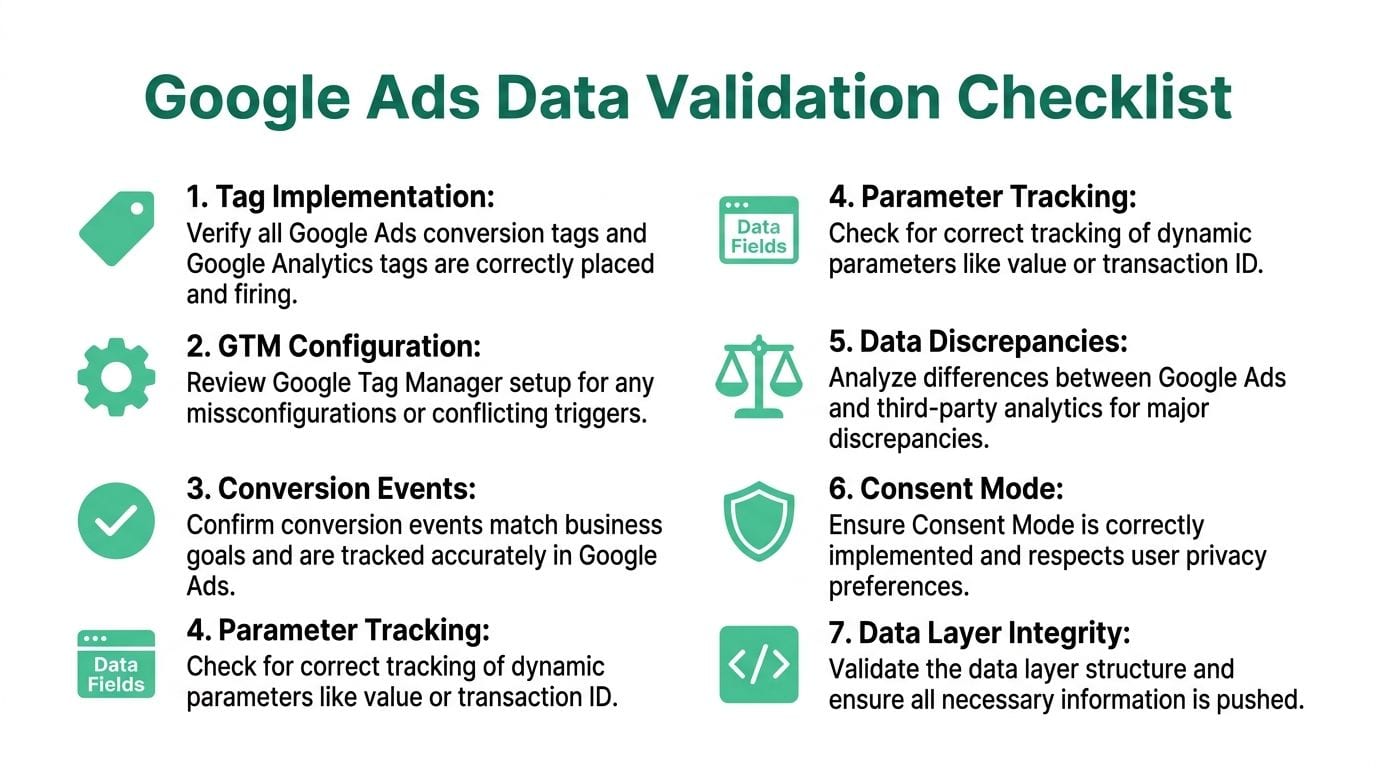
Use Google Tag Assistant and Google Tag Manager Preview mode to test every meaningful conversion action. Don’t test one path and assume the others are fine. Run through user journeys.
Check whether:
- the tag fires on the intended action
- it fires once, not twice
- it passes the right value
- it includes an identifier such as a transaction reference where relevant
- the event reaches the destination platform as expected
A form submit event that also triggers on validation errors is not a small issue. A purchase event that fires before payment confirmation is not a small issue. Both can poison automated bidding.
Separate primary outcomes from secondary signals
Not every event belongs in optimization.
Many accounts lump together demo requests, content downloads, newsletter signups, brochure views, and purchases as if they deserve equal treatment. They don’t. If you feed mixed-value actions into Google Ads without a clear hierarchy, the platform can chase the easiest action rather than the most valuable one.
A healthy setup distinguishes:
| Event type | Good use in the account | Common mistake |
|---|---|---|
| Primary conversions | Core business outcomes used for bidding | Mixing them with low-intent actions |
| Secondary conversions | Supporting behavior used for analysis | Letting them drive bidding by accident |
| Diagnostic events | QA and funnel debugging | Importing them as business wins |
This is also where teams should review conversion windows and action settings. If the setup doesn’t match the buying cycle, attribution gets distorted before analysis even begins.
For marketers who want a practical primer on how conversion credit works across touchpoints, this guide to Attribution Modeling is worth reviewing before you decide which actions should influence bidding.
Audit the UTM layer like it matters, because it does
UTM mistakes don’t always break campaigns. They break trust.
When naming conventions drift, channels fragment in reporting. Paid search sessions split across inconsistent source or campaign values. Dashboards become noisy. Analysts spend time cleaning data instead of interpreting it.
Review UTMs for consistency in:
- Source naming: One paid search source, not several variations created by different teams
- Medium logic: Keep paid traffic classifications stable across platforms
- Campaign naming: Reflect objective, market, product, or funnel stage in a predictable format
- Parameter preservation: Make sure redirects and landing page logic don’t strip values
This matters even more in multi-team environments. One agency naming pattern, one in-house naming pattern, and one CRM import naming pattern can make campaign analysis harder than it should be.
If you’re cleaning up a GA4 setup at the same time, this resource on automated validation in analytics is useful for understanding how teams monitor the issue continuously: https://www.trackingplan.com/blog/data-quality-and-automated-data-validation-in-ga4
Compare platforms, but compare the right way
You should expect differences between Google Ads and analytics tools. You should not accept unexplained differences.
A good audit compares:
- clicks in Google Ads versus sessions in analytics
- conversion counts across ad platform and analytics
- revenue or value passed into each destination
- event volume after site changes or tracking releases
The goal isn’t perfect parity. It’s directional consistency and an explanation for meaningful gaps.
If one platform says campaigns are thriving and another says the downstream events never happened, trust neither until you verify the implementation.
Inspect the dataLayer and event payloads
This is a part many skip because it looks technical. It’s also where a lot of expensive errors start.
If your site uses GTM, check the dataLayer pushes behind key actions. Confirm the event names are stable, the values are populated correctly, and the fields required by your destinations are present. If developers changed the checkout, form flow, SPA routing, or consent logic, the tag may fire while the payload underneath is wrong.
Look for problems like:
- missing transaction values
- duplicate transaction IDs
- events firing before values are available
- renamed keys that broke downstream mapping
- stale variables reused across steps in the funnel
Validate consent behavior and privacy-safe measurement
Consent handling belongs inside the audit now. It’s not a legal footnote.
When consent mode or tag governance is misconfigured, the team can end up with missing measurement, inconsistent attribution, or data collection that doesn’t align with internal policy. That’s especially risky when multiple vendors, containers, or server-side flows are involved.
Your audit should confirm:
- Tags respect consent choices
- Measurement changes are understood by the marketing team
- Critical events follow the expected implementation path
- No one is relying on assumptions from an old setup
The practical output of this stage
At the end of tracking validation, you should be able to answer these questions without guessing:
- Which conversion actions are trustworthy?
- Which ones need to be excluded from bidding?
- Which tags fire incorrectly?
- Where do UTMs break or drift?
- Which discrepancies are expected, and which signal an implementation problem?
- Does the data layer support the reporting the business wants?
If you can’t answer those, the audit is incomplete; it is only dressed up as one.
Advanced Audits for PMax and Complex Funnels
Performance Max and long B2B buying cycles break simple audit frameworks.
A basic account review might catch obvious waste, but it won’t tell you whether the system has the right inputs, whether the funnel stages are valued correctly, or whether consent and cross-device behavior are distorting the story.

Auditing PMax means auditing the inputs, not only the output
With Performance Max, weak inputs explain disappointing results.
That means checking asset groups, search themes, audience signals, feed quality where relevant, and the conversion actions feeding the model. If the campaign is underfed, poorly grouped, or pointed at noisy events, performance issues aren’t surprising.
The review should ask:
- Are asset groups built around product or service themes?
- Are the supplied signals specific enough to guide learning?
- Are the conversion actions aligned to value?
- Does reporting suggest the campaign is finding qualified intent or only available inventory?
PMax also tends to expose hidden implementation issues faster because it leans heavily on the conversion data you give it.
B2B funnels need a value map, not one conversion goal
A complex funnel includes multiple moments that matter. A gated asset download. A qualified lead. A booked demo. A closed opportunity.
The audit has to distinguish them clearly.
If every step is counted as an equal success, bidding can overweight the top of funnel. If only the final step is counted, the platform may not get enough learning signal. The answer isn’t a universal template. It’s a value model that reflects how your sales process works.
That’s where teams thinking about broader methods for optimizing Google Ads performance benefit from stepping back and reviewing whether campaign goals match pipeline reality rather than only in-platform conversion volume.
Consent and cross-device behavior make B2B audits harder
This is one of the biggest reasons manual audits miss what matters in B2B environments.
According to AdConversion, with GA4 enhanced consent signals fully rolled out in 2025, manual audits fail to validate real-time pixel firing, and 22% of B2B campaigns show tagging drift: https://www.adconversion.com/blog/google-ads-audit
That drift can show up as partial attribution, missing events from specific journeys, or reporting shifts after implementation changes that nobody connected back to consent or tag behavior.
In B2B, the cleanest-looking dashboard is sometimes the least trustworthy one, because the buying journey spans devices, sessions, and systems.
A useful advanced audit checks not only the ad account but also how the website, CRM handoff, analytics platform, and consent setup work together.
Here’s a short walkthrough worth watching if you want to see how data flow issues surface in practice:
What to look at when the funnel is long
For complex accounts, I’d prioritize this order:
- Value assignment: Make sure the platform can distinguish low-intent and sales-relevant outcomes.
- Stage alignment: Check whether imported conversions reflect funnel progression.
- Cross-device clues: Compare journeys across analytics, CRM, and ad platform reporting rather than trusting one view.
- Consent-sensitive paths: Test key flows under realistic conditions, not only in ideal internal QA environments.
That kind of audit takes longer than a free scan. It also answers better questions.
Beyond Manual Audits Automating with Trackingplan
A manual audit is useful. It’s also temporary.
The team checks the account, validates events, fixes some tag issues, cleans up UTMs, and leaves with a stronger setup. Then the site changes. A developer ships a new component. A form provider update alters event names. A consent banner adjustment changes firing behavior. Nobody notices until campaign reporting starts looking strange.
That’s the operational weakness in the traditional audit model. It tells you what was true at the moment you checked.
Why point-in-time audits keep missing the same class of problems
The hardest problems in paid media are not inside Google Ads. They’re in the systems connected to it.
Most free audits treat tracking as a checkbox. This approach overlooks that pixel failures, schema drift, and parameter errors happen continuously. According to Ignite Digital’s audit-related benchmark, 40-70% of tracking pixels fail without detection, which is a strong argument for real-time observability when agencies or in-house teams manage multiple properties: https://ignitedigital.com/resources/tools/google-ads-audit-tool/

A failure without detection is exactly what it sounds like. The ad keeps spending. The dashboard keeps updating. But one part of the measurement chain stopped working or changed shape.
That’s why teams eventually need more than a recurring spreadsheet checklist.
What automation changes in practice
Automated observability changes the job from hunting to monitoring.
Instead of manually opening GTM preview mode every time someone ships a frontend update, the team can watch for unexpected changes in event behavior, campaign tagging, schema consistency, consent implementation, or destination delivery. Instead of waiting for a weekly report anomaly, they can catch the issue close to when it appears.
The difference is practical:
| Manual audit | Automated monitoring |
|---|---|
| Finds issues after review | Flags issues as they happen |
| Depends on audit cadence | Runs continuously |
| Strong for strategic review | Strong for change detection |
| Spreadsheet-driven | Better for multi-site, multi-client scale |
That doesn’t make manual work obsolete. It makes manual work more valuable because analysts can spend time on decisions rather than repetitive checking.
One option for continuous QA
One option in this category is Trackingplan, which automatically discovers analytics and marketing implementations, monitors pixels and event flows, and alerts teams to issues like missing events, UTM errors, schema mismatches, traffic anomalies, consent problems, and potential PII leaks across web, app, and server-side stacks.
That’s a different job than a conventional free google ads audit tool. It isn’t trying to score your account structure or tell you whether your CTR is above a benchmark. It’s focused on whether the data infrastructure underneath your advertising can be trusted day after day.
If you want a practical overview of how teams typically implement that workflow, this getting-started guide is useful: https://www.trackingplan.com/blog/how-to-get-started-with-trackingplan
Where automation helps most
Automation is most useful when the environment changes frequently or the team has shared ownership.
That includes:
- Agencies managing multiple clients: More properties, more releases, more chances for unnoticed tracking drift
- In-house teams with active product development: Frontend changes can break measurement without touching the ad account
- Organizations with several tools in the stack: More destinations mean more ways for event definitions to diverge
- Privacy-sensitive setups: Consent changes and governance checks need ongoing validation
The more people can change the site, the less you should rely on a once-a-quarter audit as your only defense.
What requires human judgment
Automation won’t replace channel strategy.
A person is needed to decide whether a conversion action should influence bidding, whether campaign segmentation reflects business reality, whether search intent is worth paying for, and whether creative and landing pages match the offer. But once the team removes manual QA from the critical path, those strategic decisions get made on firmer ground.
This is the core shift. The mature version of auditing isn’t “run a report more often.” It’s “stop letting your measurement layer fail between audits.”
Frequently Asked Questions About Google Ads Audits
What can a free google ads audit tell me?
A free tool is useful for quick diagnosis.
It can flag obvious issues in campaign setup, ad strength, impression share constraints, keyword hygiene, and high-level efficiency. That makes it good for a first pass, a second opinion, or a fast review when you inherit an account.
It will not validate your full tracking implementation, your data layer behavior, or downstream attribution quality with the depth needed for serious troubleshooting.
How often should I audit a Google Ads account?
For account structure, search terms, budgets, and settings, regular manual review makes sense.
For tracking integrity, release-heavy websites and multi-team environments need ongoing checks because the data layer can change between formal audits. If your business depends on paid acquisition, the modern standard is a mix of scheduled review plus continuous monitoring.
Can I do an audit without admin access?
Partly, yes.
With marketer-level access to Google Ads and analytics, you can review campaign structure, search terms, conversion settings, naming, and reporting patterns. To properly test tags, triggers, data layer pushes, and consent behavior, you will need help from whoever manages GTM, site code, or analytics implementation.
The practical challenge isn’t access alone. It’s coordination between media, analytics, and engineering.
What’s the most important part of the audit?
Tracking accuracy.
If you can’t trust the conversion signals, you can’t trust the optimization logic built on them. Structural cleanup matters. Search term control matters. Bidding strategy matters. But bad measurement can make a well-managed account look worse or a weak account look healthy.
Should I pause campaigns while auditing?
Generally, no.
Audit live behavior whenever possible. Live testing shows how tags fire, how UTMs persist, and how the account behaves under real conditions. The exception is a critical failure, such as a broken landing page, clearly invalid conversion counting, or severe targeting leakage that’s actively wasting spend.
What’s the difference between a manual audit and automated monitoring?
They solve different problems.
A manual audit is better for diagnosis, prioritization, and strategic decisions. Automated monitoring is better for catching implementation drift, broken pixels, event mismatches, and tagging issues that happen after the audit is done.
The strongest setup uses both.
If your team is spending real money in Google Ads, the smartest next step isn’t another prettier dashboard. It’s making sure the data behind your bidding, attribution, and reporting is dependable every day. Trackingplan helps teams monitor analytics and marketing tracking automatically so broken pixels, UTM errors, schema drift, and consent issues don’t sit unnoticed while campaigns keep spending.