
Server-side scripts are the instructions that run on a web server—not in a user's browser—to power dynamic web content. They handle all the behind-the-scenes work, like database queries, user authentication, and data processing. This is exactly why they're so critical for reliable analytics and creating personalized user experiences.
What Are Server-Side Scripts and Why They Matter Now

Think of your website as a bustling restaurant. Client-side scripts are the friendly waiters interacting directly with customers at their tables. They take orders, answer questions, and manage the immediate experience—it's all visible and interactive.
But server-side scripts? They're the master chefs working diligently in the kitchen, a place the customer never sees. These "chefs" take the raw order (a user request) and do all the complex work needed to prepare the final dish (the web page). This is where the real magic happens, far away from the user's view.
The Power of the "Kitchen"
When a script runs on the server, it has access to a secure, controlled environment with powerful resources that a user's browser simply doesn't. This core difference is what makes them so essential for modern web applications and, more importantly, for trustworthy data collection.
This server-side environment allows scripts to perform critical functions that would be insecure or impossible to run on a client's device. These functions are the backbone of dynamic websites and reliable analytics.
For data teams, understanding this "kitchen" process is the first step toward appreciating why server-side analytics provides a more reliable, secure, and powerful foundation for collecting trustworthy data.
Key Functions of Server-Side Scripts
Server-side scripts are responsible for a huge range of tasks that create a seamless and secure user experience. Their capabilities are central to how the modern web operates, from e-commerce checkouts to personalized content feeds. If you want to see these concepts in action, check out our guide on what is server-side tracking.
Here are a few of their core responsibilities:
- Database Management: They securely connect to databases to retrieve, store, and update information—think user profiles, product inventory, or blog posts.
- User Authentication: When you log in to an account, server-side code verifies your credentials against a secure database. This is a process that should never happen in the browser.
- Content Personalization: They can tailor the content a user sees based on their past behavior, location, or user profile, creating a uniquely relevant experience.
Client Side vs Server Side: A Critical Comparison

To really get why server-side scripts are such a game-changer, we first need to draw a clear line between them and their client-side cousins. Think of your website as a restaurant.
Client-side scripts are the waiters taking orders right at the table. They interact directly with the customer (the user's browser), making the experience dynamic and responsive. Everything happens out in the open, right in front of the diner.
Server-side scripts, on the other hand, are the chefs in the kitchen. They’re working behind the scenes, preparing the meal, managing ingredients, and making sure everything is cooked to perfection. The customer never sees the kitchen, but that's where all the critical work happens—processing orders, accessing the pantry (database), and ensuring the final dish is exactly right.
The Problem with Working Tableside
Doing all the work at the "table" (in the user's browser) is risky, especially for something as important as analytics. Client-side tracking scripts are completely exposed to a whole host of issues that can mess with or flat-out block your data before it ever gets to you.
These interruptions are more common than you'd think, and they punch huge holes in your data. For example, a staggering 42.7% of internet users worldwide now use ad blockers. Many of these tools stop client-side analytics tags dead in their tracks, meaning you could be blind to nearly half of your user activity from the get-go.
The core difference is this: client-side scripts have to ask the browser for permission to run and send data. Server-side scripts command the data flow from an environment you completely control.
On top of ad blockers, you've got browser privacy features like Intelligent Tracking Prevention (ITP) and simple network hiccups that can lead to lost or incomplete user sessions. Server-side scripts sidestep all of these problems by building a direct, stable pipeline from your server straight to your analytics platforms.
A Head-to-Head Comparison
Breaking down the differences is key to making smart choices about your data architecture. This decision influences everything from the reliability of your data and your site's performance to its overall security. To see how these pieces fit into the bigger picture, this overview of Modern Web Application Architecture is a great resource.
Let's look at a direct comparison to make the practical differences crystal clear.
Client Side vs Server Side Scripting Key Differences
This table breaks down the fundamental differences between client-side and server-side scripting, showing how each approach impacts performance, security, and data collection.
As you can see, the choice isn't just a technical detail—it has a massive impact on the quality and completeness of the data you rely on to make business decisions.
Popular Server-Side Languages and Their Roles
Picking a server-side language isn't just a technical detail; it fundamentally shapes what’s possible with your entire analytics stack. Think of it like a chef choosing a specific knife for a specific job—the tool defines the outcome. For developers and data strategists, understanding these languages reveals how the tech you already have can support a much smarter, more robust data strategy.
While you have plenty of options, a few key languages really run the modern web. Each one brings a unique flavor to handling the behind-the-scenes logic of server-side scripts, from processing data to firing off analytics events. The language you use directly impacts how you collect, enrich, and manage your data before it ever sees the light of day.
PHP: The Ubiquitous Workhorse
PHP is the undisputed veteran of the server-side world. Its staying power is incredible, powering a massive 77-78% of all websites that use a server-side language we can see. This isn't just about legacy; it's because PHP is deeply woven into content management systems like WordPress, which runs something like 43% of the entire web. You can dig into these server-side language statistics to see the full picture.
What does this mean for your analytics? If your site is built on WordPress, Drupal, or Joomla, you're already sitting on a powerful PHP environment. It’s fantastic for standard event tracking and hooking into all sorts of marketing platforms, making it a rock-solid foundation for many server-side analytics projects.
Python: The Data Science Powerhouse
Python has skyrocketed in popularity, quickly becoming the language of choice for data science, machine learning, and any kind of complex data wrangling. Its clean, readable syntax and massive library ecosystem—with tools like Pandas and NumPy—make it a beast for tasks that go way beyond just firing a simple event.
Here's a good way to think about Python's role in analytics: other languages can tell you what happened, but Python is purpose-built to help you understand why. Its real strength is in data enrichment.
- Advanced User Profiling: You could have a Python script query your internal databases or even a machine learning model to tack on valuable user attributes in real-time.
- Predictive Scoring: It can calculate things like lead scores or churn risk on the server and then pass that enriched data to your analytics tools for some seriously powerful segmentation.
- Data Transformation: Python is a master at cleaning, structuring, and transforming raw event data before it gets to its final destination, which means your data quality goes way up.
Python's strength isn't just in sending data; it's in making that data smarter and more actionable before it ever leaves your server.
Node.js: The Real-Time Specialist
Node.js is unique because it lets developers write server-side code using JavaScript—the very same language that powers the browser. While that's great for efficiency, its true superpower for analytics is its speed and event-driven architecture. Node.js was born to handle tons of simultaneous connections without breaking a sweat.
This makes it the perfect fit for applications that need real-time data, like live chat tools, online gaming platforms, or collaborative software. In the analytics world, it allows you to process and forward high-volume event streams almost instantly, ensuring your data arrives with virtually no delay. When speed is the name of the game for your server-side scripts, Node.js is the answer.
How to Implement Server-Side Analytics Tracking
Alright, let's move from theory to practice. Bringing server-side analytics to life is all about picking an architecture that plays nicely with your current tech stack and what you're trying to achieve. The good news? You don't have to tear everything down and start over. You just need to choose a model that builds on what you already have.
The two most common routes offer different levels of control and complexity. One of the most popular ways to get started is by using a dedicated server-side tag management system, like Google Tag Manager's server container. Think of it as a central proxy. Instead of your website blasting data out to ten different marketing tools, it sends a single, unified data stream to your GTM server container. That container then takes on the job of forwarding the data to all your analytics destinations.
The Modern Data Flow Explained
This server-side model completely changes the game for how data gets from a user's browser to its final destination. It carves out a much more deliberate and controlled pathway, which is a massive strategic win. Once you understand this new flow, the benefits really start to click.
The journey breaks down into a clear, three-step process:
- Client-Side Capture: A user interacts with your website or app. A super lightweight script catches that initial action—say, a button click—and sends a minimal packet of data to your own web server.
- Server-Side Processing & Enrichment: Your server gets the data packet. This is where the real magic happens. Your server-side scripts can step in to validate the information, strip out any sensitive PII, and layer in valuable context from your backend systems, like a CRM or subscription database.
- Controlled Distribution: Finally, your server takes this clean, enriched data and forwards it to all your analytics and marketing platforms. We're talking Google Analytics, Amplitude, or Facebook Ads.
This architecture turns what was a chaotic, browser-based free-for-all into an orderly, single stream of high-quality data. You get to decide what goes out, who gets it, and what format it's in.
Key Architectural Patterns
Picking the right implementation pattern really comes down to your team's resources and technical comfort zone. Both of the main approaches deliver the core benefits of server-side tracking, but they differ in how they hook into your existing systems. For a much more detailed walkthrough, you can learn more about a Google Tag Manager server-side setup in our complete guide.
Tag Manager Proxy Server:This is usually the most accessible starting point for most teams. You spin up a dedicated server environment, often in the cloud, that runs tag management software. It acts as the middleman, receiving data from your site and then distributing it. This pattern makes managing vendors a whole lot simpler without forcing you to make deep changes to your main application code.
Direct Backend Integration:If you're looking for more granular control, you can build the tracking logic directly into your application's backend. In this setup, your application's own code is responsible for formatting and sending data to analytics vendors. It's definitely more complex to set up, but this approach gives you maximum flexibility and performance by keeping all the logic in one place.
Ensuring Data Quality with Server Side Observability
Shifting your analytics to the server is a great way to patch up major data gaps, but it can open up a brand new problem: a visibility gap. When your server side scripts are humming along behind the scenes, the whole process can feel like a ‘black box,’ making it incredibly tough to spot issues happening between your server and your analytics destinations.
This is a critical blind spot you can't afford to ignore. Backend processes can silently introduce errors that are completely invisible from the client side. A minor code change could accidentally warp an event schema, a sneaky bug might cause key event properties to go missing, or worse, you could end up leaking personally identifiable information (PII) without even knowing it.
The flow chart below shows how data typically moves in a server-side setup, from the initial user action all the way to the final insights.
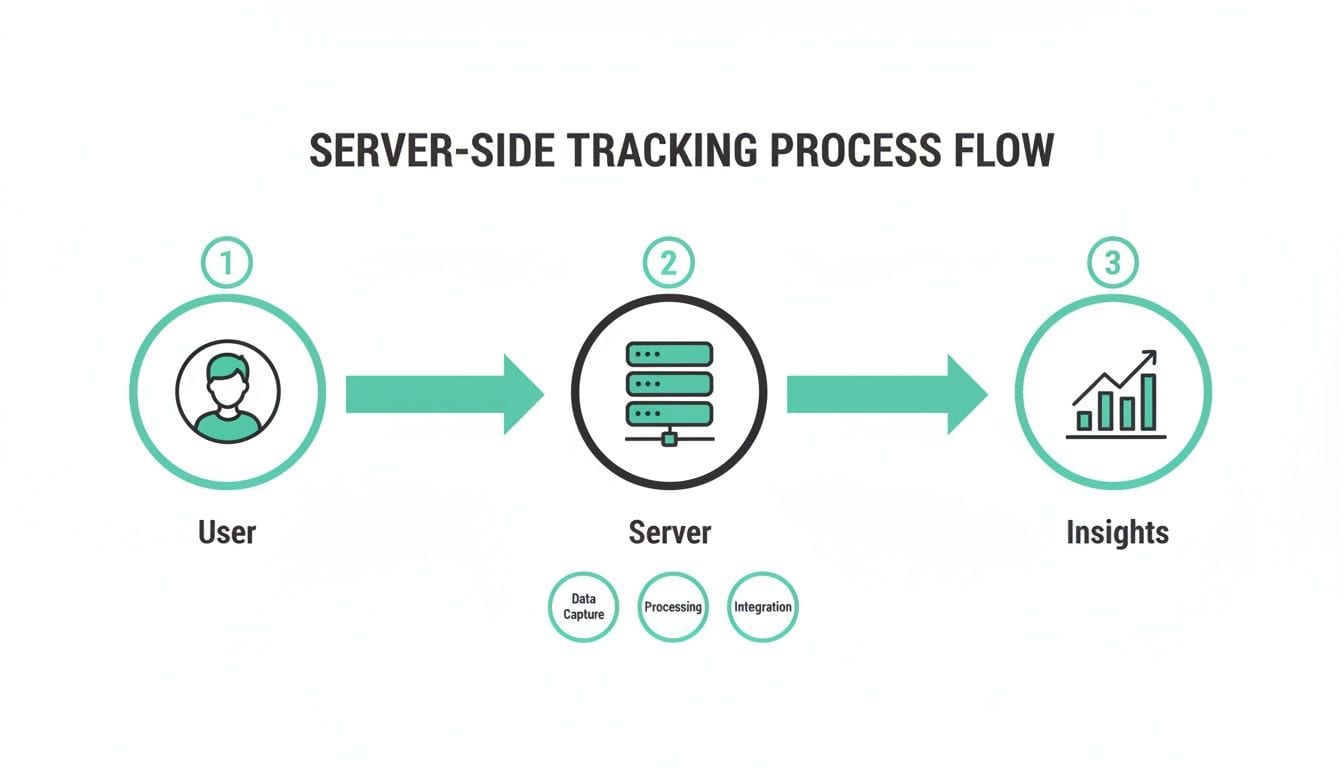
While this process creates a much more controlled and linear path for your data, it also illustrates how a problem on the server can corrupt your final insights with zero warning on the client side.
Why Analytics Observability is Non-Negotiable
Without dedicated monitoring, you’re basically flying blind and just hoping the data you collect is accurate. This is exactly where analytics observability platforms become indispensable. They serve as a dedicated quality assurance layer for your entire data pipeline, giving you the visibility you need to actually trust your server-side implementation.
An observability platform doesn't just show you what data is flowing; it validates that the data is correct, complete, and compliant at every stage of its server-side journey.
These tools are built to automatically keep an eye on your server-to-server data streams. They make sure every single event and property lines up perfectly with your tracking plan, and they can instantly spot anomalies that point to a problem with your server side scripts.
Automatically Detecting Hidden Issues
An observability solution delivers proactive alerts for the most common server-side data headaches, shifting your QA process from being reactive to truly preventative. You can get a deeper look at how to get started in our detailed guide on automating event validation for server-side tagging.
Here are a few key issues that observability tools are designed to uncover:
- Schema Deviations: You'll get an alert the moment an event is sent with unexpected properties or the wrong data types, something that often happens after a backend code update.
- Missing or Rogue Events: These tools will flag when events you’re expecting suddenly disappear, or when new, untracked events start popping up out of nowhere.
- PII Leaks: They can scan event properties for sensitive information like emails or names, stopping costly privacy violations before they ever become a real problem.
To really lock down the sensitive information handled by server-side scripts and boost overall data quality, making thorough secure code reviews a standard practice is vital. By continuously monitoring and validating your data, you can finally ensure that the insights driving your most critical business decisions are always accurate and trustworthy. It’s how you turn that server-side black box into a transparent, reliable data engine.
Common Questions About Server-Side Scripts
When teams start thinking about moving their analytics to a server-first approach, the same questions always seem to pop up. It’s a big change to your data architecture, so it's totally normal to have questions about the complexity, cost, and what the real impact will be. Let's tackle these common concerns head-on.
Getting these answers will help you navigate the shift and really understand the strategic upside of using server-side scripts for your analytics. Once you see the trade-offs and benefits clearly, you can make a much smarter decision for your data strategy.
Are Server-Side Scripts More Difficult to Implement?
I won't sugarcoat it: yes, the initial setup for server-side scripting is usually a heavier lift than its client-side cousin. It’s a job for a developer, as it requires backend skills and access to your server environment. If you're a marketer who lives in web-based tag managers, the process is going to feel a lot less direct.
But the long-term payoff often makes that upfront effort completely worth it. The improvements you'll see in data accuracy, site performance, and security are massive. Plus, with modern analytics observability tools now on the scene, the ongoing maintenance and QA work has gotten a whole lot simpler, making the entire system easier to manage after launch.
Can Server-Side Scripts Improve My Website Performance?
Absolutely. This is one of the biggest and most immediate wins you'll see. Moving tracking logic to the server gives your website a noticeable boost in speed and responsiveness. Client-side tracking often means loading a bunch of third-party JavaScript libraries right in the user's browser, which can really slow down page loads and create a clunky user experience.
By switching gears, you consolidate all those calls into a single, lightweight data stream that gets sent to your server. Your server then does the heavy lifting of distributing the data to all your different vendors.
This simple change creates a faster, smoother experience for your users. That's a win that can positively impact everything from on-site engagement and conversion rates to your SEO rankings.
How Does Server-Side Tracking Help with Data Privacy?
Server-side tracking puts you in the driver's seat, giving you total control over the data you collect and share with third-party tools. Since every piece of data has to pass through your own server environment first, you can build in powerful filtering and transformation rules before it ever leaves your control.
This centralized checkpoint is a game-changer for modern data privacy and compliance.
- Data Redaction: You can automatically find and strip out sensitive personally identifiable information (PII) before it has a chance to be leaked.
- Data Hashing: Information like email addresses can be hashed on your server, which still allows for user matching without ever exposing the raw, readable data.
- Consent Management: You can enforce user consent choices at the server level, making sure data only goes to the vendors a user has explicitly approved.
Having this capability is essential for complying with regulations like GDPR and CCPA. It gives you a verifiable chokepoint to manage all your data flows exactly how your privacy policy dictates.
Will Server-Side Tracking Make My Data 100% Accurate?
While using server-side scripts is a massive leap forward for data accuracy—bypassing ad blockers and browser restrictions—no system is perfect. It fixes a ton of client-side problems, but it can also introduce new, server-side ones.
Errors can still creep in from backend bugs, a wrong turn in the configuration, or just a server hiccup. This is exactly why continuous monitoring isn't just a nice-to-have; it's a must. An analytics observability platform becomes your automated QA team, constantly checking your data streams against your tracking plan. It spots when data breaks or schemas drift, helping you maintain rock-solid trust in your server-side data.
Ready to turn your server-side "black box" into a transparent, trustworthy data engine? Trackingplan provides complete visibility into your analytics implementation, automatically detecting issues so you can fix them fast and ensure data quality. Discover how Trackingplan can safeguard your server-side analytics today.