
To get the most out of Google Ads, your focus needs to shift. It's no longer about endless manual tweaks. Instead, it’s about feeding Google's AI the cleanest, most accurate data you can. Modern success is built on a rock-solid data foundation, as the performance of automated bidding and targeting is directly tied to the quality of the conversion data you provide.
This guide is your playbook for making sure every click, conversion, and dollar is tracked with absolute precision.
The New Era of Google Ads Optimization
Welcome to the new battlefield of Google Ads. Here, victory isn't just about outbidding your competitors anymore. Today, winning means mastering the flow of data that fuels Google's powerful machine learning algorithms. While automated strategies like Performance Max and Smart Bidding are incredibly powerful, their effectiveness is completely dependent on the accuracy of the data they receive.
Think of it like this: Google's AI is an incredibly skilled chef, but it can only cook with the ingredients you supply. If you hand over spoiled or mislabeled ingredients (in other words, flawed conversion data), the final dish is going to be a disappointment, no matter how talented the chef is.
Why Data Quality Trumps Everything
In this new era, your main job is to become a meticulous supplier of high-quality data. The old days of just tweaking keyword bids are long gone. Your focus has to expand to the entire data journey—from the user's first click all the way to the final conversion signal sent back to Google. This means your analytics have to be flawless.
To really navigate the complexities of optimizing your campaigns, you first have to grasp the fundamental principles of Google Ads. This foundation allows you to build a strategy that works with the platform's automation, not against it.
A successful strategy rests on a few core pillars, which all need to work together.
Core Pillars of Google Ads Optimization
A successful Google Ads strategy is built on several essential components. Each one plays a distinct role, but they are all interconnected. Without a strong foundation in each area, your campaigns will struggle to achieve their full potential.
While all pillars are important, the most significant shift in recent years is the elevated importance of the fourth one: Measurement & Analytics QA. Without it, the other three will eventually crumble under the weight of inaccurate data.
The most significant shift is the elevated importance of the fourth pillar—Measurement and Analytics QA. Without it, the other three pillars will crumble under the weight of inaccurate data.
The Cost of Bad Data
When your tracking is broken, you don't just get skewed reports—you actively train Google's AI to make bad decisions. Imagine a website update silently breaks your checkout pixel. Suddenly, Google might think your ads just stopped working. In response, its algorithm could pull back on bids for your most valuable audiences, strangling your sales pipeline while you're left wondering what went wrong.
This guide provides a practical playbook for building a resilient Google Ads strategy. Get ready to move beyond guesswork and start making decisions with data you can actually trust. By focusing on data integrity first, you can truly optimize Google Ads and turn your campaigns into a predictable growth engine for your business.
Build a Bulletproof Google Ads Account Structure
Think of your Google Ads account structure as the blueprint for your entire paid search operation. A messy, disorganized structure is like building a house on a shaky foundation—it’s only a matter of time before cracks appear, leading to wasted ad spend, poor performance, and a reporting nightmare. Let’s build something that lasts.
A logical structure does more than just keep things tidy; it’s one of the most powerful levers you have to optimize Google Ads. Why? Because it directly impacts your Quality Score, which in turn affects your cost-per-click (CPC) and ad position. When you organize your account logically, you give Google’s algorithm a clear roadmap to understand what you’re selling and who you’re selling it to.
This clarity gets rewarded. Google’s whole system is designed to connect the most relevant ad with a user’s query, and a well-structured account makes that connection seamless. The payoff is lower CPCs, higher ad rankings, and a much easier time digging into your performance data.
Theming Campaigns Around Business Goals
The first step in building a resilient structure is to organize your campaigns around your actual business objectives, not just your product list. It means moving beyond generic campaign names and creating thematic groups that mirror how you make money and how customers find you. This strategic separation is absolutely essential for budget control and performance analysis.
A common and highly effective strategy is to segment campaigns based on user intent and their familiarity with your brand. Think about creating these foundational campaign types:
- Branded Campaigns: These target users who are already looking for you (e.g., "Trackingplan pricing"). This traffic is usually high-intent and low-cost, so giving it a dedicated campaign prevents more expensive, general keywords from eating into its budget.
- Non-Branded Campaigns: This is where you go after users searching for solutions you offer but who might not know your brand yet (e.g., "automated analytics monitoring"). These campaigns are vital for growth and finding new customers, but they often come with a higher CPC and lower conversion rate.
- Competitor Campaigns: By targeting keywords related to your competitors (e.g., "alternatives to [Competitor Name]"), you can intercept users who are in the final stages of making a decision.
- Performance Max (PMax): As goal-based campaigns, PMax covers the entire Google Ads inventory. They perform best when you feed them clean conversion data and can be segmented by product category or specific business goals.
This thematic split gives you pinpoint control. If your non-branded campaign is suddenly burning through cash, you can adjust its budget without touching your highly profitable branded campaign.
Architecting Tightly Themed Ad Groups

Once your campaigns are set, the next layer of optimization is at the ad group level. The golden rule here is hyper-relevance. Each ad group should be a tight-knit family of keywords, ad copy, and landing pages that all revolve around a single, specific theme.
A disorganized account sends mixed signals to Google's AI, leading to higher costs and lower visibility. A structured account provides the clean, organized data that algorithms need to perform optimally, directly improving your ROI.
Let’s say you’re an online shoe retailer. A poorly structured account might lump everything into one giant ad group called "Men's Shoes," filled with hundreds of keywords like "men's running shoes," "brown leather dress shoes," and "waterproof hiking boots." The ads would be generic, and all clicks would go to the same general category page.
That approach is a recipe for low Quality Scores and wasted money.
A much better structure involves creating distinct ad groups for each specific theme:
- Keywords: "men's trail running shoes," "off-road running shoes for men"
- Ad Headline: Men's Trail Running Shoes
- Landing Page: A page showing only men's trail running shoes.
- Keywords: "men's brown leather loafers," "slip-on brown dress shoes"
- Ad Headline: Brown Leather Loafers
- Landing Page: A page featuring only brown loafers.
This tight theming creates perfect alignment between the user's search query, the ad they see, and the page they land on. This relevance is exactly what Google’s algorithm rewards, making your efforts to optimize Google Ads far more effective.
Master Smart Bidding and Audience Targeting
Once your account is neatly organized, it’s time to let Google's AI do the heavy lifting. This is where Smart Bidding and sophisticated audience targeting come into play, turning your static campaigns into dynamic, self-adjusting machines. But there’s a catch: these powerful tools are only as good as the data you feed them.
To truly optimize Google Ads, you have to understand that automated bidding isn't a "set it and forget it" solution. It's a data-hungry engine. The success of strategies like Target CPA or Target ROAS depends entirely on the volume and, more importantly, the accuracy of your conversion tracking. Without clean data, you're just automating bad decisions faster.
Choosing the Right Automated Bid Strategy
Google offers a whole suite of automated bidding strategies, each built for a different business goal. Picking the right one is absolutely crucial. Sure, Manual CPC has its place for granular control in specific, niche scenarios, but letting the algorithm take the reins almost always yields better results—but only if you give it the right information.
- Maximize Conversions: Think of this as your entry point into automated bidding. It’s designed to get you the most conversions possible within your daily budget. It's a great starting point if you're new to this or don't have enough historical data to set a specific cost-per-acquisition target.
- Target CPA (Cost Per Acquisition): Once you have a steady flow of conversions (Google recommends at least 30 in the last 30 days), you can level up to Target CPA. You tell Google how much you're willing to pay for one conversion, and it works its magic to hit that average.
- Target ROAS (Return On Ad Spend): For e-commerce or any business that can assign different values to different conversions, this is the gold standard. It aims to achieve a specific return for every dollar you spend on ads. This strategy is non-negotiable for anyone serious about profitability, but it demands rock-solid conversion value tracking.
The transition between these strategies is a journey. You might start with Maximize Conversions to gather data, then move to Target CPA once you understand your acquisition costs, and finally graduate to Target ROAS as your tracking becomes more sophisticated. This entire process hinges on the quality of your analytics. To get the most out of your ad platform data, you can explore the benefits of our Google Ads integration with Trackingplan.
Layering Audiences for Pinpoint Targeting
Bidding is only half the battle. Who you show your ads to is just as important. Layering audiences lets you refine your targeting and adjust bids based on how valuable a particular user is to your business. This is how you stop wasting money on broad, low-intent traffic and focus your budget where it really counts—on users most likely to convert.
Think of it like adding filters. You might start with a broader audience, like an in-market segment (e.g., users actively researching "home security systems"). Then, you can layer on a remarketing list of people who have already visited your site. Now you're not just targeting people interested in your product category; you're targeting those who are interested and already know who you are.
A common mistake is treating all traffic equally. By layering audiences, you tell Google's algorithm which users are most valuable, allowing Smart Bidding to work its magic more effectively and protect your budget.
For an e-commerce brand, this could look like a campaign targeting an in-market audience for "women's running shoes" but bidding 50% higher for users who are also on their "Abandoned Cart - Last 7 Days" remarketing list. This dynamic approach focuses your highest bids on your hottest leads.
The Critical Role of Exclusions
Just as important as who you target is who you don't target. Negative keywords and audience exclusions are your budget's best friends. They act as guardrails, preventing you from spending money on irrelevant clicks and low-quality traffic.
For instance, if you sell premium software, you’d want to add negative keywords like "free," "cheap," and "trial" to filter out users who aren't your ideal customers. In the same way, you can exclude your existing customer list from new acquisition campaigns to avoid paying to re-acquire people who have already converted.
Performance also varies wildly across different sectors. Conversion rates can be as low as 2.55% in Finance & Insurance or as high as 14.67% in the Automotive industry. The median conversion rate agencies see across all industries is 4.61%, highlighting that a one-size-fits-all approach is doomed to fail. These industry differences prove why customized tracking and targeted exclusions are essential for efficient spending. You can read more about these advertising benchmarks to see how your vertical compares.
Nail Your Ads and Landing Pages to Drive Conversions
Think of your Google Ad as a promise and your landing page as the follow-through. To truly optimize Google Ads for conversions, you have to get both right. It’s a classic mistake: a fantastic ad that dumps users onto a generic or confusing landing page. That’s one of the quickest ways I’ve seen to burn through a budget.
This connection is what we call message match, and it's the foundation of a solid post-click experience. When someone clicks your ad for "waterproof hiking boots" and ends up on a generic "men's shoes" page, you've broken that promise. This disconnect immediately creates friction, confusion, and a fast bounce, which signals to Google that your page isn't the right answer for the user's search.
Writing Responsive Search Ads That Actually Win
Responsive Search Ads (RSAs) have changed the game. You’re no longer just writing a single, static ad. Instead, you're feeding Google's AI a buffet of headlines and descriptions. The algorithm then does the heavy lifting, mixing and matching these pieces to create the perfect ad for each user. Your job is to supply it with top-notch ingredients.
The trick is to think in terms of themes and benefits, not just variations.
- Serve Up Variety: Don’t write 15 versions of the same headline. Instead, create distinct headlines that highlight different features, benefits, and calls to action. Mix in your brand name, special offers like "Free Shipping," and other trust signals.
- Pin Strategically: If a particular message is non-negotiable—like a sale deadline or your core value prop—you can "pin" it to a specific position (Headline 1, 2, or 3). Just use this sparingly. Over-pinning ties the algorithm's hands and limits its ability to learn.
- Front-Load Your Keywords: Get your most important keywords into the first couple of headlines. This immediately confirms relevance and grabs the user's attention right away.
The goal is to give the algorithm a rich, diverse set of assets to test. The more quality options you provide, the better it gets at figuring out what drives clicks and, more importantly, conversions.
The Anatomy of a High-Converting Landing Page
Once someone clicks your ad, the spotlight shifts entirely to the landing page. This page has one job: persuade the visitor to take one specific action. Anything that distracts from that singular goal is actively hurting your conversion rate.
A landing page isn’t your homepage. It’s a purpose-built destination designed to convert traffic from a specific campaign. Removing distractions like the main site navigation is a common and effective tactic to keep users focused on the task at hand.
Here are the key elements of a landing page that actually converts:
- A Crystal-Clear Value Proposition: Your visitor should know what you offer and why it matters to them within seconds. Your headline needs to echo the promise made in the ad.
- Compelling Visuals: A high-quality image or a short, punchy video showing your product or service in action is way more powerful than a wall of text.
- An Irresistible Call to Action (CTA): Make your CTA button impossible to miss. Use action-oriented language (think "Get My Free Quote" instead of just "Submit") and make it visually distinct from the rest of the page.
- Social Proof and Trust Signals: This is where you build credibility. Sprinkle in customer testimonials, reviews, logos of well-known clients, or security badges to reduce friction and build trust.
A/B Testing: The Engine of Continuous Improvement
Optimizing your ads and landing pages is never a one-and-done task. It's a continuous cycle of testing, learning, and iterating. A/B testing, where you pit two versions of an ad or page against each other, is what fuels this improvement.
My advice? Start by testing big, impactful changes first. For your ads, this could mean testing a completely new value proposition in your headlines. For your landing pages, you might test a totally different hero image or a drastically simplified form. Once you find a winning concept, you can start fine-tuning smaller details like button colors or CTA copy.
Don't forget that performance can vary wildly by device. Industry data shows mobile devices can have a higher median conversion rate of 6.2% compared to desktop's 5.7%. And phone calls? They often blow both out of the water, with conversion rates from 10-18%. This means your testing and tracking must account for these differences to get an accurate read on what's really working. If you want to dive deeper, you can discover insights about Google Ads conversion rates on focus-digital.co.
The Analytics QA Checklist Your Campaigns Depend On
The real secret to winning with Google Ads isn't some exotic bidding tactic or a single killer ad. It's buried in the unglamorous but absolutely critical work of analytics quality assurance. This is where the pros separate themselves from the amateurs, because they know that campaigns built on flawed data are destined to fail.
Good data isn't a luxury; it's the bedrock of every successful campaign. Without it, you're flying blind. You're feeding Google's powerful AI bad information and getting poor results in return. This checklist will help you bulletproof your data and build a system you can actually trust.
Validating Conversion Pixels and Events
Think of your conversion pixels as the most important messengers in your entire Google Ads setup. They are the direct line of communication telling the algorithm what's working. When they break, your ability to optimize Google Ads effectively stops dead.
Imagine a minor website update silently breaks your "Add to Cart" or "Purchase" pixel. You might not notice for days, maybe even weeks. In that time, you could burn thousands in ad spend. Google’s AI, starved of positive conversion signals, starts down-ranking your best ads and pulling back on bids for your most valuable audiences.
The Manual Grind:
Manually checking pixels is a tedious, error-prone chore. It means opening up browser developer tools, clicking through user flows on your site, and squinting at network requests to see if pixels fire correctly. You have to repeat this for every key conversion, across different browsers and devices. It’s so time-consuming that it rarely gets done consistently.
The Automated Advantage:
An analytics observability platform like Trackingplan automates this entirely. It runs in the background, continuously monitoring every pixel on your site. If a code change, a consent banner issue, or a third-party script breaks your Google Ads pixel, you get an alert in minutes, not weeks. This lets you fix the problem before it does any real damage to your campaign performance and budget.
A broken pixel doesn't just leave a blank spot in your report; it actively trains Google's AI to make the wrong decisions, costing you real money. Real-time monitoring turns a potential disaster into a minor, quickly-resolved issue.
This simple graphic shows the basic flow of a conversion, from the initial ad impression all the way to the action on your landing page.
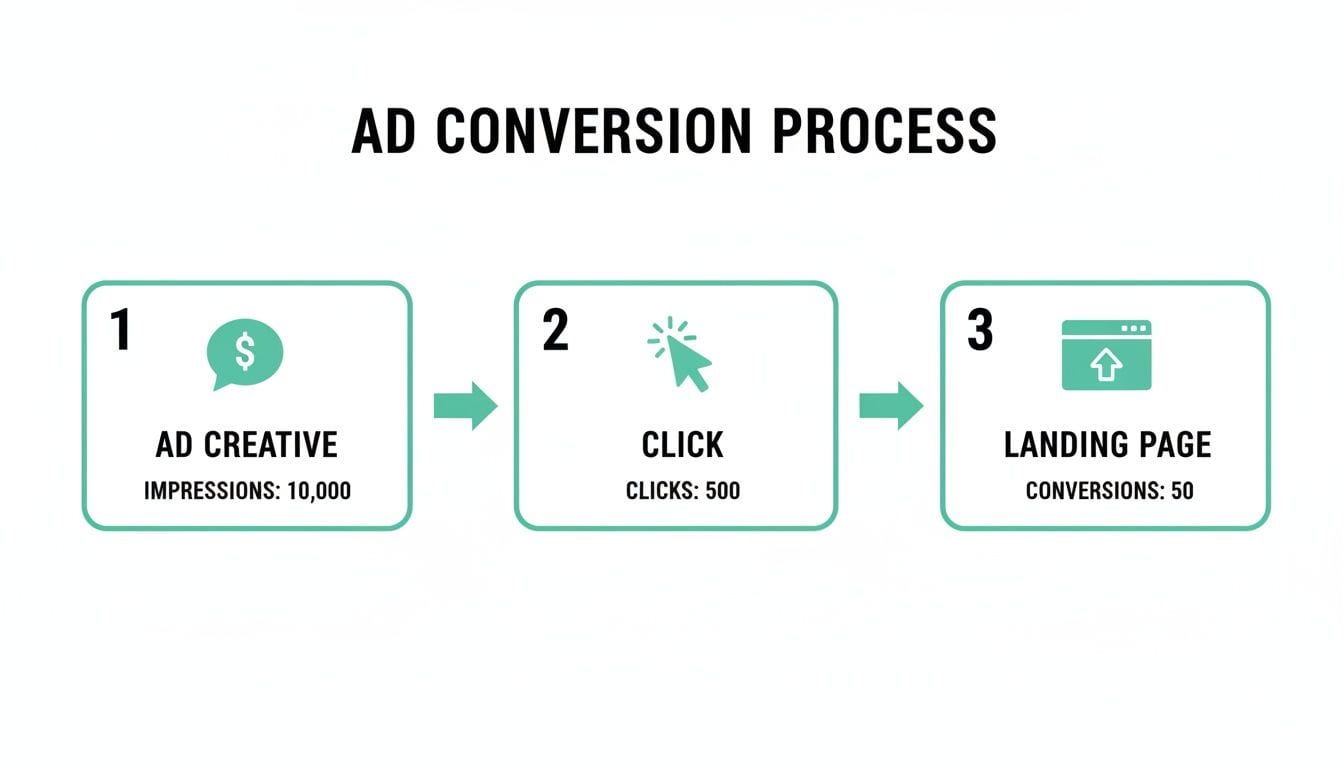
As you can see, every step is a potential point of data loss, which just reinforces why end-to-end analytics QA is so crucial.
Auditing UTM Tagging Conventions
UTM parameters are the DNA of your campaign attribution. They're what tell your analytics platform where traffic is coming from, letting you see exactly which campaigns, ad groups, and keywords are driving results. But they're only as powerful as they are consistent.
Inconsistent UTMs create a reporting nightmare. For instance, if one team member uses utm_source=google, another uses utm_source=Google, and a third uses utm_source=google-ads, your analytics tool will register these as three separate sources. Your data gets fragmented, and it becomes impossible to get a clear picture of performance.
The Manual Grind:
Auditing UTMs manually means exporting huge spreadsheets of landing page URLs from Google Analytics or other tools. Then comes the painstaking work of scanning for inconsistencies, typos, and missing parameters. For agencies or businesses running dozens of campaigns, this task is a soul-crushing time sink that often gets pushed to the side.
The Automated Advantage:
A platform like Trackingplan plugs directly into your data flow and acts as your UTM gatekeeper. It automatically audits every single campaign link against a set of rules that you define.
- Does
utm_sourcealways match your approved list? - Is
utm_campaignalways present and formatted correctly? - Are there any typos, like
utm_meidum=cpc?
When a non-compliant URL is detected, the system sends an immediate alert. This proactive approach ensures your data stays clean from the moment a campaign launches, saving you from messy, retroactive data clean-up. By enforcing a single source of truth for your campaign tagging, you build a reliable foundation for all your attribution and ROI analysis.
Turning Data Integrity into Your Competitive Advantage
To really win at Google Ads today, you have to go deeper than surface-level tweaks. It’s about building a culture of data excellence from the ground up. With ad costs climbing and platforms getting smarter, your biggest edge comes from feeding the algorithms clean, complete, and reliable information. This is how you unlock better performance and a higher ROI.
The latest numbers tell the story perfectly. The average conversion rate across Google Ads has jumped to 7.52% as of 2025, which is a 6.84% improvement year-over-year. What's more, this happened even as the average cost-per-click rose by 12.88%. It just goes to show that teams with sharp targeting and airtight tracking are the ones pulling ahead. You can explore detailed advertising benchmarks on searchenginejournal.com to see more on this trend.
From Reactive Problem to Strategic Asset
Think of robust analytics QA not as a tedious chore but as the engine of your marketing growth. It’s the difference between guessing if your campaigns are working and knowing they are. This requires a mindset shift—treating your data infrastructure with the same importance as your ad creative or bidding strategy.
By automating your data governance with an observability platform like Trackingplan, you take the guesswork out of the equation. Instead of manually auditing pixels or chasing down UTM errors, you get real-time alerts the moment something breaks. This proactive approach turns data integrity from a constant headache into your most powerful strategic asset.
With automated monitoring, you stop asking, "Is my tracking working?" and start knowing, "My tracking is working, and here's what the data tells me to do next."
This shift is crucial. When you can trust your data implicitly, you can make bolder decisions, test new strategies with confidence, and fully commit to AI-driven tools. It also opens the door to more advanced techniques. For a deeper look, check out our guide on server-side tagging for Google Ads to see how you can further protect and enhance your data quality.
Your Top Google Ads Questions, Answered
When you're deep in the trenches of Google Ads, a lot of questions come up. I've been there. Let's tackle some of the most common hurdles advertisers run into, especially when it comes to trusting your data and troubleshooting performance.
How Often Should I Be Optimizing My Google Ads Campaigns?
The honest answer? It depends. The best approach is always-on monitoring.
If you’re managing an account with a hefty ad spend, you need to be in there daily. A quick check on budget pacing and your core KPIs, like cost per conversion, is non-negotiable. It's the only way to catch a costly mistake before it snowballs.
For most other accounts, a weekly review is a great rhythm. It gives you enough time to see real performance trends emerge without getting bogged down by daily noise. But when it comes to bigger changes—like testing new ad copy or switching up your bidding strategy—you absolutely must wait for statistically significant data. That might take a few weeks, and that's okay. Patience pays off.
The single most important habit? Using an automated tool to keep a constant eye on your data integrity. Optimizing based on bad data is worse than not optimizing at all. It sends you down the wrong path, fast.
My Google Ads Conversions Don't Match My CRM. What's Going On?
Ah, the classic (and costly) problem. If I had a dollar for every time I've heard this... The discrepancy almost always boils down to a broken link somewhere in the data chain, making it impossible to properly optimize Google Ads.
Here are the usual suspects I see time and again:
- Broken Tracking Pixels: A simple site update or a new plugin can easily break your conversion pixel. Suddenly, Google Ads is flying blind, and your reported conversions plummet.
- Inconsistent UTM Tagging: Messy or missing UTMs are a recipe for disaster. Attribution becomes a fragmented mess, and your CRM has no idea how to connect a sale back to the right campaign.
- Mismatched Attribution Models: This is a sneaky one. Your CRM might be using a simple last-click model, while Google Ads is on a data-driven model. They're both telling a version of the truth, but they're assigning credit very differently.
An analytics observability platform is your best friend here. It’s like having a detective who automatically audits your entire tracking setup and flags the exact errors causing these mismatches. You can pinpoint the root cause in minutes, not days.
Why Is My Cost Per Conversion So High?
A high cost per conversion can feel like a punch to the gut, but it's usually a symptom of a few core issues. Maybe your Quality Score is in the gutter because of poor ad relevance. Or perhaps your keyword targeting is too broad, attracting window shoppers instead of serious buyers. It could even be a landing page that just isn't sealing the deal.
But before you start tearing apart your campaigns, there's a critical, often-overlooked culprit: tracking errors.
Think about it. If you're undercounting your actual conversions because of a broken pixel, your cost per conversion will look artificially high. You might have twice as many conversions as you think, but your reports are lying to you. Always make sure your measurement is 100% accurate first.
Don't let data black holes sabotage your marketing. Trackingplan gives you a single source of truth by automatically watching over your analytics and marketing tags in real time. Stop guessing and start knowing with Trackingplan.