
TL;DR:
- Traffic anomaly detection involves automatically identifying significant deviations in web or app data using historical models. It helps distinguish between genuine issues and normal traffic fluctuations, enabling proactive monitoring and efficient responses. Proper implementation requires filtering bot traffic, using dynamic thresholds, and integrating contextual analysis for accurate insights and minimal false alarms.
Traffic anomaly detection is the process of identifying data points in your web or app traffic that deviate significantly from expected patterns, and if you’ve ever opened your analytics dashboard to find a 60% drop in sessions with no obvious explanation, you already know why this matters. For digital marketers and data analysts, understanding what is traffic anomaly detection goes far beyond watching charts. It determines whether a budget decision is based on real user behavior or corrupted data, and it separates teams that react to problems in hours from those who discover them weeks later after wasting ad spend.
Table of Contents
- Key Takeaways
- What traffic anomaly detection actually means
- Detection techniques and models that actually work
- What causes traffic anomalies in practice
- Challenges in applying anomaly detection effectively
- Implementing anomaly detection in your analytics workflow
- My take: anomaly detection is not a passive feature
- How Trackingplan makes anomaly detection work for you
- FAQ
Key Takeaways
| Point | Details |
|---|---|
| Anomaly detection is proactive | Waiting for reports to surface problems costs you time and budget; detection must be automated and real-time. |
| Static thresholds create noise | Dynamic thresholds that adapt to day-of-week and seasonal patterns dramatically reduce false alerts. |
| Not all anomalies mean problems | Traffic spikes from a viral campaign are anomalies too; context separates good data surprises from bad ones. |
| Native alerts have real limits | GA4’s built-in insights are passive and generic; custom monitoring layers catch issues much earlier. |
| Bot traffic distorts everything | Filtering non-human traffic is a prerequisite for meaningful anomaly detection, not an optional step. |
What traffic anomaly detection actually means
At its core, traffic anomaly detection involves identifying data points that deviate significantly from what a statistical model predicts, using machine learning or classical statistical methods. In the marketing and analytics context, “traffic” includes sessions, pageviews, events, conversions, click-through rates, and any other metric your tracking stack collects.
An anomaly is not the same as an error. An error is a broken tag, a misfired pixel, or a missing parameter. An anomaly is a pattern-level signal that something unexpected has happened. Sometimes that unexpected thing is the error. Sometimes it’s a campaign that overperformed, a competitor that went offline, or a Google algorithm update that reshuffled your rankings overnight.
The three most common types of traffic anomalies you’ll encounter are:
- Traffic volume anomalies. Sessions or users drop or spike beyond a defined threshold relative to the predicted baseline. Unexpected drops above 30% or spikes above 100% are common trigger points for alerting.
- Engagement anomalies. Bounce rate, session duration, or pages per visit shift in ways that don’t match the traffic volume change. A 20% shift in engagement metrics often signals a UX break or a significant content change.
- Conversion anomalies. Revenue, leads, or goal completions diverge from the expected range even when traffic looks normal. This is frequently the first visible sign of a checkout bug or form error.
How does detection actually work? Modern tools build a historical baseline from weeks or months of past data, then apply statistical models to forecast what the next period should look like. When actual data falls outside the predicted confidence interval, the system flags it as an anomaly. GA4 uses 90 days of historical data for daily anomaly detection, two weeks for hourly, and 32 weeks for weekly metrics. The Z-score is the simplest metric to understand here: values above 2 or below -2 standard deviations from the mean commonly trigger anomaly flags.
Detection techniques and models that actually work
Understanding the mechanics behind traffic anomaly detection techniques helps you choose the right tool for the right problem, and it makes you a much sharper analyst when you’re investigating a flagged alert.

Bayesian state space-time series models
GA4’s anomaly detection engine runs on Bayesian state space-time series models, which forecast an expected range for each metric and then test whether actual values fall within that range using statistical significance checks. The advantage of this approach is that it adapts continuously as new data arrives, so the model stays calibrated even as your traffic patterns evolve. The limitation is that it’s still bounded by GA4’s interface and reporting cadence.
ARIMA and BigQuery ML models
For teams that want more control, BigQuery ML supports ARIMA models that let you build your own traffic forecasting pipeline. ARIMA models analyze autocorrelation in your time-series data to predict future values with confidence intervals. When actual data crosses those interval boundaries, you flag an anomaly. This approach gives you real-time, context-rich monitoring that goes well beyond what platform defaults offer.
Dynamic vs. static thresholds
Here’s where most teams make a mistake. Static thresholds treat Monday the same as Friday, and December the same as August. Dynamic thresholds that adjust for day-of-week and seasonal trends dramatically reduce false positives because they compare today’s traffic to what the model expects for today specifically, not to an overall average.
| Threshold type | How it works | Best for |
|---|---|---|
| Static | Fixed upper/lower bound regardless of time or season | Simple alerting on stable, consistent traffic |
| Dynamic | Adjusts bounds based on historical patterns for that day, week, or season | Most ecommerce, media, and seasonal businesses |
| Percentile-based | Flags outliers based on distribution rank across a rolling window | High-volume sites with complex traffic patterns |
Pro Tip: If your alerts fire every Monday morning because weekend traffic is naturally lower, switch to a dynamic threshold model immediately. You’re not detecting anomalies; you’re just creating noise that trains your team to ignore alerts.
Traffic pattern recognition using machine learning adds another layer. ML models like isolation forests and autoencoders can identify multivariate anomalies, where no single metric looks unusual but the combination of session count, bounce rate, and conversion rate together signals something is wrong. These traffic analysis tools go significantly beyond what standard analytics platforms surface by default.
What causes traffic anomalies in practice
Knowing what causes traffic anomalies is just as important as knowing how to detect them. The cause determines your response, and misreading the cause can lead to the wrong fix.
The most frequent sources of traffic behavior anomalies in marketing analytics fall into a few clear categories:
- Tracking breaks. A JavaScript error, a failed tag deployment, or a broken pixel stops data from being sent entirely. You see a session drop, but users are still arriving. This is one of the most dangerous anomalies because it corrupts attribution data silently. Broken UTM parameters and server outages are among the top marketing data issues analysts face in 2026.
- Bot and scraper traffic. A spike in sessions with 0-second session duration, no conversions, and geographic clustering around data center IP ranges is almost always non-human traffic. Filtering non-human traffic is a prerequisite for clean analytics, not an afterthought.
- SEO ranking changes. A Google algorithm update can cut organic traffic to a key landing page by 40% overnight. This shows up as a real user drop, not a tracking failure, and requires a completely different investigation path.
- Viral or referral surges. A social media post that goes wide, a press mention, or a newsletter feature can send traffic into a spike that looks alarming in your dashboard. This is a “good” anomaly. Without context, teams have been known to flag these as attacks and block the source.
- Checkout and form bugs. Conversion rate anomalies with stable traffic are a red flag for frontend bugs. A broken form field, a payment gateway timeout, or a GDPR consent overlay that blocks the checkout flow all show up this way first.
Setting practical alert thresholds matters enormously here. Thresholds like a greater than 25% decrease in key events are a reasonable starting point for most ecommerce properties, but the right number for your site depends on your normal traffic variance. High-variance sites need wider bands; low-variance sites can set tighter ones.
Challenges in applying anomaly detection effectively
Even with good tools and solid detection techniques, the real challenge is making anomaly detection operationally useful without drowning your team in noise.
Here are the most common failure points and how to address them:
- Alert fatigue from generic native alerts. GA4’s automated insights are passive without push notifications; you have to go looking for them. Custom insights provide email alerts but are constrained to simple threshold rules. Teams that rely exclusively on native platform alerts often miss the issues that matter most.
- No separation between detection and investigation. The most successful workflows treat statistical anomaly detection and business-context analysis as two distinct steps. Detection tells you something is outside the expected range. Business context tells you whether it matters and what to do.
- Failing to filter bot traffic first. Invalid traffic from bots generates false anomalies constantly. If your anomaly detection system is analyzing raw, unfiltered data, a significant percentage of your alerts are going to be meaningless. Integrate identity and trust signals into your data pipeline before anomaly detection runs.
- Using the same threshold for all metrics. A 10% drop in sessions might be unremarkable. A 10% drop in revenue on a Tuesday in November is a five-alarm fire. Treat each metric with thresholds calibrated to its business importance and typical variance.
- No integration with communication tools. Anomaly alerts that sit inside a dashboard nobody checks are useless. Integrating alerts with Slack, email, or PagerDuty turns detection into response within minutes instead of days.
Pro Tip: Build a “business calendar” into your anomaly detection workflow. Tag major campaign launches, product releases, and seasonal events in your data. When an anomaly fires during a tagged event window, your system can automatically add context to the alert instead of making you start from scratch.
Monitoring network traffic for non-marketing signals also helps. Server response times, CDN error rates, and API failure logs often explain an anomaly that looks like a marketing problem but is actually an infrastructure failure.
Implementing anomaly detection in your analytics workflow
Getting anomaly detection working in practice requires choices about tools, data pipelines, and team workflows. Here’s how to build it out without over-engineering it.
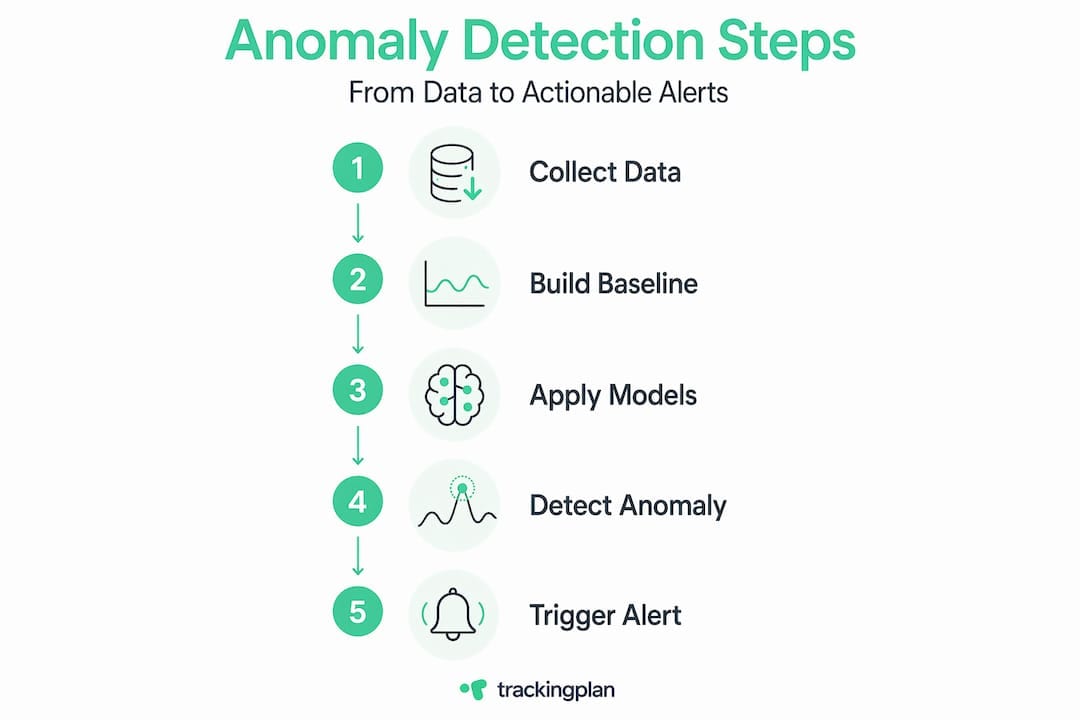
Start with what you already have. GA4’s custom insights feature lets you create rule-based alerts for metric changes and sends email notifications. Setup requires a one-time configuration and covers basic threshold alerting for active users and conversion events. It’s not sophisticated, but it catches major breaks if you set meaningful thresholds.
For teams that need more depth, consider these steps:
- Export GA4 data to BigQuery. This unlocks your full historical event stream and lets you build ARIMA or ML-based detection models. You can analyze anomaly detection for specific traffic segments, channels, or user cohorts independently.
- Build channel-level monitoring. Organic, paid, direct, and referral traffic each have different expected patterns. Treating them separately produces sharper signals. A drop in paid traffic alongside stable organic traffic almost certainly means a campaign configuration issue, not a site problem.
- Connect alerts to your communication stack. Pipe anomaly alerts into Slack channels or email distribution lists that your team already monitors. Route severity levels to different channels: high-severity alerts to on-call engineers, medium-severity to the analytics team.
- Log your investigations. Every time you investigate an anomaly, record the cause and resolution. Over time, this creates a playbook that speeds up future investigations and helps you refine your thresholds.
- Build a continuous improvement loop. Review your alert history monthly. Alerts that consistently turn out to be false positives need threshold adjustments. Incidents that were missed in detection need tighter monitoring on that metric or segment.
Learning how to analyze website traffic for anomalies also means understanding the interplay between SEO signals and technical tracking health. An organic traffic drop that correlates with a Google Search Console coverage error is a very different problem than one that correlates with a tag management deployment.
The most mature teams in 2026 treat anomaly detection as a living system. They don’t just set it up and forget it. They tune thresholds, add new metrics as the business evolves, and regularly test whether the detection system would have caught known historical incidents.
My take: anomaly detection is not a passive feature
I’ve worked with dozens of marketing analytics teams over the years, and the most consistent mistake I see is treating anomaly detection as something that runs in the background and pings you when something obvious breaks. That framing makes you reactive at best.
What I’ve learned is that the real value of anomaly detection comes from combining statistical rigor with business judgment. The system can tell you that sessions dropped 35% below the expected baseline. Only you can tell it whether that happened because a campaign went dark, a tag broke, or your main competitor launched a massive promotion and pulled attention away. The two-step process of detection followed by contextual analysis is non-negotiable.
I’ve also seen teams invest heavily in native GA4 alerts and feel covered. They aren’t. Most native anomaly alerts are passive. They surface insights inside a reporting interface, not in the tools your team uses in real time. By the time someone notices the alert in GA4, you may have been running a broken attribution model for three days.
My honest advice: start with dynamic thresholds, separate your detection from your interpretation, and build at least one custom monitoring layer outside your primary analytics platform. The investment is small compared to the cost of making strategy decisions on data that has been silently corrupted for a week. Anomaly detection is not a nice-to-have dashboard feature. It’s the difference between data you can trust and data you just hope is right.
— David
How Trackingplan makes anomaly detection work for you
Trackingplan takes the operational complexity out of traffic anomaly detection by automating the monitoring layer most teams build manually, or skip entirely. The platform continuously audits your analytics implementation across web, app, and server-side environments, detecting issues like broken pixels, missing tracking events, schema mismatches, and campaign misconfigurations before they corrupt your data at scale.
Where native analytics tools give you passive insights, Trackingplan sends real-time alerts through email, Slack, or Teams the moment a meaningful deviation appears. For teams managing data quality in digital analytics, this means anomalies are surfaced in the tools your team already uses, not buried in a dashboard.
For agencies and in-house teams managing high-stakes tracking environments, Trackingplan’s web tracking monitoring solution adds a dedicated layer that detects invalid traffic, tracking breaks, and behavioral anomalies across all your properties. Combine that with Trackingplan’s built-in root-cause analysis and you move from detection to resolution in minutes. If maintaining clean, trustworthy analytics data matters to your marketing decisions, Trackingplan is built specifically for that problem.
FAQ
What is traffic anomaly detection in simple terms?
Traffic anomaly detection is the automated process of identifying unusual patterns in website or app data that fall outside statistically expected ranges, using historical baselines and machine learning models to flag the deviation.
What are the most common causes of traffic anomalies?
The most frequent causes include tracking breaks, bot traffic surges, SEO ranking changes, campaign misconfigurations, and frontend bugs affecting conversion events. Each requires a different response once identified.
How does GA4 detect traffic anomalies?
GA4 uses Bayesian state space-time series models trained on up to 90 days of historical data to generate expected ranges. Values that fall outside those ranges with statistical significance are flagged as anomalies inside the platform’s Insights section.
What is the difference between a static and a dynamic threshold?
A static threshold triggers alerts when a metric crosses a fixed boundary regardless of time or season. A dynamic threshold adjusts that boundary based on day-of-week and seasonal patterns, which significantly reduces false positives for businesses with variable traffic.
How do I reduce false positives in anomaly detection?
Filter bot and invalid traffic from your data before detection runs, use dynamic thresholds calibrated to each metric’s normal variance, and apply business context as a second layer to separate statistical outliers from genuinely actionable issues.