
TL;DR:
- Most EU websites show cookie banners but are only 15% fully compliant, risking regulatory penalties.
- Conducting a thorough GDPR cookie audit involves discovery, categorization, and detailed documentation.
- Ongoing monitoring and precise consent management are essential to maintain compliance and protect data privacy.
Displaying a cookie banner feels like a compliance win. It isn’t. Only 15% of EU sites are fully compliant despite 67% showing cookie banners, meaning most organizations carry hidden regulatory risk every single day. For compliance officers and digital marketing teams, this gap is dangerous. A banner without a rigorous audit behind it is theater, not compliance. This article walks you through a practical, step-by-step GDPR cookie audit process, covers consent mechanics, flags the most costly categorization mistakes, and shows you how to keep analytics tracking accurate without sacrificing privacy.
Table of Contents
- Understanding the GDPR cookie audit process
- Cookie categorization: Avoiding misclassification and consent errors
- GDPR consent requirements: Granular, equal, and valid
- Ongoing monitoring, edge cases, and analytics optimization
- Expert perspective: What most audits miss and how to truly future-proof compliance
- Streamline compliance and optimize analytics with Trackingplan
- Frequently asked questions
Key Takeaways
| Point | Details |
|---|---|
| Audit process essentials | Effective cookie audits combine manual and automated scanning, cover all consent scenarios, and document findings for regulatory review. |
| Consent and categorization | Only necessary cookies are exempt from consent, while analytics and marketing cookies require prior, granular approval. |
| Monitoring and optimization | Regular scans, logs, and optimized analytics tracking ensure ongoing GDPR compliance and data quality. |
| Avoid CMP over-reliance | Don’t rely solely on CMPs—manual checks and integration with analytics tools fill compliance gaps. |
Understanding the GDPR cookie audit process
Many marketers and compliance officers only focus on banners, but a true audit dives deeper. A complete audit runs through three core phases: discovery, categorization, and documentation. Each phase builds on the last, and skipping any one of them leaves gaps that regulators and automated scanners will find.
Discovery means finding every cookie your site sets, including third-party scripts you may not have authorized. Use browser DevTools (the Application tab in Chrome) to inspect cookies manually on key pages. For larger sites, automated cookie audits are far more efficient and catch cookies that only fire under specific conditions.
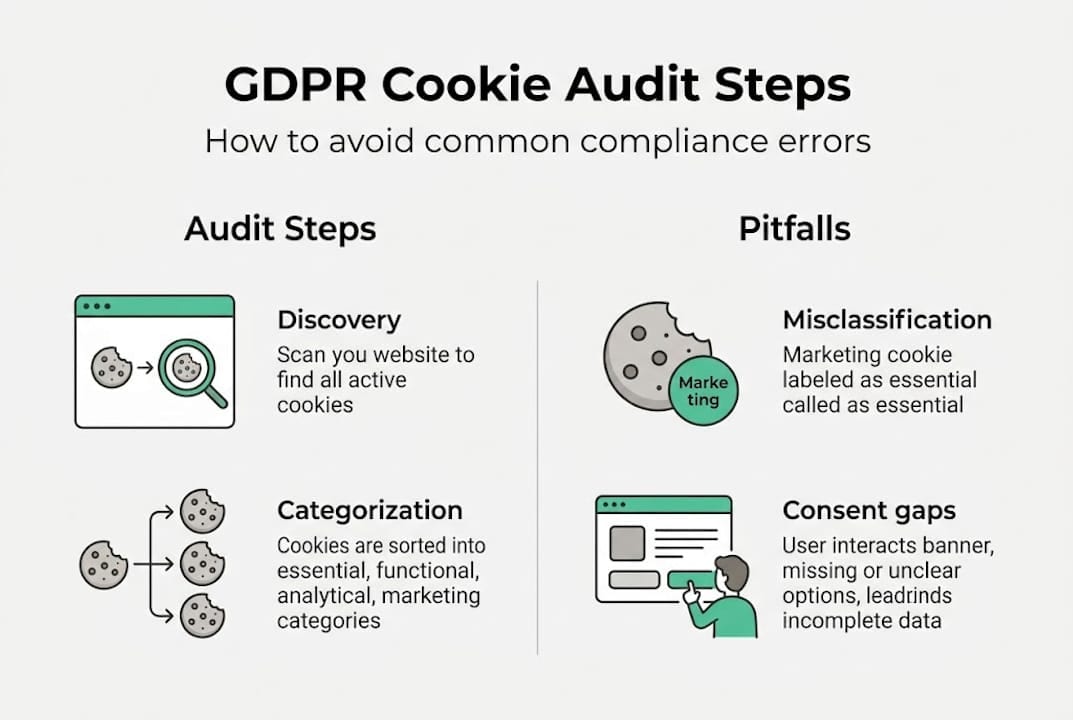
Categorization requires you to label each cookie by type: necessary, functional, analytics, or marketing. This step is where most teams make costly errors, which we’ll cover in the next section.
Documentation ties everything together. Per ICO guidance, your audit should record the cookie name, provider, purpose, lifespan, and the script that sets it. This log becomes your evidence trail for regulators.
A few structural rules matter here:
- Test at least 5 or more pages, including the homepage, a product page, a checkout page, and a blog post
- Run tests across 3 consent scenarios: no consent given, consent accepted, and consent rejected
- Repeat audits weekly or after any major site change
Here’s a quick reference for what to document:
| Field | What to record |
|---|---|
| Cookie name | Exact string (e.g., _ga) |
| Provider | First or third party |
| Purpose | Analytics, marketing, etc. |
| Lifespan | Session or persistent (days) |
| Script source | Tag, pixel, or SDK |
| Consent required | Yes or No |
Pro Tip: Use a dedicated cookie audit tool to automate discovery across all pages simultaneously. Manual DevTools checks are useful for spot verification but miss cookies that only appear after user interaction or on specific device types. For cookie testing accuracy, always test in an incognito window to simulate a first-time visitor.
Cookie categorization: Avoiding misclassification and consent errors
After auditing, it’s crucial to correctly classify each cookie. The stakes are high: misclassification is one of the most common reasons organizations fail regulatory reviews.
Strictly necessary cookies are exempt from consent requirements. Analytics and marketing cookies are not. That line sounds simple, but it blurs quickly in practice.

Here’s how the four main categories break down:
| Category | Consent required | Examples |
|---|---|---|
| Necessary | No | Session ID, load balancer |
| Functional | Recommended | Language preference, chat |
| Analytics | Yes | _ga, Hotjar, Mixpanel |
| Marketing | Yes | Facebook Pixel, Google Ads |
The most frequent misclassification is labeling analytics cookies as necessary. Teams justify this by arguing that analytics are essential to running the site. Regulators disagree. Unless a cookie is strictly required for a function the user explicitly requested (like keeping items in a cart), it needs consent.
Common errors to avoid:
- Pre-ticked boxes in your consent banner: GDPR prohibits this
- Bundled consent: asking users to accept all categories at once without granular choice
- Invalid consent signals: consent collected before the user has seen the full banner
- Forgetting marketing cookies privacy implications: retargeting pixels often set cookies before consent fires
If you’re unsure whether a cookie is necessary or not, treat it as non-essential. That’s the safer legal position and the one regulators expect. You can also eliminate tracking cookies for certain use cases and replace them with privacy-preserving alternatives.
Pro Tip: Cross-reference your cookie list against a data sharing opt out registry or your CMP’s vendor list. Third-party vendors sometimes update their cookies without notifying you, which silently breaks your categorization.
GDPR consent requirements: Granular, equal, and valid
Proper categorization sets the stage, but consent mechanics make or break compliance. Here’s what counts as valid under GDPR.
The European Data Protection Board (EDPB) is clear: consent must be prior, granular, freely given, informed, and easily withdrawable, and rejecting cookies must be as easy as accepting them. That last point eliminates a huge number of banner designs currently in use.
Here’s what valid consent looks like in practice:
- Visible reject option: The “Reject All” button must appear on the first layer of the banner, not buried in settings
- No dark patterns: Color manipulation, misleading labels, or confusing layouts that nudge users toward acceptance are prohibited
- No cookie walls: Blocking site access unless users accept cookies is generally not considered freely given consent
- Granular categories: Users must be able to accept analytics without accepting marketing, and vice versa
- Easy withdrawal: A persistent link to change consent preferences must be accessible at all times
“Consent must be as easy to withdraw as to give. Any design that makes rejection harder than acceptance is non-compliant.” — EDPB
For privacy compliance in analytics, the practical implication is that your analytics stack must be consent-aware. Google Consent Mode v2, for example, lets you adjust how Google tags behave based on consent signals, preserving some measurement capability even when users decline.
Pro Tip: Audit your banner design the same way a regulator would. Open your site in incognito mode and try to reject all cookies in under 10 seconds. If you can’t, your banner likely has a dark pattern that needs fixing before your next audit cycle.
Ongoing monitoring, edge cases, and analytics optimization
Valid consent isn’t the end. Ongoing monitoring and analytics optimization are the difference between checklist compliance and meaningful privacy.
Regular scans, consent logs, and updates are crucial. CNIL (France’s data protection authority) sets a 13-month maximum for both cookie storage and consent duration. After 13 months, consent must be re-collected. Your audit logs must prove this cycle is running correctly.
Key monitoring practices:
- Run automated scans weekly or after any deployment that touches scripts, tags, or third-party integrations
- Store consent logs with timestamps, user identifiers (where applicable), and the specific categories consented to
- Monitor for new cookies introduced by third-party vendors without your knowledge
- Check best cookie audit tools to find scanners that integrate directly with your tag management system
Edge cases trip up even experienced teams. localStorage and sessionStorage are not cookies but can store tracking identifiers and fall under the same ePrivacy rules. Browser fingerprinting is another gray area: it doesn’t use cookies at all but still constitutes tracking under GDPR. Multi-device consent, where a user accepts on mobile but visits on desktop, requires careful handling for authenticated users.
Statistic callout: EU average consent rates sit at 46% for marketing cookies and 61% for analytics cookies. Total GDPR fines have reached €4.3 to 4.5 billion. These numbers tell a clear story: enforcement is real, and consent rates directly affect your analytics data quality.
For analytics optimization within these constraints, consider:
- Consent Mode v2 to model conversions even without full consent
- Server-side tagging via a cookie scanner tool to reduce client-side cookie exposure
- First-party data strategies that don’t rely on third-party cookies at all
Expert perspective: What most audits miss and how to truly future-proof compliance
Here’s what seasoned teams and audit tools often overlook: a cookie audit is not a one-time event, and a Consent Management Platform (CMP) is not a compliance guarantee.
CMPs improve compliance but over-reliance is risky. National enforcement benchmarks vary significantly between CNIL and ICO, meaning a banner that passes in the UK may fail in France. Teams that configure a CMP once and walk away are the ones who get fined.
The smarter approach is to integrate audit findings directly into your Google Tag Manager (GTM) or server-side tagging workflow. When your audit identifies a new marketing cookie, that finding should trigger a tag review, not just a documentation update. This closes the loop between compliance and analytics operations.
Also worth noting: CNIL and ICO have different rules on analytics cookie exemptions, consent duration, and acceptable banner designs. If your site serves users in both France and the UK, you need to satisfy both frameworks simultaneously.
Future-proofing means preparing now for cookieless tracking. Privacy Sandbox APIs, first-party data infrastructure, and server-side measurement are not distant concepts. They’re the tools your marketing audit checklist should already include. Teams that treat compliance as a living workflow, rather than a quarterly checkbox, will adapt faster when enforcement tightens.
Streamline compliance and optimize analytics with Trackingplan
Applying everything in this article manually is possible, but it’s slow and error-prone at scale. Trackingplan automates the discovery, monitoring, and auditing of your entire analytics and marketing tracking stack, so compliance gaps surface before regulators find them.
With Trackingplan, your team gets real-time alerts when new cookies appear, when consent signals break, or when tracking implementations drift from your approved schema. It connects directly with your digital analytics tools and provides continuous web tracking monitoring across every page and user journey. For compliance officers and marketing teams who need both accuracy and accountability, Trackingplan turns a manual audit process into an automated, ongoing workflow.
Frequently asked questions
How often should a GDPR cookie compliance audit be performed?
Weekly scans post-changes are recommended for ongoing compliance. At minimum, run a full audit after any major site update, new feature launch, or analytics configuration change.
Are analytics cookies exempt from GDPR consent requirements?
No. Analytics cookies require consent unless they are fully anonymized and stored for fewer than 13 months, per CNIL guidance. Standard Google Analytics cookies do not meet the exemption threshold.
What are common mistakes in cookie categorization?
Misclassifying analytics as necessary is the most frequent error. When uncertain about a cookie’s classification, treat it as non-essential and require explicit user consent before setting it.
How can consent be managed across multiple devices?
For authenticated users, CNIL recommends symmetric and informed multi-device consent, meaning consent given on one device should carry across sessions where the user is logged in, but must still meet all validity requirements.
What are the risks of relying solely on Consent Management Platforms?
CMPs can be misconfigured, and vendor lists go stale. Over-reliance on a CMP without manual documentation and routine verification checks creates compliance gaps that audits and regulators will expose.