
Adobe Marketing Attribution is all about figuring out which marketing touchpoints deserve credit when a customer makes a purchase. It’s a way to move past the old-school, simplistic "last-click" thinking and see which channels actually influence your customers, helping you optimize your budget and strategy for the best possible return on investment.
Understanding Your Customer Journey with Adobe
Every marketer I know is constantly asking one critical question: what really drives our conversions? To answer that, you have to look at the entire customer journey, not just the final step before the sale.
Think of it like a winning season for a sports team. Giving all the glory to the player who scored the final goal completely ignores the brilliant assists, the solid defensive plays, and the coaching that made the victory happen in the first place.
That’s the fundamental flaw with the "last-touch" attribution model. It oversimplifies a complex journey, leading to wasted marketing spend and missed opportunities because it fails to value the earlier interactions that built awareness and trust.
The Complexity of Modern Journeys
Today’s customer journey is anything but a straight line. The path from someone first hearing about your brand to them finally making a purchase is a tangled web of interactions across countless platforms.
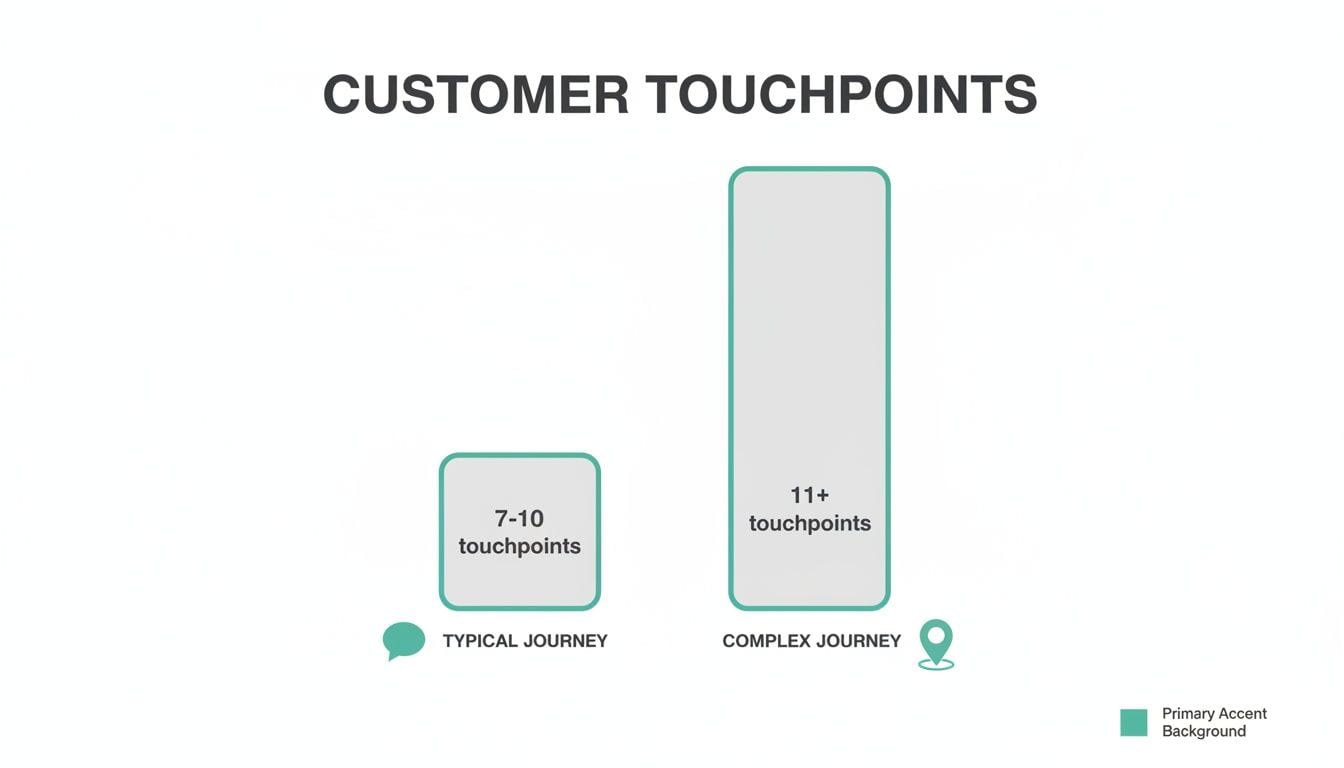
This complexity has completely changed how we have to approach marketing attribution. Enterprise buyers now interact with an average of 7 to 10 meaningful touchpoints before they're ready to convert. In my experience, many Adobe Analytics customers are tracking far more than that, which just shows how multifaceted marketing has become. Xerago has some great insights on these customer journey complexities.
By understanding every critical interaction, you can shift from guessing which channels work to knowing precisely where to invest for building momentum and driving revenue. This insight is the core purpose of a robust attribution strategy.
Of course, you can't get a clear view of the customer journey without reliable data. The foundation of any solid Adobe Marketing Attribution setup is a well-structured implementation, and that almost always starts with the data layer. You can learn more about the critical role of the data layer in Adobe Analytics in our comprehensive guide.
Without this solid base, even the most sophisticated models will spit out flawed insights. That undermines your marketing decisions and stops you from seeing the true value each channel brings to the table.
Choosing the Right Attribution Model for Your Goals
Picking an attribution model in Adobe Analytics isn't just a technical setting—it's a strategic decision that shapes your entire marketing plan. The right model brings clarity and helps you make smarter budget decisions. The wrong one? It can send you chasing phantom successes and wasting money.
Today's customer journey is anything but simple. A typical path to conversion involves 7 to 10 touchpoints, and for more complex sales, that number can easily climb to 11 or more.
This is precisely why old-school, single-touch models just don't cut it anymore. They fail to show the whole story. With so many interactions in the mix, figuring out what truly drives conversions is a complex—but absolutely critical—task.
We’ve moved far beyond just crediting the first or last click. In fact, research shows that nearly 45% of all orders come from visits greater than three. This proves that single-touch models leave a huge part of the customer journey in the dark. Thankfully, Adobe Analytics gives you a whole suite of models to work with, including First Touch, Last Touch, Linear, U-Shaped, and Time Decay.
Aligning Models With Campaign Objectives
Let's look at a real-world example to see how credit shifts depending on the model you choose. Imagine a customer buys a new laptop. Their journey involved three key steps: first seeing a social media ad, then reading a third-party blog review, and finally clicking a promotional email to make the purchase.
-
First Touch Model: This model gives 100% of the credit to that initial social media ad. It’s perfect for campaigns focused on brand awareness and demand generation. If your main goal is figuring out which channels are bringing new people into your orbit, First Touch is the lens you want to use.
-
Last Touch Model: Here, the promotional email gets all the glory. This model is great for identifying which channels are closing deals. It answers the question, "What was the final nudge that pushed the customer over the finish line?"
While these single-source models are simple, they can be pretty misleading on their own. For a more complete picture, you need to look at models that consider the entire journey. A good guide to multi-touch attribution can offer a more balanced perspective on how different touchpoints contribute to a final sale.
Sophisticated Multi-Touch Models
This is where things get interesting. Multi-touch models spread the credit across several interactions, giving you a much more nuanced view of what’s working. They acknowledge that it usually takes more than one step to get a conversion.
To make this clearer, here’s a table showing how a few popular multi-touch models would distribute credit for a $100 conversion across our laptop buyer's journey.
Adobe Attribution Model Comparison
As you can see, the story changes dramatically depending on the model you choose. Let's dig into a couple of these.
Linear Model
This model is the most democratic—it assigns equal credit to every single touchpoint. In our laptop example, the social ad, blog review, and email would each get 33.3% of the credit. It’s a great starting point for teams just moving away from single-touch attribution because it immediately highlights all the different channels involved.
The Linear model is a great starting point for teams moving away from single-touch attribution. It immediately highlights the variety of channels involved in a conversion, even if it doesn't weigh their relative importance.
Time Decay Model
This model operates on the idea that the closer a touchpoint is to the conversion, the more important it was. So, the promo email would get the most credit, the blog review would get less, and the initial social ad would get the least. This model is particularly useful for shorter sales cycles or campaigns that build urgency, like a flash sale.
Ultimately, choosing the right Adobe Marketing Attribution model isn't about finding one perfect answer for everything. It’s about picking the framework that best aligns with your business logic and campaign goals, allowing you to turn raw data into truly actionable intelligence.
Why Bad Data Is Your Biggest Attribution Blind Spot
Even the most sophisticated Adobe Marketing Attribution model is useless if it’s running on bad data. It’s like being a detective trying to crack a tough case. If your evidence is contaminated, incomplete, or mislabeled, any conclusion you draw will be dead wrong. That's exactly what happens when poor data quality and messy tagging practices sneak into your analytics.
Your attribution insights are only as good as the data feeding them. Flawed data doesn’t just cause minor rounding errors—it creates massive blind spots in your customer journey map. This leads to misguided budget decisions and, ultimately, broken marketing strategies.

The Silent Killers of Attribution Accuracy
Often, the most dangerous data problems are the ones you don't even see until the damage is done. They quietly corrupt your reports, distorting your view of ROI and channel performance. These issues usually boil down to simple human error and a lack of standardized processes.
Inconsistent campaign tagging is a classic example. Imagine one person on your team tags a campaign with utm_source=Facebook while another uses utm_source=facebook. To Adobe Analytics, those are two completely different sources. A simple capitalization mistake fragments your data, making it impossible to see the true, consolidated performance of your Facebook efforts.
This single error creates data silos that completely undermine your analysis, making a powerful channel look much weaker than it actually is.
Common Data Pitfalls and Their Consequences
Inconsistent UTM parameters are just the tip of the iceberg. A number of technical and procedural gaps can seriously compromise your Adobe Marketing Attribution efforts. Each one introduces another layer of "contaminated evidence" into your investigation.
Here are some of the most common issues teams run into:
- Broken or Missing Tracking Pixels: A single failed pixel on a key landing page can cause entire campaigns to be misattributed or, even worse, not tracked at all. This is a common side effect of site updates or redesigns where tracking scripts are accidentally removed.
- Inconsistent dataLayer Implementations: The dataLayer is the backbone of your analytics, passing critical event and user data to Adobe. If development teams implement it differently across various parts of your site or apps, you end up with missing variables and fractured user profiles.
- Manual Tagging Errors: Without a strict, centralized process for creating tracking URLs, typos and formatting mistakes are inevitable. Using
utm_medium=cpcin one link andutm_medium=paid-searchin another creates confusion and splits your data.
When your data foundation is weak, you aren't just making small miscalculations. You're operating with a fundamentally flawed map of the customer journey, which can lead you to defund your most valuable channels and overinvest in underperformers.
To fight back against poor data quality, it's helpful to understand concepts like data enrichment. This is the process of enhancing your existing data with third-party information to build a more complete and accurate picture of your customers—a crucial step toward more reliable attribution. You can learn more about What Is Data Enrichment and see how it can help clean up your datasets.
The True Cost of Inaccurate Data
The consequences of bad data go far beyond messy reports. Inaccurate attribution has a direct and painful impact on your bottom line and strategic decision-making.
First, it leads to wasted ad spend. When your data incorrectly claims a channel is underperforming, the logical (but wrong) move is to cut its budget. In reality, that channel might be a critical "assist" player that introduces new customers who convert later through other touchpoints.
Second, it erodes trust in the marketing team. When stakeholders see conflicting numbers or results that just don't match business reality, their confidence in marketing's ability to drive growth plummets. This makes it much harder to secure budgets for future campaigns and prove the department's value.
Ultimately, building a reliable Adobe Marketing Attribution program starts with a serious commitment to data integrity. Without clean, consistent, and complete data, you're just guessing. Establishing clear tagging rules, implementing robust QA processes, and using automation to catch errors aren't optional—they are essential for turning your analytics into a true strategic asset.
How to Automate Data Quality and Trust Your Insights
The solution to bad data isn't more manual spot-checks or endless spreadsheets. Chasing down errors after they’ve already poisoned your reports is a losing battle. To truly trust your Adobe Marketing Attribution insights, you need a proactive, automated defense system that catches bad data at the source.
Think of it as an immune system for your analytics. Instead of waiting for a problem to become a full-blown crisis, this system continuously monitors your data pipelines, identifies threats, and alerts you the moment something goes wrong—long before it can cause any damage.
This automated approach is really the only way to maintain data integrity at scale. It shifts your team from a reactive, firefighting mode to a proactive state of control, ensuring the data flowing into Adobe Analytics is consistently clean and reliable.

Building a Foundation of Reliable Data
Automation tools like Trackingplan act as this analytics immune system. They work 24/7 to observe your entire data flow, from the second a user interacts with your site or app to the moment that data lands in its final destination. This continuous monitoring is what catches the very issues that corrupt attribution.
Imagine getting a Slack notification the moment a critical landing page pixel fails after a new website deployment. Instead of discovering weeks of misattributed ad spend during your quarterly review, you can alert the development team to fix it in minutes. That immediate feedback loop is a total game-changer for data quality.
By automating the detection of data errors, you build a foundation of trust. Your attribution models are no longer based on questionable inputs, giving you unshakable confidence in your ROI metrics and strategic decisions.
This level of automation empowers teams to enforce data governance standards effortlessly. It makes sure every campaign, event, and user property sticks to your predefined schema, eliminating the tiny inconsistencies that skew attribution over time.
Real-Time Detection for Common Attribution Killers
Manual audits are slow, tedious, and always one step behind. An automated system, on the other hand, can spot problems the second they appear. This is absolutely critical for catching the common errors that directly sabotage Adobe Marketing Attribution.
Here are a few examples of issues that automation can flag instantly:
- Inconsistent UTM Conventions: It can automatically detect when a campaign is launched with
utm_source=googleinstead of the requiredutm_source=Google, preventing data fragmentation before it starts. - Broken or Missing Pixels: The system can identify when a third-party marketing or analytics pixel stops firing on key conversion pages, protecting your data collection from sudden drops.
- Schema and Property Errors: If an event like
add_to_cartis suddenly sent with apriceproperty formatted as a string instead of a number, you'll know about it right away. - Rogue Events: It can spot unexpected events being fired by a new feature or a third-party script, preventing unknown data from polluting your clean reports.
For a deeper dive into the mechanics and benefits of this approach, you can explore our guide on data quality monitoring. This whole process isn’t about replacing human analysts; it’s about giving them the tools to focus on strategic insights instead of mind-numbing data janitor work.
From Reactive Firefighting to Proactive Governance
Adopting an automated quality assurance process fundamentally changes how your marketing, analytics, and development teams work together. It shifts the conversation from, "Why are our numbers wrong again?" to, "How can we improve performance based on these reliable insights?"
This proactive stance creates a powerful ripple effect across the organization.
- Increased Efficiency: Teams spend way less time manually debugging data issues and more time acting on the insights from Adobe Analytics. This speeds up the pace of optimization and campaign iteration.
- Improved Cross-Team Collaboration: With a single source of truth for what's being tracked and how, developers, marketers, and analysts are always on the same page. It puts an end to the blame game that often comes with data discrepancies.
- Enhanced Confidence: When leadership knows the data is being continuously validated, their trust in marketing's ROI calculations grows. This makes it much easier to justify budgets and prove the value of your team's hard work.
Ultimately, automation turns data governance from a burdensome checklist into a seamless, integrated part of your workflow. By ensuring the integrity of your data pipeline, you empower your Adobe Marketing Attribution models to deliver what they promise: a clear, accurate, and actionable view of what truly drives your business forward.
Connecting Adobe Insights Across Your Marketing Stack
Attribution data sitting alone in an analytics dashboard is a missed opportunity. The real magic happens when you break adobe marketing attribution insights out of their silo and plug them into your entire marketing strategy. When you connect its data across your whole tech stack, it stops being a simple reporting tool and starts driving real growth.
This integration creates a powerful feedback loop where insights from one platform directly sharpen the actions you take in another. Instead of just analyzing performance after the fact, you can use attribution data to build smarter campaigns, create truly personalized experiences, and allocate your budget with surgical precision.
The Power of a Unified Customer View
There’s one thing that’s absolutely non-negotiable for making this work: a unified user ID. Think of it as the golden thread that stitches together a complete customer profile from all your different platforms. Without it, your CRM, ad platforms, and analytics tool are just looking at disconnected pieces of the same puzzle. A complete picture is impossible.
A unified ID is what lets you connect a user’s pre-conversion behavior in Adobe Analytics with their entire post-conversion lifecycle stored in your CRM. This link is the foundation for turning attribution insights into meaningful action.
By linking every single interaction to one user profile, you can finally see the full journey—from the very first ad they saw to their lifetime value as a customer. That kind of clarity changes everything.
For instance, once your CRM and Adobe Analytics are in sync, you can pinpoint which channels aren't just driving one-off conversions but are actually acquiring your most valuable, high-LTV customers. That’s a far more powerful insight than just looking at conversion volume.
Activating Insights in Your Ad Platforms
Connecting Adobe's attribution data directly to ad platforms like Google and Meta is where the rubber meets the road. It’s how you move beyond simplistic last-click metrics and start optimizing campaigns based on what genuinely assists conversions across the entire funnel.
Here are a few practical strategies you can put into action right away:
- Build Smarter Retargeting Audiences: Use Adobe’s insights to create laser-focused audience segments. Ditch the generic "all website visitors" list. Instead, build an audience of users who engaged with a specific blog post (an early touchpoint) but haven't converted yet. Then, you can hit them on Meta with tailored mid-funnel content that speaks directly to their interests.
- Reallocate Budgets with Confidence: What if your U-shaped model reveals a specific Google Ads campaign is a fantastic "opener" but a terrible "closer"? Don't just slash its budget. Instead, double down on its strength by focusing its messaging on awareness and pair it with a strong closing channel, like a targeted email offer, to finish the job.
- Optimize Bids Based on True Value: Feed your multi-touch attribution data back into your ad platforms. This allows you to bid more aggressively on the keywords and audiences that consistently contribute to high-value conversions, even if they aren’t the ones getting the final click.
Fueling Business Intelligence and Strategy
The final piece of the puzzle is piping your validated attribution data into Business Intelligence (BI) tools like Tableau or Power BI. This is what elevates the conversation from marketing tactics to company-wide strategy. It lets you blend marketing performance data with financial, sales, and operational data for a 360-degree view of the business.
This level of integration empowers you to answer the kind of complex questions that no single platform can handle alone. You could analyze how marketing channel performance impacts customer churn rates, map specific campaign touchpoints to product usage patterns, or even forecast revenue based on the historical performance of different attribution models. This is how attribution graduates from being just a marketing metric to a core business KPI.
Common Questions About Adobe Marketing Attribution
As powerful as Adobe's marketing attribution is, getting your head around its advanced features and troubleshooting the usual snags can be a bit of a challenge. Let's tackle a few of the most common questions that pop up for teams trying to get the most out of the platform.
Answering these questions is what separates basic reporting from a genuinely sophisticated understanding of your marketing performance. Nailing these details is the key to unlocking what your attribution data is really telling you.
What Is the Main Difference Between Attribution IQ and Standard Models?
Think of standard models, like First Touch or Last Touch, as simple, fixed rules. They're predictable—Last Touch always gives 100% of the credit to the final touchpoint, no questions asked. The problem is, they can seriously oversimplify a customer journey that's anything but simple.
Adobe's Attribution IQ is playing a completely different game. It uses machine learning to look at the behavior of all your visitors, not just the ones who convert. Instead of just following a rule, it builds a custom algorithmic model that figures out the statistical likelihood that each touchpoint actually influenced the conversion. This gives you a much more nuanced and realistic picture of what's working.
How Do I Fix Unspecified Channel Data in My Reports?
Seeing 'unspecified' in your reports is a classic sign of a data quality problem, not a bug in Adobe. It almost always means traffic is landing on your site without the right tracking parameters, like UTM tags. This is the kind of thing that happens with untagged social media posts, direct links shared in emails, or ad campaigns that weren't set up correctly.
The only real fix is to enforce a strict and consistent UTM tagging strategy for every single marketing activity. This is where automated monitoring tools become invaluable, as they can flag any traffic that doesn't follow your UTM rules the moment it happens. That way, you can fix the source before bad data poisons your reports.
The 'unspecified' channel is a symptom of broken tracking. Proactive monitoring transforms it from a recurring headache into a rare, quickly-resolved issue, ensuring your attribution data remains clean and trustworthy.
Can I Track Offline Channels with Adobe Marketing Attribution?
Absolutely, and you really should if you want a complete picture of your customer's journey. Adobe lets you pull in offline touchpoints like call center calls, in-store sales, or direct mail campaigns using a feature called Data Sources.
The process involves importing this offline data into Adobe Analytics. The trick is to have a shared identifier—like a customer ID, loyalty number, or even a unique coupon code—that can tie the offline event back to an online user profile. Once you make that connection, those offline touchpoints can be factored into your attribution models just like any digital channel.
At Trackingplan, we know that trusted data is the bedrock of great marketing. Our platform automates your analytics QA, constantly monitoring your tracking to catch errors before they corrupt your Adobe Marketing Attribution reports. Make sure every decision is based on data you can actually count on. Get your free demo today!