
Think of Adobe Tags as the digital postmaster for your website. They’re the system responsible for collecting every user interaction—every click, scroll, and purchase—and making sure that data gets delivered to the right analytics and marketing tools. Get this wrong, and your data is a mess, making it impossible to trust the insights you’re basing business decisions on.
What Are Adobe Tags and Why Do They Matter
At its core, Adobe Tags is the tag management system (TMS) that lives inside the Adobe Experience Platform. If you've been in the industry for a while, you'll know it by its previous names: first as Dynamic Tag Management (DTM) and more recently as Adobe Launch. The name has evolved, but its mission hasn't changed.
The whole point is to give you one central place to deploy and manage all the marketing and analytics code snippets—or "tags"—your website and mobile apps need to function.

Without a solid tag management system, your website’s data collection is pure chaos. It's like running a postal service where letters get lost, sent to the wrong address, or arrive too late to matter.
Adobe Tags steps in as the highly organized postmaster general. It ensures every piece of data is correctly sorted, stamped with the right information, and sent to its exact destination—whether that’s Adobe Analytics, a Facebook pixel, or another tool in your stack.
This is why a well-oiled tag management process is non-negotiable for any data-driven strategy. It’s the foundation for everything that follows.
The Foundation of Trustworthy Data
The system works by orchestrating a few core components. Once you understand how these pieces fit together, you’re well on your way to mastering your implementation.
Here's a quick breakdown of the essential parts of the Adobe tagging ecosystem and how they function.
| Core Components of the Adobe Tagging Ecosystem |
| :--- | :--- | :--- |
| Component | Primary Function | Simple Analogy |
| Data Elements | Variables that point to specific information on your site, like a product name, user ID, or campaign code. | Like labels on a box that tell you what’s inside. |
| Rules | Logical triggers that fire actions based on user behavior. They are essentially "if/then" statements. | The sorting machine in the post office that says, "If the package is for New York, send it to this truck." |
| Extensions | Pre-packaged integrations for deploying code from Adobe and third-party tools (e.g., Google Ads, consent platforms). | Pre-made shipping labels and boxes for popular destinations, so you don't have to create them from scratch. |
By combining these three elements, you can create a robust system that captures exactly what you need, when you need it, and sends it precisely where it needs to go.
Why You Can’t Ignore Tag Management
When tags are managed poorly, business problems follow. It’s that simple. If tags are missing, firing incorrectly, or just flat-out broken, the consequences hit you fast.
Your dashboards become unreliable, campaign attribution models fall apart, and personalization efforts completely miss their mark. Since a primary role of Adobe Tags is to feed data into your analytics platforms, it's crucial to understand the tools they empower. You can see some of the top-tier options among the best marketing analytics tools on the market today.
Using Adobe Tags to govern your implementation is how you move from a fragile, chaotic setup to one that's structured and scalable. It’s what ensures the insights you deliver to stakeholders are built on a bedrock of complete, accurate data, giving everyone the confidence to make those critical business decisions.
The Journey from DTM to the Experience Platform
To really get what modern Adobe tags are all about, it helps to rewind the tape a bit. The story starts with Dynamic Tag Management (DTM), a system that, for its time, got the job done but was incredibly rigid. Picture an old-school telephone switchboard, where every connection had to be manually plugged in by an operator—that was DTM.
It was definitely a step up from hardcoding tags directly into your website's HTML, but it had some serious growing pains. The interface felt clunky, deployments were slow, and it just couldn't keep up with the explosion of new marketing tools. As businesses tried to track more complex interactions and add more technologies, the cracks in DTM started to show.
From Launch to Platform Integration
The next big jump forward was the introduction of Adobe Launch. This wasn't just a simple rebranding; it was a total teardown and rebuild from the ground up. Launch brought an API-first design and an "extension" marketplace that completely changed the game.
This was like ripping out that old manual switchboard and installing a modern, app-based smart home system. Instead of wrestling with complex wiring, you could now just download an "app" (an extension) for any tool you needed, whether it was for analytics, advertising, or consent management. It made the whole system infinitely more agile and open.
Here's what made Launch such a big deal:
- API-First Architecture: Anything you could click in the user interface, you could also automate through an API. This was huge for developers who wanted to build sophisticated, automated workflows.
- Extension Marketplace: This opened the floodgates for third-party developers to create and share their own integrations. Suddenly, deploying tags for tools outside the Adobe ecosystem became a breeze.
- Asynchronous Loading: Launch improved site performance by loading the tag library asynchronously. In plain English, it meant the tag manager wouldn't block your website from loading, which kept users happy.
The final chapter in this evolution is where we are today: full integration into the Adobe Experience Platform (AEP), where it's now simply known as "Tags." This move cemented tag management not as a separate tool, but as a foundational piece of Adobe's entire customer experience platform. If you want to dig deeper, you can learn more about the shift away from Adobe Dynamic Tag Manager and its legacy.
Adobe's Position in the Tag Management Market
This evolution toward a specialized, enterprise-grade tool has carved out a unique spot in the market for Adobe. It doesn't try to compete with a free tool like Google Tag Manager on the sheer number of websites using it. Instead, it has become the go-to solution for large, complex organizations.
In fact, research analyzing over 50 million domains found that while Adobe Experience Platform Launch has a smaller overall footprint, it’s the trusted choice for thousands of major companies, including 5.2% of Fortune 500 enterprises. You can explore more of these Adobe market share insights from TechnologyChecker.io.
This journey from DTM to the Experience Platform tells you everything you need to know about why Adobe Tags are built for enterprise complexity. The system was re-engineered from scratch to solve the exact governance, security, and scalability problems that massive, data-driven organizations wrestle with every single day.
When you understand this history, the platform's structure and features make perfect sense. It’s not just a simple container for dropping in code snippets; it's a powerful framework designed to manage the flow of data across a sprawling tech stack, giving big businesses the control and reliability they absolutely need.
How to Implement Adobe Tags Correctly
Getting your Adobe tags right is about more than just dropping a code snippet onto a page. A solid implementation starts long before you ever log into the Adobe Experience Platform, and it begins with a document called the Solution Design Reference (SDR).
Think of the SDR as the architectural blueprint for your data collection. It’s where you map out every single piece of data you plan to track, document why it’s important, and tie it all back to your business goals. If you skip this step, you're building without a plan—and that almost always leads to a chaotic, unscalable tagging structure and poor data quality down the road.
Before we dive into the "how-to," it helps to understand where today's platform came from. The infographic below shows the evolution of Adobe's tag management solutions.
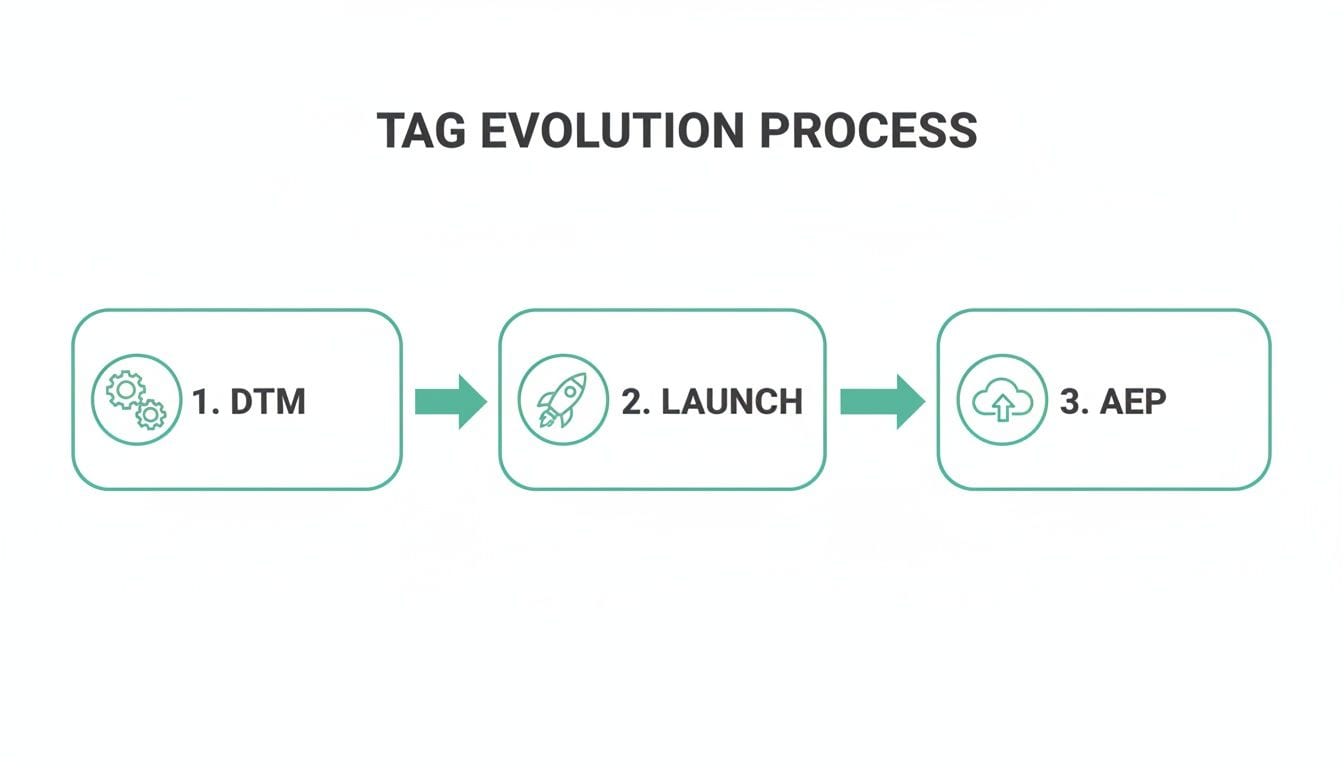
This journey from DTM to AEP highlights the shift toward more integrated and flexible tools, which makes the structured approach we're about to cover even more critical.
Setting Up Your Implementation Building Blocks
With your SDR as your guide, you can start putting together the core components inside Adobe Tags. Everything boils down to three pieces that work together to bring your data strategy to life: Properties, Data Elements, and Rules.
-
Properties: A Property is basically a container. It holds all the rules, data elements, and other configurations for a specific website or a group of related sites. Think of it as a dedicated workspace for each digital property you're managing.
-
Data Elements: These are your variables. Data Elements are pointers that grab information from your site—whether it's from the data layer, cookies, URL parameters, or even CSS selectors. For a closer look at this crucial component, our guide on the data layer in Adobe Analytics is a great resource.
-
Rules: This is where the magic happens. Rules are the logic engine of your setup, functioning as simple "if-then" statements that tell Adobe Tags what to do when something happens on your site.
Every rule is built from three parts: Events (the "if"), Conditions (which add more detail to the "if"), and Actions (the "then").
Building Rules for Common User Actions
Let's walk through how these components come together in a couple of practical examples.
First, let's track a simple page view. You'd set up a rule that looks like this:
- Event: "Window Loaded" is the trigger that fires once the page is fully loaded.
- Condition: We can leave this blank, so the rule fires on every single page.
- Action: Send a beacon to Adobe Analytics, using your Data Elements to populate variables like "Page Name" and "Site Section."
That single rule ensures every page view gets tracked and categorized correctly.
Now for something more specific, like a newsletter signup.
- Event: "Click" on the form's submit button.
- Condition: The CSS selector of the clicked element is
#newsletter-submit-button. - Action: Send an event to Adobe Analytics that triggers a "Form Submission" event. You could also use a Data Element to capture the type of email provided, like "personal" or "work."
By building your rules with this clean, logical structure, you create a system that is not just powerful but also easy for anyone on your team to understand and maintain. This is how you prevent the dreaded "tag soup" that plagues so many analytics implementations.
Ultimately, a correct implementation is a disciplined one. It’s all about translating the business requirements from your SDR into a well-organized system of properties, data elements, and rules. Do this foundational work right, and you'll be rewarded with clean, reliable data that's perfectly aligned with your business objectives from day one.
Establishing Your Adobe Tag Governance Framework
Getting your Adobe Tags implementation live is a great first step, but let's be honest—the real work starts now. Without a solid governance plan, even the most pristine setup can quickly turn into a tangled mess of broken rules, conflicting tags, and data you just can't trust. A formal governance framework is your rulebook for keeping things clean, reliable, and scalable.
Think of it as the difference between being a data firefighter, constantly putting out fires, and being a data architect, proactively building a solid foundation. This framework rests on a few simple pillars: clear naming conventions, strict user permissions, and a formal change management process. To get this right, you don't have to reinvent the wheel; you can lean on proven data governance best practices.
The Power of Consistent Naming Conventions
One of the simplest yet most powerful habits you can build is a strict naming convention for every rule and data element. When anyone on your team can glance at a rule's name and know exactly what it does, your entire setup becomes easier to manage and far more transparent.
A method I've found incredibly effective is structuring rule names to describe exactly what they do:
- [Event] ~~ [Condition] ~~ [Action]
For instance, a rule named Click ~~ Product Detail Page ~~ Send productView Event is instantly understandable. You know what it does without ever having to click into it. This small bit of discipline prevents duplicate rules and saves countless hours of reverse-engineering later on.
A clear naming convention acts as self-documentation for your Adobe Tags setup. It turns a potentially confusing list of rules into an organized, readable log of your data collection logic.
This structured approach not only makes it easier to onboard new team members but also gives developers and marketers the confidence to work within the platform without breaking things.
Here’s a practical checklist to help you establish and maintain a strong governance framework for your Adobe Tags. Think of these as the ground rules that protect your data's integrity.
Your Adobe Tag Governance Checklist
| Governance Action | Why It's Critical | Tool to Help |
|---|---|---|
| Enforce a Naming Convention | Prevents duplicate rules and makes the setup self-documenting. Anyone can understand a rule’s purpose at a glance. | Internal wiki or shared document |
| Define User Roles & Permissions | Restricts who can publish changes, reducing the risk of accidental errors and unauthorized modifications. | Adobe Experience Platform |
| Create a Change Request Process | Ensures every change is documented, tested, and approved, preventing "wild west" tagging that breaks tracking. | Jira, Asana, or similar project management tools |
| Automate Documentation | Keeps your tracking plan up-to-date in real-time, eliminating reliance on static, outdated spreadsheets. | Trackingplan |
| Schedule Regular Audits | Proactively catches broken tags, data inconsistencies, and implementation drift before they impact your analytics. | Trackingplan |
Following this checklist moves your team from a reactive state—fixing what’s broken—to a proactive one where you can trust the data flowing through your system.
A Single Source of Truth for Tracking
Ultimately, the goal of your governance framework is to establish and maintain a single source of truth for what gets tracked and how. In the past, this was often a massive spreadsheet—a static document that was outdated the moment it was "finalized" and usually ignored.
Today, modern data governance has moved beyond manual documents. Dynamic, automated solutions like Trackingplan act as a living source of truth by continuously discovering and documenting your entire implementation as it exists in the real world. Your tracking plan is no longer a static file; it's a live, always-accurate blueprint.
This automated approach gives you a few major advantages:
- Automatic Documentation: The platform maps out every single data element, rule, and tag on its own. No more manual updates.
- Proactive Management: Instead of hunting for errors after the fact, the system automatically alerts you to inconsistencies and broken tracking.
- Cross-Team Alignment: With everyone—developers, analysts, and marketers—looking at the same up-to-date information, confusion disappears. Everyone is finally working from the same playbook.
By automating the documentation and validation of your Adobe tags, you build a resilient system that can handle change without compromising data quality. This is how you turn your data into a reliable, enterprise-grade asset you can actually count on.
How to Audit and Monitor Your Adobe Tags
Even with a solid governance framework, how can you be sure your Adobe tags are actually firing correctly out in the wild? The old-school answer—slow, manual audits—is a recipe for falling behind. This reactive approach, where teams hunt for errors in spreadsheets long after a problem has already poisoned their data, just can't keep up with modern development.
The only real alternative is to shift from reactive firefighting to proactive quality assurance. This means moving away from periodic checks and embracing continuous, automated monitoring. Instead of asking "what broke last week," your team can stop data quality issues before they ever mess up your analytics.
From Manual Audits to Automated Monitoring
Let's be honest, manual audits are tedious and prone to human error. An analyst might spend hours poking around in browser developer tools to check network requests on a few key pages, but that's just a narrow snapshot in time. It completely misses issues on lower-traffic pages, fails to catch bugs that only pop up intermittently, and can't possibly validate the thousands of user paths across your site.
Automated monitoring flips that script entirely. A dedicated platform observes every single user session, automatically validating your whole implementation against your defined tracking plan. It’s like having a QA expert watching every click, 24/7.
This gives you a real-time dashboard that automatically discovers and maps out your entire tracking setup.

This level of visibility moves your team from guessing to knowing. It provides a live, comprehensive map of how your Adobe tags are performing across all user journeys, not just the ones you have time to check.
Key Validation Checks for Your Adobe Tags
A robust monitoring strategy goes way beyond just checking if tags fire. It's about a series of specific, actionable checks that guarantee data integrity from the data layer all the way to your analytics destinations.
Your auditing process, whether you do it by hand or automate it, needs to cover these critical areas:
- Schema Validation: Does the data sent with an event (like a
productView) match the structure you defined in your tracking plan? You need to check for missing, extra, or incorrectly formatted properties. - Missing or Broken Tags: Are key conversion or analytics tags failing to fire on critical pages like the checkout confirmation? Or are they firing but with errors that prevent data collection?
- "Rogue" Tag Detection: Have unauthorized or old, deprecated tags been added to your site? These can create security risks, drag down performance, and pollute your data.
- Campaign Parameter Integrity: Are UTMs and other campaign parameters being captured correctly on your landing pages? Broken campaign tracking makes it impossible to measure marketing ROI.
- PII & Consent Validation: Is Personally Identifiable Information (PII) being accidentally sent to your analytics tools? And are tags actually respecting user consent choices from your Consent Management Platform (CMP)?
Trying to check all of these variables manually is practically impossible at scale.
By automating these checks, you create a safety net for your data. The system doesn't just find problems; it prevents bad data from ever reaching your stakeholders, protecting the credibility of your analytics.
Proactive Quality Assurance with Trackingplan
This is where a dedicated observability tool like Trackingplan becomes essential. It automates the entire auditing and monitoring process for your Adobe tags, turning what was once a slow, manual chore into a real-time, proactive system.
Here’s how it works:
- Automated Discovery: Trackingplan automatically discovers your full implementation—all rules, data elements, and destinations. It creates a living, always-up-to-date tracking plan without you having to manually document a thing.
- Real-Time Alerts: The second an issue happens—a broken event, a schema mismatch, or a PII leak—your team gets an alert via Slack, email, or Microsoft Teams.
- Root-Cause Analysis: The alerts don't just tell you what broke; they show you why. By pinpointing the exact cause, developers can fix bugs in minutes instead of days.
This kind of continuous validation means you can release new features with confidence, knowing that any impact on your tracking will be caught immediately. It’s the most effective way to ensure the data flowing from your Adobe tags is consistently accurate and reliable.
Adapting Your Tags for Privacy and AI
The world of analytics is being pulled in two different directions at once. On one side, you have strict user privacy regulations; on the other, the explosive growth of artificial intelligence. If your Adobe tags strategy doesn't account for both, you'll either fall out of compliance or fail to generate trustworthy insights from increasingly complex data.
When it comes to privacy, regulations like GDPR and CCPA have made user consent the law of the land. You can’t just fire tracking pixels whenever you want anymore. Your entire Adobe Tags setup needs to connect with a Consent Management Platform (CMP) to actually listen to and respect what your users choose.
This means your rules have to be smart enough to fire only if a user has given their permission. For example, if someone opts out of advertising cookies, any rules that deploy marketing or retargeting tags must be blocked from running. It’s the only way to keep your data collection compliant and build trust with your audience.
The New Layer of AI Complexity
Just as we were getting a handle on privacy, the world of digital marketing got a massive injection of generative and agentic AI. Adobe itself is betting big on AI, projecting its fiscal 2026 revenue to hit $26.10 billion. It's not just hype—research shows 76% of organizations are already producing content faster, and 65% are seeing more marketing-driven revenue because of AI. You can read more about how AI is driving Adobe's growth on Storyboard18.
While these new AI tools are fantastic for personalization and content, they add a whole new layer of technical complexity. Think about it this way: your traditional analytics implementation is one system, and your new generative AI tools are another. They often run in parallel, each with its own data needs and outputs, which doubles the potential for things to break.
As your organization layers advanced AI capabilities on top of your existing Adobe Tags setup, the challenge of maintaining data quality grows exponentially. The risk of broken tracking, data inconsistencies, and schema drift multiplies across this more intricate ecosystem.
Why Comprehensive Observability Is Now Critical
This growing complexity means that automated, comprehensive observability is no longer a nice-to-have. Manual auditing was already struggling to keep up with analytics tags alone; it stands no chance against a stack that includes AI-driven systems. You need a way to see exactly how data is flowing through your entire setup—from user clicks to your analytics tools and now through your AI models.
An automated observability platform like Trackingplan delivers that end-to-end visibility. It becomes the single source of truth that monitors not just your Adobe tags but also the data interactions happening with your new AI tools. This ensures that as your company adopts these powerful technologies, the data at the heart of it all remains accurate, compliant, and ready for analysis.
Frequently Asked Questions About Adobe Tags
As you get deeper into Adobe Tags, a few common questions always seem to pop up. Whether you're an analyst, marketer, or developer, getting clear answers is key to working effectively. Here are some quick, straightforward answers to the questions we hear most often.
What Is the Main Difference Between Adobe Tags and Google Tag Manager
The biggest difference comes down to ecosystem integration. Google Tag Manager (GTM) is a fantastic, free tool that’s built to work perfectly with the Google Marketing Platform. It’s known for its simplicity and wide adoption.
Adobe Tags, on the other hand, is woven directly into the Adobe Experience Cloud. This gives it a native, seamless connection to tools like Adobe Analytics, Target, and Audience Manager. It’s built for large enterprises that are heavily invested in the Adobe stack, offering the robust governance features needed for complex corporate environments.
Can I Use Adobe Tags Without Adobe Analytics
Yes, you absolutely can. While it’s optimized to work with Adobe’s own products, Adobe Tags is a vendor-neutral tag management system.
You can easily use it as a central hub to deploy and manage tags for all sorts of third-party tools. This includes Google Analytics tracking codes, social media pixels, and pretty much any other script your martech stack relies on.
How Does Trackingplan Specifically Help with Adobe Tags
Trackingplan gives you complete, end-to-end observability over your entire Adobe Tags implementation. It works by automatically and continuously monitoring your setup, discovering every rule, data element, and tag as it’s actually behaving out in the wild.
Trackingplan acts as your always-on auditor. It sends you real-time alerts if tracking breaks, schemas change, or unauthorized "rogue" tags appear. By catching issues like PII leaks or consent misconfigurations, it enforces governance and keeps your tracking plan live and accurate.
This frees up your team from the tedious work of manual audits and stops data quality problems before they can ever poison your business decisions.
What Is a Solution Design Reference or SDR
A Solution Design Reference (SDR) is the single most important document for an Adobe Analytics implementation. Think of it as the architectural blueprint for your entire data collection strategy.
It defines exactly what data you need to capture, where on your site or app you'll capture it, and precisely how that data maps to your analytics variables like eVars and props.
Creating a thorough SDR before you even think about tagging is a critical best practice. It ensures your implementation is structured, scalable, and perfectly aligned with your business goals from the very beginning.
Ensure the data from your Adobe tags is always accurate and reliable with Trackingplan. Our automated observability platform gives you a single source of truth, helping you detect and fix tracking errors in real time. Start monitoring your analytics today at trackingplan.com.