
You check Shopify and see a strong sales day. Then you open Ads Manager and the numbers don't line up. Orders look healthy in your store or CRM, but Meta shows far fewer purchases.
That gap is what is generally understood when discussing Facebook pixel missing conversions. Sometimes the cause is basic, like a broken trigger or a bad event parameter. More often now, the setup is only partially broken. The pixel fires for some users, misses others, and still looks “fine enough” unless someone compares ad-platform data against backend truth.
That partial failure is what hurts most. It doesn't just distort reporting. It changes how Meta bids, who it learns from, and which customers it includes in seed audiences. A tracking issue can persist unnoticed for weeks while campaigns optimize on incomplete signals.
The Growing Gap Between Real Sales and Reported Conversions
A common scenario looks like this: Facebook reports 60 conversions while the CRM shows 100, which means the team is missing 40% of data according to Cometly’s explanation of Facebook pixel underreporting. The visible problem is reporting mismatch. The bigger problem is that Meta then optimizes from the 60 conversions it can see, not the 100 that took place.
That changes campaign behavior in ways people often misread. Bidding moves toward incomplete patterns. Lookalike audiences are built from a smaller and less representative converter set. Agencies feel this especially hard because one quiet tracking gap can spread across many ad accounts before anyone notices.
Why this mismatch feels worse now
Years ago, if a pixel undercounted badly, there was usually a clear implementation bug. Today, some loss is structural. Privacy controls, browser restrictions, app-level tracking limits, and blocker technology all interfere with browser-side collection. A pixel can be installed correctly and still miss real business outcomes.
That’s why backend metrics matter more than ever. If you're already reviewing store health using operational metrics, Carti's guide to Shopify KPIs is a useful companion because it keeps the focus on source-of-truth commerce data rather than ad-platform numbers alone.
Practical rule: If store revenue and Meta conversions diverge, don't assume the ad account is wrong and don't assume the store is right. Reconcile both. The point is to find the pattern of loss.
One of the clearest places this pattern showed up was after iOS privacy changes. Tracking teams that want a deeper breakdown of how those shifts affected conversion visibility should review Trackingplan’s write-up on conversion data loss after iOS 14.
What teams usually miss
The dangerous version of this problem isn't total failure. It's partial reporting that looks plausible. If a purchase event fires for enough users, nobody panics. Dashboards continue to populate. Campaigns keep spending. But the optimization loop is already compromised.
Three things usually happen next:
- Bidding quality declines: Meta learns from an incomplete sample and starts favoring the wrong combinations of audience, placement, or creative.
- Audience quality drops: Seed audiences miss converters Meta never received.
- Decision confidence erodes: Teams debate creative, offer, and landing page changes when the underlying issue is data quality.
When Facebook pixel missing conversions becomes normal in an account, the job isn't just to “fix the pixel.” The job is to understand where loss is expected, where loss is avoidable, and how to detect the difference before campaign decisions drift too far from reality.
How to Diagnose Missing Conversions Like a Pro
A familiar scenario. The store records 42 purchases yesterday. Meta reports 29. The pixel is installed, Events Manager shows activity, and nobody sees a clear error. That is what makes this problem expensive. Partial tracking looks close enough to trust, even when it is feeding Meta a distorted training set.
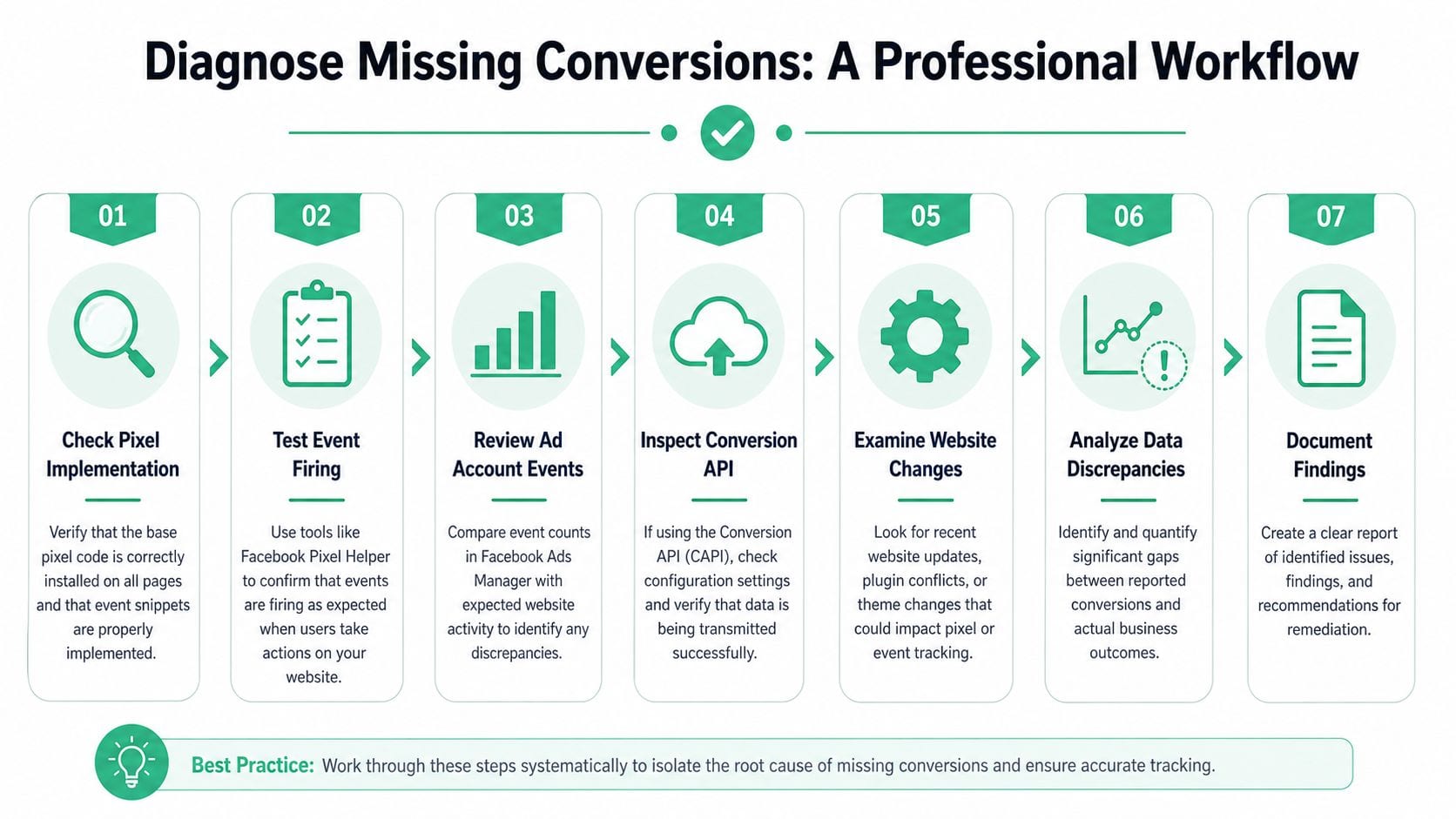
Good diagnosis starts with the conversion path, not the homepage. A base pixel firing on page load proves very little. Purchases break in the handoff points: product page logic, cart actions, checkout steps, consent layers, third-party checkout redirects, and thank-you page rendering.
Start with the full user journey
Run a real test session from landing page to purchase confirmation. Use Meta Pixel Helper while you click through the same path a buyer takes. Trigger the business actions that matter, then verify each event in sequence.
The minimum path usually looks like this:
- ViewContent on the product detail page
- AddToCart after the cart action
- InitiateCheckout when checkout starts
- Purchase on the confirmation or thank-you page
The order matters. The gaps matter more. If AddToCart fires but InitiateCheckout disappears on mobile Safari, that points to a different class of problem than a Purchase event that fires with missing order data. For a practical walkthrough of the browser extension, Trackingplan has a useful guide on how to master the Meta Pixel Helper for flawless ad tracking.
Inspect the payload, not just the event name
A green checkmark in Pixel Helper does not mean the event is usable for attribution or optimization.
Open each commerce event and inspect the parameters:
- Value: The order or revenue amount sent with the event
- Currency: The correct ISO currency code
- Content IDs: Product identifiers that match your catalog or item records
- Event consistency: The same event should send the same schema across sessions and devices
I see this mistake often. Teams confirm that Purchase fired, then stop there. But a Purchase event with blank content IDs, the wrong currency, or inconsistent value formatting can still degrade match quality and downstream reporting. Meta did receive something. It just may not be good enough to use well.
A purchase event that fires with weak or unstable parameters is still a tracking problem.
Use Events Manager to confirm transport and configuration
After the browser test, open Test Events in Events Manager and compare what you triggered with what Meta received. At this point, simple installation checks end and real debugging begins.
Focus on three comparisons:
- Pixel Helper vs. Test Events: If the browser shows the event and Test Events does not, inspect transport issues, consent suppression, browser restrictions, or script conflicts.
- Test Events vs. event details: If the event arrives but key fields are missing, inspect your data layer, platform app, or template logic.
- Configured events vs. business priorities: Check whether your highest-value conversion event is set up in a way Meta can prioritize and use reliably.
Review Aggregated Event Measurement while you are there. Confirm domain verification, event ranking, and whether your tracked events match the way the site now sells. Theme changes, checkout apps, headless builds, and redesigned funnels often leave old event logic in place long after the user journey changed.
Check browser tools when the platform UI is inconclusive
Some failures only show up in developer tools. Open the browser network tab and trigger the event again. Confirm that the request is sent, that it returns successfully, and that the payload includes the fields you expect.
This step helps isolate problems such as:
- A GTM trigger firing without a valid request leaving the browser
- Consent logic blocking purchase events for part of traffic
- A custom theme update breaking data layer variables
- A hosted or third-party checkout changing the event sequence
- Duplicate firing from browser and server implementations that are not deduplicated correctly
That last issue matters more than many teams realize. Missing conversions hurt optimization, but mixed-quality data also hurts optimization. If Meta receives only part of the truth, or receives duplicates from some sessions and nothing from others, campaign learning becomes noisy. That is why diagnosis needs to separate total failure from selective loss.
A disciplined conversion audit applies across channels. Teams that also run search can improve Google Ads performance with Silva Marketing by using the same standard: verify the business action first, then verify what the ad platform received.
Reconcile platform reporting with backend records
The final step is comparison. Pull a short date range from your ecommerce platform, CRM, or order database and line it up against Ads Manager and Events Manager.
Do not expect perfect parity. Privacy controls, browser restrictions, and attribution rules make that unrealistic. The important question is whether the loss is stable, explainable, and understood.
Use a simple review table:
| Check | What a healthy result looks like | What trouble looks like |
|---|---|---|
| Browser events | Key events fire in the right places | Missing or duplicate firing |
| Parameters | Value, currency, and IDs are present | Nulls, wrong values, inconsistent schemas |
| Events Manager | Test events appear with expected details | Events delayed, rejected, or absent |
| Backend comparison | Differences are explainable and reasonably consistent | Gaps are persistent, directional, or suddenly worse |
If the gap is small and stable, the job is expectation management plus coverage improvement. If the gap spikes after a theme release, consent update, checkout change, or CAPI deployment, the job is implementation debugging. If the browser path looks clean but Meta still underreports selectively by device or browser, you are dealing with systemic loss, not just a misplaced pixel.
That distinction decides the fix. It also decides whether your team can keep relying on manual checks, or whether automated monitoring is required to catch tracking drift before ad optimization starts learning from incomplete data.
Uncovering the Root Causes of Data Loss
Once you've confirmed the symptom, the next job is classification. Not all missing conversions come from the same layer. Some are implementation mistakes. Others are the predictable outcome of modern privacy controls.
According to Cometly’s explanation of missing conversion data in Facebook, conversion tracking now faces systemic underreporting from privacy-driven browser limitations such as Apple’s iOS 14 update and ad blockers. Those controls can prevent the Meta Pixel from storing cookies and following users, so a meaningful share of conversions never reaches Meta even when the purchase happened. That is why the mismatch between backend revenue and Facebook reporting is increasingly expected rather than exceptional.
The fixable causes
These are the issues a careful implementation can often solve:
| Symptom | Likely Cause | Where to Check |
|---|---|---|
| Purchase never appears | Event missing on thank-you page | Pixel Helper, theme code, GTM triggers |
| Purchases show wrong values | Bad parameter mapping | Event payload, dataLayer, platform integration |
| Conversions spike unrealistically | Duplicate browser and server firing | Events Manager connection methods, event IDs |
| Events vanished after release | Schema drift or site update | Recent deployments, app/plugin changes |
| Some users track, others do not | Consent suppression or browser restrictions | CMP settings, browser tests, regional behavior |
A lot of debugging work still lives here. GTM triggers misfire. Shopify apps overlap. Theme changes remove data attributes. Developers rename variables and nobody updates the downstream tag logic. These are annoying problems, but they're at least understandable and testable.
The structural causes
Many teams waste time. They keep looking for one broken snippet when the loss is happening because the browser no longer allows the same level of tracking it once did.
The major structural causes are usually these:
- App Tracking Transparency on iOS: Limits cross-app and cross-site tracking.
- Safari privacy controls: Restrict browser-based persistence and attribution continuity.
- Ad blockers: Prevent the Meta Pixel from firing at all for some users.
- Third-party cookie erosion: Reduces continuity between ad interaction and later conversion.
None of these mean your implementation is perfect. They mean perfect browser-side recovery is no longer realistic.
If you only use browser-side collection, some missing conversions are built into the environment.
The subtle causes that distort reporting
The hardest issues are not the fully missing events. They are the conversions that happen but fail to match or attribute cleanly.
Examples include:
- Weak event parameters: The event exists, but missing customer or product context makes it less useful.
- Cross-device journeys: Someone clicks on an iPhone and purchases later on a laptop. That connection can disappear.
- Consent logic timing: The customer converts before tracking is allowed, or the consent state suppresses marketing destinations.
- Attribution window mismatch: The sale happened, but not within the window Meta uses for reporting.
These are the cases where marketers insist “the pixel is working” because they can see purchases in the interface. They're also the cases where finance, CRM, or ecommerce teams keep asking why platform numbers stay low.
The practical takeaway is simple. Facebook pixel missing conversions is not one bug. It's a stack of loss points across page code, consent, browser behavior, attribution rules, and user behavior. If you don't separate fixable implementation errors from unavoidable browser-side loss, you end up doing a lot of work that never materially closes the gap.
Implementing Robust Fixes for Maximum Data Recovery
The right fix depends on where the loss happens. If the issue is bad event wiring, repair the implementation. If the issue is browser suppression, move collection closer to the server. In most serious setups, the answer is a hybrid model with browser events plus Conversions API.
Fix the basics before adding complexity
A surprising number of CAPI rollouts fail because teams skip foundational cleanup. Before you touch server-side delivery, make sure the browser layer is coherent.
Start here:
- Use one clear implementation owner: Native platform integration, GTM, or custom code. Not three at once.
- Standardize event names: Keep Meta’s standard ecommerce events clean and predictable.
- Validate parameters at source: Value, currency, and item identifiers should come from the same business logic that powers the site.
- Check thank-you page behavior: Redirects, async rendering, or embedded checkout changes often break purchase timing.
If you're planning server-side work, Trackingplan’s overview of the Facebook Conversion API is a good technical reference for the moving parts you need to validate.
Why Conversions API matters
Browser-side tracking waits for the user’s device to cooperate. Conversions API sends data from backend systems before browser restrictions can remove that signal. In practice, that means your order system, app backend, or server-side container becomes a direct source of conversion events.
This doesn't make browser collection irrelevant. The strongest setup usually starts with Both connection methods, browser plus server, then uses deduplication to keep counts clean.
According to Meta developer community guidance summarized in this developer thread, CAPI is essential for data accuracy, but implementation is complex and many advertisers struggle with deduplication issues and low event match quality. The same source also notes that Meta can take up to 72 hours to process and display CAPI data, and the default 7-day click attribution window often underreports businesses with longer sales cycles.
That last point matters operationally. Teams often implement CAPI on Monday, compare Tuesday’s dashboard to orders, and conclude it “didn’t work.” Sometimes they’re judging too early or against the wrong attribution expectation.
Choose the implementation path that fits your stack
There isn't one universal setup path. The trade-offs are practical:
Native platform integrations
Fastest to launch. Good for standard Shopify or ecommerce flows. Less flexible when you need custom event logic.Third-party plugins
Easier than custom code, but quality varies. Some create opaque mappings that are hard to debug later.Google Tag Manager
Useful when you need controlled orchestration and cleaner governance. It also helps teams manage changes without direct theme edits.Custom server implementation
Highest control. Best for non-standard funnels, subscriptions, or backend-defined conversions. Also the easiest to get wrong if engineering and analytics teams aren't aligned.
A lot of teams ask whether CAPI alone solves Facebook pixel missing conversions. It doesn't. It reduces one major category of loss. It also introduces new ways to break data if event naming, IDs, consent handling, and matching logic aren't stable.
Here’s a useful walkthrough video for teams evaluating implementation and monitoring details:
Deduplication is where good setups go bad
This is the most common failure after rollout. A browser purchase and a server purchase describe the same transaction, but Meta only knows that if both carry the same deduplication logic.
Use a shared event ID strategy. Keep the ID unique per conversion and identical across the browser and server versions of that conversion. If you don't, you'll either overcount or make reconciliation impossible.
Field note: If reported conversions suddenly rise after CAPI implementation, don't celebrate until you've ruled out duplicate counting.
Improve match quality, not just event volume
More events are not automatically better. If the server sends thin payloads with weak identifiers, the match rate can still disappoint. Focus on sending the fields Meta can reasonably use for matching and optimization, while respecting consent and your privacy requirements.
That means teams should review:
- Customer identifiers available in backend systems
- Hashing and formatting consistency
- Schema alignment between browser and server events
- Connection method reporting inside Events Manager
A robust fix is not “install CAPI and move on.” It's browser cleanup, server-side capture, deduplication discipline, and a realistic understanding of processing delays and attribution windows. That combination usually recovers the most useful signal.
From Reactive Fixes to Proactive Prevention
Most tracking teams still work in break-fix mode. Someone notices revenue looks off, someone opens Pixel Helper, someone files a dev ticket, and everyone hopes the patch holds. That approach doesn't scale.
The reason is simple. Tracking changes constantly. Themes get updated. Plugins are installed. Checkout flows move. Consent banners are reconfigured. Marketing teams add tags. Developers rename fields. Even if today's implementation is correct, next week's release can inadvertently break it.
Manual checks don't catch silent degradation
Manual QA still has value, but it misses the most dangerous failures. The browser extension may show a purchase event. Events Manager may still populate. Meanwhile, event schemas drift, parameters disappear, or one region stops sending data because of a consent rule.
That is why teams need monitoring, not just troubleshooting. A useful setup should tell you when:
- A pixel stops firing
- A server event drops
- A parameter goes missing
- A schema changes unexpectedly
- Consent suppresses destinations you thought were active
For teams dealing with multiple ad platforms and sites, this category is often better described as pixel observability than analytics setup. Trackingplan has a good explanation of what that looks like in practice in its post on using an ad pixel monitoring tool.
What proactive prevention actually looks like
A preventive workflow usually includes three layers:
Source-of-truth comparison
Regular reconciliation between CRM, store, backend, and ad platforms.Implementation monitoring
Automated checks for event presence, payload quality, and unexpected changes.Alerting
Notifications in the tools the team already uses, so bad data doesn't sit unnoticed.
A platform such as Trackingplan is a natural fit in this context. It continuously discovers and monitors analytics and attribution implementations across web, app, and server-side setups, and alerts teams when events, parameters, schemas, or consent behavior change. That kind of system is useful when one person can no longer manually verify every release and every client account.
The real goal isn't to fix one missing purchase event. It's to stop bad data from surviving long enough to influence budget decisions.
Agencies and multi-brand teams need this most
A solo store can sometimes get away with periodic manual checks. Agencies and enterprise teams usually can't. The larger the portfolio, the easier it is for partial data loss to cascade unnoticed across accounts.
The operational shift is straightforward. Treat tracking as a monitored system, not a one-time implementation. Once you do that, Facebook pixel missing conversions becomes a controlled risk instead of a recurring surprise.
Frequently Asked Questions about Facebook Conversion Tracking
What counts as a good Event Match Quality score
Teams often fixate on the score and miss the actual problem. Event Match Quality only matters if it reflects complete, consistent customer data attached to the events Meta is trying to match.
A lower score usually points to missing identifiers or uneven payload quality across the same event type. If one purchase includes value, currency, email, and item data, but the next purchase drops half of that, Meta has less to work with. That hurts optimization even when total purchase volume in Events Manager looks stable.
Use the score as a diagnostic clue, not a target. The goal is reliable input quality across every high-value event.
Is Conversions API expensive or hard to set up
That depends on the route you choose.
A native Shopify or WooCommerce integration is usually quick to launch and easier to maintain. GTM server-side setups and custom backend implementations give more control over payloads, event timing, and identity data, but they also introduce more failure points. I usually recommend the simplest setup that still gives the team ownership over deduplication and payload validation.
CAPI also does not fix weak tracking by itself. If event names are inconsistent, deduplication is broken, or backend order logic does not match what the pixel sends, undercounting can turn into double-counting.
Why does Ads Manager still underreport after CAPI
Because CAPI closes some gaps, not all of them.
You can still lose visibility through consent choices, attribution differences, cross-device journeys, delayed processing, and mismatched event definitions between Meta and your store or CRM. In practice, I often see teams declare the implementation broken when the underlying issue is that they are comparing backend orders to Meta-reported attributed conversions as if those numbers should match exactly.
Start with alignment. Compare the same date range, the same conversion definition, and the same attribution window before you judge the setup.
Will browser changes make this worse
Yes. Browser-side tracking keeps getting less dependable, and partial tracking is often more dangerous than obvious breakage because campaigns continue spending while optimization models learn from incomplete signals.
That applies beyond Meta. Teams evaluating channel mix should read Optimizing ad spend for TikTok Shop profit with the same measurement standard. Reported performance only deserves trust if the conversion layer is being checked against backend reality.
What's the simplest ongoing workflow
Keep it boring and repeatable:
- Test core conversion paths after every site or checkout change
- Check whether browser and server events are both firing as expected
- Reconcile Meta conversions against backend or CRM records on a set schedule
- Watch for drops in payload quality, not just drops in event volume
- Use automated monitoring where possible so partial failures do not sit unnoticed for weeks
That last point matters more than many teams realize. Complete outages get spotted quickly. Partial data loss often survives long enough to distort bidding, audience learning, and budget allocation.
If your team is tired of finding tracking issues only after campaign numbers look wrong, Trackingplan helps monitor pixels, server-side events, schemas, consent behavior, and conversion data quality so you can catch problems earlier and spend less time on manual audits.