
A familiar GA4 argument usually starts the same way. Paid search says it drove the sale because the buyer clicked a branded ad before converting. Email says it should get the credit because the buyer used a campaign link that morning. Social says none of this would have happened without the earlier ad that introduced the product in the first place.
Then someone opens GA4, checks two reports, and finds two different answers.
That's where teams start to lose confidence in analytics. They change the attribution setting, refresh a report, and nothing looks different. Or worse, some reports change and others don't. The result isn't just confusion. It's budget decisions made on top of misunderstood logic.
GA4 attribution models can help, but only if you understand what GA4 is attributing, where that logic applies, and where it doesn't. That's the part many teams miss. Before arguing over which channel deserves credit, it helps to make sure the tracking foundation is solid. If you're reviewing your stack more broadly, this roundup of essential tracking tools for marketers is a useful companion to attribution work.
A good framing for the rest of this discussion is simple: attribution is not a truth machine. It's a reporting method applied to observed user paths. If the paths are incomplete, the answer will be incomplete too. That's also why it helps to ground the conversation in the broader role of attribution in marketing strategy, not just in GA4 settings.
Introduction Why Attribution Gets So Complicated
Organizations don't struggle with the idea of attribution. They struggle with conflicting outputs.
A customer might discover a brand through a social ad, come back from organic search, revisit through a remarketing campaign, and finally convert from an email click. Every channel touched the journey. The disagreement starts when a dashboard forces that messy path into a single reporting view.
Why teams get stuck
GA4 makes attribution look simpler than it feels in practice. There's a setting in Admin called Reporting attribution model, so it's reasonable to assume that changing it updates attribution everywhere. It doesn't. That mistaken assumption creates a lot of the “GA4 is inconsistent” complaints analysts hear from stakeholders.
Another problem is that channel managers often ask different questions:
- Performance marketers want to know which channel closed the conversion.
- Lifecycle teams want to know which touchpoints kept the user moving.
- Analysts want to know whether the data is even comparable across reports.
- Leadership wants one number they can trust.
Those are not the same question, so they shouldn't always produce the same answer.
GA4 rarely breaks because attribution is impossible. It usually breaks because teams compare reports built on different attribution logic and assume they should match.
Why this matters in real reporting
If you're using GA4 attribution models to guide budget allocation, channel reporting, or conversion analysis, you need more than model definitions. You need to know where scope changes, which reports still use their own logic, and why data quality has more influence than the model itself.
That's the practical lens that matters. Not “which model is best” in the abstract, but “which model answers our question without hiding tracking problems.”
The Foundation of GA4 Attribution Scope and Logic
Most attribution mistakes in GA4 start before model choice. They start with scope.
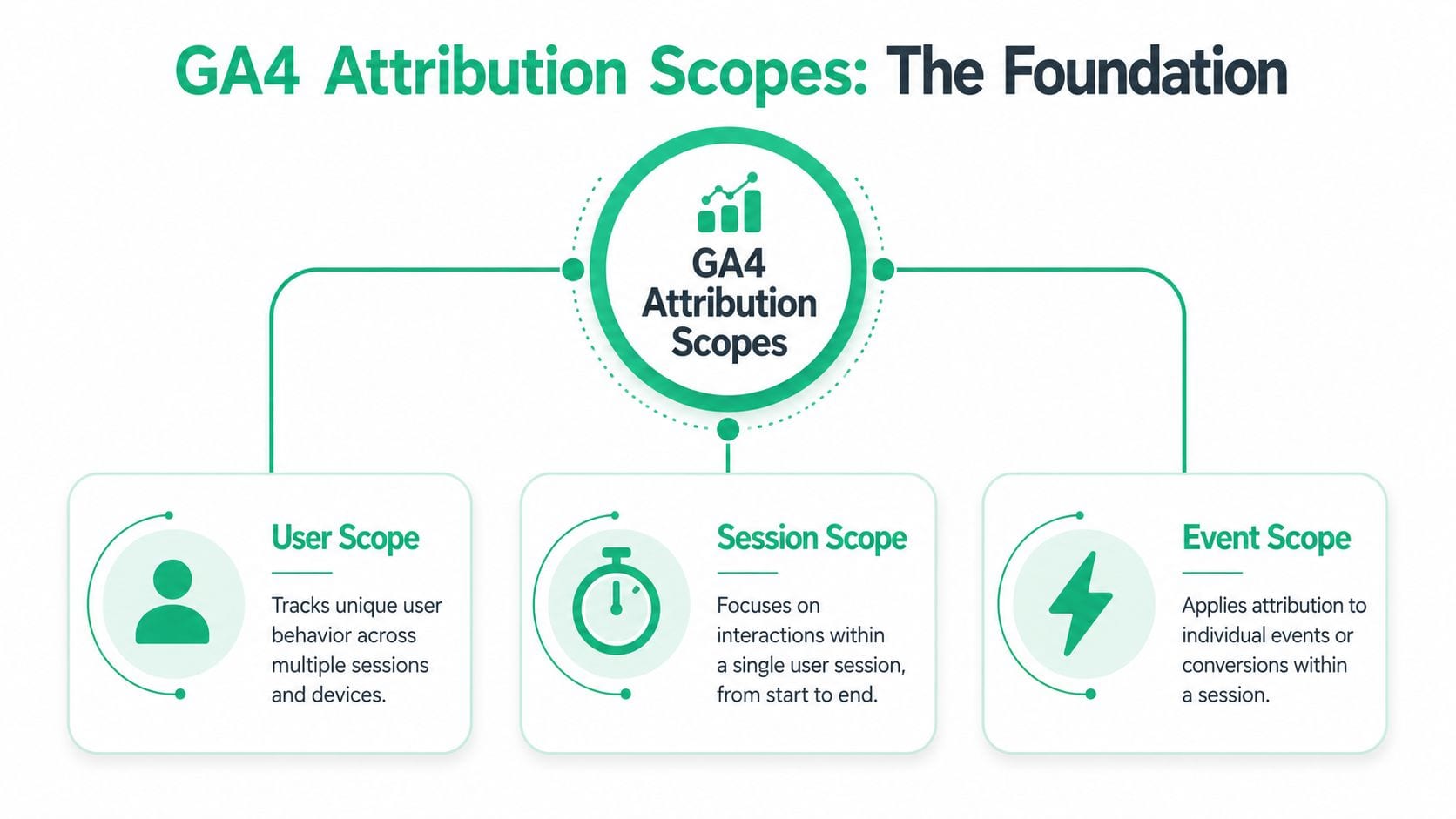
GA4 handles attribution across user, session, and event scopes. The property-level reporting model mainly applies to key events, while session acquisition uses last non-direct click logic and user acquisition credits the first channel that brought the user, as explained in this GA4 attribution breakdown from Hookflash.
Think of scope like camera zoom
A simple way to explain this to non-analysts is to treat GA4 as three camera lenses viewing the same journey.
| Scope | What it answers | Typical logic |
|---|---|---|
| User | How did this person first arrive? | First user source or campaign gets credit |
| Session | How was this visit acquired? | Last non-direct click for the session |
| Event | Which touches influenced this key event? | Reporting attribution model for key events |
The same person can appear differently depending on which lens you use. That's not a bug. That's the design.
A session report might credit Organic Search because that's how the visit started. A user acquisition report might still credit Paid Social if that was the first channel that brought the person in. An attribution report for a purchase might split credit differently again.
Why the same conversion can “move” between channels
This is why teams think GA4 is contradicting itself. In reality, they're asking different questions in different reports.
For example:
- A user first finds you through a paid social campaign.
- Days later, they return from organic search.
- During a later session, they click an email and convert.
Depending on the report, GA4 can reasonably show different channel credit. That's also why journey mapping is useful outside analytics tooling. If your team needs a non-technical way to align around touchpoints, this guide on what is a user journey map helps frame the path before you assign credit to it.
Practical rule: Never compare User Acquisition, Traffic Acquisition, and Attribution reports as if they were built on the same logic.
The baseline logic analysts should know
Before anyone changes settings, they should understand the defaults already shaping reports.
A few practical reminders:
- Session attribution ignores direct traffic unless needed: In session acquisition, GA4 uses last non-direct click logic.
- User attribution is origin-focused: The first channel that brought the user gets the credit in user acquisition.
- Event attribution is where model choice matters most: The property-level reporting attribution model mainly affects key event reporting.
If your team also struggles with channel naming and grouping, this guide on GA4 channel groups explained is worth reviewing before you interpret attribution output. Clean attribution starts with clean channel definitions.
A Tour of Available GA4 Attribution Models
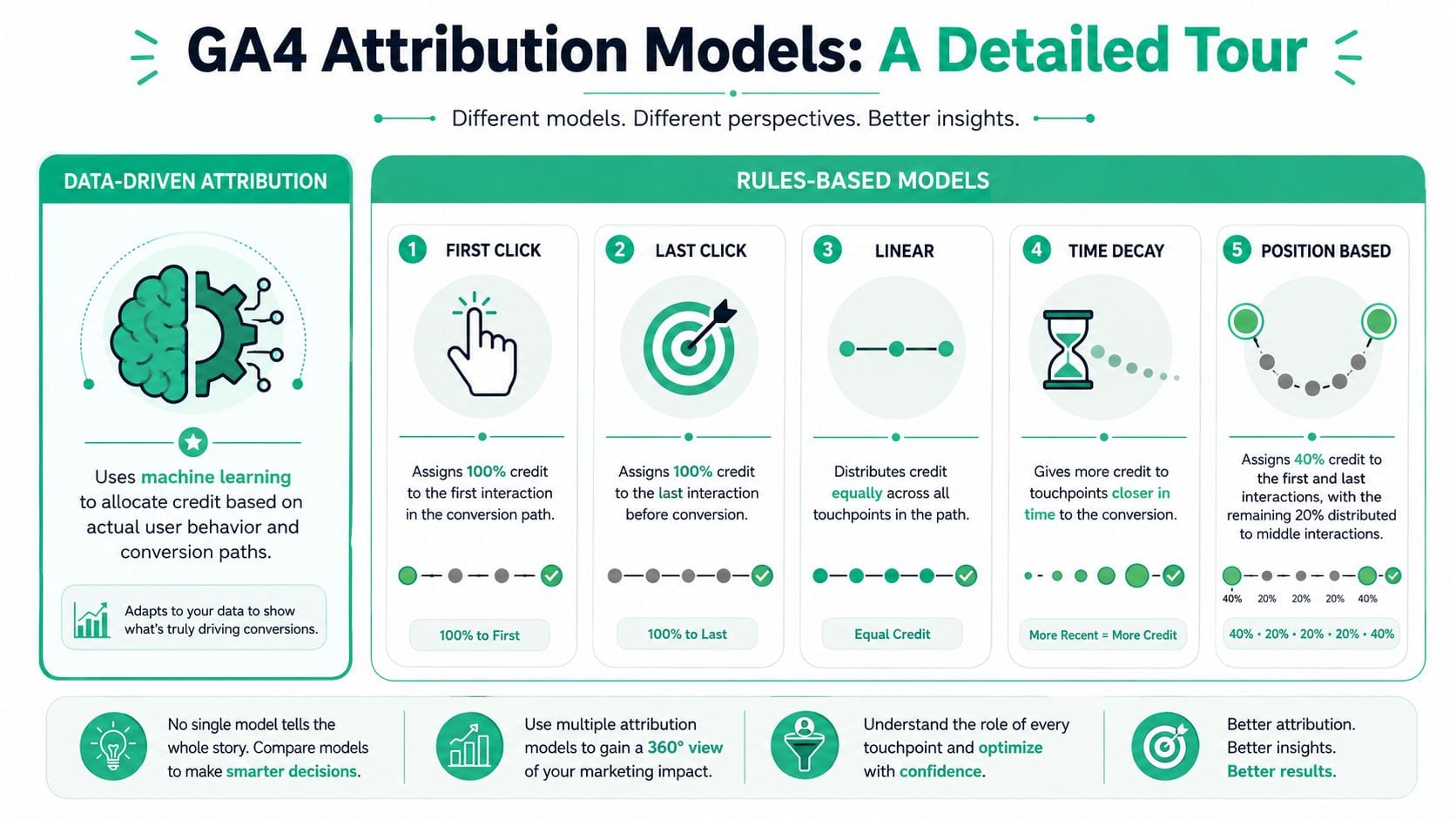
GA4 attribution models used to include a broader set of rules-based options. That changed when Google moved GA4 and Google Ads away from several older models. Industry guidance notes that first-click, linear, time-decay, and position-based attribution were sunset for new conversion actions in May 2023 for GA4 and June 2023 for Google Ads, with the broader sunset completed in September 2023, leaving GA4 users primarily comparing data-driven and paid and organic last click in practice, as summarized by Piwik PRO.
Data-driven attribution
Data-driven attribution, or DDA, is GA4's default reporting model. Google describes it as a machine-learning approach that evaluates both converting and non-converting paths and uses signals such as time from conversion, device type, number of ad interactions, order of ad exposure, and creative type to assign fractional credit rather than all credit to one touchpoint, according to Google's attribution documentation on data-driven attribution.
That matters because DDA is not a fixed formula. The same sequence of touches can be weighted differently across accounts or over time if observed conversion patterns change.
What works well
- Multi-touch journeys: Better fit when users interact across several channels before converting.
- Assist recognition: More likely to give some value to upper-funnel and mid-funnel touchpoints.
- Account-specific behavior: Uses your property's own historical path data.
What doesn't
- Poor path quality: Missing UTMs, broken click identifiers, and bad channel grouping distort the observed paths.
- Low trust environments: If stakeholders don't understand how credit moves, they may reject outputs as opaque.
Paid and organic last click
This is the cleaner, more explainable rules-based option that many teams still prefer operationally.
It assigns credit to the final eligible touch before conversion, using the model's last-click logic across paid and organic interactions. For businesses with short purchase journeys or simple reporting needs, that can be enough.
Where it helps
- Budget pacing discussions
- Fast reporting for channel owners
- Simpler stakeholder communication
Where it misleads
- It under-credits discovery and nurture activity.
- It can overstate branded search, remarketing, and retention channels that often appear near the end.
If your funnel is short and your channel mix is narrow, last click can be good enough. If your funnel spans multiple visits and multiple teams, it usually isn't.
Legacy models still matter as concepts
GA4 no longer emphasizes first click, linear, time-decay, and position-based models for new conversion actions, but analysts should still understand their logic because stakeholders often still think in those terms.
| Model | Core logic | Typical use case | Main drawback |
|---|---|---|---|
| First click | Gives all credit to the first touch | Awareness-heavy analysis | Ignores closers |
| Linear | Splits credit evenly | Balanced storytelling | Assumes all touches matter equally |
| Time decay | Gives more credit to later touches | Shorter consideration phases | Can suppress early influence |
| Position-based | Emphasizes first and last touches | Intro plus close framing | Middle touches get flattened |
If your team is trying to solve attribution challenges, it helps to separate two questions: which model is available in GA4, and which mental model your stakeholders are still using when they interpret performance.
How to Configure Attribution Settings in GA4
The settings are easy to find. Interpreting their impact is the harder part.
When I audit GA4 properties, I usually start in Admin and look for two things immediately: whether the attribution model matches the business's reporting goals, and whether the team understands what the lookback window changes.
Where to find the settings
In GA4, go to Admin > Attribution settings.
You'll typically see the key controls related to:
- Reporting attribution model
- Lookback window
That sounds straightforward, but both settings affect interpretation more than many teams expect.
What the lookback window changes
GA4's attribution reports use a 90-day lookback window by default, and the DDA model considers the last 50 interactions in a conversion path, which is a deeper interaction history than Universal Analytics' prior limit of 4 interactions, as explained in this review of data-driven attribution in GA4.
A longer interaction history can shift credit toward channels that introduced or assisted the user earlier in the journey. That's often useful for longer buying cycles, but it also increases dependence on stable tracking across sessions.
If campaign tagging is inconsistent, extending attribution visibility won't help. It will just spread credit across bad inputs.
What to check before you change anything
Before changing the reporting model, validate these basics:
- UTM consistency: Campaign names, source values, and medium values should follow an agreed convention.
- Key event quality: Purchases, lead submits, sign-ups, and other key events should fire once and with the expected parameters.
- Channel grouping sanity: Misclassified channels create fake attribution shifts.
- Cross-session continuity: If identity breaks often, long-path attribution gets weaker.
If your setup still needs cleanup, this guide on GA4 campaign tracking setup and analysis is a practical place to tighten campaign inputs before changing attribution settings.
A walkthrough can help if you want a visual refresher on implementation and analytics hygiene:
Change attribution settings only after you've confirmed the paths are trustworthy. Otherwise you're changing the lens, not fixing the data.
Choosing the Right Model for Your Business
There isn't one correct answer for every company. There's only a model that fits the question you're trying to answer and the reliability of the path data you collect.
A short, transactional buying journey doesn't need the same attribution treatment as a long, research-heavy one. Teams often overcomplicate this by treating model selection as a philosophical choice. It's more operational than that.
When last click is often enough
Some businesses don't need a nuanced fractional model for day-to-day reporting.
That's usually true when:
- The path is short: Users discover, compare, and convert quickly.
- The channel mix is narrow: A few channels drive most sessions and conversions.
- The reporting need is tactical: Teams need simple performance views for weekly optimization.
In those cases, paid and organic last click can be easier to explain and easier to act on. If stakeholders need a direct answer to “what closed the sale,” last click gives them one.
When data-driven attribution earns its keep
DDA becomes more useful when the journey is layered.
That often includes environments where:
- Buyers return through multiple sessions.
- Several channels influence the same conversion.
- Brand, content, lifecycle, and paid media teams all contribute to movement in the funnel.
- The business wants to understand assists, not just closers.
If your team invests in upper-funnel education, product discovery, remarketing, and retention together, a pure last-click view usually compresses too much of the journey into the final touch.
A practical decision filter
Ask these questions before settling on a model:
| Question | If the answer is mostly yes | Likely fit |
|---|---|---|
| Do users convert quickly after one or two touches? | Simpler journey | Last click may be enough |
| Do multiple teams influence the same conversion? | Shared channel impact | DDA is usually more useful |
| Do stakeholders need explainability above nuance? | Simpler communication | Last click is easier |
| Is tracking quality uneven across campaigns? | Weak path data | Fix data before trusting DDA |
A lot of teams choose DDA because it's the default. That isn't a strategy. If your taxonomy is messy, your event setup is unstable, or your campaign traffic is inconsistently tagged, DDA can become a polished way to distribute bad credit.
The real standard for model choice
A good attribution model should do two things:
- Match the actual complexity of your funnel.
- Produce output your team can interpret without inventing stories around it.
If it can't do both, it won't survive contact with real reporting meetings.
Common Pitfalls and How to Avoid Misleading Reports
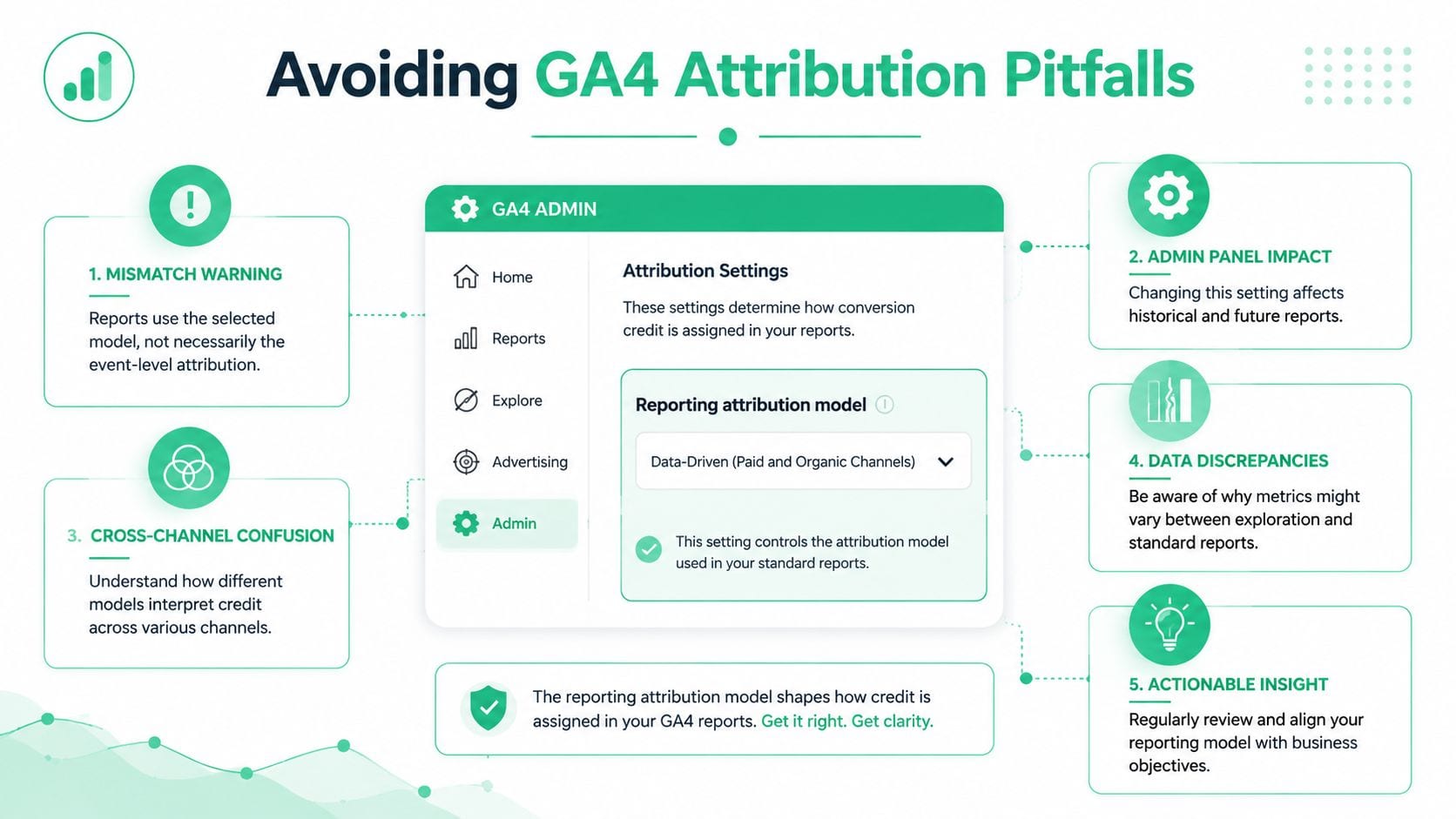
The biggest GA4 attribution mistake is simple. Teams assume the main attribution setting controls all reports.
It doesn't.
A key detail many teams miss is that GA4's main attribution setting affects only the Attribution reports and certain event-scoped reporting, while the standard Traffic Acquisition and User Acquisition reports continue using their own session-scoped or user-scoped logic, as outlined in this explanation of GA4 attribution model behavior.
The report mismatch that confuses everyone
This is the scenario I see most often:
- An analyst changes the reporting attribution model in Admin.
- They open Traffic Acquisition.
- The numbers don't move the way they expected.
- The team decides GA4 is unreliable.
What happened is simpler. The report they checked wasn't governed by the setting they changed.
That's why side-by-side comparisons often feel misleading. One report is still using session or user acquisition logic. Another is applying event-level attribution for key events.
Don't test attribution changes by refreshing Traffic Acquisition and expecting a universal shift. That report has its own logic.
The second problem is data quality
Even when teams understand report scope, attribution still fails if the inputs are bad.
DDA is especially sensitive to path quality. If UTMs are missing, click IDs break, pixels fail to fire, or channel groupings collapse unrelated traffic into the wrong buckets, the model learns from distorted paths. The output may look advanced, but it won't be dependable.
Common causes include:
- Inconsistent UTMs: The same campaign appears under several names.
- Broken events: Lead or purchase events fire incorrectly, twice, or not at all.
- Missing marketing pixels: Important ad platform touches never enter the observed path.
- Schema drift: Parameters change without analytics teams knowing.
- Consent or implementation gaps: Some sessions lose attribution context unexpectedly.
Observability matters more than debating models. Tools such as Google Tag Manager previews, analytics QA workflows, and platform-level monitoring help teams catch implementation issues early. One option in that category is Trackingplan, which monitors analytics and attribution implementations, detects missing or rogue events, flags campaign tagging problems, and alerts teams to anomalies across web, app, and server-side data collection.
If you want a practical reference on that side of the problem, this article on data quality and automated data validation in GA4 is directly relevant.
A safer way to read GA4 attribution
Use this sequence instead of jumping between reports blindly:
- Start with the question: Are you analyzing the original source, the current session source, or the touchpoints influencing a key event?
- Pick the matching report type: User Acquisition, Traffic Acquisition, or Attribution.
- Validate path integrity: Check campaign tagging, event quality, and channel grouping.
- Compare only like with like: Don't pit session-scoped reports against event-scoped reports and call it a discrepancy.
That process won't remove every limitation in attribution. It will remove a lot of self-inflicted confusion.
Conclusion Validating Your Data Is Step One
GA4 attribution models aren't difficult because the concepts are advanced. They're difficult because GA4 applies different logic in different places, and this often goes unnoticed until reports stop agreeing with each other.
The essential fixes are practical. Know the scope behind each report. Choose a model that fits your funnel instead of following the default blindly. Treat data quality as part of attribution, not as a separate cleanup task someone will handle later.
If your campaign taxonomy is inconsistent, your events are unstable, or your pixels are unreliable, model selection won't save you. It will only redistribute uncertainty in a cleaner-looking format. That's why attribution work usually gets better when teams stop asking “which model should we use?” and start asking “can we trust the path data underneath this report?”
For teams that want to keep improving that foundation, Trackingplan's documentation and video resources are worth reviewing, including material from its YouTube channel for ongoing analytics QA and implementation guidance.
If you're trying to make GA4 attribution usable in practice, start by validating the tracking layer before debating channel credit. Trackingplan helps teams monitor analytics, marketing tags, attribution pixels, UTMs, and data quality issues continuously so reporting decisions rest on cleaner inputs.