
Your team launches a new campaign, QA says the tags look fine, and then someone notices an email address sitting inside a page_view payload. The analytics implementation is technically working, but the data handling isn't safe. That often marks the starting point for most anonymization projects.
In modern analytics stacks, the problem rarely lives in one clean customer table. It shows up in dataLayer pushes, pixel requests, form events, CRM syncs, mobile SDK payloads, and server-side routing. If you want to understand how to anonymize data in that environment, you need a process that works on live event streams without wrecking attribution, reporting, or debugging.
Why Anonymization Is More Than Deleting Names
A live analytics stream can look clean at first glance and still expose people. Remove name and email from an event, and a user may still be easy to recognize from a tight combination of timestamp, location, device details, order value, campaign source, and on-site behavior.
That risk shows up more often in event data than in a static customer table. Real-time payloads collect context fast. A page_view, checkout event, CRM sync, and ad platform callback can each look harmless on their own, but together they can recreate a person with surprising accuracy.
Anonymization and pseudonymization are different controls
Teams often label data as anonymized when they have only hidden the obvious identifier. In practice, many analytics setups are using masking, hashing, or tokenization so systems can still join records across events and tools.
A GDPR-based definition cited by Tonic.ai's explanation of anonymization techniques states that pseudonymization is processing personal data so it can no longer be attributed to a specific person without additional information. That is useful for operations and access control. It is not the same as irreversible anonymization.
Use a simple test. If your team can restore the original value, connect the record to a lookup table, or identify the person by combining it with another dataset, the data is still within privacy scope.
This is why a hashed email in a marketing workflow needs honest labeling. It may support attribution, suppression lists, or audience matching, but it still carries re-identification risk.
The goal is to reduce identifiability without destroying utility
Privacy teams are not trying to make data useless. They are trying to stop a person from being singled out while keeping enough signal for reporting, experimentation, and operational debugging.
For streaming analytics data, that usually means changing structure and precision, not only deleting fields. A field-level review against a concrete list of personally identifiable information used in analytics and marketing stacks often reveals the actual problem areas. Query parameters, free-text form values, internal search terms, and custom event properties cause more exposure than teams expect.
Deletion still matters. Some data should never enter the stream at all.
A related control is data destruction. If the requirement is to remove sensitive information from storage media rather than transform it for safer analytics use, that is a different process, and this IT security guide for data destruction helps clarify that boundary.
In production environments, the working standard is straightforward:
- Block collection of direct identifiers at the source: raw email addresses, phone numbers, street addresses, account numbers, and uncontrolled free-text inputs.
- Lower precision where analysis still holds up: use age bands instead of exact age, city or region instead of precise location, rounded timestamps instead of exact event times when fine-grained timing is not needed.
- Check combination risk across systems: review whether event data, CRM data, ad platform exports, support logs, or vendor enrichments could be joined to identify someone.
That last step is where many implementations fail. The payload looks sanitized field by field, but the full stream still identifies people once enough context accumulates.
Deleting names is the beginning. Anonymization in a live analytics environment is a design decision about what the business needs, what the stream should never carry, and what level of detail remains safe after systems start joining data.
Choosing Your Anonymization Technique
Choosing a technique is a systems decision, not a terminology exercise. In a live analytics setup, the same field can be harmless in one event and risky in another, depending on what else travels with it, where it lands, and who can join it later.
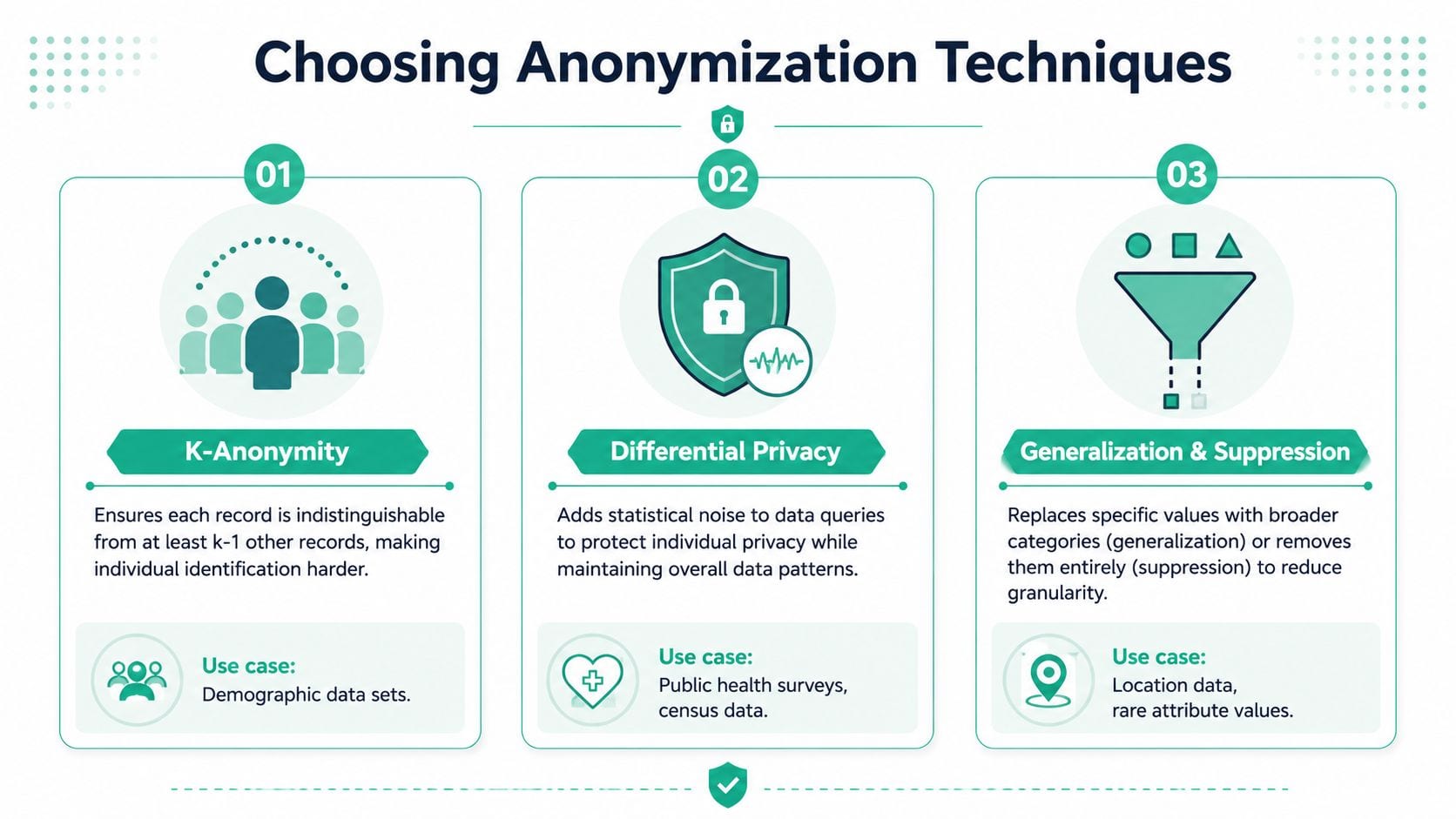
A pageview stream, a conversion pixel, and a CRM export do not need the same treatment. Real-time event pipelines make that harder because fields are copied fast across tags, SDKs, warehouses, and ad tools. A technique that preserves enough utility for product analysis can still create unnecessary exposure in marketing activation.
Choose based on use case and join risk
Start with the question teams usually skip: what does this field need to do after collection?
If a field has no reporting, debugging, modeling, or operational purpose, remove it from the stream. If the business only needs pattern-level insight, reduce precision. If continuity across sessions or events matters, pseudonymization may be acceptable, but only with strict access controls and clear rules on where the token can travel. If the output is a dashboard, partner report, or audience trend, aggregate release is often safer than exposing event-level records.
That approach works better than picking a method because it sounds mature or privacy-friendly.
Side-by-side decision guide
| Technique | Best fit in analytics | Main advantage | Main trade-off |
|---|---|---|---|
| Masking or redaction | Direct identifiers such as email or phone | Fast to implement | Doesn't solve indirect identification |
| Pseudonymization | User journey continuity, controlled QA, attribution joins | Preserves relationship across events | Still carries privacy risk |
| Generalization | Age, location, timestamps, device detail | Reduces uniqueness while keeping patterns | Lowers granularity |
| Suppression | Rare values, outliers, free text, one-off attributes | Cuts high-risk leakage points | Can remove useful context |
| Aggregate release controls | Dashboards, reporting APIs, model outputs | Safer sharing pattern than raw records | More complex governance |
In practice, several techniques usually apply to the same dataset. A common event stream might remove email, generalize timestamp precision, suppress free text, and pseudonymize the user key for limited internal analysis. That mix is normal. Single-method anonymization rarely holds up once multiple teams start querying the same data.
What fits common analytics fields
These are the choices I see work in production environments:
- Email address in signup or lead events: remove before dispatch, or redact at collection if a tool cannot avoid receiving the field during processing.
- User or device identifier used for journey analysis: pseudonymize if continuity is required, then treat the pseudonym as sensitive because it still supports tracking over time.
- Precise location data: generalize to city, region, or market area unless exact coordinates are part of the product itself.
- Birthdate or exact age: replace with age bands or cohorts.
- Event timestamps: round to the level the analysis needs, especially in streams where exact time plus page path or campaign ID can isolate a person.
- Search queries and free-text inputs: suppress by default. These fields routinely capture names, health details, account numbers, and other sensitive content by accident.
One rule is consistent across teams. The more a field supports singling out a person across repeated events, the more cautious the technique needs to be.
Pseudonymization is useful, but it is not anonymous
This distinction matters in analytics and marketing stacks because pseudonymized IDs are often treated too casually. Replacing a customer ID with a hash can preserve funnel analysis, retention reporting, and pathing. It also preserves linkability. If another system holds the lookup key, or if the same token appears across tools, the privacy risk remains real.
That does not make pseudonymization a bad choice. It makes it a controlled choice. Use it where continuity is necessary, keep the token format standardized, limit access to the mapping logic, and avoid passing the same pseudonym everywhere by default.
Where formal privacy models fit
K-anonymity, l-diversity, and differential privacy matter, but usually not at the first point of collection in a tag manager or pixel configuration.
They are more useful later, when a team wants to share a dataset, expose an internal reporting interface, or answer repeated queries on sensitive user behavior. K-anonymity helps reduce how easily one record stands out in a release. L-diversity addresses cases where a grouped dataset still reveals too much because the sensitive values are too similar. Differential privacy helps control what any single person's data contributes to reported results.
For fast-moving analytics streams, the practical sequence is simpler. Remove direct identifiers first. Reduce precision on fields that create uniqueness. Use pseudonymization only where event continuity has clear business value. Apply stronger privacy controls when data is shared, queried repeatedly, or exposed outside the small group that operates the pipeline.
A Practical Workflow for Anonymizing Analytics Data
The workflow that holds up in production is simple on paper and demanding in execution. Identify sensitive data, choose the least risky transformation that preserves the required use case, implement it as early as possible, and review what still leaks.
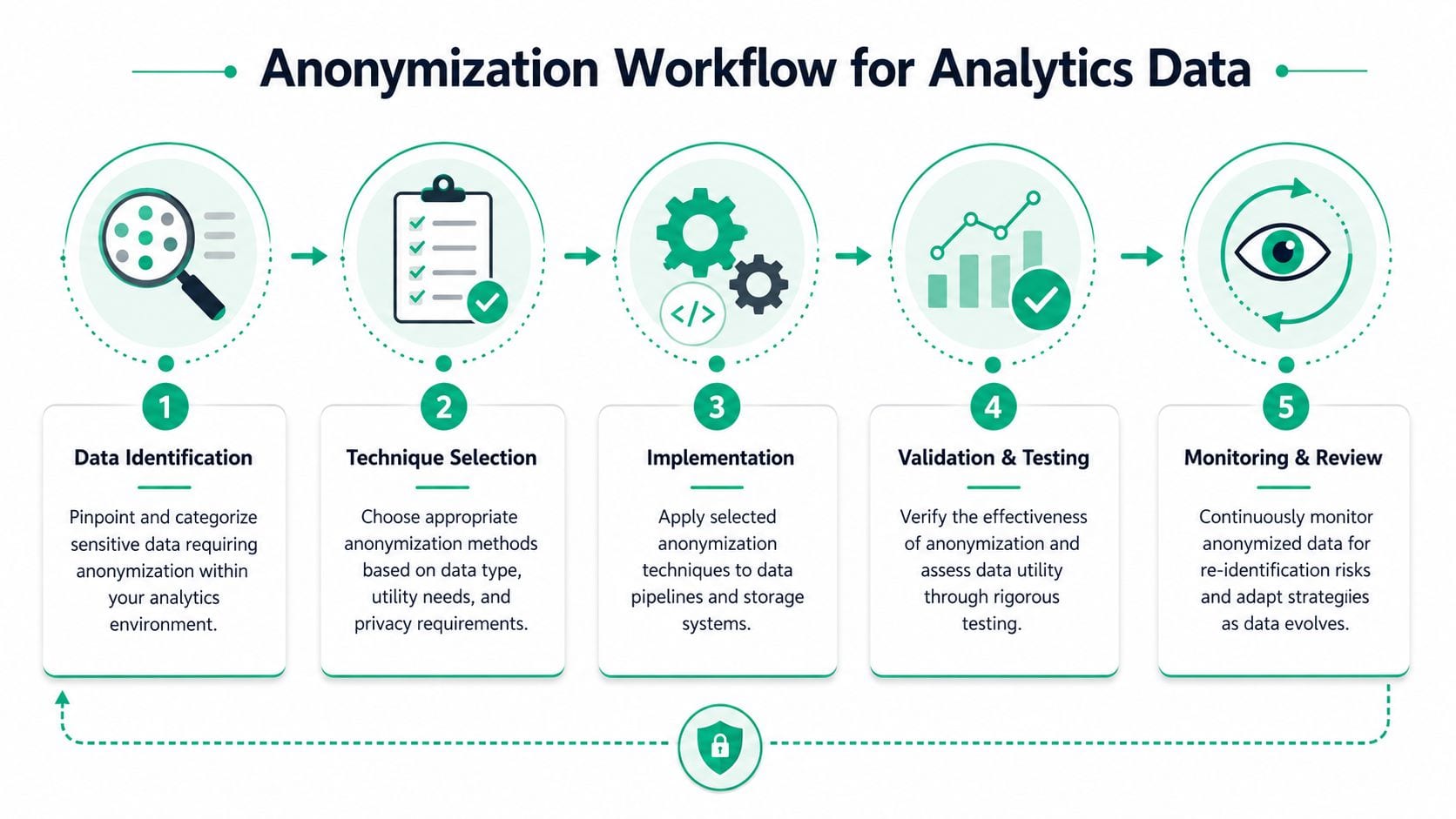
Step one is mapping the live data flow
Start with discovery. Don't just inspect your warehouse schema. Inspect what the browser, app, SDK, tag manager, and server endpoint send.
A practical workflow described by ATLAS.ti's overview of anonymization in research practice starts with removing direct identifiers, then altering indirect identifiers, generalizing contextual details, and ending with a residual-disclosure review. It also recommends documenting every change and performing periodic audits.
For analytics teams, that usually means reviewing:
- Collection points: dataLayer pushes, form handlers, mobile events, backend event emitters
- Transport layers: client-side tags, APIs, CDPs, webhooks, server-side connectors
- Destinations: analytics tools, ad platforms, product analytics, internal storage
- Replay paths: logs, QA tools, alerting systems, support exports
If your implementation relies on browser collection, server-side tracking patterns can create a cleaner interception point for anonymization logic before data reaches third-party vendors.
Here's a useful explainer from Trackingplan's channel:
Apply transformations as close to collection as possible
Batch cleanup in the warehouse is better than nothing. It's not enough if the leak already reached external platforms.
In a dynamic analytics setup, the preferred order is:
- Block direct identifiers at source when the event is created.
- Normalize risky indirect identifiers before dispatch.
- Generalize contextual details only to the precision needed for reporting.
- Run a residual-risk review against the transformed payload.
A basic browser-side example might look like this:
<script>function anonymizeAnalyticsEvent(event) {const cloned = structuredClone(event);if (cloned.user && cloned.user.email) {delete cloned.user.email;}if (cloned.user && cloned.user.phone) {delete cloned.user.phone;}if (cloned.user && typeof cloned.user.age === 'number') {if (cloned.user.age >= 20 && cloned.user.age <= 24) cloned.user.age_band = '20-24';else if (cloned.user.age >= 25 && cloned.user.age <= 29) cloned.user.age_band = '25-29';else if (cloned.user.age >= 30 && cloned.user.age <= 34) cloned.user.age_band = '30-34';else if (cloned.user.age >= 35 && cloned.user.age <= 39) cloned.user.age_band = '35-39';else cloned.user.age_band = 'other';delete cloned.user.age;}if (cloned.page && cloned.page.search_term) {delete cloned.page.search_term;}return cloned;}const originalPush = window.dataLayer.push;window.dataLayer.push = function () {const args = Array.from(arguments).map(anonymizeAnalyticsEvent);return originalPush.apply(window.dataLayer, args);};</script>This is only a starting point. Mature implementations centralize the rules so engineering, analytics, and legal review one policy set instead of scattered snippets across tags and templates.
Treat documentation as part of the control
An anonymization rule that isn't documented won't survive the next sprint.
Keep a decision log for each transformed field:
- What the original field was
- Why it was risky
- What transformation you applied
- Which tools still receive the field
- Who approved the rule
- How the rule is tested
That record matters when someone asks why a dimension vanished from a dashboard or why a destination no longer receives a customer attribute. It also keeps temporary exceptions from becoming permanent leakage.
Validating and Testing Your Anonymization Strategy
Anonymization fails unnoticed when nobody tests the live output. A team removes email from one event, but a new checkout widget starts sending it in another field. Or the masking rule works, but it breaks schema integrity and downstream reports stop grouping correctly.
That's why validation has two jobs. It must confirm that sensitive data is no longer exposed, and it must confirm that the analytics payload still behaves as expected.
Test for privacy and for structure
A useful testing routine checks both the content and the contract of the event.
The challenge gets sharper in real-time streams. Immuta's discussion of data masking notes that maintaining schema integrity after anonymization is a major challenge, especially when teams need dynamic masking while preserving the structure required by downstream analytics tools.
A practical test pack usually includes:
- PII pattern checks: look for email-like strings, phone-like values, address fragments, raw names, and uncontrolled text fields.
- Schema validation: confirm required event names, property names, data types, and allowed enums still match the tracking plan.
- Destination-specific checks: verify that Google Analytics, Amplitude, Mixpanel, ad pixels, or internal endpoints still accept the transformed payloads.
- Regression monitoring: inspect changes after releases, vendor tag updates, consent changes, and campaign launches.
For teams formalizing this process, a good reference point is this guide on data validation for digital analytics implementations.
Try to re-identify your own anonymized output before anyone else does. If your team can reconnect a user with side information, a third party may be able to do the same.
Run attacker-style review, not just syntax checks
Most automated tests catch formatting problems. They don't answer the harder question: could someone still infer identity from the remaining fields?
Use realistic reviewer exercises:
- Compare transformed payloads with CRM exports, support logs, or campaign lists.
- Look for rare combinations of attributes that make one person stand out.
- Review aggregate reports and model outputs, not just event-level records.
- Re-test after adding new properties, consent states, or destinations.
This is also where observability matters. One option in this category is Trackingplan, which monitors analytics implementations across web, app, and server-side setups and can surface issues such as schema mismatches and potential PII leaks in live traffic.
A one-time audit won't hold for long in a stack that changes every week. Validation has to be continuous, or anonymization becomes a policy document instead of an operating control.
Navigating Legal and Strategic Trade-offs
Every anonymization decision removes something. Sometimes that's good. Sometimes it damages the analysis more than the privacy gain justifies. Good governance means making those trade-offs explicitly instead of hiding them inside implementation details.
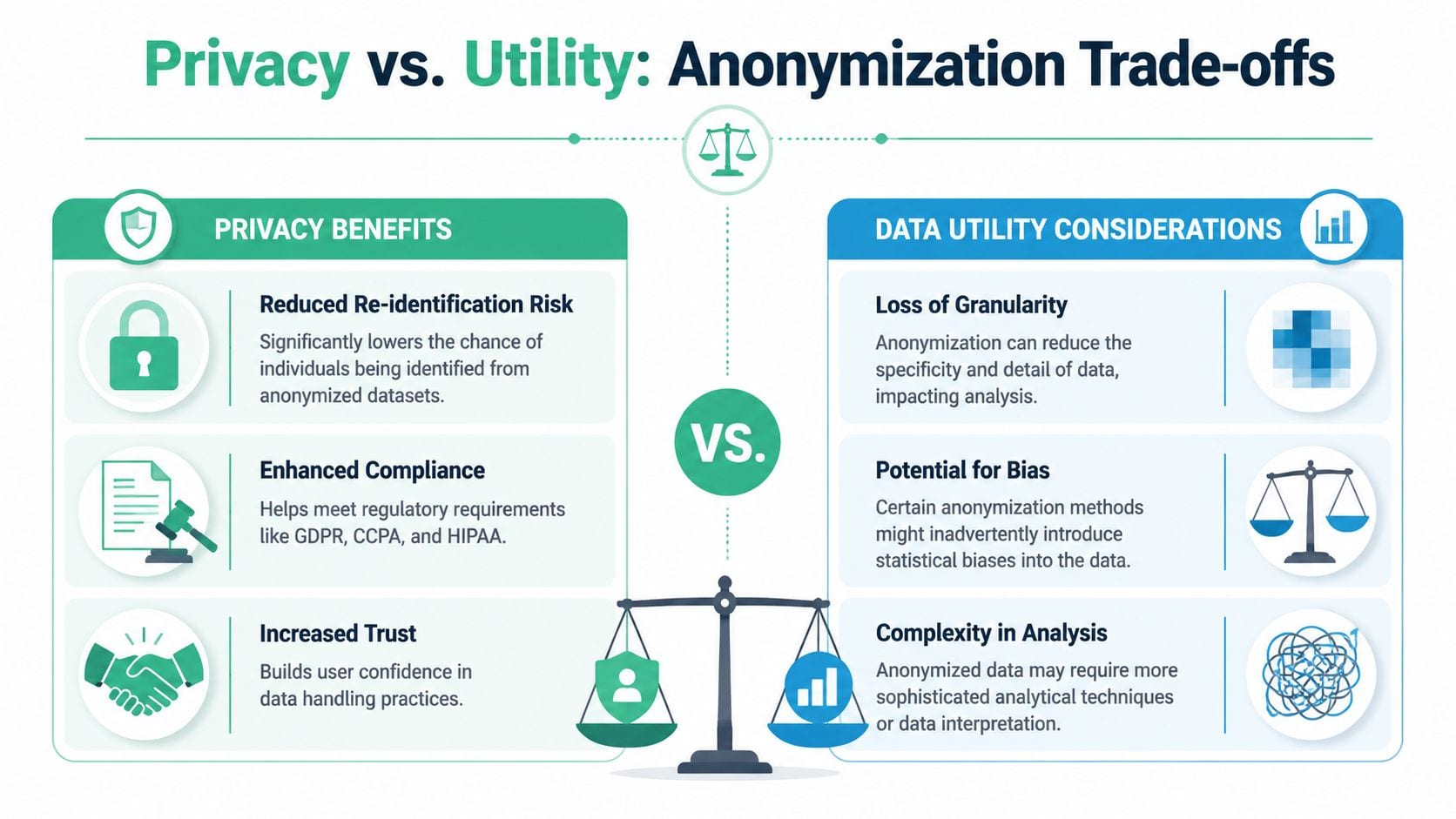
Utility falls as uniqueness rises
Highly detailed data is often analytically attractive because it lets teams slice more precisely. That same precision can make records easier to isolate.
The hardest decisions usually involve fields like granular timestamp data, exact location, detailed device attributes, or niche conversion paths. If you keep them untouched, analysts get cleaner segmentation. If you generalize them, you lower uniqueness but may lose investigative depth, especially in attribution and funnel debugging.
This balance matters even more beyond record-level data. The Science Advances article on privacy attacks and modern data releases warns that traditional record-level de-identification often provides a poor privacy-utility trade-off, and aggregate data forms like ML models do not provide built-in protection against privacy attacks. That's a blind spot in many martech environments, where teams scrub raw events but freely share dashboards, exported summaries, or model artifacts.
Build decisions around use cases
A defensible approach is to classify data by intended use rather than treating all analytics data the same.
| Use case | Privacy posture | Typical approach |
|---|---|---|
| Internal debugging | Controlled access, short retention | Pseudonymization plus strict access limits |
| Standard performance reporting | Moderate precision, broad access | Generalization and suppression of rare values |
| External sharing or partner reporting | High caution | Aggregated outputs with release controls |
| Modeling or experimentation | Case-specific review | Minimized inputs and explicit risk assessment |
That approach helps cross-functional teams agree on what's necessary versus what's merely convenient. It also creates a better audit trail for privacy review and vendor management. If you maintain public-facing governance documentation, even a simple example like our site's privacy guidelines shows the value of making data handling rules understandable outside the engineering team.
Legal compliance depends on the reality, not the label
Calling a dataset anonymized doesn't make it so. Regulators and internal counsel will care about whether a person can still be identified, directly or indirectly, using reasonable means.
That's why governance teams should document:
- What transformations were applied
- Whether reversibility still exists
- What external data could enable linkage
- Who can access the remaining dataset
- How ongoing risk is reviewed
For operational context on the broader governance side, this guide to privacy and compliance in digital analytics is a useful companion.
Legal strategy and technical strategy have to line up. If engineering says “anonymized” but the data science team can still stitch records back to people, the label won't protect you.
Building a Privacy-First Data Culture
The teams that handle anonymization well don't treat it as a one-off cleanup. They treat it as part of how analytics gets built, reviewed, and released.
That means a few habits become standard. Product and marketing teams challenge whether a field needs to exist. Developers add controls near collection points instead of trusting warehouse cleanup later. Analysts test whether reduced precision still answers the business question. Governance teams review residual risk when new integrations appear.
Good anonymization is operational discipline
A workable culture usually includes these behaviors:
- Shared field ownership: someone is accountable for each sensitive property in the tracking plan.
- Change review: new tags, pixels, SDK updates, and dataLayer fields get screened before release.
- Repeatable QA: privacy checks run alongside analytics QA, not after an incident.
- Documented exceptions: if a field must remain more detailed, the business case is recorded.
Privacy-first teams don't ask only “can we collect this?” They ask “who needs it, why, and what happens if it leaks?”
The deeper lesson is that masking fields alone won't carry the whole load. Harvard's summary of privacy theory notes that the strongest technical control is not just masking fields but constraining what can be released, using a centralized controller that can restrict query types, add statistical noise, and track cumulative disclosure in ways that can mathematically prevent re-identification when applied correctly in its overview of anonymity, de-identification, and accuracy.
Start smaller than you think
You don't need to redesign the entire stack on day one.
Start by auditing live event payloads. Remove direct identifiers from the most exposed destinations. Generalize a handful of risky indirect identifiers. Add tests for schema integrity and leakage. Then review your aggregate outputs, dashboards, and model exports with the same skepticism you apply to raw events.
That's the practical answer to how to anonymize data in a modern analytics environment. It's not one technique. It's a controlled process that keeps evolving as your stack changes.
If you want a practical next step, audit one live user journey from dataLayer to destination and document every field that could identify a person directly or indirectly. Teams that need ongoing visibility into analytics payloads, schema changes, pixel behavior, and potential PII leaks can evaluate Trackingplan as part of that process.