
Let's get straight to it: for effective Facebook ad tracking, you need a unified strategy. This means combining the browser-side Facebook Pixel with the server-side Conversions API (CAPI), and then validating everything with automated QA. If you're still just banking on the Pixel, you're operating with a flawed model that's leaking data and tanking your return on ad spend (ROAS).
To really nail this down, it helps to see how these two pieces of the puzzle fit together. The Pixel handles what happens in the browser, while CAPI fills in the blanks from your server. You absolutely need both.
Pixel vs Conversions API (CAPI) Head-to-Head
Here's a quick comparison of the two essential components for tracking Facebook ads, highlighting why you need both for a complete picture.
Pairing the Pixel with CAPI gives you a resilient, hybrid tracking system. It ensures that even when the browser fails to send an event, your server can step in to report the conversion directly to Meta, giving you a much more accurate view of campaign performance.
Why Your Facebook Ad Tracking Is Failing

Let's be honest—your current Facebook ad tracking probably has more holes than you realize. Many marketers operate with a false sense of security, completely unaware that silent data gaps are actively undermining their campaigns. You might see conversions pop up in Ads Manager, but are you really seeing the full picture?
These gaps aren't just a hypothetical problem; they're a daily reality. A perfect storm of factors has made traditional, browser-only tracking dangerously unreliable.
The Blind Spots in Your Data
The main culprit here is an over-reliance on the Facebook Pixel. While it’s still a crucial part of the setup, the Pixel lives inside the user's browser. That makes it extremely vulnerable to some major disruptions:
- iOS Privacy Updates: Apple’s AppTrackingTransparency (ATT) framework forces apps to ask users for permission to track them. Unsurprisingly, many say no, which slashes the amount of data the Pixel can gather from iOS devices.
- Ad Blockers: A significant and growing number of users run ad-blocking software. These tools often prevent tracking scripts like the Pixel from ever loading in the first place.
- Cookie Restrictions: Browsers like Safari and Firefox have built-in features like Intelligent Tracking Prevention (ITP) that aggressively limit third-party cookies. This cripples the Pixel's ability to track users across different sessions.
- Consent Management: Privacy laws like GDPR require you to get explicit user consent before any tracking starts. If a user declines, the Pixel is essentially switched off for them.
All this means you're flying partially blind. The events you see in Facebook Ads Manager are likely just a fraction of the actual conversions your ads are driving.
When you can't accurately attribute sales to your campaigns, you can't properly optimize your budget. This leads directly to wasted ad spend and a lower overall ROAS as you pour money into what appears to be working, based on dangerously incomplete data.
The Financial Impact of Poor Tracking
The financial stakes are massive. In today's competitive ad environment, every click and conversion counts. A quick look at the numbers shows a stark reality: average CTR benchmarks are already slim, sitting between 0.72%–1.49% across industries. At the same time, average CPCs are $1.06–$1.72 and CPMs hit $7.47, making every tracking error a direct hit to your budget. You can explore the full breakdown of these Meta benchmarks to see exactly how your own campaigns stack up.
This isn’t just about the numbers on a dashboard; it’s about making confident, informed decisions. Without trustworthy data, you can't reliably scale winning campaigns or kill the ones that are bleeding money. You're just guessing.
The only way forward is to build a more resilient tracking system that doesn't depend solely on the browser. That means embracing a hybrid model that combines the Pixel with the Conversions API to build a complete and accurate picture of your ad performance.
Building a Bulletproof Event Taxonomy
Before you write a single line of code or touch Google Tag Manager, your success with Facebook ads hinges on a solid plan. A well-defined event taxonomy is that plan. Think of it as the blueprint for your entire tracking setup—it dictates what you track, why you track it, and how that data translates into actionable campaign insights.
Without this blueprint, you’ll quickly fall into the classic “garbage in, garbage out” trap. We’ve all seen it: teams track inconsistent, poorly named, or just plain irrelevant events. This makes it impossible to build effective audiences, optimize for the right conversions, or get an honest read on your ROAS. A bulletproof taxonomy ensures everyone, from marketing to engineering, is speaking the same language.
Moving Beyond Generic Events
The first step is to think beyond the default PageView event. Sure, it’s necessary, but it tells you very little about a user's intent. Your real goal is to map out the specific, meaningful actions users take on their path to becoming a customer. These actions fall into two main buckets: standard and custom events.
Standard Events are actions that Facebook has predefined because they’re common across most businesses. Using them is a non-negotiable best practice. Facebook's ad system understands them out of the box, which makes optimizing your campaigns so much easier.
Key standard events you should absolutely be using include:
- ViewContent: A user views a specific product page, article, or key landing page.
- AddToCart: A user adds an item to their shopping cart.
- InitiateCheckout: A user starts the checkout process.
- AddPaymentInfo: A user saves their payment details.
- Purchase: A user completes a transaction.
- Lead: A user submits a form, signs up for a newsletter, or otherwise identifies themselves as a potential customer.
- CompleteRegistration: A user finishes signing up for an account.
Defining Custom Events for Your Business
While standard events cover the fundamentals, your business has unique interactions that signal high intent. This is where custom events come into play. These are events you define yourself to capture interactions specific to your business model.
Let's look at a couple of real-world scenarios:
For an E-commerce Store:
A standard AddToCart event is great, but what if a user clicks a "Notify Me When Back in Stock" button? That’s a huge buying signal. You could create a custom event like Subscribed_BackInStock to capture this, letting you build a hyper-targeted audience for when the product is available again.
For a SaaS Company:
A standard Lead event for a demo request is fine, but it doesn't tell you anything about product adoption. You could implement custom events like Created_FirstProject, Invited_Teammate, or Upgraded_Workspace. These help you measure user engagement and identify the "aha!" moments that lead to long-term subscriptions.
An event taxonomy isn't a static document you create once and forget. It’s a living guide that should evolve with your business. Every time you launch a new feature or marketing initiative, revisit your taxonomy to make sure you're capturing the data that actually matters.
Structuring Event Properties for Richer Data
Just tracking an event name isn't enough. The real magic happens in the additional data you send with each event, known as properties or parameters. These details provide the context you need to build powerful audiences and laser-focus your ad targeting.
Imagine tracking a standard Purchase event. Sending only the event name is like telling Facebook, "someone bought something." It's not very helpful.
Now, imagine sending that Purchase event with these properties attached:
value: 99.99currency: "USD"content_ids: ['SKU-123', 'SKU-456']content_type: 'product'num_items: 2
With this level of detail, you can create audiences of users who spent over $100, purchased a specific product, or bought multiple items at once. This is the kind of data that fuels truly effective lookalike audiences and retargeting campaigns that drive real results. The key is to get marketing and development in the same room to create a single source of truth, ensuring the data marketing needs is exactly what gets implemented.
Implementing a Hybrid Pixel and CAPI Setup
Okay, you've got your event plan. Now it's time to roll up our sleeves and get this thing built. For rock-solid Facebook ad tracking, you absolutely need a hybrid setup: the classic, client-side Facebook Pixel working in tandem with the server-side Conversions API (CAPI). Think of it as a one-two punch for data collection.
The Pixel, which we'll manage through Google Tag Manager (GTM), grabs user actions right from the browser. CAPI is your server-side powerhouse, sending data directly to Facebook's servers. This lets you bypass all the usual browser headaches like ad blockers and privacy settings. Using both together is the only way to get a complete, reliable picture of your customer journey.
But before you write a single line of code, remember that a solid implementation is built on a solid plan.
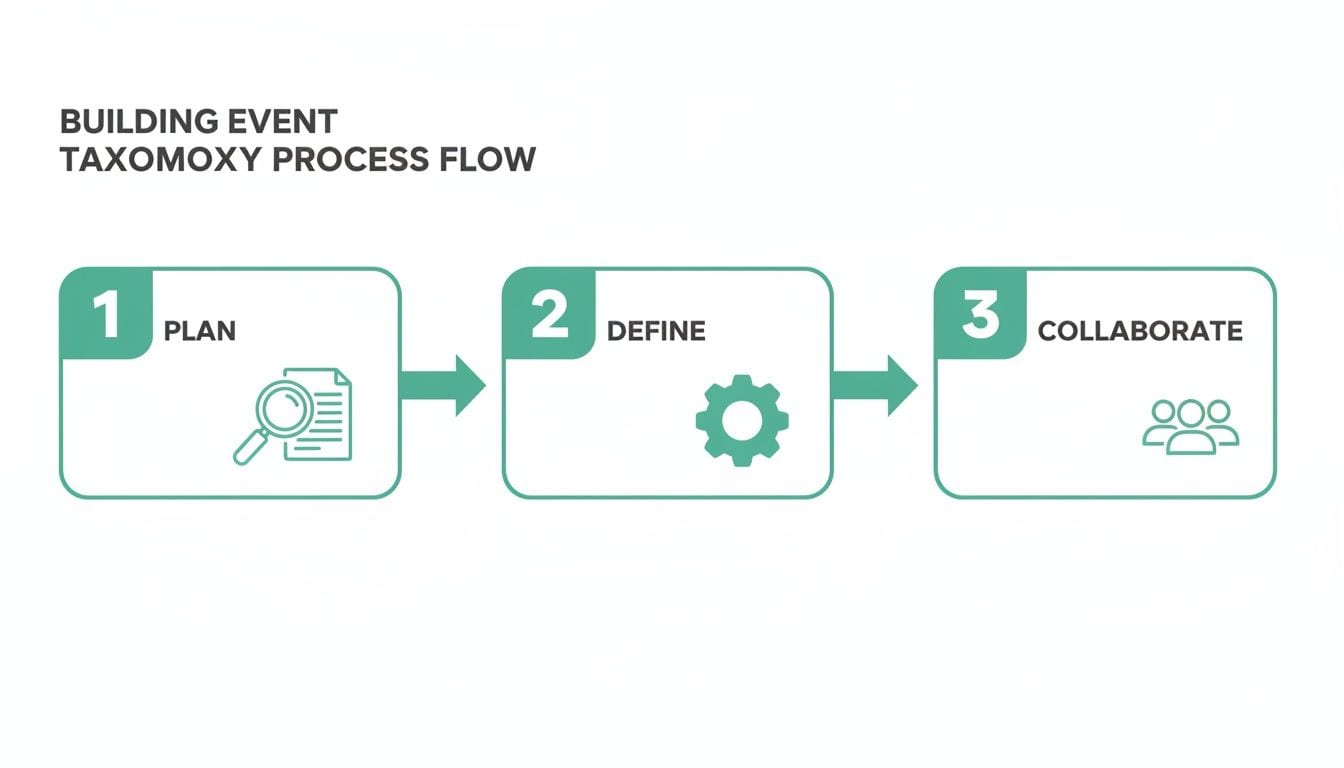
As you can see, great tracking starts with strategy and teamwork, not just flipping a switch in a tool.
Starting with the Pixel in Google Tag Manager
Your first layer is the trusty Facebook Pixel. You could just drop the code snippet directly onto your site, but trust me, using Google Tag Manager is a much smarter move. It keeps all your tracking scripts in one place and lets you add new events without bothering your developers.
The best way to start is with the official Facebook Pixel tag template from the GTM Community Template Gallery. This template makes setup a breeze, with clear fields for your Pixel ID and event parameters. It seriously cuts down on the chances of a copy-paste error. A proper Meta Pixel integration is a non-negotiable part of any serious Facebook ad tracking strategy.
For your base tag, you’ll configure it to fire on all pages. This sends the standard PageView event, which acts as the foundation for tracking everything else a user does on your site.
Diving into the Conversions API (CAPI)
While the Pixel handles the client-side, the Conversions API is your server-side safety net and data enricher. CAPI sends conversion data straight from your server to Facebook, capturing crucial events the Pixel might miss due to browser issues. We cover this in-depth in our guide to the Facebook Conversions API.
You’ve got a few options for getting CAPI up and running:
- Direct Integration: This is the most hands-on approach. Your developers will need to build HTTP requests to send data from your server to the CAPI endpoint. You get total control, but it's also the most complex.
- Partner Integrations: Many platforms like Shopify offer native CAPI integrations that you can set up with just a few clicks. If you're on one of these platforms, this is often the easiest path.
- GTM Server-Side: This is a popular middle ground. Your client-side GTM container sends data to a server-side GTM container, which then forwards it to Facebook’s CAPI. It gives you a great balance of control without the heavy lifting of a direct integration.
Whichever route you take, CAPI is what will save your data from iOS updates and ad blockers, giving you a much truer count of your conversions.
The Critical Role of Event Deduplication
Here’s where people get into trouble. When you send events from both the Pixel and CAPI, you're practically guaranteed to double-count conversions. A single Purchase could get logged twice—once from the browser and again from the server. This wrecks your data, inflates your numbers, and completely throws off Facebook's optimization algorithm.
The fix is event deduplication. The process is simple in theory: you need to send a unique event_id parameter with every single conversion event from both the Pixel and CAPI.
When Facebook sees two events with the same
event_idand name (likePurchase) within a certain time frame, it’s smart enough to keep the first one that arrives and ignore the second. This is how you ensure every conversion is counted exactly once.
For a Purchase event, the order confirmation number is a perfect event_id. The crucial part is that this ID must be identical for the same event sent from both the browser and the server.
Unifying Web and Mobile App Tracking
If your business has both a website and a mobile app, you have to connect the dots. Just like the Pixel tracks web events, the Facebook SDK is what you'll use to track in-app events on iOS and Android. You’ll need to implement the SDK to fire the same standard and custom events from your taxonomy, like fb_mobile_add_to_cart or fb_mobile_purchase.
By maintaining a consistent event naming scheme and passing the same user identifiers (where consented), you can finally see the full picture. A customer might see a Facebook ad on their laptop, add a product to their cart in your app later that day, and finally check out on their desktop a week later. A unified setup makes that entire cross-device journey visible.
This comprehensive data has a direct impact on ad performance, helping you make smarter decisions about your budget. For instance, Instagram Stories CTRs, which hover between 0.33%–0.54%, often beat the Feed's 0.22%–0.88%, suggesting Stories are a great spot for mid-funnel content. However, the Facebook Feed still commands a massive 31% traffic share, so you can't ignore it, even with a higher CPC of $3.35 compared to Stories' $1.83. You can discover more insights on how these statistics affect ad strategy and see why this kind of data makes continuous testing so vital.
Mastering Attribution in a Privacy-First World
You’ve done the heavy lifting and have a hybrid tracking implementation in place. Now you're collecting better, more reliable data. But collecting it is only half the battle—the real work begins when you start interpreting it. In a world shaped by privacy updates and browser restrictions, knowing exactly how Facebook attributes conversions is what separates guessing from genuine performance analysis.
This is where you need to get comfortable with two critical concepts: attribution windows and Aggregated Event Measurement (AEM). Getting these right is the key to giving credit where it's due and making smart decisions based on data you can actually trust.
Choosing the Right Attribution Window
An attribution window is simply the timeframe after someone interacts with your ad during which Facebook can claim credit for a conversion. Inside Facebook Ads Manager, you'll see a few options, but the ones you'll use most are:
- 7-day click: A conversion is attributed if a user clicks your ad and converts within seven days.
- 1-day view: A conversion is attributed if a user sees your ad (without clicking) and converts within one day.
So, which one do you pick? For most businesses, the 7-day click and 1-day view setting is your best bet. It strikes a great balance, capturing both immediate sales from clicks and the conversions influenced by people who just saw your ad.
Of course, this isn't a one-size-fits-all rule. It really depends on your sales cycle. If you're selling a high-ticket item with a long consideration phase, a longer click window might make sense. On the flip side, a low-cost impulse buy is likely to convert almost entirely within a 1-day click window.
Navigating Aggregated Event Measurement (AEM)
When Apple rolled out iOS 14.5, its AppTrackingTransparency (ATT) framework changed the game, severely limiting tracking for users who opted out. Facebook’s response was Aggregated Event Measurement (AEM), a system that processes web events from iOS 14.5+ users to keep measurement possible while respecting their privacy choices.
Under AEM, you can configure up to eight standard or custom events for optimization on each domain. Here’s the catch: when an opted-out iOS user performs multiple actions (like ViewContent, AddToCart, and then Purchase), Facebook will only report the single highest-priority event that you’ve configured.
You have to rank your eight events in order of importance. For an e-commerce store,
Purchasewould be at the top, followed byInitiateCheckout,AddToCart, andViewContentat the bottom. This hierarchy ensures the most valuable actions are always the ones that get reported.
Getting this prioritization right is absolutely critical for tracking Facebook ads effectively. If you skip this configuration, Facebook can't optimize or report on events from this large and important group of users.
Integrating with Consent Management Platforms
Respecting user privacy isn't just a nice-to-have; it's a legal requirement under regulations like GDPR and CCPA. A Consent Management Platform (CMP) is non-negotiable for any modern tracking setup. Your entire implementation needs to be integrated with your CMP to conditionally fire tags based on what your users agree to.
Here’s what this looks like in practice:
- A new user lands on your site and sees a consent banner.
- If they accept marketing cookies, your GTM setup fires the Facebook Pixel as intended.
- If they deny consent, the Pixel tag is blocked entirely, and no browser-side data is sent to Facebook.
A deep understanding of marketing attribution is fundamental in this privacy-conscious environment. By tying your tracking directly to user consent, you can collect the maximum amount of data ethically. This is also where your server-side CAPI setup becomes invaluable, as it can still capture anonymized or first-party data without relying on browser cookies, helping you fill the gaps left by consent opt-outs. This approach not only keeps you compliant but also builds crucial trust with your audience.
Automating QA with Real-Time Observability
Even if you’ve built the perfect hybrid setup, your tracking for Facebook ads is only as reliable as its last check-up. The old-school approach to quality assurance—manual testing—is completely outmatched by the pace of modern marketing. It’s painfully slow, incredibly repetitive, and costs a fortune in human hours.
Just think about the traditional workflow. Before every campaign launch or site update, someone has to painstakingly click through every critical user journey, pop open the browser's developer tools, and manually confirm that the Facebook Pixel fired correctly. That process just can't keep up.
The Problem with Manual Testing
Manual QA for analytics is a fundamentally reactive process. It catches problems days or even weeks too late, assuming it catches them at all. It's just a snapshot in time, leaving you completely blind to all the issues that can (and will) pop up between your scheduled tests.
Consider these all-too-common scenarios that manual checks almost always miss:
- A backend deployment on a Tuesday afternoon accidentally breaks the
Purchaseevent schema, but only for mobile users. - A new marketing campaign launches with a UTM parameter that doesn't match your established naming convention, throwing your attribution reports into chaos.
- A third-party script conflict starts intermittently blocking your Pixel from firing, but only for users on the Chrome browser.
By the time you finally spot these disasters in your weekly report, you’ve already burned through a significant chunk of your ad budget on untracked or misattributed conversions. Manual testing simply can’t offer the real-time vigilance required to protect your investment.
A New Way Forward with Automated Observability
The modern solution is to shift from tedious manual spot-checks to automated, real-time observability. Instead of hunting for problems yourself, you let a specialized platform monitor your entire analytics setup 24/7 and alert you the second something goes wrong. This is exactly where a tool like Trackingplan comes in.
Trackingplan flips the script on traditional QA. By adding a lightweight script to your site, it automatically discovers your entire data landscape. It doesn't just peek at the dataLayer; it maps out every single event, tracing it from its origin on your website or app all the way to its final destination, including the data Facebook receives via both the Pixel and the Conversions API.
This process creates a complete, living inventory of your tracking setup, which becomes the single source of truth for your marketing, analytics, and development teams.
The core idea behind observability is to move from a state of "I hope my tracking is working" to "I'll know instantly if my tracking breaks." This proactive stance is non-negotiable for maintaining data integrity and maximizing the ROI of your ad spend.
Catching Critical Issues in Real Time
With automated monitoring in place, you’re no longer flying blind. Trackingplan essentially acts as a security guard for your data, sending real-time alerts for the exact kinds of issues that silently drain campaign performance. While manual tools like the Meta Pixel Helper are great for the initial setup phase, they don’t provide the continuous protection your live campaigns demand.
Here’s what this automated safety net looks like in practice:
- Broken Pixels: Get an immediate Slack or email alert if your Facebook Pixel stops firing on a key landing page or across your entire site.
- Schema Mismatches: If a developer changes the
valueparameter of yourPurchaseevent from a number to a string, you’ll know instantly—not after your ROAS data is already corrupted. - Campaign Tagging Errors: Trackingplan can validate UTM parameters against your company's defined naming conventions, flagging any campaigns that will pollute your attribution data.
- PII Leaks: The platform automatically scans event properties to detect if personally identifiable information (PII) like an email address is accidentally being sent to Facebook, helping you dodge major privacy violations.
By catching these problems the moment they happen, you can fix them before they have a chance to damage your budget or influence business decisions. This transforms QA from a painful, periodic audit into an always-on, automated function of your marketing stack. It's the only scalable way to ensure your efforts in tracking Facebook ads consistently deliver data you can trust.
Even after you’ve dotted every ‘i’ and crossed every ‘t’ in your setup, real-world questions always pop up once you start tracking Facebook ads. This is where the rubber meets the road. Let's tackle some of the most common hurdles marketers face, with clear answers to get you over the final hurdles and feeling confident in your data.
Nailing these details is what separates a good tracking implementation from a great one.
What Is Event Deduplication and Why Is It So Important?
Event deduplication is simply Facebook’s way of making sure you don't count the same conversion twice—once from the Pixel on the browser and again from the Conversions API on your server. You solve this by sending an identical, unique event_id with both versions of the same event.
Without it, your data is a mess. Imagine a single purchase reported as two. This completely throws off your ROAS, feeds Facebook's optimization algorithm bad information, and has you making budget decisions based on fantasy numbers. For any hybrid tracking setup, this isn't just a best practice; it's absolutely essential.
How Do I Effectively Test My Conversions API Setup?
Your first stop should always be the 'Test Events' tool right inside Facebook's Events Manager. It gives you a test code to fire with your server events, letting you watch in real-time as Facebook receives and processes them. This is also the perfect spot to confirm your deduplication is working as planned.
But here’s the thing: manual testing is just a snapshot in time. For a truly robust and ongoing solution, you need an automated observability platform. This is where a tool like Trackingplan shines, continuously monitoring your CAPI feed to catch any errors, missing events, or schema changes long after you’ve finished your initial manual checks.
Why Don’t My Facebook Ad Purchases Match My CRM?
This is a classic—and often frustrating—discrepancy. It almost always boils down to a few key factors:
- Attribution Windows: Your Facebook Ads Manager is likely using an attribution window like 7-day click. This means it gives credit for a sale if a user clicked an ad up to a week ago. Your CRM, on the other hand, probably uses a last-touch model, attributing that same sale to a different channel entirely.
- Data Loss: Don't forget that ad blockers, cookie restrictions, and iOS privacy settings all conspire to block the Pixel. This creates data gaps that your server-side Conversions API is meant to fill. Your CRM might see a sale that the Pixel completely missed, leading to a mismatch.
- Tracking Errors: Simple implementation mistakes are a common culprit. The
Purchaseevent might be misconfigured, or critical parameters likevalueandcurrencycould be missing or formatted incorrectly.
The most reliable way to diagnose these discrepancies is to move beyond manual spot-checks. An automated observability tool can immediately tell you if your
Purchaseevent is misfiring or if its properties are broken, giving you a clear path to a fix.
Once you understand these nuances, you can stop chasing phantom numbers and start focusing on what’s actually driving performance.
Stop flying blind and start trusting your data. Trackingplan offers real-time observability for your entire analytics and marketing stack, automatically detecting critical issues before they drain your budget. Start your free trial and ensure every conversion is counted.