
Most marketing teams assume their tracking systems capture every user interaction accurately. In reality, client-side tracking misses up to 30% of events due to browser restrictions, ad blockers, and privacy settings. This data loss silently erodes attribution models, skews conversion metrics, and wastes ad spend. Server side tracking processes events on your own infrastructure before forwarding validated data to analytics platforms, dramatically improving accuracy and privacy compliance. This guide explains how server side tracking works, why it matters for your marketing operations, and how to implement it effectively.
Table of Contents
- Key takeaways
- What is server side tracking and how does it work?
- Why server side tracking matters for marketing data accuracy and privacy
- Comparing server side tracking with client-side tracking: pros and cons
- Implementing server side tracking: best practices and common challenges
- Optimize your server side tracking with Trackingplan solutions
- Frequently asked questions
Key Takeaways
| Point | Details |
|---|---|
| Accuracy boost | Processing events on your own server validates and enriches data before sending it to analytics platforms, improving accuracy. |
| Consent based forwarding | Consent checks on the server ensure only permitted data is sent to third party tools. |
| Data validation and enrichment | The server validates event structure and adds context such as user segments before forwarding. |
| Reduces data loss | Server side tracking minimizes data loss caused by ad blockers and browser restrictions. |
What is server side tracking and how does it work?
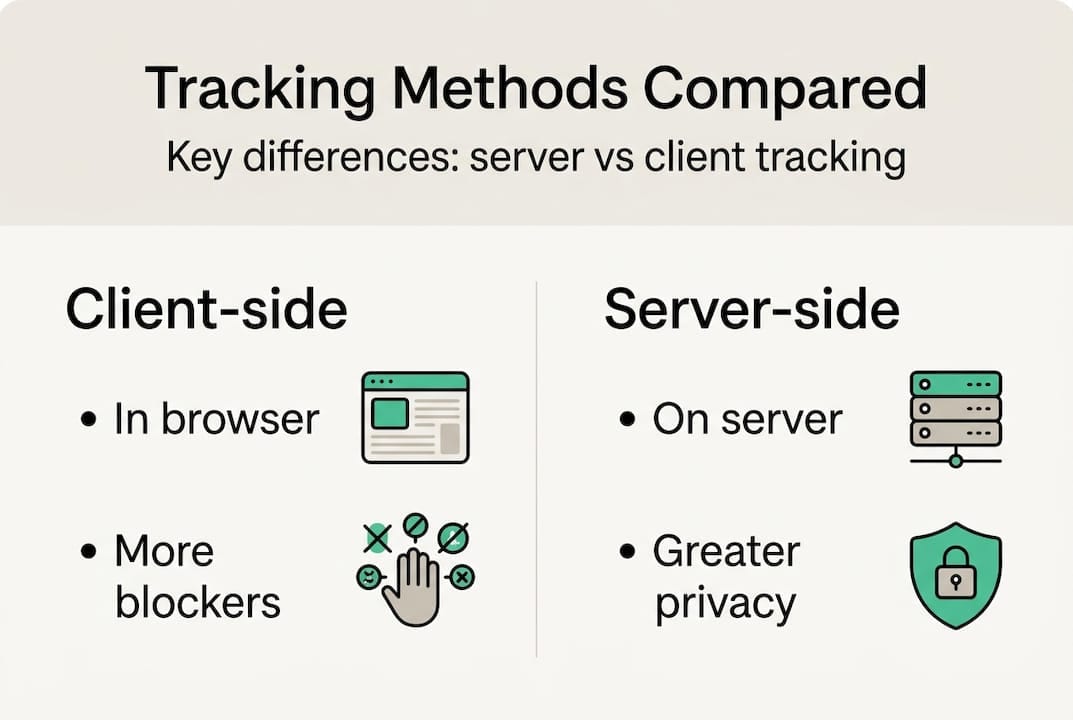
Server side tracking collects data on your website’s server rather than in the user’s browser. When a visitor takes an action, your site sends that event to your own server first. Your server then validates, enriches, and processes the data with consent checks before forwarding it to platforms like Google Analytics 4, Meta Conversions API, or other marketing tools.
This approach contrasts sharply with traditional client-side tracking, where JavaScript tags fire directly from the browser to third-party platforms. Client-side tracking exposes data to browser limitations, ad blockers, and privacy extensions that can block or modify events before they reach your analytics tools. Server side tracking eliminates these vulnerabilities by controlling the entire data pipeline.
The technical workflow follows a clear sequence. A user clicks a button or completes a purchase on your site. Your frontend code sends that event to your server endpoint. Your server validates the event structure, checks consent status, enriches the data with additional context like user segments or product categories, and then forwards the processed event to your analytics platforms through secure server-to-server connections.
First-party data handling significantly improves tracking fidelity. When your server sends events directly to platforms, those connections bypass browser restrictions entirely. Ad blockers cannot interfere because the communication happens server-to-server, not browser-to-third-party. This architecture ensures that marketing platforms receive complete, accurate event data for attribution and optimization.
The server acts as a gatekeeper and data processor. It can filter out spam, normalize event formats across different sources, append custom properties, and ensure only consented data reaches external platforms. This level of control is impossible with pure client-side implementations where JavaScript tags execute independently in each user’s browser.
Pro Tip: Start by routing high-value conversion events like purchases and signups through server side tracking before migrating all event types. This approach lets you validate the setup with critical data while maintaining existing client-side tracking as a backup.
Why server side tracking matters for marketing data accuracy and privacy
Browser restrictions and ad blockers cause substantial data loss in client-side tracking implementations. Safari’s Intelligent Tracking Prevention limits cookie lifespans, Firefox blocks third-party trackers by default, and privacy-focused extensions strip tracking parameters from URLs. These protections serve users well but create blind spots in marketing analytics. Server side tracking eliminates most of this loss by processing events in an environment users cannot block.
Data validation and enrichment happen before events reach analytics platforms. Your server can verify that purchase amounts match expected ranges, ensure user IDs follow consistent formats, and reject malformed events that would pollute your datasets. You can also enrich events with server-side context like customer lifetime value, subscription status, or inventory availability that isn’t accessible in the browser. This preprocessing delivers higher-quality data to every connected platform simultaneously.
Privacy compliance becomes more manageable with server-side consent checks. Your server verifies consent status before forwarding any data to third parties, creating a clear audit trail for regulatory compliance. You reduce reliance on third-party cookies that face increasing restrictions and potential elimination. By handling data as a first party, you maintain more control over what gets shared, when, and with whom.
Server side tracking transforms your data pipeline from a collection of independent browser tags into a centralized, controlled system that validates every event before distribution.
Accurate conversion tracking directly impacts marketing attribution and budget allocation. When client-side tracking misses conversions due to browser blocking, attribution models undervalue the channels that drove those sales. Server side tracking captures more complete conversion data, enabling accurate multi-touch attribution and informed optimization decisions. Your Meta and Google ad platforms receive reliable conversion signals, improving automated bidding performance.
The strategic advantage extends beyond immediate data quality improvements. As browsers tighten privacy controls and third-party cookies phase out completely, server side infrastructure positions you to adapt quickly. You own the data pipeline and can adjust how you process and distribute events without depending on third-party tag vendors or browser capabilities.
Pro Tip: Integrate your server side tracking with consent management platforms from the start. This ensures every event respects user preferences and creates compliance documentation automatically, saving substantial effort during audits.
Comparing server side tracking with client-side tracking: pros and cons
| Feature | Client-side tracking | Server side tracking |
|---|---|---|
| Implementation complexity | Low, add JavaScript tags | High, requires backend infrastructure |
| Data accuracy | Vulnerable to ad blockers and browser restrictions | Bypasses browser limitations, captures more complete data |
| Privacy control | Limited, relies on browser consent mechanisms | Full control over consent checks and data forwarding |
| Data enrichment | Restricted to browser-available information | Can append server-side context and business logic |
| Maintenance | Minimal, managed by tag vendors | Ongoing server maintenance and monitoring required |
| Latency | Immediate browser execution | Potential network delay for server processing |
| Platform compatibility | Universal browser support | Requires platform-specific server integrations |
Server side tracking offers substantial advantages in data accuracy and privacy but demands more technical investment. The accuracy improvements stem from eliminating browser-based data loss. When your server controls event forwarding, ad blockers cannot interfere, browser privacy settings don’t block requests, and JavaScript errors don’t prevent tracking. This reliability is crucial for high-value conversions where missing even 5% of events significantly impacts attribution.

Privacy benefits come from centralized consent management and reduced third-party exposure. Your server becomes the single point where consent decisions get enforced. You can implement sophisticated rules like forwarding different data to different platforms based on consent levels, something nearly impossible with client-side tags that operate independently. First-party data handling also improves cookie persistence and user identification across sessions.
Data enrichment capabilities expand dramatically when processing happens server-side. You can join event data with your CRM, append customer segments, calculate derived metrics, and normalize formats before distribution. This preprocessing ensures every platform receives consistent, enriched data without requiring separate enrichment logic in each tool.
The complexity tradeoff is real and significant. Server side tracking requires backend engineering skills, infrastructure to handle event volume, and ongoing monitoring to catch issues. You need to build and maintain server endpoints, implement validation logic, manage platform-specific API integrations, and ensure high availability. Small teams may struggle with these demands compared to dropping JavaScript tags on pages.
Server setup and maintenance create operational overhead. You must monitor server performance, handle traffic spikes, update integrations when platforms change APIs, and debug issues that span your infrastructure and external platforms. This ongoing investment makes sense for organizations with engineering resources and substantial data quality requirements.
Hybrid approaches combining both methods offer practical compromises. You can track page views and basic interactions client-side for simplicity while routing conversions and sensitive events through server side infrastructure. This strategy balances implementation effort with data quality improvements where they matter most. Many organizations start with hybrid setups and gradually expand server side coverage as they build expertise.
Pro Tip: Launch server side tracking with a pilot project covering one conversion type or marketing channel. This limited scope lets you validate the architecture, train your team, and demonstrate value before committing to full migration.
Implementing server side tracking: best practices and common challenges
Proper server side tracking setup involves careful planning and phased execution. Start by mapping your current tracking implementation to identify which events to migrate first. Prioritize high-value conversions and events with known data quality issues. Document your existing event schemas, required properties, and platform destinations to guide implementation.
The implementation phases follow a logical sequence:
-
Planning and architecture design: Choose your server infrastructure (cloud functions, dedicated servers, or container services), select a server-side tag management solution or build custom endpoints, and map data flows from event collection through validation to platform distribution.
-
Server endpoint setup: Build or configure endpoints to receive events from your frontend, implement authentication to prevent spam, and establish logging for debugging and monitoring.
-
Data pipeline development: Create validation rules to verify event schemas, implement consent checking logic that respects user preferences, build enrichment functions to append server-side context, and develop forwarding logic for each destination platform.
-
Platform integration: Connect to analytics and advertising platform APIs, implement error handling and retry logic for failed requests, and configure authentication credentials securely.
-
Testing and validation: Send test events through the pipeline, verify data appears correctly in destination platforms, and compare server-side event volumes with client-side baselines.
-
Gradual rollout: Deploy to a small percentage of traffic initially, monitor for errors and performance issues, and scale up progressively as confidence builds.
Key components require careful attention. Event validation rules should check required properties, verify data types and formats, and reject malformed events before forwarding. Consent checks must integrate with your consent management platform, respect jurisdiction-specific requirements, and log decisions for compliance audits. Data enrichment logic can append user segments from your database, calculate derived metrics like cart value, and normalize event names across sources.
Common challenges surface during implementation and operation. Complexity increases substantially compared to client-side tracking. You need backend engineers comfortable with API integrations, error handling, and server operations. Latency can become an issue if your server processing takes too long or if network conditions slow event forwarding. Optimize by processing events asynchronously, caching frequently accessed data, and choosing server locations near your users.
Platform compatibility requires ongoing attention. Marketing platforms update their APIs, change authentication methods, and introduce new features. You must monitor these changes and update your integrations accordingly. Build abstraction layers that isolate platform-specific logic to simplify updates.
| Challenge | Solution |
|---|---|
| High initial complexity | Start with managed server-side tag solutions before building custom infrastructure |
| Event validation errors | Implement comprehensive logging and alerting to catch schema mismatches quickly |
| Platform API changes | Subscribe to platform developer updates and maintain abstraction layers |
| Performance bottlenecks | Use asynchronous processing and scale server resources based on traffic |
| Debugging distributed systems | Implement request tracing and centralized logging across your pipeline |
Monitoring and alerting best practices ensure ongoing data integrity. Implement real-time alerts for event volume drops, validation error spikes, and platform forwarding failures. Track event processing latency to catch performance degradation. Monitor consent check rates to verify your logic works correctly. Use tracking validation tools that automatically detect schema changes and data quality issues.
Incremental rollout reduces risk substantially. Deploy server side tracking to a small traffic percentage initially. Compare event volumes, conversion rates, and platform data between server-side and client-side implementations. Investigate discrepancies before scaling up. This cautious approach catches configuration errors and logic bugs before they impact your entire dataset.
Pro Tip: Leverage tracking validation platforms early in your server side tracking setup. These tools automatically detect missing events, schema mismatches, and forwarding failures, preventing costly data loss during implementation and ongoing operations.
Optimize your server side tracking with Trackingplan solutions
Transitioning to server side tracking requires robust monitoring to ensure data quality throughout your pipeline. Trackingplan provides automated discovery and monitoring that validates your server-side implementation continuously. The platform detects missing events, schema mismatches, and forwarding failures in real time, alerting you via Slack, email, or Teams before issues impact your analytics.
Consent and privacy compliance management becomes straightforward with Trackingplan’s privacy hub, which audits your data flows and verifies that only consented data reaches third parties. The platform integrates with your server side infrastructure to provide visibility into every event, from collection through validation to final distribution. Automated alerts prevent tracking errors that would otherwise silently corrupt your datasets and attribution models. Web tracking monitoring capabilities extend across both client-side and server-side implementations, giving you comprehensive observability.
Frequently asked questions
What is the difference between server side and client-side tracking?
The fundamental difference lies in where data processing occurs. Client-side tracking runs JavaScript in the user’s browser, sending events directly to analytics platforms. Server side tracking routes events through your own server first, where you validate, enrich, and forward data with full control. This architecture reduces data loss from ad blockers and browser restrictions while improving privacy compliance through centralized consent management.
How does server side tracking improve privacy compliance?
Consent verification happens on your server before any data reaches third parties, creating a clear audit trail for regulatory compliance. Your server checks user consent status and only forwards permitted data to each platform based on their preferences. This centralized approach is far more reliable than client-side consent mechanisms that users can bypass or that fail due to JavaScript errors. Server side tracking also reduces reliance on third-party cookies, which face increasing restrictions and will eventually be eliminated entirely. By processing data as a first party, you maintain control over what gets shared and demonstrate compliance more easily during audits. The privacy hub tools help monitor these flows continuously.
What are common challenges when implementing server side tracking?
Backend engineering and ongoing maintenance create the primary hurdles. You need infrastructure to receive events, validate data, and forward to multiple platforms reliably. This requires server setup, API integration development, and monitoring systems. Potential latency issues emerge if server processing takes too long or network conditions slow forwarding. Optimize by processing events asynchronously and scaling resources appropriately. Ensuring compatibility with existing platforms demands attention as APIs evolve. You must monitor platform changes and update integrations accordingly. Debugging distributed systems where events flow from browser to server to multiple platforms requires comprehensive logging and tracing. These challenges are manageable with proper planning and tools that help fix tracking issues quickly.
Can server side tracking completely replace client-side tracking?
Hybrid tracking combining both approaches often delivers the best results. Some interactions like scroll depth, mouse movements, and immediate page engagement are most efficiently captured client-side in the browser. Server side tracking excels for conversions, user identification, and events requiring validation or enrichment. Many organizations route high-value conversion events through server infrastructure while maintaining client-side tracking for behavioral analytics. This strategy balances implementation complexity with data quality improvements. Pure server-side implementations are possible but require sending all user interactions to your server, which increases infrastructure costs and complexity. Evaluate your specific needs, resources, and data quality requirements to determine the right balance. Server side scripts can complement client-side implementations effectively.
Recommended
- Server-side tracking for data accuracy in 2026 | Trackingplan
- Explore what is server side tracking: A Practical, Privacy-First Guide | Trackingplan
- Server Side Tracking: Analytics in a Cookieless World (server side tracking) | Trackingplan
- Discover server side scripts to boost analytics and privacy | Trackingplan