
Using Snapchat ads for business is a great way to connect with an engaged, purchase-ready audience that you might be missing on other platforms. It's not just a passing trend—it's a real revenue driver with a surprisingly low barrier to entry, making it a fantastic option for businesses of all sizes.
Why Snapchat Ads Are A Smart Bet For Business Growth
Think of the digital advertising world as a huge city. Platforms like Facebook and Instagram are the crowded main squares where everyone is shouting to be heard, competition is fierce, and costs are high. Snapchat, on the other hand, is like a trendy, up-and-coming street—it’s less congested but packed with consumers eager to discover new things and spend money. For years, many businesses dismissed Snapchat as an app just for teenagers, but that's an outdated view.
Today, Snapchat has grown into a powerful marketing channel. It’s not just its user base that's expanding; advertisers are flocking to the platform because they’re seeing real, tangible results. That shift alone signals that something special is happening here.
The Surge In Advertiser Confidence
The proof is in the numbers. Businesses aren't just dipping their toes in the water anymore; they're committing serious ad budgets. In a recent quarter, the number of active advertisers on Snapchat jumped 28% year-over-year. This growth is primarily fueled by small and medium-sized businesses (SMBs), which have become the main engine for the platform's advertising expansion. You can explore more about these advertiser trends and see how companies are succeeding on the platform.
A huge part of this boom is how accessible the platform is. With a minimum daily campaign spend of just $5, Snapchat has opened its powerful advertising toolkit to everyone, making it especially attractive for startups and businesses with leaner marketing budgets.
"For businesses, Snapchat advertising is about meeting customers where they are most engaged. It's less about interrupting their feed and more about becoming part of their conversation through authentic, creative, and interactive content."
This gets to the heart of it. The platform's design encourages a different kind of advertising—one that feels more natural and less like a forced interruption.
Connecting With A Valuable Audience
The image below, taken from Snapchat's business page, really drives home the platform's focus on delivering real results for companies.
This visual underscores that the goal is to connect with an audience that chooses to engage, which is what ultimately drives business growth. When you advertise on Snapchat, you're tapping into a user base that isn't just passively scrolling. These users are actively creating, sharing, and interacting with content—including ads. This creates the perfect environment for building genuine brand loyalty and driving conversions.
Understanding The Modern Snapchat User
Before you even think about launching a Snapchat ad, you need to know exactly who you're talking to. If you're still thinking of Snapchat as just a playground for teenagers, it’s time for a major perspective shift. While the platform is a powerhouse with younger audiences, its user base is far more diverse and influential than most marketers give it credit for.
To build campaigns that actually work, you first need a clear picture of this audience. Snapchat has grown into a global communication hub with powerful user segments across all age groups, especially in key markets like North America and Europe. This isn't just a place where people passively scroll through content; it's where they actively create, share, and connect with friends—and brands.
Beyond The Gen Z Stereotype
Let's look at the hard data. As of 2025, Snapchat commands a massive audience with over 460 million daily active users and an incredible 900 million monthly active users worldwide. It's not just big; it's influential. In the fall of 2023, it was the second most popular social network among U.S. teens, beating out both Instagram and Twitter.
These numbers prove its appeal with a younger crowd, but they also point to a huge, engaged global community. The real difference on Snapchat is user behavior. This audience doesn't just watch—they participate.
This participatory mindset is your greatest asset. Users come to Snapchat to interact, share, and express themselves, creating an environment where authentic, engaging ads feel less like an interruption and more like a discovery.
This unique dynamic means your ads can become part of the conversation, not just a distraction from it. The platform’s entire culture is built on interactivity, which creates a golden opportunity for businesses willing to get creative.
The Power Of An Interactive Audience
The massive engagement with features like Lenses and Filters is all the proof you need. For example, over 700 million Snapchatters have played with generative AI Lenses more than 17 billion times. This shows a huge appetite for interactive brand experiences.
To nail your Snapchat ad campaigns, start by performing a thorough audience analysis. This process helps you get past surface-level demographics and truly understand the motivations, interests, and behaviors of your potential customers on the platform.
Once you understand who these users are and how they interact, you can design an advertising strategy that resonates authentically. This means shifting your mindset from simply showing a product to inviting users to experience your brand. Whether it’s through a fun AR Lens or a sharp, compelling video, your goal is to build a real connection that turns passive viewers into active, loyal customers with genuine purchasing power.
Choosing The Right Snapchat Ad Format For Your Goal
Matching your business objective to the right ad format is the key to a successful Snapchat campaign. Think of it like a professional chef's knife set—each blade is designed for a specific task. You wouldn't use a cleaver for delicate slicing, and you shouldn't use a simple image ad when you need an immersive brand experience.
This section is your guide to mastering these tools. We'll connect Snapchat’s core campaign objectives—Awareness, Consideration, and Conversions—to the ad formats that actually deliver results. From simple Single Image or Video Ads to interactive AR Lenses and shoppable Collection Ads, you'll learn which format to pick for any goal.
The opportunity on Snapchat is massive. Just look at how its user base flows from massive monthly reach to deep daily engagement.
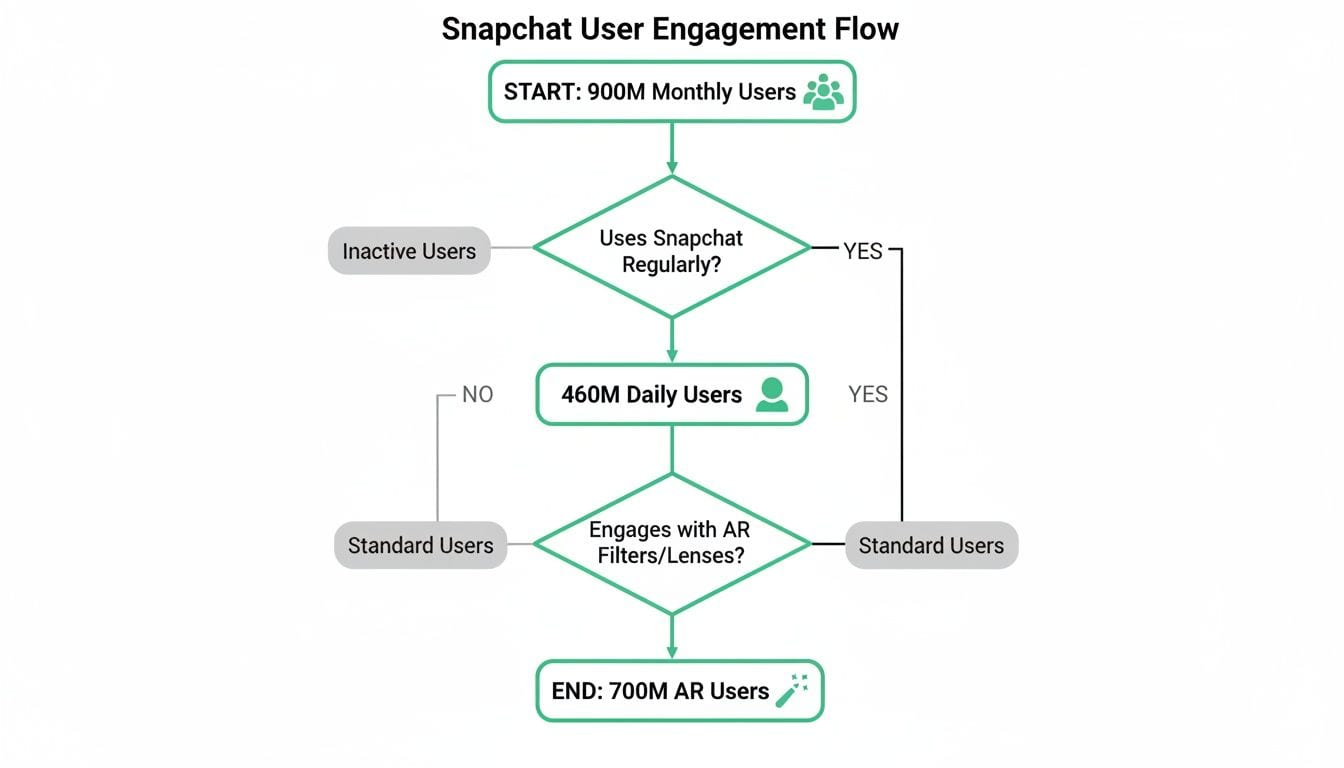
Starting with 900 million monthly active users, a huge portion comes back every single day. More importantly, 700 million of them actively use AR features, signaling a huge appetite for the kind of interactive advertising that sets Snapchat apart.
Aligning Formats With Funnel Stages
Every ad format serves a different purpose, and they all map back to the classic marketing funnel. Getting this connection right is the first step toward building a campaign that works.
You wouldn't use a highly interactive AR Lens just to get your name out there, and a simple static ad probably isn't the best tool for driving complex product sales. It's about matching the tool to the job.
- Awareness: At the top of the funnel, your goal is to introduce your brand to as many relevant people as possible. This is where broad-reach formats like Single Image/Video Ads and Commercials shine.
- Consideration: In the middle, you want to get people thinking about your product or service. Formats like Story Ads, Collection Ads, and AR Lenses are built to encourage deeper engagement and exploration.
- Conversions: At the bottom, the objective is to drive specific actions like purchases or sign-ups. Collection Ads and Dynamic Ads are designed to make this final step as seamless as possible.
The most effective strategies often mix and match formats. A recent Snapchat study found that combining skippable and non-skippable video ads led to a 1.34x higher positive rate in Brand Awareness compared to using just one.
This multi-format approach keeps your campaign feeling fresh and lets you connect with users at different points in their journey.
Matching Snapchat Ad Formats To Your Business Objectives
To make this even easier, here's a table that helps you choose the most effective ad format based on your specific marketing goal, from building brand awareness to driving sales.
Think of this table as your cheat sheet. When you know your campaign's primary goal, you can quickly identify the format most likely to get you there.
A Closer Look At Key Ad Formats
Now, let's break down the most popular and effective formats for your Snapchat ads for business strategy. Choosing the right one is crucial for getting the best return on your investment.
Single Image Or Video Ads
These are the bread and butter of Snapchat advertising. They appear between friends' Stories or in the Discover section and are perfect for quick, impactful messages.
You get a single, powerful image or a short video (up to three minutes, but those first 6-10 seconds are what really count) to drive brand awareness, website traffic, or app installs. When thinking about what to create, remember that short-form VSL ads on social media are a natural fit for this vertical, fast-paced environment.
Story Ads
Story Ads are your chance to tell a longer narrative. They appear as a branded tile in the Discover feed and consist of a series of 3 to 20 Single Image or Video Ads.
This format is perfect for walking users through a new product launch, taking them behind the scenes, or promoting an upcoming event. It lets you build a deeper connection by giving users more content to explore if they’re interested.
Collection Ads
This format is a game-changer for any e-commerce brand. A Collection Ad features a main video or image with four tappable tiles below it, allowing users to browse and shop multiple products right from the ad.
It’s designed to be a completely frictionless experience. Users can go from inspiration to purchase without ever leaving the Snapchat app, which is a powerful way to capture impulse buys.
AR Lenses
Augmented Reality Lenses are Snapchat's signature format, and they are incredibly powerful. These are interactive experiences that let users overlay digital effects, animations, and branding onto their own faces or surroundings.
The magic of Lenses is that users choose to interact with them, making your brand part of their personal content. It feels less like an ad and more like a fun tool. It’s no surprise that research shows AR Lenses are over 2x more effective at capturing meaningful attention than other ad formats.
Launching Your First Snapchat Ad Campaign

Diving into a new ad platform can feel a bit overwhelming, but Snapchat designed its Ads Manager to be surprisingly intuitive. Think of it less like the complex controls in a cockpit and more like a well-organized dashboard that guides you from takeoff to your destination.
This is your step-by-step walkthrough to get your first Snapchat ads for business live and in front of the right audience. Snapchat keeps things simple by using a three-level structure: Campaign, Ad Set, and Ad. Each level serves a clear purpose, making it easy to organize your efforts and see what’s working.
Step 1: Create Your Campaign
First things first, you need to define your campaign's primary objective. This is the single most important decision you'll make, as it tells Snapchat what you want to achieve and how to optimize your ad delivery to get you there. As we covered, your goals fall into three main buckets.
- Awareness: Get your brand and message in front of a broad audience.
- Consideration: Encourage actions like website visits, app installs, video views, or lead generation.
- Conversions: Drive specific outcomes like sales or sign-ups on your website or app.
After picking your objective, you'll give your campaign a name, set its status, and add any optional spending limits. A clear naming convention (like [Objective] - [Product] - [Date]) will save you a lot of headaches later when you’re digging through performance data.
Step 2: Define Your Ad Set Targeting And Budget
Now it’s time to zero in on exactly who will see your ads. The Ad Set is where you control your budget, schedule, ad placements, and—most critically—your audience. Snapchat’s targeting options are powerful, letting you get way more specific than just age and location.
A common mistake is starting with a target audience that’s way too broad. Instead, kick things off with a focused group that matches your ideal customer profile. It’s always better to win over a small, relevant group than to get lost in the noise of a massive, uninterested one.
You can mix and match different targeting options to build the perfect audience.
- Predefined Audiences: These are audiences curated by Snapchat based on user interests and behaviors. You can target people based on what they watch (like "Comedy Fans"), where they go (like "Coffee Shop Goers"), and even what they tend to buy (like "Apparel & Accessories Shoppers").
- Custom Audiences: This is where you can upload your own customer lists (from a CRM or email list) or create audiences based on people who have already visited your website or engaged with your other ads. This is perfect for retargeting.
- Lookalike Audiences: Once you have a solid customer base, Snapchat can find new users who share similar characteristics with your best customers. It's a fantastic way to scale your campaigns effectively.
Once you've defined your audience, you'll set either a daily or a lifetime budget. A starting budget of $25-$50 per day is usually enough to start gathering meaningful data without breaking the bank. You’ll also set the schedule, choosing exactly when your ads will start and stop running.
Step 3: Design And Launch Your Ad
Finally, you’ve made it to the Ad level. This is where you’ll upload your creative—the actual image, video, or interactive experience that users will see in their feed.
Make sure your creative is formatted for a full-screen vertical view and is designed to grab attention within the first two seconds. You'll add your brand name, a catchy headline, and a clear call-to-action (CTA) button like "Shop Now" or "Learn More."
Before you launch, double-check that you're sending users to the correct website URL and that your Snap Pixel is attached to track their actions. You can find out how to ensure your Snap tracking is flawless in our dedicated integration guide.
Once you've reviewed all the details at the Campaign, Ad Set, and Ad levels, go ahead and hit "Publish." Congratulations—your first Snapchat ad campaign is now in review and will go live shortly
How To Ensure Your Ad Tracking Is Flawless
Launching a brilliant Snapchat ad campaign is only half the battle. If your tracking is broken, you're essentially flying blind—spending money without knowing what’s actually driving sales, sign-ups, or leads. The old saying holds true: if you can't measure it, you can't manage it.
This section tackles the most critical, and often frustrating, part of running Snapchat ads for business: getting your measurement right. Without accurate data, you can’t optimize your campaigns, prove your return on ad spend (ROAS), or make informed decisions about your budget. It's the difference between guessing and knowing.
The Foundations Of Snapchat Measurement
Snapchat gives you two core tools to measure the actions users take after seeing your ads: the Snap Pixel and the Conversions API (CAPI). Think of them as two different types of detectives working together to solve the same case.
- The Snap Pixel: This is a small piece of code you place on your website. It acts like a security camera, observing user behavior on your site—like page views, adds to cart, and purchases—and sending that data back to Snapchat. You can get a deeper understanding of how this works by checking out our guide on what pixel tracking is and why it's fundamental to digital marketing.
- The Conversions API (CAPI): This is a server-to-server connection. Instead of relying on a user's browser, which can be affected by ad blockers or privacy settings, your server communicates directly with Snapchat's server. This creates a more reliable and durable data connection.
Using both the Pixel and CAPI together gives you the most complete picture of your campaign performance. The Pixel captures browser-based events, while CAPI fills in the gaps, ensuring you don't miss conversions that happen outside the typical browser flow.
Common Tracking Problems That Cost You Money
Even with these tools in place, things can go wrong. Inaccurate data is a widespread problem that plagues even the most experienced marketing teams, leading to wasted ad spend and flawed strategies.
These aren't just minor glitches; they're data black holes that can completely undermine your advertising efforts.
The most dangerous tracking errors are the ones you don't know are happening. A 'silent failure'—like a pixel event that stops firing after a website update—can go unnoticed for weeks, costing you thousands in misattributed ad spend and corrupting your performance dashboards.
Here are some of the most common culprits:
- Broken or Missing Pixel Events: A developer pushes a small code update, and suddenly your "Purchase" event stops firing on your confirmation page.
- Data Mismatches: The pixel sends a product's price as a string of text (
"99.99") instead of a number (99.99), breaking your ROAS calculations. - Consent-Related Data Loss: A user declines cookies, and your consent management platform correctly blocks the Snap Pixel, but you lose visibility into that user's entire journey.
- Attribution Gaps: Ad blockers or browser privacy features like Apple's ITP prevent the pixel from working, making it impossible to connect a sale back to the Snapchat ad that drove it.
Manually checking for these issues every day across all your key pages and user flows is impossible. It’s like trying to watch every single security camera in a giant shopping mall at once. You are guaranteed to miss something.
Your Safety Net: A Dedicated QA Platform
This is where an automated analytics QA platform becomes your essential safety net. Tools like Trackingplan act as a 24/7 data security guard for all your marketing and analytics tags, including the Snap Pixel.
Instead of manually digging for errors, the platform automatically monitors your entire tracking implementation in real time. It constantly scans your website and app to ensure every tag is present, firing correctly, and sending the right data.
When something breaks, you get an instant alert.
Example Scenario: Diagnosing A Broken Snap Pixel
Imagine you launch a new collection and run a Snapchat campaign to drive sales. The ads are getting clicks, but your Ads Manager shows zero purchases.
- The Problem: Unbeknownst to you, a recent update to your e-commerce checkout page accidentally removed the Snap Pixel's "PURCHASE" event code.
- Manual QA: You would have to manually go through the entire purchase flow, open your browser's developer tools, and inspect network requests to see if the pixel is firing. This is slow, technical, and prone to human error.
- Automated QA with Trackingplan: Trackingplan, already aware of your "PURCHASE" event, immediately detects that it's no longer firing on your thank you page. It sends an alert to your team's Slack channel with the exact details: "Critical Error: 'PURCHASE' event missing from
https://yourstore.com/order-confirmation."
This turns a multi-hour (or multi-day) investigation into a proactive, instant notification. You can fix the problem immediately, ensuring your campaign data is trustworthy and every dollar of your ad spend is accurately accounted for. This automated vigilance is what allows you to run Snapchat ads for business with complete confidence in your results.
Creating Ads That Actually Capture Attention
On Snapchat, the best-performing ads are the ones that don't look or feel like ads. The real secret to creating effective Snapchat ads for business is to develop a "Snap-first" creative mindset. This means your content needs to feel right at home alongside the native, user-generated Snaps surrounding it, not like a disruptive TV commercial shoehorned into a vertical screen.
To pull this off, you have to think and create like a Snapchatter. That involves ditching the high-polish production for a more authentic, low-fi vibe, getting creative with sound, and building experiences that people actually want to engage with and share.
Embrace The Vertical Video Standard
First things first: vertical video is non-negotiable. Snapchat is a full-screen, immersive platform, and any ad that doesn't fill the entire 9:16 aspect ratio immediately screams "I don't belong here." Designing your content specifically for this format is the baseline for looking like you're part of the conversation.
Beyond just the dimensions, the creative itself has to be a thumb-stopper. Research shows the first two seconds are absolutely mission-critical for securing ad recall. This is your one shot to make a real impact.
"The finding that attention is 8X more effective than View-Through Rate at predicting brand recall isn't just a statistic; it validates that the entire media ecosystem must change." - Mike Follett, CEO, Lumen Research
This insight really drives home why earning genuine attention is infinitely more valuable than a user passively letting your ad play out. Your creative’s entire job is to make them stop and look.
Master The First Two Seconds
Stopping the scroll is both an art and a science on a platform as fast-paced as Snapchat. To have a fighting chance, your ad needs to deliver an immediate hook, both visually and conceptually.
Here are the key elements for a powerful opening:
- Lead with strong branding: Don't wait until the end to show your logo. Weave your brand into the opening scene so that even a quick glance registers who the ad is from.
- Use sound and captions: Many users browse with sound off, so bold, easy-to-read captions are a must. For those with sound on, a catchy track or a compelling voiceover can be the hook that reels them in.
- Showcase user-generated content (UGC): Ads that feature real people using your product authentically consistently outperform polished commercials. They feel more like a trusted recommendation from a friend.
- Place your CTA wisely: The "Swipe Up" is your direct line to conversions. Make the call-to-action clear and compelling, placing it where it's easily seen without covering the most important parts of your visual message.
Design For Interaction Not Interruption
The holy grail of Snapchat advertising is creating an experience users choose to be a part of. This is where Augmented Reality (AR) Lenses and Filters truly come into their own.
AR Lenses aren't just ads; they're interactive tools that users actively search for, play with, and share with their friends. In fact, research shows that AR Lenses are over twice as effective at capturing meaningful attention compared to other ad formats. Why? Because the user is in control. When someone decides to try on your virtual sunglasses or play your branded mini-game, they're voluntarily building a positive, memorable moment with your brand.
For instance, a furniture company could build a Lens that lets users see how a new sofa looks in their own living room. A makeup brand might create a Filter that lets someone "try on" a new lipstick shade. These interactive formats turn passive viewers into active participants, forging a connection that's far deeper and longer-lasting.
Frequently Asked Questions About Snapchat Ads
Jumping into a new ad platform like Snapchat always raises a few questions. We get it. To help you hit the ground running, we’ve put together answers to the most common things marketers ask.
Let's clear up some of the confusion so you can get started with confidence.
Is Snapchat Only Effective For Reaching Teenagers?
This is probably the biggest myth we hear about Snapchat advertising. While the platform is definitely a powerhouse with teens, its influence stretches far beyond that. A huge chunk of its over 460 million daily users are actually Millennials and Gen X.
In key markets like North America, for instance, a significant percentage of Snapchatters are over 25. The platform’s targeting tools are surprisingly granular, letting you zero in on specific age brackets, income levels, and life stages. This makes it a fantastic channel for brands targeting adults, not just the younger crowd.
How Much Should I Budget For My First Snapchat Campaign?
One of the best things about Snapchat is how accessible it is. You can get started with a minimum daily ad spend of just $5. This low barrier to entry is perfect for businesses that want to test the platform without committing to a massive budget upfront.
For a small business, a great starting point is a test budget of $25 to $50 per day. This is usually enough to start gathering meaningful performance data on your creatives and audiences. The trick is to keep a close eye on your Return on Ad Spend (ROAS) in Ads Manager and then double down on what's working.
Let the data guide your spending decisions. Start small, find what works, and then scale your budget confidently based on proven performance rather than guesswork.
Why Is My Snap Pixel Tracking Inaccurate?
Inaccurate Snap Pixel data is a common headache that can throw your entire strategy off course. If you can’t trust your numbers, you can’t optimize your campaigns—it's that simple.
More often than not, the problem comes down to one of a few common culprits:
- Incorrect Pixel Placement: The pixel code might be missing from critical pages (like your order confirmation page) or stuck in the wrong part of your website’s code.
- Malformed Event Data: Sometimes the pixel fires, but it sends broken or incomplete data. A classic example is a purchase event missing the 'value' or 'currency' parameter, which completely messes up your ROAS calculations.
- Cookie Consent Conflicts: Your consent banner could be blocking the Snap Pixel from firing for users who opt out of cookies. This leads to major data gaps and severely underreported conversions.
This is exactly why having an automated analytics QA platform is no longer a "nice-to-have" but a necessity. It’s your data's safety net.
A tool like Trackingplan automatically keeps an eye on your Snap Pixel and other marketing tags in real time. It can spot when your pixel is missing, if event data is broken, or if consent settings are causing problems. You'll get an alert detailing the exact issue so you can fix it fast. To learn more about ensuring flawless tracking and finally trusting your campaign data, check out how Trackingplan can help.