
Your paid social dashboard looks normal in Chrome. Safari tells a different story. Assisted conversions disappear, user paths break mid-session, and returning visitors suddenly look new again. You review the tag manager, inspect network calls, and compare environments. Nothing obvious is broken.
That's the trap with third party cookies on Safari. The browser can remove the technical foundation your attribution and analytics setup expected, while leaving just enough signals behind to make the issue look like a tagging mistake. Teams burn hours debugging pixels that are firing correctly, only to learn the browser blocked the storage those pixels depended on.
This matters well beyond ad tech. It affects embedded forms, federated login, iframe-based tools, consent flows, identity resolution, and any analytics implementation that still assumes cross-site cookie access is available. If your audience includes iPhone and iPad users, Safari isn't an edge case. It's part of the core measurement environment.
For a broader view of why this shift changed measurement strategy, Trackingplan's post on the death of third-party cookies and first-party data is a useful companion read.
Introduction The Safari Data Black Hole
A familiar pattern shows up in analytics reviews. Marketing sees weaker attribution from Safari traffic. Product sees shorter journeys. Developers confirm that the tag is present, the request fires, and the endpoint returns successfully. Yet the conversion path still falls apart.
Safari creates this kind of “data black hole” because the visible part of the implementation can look healthy while the state layer underneath it is restricted. A pixel can load and still fail to connect the visit to prior sessions. An embedded tool can render and still lose access to the cookie it needs. A dashboard can receive events and still misclassify the user.
The symptom pattern teams usually see
The problem is rarely discovered because someone says, “Safari blocked a third-party cookie.” It is typically discovered through downstream noise:
- Attribution drift: Paid channels lose assist credit and last-touch channels absorb more of the conversion path.
- Session fragmentation: Journeys that should span multiple visits split into disconnected users.
- Iframe instability: Embedded checkout, chat, identity, or form experiences behave differently on Apple devices.
- False QA alarms: Analysts flag “missing” data even though the browser, not the implementation, removed the storage layer.
Practical rule: If a tag fires in Safari but identity, attribution, or persistence still breaks, inspect storage assumptions before rewriting the implementation.
What makes Safari uniquely frustrating is that old advice still circulates. People are told to “just enable cookies” or disable a privacy toggle. In many setups, that no longer restores the behavior teams expect. The browser's restrictions are deeper than a simple preference change, and proving that often presents a considerable challenge.
From ITP to Full Block How Safari Changed the Game
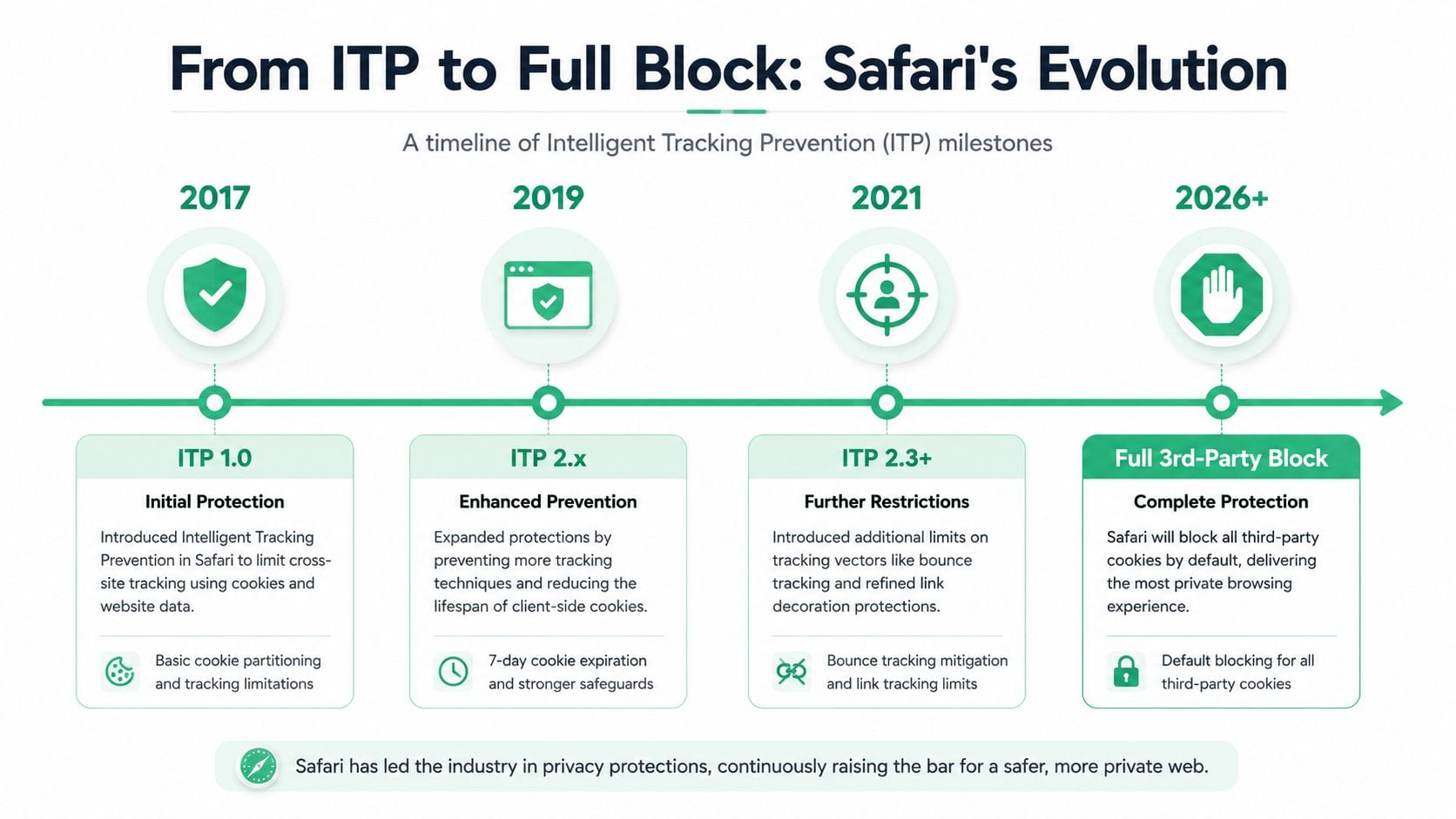
Safari didn't arrive at its current behavior all at once. Apple tightened restrictions over time, and that history explains why many older workarounds stopped working.
In 2017, Apple announced that Safari would eliminate third-party cookies, and Safari's Intelligent Tracking Prevention now applies a strict rule where client-side first-party cookies and other browser storage are erased if a user doesn't interact with the site for seven consecutive days, according to Cookie Information's summary of Safari's privacy shift.
The milestone that changed assumptions
Before ITP, many analytics and advertising setups treated cross-site cookies as normal infrastructure. Ad platforms, attribution vendors, embedded tools, and identity systems could often rely on browser storage surviving across domains. Apple challenged that model first.
Mozilla publicly moved in the same direction in that period, but Safari mattered immediately because iOS Safari is the default browser on iPhones and iPads. That gave Apple's policy decisions outsized impact on real-world measurement.
A practical way to think about the Safari timeline is this:
| Period | What changed | What broke first |
|---|---|---|
| 2017 | Apple announced the end of third-party cookies in Safari | Cross-site audience and attribution logic |
| Later ITP tightening | Client-side storage persistence became more limited | Return-user recognition and long-lived browser identifiers |
| Safari 13.1 and beyond | Full third-party cookie blocking by default | Passive iframe tracking and silent session sharing |
For teams who want the adjacent mobile privacy context, Trackingplan's piece on conversion data loss after iOS 14 helps explain why browser and platform changes have compounded each other.
Why old fixes stopped working
A lot of implementation folklore comes from earlier stages of this evolution. Teams added workarounds that made sense when browser restrictions were narrower. Those fixes age badly because Safari's direction has been consistent: remove passive tracking paths, shorten retention of script-writable storage, and force more deliberate user-controlled access.
That's why “we already solved Safari years ago” often turns out to be false. The solution may have matched an older version of ITP, not the current architecture.
Safari wasn't just reducing tracking surface area. It was changing the design rules for attribution, identity, and persistence.
The strategic lesson is simple. If your measurement stack still depends on passive cross-site storage, it's built on a browser behavior Safari has spent years removing.
Understanding Safari's Current Cookie Blocking Mechanism
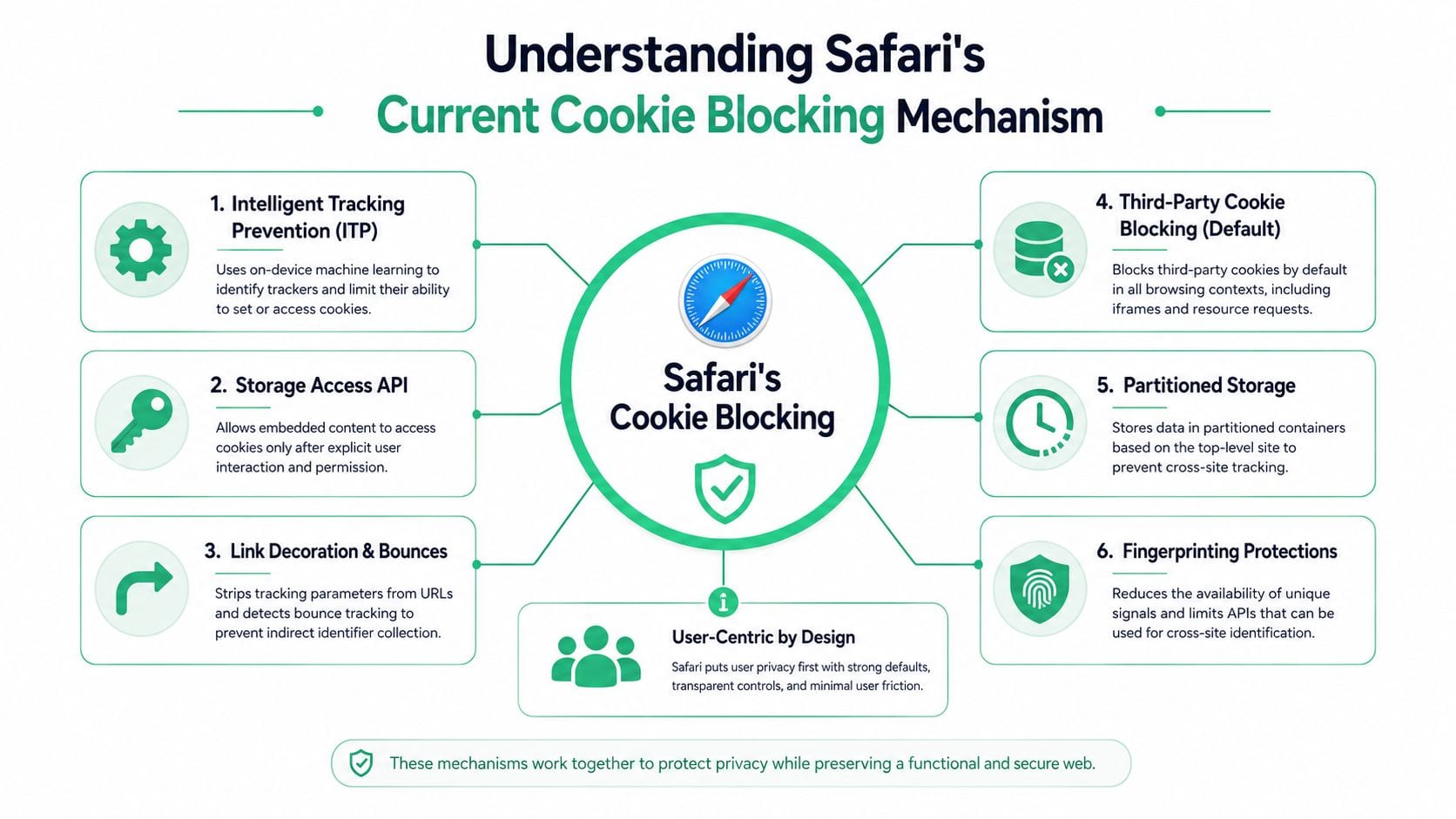
The current Safari model is stricter than many teams realize. It isn't just “harder” for third-party cookies to work. In standard browsing, Safari's ITP uses machine learning to identify tracking domains and enforces a 100% block rate for third-party cookies, with no user option to whitelist specific sites, as described in ComplyDog's explanation of Safari's cookie behavior.
What Safari blocks by default
For marketers, the headline is blunt. Traditional third-party cookie tracking doesn't function in Safari the way it once did. For developers, the important detail is where the block applies: cross-site resources and embedded contexts don't get cookie access merely because the request loads successfully.
That distinction explains a common misunderstanding. A vendor script may still execute. An iframe may still render. A request may still return a response. None of that guarantees the browser allowed the cookie operations your implementation was counting on.
Here's the practical breakdown:
- Third-party cookies: Safari blocks them by default in standard browsing.
- Per-site whitelisting: Safari doesn't offer a granular allowlist for selected third parties.
- Passive cross-site state sharing: It's effectively gone unless your implementation uses approved browser mechanisms.
Why first-party doesn't mean unrestricted
Another source of confusion is the phrase “just move to first-party cookies.” That's directionally right, but incomplete.
Safari's rules also affect client-side script-writable first-party storage when the user doesn't interact with the site over a seven-day window, as noted earlier. So if your JavaScript sets a browser identifier and you expect it to persist, Safari may remove it long before your analysts expect it to disappear.
That has two consequences:
- JavaScript-set persistence is fragile. If your analytics identity depends on client-side storage surviving untouched, Safari can reset your user history.
- “Working today” can fail next week. The implementation may pass QA during a short test window but break longitudinal analysis.
A related technical point often gets missed in stakeholder conversations. Safari is not offering a hybrid state where the user can neatly approve one embedded domain and deny another. The browser's privacy model is much more binary. That's one reason support teams and marketers keep getting told to tweak settings, then report that nothing useful changed.
For teams comparing browser behavior, Trackingplan's article on how to block third-party cookies across browsers is a good reference point for understanding why Safari behaves differently from Chrome or Firefox in testing.
What still works in principle
The remaining path for third-party cookie access in embedded contexts is code-driven, not preference-driven. Safari relies on the Storage Access API for approved access in scenarios where a third party legitimately needs storage inside an iframe or similar embedded flow.
That changes the design pattern. Instead of passive access, the browser expects an explicit request path and tighter user involvement. If your architecture still expects silent cookie availability, Safari is telling you to redesign it.
The Business Impact on Analytics and Advertising

The technical restrictions become business problems fast. Safari has a large footprint in mobile browsing, and because iOS Safari is the default browser on iPhones, third-party cookie tracking is non-functional for a majority of users, which is why data teams have to validate implementations against Safari-specific behavior to catch broken pixels and consent issues, as outlined in Pima's Safari cookie-blocking note.
Attribution gets distorted first
The first casualty is usually attribution. If an ad platform or analytics tool can't persist or recover user identity across touchpoints, assist paths shrink. Channels close to the conversion event tend to absorb more credit because they're the last observable interaction still available.
That doesn't just create reporting noise. It changes budget decisions. Teams cut channels that appear weak, even when those channels are still influencing demand but no longer receiving measurement credit inside Safari traffic.
Consider a common pattern:
- A user clicks a paid social ad on mobile Safari.
- They browse but don't convert.
- They return later through branded search and complete the purchase.
- The earlier influence becomes harder to connect.
The branded search line looks stronger. Paid social looks less efficient. The actual customer journey didn't change. The observable journey did.
For teams rethinking measurement design around these constraints, Trackingplan's guide to a cookieless attribution strategy is a practical next read.
Retargeting and audience logic weaken
Safari's restrictions also hit remarketing and audience qualification. If the browser limits the persistence of identifiers or blocks third-party cookie use entirely, audience membership becomes less durable and less reliable.
Marketers usually notice this in three places:
- Retargeting pools shrink: Users fall out of audience lists faster or never qualify as expected.
- Frequency controls get messy: The platform has less continuity for the same browser.
- Suppression logic degrades: Existing customers or recent converters may still receive prospecting or retargeting ads.
A campaign can be well built and still look inefficient when the browser removes the memory layer behind it.
Product and analytics teams feel it differently
Product analysts don't describe the issue as “retargeting decay.” They see inflated new users, broken cohort continuity, and noisy funnel steps for Apple traffic. CRM and lifecycle teams may notice login friction, duplicate profiles, or inconsistent cross-domain journeys. Support teams may only hear that “it works on one browser and not another.”
This is why Safari can't be treated as a niche browser quirk. It changes the trustworthiness of cross-team reporting. Marketing, product, engineering, and analytics may all be looking at the same underlying browser constraint through different symptoms.
A Practical Guide to Mitigation and Adaptation
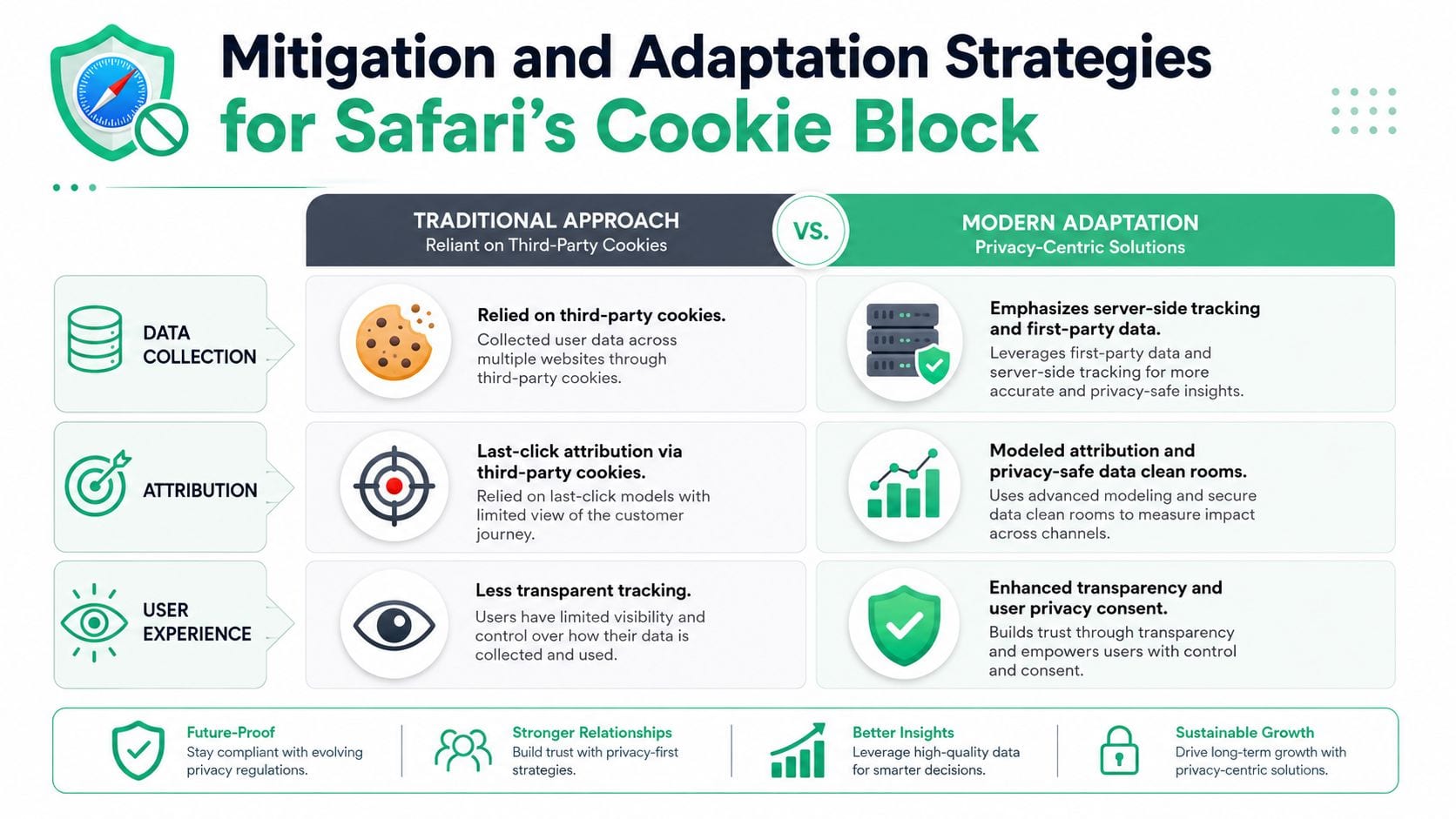
The answer isn't to keep fighting Safari with older client-side tricks. The answer is to move measurement and identity patterns toward approaches Safari is less likely to break.
Start with first-party architecture
If your current stack still depends on third-party cookies for essential measurement, don't begin by looking for a new browser hack. Begin by asking which use cases need durable site-owned identifiers and which can be reworked without browser-level persistence.
A sensible migration order looks like this:
- Stabilize first-party collection paths. Make sure core analytics events can be captured in a site-owned context.
- Reduce dependency on script-writable storage. Where possible, move critical persistence away from client-side JavaScript assumptions.
- Separate identity from media platform convenience. Don't let ad-platform cookie expectations define your source of truth.
This is less glamorous than a “one-line fix,” but it's what survives policy changes.
Use server-side tagging where it solves a real problem
Server-side tagging is often the most practical adaptation because it shifts part of the collection and forwarding logic out of the browser. That doesn't make Safari irrelevant, but it does reduce how much your implementation depends on fragile client-side state.
Server-side setups help most when you need to:
- Preserve cleaner event delivery: Browser extensions, front-end errors, and client-side race conditions have less impact.
- Control transformation logic: You can normalize payloads before sending them to analytics or ad destinations.
- Support first-party collection patterns: The architecture is better aligned with privacy-first browser behavior than legacy third-party pixel chains.
That said, server-side tagging isn't magic. It adds operational complexity. Engineering, analytics, and privacy teams all need to agree on data ownership, consent enforcement, validation, and destination mapping. A weak server-side design can move confusion from the browser into your backend pipeline.
A lot of teams learn this the hard way: server-side collection improves resilience, but only if your event schema, consent logic, and QA process are tight.
Know when the Storage Access API is required
Some workflows depend on cross-context cookie access, especially embedded authentication or iframe-based experiences. In Safari, those cases require the Storage Access API. This is the approved route, and it comes with a strict interaction model.
Starting with Safari 13.1, embedded iframes that need cookie access must call the Storage Access API through a direct user gesture such as a click, and calls made without user interaction are ignored, according to Smashing Magazine's review of third-party cookie blocking detection in 2025.
That means several familiar patterns no longer work:
| Use case | What teams often try | What actually works better in Safari |
|---|---|---|
| Embedded login | Silent session recovery in an iframe | User-initiated access flow |
| Cross-domain tool embed | Passive cookie read on load | Explicit request after interaction |
| Background identity sync | Programmatic request on page render | Reworked authentication or token flow |
Implementation note: If your iframe experience depends on cookie access before the user clicks anything, Safari is likely blocking the design, not just the cookie.
Where JWTs and backend patterns fit
When teams realize Safari won't allow passive third-party cookie access, they usually move in one of two directions.
One path is server-side tracking for measurement continuity. The other is token-based or backend-driven authentication for embedded product experiences. The exact choice depends on whether you're solving analytics persistence, identity, or both.
Here, cross-functional alignment matters:
- Developers should map which flows require browser storage and which can shift to backend state.
- Marketers should identify which reports still rely on cross-site assumptions and reframe expectations.
- Analysts should document where Safari traffic will differ so stakeholders stop treating those gaps as random defects.
If your team wants implementation walk-throughs, validation tips, or examples of modern analytics setups, Trackingplan's YouTube channel is worth checking for videos related to server-side tagging, QA, and measurement troubleshooting.
What not to waste time on
Some “fixes” are now mostly dead ends:
- Telling users to toggle settings: In many real scenarios, this won't restore the cross-site behavior your stack expects.
- Assuming iframe cookie access is automatic: It isn't.
- Treating Safari failures as isolated bugs: If the architecture depends on passive third-party state, the problem is systemic.
- Postponing migration because Chrome still works: That only delays the work while your reporting stays inconsistent across browsers.
The useful mindset is adaptation, not restoration. Safari isn't going back to permissive cross-site cookies.
Auditing Your Stack and Preparing for a Cookieless Future
The hardest part of Safari debugging is proving that the browser is the cause. There's no friendly visual cue that says “this cookie was blocked because it was third-party.” Analysts usually need Developer Tools to separate first-party storage from blocked cross-site behavior, and that blind spot wastes time, as described in Securiti's discussion of Safari's analytics debugging gap.
A practical audit workflow
Use a repeatable test path instead of ad hoc debugging:
- Reproduce in Safari first. Test the same flow in Safari and a less restrictive browser.
- Open Web Inspector and inspect storage by domain. Don't stop at network success. Check whether the expected cookie exists in the relevant context.
- Compare iframe and top-level behavior. A tag may work top-level and fail when embedded.
- Log the user interaction point. If access only works after a click, the implementation likely depends on Safari's user-gated model.
- Document the exact failure mode. “Request fired but storage unavailable” is a very different bug report from “tag missing.”
The broader lesson
Safari is a preview of the operating environment modern analytics teams now work in. Browser restrictions, consent requirements, embedded app complexity, and server-side collection all intersect. Manual audits won't keep up for long.
The teams that stay reliable are the ones that monitor their stack continuously, validate behavior across browsers, and treat observability as part of analytics engineering rather than as a cleanup task after reporting breaks.
When Safari traffic looks wrong, the fastest path forward is often proving your tag is fine and your storage assumption is outdated.
Trackingplan helps teams do exactly that. It continuously monitors analytics, marketing, and attribution implementations across web, app, and server-side environments, so you can catch broken pixels, missing events, consent issues, schema drift, and browser-specific failures before they distort reporting. If you need a practical way to audit Safari behavior and keep your measurement stack trustworthy, explore Trackingplan.