
Your campaign report says paid social is crushing it. Cost per acquisition looks efficient. Revenue attribution looks clean. Leadership approves more budget.
Then someone checks the implementation and finds the purchase event has been firing on a signup confirmation page for weeks. The dashboard wasn't lying on purpose. It was reporting exactly what the pixel sent. The problem is that the pixel sent bad data.
That's the risk many organizations underestimate. They treat pixels as a setup task instead of an operational system that can fail any day after launch. A redesign removes a tag. A developer changes a selector. A consent banner update blocks the wrong event. A new landing page goes live without the expected pixel. None of that announces itself clearly. The campaign keeps spending. The reports keep populating. The decisions keep getting made.
Marketing teams often discover this too late, after budget has already been allocated based on corrupted conversion data. At that point, the argument isn't just about analytics. It's about trust. Finance loses confidence in reported ROI. Growth teams start doubting attribution. Analysts burn time proving which numbers are safe to use.
A lot of this starts with basics that teams think they already understand. Even a simple metric like a session can be misunderstood, which is why a practical explainer on what is a session Google Analytics is useful context before you diagnose deeper tracking issues. If the team doesn't agree on what's being counted, monitoring won't fix the interpretation problem.
Introduction The Hidden Risk in Your Marketing Data
The hidden risk in marketing data isn't that dashboards break. It's that dashboards keep working while the underlying tracking has already drifted away from reality.
That drift usually starts with normal work. Someone launches a new checkout. Someone changes a form flow. Someone adds a consent tool. Someone updates tags through Google Tag Manager. Each change is reasonable on its own. Together, they create a fragile environment where pixels can duplicate, disappear, send the wrong parameters, or fire under the wrong conditions.
Why this becomes a business problem fast
When conversion data is wrong, ad platforms optimize toward the wrong signal. That means weak campaigns can look strong, while strong campaigns get cut because they appear unprofitable. The technical issue sits inside the implementation, but the financial damage shows up in budget decisions.
Marketing pixel monitoring matters because it changes the timing of discovery. Instead of finding out after a reporting anomaly, the team gets visibility while the issue is happening. That difference is what separates cleanup from control.
Bad tracking rarely fails loudly. It usually fails quietly, then shows up later as a strategic mistake.
What reliable teams do differently
Teams with dependable attribution usually have three habits:
- They treat tracking as production infrastructure. Pixels aren't a one-time install. They need ownership, review, and change control.
- They validate after every release. A site change that looks harmless to design or engineering can still break marketing data.
- They monitor continuously. Manual checks help during setup. They don't protect a live stack over time.
If your team spends meaningful budget on Google Ads, Meta, TikTok, email, or affiliate traffic, marketing pixel monitoring isn't optional. It's the control layer that tells you whether the data driving those investments is still trustworthy.
What Is Marketing Pixel Monitoring
Marketing pixel monitoring is the continuous process of checking whether your tracking pixels are present, firing when they should, blocked when they shouldn't fire, and sending the expected data to the right destinations.
That sounds technical, but the idea is simple. It's observability for your measurement layer.

Think of it as a silent alarm system
A broken report is like a smoke alarm. It tells you something is already wrong. By the time the number drops, the damage has usually happened.
Marketing pixel monitoring works more like a silent alarm in the walls. It notices the bad wiring before the fire starts. It checks whether the Meta pixel disappeared from a landing page, whether a Google Ads conversion tag stopped receiving values, whether duplicate events started inflating results, or whether a schema mismatch slipped in during a release.
That's why this work belongs earlier than dashboard review. It sits between implementation and reporting.
What it watches in practice
A solid monitoring setup usually validates several things at once:
- Pixel presence. Is the expected tag still on the page or in the flow where it belongs?
- Trigger logic. Did the event fire on the correct action, or is it firing on every page load?
- Parameter quality. Are required fields present, named correctly, and populated with valid values?
- Destination delivery. Did the event reach the analytics or ad platform?
- Consent behavior. Did the pixel respect the user's consent state?
The implementation details vary by stack, but the goal stays the same. Protect data integrity before business users consume the data.
Observability is different from debugging
Debugging is what you do after someone spots a problem. Observability is what lets you detect and explain the problem while the system is running.
That distinction matters. Many marketing departments already know how to open browser developer tools, use GTM Preview, or inspect network requests. Those are useful skills. They're not a monitoring system. They require someone to remember to check, know where to look, and catch an issue during a narrow window.
If your team needs a refresher on how platform tags work before moving into observability, this guide to understanding Facebook Pixel gives helpful implementation context. For a broader definition of pixel-based measurement in the monitoring workflow, Trackingplan also has a useful primer on what pixel tracking is.
Practical rule: if the only time you check your pixels is during launch QA, you don't have monitoring. You have hope.
The High Cost of Unmonitored Pixels
Marketing teams frequently overlook pixel failures because ad platforms continue to display activity. Spend remains active. Clicks still arrive. Some conversions still register. That partial visibility creates false confidence.
The scale of the blind spot is bigger than many teams assume. Facebook Pixel alone appears on 2.07 million active domains, and industry data shows tracking limitations can cause marketing teams to miss up to 30% of conversions, according to Technology Checker's Facebook Pixel data. That gap doesn't just affect reporting. It affects bidding, budgeting, and channel strategy.
Wasted spend is only the first layer
When platforms learn from flawed conversion signals, optimization drifts. If a low-intent action gets counted as a high-value event, the platform will find more of the wrong users. If a real purchase event stops firing, the platform loses the signal it needs to learn from actual buyers.
The result isn't always obvious in the short term. Campaigns can look stable while efficiency degrades. Teams respond by tweaking bids, refreshing creative, or changing audiences, even though the root cause is instrumentation, not media strategy.
Attribution decisions become unreliable
Bad pixels don't only undercount. They can also misclassify.
A duplicate event can overstate conversion volume. A missing parameter can make revenue unusable. A broken redirect or malformed UTM flow can shift credit to the wrong channel. Once that happens, channel comparisons stop being clean. Paid search might look overpriced because conversions were lost there. Paid social might look stronger because one event was duplicated. Email might seem weak because a tag vanished from a new template.
Here's what that does inside the business:
| Business area | What goes wrong when pixels aren't monitored |
|---|---|
| Media buying | Platforms optimize toward distorted signals |
| Budget planning | Leaders fund channels based on faulty performance data |
| Forecasting | Pipeline and revenue models inherit tracking errors |
| Team credibility | Stakeholders stop trusting reported ROI |
Executive trust is harder to rebuild than data
When a marketing team has to restate performance after a tracking issue, the damage extends beyond the quarter. Leaders start asking whether every dashboard has the same problem. Analysts get pulled into validation cycles instead of analysis. Agencies and in-house teams end up defending the measurement layer before they can discuss growth.
If a finance lead asks, “How sure are we that this conversion data is real?” and the answer is “mostly,” you already have a monitoring problem.
Why vendor setup guides aren't enough
Most vendor documentation helps you install a pixel. It doesn't tell you how to know the pixel is still healthy three months later after multiple releases, page changes, consent updates, and campaign launches.
That is the actual cost of unmonitored pixels. The issue isn't one broken tag. It's a business operating on data it hasn't verified.
Common Pixels and Their Failure Modes
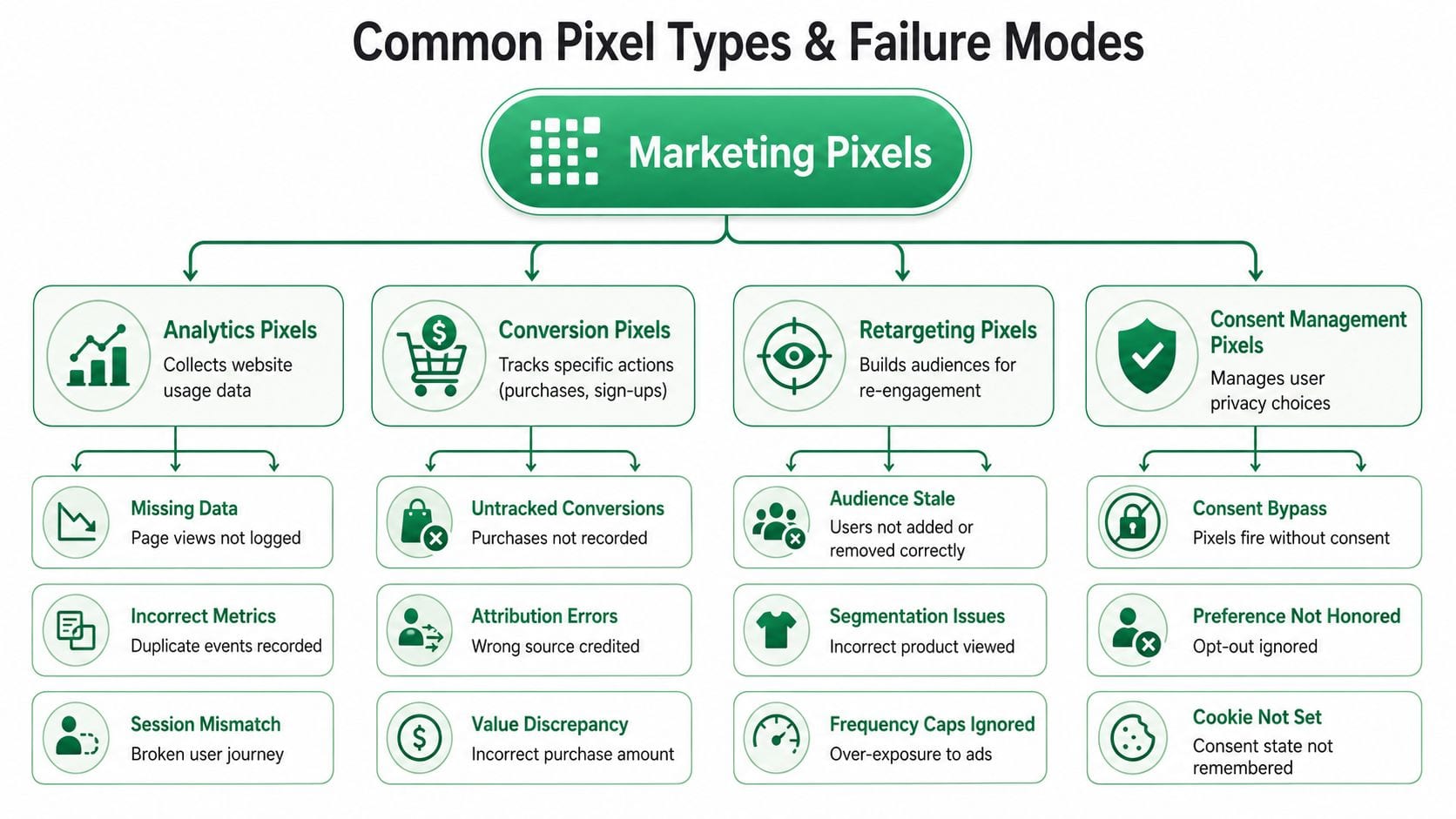
Not all pixels fail the same way. A conversion pixel problem distorts revenue. An analytics pixel problem breaks behavioral context. A retargeting issue damages audience quality. Consent-related failures create both compliance risk and bad data.
The right monitoring approach starts with knowing what each pixel type is supposed to do and how it usually breaks.
Conversion pixels
Conversion pixels track high-value actions such as purchases, signups, form submissions, or demo requests. They often pass business-critical fields like order value or product details to ad platforms. Improvado's overview of tracking pixel types is a useful reference here because it separates conversion pixels from analytics, email, and platform-specific implementations.
Common failure modes:
- Wrong trigger location. A purchase event fires on page load instead of after a confirmed transaction.
- Duplicate fires. The same conversion sends twice because both hardcoded code and GTM fire the event.
- Missing values. The event reaches the platform, but value, currency, or product details are blank or malformed.
These failures are dangerous because the platform still receives something. Teams often mistake “event exists” for “event is accurate.”
Analytics pixels
Analytics pixels collect broad engagement data such as page views, session behavior, and navigation patterns. They give context that conversion pixels can't provide.
Their failures are different:
- Missing on new pages. A new campaign microsite launches without the analytics tag.
- Inflated event counts. Single-page applications or route changes trigger repeated page-related events.
- Broken journey continuity. Session logic becomes inconsistent, making path analysis unreliable.
Implementation detail matters in this context. If your team needs to inspect platform-specific event drift, a focused Meta pixel audit checklist can help identify patterns that often spill into analytics quality problems too.
Email and platform-specific pixels
Email tracking pixels, Google Ads tags, Meta Pixel, and TikTok Pixel each have their own schemas and expectations. Platform-specific pixels usually support both attribution and audience building, so a failure affects more than one workflow.
Typical issues include:
- Schema mismatches. The event name exists, but required properties no longer match the platform's expected format.
- Audience contamination. A retargeting event fires for the wrong page type or user state, pulling irrelevant users into paid audiences.
- Broken integrations after redesigns. The page still loads, but the event trigger tied to the old markup no longer works.
Consent and governance failures
Consent-related pixels or rules are often treated as a legal concern only. In practice, they're also a measurement concern.
A few common problems:
- Consent bypass. A marketing pixel fires before consent is granted.
- Preference not honored. A user opts out, but downstream tags still load.
- State not retained. The consent signal doesn't persist, so firing behavior changes unpredictably across sessions.
Good monitoring doesn't only ask, “Did the event fire?” It also asks, “Should it have fired?”
That's the difference between basic tag debugging and actual marketing pixel monitoring.
Proactive Strategies for Pixel Monitoring
Manual QA still has a place. It's useful when you're validating a new implementation, checking a specific flow, or reproducing an issue. But as an operating model, manual QA breaks down fast.
No analyst can continuously inspect every landing page, every event schema, every campaign UTM pattern, and every release across a growing stack. That's why mature teams move from spot checks to automated controls.
What manual monitoring still does well
Browser developer tools, GTM Preview, Tag Assistant, and platform helper extensions are still worth using. They help answer narrow questions quickly.
Use them for:
- Launch validation. Confirm the expected pixel exists before a campaign goes live.
- Targeted debugging. Reproduce an issue on a specific page or event flow.
- Implementation reviews. Inspect whether a trigger condition matches the intended business action.
What they don't do is watch the stack when nobody is looking.
Why reactive checks fail at scale
The operational problem is timing. Weekly checks miss midweek failures. A dashboard review catches symptoms, not causes. A stakeholder escalation usually arrives after spend has already been optimized against bad data.
There's also the performance angle. According to Digital Marketer's tracking pixel overview, uncapped pixels can add 200 to 500ms page load delay per page, contribute to 7 to 11% bounce rate increases, and lead to 15% underreporting of engagement events. The same source notes that Trackingplan audits found 25% of enterprise sites have broken pixels from overload, and that alerts on more than 5% pixel failure rates can improve attribution accuracy by 20%.
That combination is what makes manual methods inadequate. You're not just checking correctness. You're monitoring correctness, delivery, and performance under live conditions.
What a proactive monitoring system needs
A practical framework has four parts.
Continuous validation
The system should compare live behavior against the expected tracking plan. That means checking whether required events still exist, whether parameters still conform to naming rules, and whether values remain usable.
Real-time alerting
Waiting for a monthly audit is too slow. Teams need alerts when a pixel disappears, when traffic drops unexpectedly, when rogue events spike, or when campaign tagging drifts away from convention.
Anomaly detection
Some failures aren't binary. The event still fires, but volume looks wrong. Or one destination suddenly receives less traffic than the others. Monitoring needs to detect suspicious change, not just total breakage.
Root-cause support
An alert without context creates more work. Teams need enough detail to know whether the issue came from a release, a trigger condition, a consent conflict, a missing parameter, or a destination-specific problem.
You don't want a tool that only says something is broken. You want one that tells the analyst where to start fixing it.
A simple comparison
| Approach | Good for | Fails when |
|---|---|---|
| Manual spot-checks | New launches, one-off debugging | Many pages, frequent releases, multiple teams |
| Dashboard review | Trend analysis, executive visibility | Silent tracking failures that look like business movement |
| Automated monitoring | Ongoing QA, alerts, anomaly detection | Only fails if nobody owns the response process |
If you're formalizing the process, this guide on how to audit marketing pixels for accurate analytics is a useful operational reference. The core shift is simple: stop asking analysts to find errors by hand after they affect reporting. Build a system that surfaces them while they're still small.
Automating Your Monitoring with Trackingplan
Once a team decides to automate, the question changes from “Should we monitor?” to “What should the system do every day?”
The answer should map directly to the failures that hurt reporting most: duplicate pixels, missing parameters, broken integrations, unexpected traffic drops, schema mismatches, consent misconfigurations, and UTM errors. Trackingplan's own guidance on tracking pixel deployment and monitoring failures describes these as core data quality risks and points to real-time detection as the practical response.
What automation should remove from the team's workload
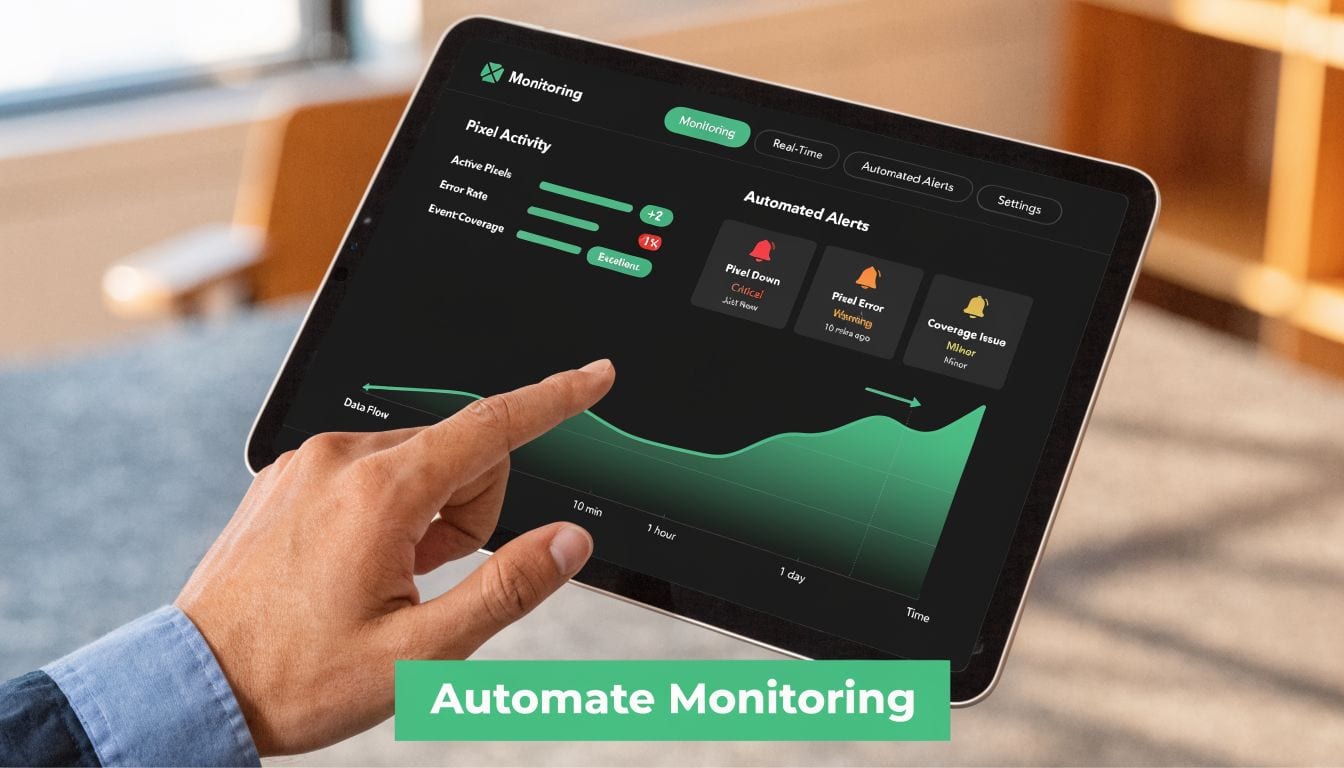
A useful platform shouldn't just log events. It should reduce the amount of manual verification analysts and developers have to do after each site change.
That means automating work such as:
- Discovery of what's implemented. Many stacks contain old pixels, duplicate tags, and destinations that nobody fully owns anymore.
- Detection of drift. The implementation after a release rarely matches the original tracking plan perfectly.
- Alert routing. Issues need to reach the right people quickly, not sit in a dashboard waiting for someone to notice.
- Root-cause clues. Teams need evidence, not just red indicators.
A practical option is Trackingplan. It automatically discovers martech implementations across dataLayer inputs and downstream destinations, monitors analytics and marketing pixels, and alerts teams through channels like email, Slack, or Microsoft Teams when it detects issues such as missing events, rogue events, schema mismatches, campaign tagging errors, broken pixels, potential PII leaks, or consent misconfigurations.
How that maps to real problems
If your team struggles with rogue events, automatic discovery helps surface tags and event flows you didn't know were active. If your paid team complains that one platform stopped matching the others, destination-level monitoring helps isolate where the drop started. If releases regularly introduce parameter inconsistencies, schema validation catches the mismatch before it contaminates reporting for weeks.
A good automated setup also helps agencies and multi-brand teams because it centralizes QA. Instead of maintaining brittle test documents and manual checklists across properties, the monitoring layer becomes the living source of what is happening.
Here's a product walkthrough video that shows the platform in action:
What to look for in implementation
The strongest monitoring workflow usually has these characteristics:
Fast installation
A lightweight tag or SDK gets the system live without a long engineering project.
Coverage across tools
Most teams don't send data to just one destination. Monitoring needs visibility across analytics platforms, ad pixels, and server-side flows.
Useful alerts
An alert should identify the event, page, destination, or parameter at fault. Noise kills adoption.
Cross-team readability
Marketing, analytics, and development should all be able to understand what broke and what changed.
The point of automation isn't to replace judgment. It's to stop wasting expert time on finding problems that software can detect immediately.
Navigating Privacy Consent and The Future of Pixels
Tracking quality and privacy compliance are now part of the same operational problem. If a consent tool blocks the wrong events, you lose data. If it fails to block the right ones, you create compliance risk. Either way, the implementation needs monitoring.
That's why privacy can't sit in a separate workflow from measurement anymore. The team responsible for attribution needs visibility into when pixels fire, under what consent state they fire, and whether the same rules are being applied consistently across web properties.

Consent accuracy is a data quality issue
A lot of teams still talk about consent as a legal checkbox. In practice, it also changes attribution, audience building, and campaign optimization.
Quarterly audits are recommended to remove deprecated tags, update consent mechanisms, and validate that new pages include the required tracking setup, according to Trackingplan's 2026 best-practice guidance on pixel deployment and monitoring. Real-time monitoring matters because those controls can drift after redesigns, CMP updates, or rushed campaign launches.
The future is less about fewer pixels and more about better control
Server-side tagging, first-party data strategies, and cookieless measurement approaches are becoming more important because they offer more control over what gets collected and forwarded. But they don't eliminate the need for monitoring. They just change where failures happen.
Instead of only asking whether a browser pixel fired, teams also need to ask:
- Did the server-side event get sent?
- Did the payload match expected schema?
- Was consent respected before forwarding data?
- Did the campaign parameters survive the handoff?
Privacy-first measurement still depends on observability. A more sophisticated stack doesn't protect you if nobody is checking whether it works as intended.
The future of marketing pixel monitoring isn't just cleaner implementation. It's controlled, auditable measurement that supports both performance and trust.
Conclusion From Reactive Firefighting to Proactive Growth
Reliable marketing data doesn't come from cleaner dashboards. It comes from a tracking layer that's being watched continuously.
That's the shift teams need to make. Stop treating pixels as snippets you install once and revisit only when something looks wrong in reporting. Treat them like live production infrastructure tied directly to spend, attribution, and executive trust.
When marketing pixel monitoring is in place, the team spends less time debugging after the fact and more time making decisions from data they can defend. Campaign performance becomes easier to interpret. Release risk goes down. Conversations with finance and leadership get simpler because the underlying measurement is being validated, not assumed.
This matters even more as privacy requirements tighten. If your team is reviewing regional compliance implications, this overview of EU GDPR and Israel's updated privacy protection is a useful legal context for the measurement changes happening around consent and data handling.
Reactive firefighting is expensive. Proactive monitoring is how marketing teams protect both budget and credibility.
If your team wants fewer surprises in attribution, cleaner campaign data, and faster detection of broken pixels, it's worth evaluating Trackingplan as part of your analytics QA process.