
Your analytics team probably knows this pattern too well. A stakeholder asks why conversion dropped, marketing wants campaign answers before lunch, product needs funnel fallout by country, and someone from finance wants a cleaned export in a format that didn't exist yesterday.
That workload doesn't disappear because a new AI interface shows up. It changes shape. The most useful AI data analyst setups don't replace judgment. They absorb repetitive querying, summarize patterns faster, and give human analysts more room to work on decisions that move the business.
The catch is simple. An AI data analyst is only as good as the data it consumes. If your events are inconsistent, your schema is drifting, or your tags are broken, the system won't become strategic. It will become confidently wrong at scale. That's why automated data quality and observability belong in the core AI analytics stack, not in the cleanup phase after rollout.
Your Team's New Most Valuable Player
The strongest case for an AI data analyst isn't that it answers questions faster. It's that it changes where your best analysts spend their time.
When teams are buried in recurring requests, analysts become ticket processors. They rewrite the same SQL logic, sanity check the same dashboards, and spend too much of the week translating business questions into data pulls. That work matters, but it doesn't fully use the people you hired.
An AI data analyst helps with the front half of that cycle. It can handle routine questions, generate first-pass summaries, and surface patterns that would otherwise stay hidden until someone had time to look. Human analysts still do the hard part. They validate what matters, connect findings to the business, and turn analysis into action.
The labor market already reflects that shift. Contrary to replacement fears, the field is growing. The U.S. Bureau of Labor Statistics projects 23% growth in data analyst jobs by 2032, and 87% of analysts say AI makes them feel more strategically valuable than ever according to this discussion of AI's impact on analytics careers.
What changes in practice
A useful mental model is this:
- AI handles repetition: recurring queries, first-pass summaries, and broad pattern scans.
- Analysts handle ambiguity: conflicting signals, business trade-offs, and stakeholder context.
- Leaders handle prioritization: deciding which insights deserve action and investment.
Practical rule: If your analysts still spend most of their week gathering data instead of shaping decisions, AI hasn't transformed the function yet. It has only added another interface.
That's why the best teams don't frame AI as a headcount question. They frame it as an advantage. The role of the analyst moves upward, from report production toward business interpretation, experimentation, and strategy.
What Exactly Is an AI Data Analyst
An AI data analyst isn't one tool. It's a connected system that lets people ask business questions in natural language, translates those questions into data operations, and returns answers that are easier to explore than a raw table dump.
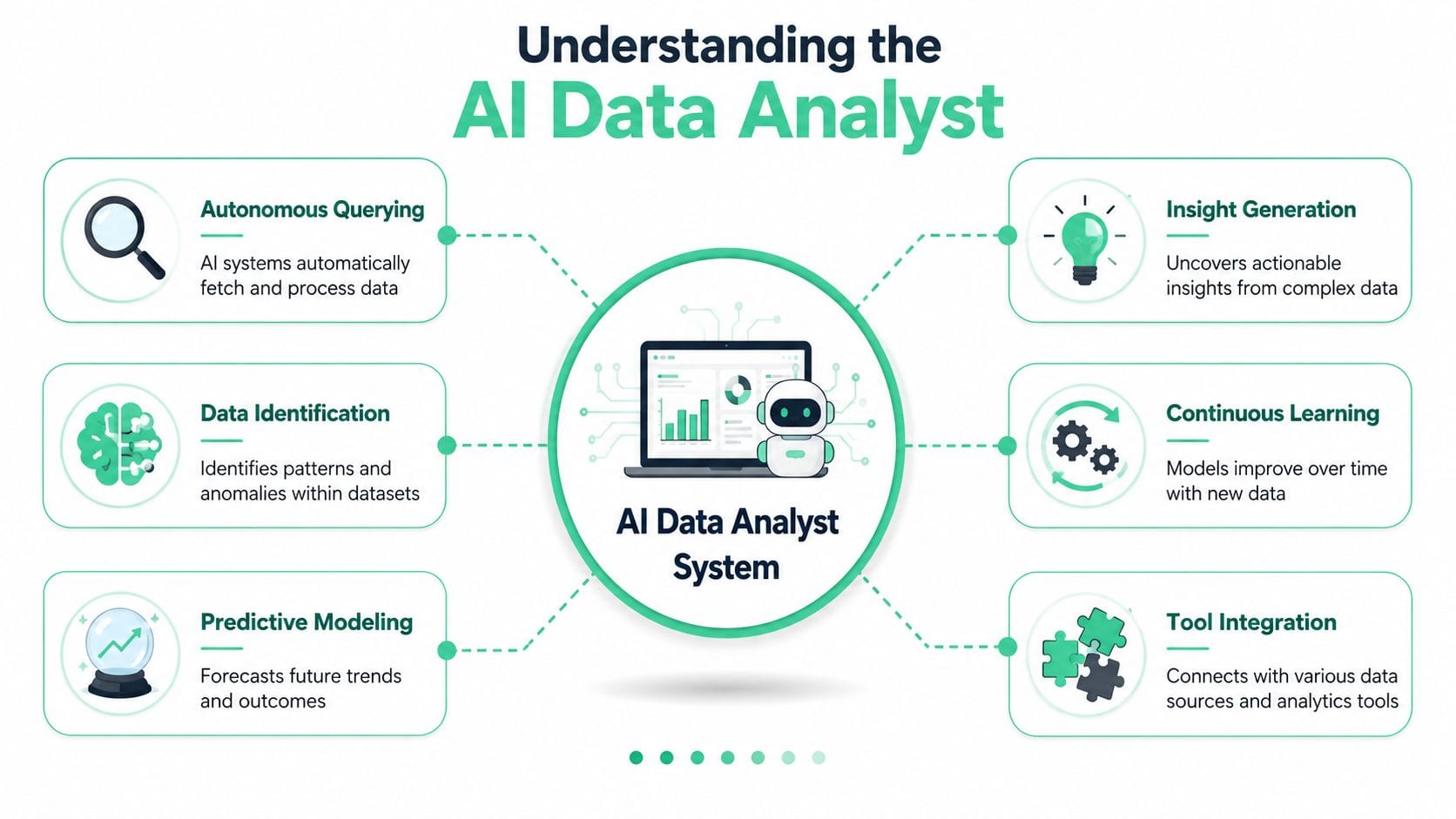
Consider it a tireless junior analyst with unusual strengths and obvious weaknesses. It can search broadly, work quickly, and respond conversationally. But it doesn't automatically understand your company's metric definitions, messy implementation history, or the political consequences of a bad recommendation.
The core parts of the system
Most real deployments include three layers.
Natural language interface
This is the part users see. A marketer asks why paid social conversions fell in one market. A product manager asks which onboarding step correlates with churn. The interface turns business language into a machine-readable task.
That sounds simple. It isn't. Business users often ask vague questions, use inconsistent metric names, or mix causal and descriptive language in the same prompt. Good systems narrow the request before they answer.
A short product walkthrough helps make that concrete:
Semantic layer
This is the most overlooked piece. The semantic layer defines what your business means by terms like “active user,” “qualified lead,” “net revenue,” or “conversion.” Without it, the AI is guessing across inconsistent definitions.
That's also why accuracy improves when semantic layers are in place. In real enterprise settings, AI data analyst tools often struggle because they're interpreting ambiguous business logic on top of changing schemas.
Query and reasoning engine
This layer talks to the warehouse, BI stack, spreadsheets, and event data. It's where the system turns a prompt into a query, assembles results, and generates a narrative or recommendation.
An AI data analyst isn't replacing your stack. It sits on top of the stack and depends on its quality.
What it does well and what it doesn't
It works well for exploratory questions, recurring operational analysis, trend spotting, and summarization. It works poorly when the underlying instrumentation is unreliable, when business logic is disputed, or when the question demands careful causal interpretation.
That distinction matters. The fastest route to disappointment is buying a conversational layer and assuming it created analytical maturity on its own.
Traditional vs AI-Augmented Analytics Workflows
Traditional analytics workflows usually break at the handoff points. A stakeholder asks a question. An analyst interprets it, checks definitions, writes or modifies SQL, validates the output, builds a chart, sends a report, and waits for the follow-up questions that should've been asked in the first round.
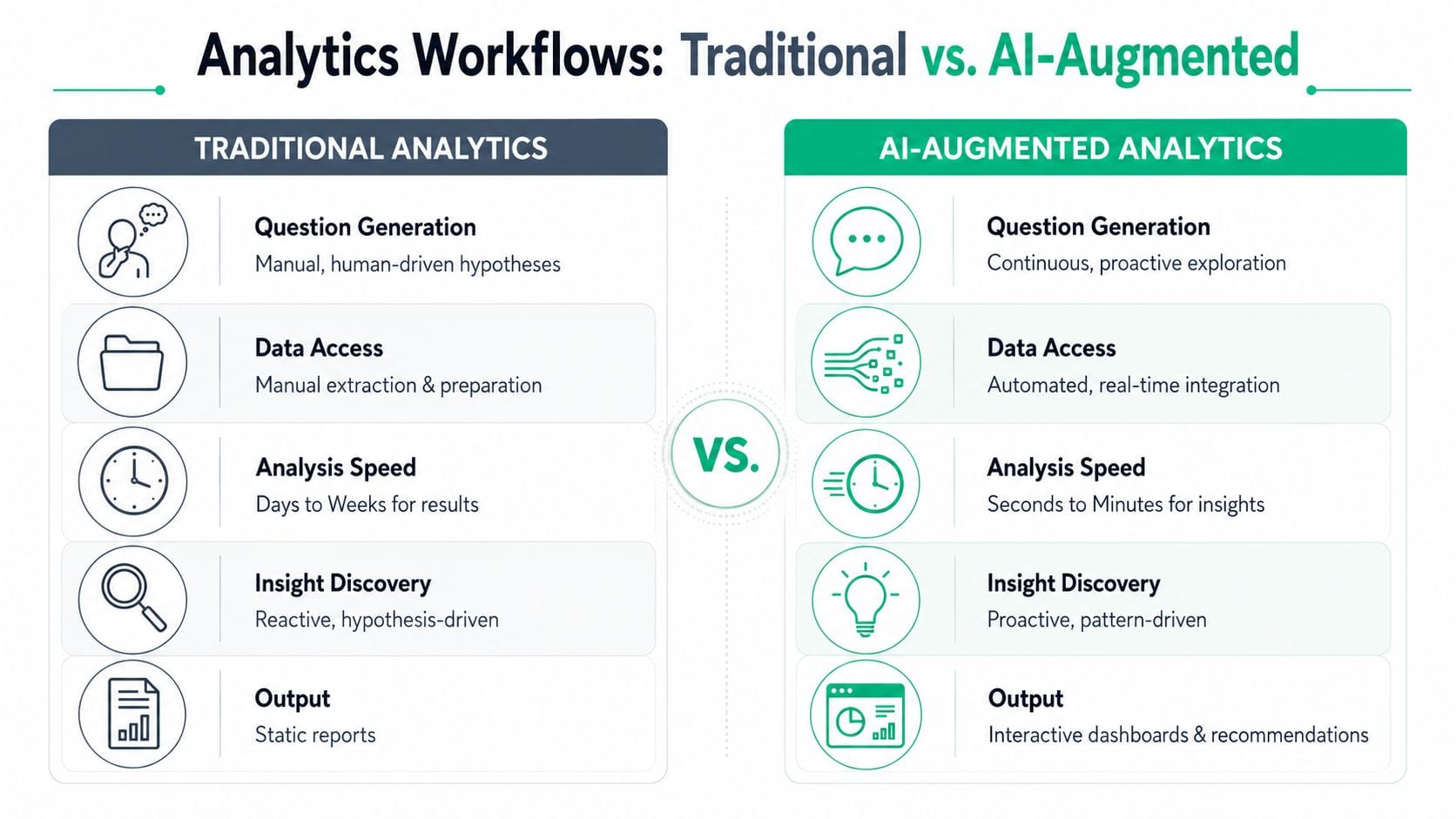
AI-augmented workflows feel different because they're conversational and iterative. Users can ask, refine, compare, and drill deeper in one working session instead of through a chain of tickets and dashboard revisions.
Where the old workflow slows down
The bottlenecks aren't mysterious:
| Workflow stage | Traditional pattern | AI-augmented pattern |
|---|---|---|
| Question intake | Analyst translates vague requests | User explores directly with guided prompts |
| Data access | Manual extraction and preparation | Connected systems retrieve data quickly |
| Analysis cycle | Linear and report-driven | Iterative and conversational |
| Output | Static report or dashboard | Answers, summaries, and next questions |
The biggest difference isn't speed alone. It's how much analytical surface area a team can cover in the same week.
A second difference is what happens after insight discovery. One of the chronic failures in analytics is the insight-to-action gap. Findings get shared, discussed, and then stall. AI-powered analytics can reduce human queries by 40% to 60% by handling routine workloads and surfacing insights automatically, which gives teams more time to push those insights into actual decisions.
Why this matters beyond internal efficiency
This workflow shift also changes how teams validate behavior. When you compare synthetic behavior with actual customer behavior, testing shortcuts can distort conclusions. That's why pieces like Uxia on human vs AI users are useful reading. They remind teams that simulated interactions can help, but they don't replace grounded observation of real users.
Faster answers are only better if the team can trust the question, the data, and the path from insight to action.
That's the line many organizations miss. AI compresses the query cycle. It doesn't remove the need for validation, business framing, or operational follow-through.
Four Practical Use Cases in Modern Analytics
The most convincing AI data analyst use cases aren't futuristic. They solve ordinary problems that drain analyst time every week.
Analytics QA
A common failure pattern starts with an innocent release. A developer changes a dataLayer value, a tag fires differently, or a parameter arrives in a new format. Dashboards still load, but something is off.
An AI-assisted workflow can spot mismatches faster by scanning event structures, identifying unusual parameter behavior, and flagging schema inconsistencies for review. This practical application often provides initial value for many teams. Before a model recommends anything strategic, it can help catch broken measurement.
A strong companion to this workflow is a documented tracking plan. Twilio defines a tracking plan as a strategic document that specifies which events and properties should be tracked, why they matter, and where they belong in the codebase, creating a single source of truth for analytics in its guide to creating a tracking plan.
Anomaly detection
The next use case is early warning. An AI data analyst can monitor patterns across traffic, conversion, retention, or campaign performance and bring unusual movement to the surface before someone manually notices it in a weekly review.
That doesn't mean every spike is meaningful. It means the system can narrow attention. Analysts then decide whether the issue came from behavior, implementation, seasonality, or a broken tag.
Root-cause analysis
AI proves more useful than a dashboard. A dashboard tells you what moved. An AI data analyst can propose likely drivers by comparing dimensions, checking upstream events, and tracing where a funnel changed.
For teams evaluating examples of how this shows up in day-to-day work, Trackingplan's data analyst use cases gives a practical view of the kinds of QA and observability tasks analysts usually end up owning.
The best AI workflows don't stop at “something changed.” They help teams ask the next three questions immediately.
Fraud and risk monitoring
The financial sector gives a strong real-world example of mature AI analytics usage. In banking, 91% of U.S. banks use AI-powered systems for fraud detection, and those systems help identify 95% of high-risk transactions before losses occur according to these data analytics adoption figures in finance.
That example matters because it shows where AI performs best. It handles high-volume pattern recognition, flags risk rapidly, and supports analysts who investigate edge cases. The same operating model applies in marketing, product, and digital analytics. AI scans broadly. People make the final business call.
Essential Skills and Tools for the AI-Powered Team
The teams getting the most from AI aren't the ones with the flashiest interface. They're the ones that upgraded both their skills and their stack.
The human layer still matters most
Analytical maturity still starts with people, not software.
- Business judgment: Analysts need to know which questions matter, which metrics reflect reality, and which findings are noise.
- Critical thinking: AI can produce plausible but flawed output. Someone has to challenge assumptions, test edge cases, and spot weak logic.
- Communication: An answer isn't useful until a stakeholder understands what changed, why it matters, and what should happen next.
Those skills get more important with AI, not less. When routine querying gets easier, the premium shifts toward interpretation and prioritization.
The stack that supports modern analysis
A practical AI analytics stack usually includes a warehouse, a BI layer, an AI interface, and a quality control layer that keeps the first three honest.
Here's the simplest version:
| Layer | Role |
|---|---|
| Data storage | Warehouse or governed source of truth |
| Business intelligence | Dashboards and recurring reporting |
| AI analysis layer | Natural language querying, summaries, exploration |
| Observability and QA | Validation of schemas, events, pixels, and anomalies |
Automated observability is the category many teams add too late. But once AI starts touching analytics workflows, it becomes foundational. If teams are evaluating the broader range of available solutions, this roundup of AI-powered analytics tools for 2026 is useful because it frames the stack as an ecosystem instead of a single product choice.
What senior analysts do more of now
Senior analysts in AI-enabled teams usually spend less time on extraction and more time on these tasks:
- Metric governance: defining business logic clearly enough that tools can reuse it correctly
- Decision support: helping teams choose between actions, not just reviewing charts
- Cross-functional alignment: resolving disagreements between marketing, product, finance, and engineering before they become reporting conflicts
That's the direction of travel. Analysts become less like report builders and more like decision architects.
Why Data Quality Is the Achilles Heel of AI Analytics
AI analytics fails in a predictable way. The interface looks polished, the answers come back quickly, and the mistakes are hidden behind confident language.
That's dangerous because it creates a false sense of analytical maturity. If the underlying data is incomplete, mislabeled, duplicated, delayed, or semantically inconsistent, the AI won't fix those conditions. It will amplify them.
Where AI data analysts break
The practical performance gap is already visible. On complex enterprise queries, AI data analyst tools often land at 50% to 69% accuracy, with failures driven largely by hallucinations, text-to-SQL mistakes, and data drift, as outlined in this analysis of accuracy challenges in AI data analyst tools.
That figure explains why polished demos don't tell the whole story. Controlled benchmarks reward clean datasets and simple tasks. Real organizations have inherited events, overlapping definitions, undocumented changes, and source systems that don't agree.
Why observability matters before intelligence
Teams often talk about AI readiness in terms of model choice. In practice, readiness starts lower in the stack.
A reliable setup needs:
- Event visibility: knowing what data is being collected across web, app, and server-side flows
- Schema monitoring: catching property mismatches, rogue values, and disappearing fields
- Implementation awareness: seeing when pixels, tags, UTMs, or destinations change unexpectedly
If you're building an internal framework for this work, articles on solving data quality issues are useful because they anchor the conversation in operational causes, not abstract “bad data” language.
Bad dashboards are obvious. Bad AI answers are harder to catch because they often sound reasonable.
That's why data quality needs active monitoring. Static documentation helps. Manual QA helps. But neither is enough in environments where marketing tags change, app releases ship weekly, and multiple teams touch instrumentation.
A practical starting point is to adopt consistent governance and validation habits before expanding AI access. This guide to data quality best practices is a useful reference for teams trying to tighten those fundamentals across analytics operations.
How to Pilot an AI Data Analyst Program
Most AI analytics pilots fail for boring reasons. The scope is too broad, the success criteria are vague, and the team tests the AI before validating the data.
That sequence should be reversed.
Start with one narrow business problem
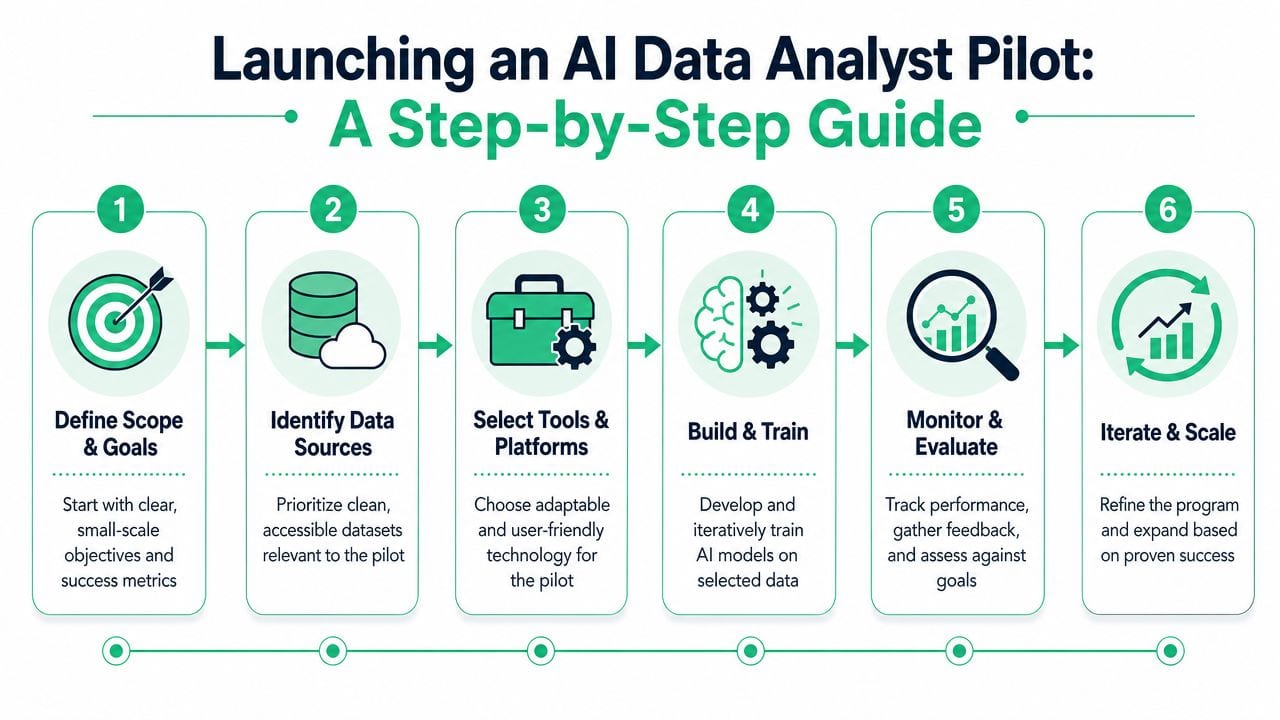
A good pilot begins with a use case that's important, repeatable, and easy to validate. Examples include campaign anomaly review, recurring funnel diagnostics, or analytics QA for a defined product flow.
Don't start with “make all company data conversational.” Start with one workflow where analysts already know the current bottleneck.
Put data validation before AI rollout
This is the step teams skip. Automated observability tools connect with platforms like Google Analytics 4, Adobe Analytics, Amplitude, and Segment to detect schema errors, rogue events, and tagging issues in real time, which creates a stable base for AI workflows in line with how automated observability integrations work.
Trackingless automated QA platforms can also discover real measurement plans directly from live user traffic rather than relying on manual setup. That matters because many organizations don't have a fully current picture of their implementation state.
For teams shaping process around this, these proven data quality frameworks are useful because they connect governance with day-to-day execution.
Build the pilot like an operating process
Use a short checklist, but don't treat every step equally.
- Choose the question well. Pick a use case with visible business value and clear ownership.
- Audit the input data first. If event naming or metric logic is unstable, fix that before testing outputs.
- Set evaluation criteria. Review answer quality, trustworthiness, and analyst adoption, not just speed.
- Keep a human in review. Analysts should validate early responses and document where the system fails.
- Plan for workflow change. New tooling affects intake, governance, and stakeholder expectations.
Change management is usually the hidden work. Teams need new habits around validation, escalation, and metric ownership. To address these needs, a practical resource on analytics change management can help leaders avoid treating the pilot as a purely technical deployment.
A pilot works when it proves one thing clearly. The team can trust the answers enough to change how work gets done.
Frequently Asked Questions About AI Data Analysts
Will AI data analysts replace human data analysts
No. They'll augment them.
AI is strong at repetitive retrieval, broad pattern scanning, and first-pass summaries. Human analysts still do the work that matters most in real organizations: framing the business problem, checking whether the answer makes sense, resolving conflicting definitions, and communicating what action should follow. The role shifts upward from data mechanic to data strategist.
What is the first, most practical step to get started with AI analytics
Start with your data, not the AI interface.
Before a team asks an AI system to explain performance, it needs to know whether the events, tags, schemas, and destinations are reliable. In practice, the first useful move is implementing automated analytics observability and QA so the team can see what's really being collected and where the current issues are.
How can I justify the cost of new AI and data quality tools
Tie the investment to labor, decision quality, and risk.
If analysts spend large chunks of their week auditing broken tracking, rebuilding reports, or investigating inconsistent numbers across systems, that work has a real cost. So does a bad decision made from flawed data. The best business case usually combines efficiency gains with reduced reporting risk and stronger trust in the numbers leadership uses.
If your team is exploring AI analytics, don't start by asking which chatbot can write SQL fastest. Start by asking whether your measurement layer is trustworthy enough to support AI at all. Trackingplan helps teams monitor analytics quality, discover implementation issues from real traffic, and keep the data foundation strong enough for AI-driven analysis to be useful.