
TL;DR:
- Analytics testing verifies data accuracy at every stage to prevent costly measurement errors. Automated tools catch tracking and pipeline failures, ensuring reliable marketing insights. Continuous testing and monitoring are essential to maintain data integrity during campaigns.
Analytics testing is the systematic process of verifying data collection, processing, and reporting to guarantee accurate and actionable marketing insights. Without it, campaigns run on corrupted data, attribution breaks down, and ad spend gets wasted on decisions built on faulty numbers. Poor data quality costs organizations an average of $12.9 million annually, according to Gartner. That figure makes analytics testing one of the highest-return investments a marketing team can make. Trackingplan exists precisely to close this gap, giving analysts automated monitoring and real-time alerts when tracking breaks.
What is analytics testing and why does it matter?
Analytics testing is a multi-layered validation discipline that covers four distinct layers: tracking events, data pipelines, transformations, and reporting outputs. Each layer can fail independently, and a failure at any point corrupts everything downstream. Data testing includes schema, regression, BI report, security, and performance tests to ensure reliability across the full stack. That breadth is what separates analytics testing from simple QA checks on a dashboard.

The stakes are concrete. A broken pixel on a checkout page silently drops conversion events. A schema change in a data warehouse causes a revenue metric to double-count. A misconfigured UTM parameter misattributes an entire paid campaign to organic. None of these failures announce themselves. They sit quietly in your data until a business decision goes wrong. Systematic validation catches them before that happens.
For digital marketers, the practical payoff is better attribution, more reliable A/B testing for analytics experiments, and confidence that the numbers driving budget decisions are real.
Core analytics testing methods every analyst should know
The foundation of any testing program is a set of generic data tests that run automatically on every data model. These include checks for uniqueness (no duplicate rows), not-null constraints (required fields always populated), accepted values (categorical fields contain only valid options), and referential integrity (foreign keys match primary keys). These four checks alone catch the majority of structural data failures before they reach a report.
Business logic testing goes one layer deeper. It validates that calculated metrics behave correctly under real conditions. A session count metric, for example, should never exceed the number of unique users in a given time window. A revenue metric should never go negative. These rules encode what “correct” means for your specific business, and they fail loudly when something changes unexpectedly.
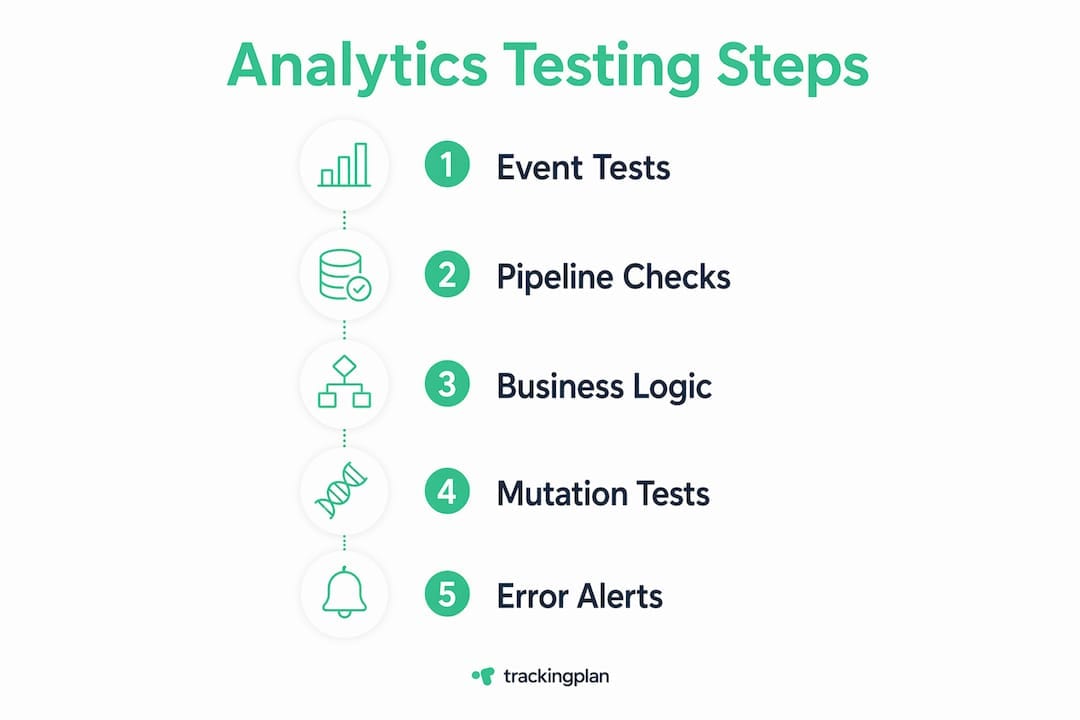
Metric mutation testing applies deliberate logic mutations to verify that your validation suite actually catches realistic business metric errors. The technique works like this: you intentionally introduce a known error into a metric calculation, then confirm that your tests flag it. If they do not, your test coverage has a blind spot. This approach detects silent failures that structural tests miss entirely.
| Test type | What it checks | When it fails |
|---|---|---|
| Schema / uniqueness | Row-level structure and deduplication | Duplicate events, missing required fields |
| Business logic | Metric calculation rules | Revenue goes negative, sessions exceed users |
| Mutation testing | Test suite effectiveness | A known error passes undetected |
| Pipeline / regression | Data flow between systems | ETL job drops rows, transformation breaks |
| Performance testing | Query speed and system load | Reports time out under peak traffic |
Pro Tip: Run mutation tests on your most critical metrics first: revenue, conversion rate, and session count. These are the numbers that drive budget decisions, so their test coverage must be airtight.
What tools power effective analytics performance testing?
Automated performance testing pipelines can reduce deployment cycles by approximately 75% and decrease performance-related incidents by up to 90%. Automation also saves 70–80% of effort compared to manual testing. Those numbers explain why teams that still rely on manual spot-checks fall behind quickly.
Several tool categories support different parts of the testing stack:
- Data transformation frameworks like dbt provide built-in data test syntax that runs schema and business logic checks directly against your warehouse on every model build.
- Load and performance testing tools like Apache JMeter simulate real user behaviors at scale to identify response time bottlenecks before they hit production dashboards.
- Performance contract systems encode target metrics in machine-readable files. Performance contracts enable automated regression detection before code merges, a practice known as shift-left testing.
- AI-powered monitoring platforms like Trackingplan continuously audit tracking implementations, detect schema mismatches, and send real-time alerts via Slack, email, or Teams when something breaks.
- Probabilistic testing frameworks use statistical methods like Wilson scores and t-distributions to validate large datasets quickly without exhaustive row-by-row scans.
The right combination depends on your stack. A team running dbt on BigQuery needs different tooling than a team managing tag-based tracking across multiple client sites. What every team needs, regardless of stack, is coverage at all four layers: tracking, pipeline, transformation, and reporting.
Pro Tip: Pair dbt data tests with a dedicated tracking monitor like Trackingplan. dbt catches warehouse-level failures; Trackingplan catches client-side tracking failures. Together they cover the full data journey.
How to execute analytics testing in a marketing campaign
A working analytics testing program follows a clear sequence. Skipping steps early creates gaps that surface as unexplained data discrepancies later.
- Define your tracking plan. Document every event, property, and expected value before a campaign launches. This becomes the schema contract your tests enforce. Trackingplan can auto-generate this from your existing implementation.
- Write schema tests first. Confirm that required event properties are never null, that event names match your taxonomy, and that user IDs are unique. These run fast and catch the most common tracking errors.
- Add business logic tests. Write rules that encode what correct data looks like for your campaign metrics: conversion rate bounds, expected traffic ranges, and attribution channel constraints.
- Run pipeline integrity checks. Verify that data moves correctly from your tag manager or SDK through your warehouse to your reporting layer. Check row counts at each stage to spot drops.
- Apply mutation testing to critical metrics. Introduce a deliberate error into your conversion metric calculation and confirm your test suite catches it. Fix any gaps before the campaign goes live.
- Set up continuous monitoring. Configure alerts for anomalies: traffic spikes, sudden drops in event volume, or schema drift. Trackingplan’s AI-powered alerts flag these in real time, so you catch issues within minutes rather than days.
- Review test results after every deployment. A code push, tag update, or third-party script change can silently break tracking. Post-deployment checks are non-negotiable.
The campaign tracking checklist approach works well here. Treat each campaign launch like a software release: no data goes live without passing its test suite.
Analytics testing for marketing ROI depends on this discipline being consistent, not occasional. Teams that test only at launch miss the failures that happen mid-campaign when tags get overwritten or third-party scripts conflict.
Troubleshooting common analytics testing issues
The most common mistake analysts make is treating all test failures as equivalent. They are not. A tracking failure and a pipeline failure look similar on a dashboard but require completely different fixes.
Separating tracking failures from pipeline failures requires specialized tests. A session start rate check, for example, tells you whether events are firing on the client side. An event uniqueness check tells you whether the pipeline is deduplicating correctly. Running both in parallel pinpoints which layer broke.
Common issues and their diagnostic signals:
- Schema drift: An event property changes name or type after a platform update. Tests flag not-null or accepted-value failures on fields that previously passed.
- Missing events: A pixel fires on some pages but not others. Session start rate drops below its expected floor, triggering an alert.
- Inconsistent metrics: Two reports show different conversion counts for the same campaign. A pipeline regression test reveals that a transformation step is applying a date filter incorrectly.
- Silent business logic changes: A developer updates a revenue calculation without notifying the analytics team. The dashboard stays green, but the numbers are wrong.
A green dashboard does not guarantee correct data. Silent business logic changes are the most dangerous failures in analytics because they pass every structural test while corrupting every business decision that depends on them.
A fail-soft testing culture configures warnings instead of blocking errors for non-critical checks. This surfaces tracking issues without breaking downstream reporting. Reserve hard failures for the metrics that directly drive budget decisions: revenue, conversions, and attribution.
Key Takeaways
Effective analytics testing requires coverage at every layer of the data stack, from client-side tracking through pipeline integrity to business logic validation.
| Point | Details |
|---|---|
| Test all four layers | Cover tracking events, pipelines, transformations, and reporting to catch failures at every stage. |
| Use mutation testing | Deliberately introduce errors to confirm your test suite catches realistic business logic failures. |
| Separate failure types | Distinguish tracking failures from pipeline failures using session rate and uniqueness checks. |
| Adopt fail-soft culture | Configure warnings for non-critical checks so alerts surface issues without breaking reports. |
| Automate continuously | Automated pipelines cut deployment cycles and reduce performance incidents far beyond what manual checks achieve. |
The uncomfortable truth about analytics testing I’ve learned over time
Most teams test their analytics once at launch and then assume the data stays clean. It does not. Every tag manager update, every third-party script addition, every developer pushing a “minor” code change is a potential tracking break. I have seen campaigns run for weeks on zero conversion data because a checkout page update silently removed the purchase event. The dashboard looked fine. The numbers were catastrophically wrong.
The insight that changed how I think about this came from mutation testing for analytics engineering. The technique forced me to ask a question I had never asked before: not “does my data look correct?” but “would my tests actually catch it if the data were wrong?” The answer, the first time I ran mutation tests on a production metric suite, was no. Half my tests were structural theater. They passed on bad data because they were checking the wrong things.
AI-powered monitoring has shifted the balance. Continuous anomaly detection catches the failures that happen between scheduled test runs, which is when most real-world breaks occur. But automation does not replace judgment. You still need a human who understands the business logic to write the right tests and interpret the alerts correctly. The teams that get this right treat analytics testing as a shared responsibility between analysts, developers, and marketers, not a task that belongs to one person in a corner.
The best practices for tracking accuracy that hold up over time are the ones built into the workflow, not bolted on after a data crisis.
— David
How Trackingplan fits into your analytics testing workflow
Trackingplan automates the parts of analytics testing that break most often and get caught last: client-side tracking failures, schema mismatches, and pixel errors across websites, apps, and server-side environments.
The platform uses AI to continuously audit your full Martech stack, sending real-time alerts via Slack, email, or Teams the moment an anomaly appears. For marketing teams managing multiple campaigns or client sites, that speed matters. A broken pixel caught in minutes costs far less than one caught after a week of corrupted attribution data. Trackingplan’s digital analytics data quality tools give analysts the coverage they need across every layer of their tracking implementation, without the manual effort of building and maintaining custom test suites from scratch.
FAQ
What is analytics testing?
Analytics testing is the systematic validation of data collection, processing, and reporting to confirm that marketing metrics are accurate. It covers schema checks, business logic validation, pipeline integrity, and performance testing across the full data stack.
Why is analytics testing important for marketing campaigns?
Broken tracking silently corrupts attribution, conversion data, and ROI calculations. Poor data quality costs organizations an average of $12.9 million annually, making systematic validation one of the highest-return practices a marketing team can adopt.
What is mutation testing in analytics?
Mutation testing deliberately introduces known errors into metric calculations to verify that your test suite catches them. It exposes blind spots in structural tests that would otherwise allow silent business logic failures to pass undetected.
How do I separate a tracking failure from a pipeline failure?
Use specialized checks: session start rate tests identify client-side tracking failures, while event uniqueness and row-count checks identify pipeline-level failures. Running both in parallel pinpoints which layer broke.
How often should analytics testing run?
Analytics testing should run continuously, not just at campaign launch. Every code deployment, tag update, or third-party script change is a potential break point, so automated monitoring with real-time alerts is the standard for teams that depend on accurate data.