
The most popular advice on this topic is also the most misleading. Teams are told to buy a “HIPAA compliant” tool, turn on encryption, enable MFA, and move on. That advice fails the first real audit.
A HIPAA compliant platform isn't a badge you buy. It's a system you operate, document, review, and defend. In analytics, that distinction matters even more because data pipelines collect a lot of messy inputs. URL parameters, event payloads, form metadata, IP addresses, user identifiers, and downstream destinations can all create compliance exposure long before anyone notices.
New teams usually focus on infrastructure first. I'd reverse that order. Start with legal scope, data handling rules, access decisions, and evidence collection. Then choose technology that supports those decisions. Otherwise you end up with a secure-looking stack that still can't prove who accessed PHI, why they had access, what was transmitted, or whether the vendor accepted Business Associate obligations.
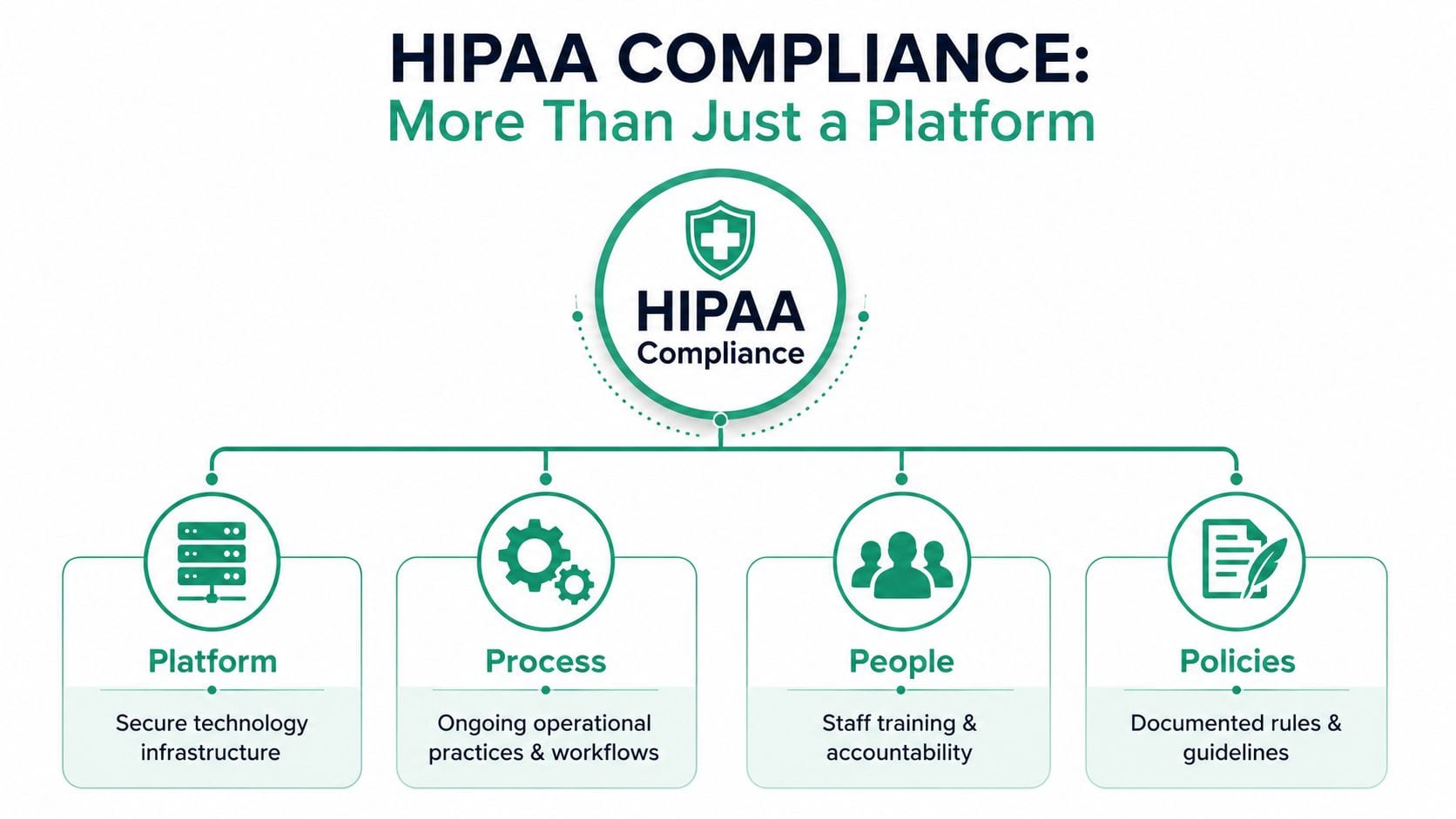
HIPAA Compliance Is More Than a Platform It's a Process
The biggest misconception is simple. People think technical controls equal compliance. They don't.
Most advice about a HIPAA compliant platform overemphasizes encryption and authentication while skipping the harder question of proof. That's a problem because 78% of breaches stem from human error or policy failures rather than technical flaws according to HIPAA Vault's discussion of what makes a platform HIPAA compliant. If your team can't show an auditor a documented risk analysis, workforce training records, incident response procedures, and evidence that those controls are current, your encrypted stack won't save you.
What the platform actually is in legal terms
A platform becomes more than software once it stores or processes electronic protected health information on behalf of a healthcare organization. At that point, the vendor operates as a Business Associate. That legal status changes the relationship immediately.
For the healthcare provider or health plan, that means vendor selection is a compliance decision, not just a procurement task. For the platform vendor, it means documented responsibilities, security controls, and operational obligations have to exist before data flows.
A lot of product pages blur this line. They talk about “HIPAA-ready” features while avoiding the operational side of the relationship. A better standard is whether the vendor helps you ensure HIPAA compliance for your app in a way that covers legal agreements, staff procedures, and system governance, not just storage settings.
Four things auditors care about more than your marketing page
Teams get into trouble when they treat HIPAA like a product checklist. It works better as an evidence checklist.
- Documented risk analysis: It has to be maintained as a living process, not filed away after procurement.
- Workforce training: Everyone handling PHI needs training that reflects actual workflows, not generic onboarding slides.
- Incident response: Teams need a written process for detecting, escalating, and responding to suspected exposure.
- Administrative ownership: Someone must own the program, approve changes, and keep the paper trail audit-ready.
Practical rule: If your team can describe a safeguard but can't produce evidence that it's reviewed, assigned, and enforced, treat that safeguard as incomplete.
Process failures usually start small
They rarely begin with obvious neglect. More often, a developer reuses a shared admin login. A marketer adds a new pixel without legal review. An analyst exports raw event data into a non-approved workspace. Nobody thinks they're breaking HIPAA. They're just trying to ship work.
That's why the operating model matters more than the platform label. A sound privacy workflow, like the governance habits discussed in privacy and compliance operations, prevents these small decisions from accumulating into a reportable problem.
A HIPAA compliant platform should support your process. It can't replace it.
Required Technical Safeguards for Analytics Platforms
Once governance is defined, the technical baseline gets much clearer. In analytics, the job is to move data without exposing identifiable health information to systems, users, or destinations that shouldn't receive it.
A platform handling ePHI on behalf of a covered entity is operating as a Business Associate, and the core technical requirements include AES-256 encryption for data at rest and TLS 1.2 or higher for data in transit as described in this healthcare analytics guidance. Those aren't luxury controls. They're the minimum architecture for moving sensitive data through an analytics workflow.
Encryption has to match the full data path
Teams often verify database encryption and stop there. That misses how analytics systems behave.
Event data moves through collection endpoints, processing queues, APIs, storage layers, exports, and downstream integrations. If identifiable data leaves your controlled environment before it's transformed, filtered, or de-identified, you've already created risk. The secure design is to keep identifiable patient data inside compliant infrastructure first, then route only the minimum necessary output downstream.
A practical architecture question is whether analytics needs identifiable data at all. In many pipelines, it doesn't. You can often reduce exposure by masking, tokenizing, or removing direct identifiers before the event reaches reporting tools. Teams working through data anonymization patterns usually discover that many “required” fields were only there because nobody challenged the original event design.
Identity and access controls must be explicit
Shared credentials are a non-starter in healthcare analytics. If multiple people use the same login, you lose accountability immediately.
Use this test: can you answer who accessed a record, when they accessed it, and why that person had permission? If the answer is fuzzy, access control is weak even if your SSO screen looks polished.
Here's the control stack that tends to hold up in practice:
| Control | What it prevents | What good implementation looks like |
|---|---|---|
| Unique user identification | Ambiguous accountability | Every user has an individual account |
| Strong authentication | Casual unauthorized access | Strong passwords, tighter admin protections |
| Role-based access control | Overexposure of PHI | Users see only the data needed for their role |
| Row-level restrictions | Broad access to mixed datasets | Sensitive records are segmented within shared environments |
Auditability is part of the technical design
An analytics platform has to do more than collect and report. It needs to preserve evidence. Logs should capture access, updates, deletions, permission changes, and configuration actions in a way security and compliance teams can review.
Secure analytics architecture is boring by design. The best systems don't impress people with flexibility. They constrain the ways PHI can move.
Technical safeguards work when they reinforce policy. Encryption protects the payload. Access controls restrict exposure. Audit trails prove what happened. If one layer is missing, the rest carry less weight.
Evaluating and Vetting a HIPAA Compliant Vendor
A polished demo does not tell you whether a vendor can survive an audit. Procurement teams often start with dashboards, integrations, and price, then ask legal and compliance to clean up the risk at the end. That order creates expensive surprises.
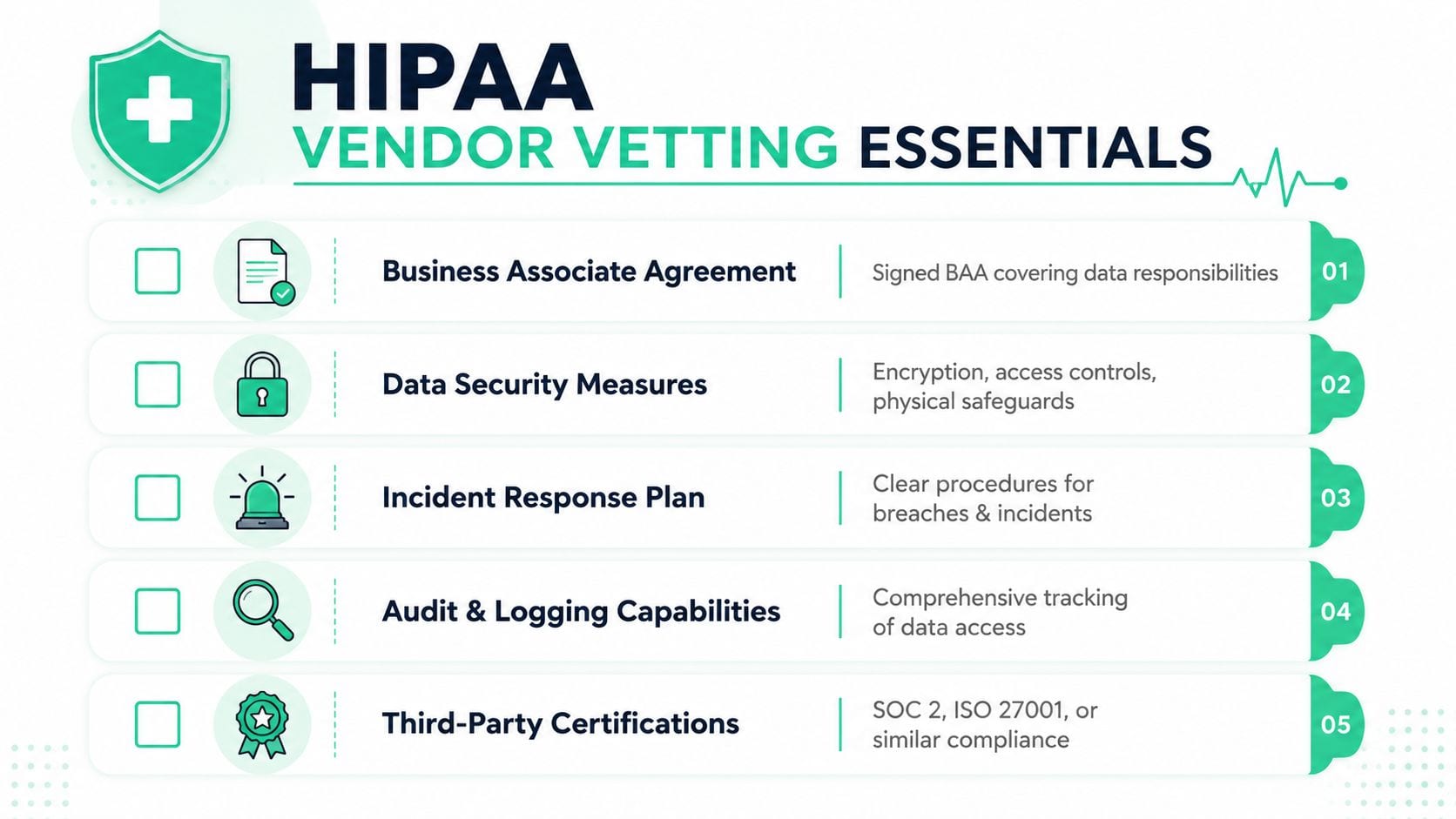
Start with responsibility. If a vendor will store, transmit, or otherwise handle PHI on your behalf, they need to sign a Business Associate Agreement. Ask that question before the demo, not after technical fit is already driving the decision.
Start with the contract before the demo
The BAA is operational risk allocation in writing. It should spell out permitted uses of PHI, breach notification timing, subcontractor oversight, data retention, and how data is returned or destroyed at termination. If those terms stay vague, the implementation team usually inherits the ambiguity later.
It also helps to review the vendor's data handling terms alongside privacy and security requirements. Teams that already know how to review a data processing agreement for vendor accountability and data handling boundaries usually move through BAA review faster because they can separate marketing language from enforceable obligations.
I look for one simple sign of maturity. The vendor can explain, in plain language, which compliance duties they own, which ones remain with the customer, and what evidence they can produce for each.
What to verify beyond sales claims
After the BAA is on the table, move to evidence. Ask for documentation, not assurances. A vendor that handles regulated data should be ready for this level of review.
Use a review structure like this:
- Administrative controls: Ask who approves access for vendor staff, how workforce training is documented, how sanctions are handled, and how often risk assessments are updated.
- Security operations: Review incident response procedures, vulnerability management practices, backup handling, and change control for production systems.
- Audit support: Confirm what logs exist, how long they are retained, whether they are tamper-resistant, and how quickly the vendor can produce them during an investigation.
- Third-party assurance: Request current SOC 2 Type 2 reports, recent penetration test summaries, and any shared responsibility documentation that explains customer versus vendor obligations.
- Subprocessor governance: Identify hosting providers, support tools, and any downstream services that could touch PHI. Then verify contract coverage and oversight.
These questions matter because HIPAA compliance in analytics fails as often in procedure as in code. A vendor may encrypt data properly and still struggle to show who approved privileged access, when a configuration change was reviewed, or how an incident would be escalated. That gap becomes your problem during an audit.
What strong vendor diligence feels like
Good diligence creates friction early and clarity later. Ask the vendor to walk through a real workflow, not a slide deck. For example, have them show how a support engineer gets temporary access to a customer environment, who approves it, how it is logged, when it expires, and how that access is reviewed afterward.
That single process exposes a lot. You learn whether access control is disciplined, whether procedures are documented, and whether the company treats audit evidence as a routine output or a scramble.
A practical review usually comes down to four questions:
- Can they define which data should and should not enter the platform?
- Can they produce policy documents and records that show their controls are operating, not just designed?
- Can they explain how they would investigate a suspected impermissible disclosure involving your data?
- Can they support your governance program with documentation that fits your own proactive compliance strategies?
A HIPAA compliant vendor is not just a vendor with security features. It is a company that can show documented responsibility, repeatable process, and evidence you can defend in front of auditors, counsel, and internal leadership.
Implementing Your HIPAA Compliant Analytics Platform
Deployment is where compliant design often falls apart. Teams buy the right software and then configure it in ways that widen exposure. A HIPAA compliant platform can still be used badly.
Start implementation by reducing what enters the system. Don't send full payloads and promise to clean them later. Decide up front which fields are necessary, which can be transformed, and which should never be collected.

Configure least privilege before onboarding users
Access design shouldn't wait until after launch. Build roles around jobs, not around convenience.
For example, analysts may need event-level visibility without administrative rights. Developers may need implementation diagnostics without unrestricted PHI access. Agencies and contractors should get narrower scopes than internal operations teams. If your first admin role is “superuser for everyone on the project,” you're already drifting.
A cleaner implementation pattern looks like this:
- Collection controls: Filter or suppress risky fields before ingestion.
- Role mapping: Assign permissions by function, then test each role against real tasks.
- Environment separation: Keep production data away from sandboxes and training spaces.
- Approval workflow: Require review before new tags, destinations, or events go live.
Protect credentials and recovery paths from day one
Operational resilience is part of compliance, not an afterthought. HIPAA-compliant software should be configured to regularly back up data and be able to restore critical business data and PHI during emergency events, and it should use a secure SDLC with secrets management for environment variables, API keys, and database credentials as outlined in Rocket.Chat's overview of HIPAA-compliant software.
That means no credentials in plain text documents, no hardcoded keys in deployment scripts, and no “temporary” secrets left in chat threads. It also means recovery planning has to be tested in the same environment where regulated analytics workflows run.
Teams that adopt proactive compliance strategies usually do better here because they treat change management and recovery readiness as routine operating work, not emergency tasks.
Before launch, run the implementation through the lens of server-side tagging for data accuracy and compliance. Server-side collection won't solve every privacy issue, but it gives teams more control over what gets forwarded, transformed, or blocked before data reaches external tools.
Maintaining Compliance Through Continuous Monitoring
A HIPAA compliant platform does not stay compliant on its own. The platform can support the work, but the work is still yours.
After go-live, the main question changes. It is no longer "did we configure the controls?" It becomes "can we prove, every week, that the controls still work, that approved data flows still match reality, and that someone would catch drift before it turns into an incident?" That is the part teams often underestimate.
A defensible monitoring program starts with audit evidence. Access logs, configuration changes, failed login attempts, exports, and administrative actions should be recorded with enough detail to identify who did what and when. That also means no shared accounts, no generic admin users, and no informal access paths that sit outside your review process. Logs only help if someone reads them, documents findings, and follows up.
What teams should monitor every week
Compliance drift usually comes from ordinary operating changes, not a dramatic failure. A new intake flow gets published. A campaign adds tracking parameters. A developer updates an SDK. A destination setting changes. Each action looks minor. Any one of them can change what data is collected, where it is sent, or who can see it.
Weekly review routines should cover at least these areas:
- Audit log review: Check privileged access, configuration changes, failed logins, exports, and unusual access patterns.
- Tracking QA: Inspect new events, properties, destinations, and payload changes for identifiers, free-text fields, and consent issues.
- Access recertification: Confirm that each user still needs the permissions they hold.
- Data flow validation: Compare live data movement against the approved design, not the original implementation ticket.
- Exception tracking: Record what was found, who reviewed it, what was remediated, and what still needs a decision.
That last item matters more than teams expect. Auditors and internal compliance reviewers want evidence of an operating process. A clean dashboard screenshot is not enough. Review records, approvals, exceptions, and remediation notes are what show the organization is managing HIPAA as an ongoing administrative process.
Monitoring has to include analytics behavior
Security teams often watch infrastructure. Analytics teams watch reports. HIPAA monitoring has to cover the payloads themselves.
Silent drift is common in analytics. A form update can start passing labels, record references, appointment context, or identifiers in a custom property without triggering a traditional security alert. The system may be healthy from an uptime standpoint while the implementation is out of policy. That is why teams need routine inspection of what is being collected and forwarded, not just whether the vendor platform is online.
If a relevant walkthrough from Trackingplan's video library fits your workflow, it can be useful to review their Trackingplan YouTube channel for examples of analytics QA and real-time monitoring in practice.
Review logs and payload changes like an investigator. Check whether current behavior matches approved use, documented controls, and signed vendor scope.
Incident response has to be assigned before you need it
A monitoring program fails fast when nobody owns the next step. Compliance, security, engineering, analytics, and legal should each know who triages an alert, who preserves evidence, who confirms the data involved, and who decides whether notification obligations are triggered.
Keep the response cycle short and documented:
- Contain the affected data flow.
- Preserve logs, payload samples, and configuration history.
- Confirm what data was involved.
- Identify which users, systems, or vendors were touched.
- Document remediation, approvals, and follow-up controls.
The point of continuous monitoring is not to create more dashboards. It is to maintain auditable proof that the analytics environment still operates within policy after the launch team has moved on.
Avoiding Costly HIPAA Compliance Mistakes
The expensive mistakes are rarely dramatic on day one. They look reasonable in the moment.
A marketing team wants visibility into lead quality, so they add standard analytics to a scheduling form. A developer spins up a test workspace using production-like data because it's faster than generating synthetic inputs. A former contractor keeps access because nobody owns offboarding for analytics tools. Each decision feels temporary. Together they create a compliance mess.
Five mistakes that show up again and again
Using a non-approved platform for “just testing”
Testing environments often become semi-permanent. If PHI enters the tool before a BAA is signed and controls are reviewed, the problem already exists.Letting URLs and form payloads pass through untouched
Standard analytics tools can capture identifiers in query strings, hidden fields, or custom event properties. Teams need explicit suppression rules, not assumptions.Ignoring scope creep
A project starts as anonymous web analytics, then someone adds appointment status, patient type, or intake context. The data classification changed, but governance didn't.Keeping broad access after people change roles
Permissions don't clean themselves up. Old access rights are one of the first things I check in a new deployment review.Treating implementation changes as purely technical
New tags, integrations, and destinations should go through privacy review. If engineering approves changes without compliance context, risky data paths open unnoticed.
The defensive posture that works
The safest teams are not the ones with the longest policy binders. They're the ones that build friction in the right places.
Use pre-launch reviews for new tracking. Require sign-off for any destination that receives event data. Validate that approved fields match live payloads. Remove user access on role change, not at the next quarterly cleanup.
The phrase “we're not sending PHI intentionally” has preceded a lot of painful investigations.
Healthcare analytics needs a healthy level of skepticism. Assume fields will be reused, tags will drift, vendors will market aggressively, and busy teams will default to speed unless the process stops them.
Essential Resources for Audit-Ready Compliance
Teams usually ask for a checklist. What they really need is a negotiation kit and a validation routine.
A good starting point is the BAA itself. Legal counsel should handle the final language, but operational teams should know what terms matter because those terms affect implementation, monitoring, and incident handling.
BAA clauses worth checking with legal
Review these areas before signing:
| Clause area | What to look for | Why it matters operationally |
|---|---|---|
| Breach notification | Clear timelines, escalation paths, vendor obligations | Security and legal teams need workable response timing |
| Permitted use of data | Limits on how the vendor may process PHI | Prevents vague or overly broad use rights |
| Subcontractors | Whether downstream processors are governed and disclosed | Your risk extends to their chain, not just their app |
| Data return or destruction | What happens at termination | Avoids PHI lingering in former systems |
| Audit support | Vendor obligations to provide evidence | You may need records quickly during review or investigation |
A practical self-audit for analytics deployments
Run these tests as part of internal review, not only before an external audit:
Access test
Log in with each role type and verify users can see only what their job requires.Logging test
Trigger a known administrative action and confirm it appears in audit records with the right user identity and timestamp.Payload inspection test
Review live events for identifiers in URLs, custom properties, form metadata, and forwarded destinations.Credential handling test
Confirm API keys, environment variables, and database credentials are managed through approved secrets controls.Recovery test
Verify backup and restoration procedures for systems that store or process regulated analytics data.
Evidence beats intention
During audits, good intentions carry very little weight. Auditors and leadership want records, approvals, logs, role definitions, training proof, and change history.
That doesn't mean your program has to be huge. It means it has to be consistent. Smaller teams can run strong HIPAA programs if they keep scope disciplined, document decisions as they happen, and verify that production behavior matches policy.
The test for a HIPAA compliant platform is straightforward. Can your team explain the control, show the evidence, and prove the control still works today?
If your team needs a practical way to monitor analytics implementations, catch rogue tags, and spot potential privacy issues before they turn into compliance incidents, Trackingplan is worth evaluating. It gives data, marketing, and engineering teams a shared view of what's being collected and where it's going, which makes audit preparation and day-to-day governance much easier.