
You're probably sitting on a massive archive of customer conversations right now. Support calls, chatbot sessions, sales notes, complaint emails, in-app messages, maybe even transcripts from user interviews. Everyone agrees those conversations matter, but when someone asks a basic question like “Why are customers frustrated this week?” or “What objections are showing up before people churn?” the room goes quiet.
The data exists. The answers are somewhere in the mess. But raw transcripts don't behave like a clean dashboard table.
That's where conversational analytics becomes useful. Not as a novelty interface, and not as a chatbot bolted onto your BI stack, but as a disciplined system for turning messy language into something teams can query, trust, and act on. Done well, it helps marketers spot friction before conversion drops, analysts connect sentiment to business outcomes, and developers instrument the pipeline so the whole thing stays reliable over time.
Failure in conversational analytics isn't typically due to a lack of AI models. It stems from skipping the hard parts: taxonomy design, transcript quality, identity stitching, governance, and ongoing validation. If you want conversational analytics to influence product decisions, retention work, support operations, and campaign strategy, you have to build trust into the lifecycle from day one.
The Untapped Goldmine in Your Customer Conversations
A familiar pattern shows up in growing companies. The support team handles a flood of chats every day. Sales records calls in Gong or Chorus. Customer success logs renewal risks in the CRM. Marketing runs surveys and watches social replies roll in. Product managers read a handful of transcripts and come away with strong opinions. Then leadership asks for a clear view of the voice of the customer, and nobody can give one with confidence.
What usually happens next is manual sampling. Someone exports a few conversations, tags them in a spreadsheet, and presents a summary that feels directionally right but never quite complete. The loudest issues dominate attention, while quieter patterns stay buried.
That's expensive in ways teams don't always notice at first.
A recurring complaint about onboarding might be treated as a training issue when it's a broken product flow. A spike in refund requests might look like a pricing problem when customers are really confused by fulfillment delays. A campaign may appear weak when the issue sits deeper in the customer journey analytics process, where expectations set in ads don't match what users experience after the click.
What makes this data different
Conversation data is messy, emotional, and context-heavy. That's exactly why it's valuable.
Structured analytics tells you what happened. Customer conversations often tell you why it happened. They expose hesitation, intent, confusion, urgency, satisfaction, and language that never appears in event logs or CRM stage fields.
The richest customer signal usually isn't in the dashboard. It's in the sentence someone says right before they leave, convert, complain, or escalate.
Teams that treat these interactions as an archive miss the point. Teams that treat them as an operational dataset gain a much clearer view of product friction, service quality, campaign fit, and churn risk. The goldmine isn't the transcript itself. It's the ability to convert unstructured language into repeatable insight without losing business context.
What Is Conversational Analytics
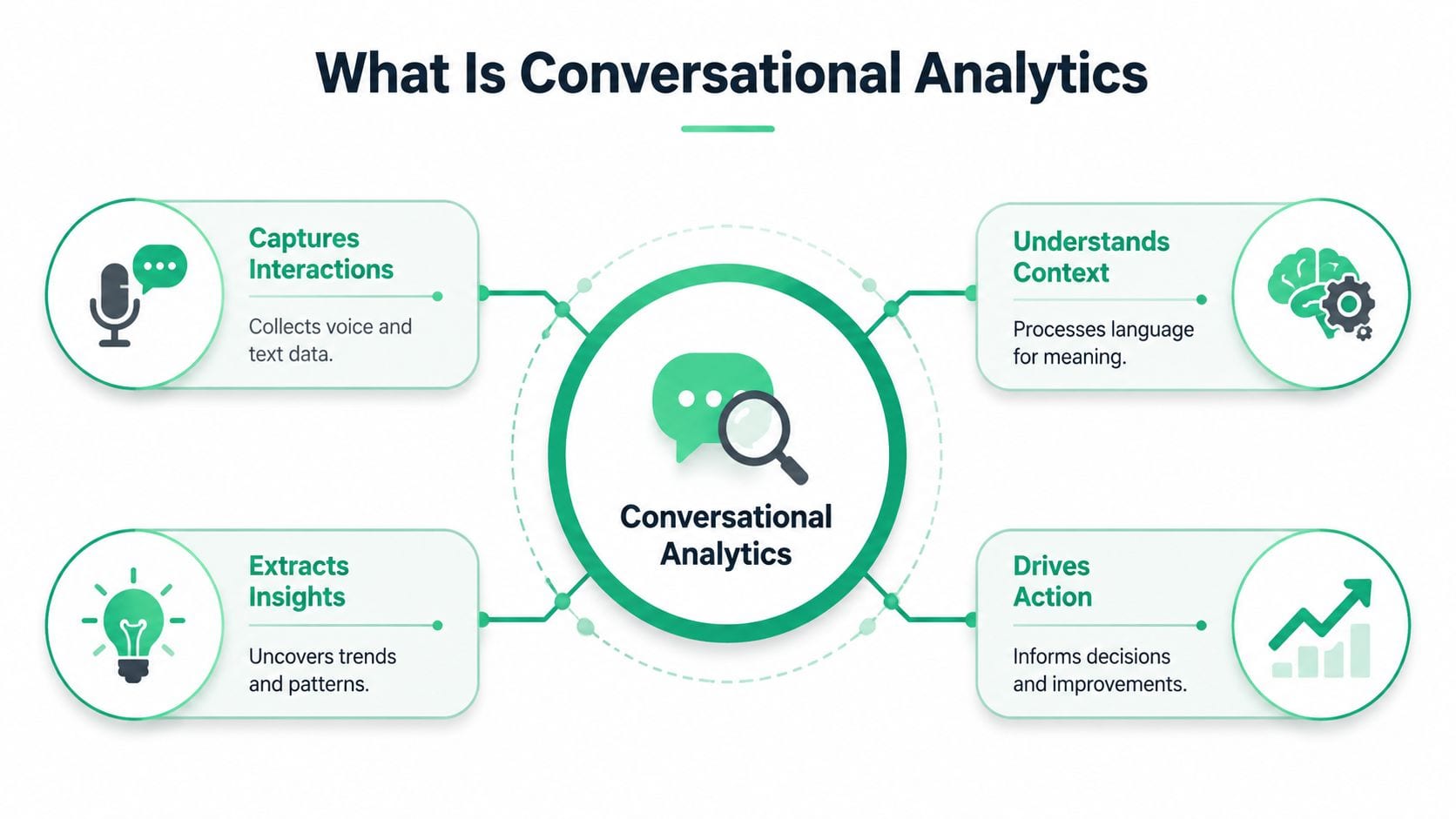
Conversational analytics is the practice of collecting customer conversations, interpreting their meaning, and converting them into structured signals the business can use. Those conversations can come from phone calls, live chat, email threads, chatbot sessions, sales transcripts, support tickets, or social interactions.
A useful way to think about it is this. Imagine a team of fast, tireless analysts listening to every customer interaction, identifying what the customer wanted, what they felt, what topic they were talking about, whether the issue was resolved, and whether the conversation points to a broader pattern. Then imagine that team organizing all of those findings into something your warehouse, dashboards, alerts, and decision processes can consume.
That's the job.
To ground the concept, this visual captures the operating model:
What gets transformed
At the start, the input is unstructured. A customer says, “I've tried to reset my password three times and now I can't log in from mobile.” That sentence is useful to a human, but it's awkward for a reporting system.
Conversational analytics turns that into business-ready fields such as:
- Intent classification such as login issue, billing question, cancellation request, or feature inquiry
- Topic tagging such as password reset, mobile app, authentication failure
- Sentiment or tone indicators that help distinguish neutral requests from frustrated or high-risk interactions
- Resolution signals such as solved, escalated, abandoned, or unresolved
- Entity extraction for products, competitors, locations, channels, or campaign references
Those outputs aren't valuable because they look impressive. They're valuable because teams can aggregate them, compare them across segments, join them to revenue or retention data, and act on them.
For a complementary perspective on the mechanics, this guide to conversation analytics does a good job of framing the interaction layer and why plain-language systems matter.
Later in the workflow, a live example helps. This video shows how conversational interfaces can make analytics more accessible to non-technical users:
Why the business cares
The point isn't to generate prettier transcript summaries. The point is to create a bridge between language and decision-making.
Marketers use conversational analytics to understand objection patterns and campaign-message mismatch. Analysts use it to enrich behavioral models with context that event data can't capture. Support leaders use it to identify broken workflows, coaching opportunities, and escalation triggers. Developers use it to operationalize the pipeline so downstream reporting stays stable.
Practical rule: If the output of your conversational analytics system can't be joined to business entities like account, user, order, session, or campaign, it will stay interesting but not operational.
Key Types and Core Technologies
Not all conversational analytics systems do the same job. The implementation changes depending on whether you're analyzing spoken conversations or written ones, and whether you need immediate intervention or longer-horizon trend analysis.
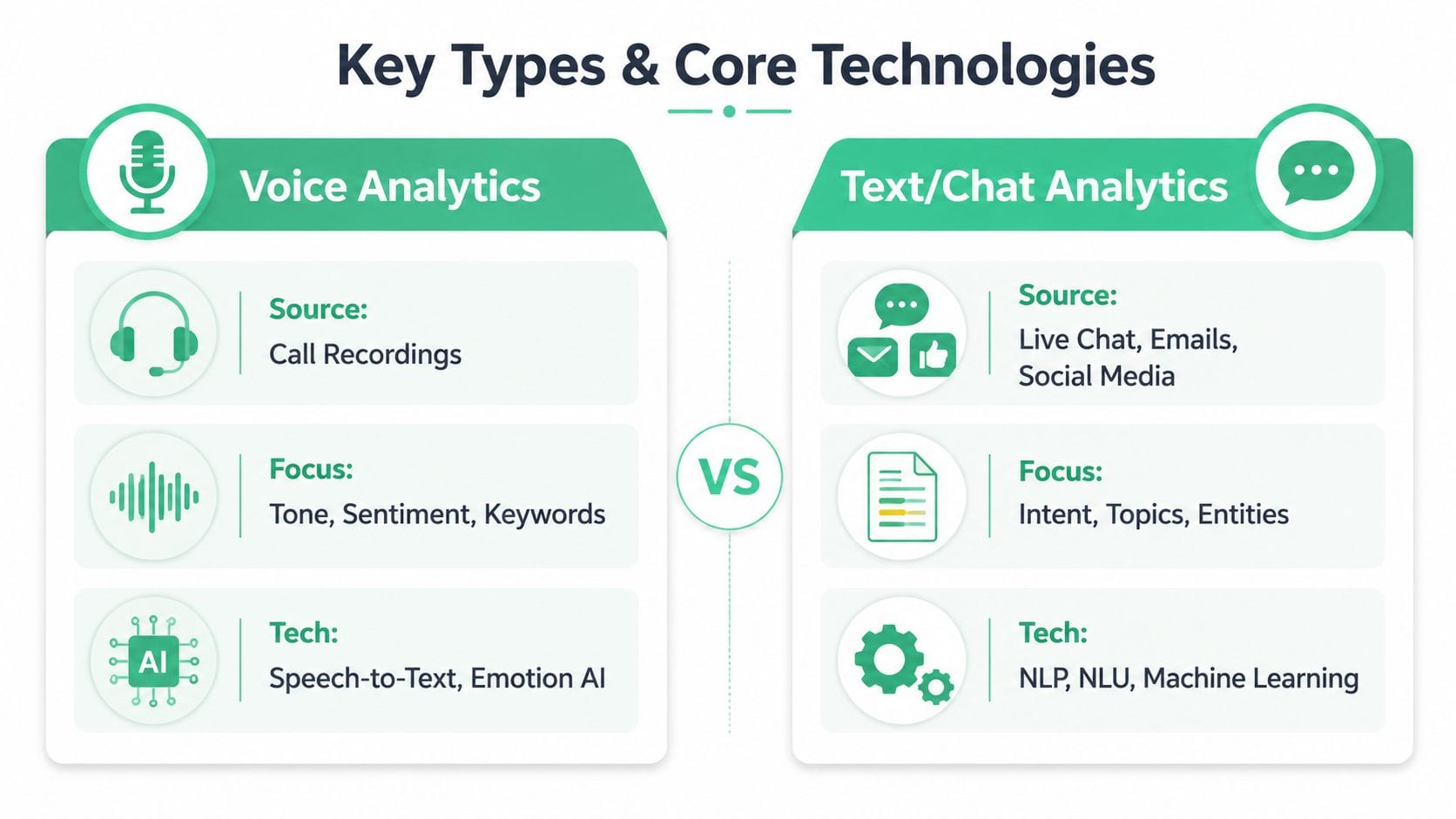
Voice analytics versus text and chat analytics
Voice analytics starts with call recordings. Before you can classify topics or detect sentiment, you need reliable speech-to-text transcription. That introduces issues written channels don't have. Audio quality varies. Speakers interrupt each other. Domain-specific terms get transcribed incorrectly. Silence, pacing, overlap, and stress in the speaker's voice can carry meaning that plain text may flatten.
Text and chat analytics usually begins in a cleaner state. Live chat, email, chatbot logs, SMS, and support tickets already arrive as text. That removes the transcription layer, but it creates different problems. People write in fragments. They paste order IDs, links, and internal jargon. They may switch topics mid-thread, and long email chains can mix resolved and unresolved issues in the same record.
A simple side-by-side helps:
| Type | Best for | Main challenge | Typical technology |
|---|---|---|---|
| Voice analytics | Contact centers, sales calls, support hotlines | Transcription quality and speaker separation | Speech-to-text, acoustic analysis, NLP |
| Text or chat analytics | Live chat, support inboxes, social, chatbot logs | Thread context and messy language | NLP, NLU, entity extraction, classification |
If you work in service-heavy industries, the operational payoff can be immediate. For example, teams exploring front-desk automation often run into the overlap between call handling and insight extraction. This piece on how AI receptionists help auto repair shops is a useful adjacent example because it shows how conversational systems move from simple call coverage into workflow and intent handling.
Real-time versus batch analytics
Real-time analytics matters when the business needs to intervene during or immediately after the interaction. Think supervisor alerts, complaint escalation, fraud review, or routing a high-intent lead to the right rep before the opportunity cools.
Batch analytics serves a different purpose. It's better for pattern detection, root-cause analysis, trend reporting, and model refinement. Most organizations need both, but they shouldn't confuse them.
- Use real-time pipelines when delay reduces the value of the signal
- Use batch processing when consistency, cost control, and deeper enrichment matter more
- Combine both when a fast operational trigger later feeds a slower analytical layer for trend validation
The mistake I see most often is forcing one architecture to do both jobs badly.
What the core technologies actually do
A lot of tooling gets grouped under the same AI label, but the components have distinct jobs:
- Speech-to-text converts audio into machine-readable text.
- Natural language processing parses language structure and identifies meaning.
- Natural language understanding focuses more directly on intent, entities, and context.
- Classification models assign labels such as cancellation risk or billing issue.
- Summarization models condense long interactions into usable records for agents or analysts.
- Semantic layers and prompt controls help align language used by employees with the language used in underlying systems.
If your team is already evaluating automation more broadly, the AI agents for marketing guide is worth reading because many of the same orchestration questions show up there too.
Designing a Robust Data Architecture
A conversational analytics project becomes fragile when teams treat it as a single model problem. It isn't. It's a data architecture problem first.
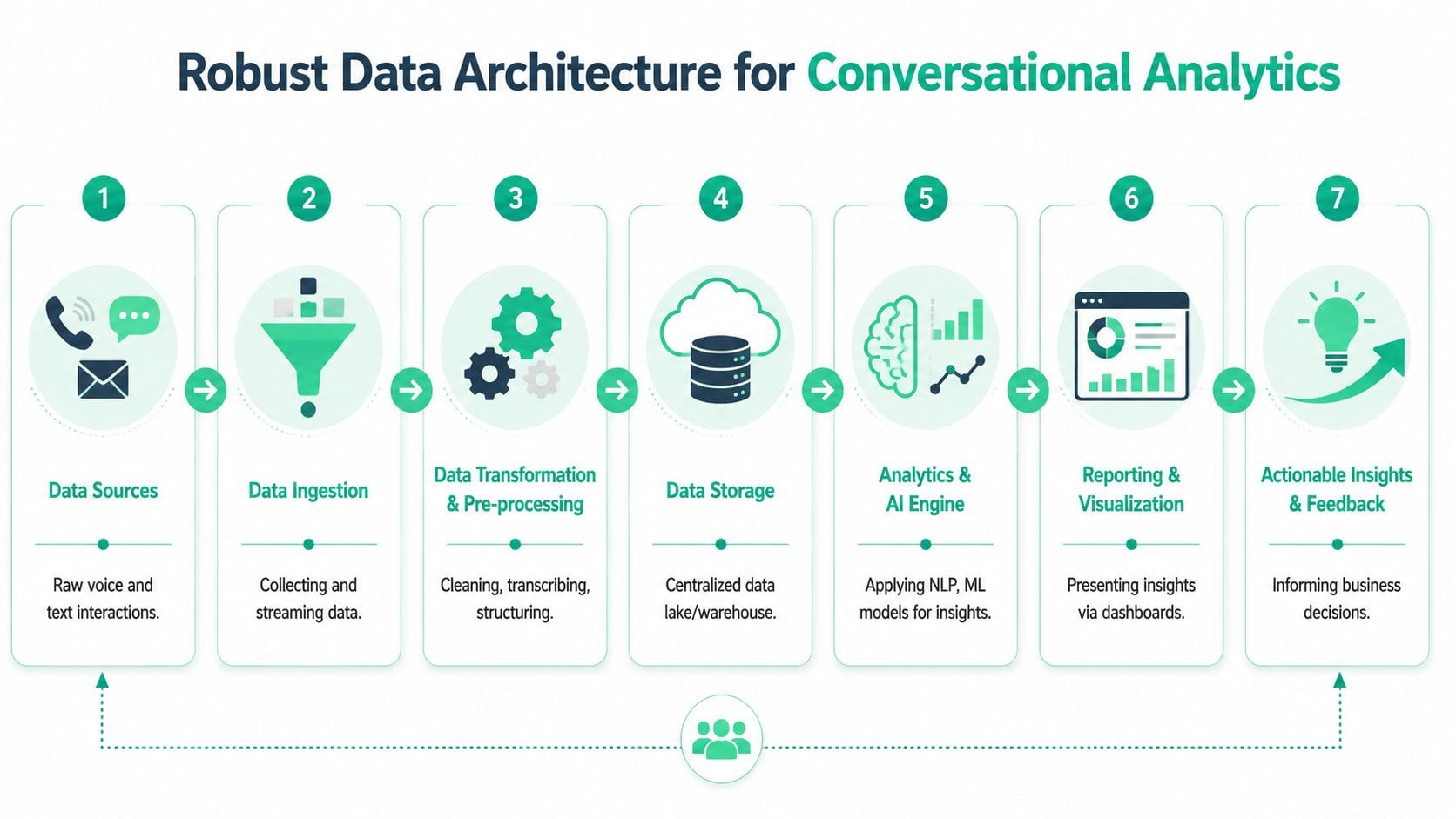
The stack usually starts with multiple upstream systems: contact center platforms, chatbot providers, CRM records, email systems, support platforms like Zendesk, sales tools like Gong, and product analytics events. Each source has its own schema, timing, identity conventions, and metadata quality. If you don't normalize that early, every downstream metric becomes harder to trust.
This flow is the architecture that is commonly required in some form:
Start with ingestion and identity
The first design choice is how data enters the system. APIs, webhooks, event streams, file drops, and vendor connectors all work, but they behave differently under change. Webhooks are good for responsiveness. Scheduled extraction may be easier to govern. Streaming is useful when low latency matters.
Identity is the harder problem. A transcript by itself rarely has business value until it can be tied to a customer, account, ticket, order, campaign, or session. That means you need a joining strategy that's explicit.
A clean foundation usually includes:
- Canonical conversation IDs so one interaction has one durable reference across systems
- Source metadata capture including channel, platform, agent, language, queue, timestamp, and routing context
- Identity stitching rules to connect conversation records to CRM, product analytics, and support entities
- Raw zone retention so you can reprocess when models or taxonomies change
Transform before you analyze
Many teams are eager to jump into prompts, classifiers, and dashboards. Resist that. The most impactful work happens in preprocessing.
You need to clean transcripts, separate speakers, remove boilerplate, detect language, redact sensitive data where necessary, standardize timestamps, and create a stable intermediate model. That model should be opinionated enough for analytics teams to use, but not so rigid that developers have to rebuild the pipeline every time the taxonomy changes.
A good conversational analytics model typically includes layered tables:
| Layer | Purpose |
|---|---|
| Raw interactions | Preserve source fidelity for replay and audit |
| Normalized conversations | Standardize fields across channels |
| Enriched outputs | Add intents, topics, summaries, entities, and status labels |
| Business marts | Join conversation signals to revenue, retention, product, and marketing data |
If your analysts can only use the final dashboard and can't inspect the normalized layer, debugging becomes guesswork.
For teams cleaning up upstream implementation quality, these data layer best practices apply directly. Conversational systems don't escape instrumentation discipline. They depend on it.
Choose storage and serving with reprocessing in mind
A modern warehouse or lakehouse works well here because conversational analytics is iterative. Taxonomies evolve. Models improve. Governance rules tighten. You need to re-run enrichment logic without rebuilding the entire system from scratch.
That's why I prefer architectures that separate storage from compute and preserve both raw and enriched states. Dashboards, reverse ETL workflows, model training jobs, and alerting systems can all consume the same trusted intermediate layers. That gives marketers, analysts, and developers one operating picture instead of competing exports and disconnected notebooks.
Essential Metrics and Business KPIs
The easiest way to waste a conversational analytics investment is to track whatever the model can produce instead of what the business can use. Many teams end up with polished dashboards full of labels that never influence a decision.
The right metric set starts with operations, then climbs into business outcomes.
Operational signals that actually matter
Some metrics describe the conversation itself. Others describe what the conversation means for the business. You need both.
- Intent mix shows what customers are trying to do. If password resets, shipping questions, or cancellation requests dominate volume, that tells different teams where to focus.
- Topic trends help identify recurring issues across products, campaigns, or lifecycle stages.
- Resolution status shows whether conversations end in success, escalation, handoff, or abandonment.
- Sentiment and tone markers help surface interactions that carry frustration, urgency, confusion, or satisfaction.
- Handle-time and effort indicators reveal where conversations are becoming unnecessarily long or complex.
- Agent or workflow adherence signals help support and QA leaders understand consistency.
These are useful, but they're still intermediate. On their own, they don't justify the system.
Connecting conversation metrics to business KPIs
The architecture earns its keep. A topic label becomes valuable when it's joined to churn, conversion, refund behavior, expansion activity, or support cost. A sentiment shift matters when it lines up with a release, pricing change, campaign launch, or fulfillment issue.
Here's the practical mapping:
| Conversation metric | What it reveals | Business KPI it can influence |
|---|---|---|
| Negative sentiment clusters | Friction, unmet expectations, product pain | Retention, churn risk, CSAT direction |
| Repeated contact intents | Customers needing multiple attempts to solve one issue | Service cost, customer effort, loyalty |
| Pre-purchase objections | Reasons buyers hesitate | Conversion rate, sales cycle quality |
| Escalation patterns | Which issues require expensive intervention | Support efficiency, staffing, margin |
| Feature request themes | Demand signals from customer language | Product prioritization, adoption potential |
A marketer should be able to ask, “Which campaigns bring in leads with pricing confusion?” An analyst should be able to compare unresolved onboarding conversations against activation behavior. A support leader should be able to see whether a new policy reduced escalations or just shifted them to another channel.
Working test: If a metric can't change a queue, workflow, playbook, campaign, or roadmap decision, it probably belongs in model diagnostics, not the executive dashboard.
What doesn't work
Three patterns consistently fail.
First, teams over-index on generic sentiment. A blunt positive-versus-negative label rarely explains enough by itself. Second, they skip taxonomy governance, so the same issue gets tagged under slightly different names across channels. Third, they isolate conversational analytics from product and revenue data, which leaves them with descriptive reporting that sounds insightful but lacks operational consequence.
The best KPI design is boring in the right way. It uses conversation data to improve decisions people already have to make.
Ensuring Data Quality and Governance
Most conversational analytics failures don't look dramatic. They look plausible.
A transcript field changes upstream and starts arriving half-populated. A vendor connector drops metadata needed for identity stitching. A chatbot update introduces a new event shape nobody mapped. A transcript contains sensitive information that should've been redacted before enrichment. The dashboard still loads, the charts still move, and the team keeps making decisions on compromised inputs.
That's why data quality and governance can't be bolted on later.
Where trust breaks
Conversational pipelines are exposed to more failure modes than standard event analytics because they combine language data, model outputs, business taxonomies, and cross-system joins.
Common breakpoints include:
- Schema drift when APIs or vendors change transcript payloads
- Missing conversation attributes such as channel, agent, campaign, or ticket linkage
- PII leaks in transcripts, summaries, or downstream exports
- Broken event instrumentation that makes conversation context impossible to join
- Model drift when the classifier still runs but no longer reflects current business language
- Permission mismatches that expose more text than a role should access
This is the part many teams underestimate. A misclassified topic is annoying. A silent identity mismatch can distort retention analysis, campaign attribution, and support reporting all at once.
The operational reality looks like this:
Governance has to be active, not aspirational
Good governance is more than a policy document. It's an operating system for definitions, access, review, and exception handling.
A solid governance model includes:
- Approved taxonomies for intents, topics, escalation reasons, and resolution states
- Role-based access controls for raw transcripts, enriched outputs, and summaries
- PII handling rules for ingestion, masking, retention, and downstream use
- Validation workflows for model changes, prompt changes, and taxonomy updates
- Auditability so analysts can inspect how a label or summary was produced
For broader governance discipline in digital analytics environments, this guide to data governance for analytics is closely aligned with the same operational concerns.
Trust doesn't come from the model sounding confident. Trust comes from controlled inputs, visible lineage, and fast detection when something changes.
Why observability matters
Teams often monitor application uptime and warehouse jobs, but leave analytics quality to manual checks and hope. That gap is costly. If a conversation field goes missing or a schema changes unnoticed, business users may discover the issue only after a report looks odd. By then, bad decisions may already be in motion.
What works better is automated observability around the implementation itself. You want systems that continuously watch for drift, missing events, broken mappings, malformed properties, campaign-tagging issues, consent misconfigurations, and potential PII leaks before those issues spread into dashboards and models.
If you want a practical view of that monitoring layer, check the demos on Trackingplan's YouTube channel to see how analytics QA and observability work in a live environment.
Implementation Checklist and Future Trends
Many teams don't need a grand transformation program to get started. They need a disciplined first deployment with clear ownership and narrow scope.
A rollout checklist that holds up in practice
Define the business question first
Pick a use case with visible consequence. Support deflection, churn signals, onboarding friction, campaign objection analysis, or sales-call insights all work better than a vague mandate to “use AI on transcripts.”Choose the conversation sources deliberately
Start with one or two channels that are operationally important and reasonably accessible. Don't ingest every source on day one.Design the taxonomy before model tuning
Agree on intents, topics, statuses, and business definitions early. Otherwise every team will reinterpret outputs differently.Build the data joins into the core model
If interactions can't connect to CRM, product, campaign, or ticketing entities, the project will stall at the insight stage.Create a validation loop with human review
Analysts, support leads, and product stakeholders should review labels and summaries regularly. This isn't optional.Operationalize outputs
Pipe signals into dashboards, QA workflows, alerts, and team rituals. Insight without workflow adoption fades fast.
For teams building agentic workflows around these interactions, the build AI customer support agents quickstart is a practical resource because it shows how conversational systems become part of support operations rather than isolated experiments.
Where conversational analytics is heading
The next wave is less about asking a question in plain English and more about building systems that understand context across channels, summarize meaning accurately, and recommend next actions with clear guardrails. Large language models are improving summarization, categorization, and exploratory querying. The useful implementations won't be the flashiest ones. They'll be the ones grounded in governed data, stable semantics, and visible validation.
The future of conversational analytics is proactive. Systems won't just report what customers said. They'll help teams detect risk earlier, coordinate responses across tools, and connect customer language to product, marketing, and service decisions in near real workflows.
If your team is building conversational analytics, don't wait until dashboards break to think about trust. Trackingplan helps analytics, marketing, and engineering teams monitor data quality, catch schema drift, spot missing or rogue events, detect PII issues, and keep the underlying measurement layer reliable so conversational insights stay usable.