
A team approves a new vendor, someone adds the tag, and six months later no one can explain why it still fires on every page, whether it honors consent, or which reports depend on it.
That is the cost of weak tag management. The problem is not only slow deployment. It is unclear ownership, inconsistent event design, duplicate pixels, and reporting that looks precise until finance, marketing, and product compare numbers and find three different versions of the same conversion.
Before centralized tag management, teams often live in a pattern that looks manageable from the outside and messy from the inside. Marketing requests a pixel. Engineering adds it when there's time. Analytics notices the event naming is inconsistent. Legal asks whether the tag respects consent choices. No one has a complete answer without checking three systems and four people.
That model breaks down as soon as the business runs more than a handful of acquisition channels. One team adds Google Ads tags, another adds Meta pixels, product wants event tracking, and an agency installs retargeting scripts for a short campaign that somehow stay on the site for months.
A tag management system gives teams a central control point for deploying and configuring tracking without hardcoding every script into the site. For a quick baseline definition, Trackingplan's FAQ on tag management is a useful reference. In practice, the bigger shift is operational. A TMS changes tracking from scattered implementation work into a managed process with approvals, rules, versioning, and rollback.
What chaos looks like in practice
The failure mode usually isn't dramatic. It's quieter than that.
- Campaigns stall: A launch slips because tracking changes depend on a code release.
- Data drifts: Event names change between pages, regions, or releases.
- Ownership gets fuzzy: Teams can request tags, but no one clearly owns approval, QA, or removal.
- The site gets heavier: Third-party scripts pile up, each with its own behavior and risk profile.
The practical rule is simple. If no one can answer “why is this tag here?” within a few minutes, the issue is governance, not just tooling.
Teams working on attribution, paid media reporting, or building an SEO measurement system run into the same constraint. Reliable reporting depends on consistent instrumentation, clear ownership, and routine checks after launch, not just getting the tag live once.
That lifecycle view matters. A TMS can speed up deployment, but speed without standards usually produces faster mistakes. The organizations that get reliable data treat tag management as an end-to-end discipline: strategy first, controlled implementation second, then automated QA and observability to catch drift before it reaches dashboards or decision-making.
Introduction The Chaos Before Centralized Tag Management
A paid campaign is ready to launch. Marketing needs a conversion pixel live by Friday. Engineering already froze the sprint. Analytics finds three versions of the same signup event across the site. Legal asks whether the vendor respects consent status in every region. Each team is doing its job, but the process still fails because tagging is scattered across requests, code changes, spreadsheets, and tribal knowledge.
That setup holds for a while. Then the business adds more channels, more vendors, and more reporting demands. A product team wants feature adoption events. Paid media needs platform-specific conversion tags. An agency adds retargeting scripts for a short campaign and no one removes them later. Over time, the site becomes a storage closet for old tracking decisions.
What chaos looks like in practice
The failure mode is usually operational, not dramatic.
- Campaigns stall: Tracking updates wait for a release window, so launches slip or go live without proper measurement.
- Data drifts: Event names and parameters change by page, region, team, or developer.
- Ownership gets fuzzy: Teams can request tags, but approval, QA, consent review, and cleanup sit in a gray area.
- The site gets heavier: Third-party scripts accumulate, adding latency, security exposure, and compliance risk.
Practical rule: If you can't answer “why is this tag here?” within a few minutes, the problem is governance.
A centralized tag management process addresses that bottleneck by putting one operating model around deployment, rules, approvals, and change history. The point is not only to publish tags faster. The point is to make tracking dependable enough for teams that rely on it for budget decisions, attribution, privacy controls, and reporting.
That broader lifecycle is where many teams fall short. They focus on implementation and treat the job as finished once the tag fires. In practice, the harder work starts after launch. Tags need naming standards, ownership, version control, retirement rules, and ongoing checks for breakage or drift. Teams working on attribution, paid media reporting, or building an SEO measurement system run into the same constraint. Reliable measurement depends on disciplined instrumentation and routine validation, not one successful deployment.
Centralized tag management fixes the first layer of chaos. Automated governance and QA are what keep it fixed.
How a Tag Management System Actually Works
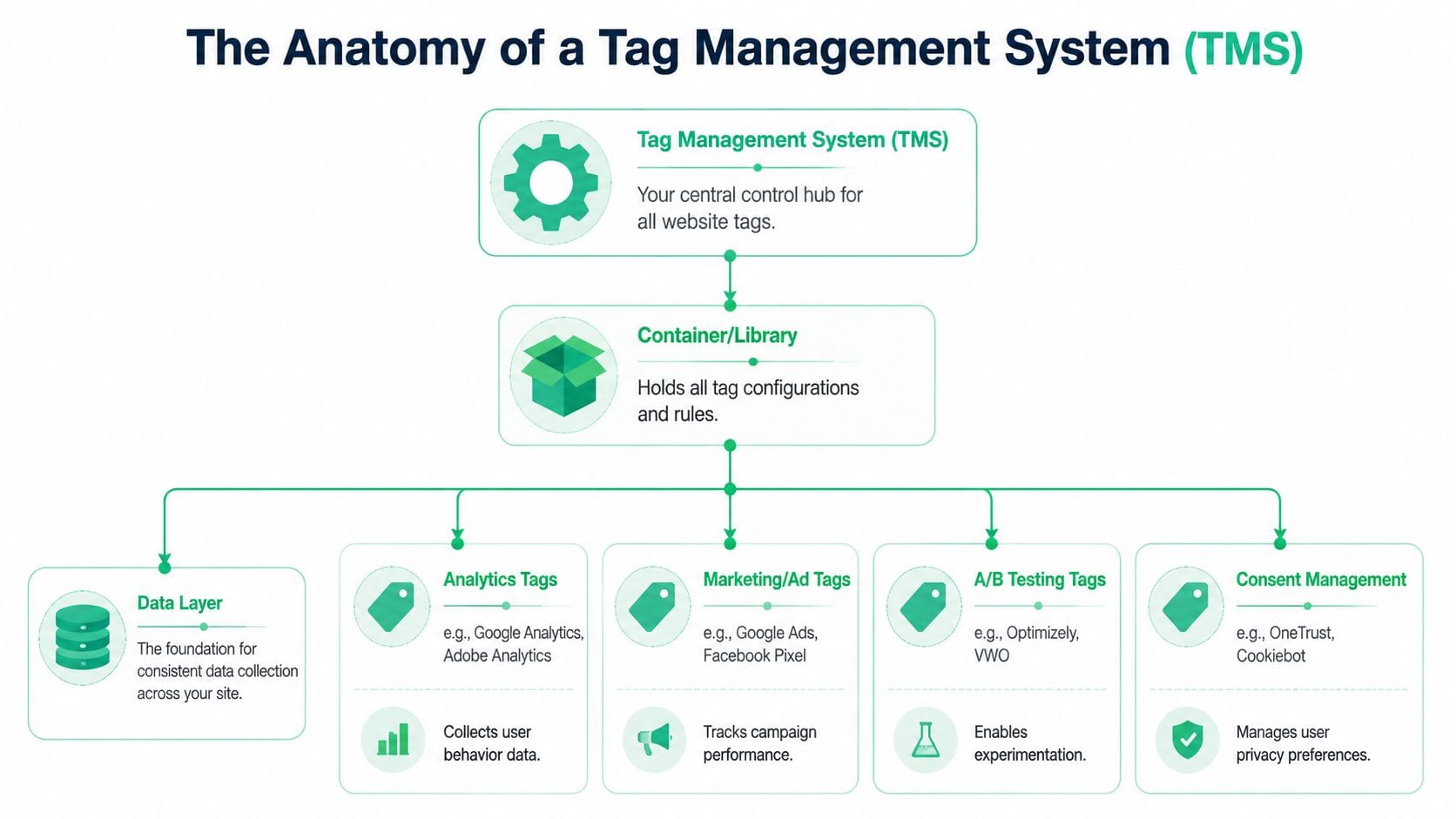
A good way to explain a TMS is to think of it as a universal remote for your marketing and analytics stack. Instead of wiring every tool directly into the site one by one, you place one controlling layer on the page and manage the rest from there.
That controlling layer is the container tag. It's a lightweight JavaScript snippet that sits on the site and loads the rules you've configured in the tag manager. From that point on, the platform decides which tags fire, when they fire, and what data they send.
The three moving parts that matter
Most implementations become easier to understand when you separate them into three parts.
| Component | What it does | Why it matters |
|---|---|---|
| Data layer | Holds structured information about the page, user actions, and transaction context | Gives tags a consistent source of truth |
| Triggers | Define when a tag should fire | Prevents tags from firing everywhere or at the wrong time |
| Variables | Pull values from the page, cookies, URLs, or data layer | Lets one tag adapt dynamically without custom code each time |
If the container is the remote, the data layer is the wiring diagram. It tells the TMS what happened and what details are available. A purchase event, for example, should expose values like transaction ID, product details, and revenue in a predictable format. Without that structure, teams end up scraping values from the page or relying on brittle logic that breaks during redesigns.
For a useful primer on the objects a TMS controls, this explanation of web tags helps non-developers connect the business purpose of tags with their technical role.
Why the container model changes operations
A TMS works by injecting a single container tag into your site, which then dynamically manages all other tags. This decoupling reduces dependency on IT cycles from days to seconds. Organizations using a TMS see a 40-60% reduction in site load penalties from fragmented code and a 90% increase in campaign deployment speed.
That architecture matters because websites rarely suffer from one bad script. They suffer from dozens of scripts added over time by different teams with no common control layer. A container brings those scripts into one governed environment with versioning, user permissions, and rollback options.
The hidden value of a TMS isn't only that it can publish faster. It can also pause, debug, and reverse changes without touching application code.
Client-side and server-side are not the same thing
In client-side tag management, tags run in the user's browser. That's the familiar model for many GTM deployments. It's flexible and quick to launch, but it comes with trade-offs. Browser policies, network conditions, and ad blockers can interfere with requests.
In server-side tag management, data is first sent to a controlled server environment and then forwarded to analytics or advertising destinations. According to the verified data provided, client-side setups can experience data loss of up to 15-20% in high-traffic environments, while server-side processing can result in a near-100% data capture rate because it bypasses many browser-side interruptions.
That shift also changes privacy and governance. Server-side processing gives teams a place to validate payloads, apply consent logic, and redact sensitive fields before data is forwarded. It's not automatically “better” for every use case, but it is a different architectural choice with clear implications for data quality and control.
What works and what doesn't
What works
- Structured event design: Build around a defined data layer, not ad hoc page scraping.
- Trigger discipline: Fire based on explicit business events, not broad page rules whenever possible.
- Environment control: Use development, staging, and production separately.
What doesn't
- Using the TMS as a dumping ground: If every vendor request gets approved, the container becomes another source of sprawl.
- Letting marketers publish without guardrails: Speed without review creates inconsistent data.
- Treating server-side as a magic fix: It improves control, but it still needs a data model, consent logic, and testing.
The Core Business Benefits of Effective Tag Management
The business case for tag management is stronger now because it's no longer just a marketer's convenience tool. It has become part of how organizations run digital operations. Grand View Research estimates the global tag management system market at USD 1.24 billion in 2024 and projects it will reach USD 6.45 billion by 2033, implying an 11.5% CAGR from 2025 to 2033, according to its tag management system market report.
That growth makes sense when you look at what a mature setup changes inside the business.
Faster execution without waiting on every release
The first benefit is operational speed. Marketing teams don't have to bundle every tracking change into the product roadmap. Analysts can standardize measurement logic without opening engineering tickets for minor updates. Agencies can work within controlled permissions instead of requesting source-code edits for every campaign tag.
This doesn't remove engineering from the process. It puts engineering effort where it matters most: data layer design, architecture, and review of high-risk changes.
Better site performance and cleaner implementations
A TMS reduces the scattershot pattern of scripts added directly into templates, page builders, and one-off plugins. Consolidation helps teams manage load order, remove obsolete vendors, and understand which scripts are still justified.
That matters for experience as much as for reporting. Teams working on how digital teams improve customer experience already know that user journeys degrade when instrumentation is disorganized. Slow pages, conflicting scripts, and broken consent behavior are customer experience problems, not just analytics problems.
Stronger governance and lower operational drag
The best TMS setups create one place to review permissions, naming conventions, environment history, and publishing workflows. That creates a chain of accountability that hardcoded tags rarely have.
A mature program usually improves four things at once:
- Approval clarity: Teams know who can request, approve, and publish.
- Auditability: Changes have version history and can be traced.
- Compliance control: Consent-dependent logic can be applied consistently.
- Cost discipline: Teams spend less time fixing avoidable instrumentation errors.
Why executives should care
Poor tag management distorts attribution, inflates QA time, and creates unnecessary vendor risk. Good tag management makes data collection more stable and decision-making more credible.
If dashboards influence budget allocation, media optimization, and product priorities, the instrumentation layer deserves the same attention as the reporting layer. Otherwise, you're just making faster decisions from weaker inputs.
Building Your Tagging Strategy and Governance Framework
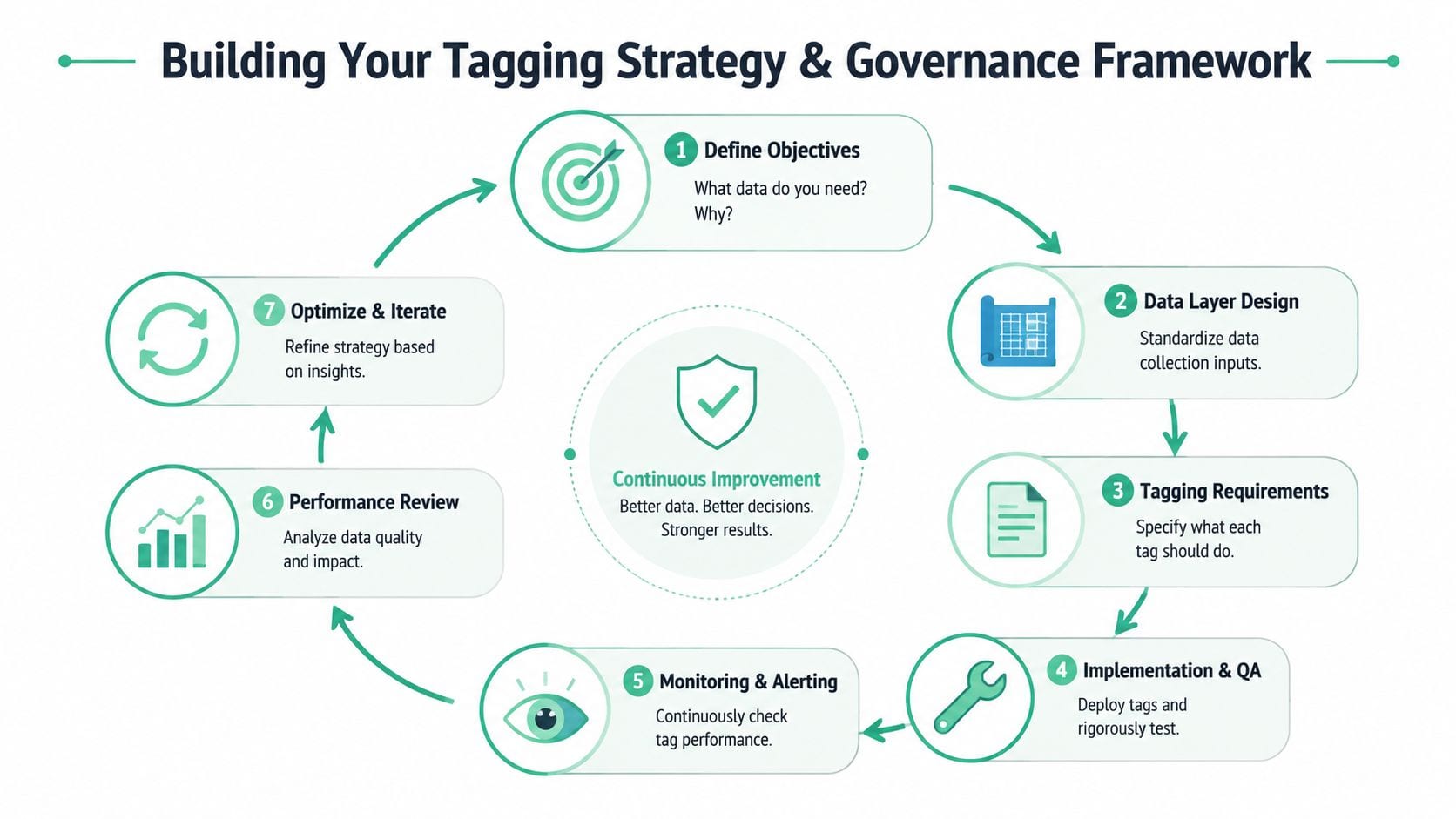
A TMS without governance is just a faster way to create confusion. Teams often discover this after the initial rollout goes well. Publishing is easy, the interface is friendly, and everyone wants access. Six months later, the container is crowded, naming is inconsistent, no one trusts the event catalog, and every release needs detective work.
InfoTrust's guidance on tag management makes the core point clearly in its tag management overview: long-term success depends on a governance model that fits existing processes and validates each tag against both business and development requirements. That's why tag management is as much an operating-model problem as a tooling problem.
Start with a data contract, not a tag list
The first governance mistake is beginning with vendor tags. Start instead with the business events you need to measure. A TMS should implement a measurement strategy, not define it.
That means agreeing on a data layer specification. For each event, document:
- Event name: One canonical name per business action
- Required properties: The fields that must always be present
- Optional context: Useful metadata that may vary by page or flow
- Ownership: Which team is accountable for keeping the event accurate
This creates a shared contract between product, engineering, analytics, and marketing. Without it, each team interprets “purchase,” “lead,” or “signup” differently.
Build naming rules that survive scale
Naming conventions sound boring until the implementation grows. Then they become the difference between a manageable setup and a daily cleanup exercise.
Use naming standards for:
- Tags: Include platform, purpose, and environment if relevant
- Triggers: Name the business action, not just the technical condition
- Variables: Reflect the source and meaning of the value
- Folders or workspaces: Group by function, domain, or team where appropriate
A tag named “GA4 Event Purchase” is useful. A tag named “new tag 17” is technical debt on day one.
Governance check: If two different analysts would create two different names for the same event, your standards aren't written clearly enough.
Define roles before you define access
A strong governance model is operational, not theoretical. People need to know who does what.
A practical split often looks like this:
| Role | Typical responsibility |
|---|---|
| Requestor | Submits the business need and expected outcome |
| Analytics owner | Reviews event design and data requirements |
| Developer or implementation owner | Confirms data layer availability and technical feasibility |
| Approver | Reviews privacy, performance, and business fit |
| Publisher | Pushes changes through the correct environment |
The key is separation of duties. The person requesting a marketing pixel shouldn't be the only person deciding whether it belongs on the site.
Use approval flows that match business risk
Not every tag needs the same review path. A new internal analytics event is different from a third-party remarketing pixel. A consent-related change is different from a copy update in an existing tag.
Build lightweight rules such as:
- Low-risk changes go through analytics review and staging QA.
- Vendor additions require privacy and performance review.
- Consent or identity changes require legal or governance signoff.
- Production publishing happens only from approved workspaces or environments.
What fails in practice is either extreme. Too little control creates sprawl. Too much process creates workarounds.
Document the lifecycle, including removal
Organizations typically define how tags get added. Fewer define how they get retired.
Every tag should have:
- Business purpose
- Owner
- Destination
- Consent basis
- Review date
- Retirement criteria
That last field matters. Campaign tags, pilot vendors, and temporary experiments have a habit of becoming permanent. A governance model should treat removal as part of normal maintenance, not as a cleanup project that never gets prioritized.
Your Implementation and Migration Checklist
A TMS migration goes wrong when teams treat it like a copy-and-paste exercise. It isn't. The migration is your chance to remove bad logic, standardize the data layer, and stop carrying forward years of tracking debt.
The safest approach is phased, documented, and boring in the best possible way.
Step one: audit what exists
Before choosing what to migrate, inventory what's already running. That includes hardcoded scripts, CMS plugins, legacy pixels, custom HTML tags, and anything loaded through third-party tools.
Look for three categories:
- Keep: Tags tied to active reporting, media, or product use cases
- Refactor: Tags that matter but rely on weak triggers or inconsistent payloads
- Remove: Redundant, expired, unknown, or duplicate scripts
Many teams commonly find the same platform implemented twice in different ways.
Step two: define the future-state data layer
Don't migrate brittle logic if you can replace it with structured data. The migration should move event collection toward explicit data layer inputs and away from page scraping wherever possible.
Write requirements around business events first. Then map each destination tool to those events. That sequence matters. If you start from tool requirements only, you'll end up with one event model for ads, another for analytics, and another for product.
A migration should reduce exceptions. If every destination needs custom event logic, the underlying measurement design is probably the problem.
Step three: choose architecture early
This is the point where teams should decide how much of the stack stays client-side and what should move server-side. The verified data provided states that client-side tags can lose up to 15-20% of data because of ad blockers and browser policies, while server-side processing can deliver a near-100% data capture rate.
That doesn't mean every tag belongs off-page. It means high-value flows deserve deliberate architectural review. Conversion events, identity-sensitive data flows, and destinations affected by browser limitations often justify server-side routing sooner than low-priority campaign pixels.
A practical migration sequence
Stand up the new container and environments
Create development, staging, and production from the start. Don't improvise governance after launch.Install the base container safely
Add the TMS snippet through a controlled release. Keep initial publishing limited to a small, non-critical scope if possible.Implement the data layer inputs
Work with developers on the events and properties that matter most. Quality is won or lost during this phase.Migrate in batches
Start with foundational analytics tags, then consent-dependent tools, then media and specialized vendors. Batching makes failures easier to isolate.Run side-by-side validation when needed
For critical reporting, compare old and new collection paths during a transition window.Remove old code
Don't leave hardcoded duplicates in place “just in case.” That creates double counting and endless confusion.
What teams often miss
The technical migration is only half the checklist. The other half is operational.
- Access design: Set permissions before broad rollout.
- Documentation: Record event definitions, triggers, owners, and exceptions.
- Training: Marketers, analysts, developers, and agencies need a common workflow.
- Rollback planning: Know how to pause or revert quickly if production data goes sideways.
A controlled migration feels slower at first. In practice, it's what prevents months of post-launch reconciliation.
Automated QA and Observability for Your Tagging
Teams often excel at launching tags, yet struggle to prove they still work two weeks later.
That gap exists because manual QA doesn't scale. Someone checks preview mode, validates a few network requests, confirms data in the destination, and signs off. Then the site changes, a vendor script updates, a new consent rule is added, or a release shifts the event payload. The original test is no longer enough.
Why manual QA keeps failing
Manual testing is valuable during implementation, but it breaks down in production for a few reasons.
- It samples, not monitors: Teams check a few key flows, not the full live environment.
- It misses intermittent issues: Some failures appear only under certain browsers, consent states, campaigns, or page types.
- It depends on tribal knowledge: The person who understands the implementation often becomes the bottleneck.
- It rarely checks for drift: Event names, properties, and payload shapes change subtly over time.
The result is familiar. Dashboards look odd, attribution shifts, analysts start second-guessing the data, and everyone spends time proving whether the issue is real.
Observability closes the loop
A TMS helps you deploy. Observability helps you verify. Those are different jobs.
In mature setups, teams monitor the tagging layer continuously. They want to know when:
- a key event stops firing
- a property disappears from the payload
- a new rogue tag appears on the site
- consent behavior changes unexpectedly
- campaign parameters arrive in the wrong format
- possible sensitive fields start leaking into analytics or ad tools
That's where automated analytics QA belongs. It acts like a monitoring layer over the implementation rather than another publishing interface.
For teams using GTM, this article on data observability with Trackingplan and Google Tag Manager gives a concrete example of how monitoring complements deployment. The useful distinction is simple: GTM manages rules and firing logic, while an observability layer checks what happens in production.
What good automated QA looks like
A practical monitoring setup should answer four questions clearly.
Is the implementation complete
You need visibility into what tags, events, and destinations are present across your site or app estate. This includes data layer signals, browser-side requests, and server-side flows where relevant.
Is the schema stable
A tracking plan isn't just an event list. It's the expected shape of the data. Good QA should flag missing properties, wrong types, renamed fields, and unexpected event variants before those changes spread into dashboards and models.
Is anything unauthorized happening
Third-party code is not only a measurement issue. It's a governance issue. The verified data provided highlights a risk angle many teams underweight: independent research from Cisco, cited in Improvado's discussion of alternatives to Google Tag Manager, found that 95% of organizations had at least one incident involving a third-party vendor in the prior two years, and 41% said their most serious recent incident came through a third party, as summarized in Improvado's article on GTM alternatives and tag architecture.
That's why tag governance now overlaps with vendor risk, privacy review, and consent management.
Good tag management doesn't end when a tag fires. It ends when the right tag fires, with the right payload, under the right consent state, and keeps doing so after the next release.
Can the right people act quickly
Alerts that nobody sees are just background noise. Useful QA routes issues to the people who can fix them, with enough context to identify where the break occurred. Marketing may need to know a conversion pixel dropped. Engineering may need to know a data layer field vanished. Privacy teams may need to know a consent mismatch appeared.
Where tooling fits
This is the right place for a tool discussion because the TMS alone won't solve ongoing validation. Teams may combine native preview tools, browser debuggers, analytics platform diagnostics, and dedicated monitoring products. One option is Trackingplan, which is designed to automatically discover martech implementations, monitor analytics and marketing pixels, detect anomalies and schema mismatches, and surface issues such as rogue events, broken tags, campaign-tagging errors, and potential PII leaks.
That kind of tooling matters most when multiple teams touch the same implementation. It creates a shared operational view of what's live, not just what was intended.
How to Choose the Right Tag Management Solution
Choosing a TMS is less about feature checklists and more about fit. The right platform for a small marketing team isn't automatically right for a regulated enterprise with multiple domains, regional consent requirements, and server-side routing plans.
A useful scorecard starts with these questions.
The criteria that matter most
Usability for your actual operators
If marketers, analysts, or implementation specialists can't work in the tool confidently, every change will still route through a small technical bottleneck.Template and integration coverage
A broad template library saves time, but quality matters more than quantity. Check how often you'll need custom templates or custom code.Server-side support
If your roadmap includes privacy-first collection or moving critical flows off the page, evaluate server-side capabilities early.Permissions and governance controls
Look closely at workspaces, approvals, publishing rights, versioning, and audit history.Documentation and support
The tool will become part of daily operations. Weak support or unclear docs creates long-term friction.Total cost of ownership
Don't only compare license cost. Include implementation effort, training, maintenance burden, and the cost of poor QA if the platform leaves governance gaps.
A practical way to compare options such as Google Tag Manager, Adobe Experience Platform Tags, Tealium, and others is to score them against your operating model, not just their marketing pages. This comparative analysis of tag management systems is a good starting point for structuring that evaluation.
The right answer is usually the system your team can govern well, not the one with the longest feature list.
If your team already has a TMS but still struggles with broken events, schema drift, rogue pixels, or unreliable dashboards, Trackingplan is worth evaluating as a dedicated observability and analytics QA layer. It helps teams monitor what's being collected across web, app, and server-side implementations so tag management supports reliable data instead of just faster deployment.