
TL;DR:
- Website tracking collects data on user interactions, enabling accurate attribution and performance analysis. Combining cookie-based, login-based, and identity stitching methods provides a comprehensive view of visitor behavior. Privacy regulations and AI traffic patterns require teams to adapt their strategies and continuously audit their tracking setups.
Website tracking is the practice of collecting data on how visitors interact with your site, from the pages they view to the actions they take before converting. Done right, it tells you which campaigns drive revenue, where users drop off, and what changes actually move the needle. Done wrong, or not done at all, it leaves your marketing budget flying blind. This guide covers the core tracking methods, how to build a reliable setup, the privacy and technical challenges reshaping the field in 2026, and how AI-generated traffic is forcing teams to rethink attribution from the ground up.
What is website tracking and why does it matter?
Website tracking is the technical process of capturing user interactions through scripts, tags, and identifiers embedded in your site. The industry standard term is digital analytics implementation, and it covers everything from pageview counts to granular event data like button clicks, video plays, and checkout completions. Tracking user behavior at this level is what separates teams making data-driven decisions from teams guessing.
The business case is direct. Without accurate tracking, marketing attribution breaks down. You cannot tell whether a paid search campaign or an organic blog post drove a conversion. You cannot identify a broken checkout flow until revenue drops. Web performance monitoring and visitor data together give you the feedback loop that makes every other marketing decision more reliable.
Regulatory bodies like the EU’s GDPR and California’s CCPA have added legal weight to tracking practices. Compliance is no longer optional. Tracking before gaining active user consent violates privacy law, which means your implementation must account for consent management from day one, not as an afterthought.
What are the main website tracking methods?
Three methods dominate modern online visitor tracking: cookie-based tracking, login-based tracking, and identity stitching. Each has a distinct accuracy profile and a different set of trade-offs.
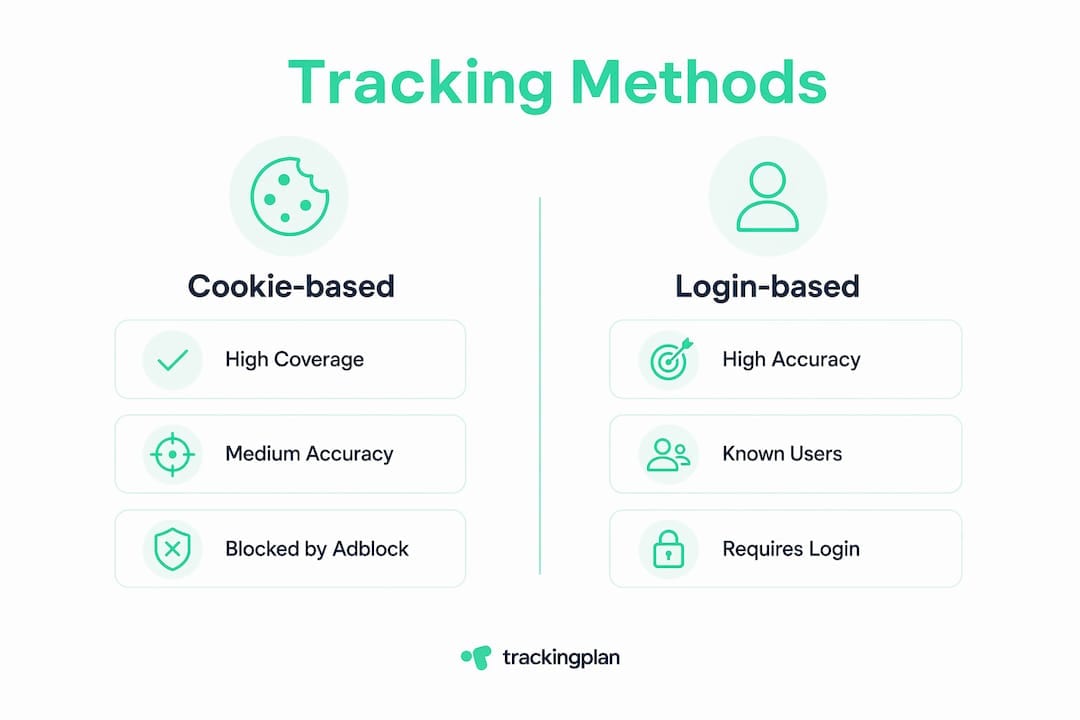
Cookie-based tracking
Cookie-based tracking places a small file in the visitor’s browser to recognize them across sessions and pages. It offers broad coverage by default, but that coverage is shrinking. Ad blockers, browser privacy settings, and consent rejection all reduce the data you actually collect. In EU markets, this problem is severe.
Login-based tracking
Login-based tracking offers the highest accuracy because it ties behavior to a known user identity rather than a device or browser. The trade-off is coverage. Login-based methods typically reach only 10%–30% of e-commerce visitors, though SaaS products with free trials see higher rates because users must authenticate to access the product. That accuracy gap makes login data the gold standard for the users you do identify, but it cannot stand alone.
Identity stitching
Identity stitching connects anonymous session data to a known user profile after they log in or submit a form. It bridges the gap between cookie-level data and person-level data, enabling cross-device and cross-session analysis. Advanced teams use identity stitching to reconstruct full customer journeys that would otherwise appear fragmented across multiple anonymous sessions.
| Method | Coverage | Accuracy | Key limitation |
|---|---|---|---|
| Cookie-based | High | Medium | Blocked by ad blockers and consent rejection |
| Login-based | Low (10%–30%) | Very high | Requires authenticated users |
| Identity stitching | Medium | High | Depends on at least one identification event |
Pro Tip: Run all three methods in parallel where possible. Cookie data gives you volume, login data gives you accuracy, and identity stitching connects the two. No single method covers the full picture.
How to set up effective website tracking
A reliable tracking setup follows a four-step process: define your goals, install tracking snippets across all pages, apply UTM parameters to campaigns, and audit data flow across key user paths. Skipping any step creates gaps that compound over time.
-
Define high-value conversion events first. Purchases, form submissions, and sign-ups are the metrics that connect tracking data to business outcomes. Focusing on conversion tracking before vanity metrics like average time on site leads to better decisions. Map each event to a specific business goal before you write a single line of tag configuration.
-
Install tracking snippets on every page. Partial installation is one of the most common and costly mistakes. A snippet missing from your checkout confirmation page means you cannot measure completed purchases. Test snippet presence on at least 5–10 representative page types, including landing pages, product pages, and thank-you pages.
-
Apply UTM parameters to all campaign URLs. UTM parameters are the tags you append to URLs to identify the source, medium, and campaign name of incoming traffic. Without them, paid traffic often appears as direct or organic in your reports, making attribution accuracy impossible to achieve.
-
Audit your data flow regularly. Testing at setup is not enough. User flows change, new pages launch, and tag managers get misconfigured. Run structured audits across key conversion paths on a recurring schedule. Tools that automate this process catch errors before they distort weeks of data.
Pro Tip: Use layered event tracking to reduce noise. Track micro-events like scroll depth and video plays only after your core conversion events are verified and stable. Adding too many events too early creates a messy data layer that is hard to debug.
What are the major tracking challenges in 2026?
Privacy regulations and technical limitations are the two forces reshaping what data you can collect and how. Both are getting harder to work around, and the teams that adapt fastest will have the most complete picture of their users.
The consent gap
Cookie consent rejection rates in some EU markets cause 40%–60% data loss. That is not a rounding error. It means that in some markets, more than half of your visitors generate no usable tracking data under a standard cookie-based setup. Marketing attribution built on that incomplete data will systematically undercount the impact of campaigns targeting EU audiences.

Ad blockers and browser restrictions
Client-side tracking is also vulnerable to ad blockers and privacy extensions, which strip tracking scripts before they execute. Safari’s Intelligent Tracking Prevention and Firefox’s Enhanced Tracking Protection both limit cookie lifetimes and block third-party trackers by default. The result is a growing layer of invisible traffic that your analytics platform never sees.
Legal compliance under GDPR
No tracking scripts should execute before user consent under EU GDPR. This is a legal requirement, not a best practice. A consent management platform that fires tags only after explicit opt-in is the baseline. Anything less exposes your organization to regulatory risk.
Practical mitigation strategies
- Run client-side and server-side tracking side by side to benchmark data loss. Server-side methods are not blocked by browser extensions, giving you a cleaner signal.
- Implement cookieless tracking methods as a complement to cookie-based collection, not a replacement.
- Use aggregate modeling to estimate the behavior of non-consenting visitors based on consenting cohorts.
- Audit your consent management platform regularly to confirm that tags fire only after valid consent is recorded.
“Website tracking is as much a legal compliance task as a technical one. Teams that treat privacy as a checkbox will face both data gaps and regulatory exposure. Teams that build consent into their architecture from the start collect better data and carry less risk.”
How does AI-driven traffic affect tracking and attribution?
AI-powered search tools like ChatGPT and Perplexity are sending meaningful traffic to websites, and most standard analytics setups cannot attribute it correctly. Detection of AI-generated traffic is now a critical requirement for full customer journey mapping, not an edge case.
The core problem is referrer data. When a user clicks a link from an AI chat interface, the referrer string is often missing, malformed, or categorized as direct traffic. That misattribution inflates your direct channel and hides a growing source of high-intent visitors. Teams optimizing spend based on that data are making decisions on a flawed foundation.
Adapting your tracking strategy for AI traffic requires several specific steps:
- Identify known AI platform referrer strings and create custom channel groupings in your analytics configuration. Tracking LLM traffic in GA4 requires manual channel definitions that most default setups do not include.
- Monitor for traffic patterns that suggest AI referral: high engagement rates, low bounce rates, and direct-labeled sessions that convert at above-average rates.
- Use an AI search visibility checker to understand which AI platforms surface your content and estimate the traffic volume you should expect.
- Tag any content you publish specifically for AI search audiences with consistent UTM parameters when linking from owned channels.
AI-driven traffic sources are increasingly significant and require dedicated tracking strategies. Teams that ignore this channel are not just missing data. They are misreading the performance of their entire content and SEO programs.
Key takeaways
Accurate website tracking requires combining multiple methods, building consent into your architecture, and updating your attribution model to account for AI-generated traffic.
| Point | Details |
|---|---|
| Use multiple tracking methods | Combine cookie-based, login-based, and identity stitching for complete visitor coverage. |
| Audit conversion events first | Track purchases and sign-ups before adding vanity metrics to keep data clean and useful. |
| Account for consent data loss | EU consent rejection causes 40%–60% data loss; server-side tracking helps compensate. |
| Comply with GDPR from day one | No tracking script should fire before explicit user consent is recorded. |
| Attribute AI traffic explicitly | Create custom channel groupings for ChatGPT and Perplexity to avoid misattribution as direct. |
What I’ve learned after years of tracking audits
The most common mistake I see is not a technical one. Teams spend weeks configuring tag managers and event schemas, then measure the wrong things. They track scroll depth and hover events before they have a single reliable purchase confirmation firing correctly. Vanity metrics feel productive because the data keeps coming in. Conversion data feels harder because it requires coordination between marketing, development, and sometimes legal. That friction is exactly why it matters more.
The second pattern I keep seeing is teams treating privacy compliance as a one-time setup. They install a consent banner, check the box, and move on. Six months later, a tag manager update fires a pixel before consent loads, and they have been out of compliance for weeks without knowing it. Compliance is a monitoring task, not a configuration task.
The AI traffic problem is the one that surprises teams most in 2026. They see their direct channel growing and assume brand awareness is up. When they dig in, a significant portion is AI referral that their setup never labeled correctly. The customer journey analysis they built their strategy around is missing an entire channel. Getting this right requires updating your channel definitions and checking them every time a new AI platform gains traction.
My honest recommendation: start with a full audit of your current conversion tracking before adding anything new. Fix what is broken, confirm what is working, and then layer in the advanced methods. A clean foundation beats a complex setup built on bad data every time.
— David
Trackingplan and the data quality problem
Broken pixels, misfiring tags, and consent violations do not announce themselves. They quietly corrupt your data for days or weeks before anyone notices a number that looks wrong.
Trackingplan monitors your web tracking implementation continuously, sending real-time alerts via Slack, Teams, or email the moment an anomaly appears. It integrates directly with digital analytics tools and tag management platforms to automate audits, validate conversion events, and flag compliance gaps before they become reporting disasters. Teams using Trackingplan spend less time debugging and more time acting on data they can actually trust.
FAQ
What is website tracking?
Website tracking is the process of collecting data on visitor interactions, including pageviews, clicks, and conversions, using scripts, tags, and identifiers embedded in a site. It forms the foundation of marketing attribution and web performance monitoring.
What is the most accurate website tracking method?
Login-based tracking is the most accurate method because it ties behavior to a verified user identity. It typically covers only 10%–30% of e-commerce visitors, so it works best when combined with cookie-based tracking and identity stitching.
How does GDPR affect website tracking?
GDPR requires that no tracking scripts execute before a user gives explicit consent. Teams must use a compliant consent management platform and audit it regularly to confirm tags fire only after valid opt-in is recorded.
Why is AI traffic hard to track?
AI platforms like ChatGPT and Perplexity often send traffic without a standard referrer string, causing it to appear as direct traffic in most analytics setups. Custom channel groupings and dedicated UTM strategies are required to attribute this traffic correctly.
How often should I audit my tracking setup?
Auditing after every major site update is the minimum. Automated monitoring tools that check your tracking continuously catch errors between scheduled audits and prevent data loss from compounding over time.