
Many marketers assume tracking pixels are too technical or only matter to developers, but that’s a costly misconception. These tiny tools quietly power the attribution models, retargeting campaigns, and conversion insights that separate high-performing teams from those guessing in the dark. Whether you’re optimizing ad spend, personalizing customer journeys, or proving ROI to stakeholders, tracking pixels deliver the transparent, actionable data you need. This guide demystifies tracking pixels for digital marketing teams and agencies, showing you how to harness them for better results, tighter compliance, and smarter decisions.
Table of Contents
- What are tracking pixels and how do they work?
- Key types of tracking pixels and real-world use cases
- Benefits of tracking pixels for marketing teams
- Privacy, consent, and regulatory compliance
- Best practices for tracking pixel implementation and monitoring
- Take control of your tracking pixels with powerful tools
- Frequently asked questions
Key Takeaways
| Point | Details |
|---|---|
| Tracking pixels defined | Tracking pixels are invisible images that collect user interaction data for analytics and marketing optimization. |
| Consent is critical | Most individual-level tracking now requires explicit user consent, especially in the EU under GDPR. |
| Multiple use cases | Tracking pixels support attribution, retargeting, and campaign measurement for better marketing results. |
| Best practices matter | Auditing, anonymizing, and consistent monitoring are vital for data quality and legal compliance. |
What are tracking pixels and how do they work?
A tracking pixel is a tiny, invisible image embedded in a website or email that records user behavior. When a page loads or an email opens, the pixel fires a request to a server, logging details like timestamps, device types, and actions taken. This server call is what enables marketers to measure opens, clicks, conversions, and engagement without storing data locally on the user’s device.
Here’s how the process unfolds:
- A user visits your landing page or opens your email
- The pixel (often a 1x1 transparent GIF or JavaScript snippet) loads in the background
- The pixel sends a signal to your analytics or ad platform’s server
- The server records the event and attributes it to the user’s session or campaign source
Common use cases include tracking email opens in marketing automation platforms, measuring website conversions for paid ads, and building audience segments for retargeting. One widespread misconception is that tracking pixels themselves store data. They don’t. Instead, they trigger server calls that log information on the platform’s backend.
“Tracking pixels are the invisible messengers of digital marketing, silently reporting user actions back to your analytics stack.”
Privacy regulations have reshaped how pixels operate. Individual-level tracking now requires explicit consent under GDPR and ePrivacy rules, especially in the EU, with limited exceptions for aggregate analytics or security purposes. This means you can’t just drop pixels on your site and hope for the best. You need a consent management strategy that respects user choice while preserving your ability to measure performance. Understanding what is pixel tracking and why tracking is crucial for marketing success sets the foundation for compliant, effective campaigns.
Key types of tracking pixels and real-world use cases
Not all tracking pixels serve the same purpose. Knowing the main categories helps you deploy the right tool for each marketing objective. Here’s a breakdown of the most common pixel types and how they fit into real campaigns:
| Pixel Type | Primary Function | Real-World Example |
|---|---|---|
| Conversion Pixel | Tracks completed actions like purchases or sign-ups | Google Ads conversion tracking after checkout |
| Retargeting Pixel | Builds audiences for follow-up ads | Facebook Pixel capturing product page visitors |
| Analytics Pixel | Monitors site behavior and user flows | Google Analytics event tracking on blog posts |
| Email Pixel | Measures email opens and engagement | Mailchimp open tracking in newsletters |
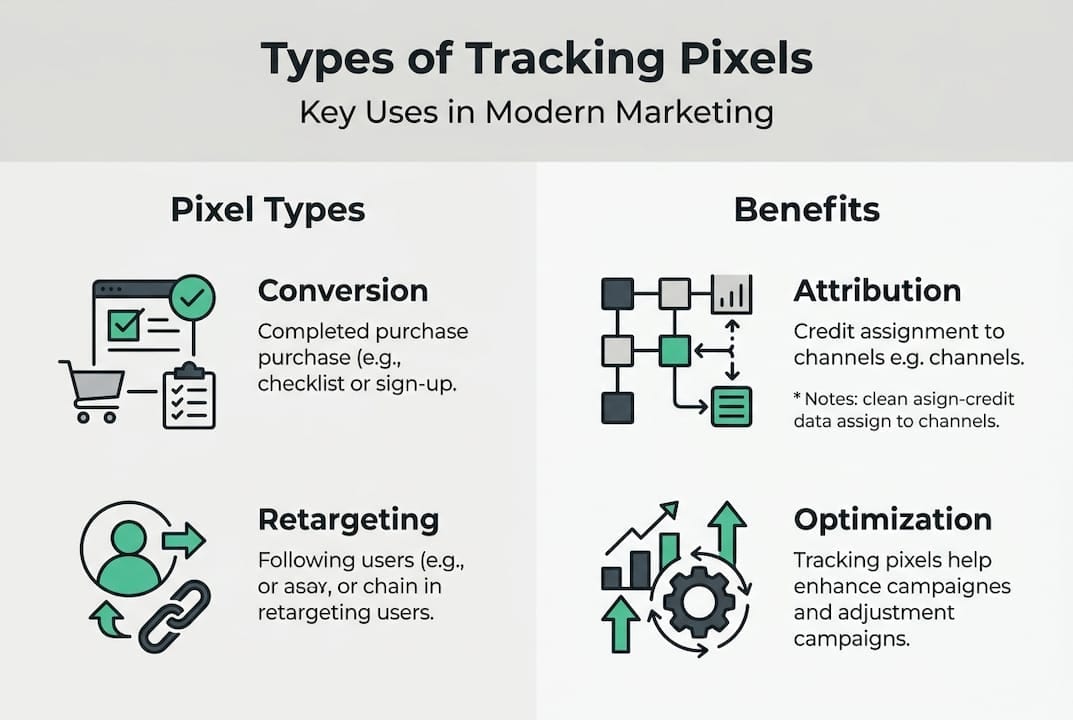
Conversion pixels fire when a user completes a specific goal, such as submitting a form or making a purchase. They’re essential for measuring ROI and optimizing bids in platforms like Google Ads or Microsoft Advertising.
Retargeting pixels collect data on site visitors to create custom audiences. For example, the Facebook Pixel logs users who viewed a product but didn’t buy, enabling you to serve them tailored ads later. This is where marketing attribution becomes critical, as you need to know which touchpoint deserves credit for the eventual conversion.
Analytics pixels track broader user behavior, like page views, scroll depth, or video plays. Google Analytics relies on these to build session reports and funnel visualizations. They’re invaluable for understanding how users navigate your site and where they drop off.

Email pixels are embedded in HTML emails to detect opens. When a recipient’s email client loads the pixel, the sender knows the message was viewed. This metric drives A/B testing and send-time optimization in email marketing platforms.
Tracking pixels are used for attribution, including last-click and multi-touch models, retargeting, and monitoring engagement quality scores. Each type serves a distinct role, but they often work together to paint a complete picture of the customer journey. Mastering attribution tracking optimization ensures you’re crediting the right channels and maximizing your marketing spend.
Benefits of tracking pixels for marketing teams
Tracking pixels unlock a range of advantages that directly impact campaign performance and business outcomes. Here’s why they’re indispensable for modern marketing teams:
- Detailed attribution modeling: Pixels enable multi-touch attribution, showing which channels and touchpoints contribute to conversions. This clarity helps you allocate budget to high-performing campaigns and cut waste.
- Remarketing and audience segmentation: By tagging users based on behavior, you can build hyper-targeted audiences. Someone who abandoned a cart gets a different message than a first-time visitor.
- Improved campaign ROI: Precise tracking means you can optimize bids, creative, and targeting in real time. When you know which ads drive results, you stop guessing and start scaling.
- Data quality insights: Pixels reveal drop-off points in your funnel and highlight which creative assets resonate. If users bail after viewing a product page, you know where to focus your optimization efforts.
- Aggregate analytics without privacy risk: When anonymized, pixel data can deliver valuable insights without triggering consent requirements. This balance is crucial for teams navigating strict privacy laws.
Pro Tip: Use pixels for attribution, including last-click and multi-touch models, retargeting, and monitoring engagement quality scores. Anonymize aggregates to sidestep consent hurdles while still gaining actionable intelligence.
Consider a B2B SaaS company running LinkedIn and Google Ads simultaneously. Without pixels, they’d struggle to know which platform drove demo requests. With conversion pixels on their thank-you page, they can attribute each lead to its source, adjust bids accordingly, and prove ROI to leadership. This level of precision transforms marketing from a cost center into a revenue driver.
Pixels also support dynamic creative optimization. If you’re testing five ad variations, pixels tell you which one converts best for each audience segment. You can then allocate more budget to winners and pause underperformers, compounding your efficiency gains over time. For deeper insights, explore how to optimize attribution tracking and achieve ROI accuracy improvements across your entire stack.
Privacy, consent, and regulatory compliance
Data-driven marketing and privacy aren’t opposing forces. They’re two sides of the same coin. Mastering pixel compliance is now non-negotiable, especially in regions with strict data protection laws.
Most individual-level tracking requires explicit user consent under GDPR and ePrivacy regulations, with limited exceptions for aggregate data or security purposes. The CNIL’s recent draft rules clarify that email senders are data controllers responsible for compliance when using tracking pixels. This means you can’t hide behind your email service provider. You own the obligation to inform users and obtain consent.
Here’s the key distinction:
| Data Type | Consent Required? | Example |
|---|---|---|
| Personal/Identifiable | Yes, always | IP address linked to user profile |
| Aggregate/Anonymized | Sometimes exempt | Total page views without user IDs |
| Security/Fraud Prevention | Often exempt | Bot detection signals |
When tracking involves profiling or targeting individuals, consent is mandatory. When you’re analyzing aggregate trends without identifying anyone, you may proceed without consent in some jurisdictions. The line isn’t always clear, so err on the side of transparency.
“Privacy compliance isn’t a checkbox. It’s an ongoing commitment to respecting user choice while delivering marketing value.”
Your compliance checklist should include:
- Transparency: Clearly explain what data you collect and why in your privacy policy and cookie banner
- Opt-in mechanisms: Use affirmative consent (pre-checked boxes don’t count) before dropping tracking pixels
- Documentation: Maintain records of consent, pixel deployments, and data processing activities
- Regular audits: Review your pixel implementations quarterly to catch drift and ensure ongoing compliance
For teams managing pixels across multiple platforms, privacy-first marketing strategies are essential. Implementing consent mode for pixels allows you to respect user preferences while still collecting anonymized data when consent is denied. Tools like a consent and cookie checker help you validate that your setup aligns with legal requirements. Dive deeper into analytics privacy compliance to future-proof your tracking strategy.
Best practices for tracking pixel implementation and monitoring
Deploying pixels correctly the first time saves hours of debugging and prevents data gaps that skew your reporting. Follow this proven checklist for bulletproof tracking:
- Plan your tracking strategy: Map out which events matter most (purchases, sign-ups, downloads) and which platforms need pixel data. Document your plan so everyone on the team knows what’s being tracked and why.
- Deploy pixels systematically: Use a tag management system like Google Tag Manager to centralize pixel deployment. This reduces errors and makes updates faster. Place conversion pixels on confirmation pages, retargeting pixels on key product pages, and analytics pixels site-wide.
- Test before going live: Fire test events in a staging environment. Verify that data appears correctly in your analytics dashboards and ad platforms. Check that pixels fire only once per page load to avoid inflated metrics.
- Monitor continuously: Set up automated alerts for pixel failures, missing tags, or unexpected traffic drops. Real-time monitoring catches issues before they corrupt your data or waste ad spend.
- Audit regularly: Review your pixel setup quarterly. Remove deprecated tags, update consent mechanisms, and validate that new pages include the necessary tracking. Common errors include duplicate pixels, missing parameters, and broken integrations after site redesigns.
Pro Tip: Anonymizing pixel data can balance insight and privacy. For example, hashing email addresses before sending them to ad platforms preserves targeting capabilities while reducing personal data exposure.
Consistent auditing is where most teams fall short. A pixel that worked perfectly at launch can break after a CMS update or plugin conflict. Without monitoring, you might run campaigns for weeks on bad data, making decisions that hurt rather than help performance. Email senders are considered controllers and responsible for data protection compliance when using tracking pixels, so you can’t outsource accountability.
For a comprehensive approach, learn how to audit marketing pixels and ensure your analytics remain accurate. Automated tools can flag schema mismatches, detect missing pixels, and alert you to anomalies in real time, turning pixel management from a reactive chore into a proactive advantage.
Take control of your tracking pixels with powerful tools
You’ve learned what tracking pixels are, how they work, and why they matter. Now it’s time to put that knowledge into action with tools designed to simplify pixel management, ensure compliance, and maximize data accuracy.
Trackingplan offers integrated solutions that monitor your pixels in real time, catch errors before they impact campaigns, and keep you compliant with evolving privacy regulations. Whether you’re managing a single site or dozens of client accounts, you need visibility into what’s firing, what’s broken, and what’s at risk.
Our platform automatically discovers every pixel on your site, validates that they’re sending the right data, and alerts you instantly when something goes wrong. You’ll know if a conversion pixel stops firing, if a retargeting audience isn’t building, or if a privacy setting blocks critical tracking. This proactive approach saves time, protects your ad spend, and gives you confidence that your data is trustworthy.
Explore our digital analytics tools to see how seamless integration works across your entire stack. Dive into web tracking monitoring for real-time validation and debugging. Visit our privacy hub to stay ahead of compliance requirements and build trust with your audience. When your pixels work flawlessly, your marketing performs better, your reporting is accurate, and your team focuses on strategy instead of firefighting.
Frequently asked questions
Are tracking pixels legal in the US and Europe?
Tracking pixels are legal, but in Europe you must get prior user consent and follow privacy laws like GDPR. In the US, rules are less strict but transparency is still recommended.
Do tracking pixels collect personal data?
Tracking pixels can collect personal data, like IP addresses or user actions, especially when tied to identifiable information. Anonymized or aggregate data may avoid this.
What’s the difference between cookies and tracking pixels?
Cookies store data in the user’s browser, while tracking pixels send information to a server each time a web page or email loads, often without storing data locally.
Can users block or opt out of tracking pixels?
Yes, users can block tracking pixels with browser privacy settings or extensions, and marketers must offer opt-out where legally required.
How do I monitor if my pixels are working correctly?
Use specialized auditing and monitoring tools to test, validate, and track your pixels in real time for accuracy and compliance.