
TL;DR:
- Schema mismatch occurs when systems have incompatible data structures, leading to processing errors and data corruption. Preventing schema mismatches through validation and governance practices is essential for maintaining data quality and accurate marketing analytics.
Schema mismatch is a conflict between the expected data structure of one system and the actual structure delivered by another, causing errors in data processing, replication, or integration. For digital marketers, analysts, and developers, this conflict is not a minor inconvenience. It corrupts tracking data, breaks analytics pipelines, and produces the kind of silent reporting errors that distort ROI calculations before anyone notices. Understanding schema mismatch means understanding why your data quality fails at the structural level, not just the surface level.
What is schema mismatch, and why does it matter?
Schema mismatch is defined as the condition where two systems or components represent the same information using incompatible definitions, data types, or structures. Schema matching research confirms that mismatches stem from heterogeneity in semantic definitions or data expressions, requiring reconciliation strategies that go beyond simple name matching. That means two fields called “user_id” in different systems can still cause a mismatch if one stores the value as a string and the other expects an integer.

The downstream consequences are real. Schema mismatches disrupt marketing analytics pipelines, leading to inaccurate reporting and data loss that directly affects ROI calculations and decision-making. A broken event schema in Google Analytics 4 or Segment can mean weeks of conversion data that looks complete but is structurally wrong.
Users frequently misidentify schema mismatch as a network or connectivity error. The fix is not a reconnect or a refresh. It requires structural synchronization between the source and target schemas.
What causes schema mismatch errors in data environments?
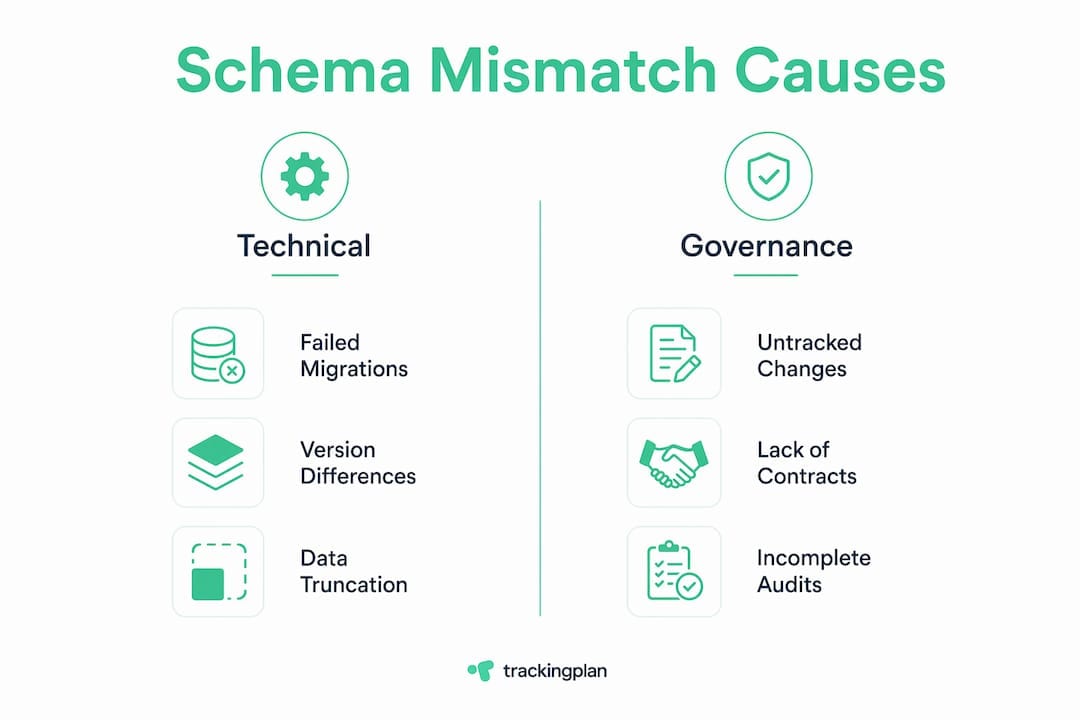
Schema mismatch errors have several distinct root causes, and each one requires a different fix. The most common causes include:
- Schema updates without migration. A developer updates a database model in staging but does not apply the corresponding migration to production. The two environments now hold different structural definitions for the same table.
- Data type conflicts. One system stores a timestamp as a Unix integer. Another expects an ISO 8601 string. The column names match, but the types do not. AWS Glue data quality checks confirm that these subtle type conflicts trigger validation failures even when column counts appear identical.
- Missing required fields. A required field exists in the schema definition but is absent from the incoming payload. This is especially common in event tracking, where optional fields get omitted during implementation.
- LLM output truncation. JSON schema mismatches in LLM-powered applications commonly occur due to type inconsistencies, missing fields, extra keys, or output truncation caused by low max_tokens settings. When an AI model generates a JSON payload that exceeds its token limit, the output is cut mid-structure, producing invalid or incomplete schemas.
- Concurrency conflicts. Simultaneous schema changes in collaborative systems like Notion cause cache desynchronization and structural corruption. Two users renaming columns or changing field types at the same time can desynchronize client and server views of the same schema.
Pro Tip: LLM-generated JSON outputs with more than 10–15 fields carry a significantly higher risk of truncation-related mismatches. Keep AI-generated schemas as flat and minimal as possible, and always validate output against a defined schema before passing it downstream.
How do schema mismatches appear in real systems?
Schema compatibility problems show up differently depending on the platform. Here are the three most common real-world scenarios.
Active Directory replication failures
Active Directory schema mismatches cause replication failures when schema versions or data structures differ between domain controllers. This typically happens after a schema update that does not fully propagate across all controllers, or after a failed replication cycle leaves one controller on an older version. The result is data inconsistency across the directory, which can affect authentication and access control.
ORM and database divergence
In frameworks like Entity Framework Core (EF Core), schema mismatches occur when the model definition and actual database schema diverge, often causing runtime exceptions. A developer adds a new property to a C# model but forgets to run the corresponding EF Core migration. The application compiles cleanly, then crashes at runtime when it tries to query a column that does not exist in the database.
CMS environment conflicts
In platforms like Umbraco, schema mismatch errors between source and target environments block content transfers entirely. The fix requires either deploying pending schema changes or manually aligning schema names and aliases between environments. SQL Server Management Studio is the standard tool for identifying these divergences at the database level, while CMS portals surface them through deployment error logs.
The table below compares these three scenarios by cause, symptom, and resolution method.
| System | Common cause | Symptom | Resolution |
|---|---|---|---|
| Active Directory | Failed schema replication | Replication errors, data inconsistency | Force replication, align schema versions |
| EF Core / ORM | Missing migration after model change | Runtime exceptions on query | Apply pending migrations |
| Umbraco CMS | Source and target schema divergence | Blocked content deployment | Deploy pending changes, align aliases |
What are best practices for detecting and fixing schema mismatches?
Fixing schema alignment issues after they cause errors is reactive. The better approach is to build detection and prevention into your workflow from the start.
- Enable schema migration with explicit flags. Platforms like Databricks require explicit flags such as mergeSchema to allow structural changes to tables. Schema migration defaults to off in these platforms to prevent accidental data corruption. Enabling it requires deliberate action, which forces teams to think through the structural change before committing it.
- Apply ORM migrations systematically. In EF Core, systematic use of migrations aligned with model changes is the primary defense against runtime schema errors. Every model change should be paired with a migration file, reviewed, and applied in sequence across all environments.
- Validate schemas at the pipeline boundary. Before any data moves from one system to another, run a schema validation check. Tools like Great Expectations, dbt tests, and AWS Glue data quality rules can catch type mismatches and missing fields before they reach your reporting layer.
- Sync CMS environments before deployment. In Umbraco and similar platforms, always check the schema state of the target environment before pushing content. Mismatched aliases or document type names will block the transfer and require manual correction.
- Monitor analytics implementations continuously. Schema changes in your martech stack, such as a renamed event property in Segment or a changed parameter type in a Google Tag Manager trigger, can silently break downstream reports. Automated monitoring catches these before they compound.
Pro Tip: Integrate schema validation into your CI/CD pipeline as a required step before any deployment. A failed schema check should block the build, not just generate a warning. This single change eliminates the majority of production schema errors.
Why schema mismatch damages analytics accuracy for marketing teams
Schema mismatch is not just a developer problem. For marketing analysts, it is a data accuracy problem that shows up in the metrics you use to make budget decisions.
Consider a common scenario: a developer renames an event property from “purchase_value” to “order_total” in a tracking implementation. The analytics platform still expects “purchase_value.” Every purchase event after that change arrives with a field the platform does not recognize. Revenue data drops to zero in your reports, but the transactions are still happening. You are now making spend decisions based on a broken data feed.
The impact extends to API reliability. When an automated workflow, such as a CRM sync or an ad platform integration, receives a payload that does not match its expected schema, it throws an error and stops processing. Depending on how the workflow handles errors, you may lose data silently or trigger cascading failures across connected systems. Maintaining schema consistency across marketing databases is not optional when your attribution models depend on clean, complete event data.
The audit approach that works is straightforward. First, document your expected schema for every key event and data feed. Second, run automated validation against that schema on a scheduled basis. Third, set up alerts for any deviation, including new fields, missing fields, and type changes. Platforms like Trackingplan automate this process across your entire martech stack, flagging schema mismatches in real time before they corrupt your reporting.
For a deeper look at how these errors surface across different marketing data types, the Trackingplan guide to marketing data errors covers the full taxonomy with practical fixes.
Key takeaways
Schema mismatch is a structural conflict between systems that corrupts data at the source, making detection and prevention far more valuable than post-error cleanup.
| Point | Details |
|---|---|
| Schema mismatch defined | A conflict between expected and actual data structures causing errors in processing or integration. |
| Most common causes | Type conflicts, missing fields, failed migrations, LLM truncation, and concurrency issues. |
| Real-world systems affected | Active Directory, EF Core ORMs, CMS platforms like Umbraco, and AI-powered JSON pipelines. |
| Prevention over remediation | Integrate schema validation into CI/CD pipelines to catch mismatches before they reach production. |
| Marketing analytics risk | Renamed or missing event properties silently break conversion tracking and distort ROI reporting. |
Schema mismatch is a governance problem, not just a technical one
I have spent years watching teams treat schema mismatch as a one-time bug to squash. A developer gets an error, applies a migration, and closes the ticket. Two weeks later, a different mismatch surfaces in a different system. The cycle repeats because the root cause is never addressed.
The real problem is governance. Most teams have no single source of truth for their schema definitions. Marketing adds a new event parameter. Engineering updates the database model. Neither team tells the other. By the time the mismatch surfaces in a report, the data gap is already weeks old.
What actually works is treating your schema as a contract. Every change to an event, a field name, or a data type should go through a review process, just like a code change. That means version-controlled schema definitions, automated validation at every pipeline boundary, and real-time alerts when production data deviates from the contract.
I have also seen teams underestimate the value of AI-assisted debugging for this problem. When a mismatch produces a cryptic runtime error, an AI-assisted tool that maps the error back to the specific field and schema version saves hours of manual investigation. The combination of automated monitoring and AI-assisted root-cause analysis is the fastest path from error to fix.
The teams that handle schema mismatch well are not the ones with the most sophisticated tooling. They are the ones who treat schema consistency as a shared responsibility across engineering, analytics, and marketing.
— David
How Trackingplan helps you catch schema mismatches before they cost you
Trackingplan monitors your entire analytics and martech stack in real time, automatically detecting schema mismatches, broken event properties, and tracking errors the moment they occur. When a field type changes or a required parameter goes missing, Trackingplan sends an alert via Slack, email, or Teams before the error reaches your reports. Its AI-assisted debugger maps each error back to its root cause, cutting investigation time from hours to minutes. For teams managing complex digital analytics implementations, Trackingplan provides the automated schema validation layer that keeps your data accurate and your decisions grounded in reality.
FAQ
What is schema mismatch in simple terms?
Schema mismatch is when two systems expect data in different formats or structures, causing errors when they try to exchange information. It is a structural conflict, not a network issue.
What are the most common schema mismatch examples?
Common examples include a renamed event property in Google Analytics 4, a missing migration in EF Core, an Active Directory replication failure after a schema update, and truncated JSON output from an LLM exceeding its token limit.
How do I fix a schema mismatch error?
The fix depends on the system. In ORMs like EF Core, apply the pending migration. In CMS platforms like Umbraco, deploy pending schema changes to align source and target environments. In data pipelines, enable schema migration flags like mergeSchema in Databricks.
How does schema mismatch affect marketing analytics?
A schema mismatch in your tracking implementation can cause event data to stop populating in your analytics platform, producing gaps in conversion reporting and distorted attribution data. The impact on data accuracy is direct and often silent until a report review catches the discrepancy.
How can I prevent schema mismatches in my analytics stack?
Integrate schema validation into your CI/CD pipeline, document expected schemas for every key event, and use automated monitoring tools to alert you when production data deviates from the defined structure. Continuous monitoring is more reliable than periodic manual audits.