
You probably know the workflow already. A KPI dips, Slack lights up, someone opens three dashboards, someone else exports data to a spreadsheet, and the team spends the afternoon arguing about whether the issue is demand, attribution, tracking, or a broken release.
That routine is exactly why agentic analytics tools are getting so much attention. They change analytics from a lookup task into an operating system for decisions. But there's a catch most vendor pages skip past. Autonomous analysis is only useful when the underlying data is trustworthy enough to automate against.
That makes data observability the first real step, not a nice-to-have after purchase. If your events are missing, your UTMs are inconsistent, or your schema changes without warning, the agent won't become intelligent. It will just become confidently wrong, faster.
Beyond the Dashboard What Are Agentic Analytics Tools
Traditional dashboards are useful, but they have a built-in limit. They wait. They wait for a human to notice a drop, ask a question, filter a chart, and decide what to do next. In a busy marketing or product team, that delay is where a lot of preventable damage happens.
That's why the distinction between reporting and analysis matters. If you need a quick refresher on how reporting and analytics differ, it helps frame why static charts alone rarely solve operational problems. Reporting tells you what happened. Analytics tries to explain why. Agentic analytics adds the next layer. It decides what should happen next and can trigger that next step automatically.
From dashboard review to active decision system
Agentic analytics tools don't behave like passive BI. They continuously monitor data, look for changes, reason through possible causes, and initiate follow-up actions. In practice, that can mean escalating an anomaly, updating a CRM workflow, pausing a risky campaign adjustment, or sending an alert to the right owner before a weekly review ever happens.
Unlike a dashboard that waits for a query, agentic analytics flips the model from reactive to proactive insight delivery. Databricks describes this shift as a move toward systems that ingest data, analyze it, explain findings, recommend actions, and act through connected business systems in a closed loop through agentic analytics.
Most analytics teams don't have an insight problem. They have a response-time problem.
Why this category matters now
This isn't a fringe trend. The global agentic AI market is valued at USD 6.96 billion and is projected to reach USD 57.42 billion by 2031, with a CAGR of 42.14%, according to Exabeam's overview of agentic AI tools. That projection matters because it shows where enterprise analytics is heading. Organizations aren't just buying faster dashboards. They're investing in systems that can monitor, reason, and trigger action with less manual coordination.
The practical appeal is obvious. Analysts spend less time chasing routine anomalies. Marketers get earlier warnings. Operations teams stop relying on stale reports to catch live issues.
What doesn't work is assuming the tool alone creates reliability. If the source data is unstable, the agent can automate the wrong diagnosis just as efficiently as the right one.
The Core Functions of Agentic Analytics
A simple way to understand agentic analytics tools is to compare them with a weather report and a smart sprinkler. A weather report tells you rain is unlikely. A smart sprinkler checks the conditions, decides the lawn still needs water, skips one zone because the soil is already wet, and runs a shorter cycle automatically.
That second model is how agentic systems behave. Agentic analytics tools are defined by four core functions: real-time analytics, autonomous decision logic, action execution, and feedback loops, as described in OvalEdge's explanation of agentic analytics tools.
The four functions in practice
Real-time analytics
The tool continuously watches incoming data for anomalies, trends, and shifts. This is the monitoring layer. It matters because a system can't act early if it only refreshes when someone opens a report.
Autonomous decision logic
At this stage, the agent chooses a response path. It doesn't just flag that conversions dropped. It evaluates what likely changed and what response fits the business rule or objective.
If you're building toward this model, it helps to understand the role of data observability in modern analytics stacks. Monitoring business metrics without monitoring the quality of the underlying data leaves a major blind spot.
Action execution
A true agentic tool doesn't stop at insight. It can trigger alerts, update connected systems, open tickets, or push workflow changes through APIs and operational tools.
Feedback loops
The system checks what happened after the action. Did the alert resolve the issue? Did the recommendation improve the target metric? Did the anomaly disappear or persist? That loop is what moves the tool beyond one-off automation.
Agentic analytics vs traditional tools
| Capability | Traditional BI | Automated Reporting | Agentic Analytics |
|---|---|---|---|
| Data monitoring | Usually reviewed manually | Scheduled output | Continuous monitoring |
| User interaction | Requires queries or dashboard checks | Sends predefined reports | Detects and initiates |
| Decision logic | Human-driven | Rule-based summaries | AI-driven planning and response |
| Action taking | Usually outside the tool | Limited notification workflows | Can trigger workflows and system actions |
| Learning from outcomes | Minimal | Minimal | Uses feedback loops to adjust |
Practical rule: If a tool only summarizes data faster, it's helpful. If it can monitor, decide, and trigger follow-up safely, it's agentic.
The trade-off is control. Traditional BI is slower but easier to inspect. Agentic analytics is faster and more scalable for repeatable decisions, but it needs stronger guardrails, cleaner integrations, and much better trust in the data layer.
How Agentic Analytics Workflows Operate
The easiest way to understand agentic analytics tools is to follow one workflow from start to finish. In a campaign environment, the process is less mysterious than people expect. It's a sequence.
Agentic analytics tools operate through a closed-loop, multi-step reasoning cycle with five phases: Ingest, Analyze, Explain, Recommend, and Act, according to Databricks' definition of agentic analytics.
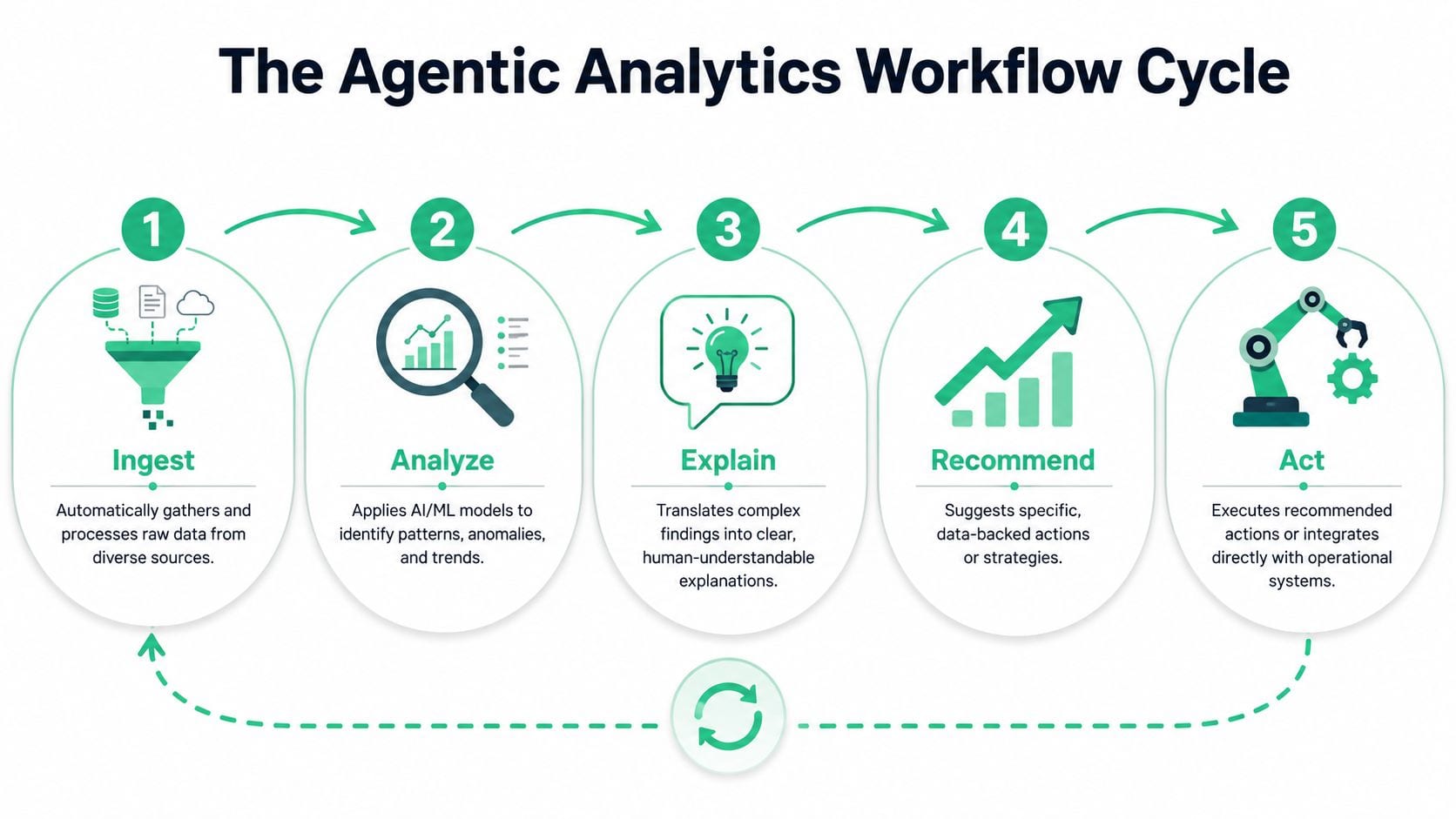
A campaign example from signal to action
Say an e-commerce team is running paid social, search, email, and affiliate traffic into the same storefront. Revenue from one paid social campaign falls sharply during the day, but spend continues normally.
Ingest
The agent pulls data from ad platforms, web analytics, attribution tools, order systems, and event streams. It doesn't wait for an analyst to merge exports.
Analyze
The system compares current performance with recent patterns, segment behavior, and funnel steps. It identifies that click volume is stable, but product view events from a landing page have suddenly dropped.
Explain
Now the workflow gets useful. The agent translates that pattern into a human-readable explanation. It might surface that traffic quality hasn't collapsed. Instead, user journeys from a specific campaign are missing mid-funnel events, which points to a tracking or page issue rather than a media issue.
A strong agent doesn't just say what changed. It narrows the operational question your team actually needs to solve.
What happens after diagnosis
Recommend
The tool proposes next actions. That may include pausing automated bid increases, alerting marketing and engineering, validating event delivery on the affected landing page, and reviewing campaign tagging before reallocating budget.
If you're thinking about how humans structure this kind of context for AI workflows, I like this broader Guide to building an AI-enabled second brain because it shows why agents perform better when information is organized for retrieval and action, not just stored.
Act
The final phase is where the system earns the word agentic. It can create an incident, notify owners in Slack, update a workflow state, or trigger a rules-based operational response.
What works here is bounded autonomy. Let the system act on low-risk, reversible tasks first. Alerting, triage, routing, and investigation triggers are usually safer starting points than direct budget shifts or customer-facing changes.
What doesn't work is pretending every workflow should be fully autonomous on day one. High-speed action without verified inputs creates a very expensive way to automate confusion.
Key Use Cases for Your Team
A team usually sees the value of agentic analytics the moment a live decision depends on data that might be wrong. Paid media can look weak because conversion events stopped firing. Product adoption can appear to stall because a release changed event names. Support volume can rise because no one caught the break early. The agent matters, but the bigger lesson is simpler. Automation only helps if the underlying data can be verified.

For marketers
In many organizations, marketing teams feel bad analytics quickly because campaign decisions happen daily and budget shifts happen fast.
- Campaign anomaly detection: An agent can watch conversion rate, traffic quality, attribution patterns, and landing page behavior throughout the day, then flag a meaningful deviation before the next reporting cycle.
- Budget protection: If downstream measurement starts to fail, the system can hold back aggressive optimization, notify the channel owner, and keep the team from scaling or cutting spend on unreliable evidence.
This use case exposes a common gap in vendor demos. Many tools can summarize performance changes, but fewer can connect those changes to instrumentation issues such as missing pixels, broken tags, or malformed UTMs. That is why teams evaluating agentic platforms should also review AI-powered analytics tools for 2026, especially if campaign validation and data quality checks sit close to revenue.
For analysts
Analysts get the biggest lift when the agent handles repeatable investigation work and leaves interpretation, challenge, and prioritization to humans.
Root-cause triage
A useful agent starts the analysis instead of waiting for an analyst to build the first query set. It can compare segments, isolate the affected time range, inspect related dimensions, and surface the few explanations worth checking first.
Stakeholder-ready explanation
Analysts also spend time converting technical findings into language a marketing lead, product manager, or finance partner can act on. Strong tools shorten that translation step by drafting a plain-language summary tied to the business question, not just the metric change.
I look for restraint here. If the system presents three plausible causes with evidence, that helps. If it writes a confident story on weak inputs, it creates more review work than it saves.
If your team is still separating lightweight assistants from operational systems, this overview of how AI can analyze your data is a useful comparison point.
For developers and QA teams
Developers and QA teams usually care less about dashboards and more about whether tracking survived the latest release.
- Release validation: After deployment, an agent can check for missing events, schema drift, destination drops, or changes in parameter population that suggest instrumentation broke.
- Faster incident handling: Instead of sending a generic alert, the system can attach affected pages, event names, timestamps, and recent changes so engineering can reproduce the issue faster.
These workflows are where the foundation question becomes unavoidable. If the agent only sees reporting outputs, it may catch a symptom but miss the implementation fault. If it also has access to data observability signals, event validation, and schema monitoring, it can narrow the problem to the layer your team needs to fix.
How to Select and Evaluate Agentic Tools
Most buying teams get distracted by the demo. Natural language querying looks impressive. So do auto-generated summaries. But proper evaluation starts after the vendor shows the polished prompt box.
A practical review should test whether the system can connect to your environment, explain itself, operate within governance rules, and fail safely. If you want a broad view of how AI can analyze your data, that's a useful companion read before you compare vendors, because it separates lightweight analysis assistants from systems built for operational decision support.
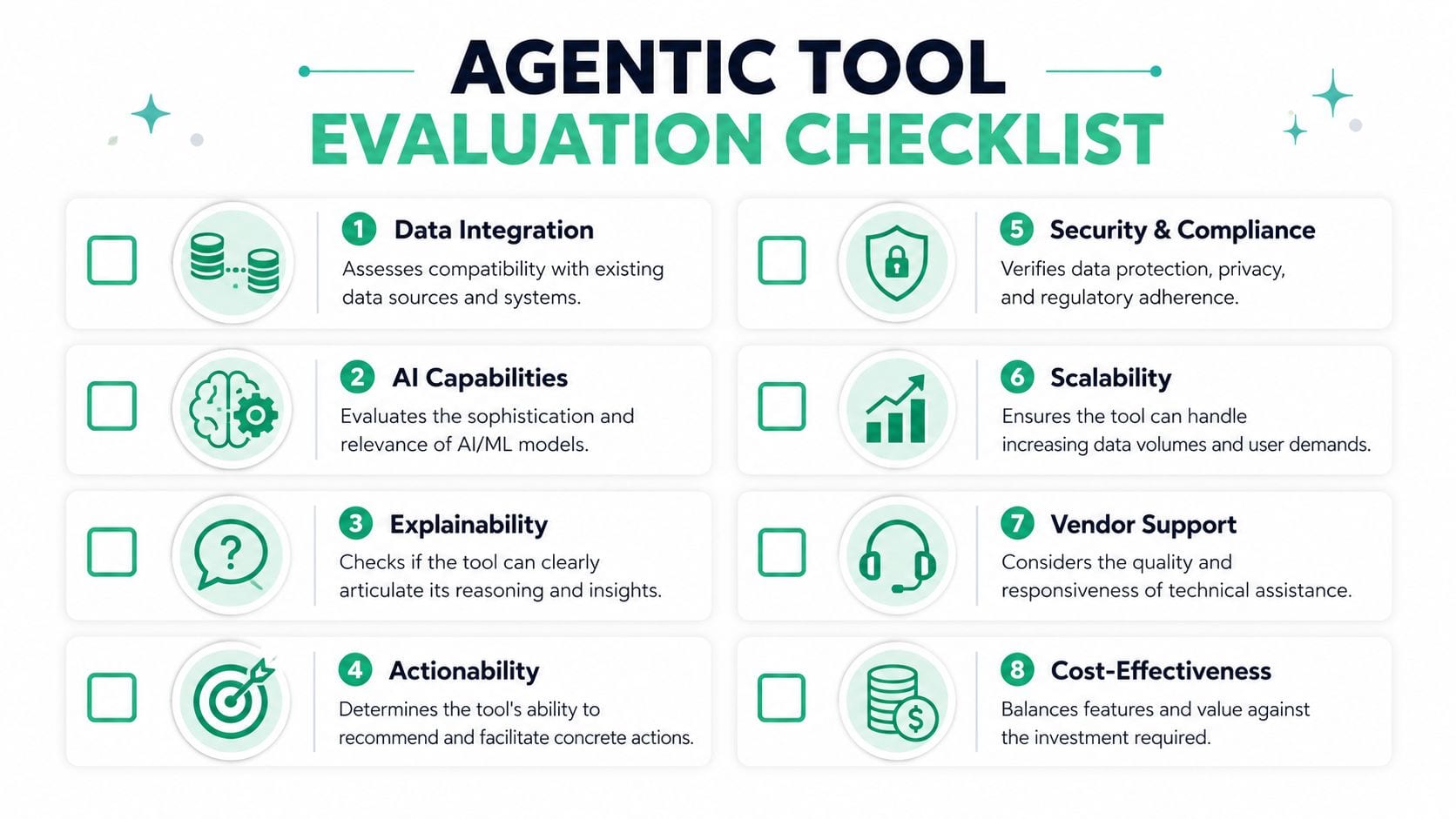
The shortlist criteria that actually matter
Integration depth
Ask what the tool can read and what it can write back to. Reading from a warehouse is easy to claim. Safely triggering downstream action across CRM, ad, ticketing, and messaging systems is harder.
Explainability
You need to know why the agent reached a conclusion. If it can't show its inputs, logic, or decision path clearly, trust won't survive the first bad call.
Governance and permissions
The platform should support scoped access, action limits, and approval gates. In enterprise environments, autonomous action without role-based constraints is a non-starter.
Observability
You need logs, traces, decision history, and issue visibility. This isn't optional. If an agent updates something important, teams need to inspect what happened afterward.
For teams comparing the broader field of options, this list of AI-powered analytics tools for 2026 is a useful way to see how categories differ across conversational analytics, observability, and decision automation.
Questions worth asking in a live evaluation
| Question | Why it matters |
|---|---|
| What happens when a source system is delayed or unavailable? | You need to understand failure behavior before production use. |
| Can the tool explain the root cause path it followed? | Opaque answers slow adoption. |
| Which actions can run automatically and which need approval? | This defines your risk boundary. |
| How are errors, overrides, and decision logs stored? | Auditability determines enterprise readiness. |
A flashy interface doesn't mean the system is ready. Agentic analytics tools are only useful when they can operate inside the reality of messy stacks, changing schemas, and teams that need oversight.
Common Pitfalls and How to Mitigate Them
A team gives an analytics agent permission to flag campaign issues, suggest budget shifts, and route incidents automatically. Then a tracking change ships on Friday, half the conversion events stop firing, and the agent spends Monday optimizing around broken inputs. That is how trust disappears.
The failure usually starts below the AI layer. Instrumentation breaks. Naming conventions drift. Campaign tags get sloppy. Schemas change without warning. Once those issues enter the pipeline, the system can still sound confident while producing bad recommendations.
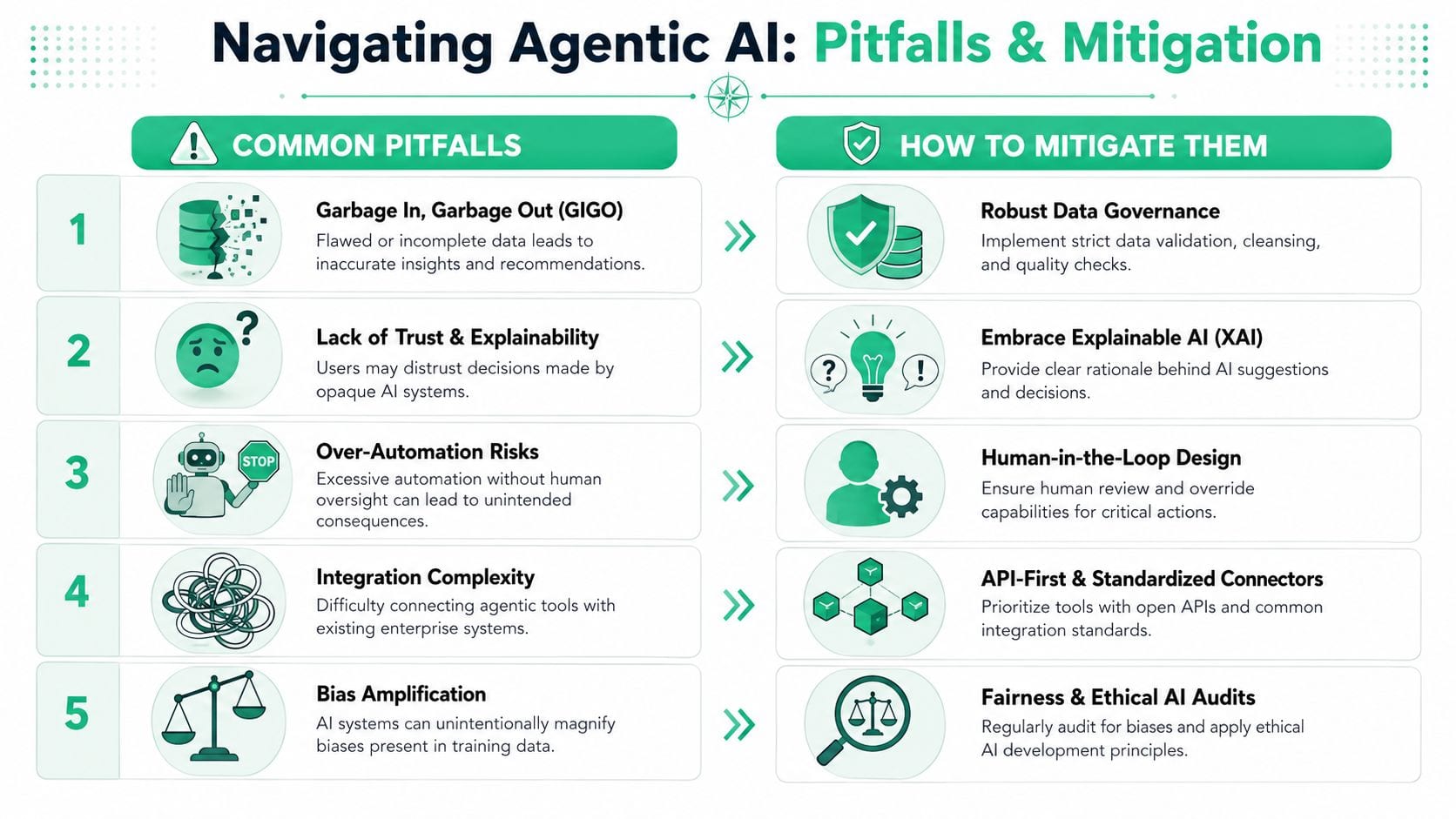
The first pitfall is still GIGO
A common request from marketers and analysts is simple. They want the system to catch missing events, broken pixels, UTM mistakes, and destination failures before those problems distort reporting or trigger the wrong action. That is exactly where data observability earns its place in an agentic setup.
Trackingplan is relevant here for a practical reason. It validates tracking changes, missing pixels, campaign issues, and data delivery problems automatically, which helps teams catch input failures before an agent starts reasoning on top of them.
If you want agentic systems to act safely, start with the underlying mechanics of data quality best practices. Event integrity, naming consistency, schema stability, destination monitoring, and campaign hygiene matter before any AI layer sits on top.
Other failure modes teams hit fast
Opaque recommendations
Confidence drops fast when a tool cannot show why it recommended a change. If the output affects spend, customer messaging, or workflow routing, teams need the logic path, the input data used, and the assumptions applied.
Premature autonomy
Some teams try to jump from dashboard fatigue to automated action in one step. The safer pattern is narrower. Start with detection and triage, then add low-risk actions, and keep expensive or hard-to-reverse decisions behind approval.
Fragile integrations
An agent depends on the systems around it. If an API times out, a field gets renamed, or a connector omits context, the workflow can fail unnoticed. Unnoticed failures are the dangerous ones because the agent may continue operating as if nothing changed.
Drift in business rules
Historical data can encode old goals, outdated thresholds, or biased patterns. If nobody revisits those rules, the system keeps optimizing for yesterday's priorities instead of today's operating reality.
Bad data stops being a reporting problem once an agent can act on it.
Practical mitigations that hold up
- Validate inputs continuously: Check events, schemas, UTMs, and destinations before trusting the recommendation layer.
- Set approval boundaries: Require review for budget changes, customer-facing actions, or anything expensive to reverse.
- Require explanation paths: If the tool cannot show how it reached a conclusion, do not let it trigger action automatically.
- Log the full action trail: Teams need to reconstruct what the agent saw, what it inferred, and what it changed.
- Review rules on a schedule: Objectives, exclusions, and thresholds drift over time. The agent should be updated before performance degrades.
Teams often skip this work because the automation story is more exciting than the data foundation. In practice, this is the part that decides whether agentic analytics becomes a reliable operating layer or just a faster way to scale mistakes.
Your Roadmap to Adopting Agentic Analytics
A good rollout starts smaller than generally anticipated. The fastest way to lose confidence is to automate decisions before you can trust the underlying inputs. The safer route is a phased model.
Phase 1 builds the data foundation
Start with data quality, observability, and instrumentation reliability. Before you evaluate autonomous actions, make sure your tracking layer is stable enough to support them. That means event completeness, schema consistency, campaign-tagging discipline, destination monitoring, and alerting when something breaks.
Phase 2 picks one narrow use case
Choose a repetitive workflow with visible business value and limited downside. Campaign anomaly triage, release-related tracking validation, or automated escalation of suspicious attribution shifts are good candidates. Avoid broad mandates like "AI for all analytics."
Phase 3 adds bounded autonomy
Once the team trusts the diagnosis layer, let the system take low-risk actions. Route incidents, notify owners, open tickets, pause a rule, or attach context to alerts automatically. Keep major business changes behind approval gates.
Phase 4 expands with governance intact
At this point, scale by function, not by hype. Add more workflows only after each one has clear ownership, logs, failover rules, and decision boundaries. The practical goal isn't maximum autonomy. It's reliable autonomy.
A spring 2025 MIT Sloan Management Review survey found that 35% of respondents had adopted AI agents by 2023, and 44% planned short-term deployment, according to MIT Sloan's explanation of agentic AI. That demand makes sense. The economic case is strong. But adoption won't stick if teams skip validation, standardization, and oversight.
If you want one rule to carry forward, use this one. Don't start by asking what the agent can automate. Start by asking what data it can trust.
If your team wants to make agentic analytics safe enough for real operations, Trackingplan is worth evaluating as part of the foundation layer. It monitors analytics implementations across web, app, and server-side environments, detects issues like missing events, broken pixels, schema mismatches, UTM errors, and consent problems, and helps teams catch data-quality failures before an autonomous system acts on them.