
Most advice on Performance Max conversion tracking starts in the wrong place. It focuses on tag installation before the decision, which is what you want Google to optimize toward. In Performance Max, conversion tracking is not a reporting layer you bolt on later, it's the training signal that tells Google AI how to allocate budget across Search, Shopping, YouTube, Display, Discovery, Gmail, and Maps, so bad measurement doesn't just distort dashboards, it steers spend in the wrong direction.
That's why the first job is to define the conversion logic with care. Google explicitly recommends accurate conversion measurement before using Performance Max, and its setup guidance says conversion goals and values directly guide the system's bidding and budget allocation. If you're using value-based bidding, Google says to use Maximize conversion value and add a ROAS target when ROI goals are specific, which only works if your conversion values are trustworthy. For a practical companion to the setup mindset, the overview in Google Ads for ecommerce growth is a useful broader reference, while what conversion tracking is is a good refresher on the measurement layer itself.
Practical rule: if the conversion action is noisy, delayed, or poorly valued, Performance Max will still optimize. It just won't optimize the way you want.
Google also warns that reporting needs a lag window. If users typically take 7 days to convert after engaging, the most recent week of data should be excluded from performance review so you don't judge the campaign on incomplete information. In practice, that means setup and interpretation have to be designed together. A clean tag setup with the wrong goal is still a bad setup, and a smart goal with broken attribution is just as damaging.
Why Conversion Tracking Is the Engine Behind Performance Max
Performance Max looks automated on the surface, but the automation is only as good as the conversion signal underneath it. Google's own guidance makes that plain. Conversion goals and values tell the system what matters, and those inputs shape how budget moves across placements instead of leaving spend evenly distributed or intuitively “balanced” by the marketer.
That's the first misconception to kill. Conversion tracking is not a passive report card, it's the core feedback loop that trains bidding. When the signal is incomplete, the AI doesn't pause, it learns from what's available and starts biasing spend toward the wrong audience, placement, or asset mix. That is why bad setup in Performance Max shows up as a bidding problem long before it shows up as a reporting problem.
What the system actually learns from
Google's setup guidance says conversion goals and actions directly guide Google AI, and assigning the right values can materially change budget allocation across all the major PMax surfaces. If you're tracking only a weak proxy event, the campaign will treat that proxy as the outcome to chase. If you're tracking real value, it can shift toward the customers and placements that create that value.
That difference matters even more in value-based bidding. Google says that if you're using value-based bidding, Maximize conversion value is the right strategy, with a ROAS target added when you have specific return goals. You can't do that well with flat, shallow conversion data. A “lead” that means five different things across your pipeline is not a stable bidding input.
A cleaner way to think about it is this. The conversion event is the label on the training data. If the label is wrong, everything downstream is wrong too.
Why recent data can mislead you
Performance Max reporting also has a lag problem. Google says that if users usually convert 7 days after engagement, the most recent week should be left out of performance review so the data isn't incomplete. That's not a small nuance. It means the campaign can look weak or unstable because the attribution window hasn't matured yet.
For teams building broader account strategy, the practical takeaway is that conversion tracking influences both measurement and automation. If you need a deeper measurement framework, browse comparative bidding techniques can help you see where PMax fits relative to more controlled bidding setups. The key point remains simple, though. In Performance Max, the conversion signal is the steering wheel.
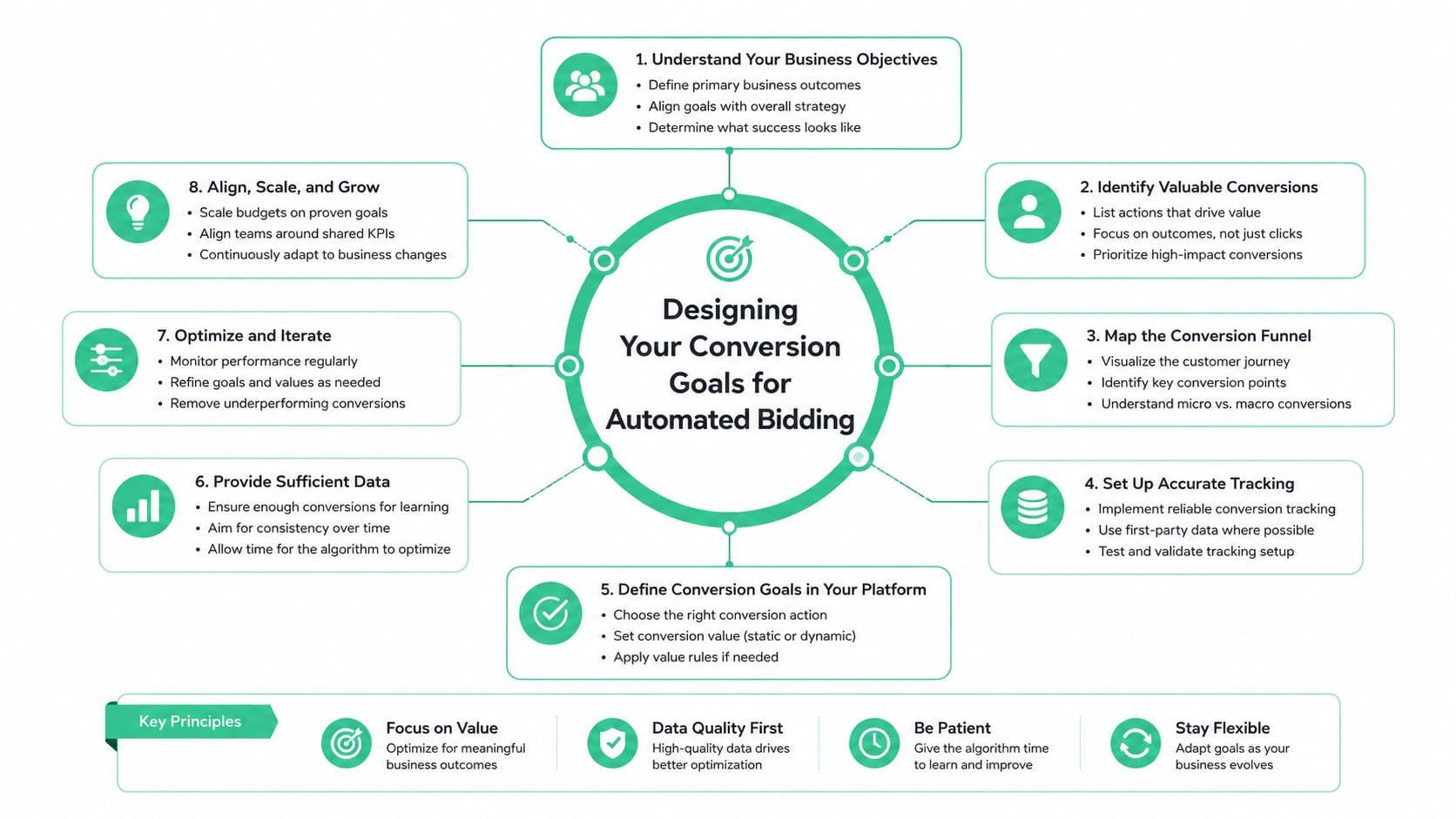
Designing Your Conversion Goals for Automated Bidding
The hardest part of Performance Max isn't the tag, it's deciding what deserves to be optimized in the first place. Many accounts get this backwards. They install tracking for whatever is easiest to fire, then wonder why the campaign spends aggressively on low-quality leads or shallow engagement.
Primary and secondary actions should not mean the same thing
The cleanest setup starts by separating primary actions from secondary ones. Primary actions are what Performance Max should optimize toward. Secondary actions are still useful for analysis, but they should not distort bidding. If a form submit, a booked call, and a closed deal all matter, they don't all deserve the same role in the account.
For ecommerce, that decision is usually straightforward. The purchase event is the primary action, and everything upstream is supportive context. For lead generation, the choice is harder because the earliest form fill is rarely the best business outcome. In those accounts, the issue is not whether you can track a conversion, it's whether the event you're passing into Google Ads is a good proxy for downstream revenue.
A simple rule helps here. If an action happens often but produces inconsistent value, it is usually a poor primary action. If an action happens less often but maps more closely to qualified pipeline or closed revenue, it deserves more weight, even if the volume is lower.
Value changes the budget story
Google's guidance on value-based bidding matters because assigned value changes how the system allocates spend. That's true even when the value is a proxy. A lead-gen campaign that assigns different values to different lead types gives Google a much better decision surface than one that treats every form fill identically.
Many teams get stuck here. They want the machine to find high-quality customers, but they feed it undifferentiated events. If one channel drives cheap contacts and another drives fewer but better-qualified prospects, flat conversion values erase that signal. Google can't optimize to quality it can't see.
Practical rule: if your business has offline qualification, the event you optimize to should be the event you trust most, not the event that fires earliest.
For a practical comparison of how bid approaches shape this decision, browse comparative bidding techniques is worth reviewing alongside your conversion plan. And if you're deciding how to translate GA4-style events into Google Ads goals, optimizing GA4 conversions, tracking methods, and best practices is a useful reference point for the measurement logic, especially when the account has multiple possible outcomes.
Lead gen, SaaS, and ecommerce need different goal logic
Ecommerce accounts usually want the purchase event with transaction value passed cleanly. SaaS often needs a layered approach, trial starts can be important, but paid conversions or qualified demos are usually better primary signals if they're available with enough frequency. Lead gen sits in the middle, where form submits, qualified leads, calls, and offline sales can all matter, but not equally.
The decision comes down to three trade-offs, volume, lag, and signal quality. High volume helps the algorithm learn. Low lag helps it update quickly. High signal quality helps it optimize toward profit rather than activity. You rarely get all three at once, so the goal design is about choosing the least-bad compromise for the business outcome you care about.
Implementing Tags Across Your Conversion Flow
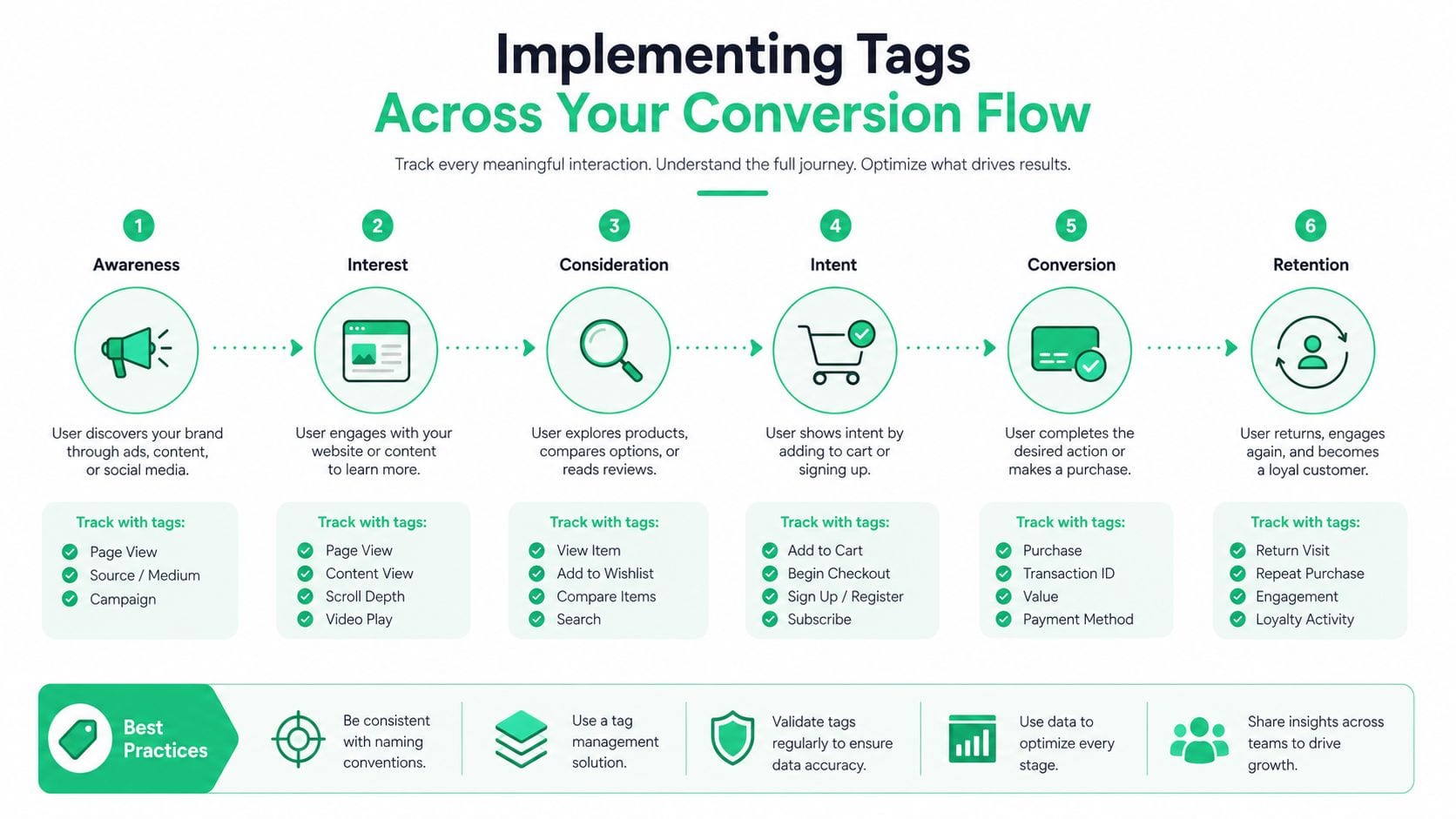
Once the goal design is settled, the technical work gets much simpler if you're disciplined about sequence. Google's recommended setup is to create the conversion action in Google Ads first, then deploy the Google tag on every page in the purchase or booking flow, including third-party checkout pages. If you skip the intermediary pages in that flow, attribution gets fragile fast, especially when the user hops across domains or payment providers.
Start in Google Ads, not in the tag manager
The first mistake I see in production is teams deploying tags before the conversion action is defined in Google Ads. That creates naming drift, duplicated actions, or a tag that fires correctly but points to the wrong conversion label. Google's setup guidance is clear that the conversion action and its values are what Performance Max learns from, so the action definition has to exist before the implementation details.
When you're using a direct Google tag setup, the important part is consistency. The conversion should fire on the true success event, not on a button click, modal view, or halfway state. For ecommerce and booking flows, Google says to pass transaction_id and value/currency dynamically so deduplication and value-based optimization work properly. Without those parameters, you can end up with duplicate or low-confidence records that make bidding less reliable.
GTM needs more than a single tag
For teams using Google Tag Manager, the recommended sequence is specific. Create the conversion action, add a Conversion Linker tag, place the conversion tag on the right pages, and verify the request against www.googleadservices.com so you know the tag is hitting the intended account and conversion name. That verification step matters because GTM can look “done” while still sending malformed or misrouted events.
The practical version is simple.
- Conversion Linker first: this helps maintain click attribution across pages and domains.
- Conversion tag on the success page or success event: not on the entry form or intermediate step.
- Dynamic parameters where applicable: especially transaction_id, value, and currency.
- Network verification: confirm the outgoing request matches the intended account setup.
If the event fires before the success state is actually complete, you're not tracking a conversion, you're tracking intent.
GA4 can complement the setup, but it shouldn't replace Ads tags
A lot of teams import GA4 events into Google Ads and stop there. That's convenient, but it's also a common weakness. The better pattern is to use Google Ads conversion tags as the primary bidding signal, then keep GA4 as a complementary analytics source. The import route can be useful for analysis and cross-checking, but it's not the same as giving Performance Max a purpose-built bidding signal.
That distinction matters because automated bidding needs dependable, account-native conversion data. If the account only sees imported analytics events, especially when event naming, consent, or attribution settings drift, optimization quality often degrades. For a broader reference on the tracking layer, optimizing GA4 conversions, tracking methods, and best practices fits naturally alongside the implementation work. And for teams that want a campaign-URL governance angle, Trackingplan's own Google Ads Tracking Template can be one way to standardize tracking parameters without inventing a custom naming convention for every launch.
Enabling Enhanced Conversions and Offline Imports
Standard tags rarely capture the full truth. People switch devices, complete forms under consent restrictions, call sales teams later, or buy after a human-assisted cycle. That's why enhanced conversions and offline imports matter. They improve the quality of the signal Performance Max sees, especially when the original web event is incomplete or delayed.
Enhanced conversions fill attribution gaps
Google's setup flow now emphasizes event-based web conversions, the Google tag, and the option to enable enhanced conversions. The idea is straightforward. You collect first-party user data during the conversion process, hash it, and use it to improve matching quality. That can make attribution more resilient when the normal click-to-conversion path is messy.
The implementation has to be handled carefully. The data needs to come from a legitimate first-party context, the consent posture has to match your policy, and the tag configuration has to align with how your forms or checkout work. If your form captures email on one page and submits on another, the data layer has to persist cleanly enough for the enhanced conversion event to use it correctly.
Offline imports are essential when the real sale happens later
For many B2B and service businesses, the conversion doesn't happen on the website. It happens after a rep qualifies the lead, a booking is confirmed by phone, or a CRM stage changes. In those cases, offline conversion imports are the better source of truth because they let Google Ads optimize toward downstream outcomes instead of raw web activity.
The key matching field is usually the click ID, especially GCLID, so the original ad interaction can be tied back to the later sale or qualified event. If the file format is wrong, the upload may appear successful while the rows never match. That's one of the ugliest failure modes because it looks like a data delay when it's really a schema problem.
Here's the pattern that tends to hold up in production.
- Capture the click ID early: store it when the lead first lands.
- Pass the identifier into the CRM: don't leave it trapped in the web form tool.
- Import the downstream event with the right timestamp: so Google can evaluate it in the right conversion window.
- Keep the value consistent: especially if you're bidding on quality, not just volume.
For a deeper implementation walkthrough, enhanced conversions in Google Ads is a useful companion. It's especially helpful when teams need to reconcile privacy constraints with practical attribution, because the measurement design has to survive both engineering review and marketing pressure.
What usually breaks
Most failures are not dramatic. They're small mismatches. The CRM field doesn't map cleanly, the offline file uses a different timestamp format, the click ID gets dropped on mobile, or a webhook fires before the deal stage is final. Any of those issues can weaken Performance Max because the campaign is learning from a partial truth.
The safest mindset is to treat enhanced conversions and offline imports as signal recovery systems, not as optional extras. They don't replace the core conversion tag. They make the signal more complete when real customers don't behave neatly.
Validating Tracking and Interpreting PMax Reports
A tag that exists isn't the same as a tag that works. Validation has to happen at the browser, request, and reporting levels, because each layer can fail differently. Google Tag Assistant and GTM preview mode are useful for confirming that the event fires, but network inspection is what tells you whether the request is reaching Google Ads with the expected parameters.
Validate the event before you trust the report
The cleanest QA sequence is browser first, then request, then report. In GTM preview, confirm the trigger is firing only on the intended success state. In Tag Assistant, confirm the conversion tag is detected. Then inspect the network request and verify the right parameters, account, and conversion action are being sent.
That matters because many “reporting problems” are really implementation problems. If the tag fires on the wrong page or misses transaction values, the campaign can still register conversions, just not the right ones. The result is a report that looks active but a bidding model that's learning from bad input.
Practical rule: don't ask whether the campaign is getting conversions until you've verified that the right conversion is being sent.
Read the PMax reports in the right place
Google's reporting has improved, and that matters because Performance Max was built as a cross-channel campaign. You can now access the channel performance report from Campaigns → Insights and reports → channel performance, and Google says the report can be downloaded from the table toolbar. You can also inspect the Asset Associations Report and the Asset report to see which creative elements are tied to conversion activity, and you can add conversion metrics directly in table views.
That reporting structure is useful because it moves you away from a single campaign-level number. A campaign can look healthy overall while one asset group underperforms badly, or one channel drives a lot of activity but poor-quality conversions. The point is not to chase every number, it's to isolate where the conversion signal is coming from.
For teams that want a broader metrics lens, track your AdWords metrics pairs well with PMax reporting because it reinforces the idea that one metric never tells the whole story. You still need conversion quality, lag, and asset-level context before making changes.
Don't overreact to the newest data
Google says the Insights page is refreshed daily, which is useful, but it doesn't remove conversion lag. If users usually take 7 days to convert after engaging, the latest week is incomplete and shouldn't be judged the same way as older data. That's where teams often overcorrect, especially after a budget change or asset refresh.
The right habit is to compare like with like. Check enough mature data to see the actual trend, then use the daily Insights page for directional monitoring, not reflexive decision-making. For a validation checklist, verify conversion tracking is a practical reference when you're tightening the QA process across multiple accounts.
Maintaining Tracking Reliability Over Time
Performance Max tracking usually fails by drift, not by disaster. A page template changes, a checkout provider updates, a consent banner blocks a firing condition, or an event schema shifts just enough to stop matching cleanly. The campaign keeps spending, but the learning signal gets worse month by month.
The most stable accounts don't rely on occasional audits. They use observability to catch issues before the bidding model starts making decisions on broken data. That's where automated monitoring tools matter. Trackingplan, for example, continuously discovers Martech implementations and can flag missing pixels, schema mismatches, property drift, campaign tagging errors, UTM convention problems, and consent misconfigurations before those issues distort conversion data.
Build for ongoing signal quality, not one-time launch QA
The right maintenance posture assumes that tracking will change. Developers ship site updates. Marketers add new forms. Commerce teams tweak checkout flows. Each change can break attribution in a way that's hard to notice from the UI alone.
A sustainable process usually includes three layers. First, automated detection of broken or rogue events. Second, alerting through Slack or email when expected events stop appearing or change shape. Third, a light review of recent conversions against the account's current goal logic so primary and secondary actions still reflect business reality.
Keep the campaign learnable
Google's guidance on Performance Max points to the same operational truth. Strong conversion signals and recent data matter. One expert guide recommends at least 30 conversions in the last 30 days and a minimum budget of $100/day for about 6 weeks to let the system work through learning and stabilize bidding. That isn't a magic formula, but it reflects a real constraint. The algorithm needs enough clean input to separate signal from noise. Those figures come from the broader setup guidance in Google Ads Performance Max complete guide 2025, and they're most useful as a planning baseline, not a promise.
Maintenance rule: if the campaign's inputs keep changing, the learning phase never really ends.
A good observability setup also catches schema mismatches, rogue events, and consent issues before they pollute your reporting stack. That's more reliable than waiting for a monthly audit to reveal a broken checkout path that's already affected bidding for weeks. The accounts that hold up over time are the ones that treat conversion tracking like production infrastructure.
If you want conversion tracking for Performance Max to stay reliable after launch, set up continuous monitoring instead of depending on manual spot checks. Start by defining your primary and secondary conversion actions clearly, validate the tags end to end, and then use observability to catch drift before it changes bidding behavior. A CTA for Trackingplan.